<?xml version="1.0" encoding="UTF-8"?>
<!DOCTYPE html PUBLIC "-//W3C//DTD XHTML 1.1//EN" "http://www.w3.org/TR/xhtml11/DTD/xhtml11.dtd">
<html xmlns="http://www.w3.org/1999/xhtml" xml:lang="en">
<head>
<meta content="text/html; charset=UTF-8" http-equiv="content-type" />
<meta http-equiv="Content-Language" content="en" />
<meta name="generator" content="Pressbooks 5.37.0" />
<meta name="pb-authors" content="Don Bentley" />
<meta name="pb-title" content="Current &amp; Emerging Computing Technology" />
<meta name="pb-language" content="en-ca" />
<meta name="pb-cover-image" content="https://opentextbc.ca/comptech/wp-content/uploads/sites/415/2022/10/OTB-Current-Emerging-Computing-Technology-COVER.jpg" />
<meta name="pb-book-license" content="cc-by" />
<meta name="pb-is-based-on" content="https://pressbooks.bccampus.ca/dbentley" />
<meta name="pb-primary-subject" content="U" />
<meta name="pb-custom-copyright" content="© 2022 Don BentleyThe CC licence permits you to retain, reuse, copy, redistribute, and revise this book—in whole or in part—for free providing the author is attributed as follows:Current &amp; Emerging Computing Technology by Don Bentley is licensed under a CC BY 4.0 licence.If you redistribute all or part of this book, it is recommended the following statement be added to the copyright page so readers can access the original book at no cost:Download for free from the B.C. Open Collection.Sample APA-style citation (7th Edition):Bentley, D. (2022). Current &amp; emerging computing technology. BCcampus. https://opentextbc.ca/comptech/Cover image attribution:“closeup photo of computer keyboard” by Christian Wiediger is licensed under an Unsplash License.Ebook ISBN: 978-1-77420-191-6Print ISBN: 978-1-77420-190-9Visit BCcampus Open Education to learn about open education in British Columbia." />
<meta name="pb-ebook-isbn" content="978-1-77420-191-6" />
<meta name="pb-print-isbn" content="978-1-77420-190-9" />
<meta name="pb-about-50" content="This book is written for the typical computer user: someone who uses computers for day-to-day activities (browsing the web, sending/receiving email, etc.) and is interested in delving a bit deeper into some of the current technology concepts and terminology." />
<meta name="pb-about-unlimited" content="This book is written for the typical computer user: someone who uses computers for day-to-day activities (browsing the web, sending/receiving email, etc.) and is interested in delving a bit deeper into some of the current technology concepts and terminology." />
<meta name="pb-additional-subjects" content="UDD, JBCT1, UTC, UT" />
<meta name="pb-publisher" content="BCcampus" />
<meta name="pb-publisher-city" content="Victoria, B.C." />
<title>Current &amp; Emerging Computing Technology</title>
</head>
<body lang='en' >
<div id="half-title-page"><h1 class="title">Current &amp; Emerging Computing Technology</h1></div><div id="title-page">
			<h1 class="title">Current &amp; Emerging Computing Technology</h1>
		<h2 class="subtitle"></h2>
					<p class="author">Don Bentley</p>
								<p class="publisher">BCcampus</p>
		<p class="publisher-city">Victoria, B.C.</p>
	</div>
<div id="copyright-page">
	<div class="ugc">
					
<div class="license-attribution"><p><img src="https://opentextbc.ca/comptech/wp-content/themes/pressbooks-book/packages/buckram/assets/images/cc-by.svg" alt="Icon for the Creative Commons Attribution 4.0 International License" /></p><p>Current &amp; Emerging Computing Technology by Don Bentley is licensed under a <a rel="license" href="https://creativecommons.org/licenses/by/4.0/">Creative Commons Attribution 4.0 International License</a>, except where otherwise noted.</p></div>

							<p>© 2022 Don Bentley</p><p>The CC licence permits you to retain, reuse, copy, redistribute, and revise this book—in whole or in part—for free providing the author is attributed as follows:</p><div class="textbox"><em><a href="https://opentextbc.ca/comptech/">Current &#38; Emerging Computing Technology</a></em> by Don Bentley is licensed under a <a href="http://creativecommons.org/licenses/by/4.0/">CC BY 4.0 licence</a>.</div><p>If you redistribute all or part of this book, it is recommended the following statement be added to the copyright page so readers can access the original book at no cost:</p><div class="textbox">Download for free from the <a href="https://collection.bccampus.ca/">B.C. Open Collection</a>.</div><p><strong>Sample APA-style citation (7th Edition):</strong></p><div class="textbox">Bentley, D. (2022). <em>Current &#38; emerging computing technology</em>. BCcampus. https://opentextbc.ca/comptech/</div><p><strong>Cover image attribution:</strong></p><div class="textbox">&#8220;<a href="https://unsplash.com/photos/WkfDrhxDMC8">closeup photo of computer keyboard</a>&#8221; by <a href="https://unsplash.com/@christianw">Christian Wiediger</a> is licensed under an <a href="https://unsplash.com/license">Unsplash License</a>.</div><p><strong>Ebook ISBN: </strong>978-1-77420-191-6</p><p><strong>Print ISBN: </strong>978-1-77420-190-9</p><p>Visit <a href="http://open.bccampus.ca/">BCcampus Open Education</a> to learn about open education in British Columbia.</p>
							</div>
</div>
<div id="toc">
	<h1>Contents</h1>
	<ul>
					<li class="front-matter miscellaneous">
	<a href="#front-matter-accessibility-statement">
		<span class="toc-chapter-title">Accessibility Statement</span>
							</a>
	</li>

					<li class="front-matter miscellaneous">
	<a href="#front-matter-for-students-how-to-access-and-use-this-textbook">
		<span class="toc-chapter-title">For Students: How to Access and Use this Textbook</span>
							</a>
	</li>

					<li class="front-matter miscellaneous">
	<a href="#front-matter-about-bccampus-open-education">
		<span class="toc-chapter-title">About BCcampus Open Education</span>
							</a>
	</li>

					<li class="front-matter introduction">
	<a href="#front-matter-introduction">
		<span class="toc-chapter-title">Introduction</span>
							</a>
	</li>

					<li class="part display-none">
	<a href="#part-main-body">
					Main Body
			</a>
</li>

					<li class="chapter standard">
	<a href="#chapter-software-updates-patches">
		<span class="toc-chapter-title">Software Updates and Patches</span>
							</a>
	</li>

					<li class="chapter standard">
	<a href="#chapter-malware-viruses">
		<span class="toc-chapter-title">Malware and Viruses</span>
							</a>
	</li>

					<li class="chapter standard">
	<a href="#chapter-geolocation">
		<span class="toc-chapter-title">Geolocation</span>
							</a>
	</li>

					<li class="chapter standard">
	<a href="#chapter-blockchain-cryptocurrency">
		<span class="toc-chapter-title">Blockchain &#038; Cryptocurrency</span>
							</a>
	</li>

					<li class="chapter standard">
	<a href="#chapter-searching-the-web">
		<span class="toc-chapter-title">Searching the Web</span>
							</a>
	</li>

					<li class="chapter standard">
	<a href="#chapter-analyzing-web-content">
		<span class="toc-chapter-title">Analyzing Web Content</span>
							</a>
	</li>

					<li class="chapter standard">
	<a href="#chapter-crowdsourcing-online-reviews">
		<span class="toc-chapter-title">Crowdsourcing Online Reviews</span>
							</a>
	</li>

					<li class="chapter standard">
	<a href="#chapter-privacy-online-presence">
		<span class="toc-chapter-title">Privacy &#038; Online Presence</span>
							</a>
	</li>

					<li class="chapter standard">
	<a href="#chapter-email">
		<span class="toc-chapter-title">Email</span>
							</a>
	</li>

					<li class="chapter standard">
	<a href="#chapter-cloud-computing">
		<span class="toc-chapter-title">Cloud Computing</span>
							</a>
	</li>

					<li class="chapter standard">
	<a href="#chapter-staying-organized">
		<span class="toc-chapter-title">Staying Organized</span>
							</a>
	</li>

					<li class="chapter standard">
	<a href="#chapter-user-id-password-management">
		<span class="toc-chapter-title">User-ID / Password Management</span>
							</a>
	</li>

					<li class="chapter standard">
	<a href="#chapter-wi-fi-networks">
		<span class="toc-chapter-title">Wi-Fi Networks</span>
							</a>
	</li>

					<li class="chapter standard">
	<a href="#chapter-home-networks">
		<span class="toc-chapter-title">Home Networks</span>
							</a>
	</li>

					<li class="chapter standard">
	<a href="#chapter-backup-restore">
		<span class="toc-chapter-title">Backup &#038; Restore</span>
							</a>
	</li>

					<li class="chapter standard">
	<a href="#chapter-file-printer-sharing">
		<span class="toc-chapter-title">File &#038; Printer Sharing</span>
							</a>
	</li>

					<li class="chapter standard">
	<a href="#chapter-remote-access-vpns">
		<span class="toc-chapter-title">Remote Access &#038; VPNs</span>
							</a>
	</li>

					<li class="chapter standard">
	<a href="#chapter-bluetooth">
		<span class="toc-chapter-title">Bluetooth</span>
							</a>
	</li>

					<li class="back-matter miscellaneous">
	<a href="#back-matter-versioning-history">
		<span class="toc-chapter-title">Versioning History</span>
							</a>
	</li>

			</ul>
</div>
<div class="front-matter miscellaneous " id="front-matter-accessibility-statement" title="Accessibility Statement">
	<div class="front-matter-title-wrap">
		<p class="front-matter-number">1</p>
		<h1 class="front-matter-title">Accessibility Statement</h1>
								</div>
	<div class="ugc front-matter-ugc">
				 <p>BCcampus Open Education believes that education must be available to everyone. This means supporting the creation of free, open, and accessible educational resources. We are actively committed to increasing the accessibility and usability of the resources we produce.</p> <h1>Accessibility of This Resource</h1> <p>The web version of this resource <em><a href="https://opentextbc.ca/comptech/" data-url="https://opentextbc.ca/comptech/">Current &amp; Emerging Computing Technology</a> </em>has been designed to meet <a href="https://www.w3.org/TR/WCAG20/" data-url="https://www.w3.org/TR/WCAG20/">Web Content Accessibility Guidelines 2.0</a>, level AA. In addition, it follows all guidelines in <a href="https://opentextbc.ca/accessibilitytoolkit/back-matter/appendix-checklist-for-accessibility-toolkit/" data-url="https://opentextbc.ca/accessibilitytoolkit/back-matter/appendix-checklist-for-accessibility-toolkit/">Appendix A: Checklist for Accessibility</a> of the <a href="https://opentextbc.ca/accessibilitytoolkit/" data-url="https://opentextbc.ca/accessibilitytoolkit/"><em>Accessibility Toolkit – 2nd Edition</em></a>. It includes:</p> <ul><li><strong>Easy navigation</strong>. This resource has a linked table of contents and uses headings in each chapter to make navigation easy.</li> <li><strong>Accessible images</strong>. All images in this resource that convey information have alternative text. Images that are decorative have empty alternative text.</li> <li><strong>Accessible links</strong>. All links use descriptive link text.</li> </ul> <table class="grid" style="width: 100%;"><caption>Accessibility Checklist</caption> <tbody><tr><th scope="col">Element</th> <th scope="col">Requirements</th> <th scope="col">Pass?</th> </tr> <tr><th scope="row">Headings</th> <td>Content is organized under headings and subheadings that are used sequentially.</td> <td>Yes</td> </tr> <tr><th scope="row">Images</th> <td>Images that convey information include alternative text descriptions. These descriptions are provided in the alt text field, in the surrounding text, or linked to as a long description.</td> <td>Yes</td> </tr> <tr><th scope="row">Images</th> <td>Images and text do not rely on colour to convey information.</td> <td>Yes</td> </tr> <tr><th scope="row">Images</th> <td>Images that are purely decorative or are already described in the surrounding text contain empty alternative text descriptions. (Descriptive text is unnecessary if the image doesn’t convey contextual content information.)</td> <td>Yes</td> </tr> <tr><th scope="row">Tables</th> <td>Tables include row and/or column headers that have the correct scope assigned.</td> <td>Yes</td> </tr> <tr><th scope="row">Tables</th> <td>Tables include a title or caption.</td> <td>Yes</td> </tr> <tr><th scope="row">Tables</th> <td>Tables do not have merged or split cells.</td> <td>Yes</td> </tr> <tr><th scope="row">Tables</th> <td>Tables have adequate cell padding.</td> <td>Yes</td> </tr> <tr><th scope="row">Links</th> <td>The link text describes the destination of the link.</td> <td>Yes</td> </tr> <tr><th scope="row">Links</th> <td>Links do not open new windows or tabs. If they do, a textual reference is included in the link text.</td> <td>Yes</td> </tr> <tr><th><strong>Links</strong></th> <td>Links to files include the file type in the link text.</td> <td>Yes</td> </tr> <tr><th scope="row">Font</th> <td>Font size is 12 point or higher for body text.</td> <td>Yes</td> </tr> <tr><th scope="row">Font</th> <td>Font size is 9 point for footnotes or endnotes.</td> <td>Yes</td> </tr> <tr><th scope="row">Font</th> <td>Font size can be zoomed to 200% in the webbook or eBook formats.</td> <td>Yes</td> </tr> </tbody> </table> <h1>Known Accessibility Issues and Areas for Improvement</h1> <p>There are currently no known accessibility issues.</p> <h1>Let Us Know if You are Having Problems Accessing This Book</h1> <p>We are always looking for ways to make our resources more accessible. If you have problems accessing this resource, please contact us to let us know so we can fix the issue.</p> <p>Please include the following information:</p> <ul><li>The name of the resource</li> <li>The location of the problem by providing a web address or page description.</li> <li>A description of the problem</li> <li>The computer, software, browser, and any assistive technology you are using that can help us diagnose and solve your issue (e.g., Windows 10, Google Chrome (Version 65.0.3325.181), NVDA screen reader)</li> </ul> <p>You can contact us one of the following ways:</p> <ul><li>Web form: <a href="https://collection.bccampus.ca/contact/" data-url="https://collection.bccampus.ca/contact/">BCcampus Open Ed Help</a></li> <li>Web form: <a href="https://open.bccampus.ca/browse-our-collection/reporting-an-error/" data-url="https://open.bccampus.ca/browse-our-collection/reporting-an-error/">Report an Error</a></li> </ul> <p>This statement was last updated on October 5, 2022.</p> <p>The Accessibility Checklist table was adapted from one originally created by the <a href="https://press.rebus.community/the-rebus-guide-to-publishing-open-textbooks/back-matter/accessibility-assessment/" data-url="https://press.rebus.community/the-rebus-guide-to-publishing-open-textbooks/back-matter/accessibility-assessment/">Rebus Community</a> and shared under a <a href="https://creativecommons.org/licenses/by/4.0/" data-url="https://creativecommons.org/licenses/by/4.0/">CC BY 4.0 License</a>.</p> 
	</div>


	</div>
<div class="front-matter miscellaneous " id="front-matter-for-students-how-to-access-and-use-this-textbook" title="For Students: How to Access and Use this Textbook">
	<div class="front-matter-title-wrap">
		<p class="front-matter-number">2</p>
		<h1 class="front-matter-title">For Students: How to Access and Use this Textbook</h1>
								</div>
	<div class="ugc front-matter-ugc">
				 <p>This textbook is available in the following formats:</p> <ul><li><strong>Online webbook</strong>. You can read this textbook online on a computer or mobile device in one of the following browsers: Chrome, Firefox, Edge, and Safari.</li> <li><strong>PDF</strong>. You can download this book as a PDF to read on a computer (Digital PDF) or print it out (Print PDF).</li> <li><strong>Mobile</strong>. If you want to read this textbook on your phone or tablet, you can use the EPUB (eReader) file.</li> <li><strong>HTML</strong>. An HTML file can be opened in a browser. It has very little style so it doesn’t look very nice, but some people might find it useful.</li> </ul> <p>For more information about the accessibility of this textbook, see the Accessibility Statement.</p> <p>You can access the online webbook and download any of the formats for free here: <em><a href="https://opentextbc.ca/comptech/" data-url="https://opentextbc.ca/comptech/">Current &amp; Emerging Computing Technology</a></em>. To download the book in a different format, look for the “Download this book” drop-down menu and select the file type you want.</p> <table><caption>How can I use the different formats?</caption> <tbody><tr><th scope="col">Format</th> <th scope="col">Internet required?</th> <th scope="col">Device</th> <th scope="col">Required apps</th> <th scope="col">Accessibility Features</th> <th scope="col">Screen reader compatible</th> </tr> <tr><td>Online webbook</td> <td>Yes</td> <td>Computer, tablet, phone</td> <td>An Internet browser (Chrome, Firefox, Edge, or Safari)</td> <td>WCAG 2.0 AA compliant, option to enlarge text, and compatible with browser text-to-speech tools</td> <td>Yes</td> </tr> <tr><td>PDF</td> <td>No</td> <td>Computer, print copy</td> <td>Adobe Reader (for reading on a computer) or a printer</td> <td>Ability to highlight and annotate the text. If reading on the computer, you can zoom in.</td> <td>Unsure</td> </tr> <tr><td>EPUB</td> <td>No</td> <td>Computer, tablet, phone</td> <td>An eReader app</td> <td>Option to enlarge text, change font style, size, and colour.</td> <td>Unsure</td> </tr> <tr><td>HTML</td> <td>No</td> <td>Computer, tablet, phone</td> <td>An Internet browser (Chrome, Firefox, Edge, or Safari)</td> <td>WCAG 2.0 AA compliant and compatible with browser text-to-speech tools.</td> <td>Yes</td> </tr> </tbody> </table> <h1>Tips for Using This Textbook</h1> <ul><li><strong>Search the textbook</strong>. <ul><li>If using the online webbook, you can use the search bar in the top right corner to search the entire book for a key word or phrase. To search a specific chapter, open that chapter and use your browser’s search feature by hitting <strong>[Cntr] + [f]</strong> on your keyboard if using a Windows computer or <strong>[Command] + [f] </strong>if using a Mac computer.</li> <li>The <strong>[Cntr] + [f]</strong> and <strong>[Command] + [f]</strong> keys will also allow you to search a PDF, HTML, and EPUB files if you are reading them on a computer.</li> <li>If using an eBook app to read this textbook, the app should have a built-in search tool.</li> </ul> </li> <li><strong>Navigate the textbook</strong>. <ul><li>This textbook has a table of contents to help you navigate through the book easier. If using the online webbook, you can find the full table of contents on the book’s homepage or by selecting “Contents” from the top menu when you are in a chapter.</li> </ul> </li> <li><strong>Annotate the textbook</strong>. <ul><li>If you like to highlight or write on your textbooks, you can do that by getting a print copy, using the Digital PDF in Adobe Reader, or using the highlighting tools in eReader apps.</li> </ul> </li> </ul> 
	</div>


	</div>
<div class="front-matter miscellaneous " id="front-matter-about-bccampus-open-education" title="About BCcampus Open Education">
	<div class="front-matter-title-wrap">
		<p class="front-matter-number">3</p>
		<h1 class="front-matter-title">About BCcampus Open Education</h1>
								</div>
	<div class="ugc front-matter-ugc">
				 <p><em><a href="https://opentextbc.ca/comptech/" data-url="https://opentextbc.ca/comptech/">Current &amp; Emerging Computing Technology</a></em> by Don Bentley was funded by BCcampus Open Education.</p> <p><a href="https://open.bccampus.ca/" data-url="https://open.bccampus.ca/">BCcampus Open Education</a> began in 2012 as the B.C. Open Textbook Project with the goal of making post-secondary education in British Columbia more accessible by reducing students’ costs through the use of open textbooks and other OER. <a href="https://bccampus.ca/" data-url="https://bccampus.ca/">BCcampus</a> supports the post-secondary institutions of British Columbia as they adapt and evolve their teaching and learning practices to enable powerful learning opportunities for the students of B.C. BCcampus Open Education is funded by the <a href="https://www2.gov.bc.ca/gov/content/governments/organizational-structure/ministries-organizations/ministries/advanced-education-skills-training" rel="noopener" data-url="https://www2.gov.bc.ca/gov/content/governments/organizational-structure/ministries-organizations/ministries/advanced-education-skills-training">British Columbia Ministry of Advanced Education and Skills Training</a> and the <a href="http://www.hewlett.org/" rel="noopener" data-url="http://www.hewlett.org/">Hewlett Foundation</a>.</p> <p>Open educational resources (OER) are teaching, learning, and research resources that, through permissions granted by the copyright holder, allow others to use, distribute, keep, or make changes to them. Our open textbooks are openly licensed using a <a href="https://creativecommons.org/licenses/" data-url="https://creativecommons.org/licenses/">Creative Commons licence</a> and are offered in various eBook formats free of charge, or as printed books that are available at cost.</p> <p>For more information about open education in British Columbia, please visit the <a href="https://open.bccampus.ca/" data-url="https://open.bccampus.ca/">BCcampus Open Education</a> website. If you are an instructor who is using this book for a course, please fill out our <a href="https://open.bccampus.ca/use-open-textbooks/tell-us-youre-using-an-open-textbook/" data-url="https://open.bccampus.ca/use-open-textbooks/tell-us-youre-using-an-open-textbook/">Adoption of an Open Textbook</a> form.</p> <div class="textbox">This book was produced using the following styles:&nbsp;<a href="https://opentextbc.ca/comptech/wp-content/uploads/sites/415/2022/10/Provincial-Computer-Studies-Style-Sheet-1.docx" data-url="https://opentextbc.ca/comptech/wp-content/uploads/sites/415/2022/10/Provincial-Computer-Studies-Style-Sheet-1.docx">Provincial Computer Studies Style Sheet [Word]</a></div> 
	</div>


	</div>
<div class="front-matter introduction " id="front-matter-introduction" title="Introduction">
	<div class="front-matter-title-wrap">
		<p class="front-matter-number">4</p>
		<h1 class="front-matter-title">Introduction</h1>
								</div>
	<div class="ugc front-matter-ugc">
				 <p>This book is written for the typical computer user: someone who uses computers for day-to-day activities (browsing the web, sending/receiving email, etc.) and is interested in delving a bit deeper into some of the current technology concepts and terminology.</p> <p>In contrast to a commercially produced book (where the author and publisher receive a payment for each copy), this book is an open education resource (OER) with a <a href="https://creativecommons.org/licenses/by/4.0/" data-url="https://creativecommons.org/licenses/by/4.0/">Creative Commons Attribution licence</a>, which allows it to be shared and used at no charge (subject to certain conditions of the particular license).</p> <p><img class="aligncenter wp-image-16 size-medium" src="https://opentextbc.ca/technicalwritingh5p/wp-content/uploads/sites/415/2022/10/image20-300x226.png" alt="A moon peaking up over distant mountains. The moon has the Creative Commons' CC logo on it." width="300" height="226" srcset="https://opentextbc.ca/comptech/wp-content/uploads/sites/415/2022/10/image20-300x226.png 300w, https://opentextbc.ca/comptech/wp-content/uploads/sites/415/2022/10/image20-768x578.png 768w, https://opentextbc.ca/comptech/wp-content/uploads/sites/415/2022/10/image20-65x49.png 65w, https://opentextbc.ca/comptech/wp-content/uploads/sites/415/2022/10/image20-225x169.png 225w, https://opentextbc.ca/comptech/wp-content/uploads/sites/415/2022/10/image20-350x264.png 350w, https://opentextbc.ca/comptech/wp-content/uploads/sites/415/2022/10/image20.png 1024w" title="" /></p> <h3>Image Attribution</h3> <ul><li><a class="rId63" href="https://www.flickr.com/photos/31437555@N00/301014978" data-url="https://www.flickr.com/photos/31437555@N00/301014978">“Creative Commons Moon.”</a>&nbsp;by&nbsp;<a class="rId64" href="https://www.flickr.com/photos/31437555@N00" data-url="https://www.flickr.com/photos/31437555@N00">Jeffrey Beall</a>&nbsp;is licensed under&nbsp;<a class="rId65" href="https://creativecommons.org/licenses/by-nd/2.0/?ref=ccsearch&amp;atype=rich" data-url="https://creativecommons.org/licenses/by-nd/2.0/?ref=ccsearch&amp;atype=rich">CC BY-ND 2.0</a>.</li> </ul> 

	</div>


	</div>
<div class="part-wrapper" id="part-main-body-wrapper">
    <div class="chapter standard " id="chapter-software-updates-patches" title="Software Updates and Patches">
	<div class="chapter-title-wrap">
		<p class="chapter-number">1</p>
		<h1 class="chapter-title">Software Updates and Patches</h1>
								</div>
	<div class="ugc chapter-ugc">
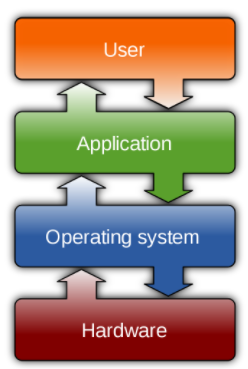
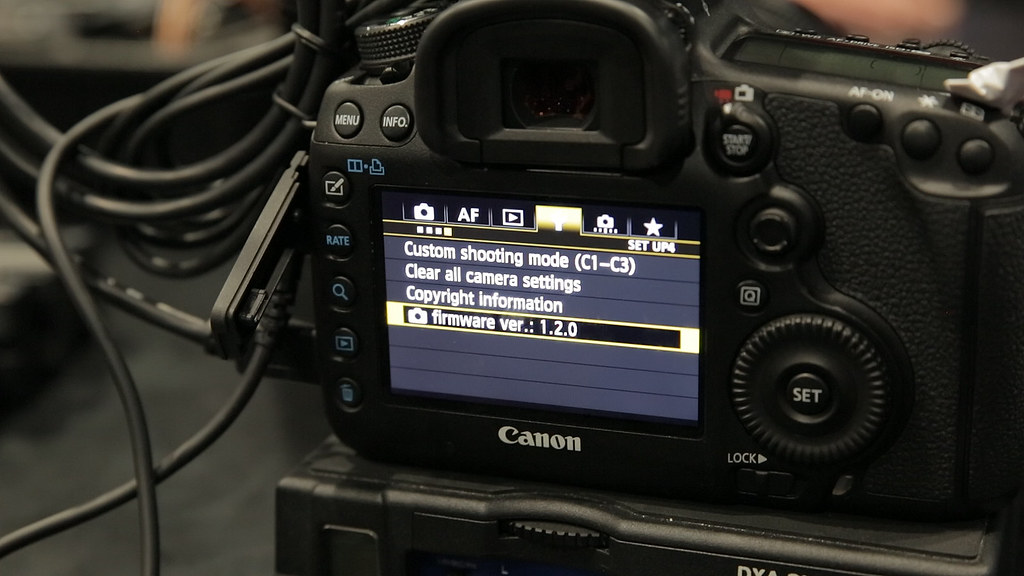
				 <p>When a software update is released, it can be a combination of new or enhanced features, and/or any software patches (the fixing of a security vulnerability).</p> <p>Software <strong>updates</strong> with new/enhanced features can be welcomed by some users who have been waiting for a certain feature; however, they can be problematic for others, as they don’t need the new features, and the new features often come with a change in the user interface. For example, both my mother &amp; father borrow online books from the local library and read them on their iPads. Both of them dislike getting an update to the library app on the iPad, as it sometimes changes the location of the buttons they need to press to get/read a book, or changes the sequence of things they need to do to open up the library catalog.</p> <p>Software <strong>patches</strong> are a different story when compared to software updates. Patches are meant to fix security vulnerabilities – things (essentially things software engineers didn’t initially think of) that could leave your device open to remote access and/or, theft of information, etc. For the security of your device and personal data contained on it, you want to install patches as soon as they become available (e.g., automatically).</p> <p>On your device (computer, tablet, phone), there are two distinct types of software. Understanding the difference between the two types will help you understand your priorities for software updates and patches.</p> <div class="wp-caption aligncenter" id="attachment_20" aria-describedby="caption-attachment-20" style="width: 248px"><img class="wp-image-19 size-full" src="https://opentextbc.ca/technicalwritingh5p/wp-content/uploads/sites/415/2019/05/Operating-System-e1640189711944.png" alt="A flow chart: User, Application, Operating system, and Hardware." width="248" height="369" srcset="https://opentextbc.ca/comptech/wp-content/uploads/sites/415/2019/05/Operating-System-e1640189711944.png 248w, https://opentextbc.ca/comptech/wp-content/uploads/sites/415/2019/05/Operating-System-e1640189711944-202x300.png 202w, https://opentextbc.ca/comptech/wp-content/uploads/sites/415/2019/05/Operating-System-e1640189711944-65x97.png 65w, https://opentextbc.ca/comptech/wp-content/uploads/sites/415/2019/05/Operating-System-e1640189711944-225x335.png 225w" title="" /><div class="wp-caption-text" id="caption-attachment-20">Figure 1.1 The operating system sits between the hardware and user.</div></div> <h1>Operating System</h1> <p>Your computing devices (computer, tablet, phone) typically have one operating system on the device (Windows on a PC computer; macOS on a Mac computer; ioS on an iPad, etc.). The operating system has the most privileged access to your device hardware, and can do many more things to your device than the average piece of application software. As such, if your operating system manufacturer discovers (or is informed of) an operating system software exploit that can be used by a hacker for nefarious purposes, as soon as the manufacturer releases a patch for the exploit, you will want to install it. Having automatic updates for your operating system is highly desirable from a security perspective.</p> <h1>Application Software (Apps)</h1> <p>Application software (often referred to as “apps”) are all those individual pieces of software on your computer, tablet or phone. Web browsers (e.g. Chrome, Safari, Firefox, etc.), productivity software (e.g. Microsoft Office Word, Excel, etc.), games, etc. are all examples. Many companies that provide a website where you can access their services (e.g. banks, weather forecasts, Netflix, Amazon, Facebook, etc.) also have released apps for their services. Apps on smartphones offer the advantage of being appropriately sized for the screen (viewing websites that have not been optimized for viewing on a phone can be challenging); however, sometimes the app doesn’t have (yet) all the features that the web site offers. So, if you are using apps (rather than navigating to a website) you should be updating your apps to patch any security vulnerabilities.</p> <h1>Firmware</h1> <p>Firmware is software that is embedded in a device on a specialized circuit chip. Devices that you can connect to the Internet (e.g. Wi-Fi router, printer, smart doorbell, smart thermostat, smart TV, digital cameras, etc.) contain firmware.</p> <div class="wp-caption aligncenter" aria-describedby="caption-attachment-20" style="width: 500px"><img class="wp-image-20" src="https://opentextbc.ca/technicalwritingh5p/wp-content/uploads/sites/415/2022/10/image43.png" alt="A digital camera interface shows a message about a firmware update." width="500" height="281" srcset="https://opentextbc.ca/comptech/wp-content/uploads/sites/415/2022/10/image43.png 1024w, https://opentextbc.ca/comptech/wp-content/uploads/sites/415/2022/10/image43-300x169.png 300w, https://opentextbc.ca/comptech/wp-content/uploads/sites/415/2022/10/image43-768x432.png 768w, https://opentextbc.ca/comptech/wp-content/uploads/sites/415/2022/10/image43-65x37.png 65w, https://opentextbc.ca/comptech/wp-content/uploads/sites/415/2022/10/image43-225x127.png 225w, https://opentextbc.ca/comptech/wp-content/uploads/sites/415/2022/10/image43-350x197.png 350w" title="" /><div class="wp-caption-text">Figure 1.2 Canon camera updating firmware.</div></div> <p>Just like other types of software, security vulnerabilities are discovered and patched by the manufacturer. Devices that lack a screen can’t notify you about a software patch, so when you purchase a device, when you go online to register for the warranty it’s a good idea to also register for “important updates” by email from the manufacturer (you can skip the other promotional marketing material). Also, in the “Settings” choice for each device there is usually a way to manually “check for updates”.</p> <p>Keeping all your software (operating system, apps, firmware) up-to-date is recommended by Internet security professionals.</p> <h3>Media Attributions</h3> <ul><li>“<a href="https://commons.wikimedia.org/wiki/File:Operating_system_placement_(software).svg" data-url="https://commons.wikimedia.org/wiki/File:Operating_system_placement_(software).svg">Operating system placement (software)</a>” by Golftheman is licensed under a <a href="https://creativecommons.org/licenses/by-sa/3.0/deed.en" data-url="https://creativecommons.org/licenses/by-sa/3.0/deed.en">CC BY-SA 3.0 licence</a>.</li> <li>“<a href="https://flic.kr/p/eaxDa8" data-url="https://flic.kr/p/eaxDa8">Canon 5D Mark III 1.2.0 Firmware</a>” by <a href="https://www.flickr.com/photos/davedugdale/" data-url="https://www.flickr.com/photos/davedugdale/">Dave Dugdale</a> is licensed under a <a href="https://creativecommons.org/licenses/by-sa/2.0/" data-url="https://creativecommons.org/licenses/by-sa/2.0/">CC BY-SA 2.0 licence</a>.</li> </ul> 
	</div>


	</div>
<div class="chapter standard " id="chapter-malware-viruses" title="Malware and Viruses">
	<div class="chapter-title-wrap">
		<p class="chapter-number">2</p>
		<h1 class="chapter-title">Malware and Viruses</h1>
								</div>
	<div class="ugc chapter-ugc">
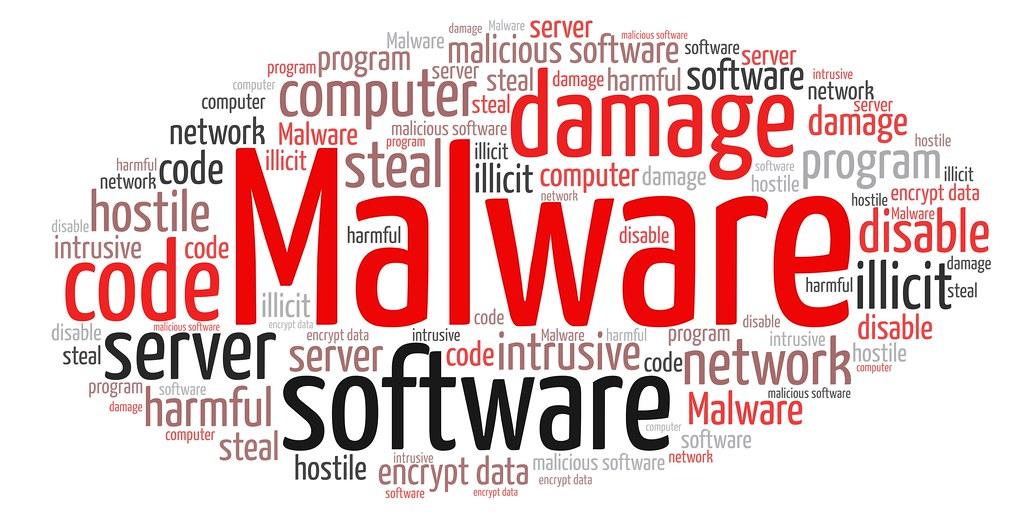
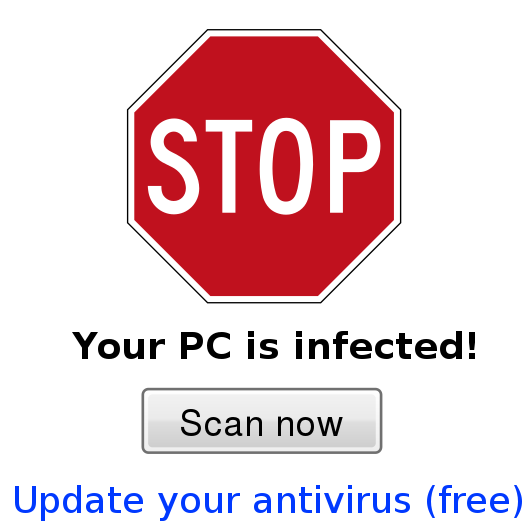
				 <h1>Risks</h1> <p>The terms “malware” and “virus” are often used interchangeably; however, there is a subtle distinction. Malware is a generic term for any type of malicious software, whereas a virus is a specific type of malware that replicates and can be passed from computer to computer (analogous to how a flu virus would be transmitted from person to person). When microcomputers were first introduced, it was primarily viruses that were the cause of concern, so people installed “anti-virus” software. The threats today come from a broader spectrum referred to as malware, but it is not uncommon to hear people use the word “virus” when more correctly what they are referring to is “malware.”</p> <div class="wp-caption aligncenter" id="attachment_24" aria-describedby="caption-attachment-24" style="width: 600px"><img class="wp-image-23" src="https://opentextbc.ca/technicalwritingh5p/wp-content/uploads/sites/415/2021/12/image7.jpg" alt="A word cloud with &amp;quot;Malware&amp;quot; appearing very large in the middle. Other words include damage, computer, code, hostile, and steal." width="600" height="302" srcset="https://opentextbc.ca/comptech/wp-content/uploads/sites/415/2021/12/image7.jpg 1024w, https://opentextbc.ca/comptech/wp-content/uploads/sites/415/2021/12/image7-300x151.jpg 300w, https://opentextbc.ca/comptech/wp-content/uploads/sites/415/2021/12/image7-768x386.jpg 768w, https://opentextbc.ca/comptech/wp-content/uploads/sites/415/2021/12/image7-65x33.jpg 65w, https://opentextbc.ca/comptech/wp-content/uploads/sites/415/2021/12/image7-225x113.jpg 225w, https://opentextbc.ca/comptech/wp-content/uploads/sites/415/2021/12/image7-350x176.jpg 350w" title="" /><div class="wp-caption-text" id="caption-attachment-24">Figure 2.1 Beware Malware.</div></div> <p>When software is written for computing devices (computers, tablets, phones, etc.), programmers need to be able to write “perfect” code so that no malicious use of the software occurs (be it program, app or operating system). Even with testing for quality assurance, software only approaches “near perfect”, leaving room for a programmer with malicious intent to exploit some unintended opening. The malicious software is referred to as “malware”.</p> <p>Types of malware cover a broad spectrum:</p> <ul><li><strong>Adware:</strong> Aggressive advertising that appears on your computer screen constantly.</li> <li><strong>Spyware:</strong> Gathers your personal information (without your knowledge) with the intent of identity theft, impersonation or fraud.</li> <li><strong>Scareware:</strong> Typical scareware would be a message such as “Danger, your computer is infected, click here to fix the problem” when in fact your computer is not infected, and by clicking on the link to supposedly fix your computer, you actually end up downloading and installing malware on your computer instead.</li> <li><strong>Ransomware:</strong> The encrypting of your data (files, pictures, music, etc.) so you can’t access it anymore unless you pay a ransom to un-encrypt it. Ransomware has been used to target individuals (with ransoms of a few hundred dollars), as well as large corporate entities (with ransoms in the millions of dollars). In 2021, Colonial Pipeline (which delivers 100 million gallons of fuel a day) temporarily closed its operations when ransomware was found on its computer systems. The shutdown affected the supply of gasoline in large parts of the US East Coast. The company made a ransom payment to hackers in excess of $4 million in order to restore pipeline operations. In an interesting twist, the FBI hacked the hackers “digital wallet” and recovered a large portion of the ransom.</li> <li><strong>Virus:</strong> Designed to damage the operation of your device by deleting, corrupting or slowing your device’s operation. Viruses require a computer user to do something to help them spread (e.g. download and run a file, run a macro, etc).</li> <li><strong>Worm:</strong> A type of malicious software similar to a virus, but with an important distinction, worms spread through computer networks without the assistance of a computer user.</li> <li><strong>Trojan:</strong> Like the name implies, software that purports to do something useful, but also contains malware. For example, “See this Hollywood star caught in a compromising video, click here to download software to view the video”. If you click on the link, you will view a video, but end up installing some malicious software at the same time.</li> <li><strong>Remote Control:</strong> Background control of your computer (without your knowledge) to perform malicious activity.</li> <li><strong>Keyloggers:</strong> Software that records the keys you press, typically used to capture the addresses of web sites you visit, and your username and password. Be cautious of computers in public places (e.g. libraries, coffee shops, etc.) that might be infected, just browse the Internet, and don’t visit any websites that you would need to type in your username and password.</li> </ul> <h1>Malware Symptoms</h1> <p>With appropriate anti-malware software (also called antivirus) installed on your computer, and thinking critically about any messages you receive about installing software on your device, you should be able to avoid malware infections. If your computer exhibits any of the following symptoms, you may wish to perform a scan to check for malware on your system:</p> <ul><li>Slower than usual computer or web browser speeds</li> <li>Programs freezing or crashing</li> <li>Excessive background activity</li> <li>Emails your friends receive, apparently from you, but you didn’t send</li> </ul> <p>If you have anti-malware (antivirus) software installed on your device, you can run this program (app), and look for a choice that will allow it to “Scan.”</p> <p>If you don’t have antivirus software installed, there are a number of websites you can go to that will perform a free scan of your device. Search for “free online antivirus”, and look at the search results (rather than the “Ads)”. TrendMicro and AVG are well known for their free online antivirus tools.</p> <h1>Malware Prevention</h1> <h2>Thinking Critically</h2> <div class="wp-caption aligncenter" aria-describedby="caption-attachment-24" style="width: 300px"><img class="wp-image-24" src="https://opentextbc.ca/technicalwritingh5p/wp-content/uploads/sites/415/2022/10/image8.png" alt="A notice that reads: &amp;quot;STOP. Your PC is infected. Update your antivirus free.&amp;quot; Underneath, a button is labelled &amp;quot;Scan now.&amp;quot;" width="300" height="300" srcset="https://opentextbc.ca/comptech/wp-content/uploads/sites/415/2022/10/image8.png 531w, https://opentextbc.ca/comptech/wp-content/uploads/sites/415/2022/10/image8-300x300.png 300w, https://opentextbc.ca/comptech/wp-content/uploads/sites/415/2022/10/image8-150x150.png 150w, https://opentextbc.ca/comptech/wp-content/uploads/sites/415/2022/10/image8-65x65.png 65w, https://opentextbc.ca/comptech/wp-content/uploads/sites/415/2022/10/image8-225x225.png 225w, https://opentextbc.ca/comptech/wp-content/uploads/sites/415/2022/10/image8-350x350.png 350w" title="" /><div class="wp-caption-text">Figure 2.2 Malware pretending to be antivirus software.</div></div> <p>If your device displays a message urging you to take some action, think critically whether this message seems legitimate. For example:</p> <p>You see a message claiming that your computer has a malware infection, and you need to do something to fix it. Did the message appear when you weren’t doing anything on your computer (so perhaps it’s a legitimate background process of your anti-malware program), or were you browsing the web and this message appeared (so perhaps it’s a malicious web site displaying a fake message trying to imitate a legitimate message from your anti-malware software).</p> <p>If a website wants you to download and install software to view a video, you would ask yourself, <em>Since I am able to view other videos on my device without downloading software, why would I need to do anything special to view this particular video?</em> Is it really a different video format, or perhaps something malicious is in the download?</p> <p>Anything that asks you to “download” or “make changes to your computer.” If this is coming at an unexpected time (i.e., you were doing something else on your device), exercise caution.</p> <p>Another example is unsolicited phone calls claiming that your computer is infected and you need to follow the caller’s instructions on how to fix it. In actuality, your computer is fine, and if you follow the caller’s instructions, you will end up downloading and installing malware.</p> <h2>High Risk Activities</h2> <p>Certain activities can put your device at higher risk of contracting malware, or exposing personal information. Two of the largest risks come from:</p> <p>Wi-Fi hotspots with no password. A Wi-Fi hotspot is a public location (e.g., a coffee shop or restaurant) where the business allows customers to connect wirelessly to the Internet. When connecting to a Wi-Fi hotspot that doesn’t have a password, communication between your device and the hotspot is “in clear,” i.e. what you type could be seen by someone else also connected to the hotspot (if they are using special software for this purpose). If you are using a Wi-Fi connection that doesn’t require you to type a password when you first join the hotspot, restrict your activity to browsing the web, and don’t enter any personally identifiable information or usernames and passwords. You can tell if your hotspot is broadcasting in clear (i.e. no encryption) by looking at the Wi-Fi setting on your device, and for hotspots with no passwords you should see an open padlock beside the hotspot name.</p> <p>Browsing porn websites. Malicious programmers trying to infect computing devices want to infect as many devices as possible, and as porn is a common search on the web, creating an infected porn website has been one of the more common ways of distributing malware.</p> <h2>Anti-Malware (Antivirus) Software</h2> <p>Today, the terms anti-malware and antivirus are often used interchangeably and generally refer to the same thing; although anti-malware is a more technically correct description of the function of the software, the term antivirus is still widely used by many security software vendors as it is a more familiar term for many people.</p> <p>Anti-malware (antivirus) software is designed to detect, prevent and remove malicious software from computing devices. You can conduct a web search for “anti-malware reviews” to see current recommendations for free and paid software for your device(s).</p> <p>The current Windows operating system includes the Microsoft Defender program (previously called Windows Defender). The Mac operating system doesn’t currently have an Apple developed antivirus or anti-malware program. Virus and malware programmers have focused more on Windows PCs (simply because there are more of them than Mac computers), but it is a myth that Macs don’t get viruses/malware infections, there are just fewer malware programs written for Macs, so in that sense there is less chance of infection, but the chance does exist.</p> <p>Which anti-malware/antivirus program you use is likely not as important as whether you have an anti-malware/antivirus program installed and running on your computer.</p> <p>Your anti-malware/antivirus program typically is set up to automatically download a list of known malware to search for. As new malware is being created all the time, it’s important that your antivirus always has the latest list of malware to scan for.</p> <p>It’s also important that you regularly scan your device for malware. Often, antivirus programs are set up to run in the early morning hours when the device is not being used.</p> <h3>Media Attributions</h3> <ul><li>“<a href="https://flic.kr/p/2gKPAgm" data-url="https://flic.kr/p/2gKPAgm">Malware</a>” by <a href="https://www.flickr.com/photos/182229932@N07/" data-url="https://www.flickr.com/photos/182229932@N07/">EpicTop10.com</a> is licensed under a <a href="https://creativecommons.org/licenses/by/2.0/" data-url="https://creativecommons.org/licenses/by/2.0/">CC BY 2.0 licence</a>.</li> <li>“<a href="https://commons.wikimedia.org/wiki/File:Malvertising.svg" data-url="https://commons.wikimedia.org/wiki/File:Malvertising.svg">Malvertising</a>” by <a title="User:Syced" href="https://commons.wikimedia.org/wiki/User:Syced" data-url="https://commons.wikimedia.org/wiki/User:Syced">Syced</a> is made available under the <a href="https://creativecommons.org/publicdomain/zero/1.0/deed.en" data-url="https://creativecommons.org/publicdomain/zero/1.0/deed.en">CC0 1.0 Universal Public Domain Dedication</a>.</li> </ul> 
	</div>


	</div>
<div class="chapter standard " id="chapter-geolocation" title="Geolocation">
	<div class="chapter-title-wrap">
		<p class="chapter-number">3</p>
		<h1 class="chapter-title">Geolocation</h1>
								</div>
	<div class="ugc chapter-ugc">
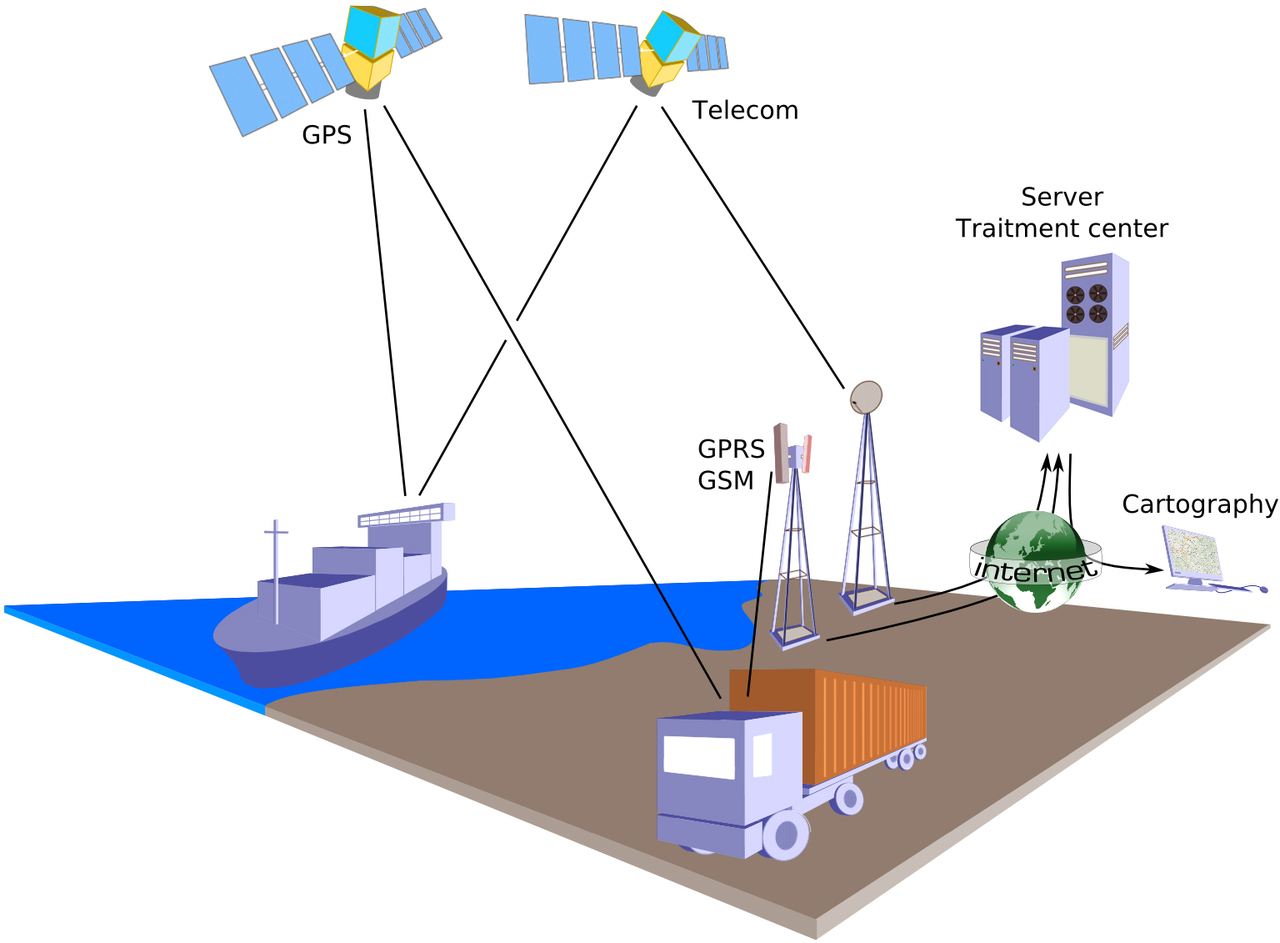
				 <div><p>Geolocation is the ability of your device (computer, tablet, phone) to know your location. Mobile phone companies know which cell tower you are connected to, and ISPs (Internet Service Providers) know the location of your home.</p> <div class="wp-caption aligncenter" id="attachment_27" aria-describedby="caption-attachment-27" style="width: 500px"><img class="wp-image-27" src="https://opentextbc.ca/technicalwritingh5p/wp-content/uploads/sites/415/2021/12/image40.png" alt="Geolocation makes use of satellites or cell technology that help identify earthly locations through there known position in the sky and timing of radio signals." width="500" height="368" srcset="https://opentextbc.ca/comptech/wp-content/uploads/sites/415/2021/12/image40.png 1280w, https://opentextbc.ca/comptech/wp-content/uploads/sites/415/2021/12/image40-300x221.png 300w, https://opentextbc.ca/comptech/wp-content/uploads/sites/415/2021/12/image40-1024x754.png 1024w, https://opentextbc.ca/comptech/wp-content/uploads/sites/415/2021/12/image40-768x566.png 768w, https://opentextbc.ca/comptech/wp-content/uploads/sites/415/2021/12/image40-65x48.png 65w, https://opentextbc.ca/comptech/wp-content/uploads/sites/415/2021/12/image40-225x166.png 225w, https://opentextbc.ca/comptech/wp-content/uploads/sites/415/2021/12/image40-350x258.png 350w" title="" /><div class="wp-caption-text" id="caption-attachment-27">Figure 3.1 Geolocation utilizes satellites or cell towers for positioning</div></div> <p>Your device’s operating system will typically have a global setting that you can configure as to whether you would like to share your location with apps. If you say yes to the global setting, the first time you use an app, typically the app will ask you if you wish to share your location with this particular app, and remember your answer, so it won’t ask you again. You can choose to share your location with some apps but not others if you so wish.</p> <p>Sharing your location with an app, for example a map app, means the app will be able to determine your location, and in this case will be able to show your location on the map. If you are out for a walk or hike on an unfamiliar route, the app could track your route, making it easy to backtrack and return to your starting location.</p> <p>You can share your location with family and friends, so that they can see where you are. My wife and I find this feature useful when we are meeting somewhere, as often one of us is running late and when we try to call the other person, they often don’t hear their mobile phone ring. Sharing our location allows us to see if we have both arrived in our meeting location, and if not, how far away the other person is.</p> <p>You can also temporarily share your location (e.g. specify a time limit, such as 30 minutes). For example, if a delivery driver is having trouble locating your home, and gives you a call on your mobile phone, you could temporarily share your location for long enough to enable delivery of the package.</p> <p>Geolocation also has privacy implications if others have access to this data, or demand access to it. For example, during the COVID-19 pandemic, the Chinese government required citizens to download an app that tracked the citizen’s location, and the government used this to ensure citizens stayed home if they were in quarantine, and if they were allowed out for grocery shopping, that they completed their shopping and returned home within the time they were allotted.</p> <h3>Media Attributions</h3> <ul><li><a href="https://en.wikipedia.org/wiki/Geopositioning" data-url="https://en.wikipedia.org/wiki/Geopositioning">“Geopositioning”</a> by <a href="https://commons.wikimedia.org/w/index.php?title=User:%C3%89ric_Chassaing&amp;action=edit&amp;redlink=1" data-url="https://commons.wikimedia.org/w/index.php?title=User:%C3%89ric_Chassaing&amp;action=edit&amp;redlink=1">Éric Chassaing</a> is licensed under a <a href="https://creativecommons.org/publicdomain/zero/1.0/" data-url="https://creativecommons.org/publicdomain/zero/1.0/">CC0 1.0 Licence</a></li> </ul> </div> 
	</div>


	</div>
<div class="chapter standard " id="chapter-blockchain-cryptocurrency" title="Blockchain &#038; Cryptocurrency">
	<div class="chapter-title-wrap">
		<p class="chapter-number">4</p>
		<h1 class="chapter-title">Blockchain &#038; Cryptocurrency</h1>
								</div>
	<div class="ugc chapter-ugc">
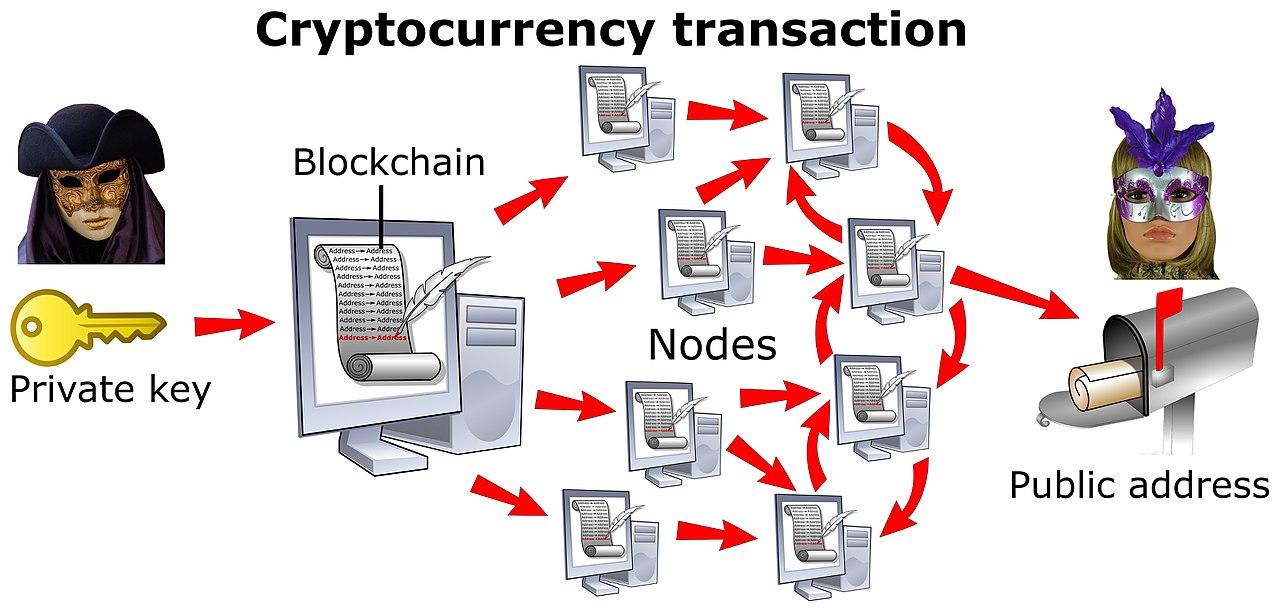
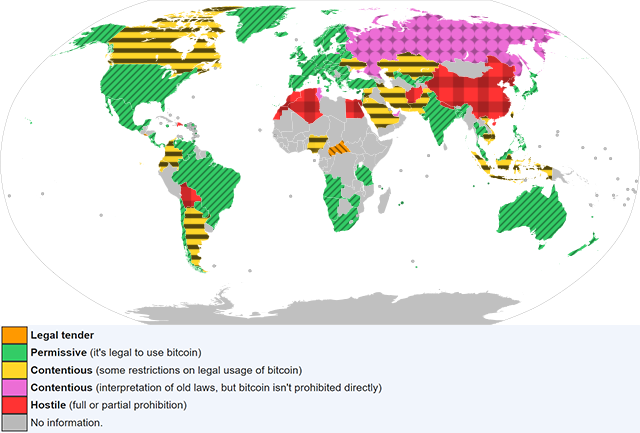
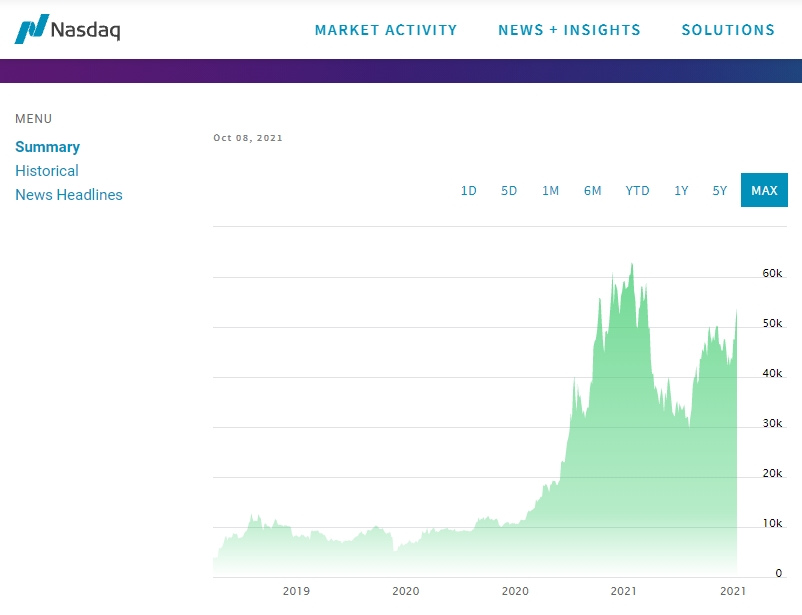
				 <p>Blockchain is a record keeping technology that can be used to record information about any number of things such as: voting records, supply chains and item histories, medical data, and perhaps is best known as the technology behind cryptocurrency.</p> <p>Let’s compare a cryptocurrency transaction to traditional electronic transfer of funds. Assume Person 1 wants to send Person 2 some money.</p> <div><table><caption>Table 4.1 Traditional eTransfer vs. Cryptocurrency Transfer</caption> <tbody><tr><th scope="col"></th> <th scope="col">Traditional eTransfer</th> <th scope="col">Cryptocurrency Transfer</th> </tr> <tr><th scope="row">Who knows about the transfer?</th> <td>Person 1 and their bank. <p>Person 2 and their bank.</p></td> <td>Person 1 and Person 2 and the cryptocurrency (e.g. bitcoin) “blockchain”.</td> </tr> <tr><th scope="row">Are the true identities of Person 1 and 2 known?</th> <td>Yes, by the banks involved.</td> <td>Not necessarily, they could be anonymous.</td> </tr> <tr><th scope="row">Who keeps the records of the transaction?</th> <td>The banks involved.</td> <td>The “blockchain”.</td> </tr> <tr><th scope="row">Are these records private or public?</th> <td>Private</td> <td>Public (certain details).</td> </tr> <tr><th scope="row">Are there fees to transfer the funds?</th> <td>Sometimes there are bank fees, especially for international transactions.</td> <td>Yes, fees vary, but are roughly comparable to traditional bank fees.</td> </tr> <tr><th scope="row">How fast does the transfer happen?</th> <td>Within your home country the transfer is usually fast; however, if crossing international borders the transfer usually takes a number of days.</td> <td>Currently, averaging 30-60 minutes regardless of whether the transaction is domestic or international. In some cases, transactions can take days.</td> </tr> </tbody> </table> </div> <p>In blockchain, the records are referred to as blocks, and the blocks are chained (or linked) together using cryptographic methods which are designed to ensure the record keeping is secure, verifiable and permanent. Additionally, the record keeping is decentralized and distributed across a number of different computer systems (nodes) to achieve these goals.</p> <div class="wp-caption aligncenter" id="attachment_32" aria-describedby="caption-attachment-32" style="width: 600px"><img class="wp-image-30" src="https://opentextbc.ca/technicalwritingh5p/wp-content/uploads/sites/415/2021/12/image17.jpg" alt="Blockchain technology allows the value and possession of cryptocurrency to be stored securely on the Internet" width="600" height="288" srcset="https://opentextbc.ca/comptech/wp-content/uploads/sites/415/2021/12/image17.jpg 1280w, https://opentextbc.ca/comptech/wp-content/uploads/sites/415/2021/12/image17-300x144.jpg 300w, https://opentextbc.ca/comptech/wp-content/uploads/sites/415/2021/12/image17-1024x491.jpg 1024w, https://opentextbc.ca/comptech/wp-content/uploads/sites/415/2021/12/image17-768x368.jpg 768w, https://opentextbc.ca/comptech/wp-content/uploads/sites/415/2021/12/image17-65x31.jpg 65w, https://opentextbc.ca/comptech/wp-content/uploads/sites/415/2021/12/image17-225x108.jpg 225w, https://opentextbc.ca/comptech/wp-content/uploads/sites/415/2021/12/image17-350x168.jpg 350w" title="" /><div class="wp-caption-text" id="caption-attachment-32">Figure 4.1 Cryptocurrency uses blockchain technology.</div></div> <p>Each transaction has a “private” and “public” component to it. In broad terms, comparing this to a traditional bank transaction, the “private” portion would be like your banking password, and the public portion would be an email address. You keep your password “private” (so others can’t access your account), but you can give out your “public” email address so that people can send you money.</p> <p>Cryptocurrency is digital money, which means there’s no physical coin or bill – it’s all online. Bitcoin is one of the best known cryptocurrencies, but there are many others, and new cryptocurrencies (or coins) are being created regularly.</p> <p>One of the big advantages of a cryptocurrency is you can transfer it to someone online without a go-between (such as a bank), so it can be a much faster (potentially instantaneous) transaction.</p> <h1>Issues with Cryptocurrencies</h1> <p>Unfortunately, cryptocurrencies such as Bitcoin are still in their infancy and have some substantial issues facing them:</p> <h2>Reputation</h2> <p>Due to the fact Bitcoin transactions provide a level of anonymity for the buyer and seller, it is a popular choice for illegal activity (money laundering, purchase and sale of illegal drugs, ransomware, etc.). Possession or trading in Bitcoin is currently illegal in a number of countries throughout the world, and it is too early to tell if this trend will continue, or reverse itself.<a id="f4.2" class="internal" data-url=""></a></p> <div class="wp-caption aligncenter" aria-describedby="caption-attachment-32" style="width: 640px"><img class="wp-image-31 size-full" src="https://opentextbc.ca/technicalwritingh5p/wp-content/uploads/sites/415/2022/10/Legal_status_of_bitcoin_640.png" alt="image description linked in caption" width="640" height="433" srcset="https://opentextbc.ca/comptech/wp-content/uploads/sites/415/2022/10/Legal_status_of_bitcoin_640.png 640w, https://opentextbc.ca/comptech/wp-content/uploads/sites/415/2022/10/Legal_status_of_bitcoin_640-300x203.png 300w, https://opentextbc.ca/comptech/wp-content/uploads/sites/415/2022/10/Legal_status_of_bitcoin_640-65x44.png 65w, https://opentextbc.ca/comptech/wp-content/uploads/sites/415/2022/10/Legal_status_of_bitcoin_640-225x152.png 225w, https://opentextbc.ca/comptech/wp-content/uploads/sites/415/2022/10/Legal_status_of_bitcoin_640-350x237.png 350w" title="" /><div class="wp-caption-text">Figure 4.2 Legality of bitcoin by country or territory. <a class="internal" href="#id4.2" data-url="https://opentextbc.ca/comptech/chapter/blockchain-cryptocurrency/#id4.2">[Image description]</a></div></div> <h2>Non Fiat</h2> <p>A fiat currency is legal tender in the country of issue (i.e. it can be used anywhere in the country to make purchases, pay bills, etc.), and is overseen by a central bank – Bitcoin is currently only a fiat currency in two countries – El Salvador and Central Africa Republic. Although some businesses are willing to accept Bitcoin, it is not yet widely accepted, and businesses where it can be spent are still limited.</p> <h2>Lack of Transparency/Regulatory Oversight</h2> <p>In many ways cryptocurrency more closely resembles stocks than currency (as its value can be subject to large price variations day-to-day). In contrast to most stock markets, where major shareholders in a public company are known, and regulations exist to penalize anyone who would attempt to manipulate the price of stock, use of Bitcoin often lacks these protections. The person (or persons) rumored to have the largest Bitcoin holding goes by the name of Satoshi Nakamoto (credited as the initial developer(s) of Bitcoin), but their true identity remains unknown.</p> <h2>Volatility</h2> <p>Bitcoin has seen some wild price swings, both up and down, for example the value of one bitcoin on the following dates was:</p> <ul><li>April 14, 2021 – $63,001 USD</li> <li>April 24, 2021 – $49,706 USD</li> <li>July 19, 2021 – $29,619 USD</li> <li>October 8, 2021 – $53,811 USD<a id="f4.3" class="internal" data-url=""></a></li> </ul> <div class="wp-caption aligncenter" style="width: 802px"><img src="https://opentextbc.ca/technicalwritingh5p/wp-content/uploads/sites/415/2022/10/image5.png" alt="Bitcoin price from 2019 to 2022, image description linked in caption" width="802" height="615" title="" /><div class="wp-caption-text">Figure 4.3 Bitcoin (BTC) trading price on Nasdaq <a class="internal" href="#id4.3" data-url="https://opentextbc.ca/comptech/chapter/blockchain-cryptocurrency/#id4.3">[Image description]</a></div></div> <p>Note: Even though the price of one bitcoin is substantial, each bitcoin is made up of 100,000,000 satoshis (the smallest units of bitcoin), which allows people to purchase fractions of a bitcoin with as little as one U.S. dollar.</p> <h2>Environmental Impact</h2> <p>The process of creating Bitcoin transactions is referred to as “mining”, and these mining processes require substantial computing power (and the associated electricity to run the computers). Companies engaged in Bitcoin mining often locate their server farms (many computers working in unison) in colder remote communities where electricity is less expensive, as the server farms consume substantial amounts of electricity, and need colder temperatures to dissipate the substantial amounts of heat they generate with their computers. Data from the <a href="https://cbeci.org/" data-url="https://cbeci.org/">University of Cambridge’s Bitcoin Electricity Consumption Index</a> shows that the Bitcoin network now consumes more electricity than many countries. If Bitcoin was a country, it would be the 34th largest consumer of electricity on the planet in October 2021, putting its annual electricity consumption ahead of countries such as Finland.</p> <h1>Cryptocurrency FAQ (Frequently Asked Questions)</h1> <ul><li>Are cryptocurrency transactions secret? <ul><li>No, the details of the account that has the “coin”, who had it before, etc. are recorded. What is not recorded (or easily accessed) is who owns the accounts.</li> </ul> </li> <li>How do you buy and sell cryptocurrency? <ul><li>Most people rely on crypto exchange services like Coinbase, Robinhood, and recently PayPal (although the crypto in a PayPal account cannot be transferred to other accounts on or off the platform).</li> </ul> </li> <li>Where do I store my cryptocurrency? <ul><li>Crypto is digital, so in a similar way that digital photos are stored on a computing device, cryptocurrency is also stored on a computing device. Examples of storage locations include: a personal computer, a detachable hard drive, cloud storage, etc. The storage location is typically referred to as a digital “wallet”.</li> </ul> </li> <li>What is the difference between a “hot wallet” and a “cold wallet”? <ul><li>A hot wallet is connected to the internet, a cold wallet is not. A hot wallet makes it easier to trade or spend crypto, but it could be vulnerable to online attacks and theft. A cold wallet is typically not connected to the internet, so while it may be more secure, it’s less convenient.</li> </ul> </li> <li>What happens when Bitcoins are lost? <ul><li>If you lose your private keys, unfortunately, there is no back-up or secret back door to retrieve your funds. It is crucial to write down and keep safe all your passwords and seed phrases for your exchange wallets and hard wallets. Some estimates predict there has been over 5 million Bitcoin lost since it’s creation, with no way of getting them back.</li> </ul> </li> <li>Has a crypto exchange ever been hacked? <ul><li>Mt. Gox, once the dominant bitcoin exchange, was the first high-profile hack in cryptocurrency history. The hack forced the exchange to file for bankruptcy, as it lost 750,000 of its users’ bitcoins, plus 100,000 of its own.</li> </ul> </li> </ul> <h3>Image Descriptions</h3> <p><strong><a id="id4.2" class="internal" data-url=""></a>Figure 4.2 Legality of bitcoin by country or territory image description:</strong></p> <p>A world map demonstrating the legal status of Bitcoin in different regions. It shows where Bitcoin is legal tender, permissive (it’s legal to use Bitcoin), contentious (some restrictions on legal usage of Bitcoin), contentious (interpretation of old laws, but Bitcoin isn’t prohibited directly), hostile (full or partial prohibition), and no information. Overall, the map shows that Bitcoin can be used in many countries (although some countries impose restrictions). However, there are a number of countries where the use of bitcoin is prohibited. The following list provides an in-depth description:</p> <ul><li>Legal tender (marked in orange colour and backslashes): Central Africa Republic, El Salvador.</li> <li>Permissive (it’s legal to use Bitcoin, marked in green colour and forward slashes): most of Europe and Oceania, some regions in the Americas (e.g. USA, Mexico, Chile, Brazil etc.), Africa (e.g. South Africa, Angola, Namibia, Tanzania, and Zimbabwe), and Asia (e.g. South Korea, Japan, Thailand, Malaysia, India, Turkey etc.)</li> <li>Contentious (some restrictions on legal usage of Bitcoin, marked in yellow colour and horizontal strips): Canada, Argentina, Columbia, Ecuador, Nigeria, Ukraine and some regions in Asia (Kazakhstan, Saudi Arabia, Syria, Iran, Taiwan, Indonesia etc.)</li> <li>Contentious (interpretation of old laws, but Bitcoin isn’t prohibited directly, marked in pink colour and diamonds): Russia, Tunisia, United Arab Emirates.</li> <li>Hostile (full or partial prohibition, marked by read colour and squares): China, Nepal, Afghanistan, Egypt, Morocco, Algeria, Western Sahara, Dominican Republic and Bolivia.</li> <li>No information (marked by grey colour): majority of central Africa and Madagascar, some regions in central and south America (Peru, Cuba Uruguay, Guatemala etc.), Asia (Mongolia, Iraq, Sri Lanka, Turkmenistan etc.), and a few regions in Europe (Serbia, Kosovo, Montenegro, and Moldova).</li> </ul> <p><a class="internal" href="#f4.2" data-url="https://opentextbc.ca/comptech/chapter/blockchain-cryptocurrency/#f4.2">[Return to Figure 4.2]</a></p> <p><strong><a id="id4.3" class="internal" data-url=""></a>Figure 4.3 Bitcoin (BTC) trading price on Nasdaq image description:</strong></p> <p>Bitcoin trading price swing from 2019 to 2021:</p> <ul><li>2019: price swing around 10k in the second half of the year</li> <li>2020: price swing under 10k in the first half of the year, then price swing above 10k and reaching 30k by the end of the year</li> <li>2021: price swing from 30k to above 60k in the first half of the year, price swing between 30k and 50k in the second half of the year.</li> </ul> <p><a class="internal" href="#f4.3" data-url="https://opentextbc.ca/comptech/chapter/blockchain-cryptocurrency/#f4.3">[Return to Figure 4.3]</a></p> <h3>Media Attributions</h3> <ul><li>“<a href="https://commons.wikimedia.org/wiki/File:Cryptocurrency_transaction.jpg" data-url="https://commons.wikimedia.org/wiki/File:Cryptocurrency_transaction.jpg">Cryptocurrency transaction</a>” by <a href="https://commons.wikimedia.org/wiki/User:Mikael_H%C3%A4ggstr%C3%B6m" data-url="https://commons.wikimedia.org/wiki/User:Mikael_H%C3%A4ggstr%C3%B6m">Mikael Häggström&nbsp;</a>is licensed under a <a href="https://creativecommons.org/publicdomain/zero/1.0/deed.en" data-url="https://creativecommons.org/publicdomain/zero/1.0/deed.en">CC0 1.0 Universal licence</a>.</li> <li>Figure 4.2 Legality of bitcoin by country or territory is adapted from “<a href="https://commons.wikimedia.org/wiki/File:Legal_status_of_bitcoin.svg" data-url="https://commons.wikimedia.org/wiki/File:Legal_status_of_bitcoin.svg">Legal status of bitcoin</a>” by <a title="User:Manabimasu" href="https://commons.wikimedia.org/wiki/User:Manabimasu" data-url="https://commons.wikimedia.org/wiki/User:Manabimasu">Manabimasu</a> is licensed under a <a href="https://creativecommons.org/publicdomain/zero/1.0/deed.en" data-url="https://creativecommons.org/publicdomain/zero/1.0/deed.en">CC0 1.0 Universal licence</a>.</li> <li>Screen capture from <a href="https://www.nasdaq.com/market-activity/cryptocurrency/btc" data-url="https://www.nasdaq.com/market-activity/cryptocurrency/btc">Bitcoin Latest Prices, Charts &amp; Data | Nasdaq</a> October 9, 2021.</li> </ul> 
	</div>


	</div>
<div class="chapter standard " id="chapter-searching-the-web" title="Searching the Web">
	<div class="chapter-title-wrap">
		<p class="chapter-number">5</p>
		<h1 class="chapter-title">Searching the Web</h1>
								</div>
	<div class="ugc chapter-ugc">
				 <div class="wp-caption aligncenter" id="attachment_35" aria-describedby="caption-attachment-35" style="width: 300px"><img class="wp-image-35" src="https://opentextbc.ca/technicalwritingh5p/wp-content/uploads/sites/415/2021/12/image39.png" alt="a magnifying glass, symbolic of the idea to take extra time and look in more detail at web sites offered by search engines to identify useful and accurate information." width="300" height="212" srcset="https://opentextbc.ca/comptech/wp-content/uploads/sites/415/2021/12/image39.png 600w, https://opentextbc.ca/comptech/wp-content/uploads/sites/415/2021/12/image39-300x212.png 300w, https://opentextbc.ca/comptech/wp-content/uploads/sites/415/2021/12/image39-65x46.png 65w, https://opentextbc.ca/comptech/wp-content/uploads/sites/415/2021/12/image39-225x159.png 225w, https://opentextbc.ca/comptech/wp-content/uploads/sites/415/2021/12/image39-350x247.png 350w" title="" /><div class="wp-caption-text" id="caption-attachment-35">Figure 5.1 Use Web Search Strategies</div></div> <p>The World Wide Web (WWW) is a vast information resource that can be used to answer almost any question you may have. Wondering about the recommended internal temperature for a hamburger cooked on a BBQ, whether a plant you just bought likes sun or shade, or need a user manual for some piece of electronics you own, the web likely has the answer somewhere – the trick is being able to find that “somewhere”.</p> <h1>Effective Searching</h1> <p>Search engines essentially look for web pages that contain the words you are searching for, and use internal guidelines to choose which of these pages they think will be most relevant to your search. Whether you are using Google, Bing, Yahoo or some other search engine, there are a number of techniques that will help you locate what you are looking for:</p> <ul><li>Pick descriptive search words. Words such as “the”, “of”, “and”, etc. are very common, and occur on most web pages, so including them doesn’t necessarily enhance your search results. So searching for “internal temperature cooked hamburger” will typically give you nearly the same results as searching for the “what should be the internal temperature of cooked hamburger”.</li> <li>Add or delete search words. If your search results aren’t specifically what you are looking for, consider adding another descriptive word to your search to narrow the results. Similarly, if you get too few search results, consider removing a word from your search.</li> <li>Choose the type of search. Search engines usually default to “All” (e.g. web pages, images, news, etc.). For example, if you were searching for something like “flu season”, if you choose the “News” tab, your search results will be more relevant to this year’s flu season, rather than flu season during any year.</li> </ul> <h1>Paid versus UnPaid Results</h1> <p>Most web site search engines make money by selling space (often near the top of the search results). The advertiser chooses words (e.g sporting equipment), a region (e.g. Greater Vancouver), a demographic (e.g. persons aged 20-60), and a variety of other factors, and then when a person who meets the criteria searches using the chosen search words, the advertiser’s website appears near the top of the search results.</p> <p>The search results that appear below the paid results are the unpaid results, and the websites that appear are chosen by the search engine using a proprietary formula (which is not usually disclosed outside the company). Things such as how many visits a website receives, how many other websites link to it, and a variety of other factors help websites place higher in search engine results. The search engine’s goal is to provide you with relevant results (otherwise you would switch to a different search engine), and websites that don’t pay the search engines directly often pay other companies to assist them with SEO (Search Engine Optimization). The goal of most for-profit companies is to appear on the first page of results returned by the search engine.</p> <p>So be aware of the difference between the paid and the unpaid results. The paid results are usually indicated, typically with the word “Ad” at the beginning.</p> <p>Paid results can be useful (they can be a link to the website you are looking for), or alternatively, they can belong to businesses with unethical business practices. As an example, some concert websites can be problematic, as you can often find multiple web sites claiming to be the “official” website for concert tickets. Clicking on the very first web site in the search results (remember the first few sites are usually the sites that have paid to be there) can lead you to a site claiming to be the “official” site, but in fact is not, and when you purchase the ticket through them, all that simply happens is that they buy the ticket for you through from an official site, and charge you a hefty mark-up in the process.</p> <p>In general, you are much less likely to end up at a website with questionable business practices if you ignore the paid results (those with “Ad” beside them), and look at the unpaid results immediately below.</p> <h3>Media Attributions</h3> <ul><li>“<a href="https://svgsilh.com/3f51b5/image/485643.html" data-url="https://svgsilh.com/3f51b5/image/485643.html">engine address internet www</a>” by <a href="https://svgsilh.com/3f51b5/" data-url="https://svgsilh.com/3f51b5/">SVG Silh</a> has been designated to the <a href="https://creativecommons.org/publicdomain/zero/1.0/" data-url="https://creativecommons.org/publicdomain/zero/1.0/">public domain (CC0)</a>. This work is an adaptation of “<a href="https://pixabay.com/illustrations/google-question-search-online-seek-485643/" data-url="https://pixabay.com/illustrations/google-question-search-online-seek-485643/">Google Question Search Online</a>” on <a href="https://pixabay.com/service/license/" data-url="https://pixabay.com/service/license/">Pixabay</a>.</li> </ul> 
	</div>


	</div>
<div class="chapter standard " id="chapter-analyzing-web-content" title="Analyzing Web Content">
	<div class="chapter-title-wrap">
		<p class="chapter-number">6</p>
		<h1 class="chapter-title">Analyzing Web Content</h1>
								</div>
	<div class="ugc chapter-ugc">
				 <p>Unlike a traditional newspaper or magazine which has editors to ensure the quality of writing for the publication, many websites and blogs are written without the benefit of having another person edit the author’s text. This may not be an issue for some sites; however, be aware that if someone wants to create a web site and claim that the earth is flat (rather than round), there is no approval system for what is written on the web – people can write whatever they like (true or not).</p> <h1>Value</h1> <p>Value is a subjective criteria. The most important thing to keep in mind is that the web is not a homogenous collection of websites, the quality and writing of websites on the web ranges from outstanding to poor, and everything in between. Be prepared to be a bit skeptical, and critically assess whether the website you are looking at is providing value to the reader. If not, there are likely many others to choose from.</p> <h1>Accuracy</h1> <p>As mentioned previously, there is no central authority on the WWW (world wide web) that checks web content for accuracy and truthfulness, website authors are free to write absolutely anything. To judge the accuracy of a site, it is often a good idea to consult multiple web sites to see if there is a consensus on the Issue.</p> <h1>Bias</h1> <p>Web sites can have a bias, which may or may not be obvious. Rather than being written to promote thoughtful discussion on a subject, there are websites that are designed to promote a single point of view, whether that be political, related to the latest weight-loss diet, etc. Often these sites will look accurate (in that the information is partially correct), but they are one-sided, and fail to provide all relevant information or take opposing points of view into consideration. Again, be prepared to consult multiple sites to gain a more complete understanding of the issues involved.</p> <h1>Potential Malware</h1> <p>There are websites that are designed to infect your computer with “malware” (a type of software designed to damage or control a computer, or steal information from the computer). One example of how this might work is a news item that appears designed to encourage you to click for more details, for example “Caught on video – you won’t believe what this student did, and what the teacher did afterwards”. So you are a little curious, you click on the link, and receive a message that your computer needs to install software so you can view this video. If you click on the link to install the software, you will either get a video player+malware, or just straight malware – in either case this is not good. If your computer has antivirus / anti-malware installed, hopefully you will get a warning before you install the malware. Malware is a large topic which was examined earlier, but be aware a small percentage of websites on the web are specifically designed to infect other computers.</p> 
	</div>


	</div>
<div class="chapter standard " id="chapter-crowdsourcing-online-reviews" title="Crowdsourcing Online Reviews">
	<div class="chapter-title-wrap">
		<p class="chapter-number">7</p>
		<h1 class="chapter-title">Crowdsourcing Online Reviews</h1>
								</div>
	<div class="ugc chapter-ugc">
				 <div class="wp-caption aligncenter" id="attachment_41" aria-describedby="caption-attachment-41" style="width: 1024px"><img class="wp-image-40 size-full" src="https://opentextbc.ca/technicalwritingh5p/wp-content/uploads/sites/415/2021/12/image30-e1664906513957.png" alt="Am image of a few people thinking. They may have information and experience that may be useful in seeking opinions on services." width="1024" height="432" srcset="https://opentextbc.ca/comptech/wp-content/uploads/sites/415/2021/12/image30-e1664906513957.png 1024w, https://opentextbc.ca/comptech/wp-content/uploads/sites/415/2021/12/image30-e1664906513957-300x127.png 300w, https://opentextbc.ca/comptech/wp-content/uploads/sites/415/2021/12/image30-e1664906513957-768x324.png 768w, https://opentextbc.ca/comptech/wp-content/uploads/sites/415/2021/12/image30-e1664906513957-65x27.png 65w, https://opentextbc.ca/comptech/wp-content/uploads/sites/415/2021/12/image30-e1664906513957-225x95.png 225w, https://opentextbc.ca/comptech/wp-content/uploads/sites/415/2021/12/image30-e1664906513957-350x148.png 350w" title="" /><div class="wp-caption-text" id="caption-attachment-41">Figure 7.1 When you have a question/problem, the crowd will have many ideas and opinions on how to solve your problem.</div></div> <p>Online reviews can be classified into two major types: single entity reviews, and crowd sourced reviews. In a single entity review, a person (or perhaps a number of people who work for the same newsmagazine) decide to review a product, and commonly compare this product features with other similar products on the market. The other type of online reviews that are very prevalent today are crowdsourcing reviews: where anyone who has bought a product or used the service can offer their views on how good the product or service was or was not. These reviews have become quite common in a number of areas of our lives, in particular:</p> <ul><li>eCommerce (the sale of goods and services)</li> <li>Travel</li> </ul> <p>Many of us have looked at reviews on:</p> <ul><li>Google</li> <li>Amazon</li> <li>Facebook</li> <li>Yelp</li> <li>TripAdvisor</li> <li>Airbnb or VRBO</li> <li>Your favourite retailer</li> </ul> <p>These crowdsourced online reviews can be very useful, but when reading them, users should be aware of a number of issues.</p> <h1>Open vs. Closed Review Platforms</h1> <p>An open platform would be something like “Yelp”, where you can write about any business you want. Yelp has no way of knowing whether you actually visited the business you are writing about.</p> <p>A closed review platform only allows reviews from customers of the platform. For example: Airbnb, Amazon, etc. To write the review, you need to be a registered customer on the platform and have used the product, for example: stayed in the accommodation (e.g. Airbnb) or actually bought the product (e.g. Amazon).</p> <div class="wp-caption aligncenter" aria-describedby="caption-attachment-41" style="width: 500px"><img class="wp-image-41 size-full" src="https://opentextbc.ca/technicalwritingh5p/wp-content/uploads/sites/415/2022/10/image19.png" alt="Cartoon showing the clicking of a mouse combined with a fist with its thumb down - the symbol for saying NO." width="500" height="234" srcset="https://opentextbc.ca/comptech/wp-content/uploads/sites/415/2022/10/image19.png 500w, https://opentextbc.ca/comptech/wp-content/uploads/sites/415/2022/10/image19-300x140.png 300w, https://opentextbc.ca/comptech/wp-content/uploads/sites/415/2022/10/image19-65x30.png 65w, https://opentextbc.ca/comptech/wp-content/uploads/sites/415/2022/10/image19-225x105.png 225w, https://opentextbc.ca/comptech/wp-content/uploads/sites/415/2022/10/image19-350x164.png 350w" title="" /><div class="wp-caption-text">Figure 7.2 Beware of fake reviews</div></div> <h1>Fake Reviews</h1> <p>In general, most reviews are authentic; however, fake reviews do creep into systems, and users should be aware that they can exist.</p> <p>With an open review system (e.g. Yelp, TripAdvisor), the review platform doesn’t know if you have actually used the service. For example, there have been cases of unscrupulous restaurant owners asking their staff to leave negative reviews about competing restaurants nearby, or leave glowing reviews about the restaurant where they work.</p> <p>With closed review systems, both the reviewer and reviewee have accounts on the platform (e.g. Airbnb, Amazon) so in theory only people who have used the service / bought the product can leave a review; however, some enterprising individuals have found ways to inflate the number of positive reviews. For example, some unscrupulous vendors have done this – ask some people to buy their product, write a glowing review, return the product (for full refund), and then the reviewer receives some form of compensation for the review. Other unethical vendors offer some sort of financial incentive if you write a 5 star review.</p> <p>Although platforms that allow online reviews generally work diligently to ensure all reviews are authentic, fake reviews can creep in.</p> <p>Here are some suggestions to help identify fake reviews:</p> <ul><li>Pros &amp; Cons: Real reviews usually mention both the positive, and also things the reviewer wishes were different. Fake reviews tend to be entirely positive, or entirely negative.</li> <li>Length &amp; Thoughtfulness: Real reviews are often longer, and you can tell that the reviewer has put some thought into what they have written. The fake reviews are often shorter, display less thoughtfulness, and rely on absolutes, e.g. “This is the best ever…”</li> <li>Reviewer’s Profile: Look to see when they joined the platform, how many reviews they have written over their time on the platform. Fake reviewers are more likely to have joined just recently, and may have no other reviews, or may have many other short positive reviews in their profile.</li> <li>Read Some of the Reviews: It’s important to read the most recent reviews, as the “star” rating doesn’t tell the whole story. A product could have hundreds of 4.5/5 star reviews, but then the product could have been changed to something without the same quality (or in some cases an entirely different product), and reading the most recent reviews will give you a sense if you can rely on the star ratings.</li> <li>Computational Analysis: As fake reviews tend to have patterns that a computer can recognize, software has been created to detect fake reviews, check out <a href="https://www.fakespot.com/" data-url="https://www.fakespot.com/">fakespot.com</a></li> </ul> <h1>Positive Bias</h1> <p>Online reviews have been shown to be overly positive. In the research study <a href="https://papers.ssrn.com/sol3/papers.cfm?abstract_id=3100217" data-url="https://papers.ssrn.com/sol3/papers.cfm?abstract_id=3100217">The Extreme Distribution of Online Reviews</a>, the authors note “The tendency to observe primarily positive reviews has fueled the debate on how informative consumer reviews actually are…” Among the conclusions of the study are:</p> <p>“…when most reviews tend to be highly skewed towards the positive side of the scale, consumers should pay more attention to the number of reviews than to the average rating, as the average ratings do not allow to distinguish between high- and low-quality products.”</p> <p>“Our initial examination reveals that the sentiment of review texts is less extreme than the numerical ratings.”, so don’t just look at the number of stars related to the product, go and read some of the associated reviews.</p> <h3>Media Attributions</h3> <ul><li><a href="https://www.flickr.com/photos/35723892@N00/4983863106" data-url="https://www.flickr.com/photos/35723892@N00/4983863106">“crowdsourcing”</a> by <a href="https://www.flickr.com/photos/35723892@N00" data-url="https://www.flickr.com/photos/35723892@N00">Ralf Appelt</a> is licensed under a <a href="https://creativecommons.org/licenses/by-nc-sa/2.0/?ref=ccsearch&amp;atype=rich" data-url="https://creativecommons.org/licenses/by-nc-sa/2.0/?ref=ccsearch&amp;atype=rich">CC BY-NC-SA 2.0 Lience</a></li> <li><a href="https://www.flickr.com/photos/68232538@N00/15719727892" data-url="https://www.flickr.com/photos/68232538@N00/15719727892">“Online Reviews”</a> by <a href="https://www.flickr.com/photos/68232538@N00" data-url="https://www.flickr.com/photos/68232538@N00">James Provost</a> is licensed under a <a href="https://creativecommons.org/licenses/by-nc-nd/2.0/?ref=ccsearch&amp;atype=rich" data-url="https://creativecommons.org/licenses/by-nc-nd/2.0/?ref=ccsearch&amp;atype=rich">CC BY-NC-ND 2.0 licence.</a></li> </ul> 
	</div>


	</div>
<div class="chapter standard " id="chapter-privacy-online-presence" title="Privacy &#038; Online Presence">
	<div class="chapter-title-wrap">
		<p class="chapter-number">8</p>
		<h1 class="chapter-title">Privacy &#038; Online Presence</h1>
								</div>
	<div class="ugc chapter-ugc">
				 <div class="wp-caption aligncenter" style="width: 374px"><img src="https://opentextbc.ca/technicalwritingh5p/wp-content/uploads/sites/415/2021/12/image38.png" alt="A cartoon showing a group of people conversing, perhaps at a party. This sections discusses issues around sharing information but also keeping important information private." width="374" height="499" title="" /><div class="wp-caption-text">Figure 8.1 Managing your privacy and online presence</div></div> <p>Some companies provide us with free access to things like email, social media, etc. in exchange for showing us advertising. These companies are interested in knowing as much as possible about us (e.g. gender, age, income, etc.) in order to show us advertising that is targeted to our particular demographic. This collection of our personal information can be either seen as intrusive, or as useful (since the ads are more relevant), or somewhere in between. There is information we can purposely put online for others, and then there is information we can inadvertently leave behind when we do things such as search the web. You will want to make a conscious decision as to how to balance your online presence with your privacy. There are a number of factors that impact your online privacy and presence.</p> <h1>Web Browsing Privacy</h1> <h2>Browser Cookies</h2> <p>Web browser cookies are a small text file that records information about your visit to a web site. The next time you return to the web site, the browser reads the cookie file. Similar to a fortune cookie, a browser cookie contains a small amount of text or a message. A few facts about cookies:</p> <ul><li>Cookies aren’t malicious, they can’t harm your computer like malware potentially could.</li> <li>Cookies’ primary purpose is customization of web pages the next time you interact with or return to the site.</li> <li>Cookies can’t steal information about you, they only know what you do on the website or what you tell them. <ul><li>For example, if on a website you look at a web page selling a particular pair of shoes, a cookie can remember that.</li> <li>If the web site asks for you to type your name or a username, it can remember that. Cookies don’t have the ability to look at other files on your computer to try and figure out what your name is, so if the web site knows your name, you must have told the website this information.</li> </ul> </li> <li>Cookies are only read by the website that created them, so in theory they weren’t designed to share information between websites (website developers found a clever way around this – third party cookies)</li> </ul> <h2>First and Third Party Cookies</h2> <ul><li>First party cookies are created by the website you set out to visit.</li> <li>Third party cookies are created when the website you visit temporarily redirects you to a cookie tracking website. <ul><li>If you visit another web site that uses the same third party cookie tracking website, then information effectively passes from one web site to the other. This is how, for example an advertisement for the clothing you were looking at buying on one web site shows up in an advertisement on a different website that you look at.</li> <li>Third party tracking cookies are considered a privacy issue, and government legislation has made many websites obtain your consent before they use a cookie on a site you visit.</li> <li>Third party tracking cookies are on the way out. The Safari and Firefox web browsers started blocking them in 2020, and the Chrome browser will also phase them out by 2022.</li> </ul> </li> </ul> <h2>Clearing Your Browsing History</h2> <p>When you browse the web, your web browser keeps certain information:</p> <ul><li>Cache. The browser cache keeps images and text from web pages you have recently visited. It’s primary purpose is to make your web browsing faster. If you revisit a web page you have recently visited, the browser will pull web page information from the cache, rather than going to the website to get it. It’s faster to retrieve information from the cache than from the Internet, so having a cache speeds up the browsing experience.</li> <li>History. Your browser history is a list of websites that you have visited. When you start typing the address of a website, you may see suggestions as to what website you may want, your browser history is playing a part in generating these suggestions – it assumes if you have been to a site once, you may want to go back again.</li> <li>Cookies. As previously discussed, a cookie is a small text file that records information about your visit to a web site, such as your username and/or pages you looked at.</li> </ul> <h3>Why would I want to clear my browser history?</h3> <p>You might have been using a computer other than your own (e.g. coffee shop, library), and for privacy reasons, you might want to clear your history. Another reason could be if a web page you have previously visited isn’t loading properly, clearing the history may solve that problem. In general, if you have your own device (phone, tablet, laptop), most people don’t bother clearing their browser history.</p> <h3>How do I clear my browser history?</h3> <p>In your browser (e.g. Firefox, Safari, Chrome, Edge, etc.) there typically is a “settings” menu, and somewhere in that menu will be the option to clear the history. To get the specific steps for your particular browser, search for the words “clear browser history” and add the name of your browser to the search.</p> <div class="wp-caption aligncenter" id="attachment_47" aria-describedby="caption-attachment-47" style="width: 1362px"><img class="wp-image-45 size-full" src="https://opentextbc.ca/technicalwritingh5p/wp-content/uploads/sites/415/2022/10/image37.png" alt="A screen capture of the settings for Microsoft Edge where History and Cookies can be cleared" width="1362" height="379" srcset="https://opentextbc.ca/comptech/wp-content/uploads/sites/415/2022/10/image37.png 1362w, https://opentextbc.ca/comptech/wp-content/uploads/sites/415/2022/10/image37-300x83.png 300w, https://opentextbc.ca/comptech/wp-content/uploads/sites/415/2022/10/image37-1024x285.png 1024w, https://opentextbc.ca/comptech/wp-content/uploads/sites/415/2022/10/image37-768x214.png 768w, https://opentextbc.ca/comptech/wp-content/uploads/sites/415/2022/10/image37-65x18.png 65w, https://opentextbc.ca/comptech/wp-content/uploads/sites/415/2022/10/image37-225x63.png 225w, https://opentextbc.ca/comptech/wp-content/uploads/sites/415/2022/10/image37-350x97.png 350w" title="" /><div class="wp-caption-text" id="caption-attachment-47">Figure 8.2 edge://settings/privacy</div></div> <h3>What happens when my browser history is cleared?</h3> <p>Depending on your browser, you may need to select each of the three main areas to clear, or they may be cleared in a single step. Here’s what to expect if you clear each of the areas:</p> <ul><li>Cache. If you have a slower Internet connection, it may look like your browser is a bit slower than it used to be until the cache is rebuilt.</li> <li>History. Initially, you won’t see the most relevant autocomplete suggestions of sites you may want to visit, but your history will rebuild itself over time.</li> <li>Cookies. For any websites that you had chosen “remember me”, you will likely need to put in your username again the next time you log into the site again.</li> </ul> <h2>Private Mode in Web Browsers</h2> <p>So what if you would like to visit a particular website and don’t want that website as part of your browsing history, but you don’t want to clear your entire browsing history? Perhaps you are on your lunch break at work, and don’t want the details of your visit to an online shopping site recorded by the browser. The way to accomplish this is to switch to your browser’s “private” browsing mode. Different browsers have slightly different names for their private browsing mode:</p> <div><table style="width: 100%; height: 193px;"><caption>Table 8.1 Private Browsing Labels</caption> <tbody><tr style="height: 35px;"><th style="height: 35px;" scope="col">Browser</th> <th style="height: 35px;" scope="col">Name for Private Browsing</th> </tr> <tr style="height: 35px;"><td style="height: 35px;">Firefox</td> <td style="height: 35px;">Private</td> </tr> <tr style="height: 35px;"><td style="height: 35px;">Chrome</td> <td style="height: 35px;">Incognito</td> </tr> <tr style="height: 35px;"><td style="height: 35px;">Safari</td> <td style="height: 35px;">Private</td> </tr> <tr style="height: 35px;"><td style="height: 35px;">Edge</td> <td style="height: 35px;">InPrivate</td> </tr> </tbody> </table> </div> <p>Generally speaking, for each of these browsers look for three dots, three lines or a new window tab near the top right corner of the browser, clicking on this will open a menu, and then you can open a new window in a private browsing mode.</p> <h2>Private Browsers</h2> <p>The private browsing mode in the popular browsers provides some extra security in that your web history is not saved on the computer you are using; however, your IP address is still trackable (which can be traced – with some effort – to your physical location). If you want an extra level of anonymity, you could download a special browser for this purpose, such as Tor or Brave. These browsers not only hide your history, they mask your IP address and physical location from the websites you visit by routing your browsing through several servers before it reaches your destination. These connections are also encrypted to increase anonymity.</p> <h2>VPNs (Virtual Private Networks)</h2> <p>Some people use a VPN provider to enhance online privacy. Websites know the IP (Internet Protocol) address of people who visit the website. An IP address has an associated real world location. You can visit a website such as <a href="https://whatismyipaddress.com/" data-url="https://whatismyipaddress.com/">What Is My IP Address</a> and see your IP address, as well as your approximate location on a map.</p> <p>VPNs act as an intermediary between you and the website you visit, so the website sees the VPN’s IP address, rather than seeing your IP address. So once your VPN connection is established, your Internet traffic emerges without signs of who you are or where you’re connecting from.</p> <p>If you are considering using a VPN for privacy reasons, check your VPN’s user agreement to see if the provider keeps logs of your online activities. If they do, look for another VPN.</p> <p>Most VPN services charge for their services; however, there are some free VPN services (they will show ads in your app).</p> <p>The quality (and privacy policies) of VPN providers varies widely. Search the Internet for current reviews on VPN providers and do some research before selecting one.</p> <h2>The Dark Web &amp; TOR (The Onion Router)</h2> <div class="wp-caption aligncenter" aria-describedby="caption-attachment-47" style="width: 600px"><img class="wp-image-46" src="https://opentextbc.ca/technicalwritingh5p/wp-content/uploads/sites/415/2022/10/image13.png" alt="Cartoon of an iceberg, two thirds of which is underwater, labeled to show that the Internet most people use is like the visible part of the iceberg, with the Deep and Dark Webs being the even larger unseen parts." width="600" height="425" srcset="https://opentextbc.ca/comptech/wp-content/uploads/sites/415/2022/10/image13.png 1200w, https://opentextbc.ca/comptech/wp-content/uploads/sites/415/2022/10/image13-300x212.png 300w, https://opentextbc.ca/comptech/wp-content/uploads/sites/415/2022/10/image13-1024x724.png 1024w, https://opentextbc.ca/comptech/wp-content/uploads/sites/415/2022/10/image13-768x543.png 768w, https://opentextbc.ca/comptech/wp-content/uploads/sites/415/2022/10/image13-65x46.png 65w, https://opentextbc.ca/comptech/wp-content/uploads/sites/415/2022/10/image13-225x159.png 225w, https://opentextbc.ca/comptech/wp-content/uploads/sites/415/2022/10/image13-350x248.png 350w" title="" /><div class="wp-caption-text">Figure 8.3 The Surface Web, Deep Web &amp; Dark Web</div></div> <p>The dark web makes up less than 1% of the web and is designed to provide anonymity for users and website owners. You can’t access the dark web with a normal web browser, you need a special browser – TOR (The Onion Router).</p> <p>Like the Internet, the core principles behind the TOR network were developed by the US Military. “Onion routing” was designed to protect military intelligence communications online.</p> <p>The dark web is a popular platform for:</p> <ul><li>Those living in countries where they face imprisonment for criticizing their government – journalists, activists, and non-government news agencies.</li> <li>Users behind government firewalls who wish to anonymously access information (other than that provided by the state).</li> <li>Whistleblowers and information-leakers, for example, Edward Snowden.</li> <li>Activists and revolutionaries (like the hacking group Anonymous). The dark web serves as a platform where activists can organize in secret.</li> <li>Illegal activities such as drug purchases, stolen credit cards, pirated movies and much more.</li> </ul> <p>The dark web can be a dangerous place for the general internet user, even if they are not involved in any of the illegal activities that occur there. Search the Internet for more information about risks and precautions for the dark web if you intend to access it.</p> <h1>Social Media Privacy Issues</h1> <p>Social media platforms (such as Facebook, LinkedIn, etc.), are websites where you can share details about your life online with family, friends and/or the public.</p> <p>One of the single biggest issues with social media is that the default privacy settings are typically too broad from a privacy perspective (you end up sharing more details than you expect with a broader audience than you expect).</p> <p>Details that you make public can be “scraped” (collected using software that simulates a human surfing the web, which then records this information) from these websites without the need to hack into them, as the privacy settings on people’s social media accounts have categorized this data as public rather than private. The use of automated computer programs to do the scraping can result in large amounts of data on many users being available.</p> <p>In 2021, personal data from 500 million LinkedIn users (about ⅔ of the company’s users) was “scraped” and made for sale online.</p> <p>Also in 2021, Facebook saw scraped data from about 533 million users posted in an online forum. The data included users: full names, location, email addresses and other information.</p> <p>In order to protect your privacy, and your personal details so they are not used by a “bad actor” with malicious intent, you can:</p> <p>limit the audience of your posts (e.g friends only, rather than making them public).</p> <ul><li>take a look at your social media platform “settings” and limit how much of your information is made public or shared.</li> <li>scale back on details in your profile. For example, <ul><li>you can leave out your birth date or your birth year, just provide one piece of that information, not both.</li> <li>be careful about adding family members as that information could reveal your mother’s maiden name, which is often used as a security question.</li> <li>do not list your mobile phone number publicly, as this phone number is often used in two factor authentication when you log into websites such as your bank, and there are ways in which mobile phone text messages can be intercepted.</li> </ul> </li> </ul> <h1>Online Presence</h1> <div class="wp-caption aligncenter" aria-describedby="caption-attachment-47" style="width: 499px"><img class="wp-image-47 size-full" src="https://opentextbc.ca/technicalwritingh5p/wp-content/uploads/sites/415/2022/10/image16.png" alt="A map of Internet apps with links between them. The Internet can be very useful for promoting yourself in the job market." width="499" height="437" srcset="https://opentextbc.ca/comptech/wp-content/uploads/sites/415/2022/10/image16.png 499w, https://opentextbc.ca/comptech/wp-content/uploads/sites/415/2022/10/image16-300x263.png 300w, https://opentextbc.ca/comptech/wp-content/uploads/sites/415/2022/10/image16-65x57.png 65w, https://opentextbc.ca/comptech/wp-content/uploads/sites/415/2022/10/image16-225x197.png 225w, https://opentextbc.ca/comptech/wp-content/uploads/sites/415/2022/10/image16-350x307.png 350w" title="" /><div class="wp-caption-text">Figure 8.4 It’s a good idea to have a professional online presence.</div></div> <p>As part of the hiring process for many companies, the Human Resources (HR) department often surveys the online presence of potential job applicants. There have been numerous instances of the top candidate for a job not being offered the job after their online presence has been searched. It’s prudent for you to search your own name using a search engine, and see what you can find. In order to provide a professional online presence for search engines to find, you may wish to consider:</p> <h2>ePortfolios</h2> <p>Students in college or university may create an ePortfolio during the course of their studies. An ePortfolio is a collection of work (evidence) in an electronic format that showcases learning or accomplishments. It can become a type of enhanced résumé. For example, instead of just saying you write clearly and know how to use software to produce brochures, take a brochure you have produced in class (or at your job) and include that in your ePortfolio. If you don’t already have an ePortfolio, search the words “free ePortfolio” to locate some websites that will allow you to publish one at no charge.</p> <h2>Social Media</h2> <p>If you don’t have a social media presence, potential employers may wonder if your technology skills are lacking, even if you have consciously made the choice not to have one for privacy reasons.</p> <p>Consider using a professional networking site (such as LinkedIn or others) to establish and maintain professional contacts, and it can also be a way to either find work or further your career. Search for a “LinkedIn tutorial”, to learn how to enhance your online presence.</p> <p>If you use social media such as Facebook or Twitter, consider having two accounts: one personal, one professional. Reserve the personal account for family and friends, and keep the privacy setting high so that only family and friends can see the posts. With your professional accounts, lower privacy settings could allow a more public view of your posts (which could be beneficial in future job searches), so keep all your posts professional and work-related on this account.</p> <h2>Websites and Blogs</h2> <p>Would you prefer to use a website or blog to project your professional image rather than using social media? There are many free services available, and for a small fee you can register an Internet domain name and host your web site without any advertisements.</p> <h3>Media Attributions</h3> <ul><li>&nbsp;<a href="https://www.flickr.com/photos/32641069@N00/4281052958" data-url="https://www.flickr.com/photos/32641069@N00/4281052958">“Social media as art”</a> by <a href="https://www.flickr.com/photos/32641069@N00" data-url="https://www.flickr.com/photos/32641069@N00">SFview</a> is licensed under a&nbsp;<a href="https://creativecommons.org/licenses/by-nc-sa/2.0/?ref=ccsearch&amp;atype=rich" data-url="https://creativecommons.org/licenses/by-nc-sa/2.0/?ref=ccsearch&amp;atype=rich">CC BY-NC-SA 2.0 licence.</a></li> <li>edge://settings/privacy <a href="https://www.microsoft.com/en-us/legal/intellectualproperty/copyright/permissions" data-url="https://www.microsoft.com/en-us/legal/intellectualproperty/copyright/permissions">Used with permission from Microsoft</a></li> </ul> <ul><li>&nbsp;“<a href="https://commons.wikimedia.org/wiki/File:Iceberg_of_Webs.svg" data-url="https://commons.wikimedia.org/wiki/File:Iceberg_of_Webs.svg">The Surface Web, Deep Web &amp; Dark Web</a>” by <a href="https://commons.wikimedia.org/wiki/User:Ranjithsiji" data-url="https://commons.wikimedia.org/wiki/User:Ranjithsiji">Ranjithsij.</a> Modified by <a href="https://commons.wikimedia.org/wiki/User:Flori4nK" data-url="https://commons.wikimedia.org/wiki/User:Flori4nK">Flori4nK</a> for a more accurate representation is licensed under a <a href="https://creativecommons.org/licenses/by-sa/4.0/deed.en" data-url="https://creativecommons.org/licenses/by-sa/4.0/deed.en"><span class="cc-license-identifier">CC BY-SA 4.0 licence.</span></a></li> <li><a href="https://www.flickr.com/photos/7849372@N04/3582297307" data-url="https://www.flickr.com/photos/7849372@N04/3582297307">“Social media dataflows”</a> by <a href="https://www.flickr.com/photos/7849372@N04" data-url="https://www.flickr.com/photos/7849372@N04">Anne Helmond</a> is licensed under a <a href="https://creativecommons.org/licenses/by-nc-nd/2.0/?ref=ccsearch&amp;atype=rich" data-url="https://creativecommons.org/licenses/by-nc-nd/2.0/?ref=ccsearch&amp;atype=rich">CC BY-NC-ND 2.0</a></li> </ul> 
	</div>


	</div>
<div class="chapter standard " id="chapter-email" title="Email">
	<div class="chapter-title-wrap">
		<p class="chapter-number">9</p>
		<h1 class="chapter-title">Email</h1>
								</div>
	<div class="ugc chapter-ugc">
				 <div><p>Email has become an ubiquitous part of most people’s lives. Here are some things to consider to make your email communications more effective.</p> <h1>From:</h1> <p>People often have more than one email account, possibly: work, school, personal, business. Separate accounts allow you to organize email you send and receive, so if you don’t have multiple accounts ask yourself if this would be a good choice for you? If so, search the web for “free email accounts”, there are many providers that will offer you a free email account.</p> <p>If your personal email account isn’t professional (e.g. hotbabe@… beerdrinkingchampion@…) consider getting a second account with an email address you wouldn’t be embarrassed to put on your resume (e.g. firstname.lastname@…).</p> <p>The email app on your phone/tablet/computer likely supports multiple email accounts, so it’s easy to check all your accounts from one app. When you reply to an email, it will be from your account that the message was originally sent to, so this helps keep things organized. When starting to compose a new email though, you will need to consciously pick which email account you want to send “From”.</p> <h1>To:</h1> <h2>Address Books</h2> <p>Use the “address book” in your email system to keep track of the people you correspond with. Ensure you have an entry for “surname” as well as the “first name”, since if you have 2 contacts named Robert, you want to know which one to pick.</p> <h2>Distribution Lists</h2> <p>Do you have a group of people you email regularly, perhaps a group at work, or something like a sports team, non-profit organization, club or bridge group you belong to? Create a distribution list, so all you type is the name of the distribution list, then the email message will be sent to all the addresses in the list. If you are using a distribution list, make a conscious choice about putting it in either the “To:” field (where everyone will see all the other email addresses the message is being sent to) or putting it in the “BCC:” field (where no one will see all the other email addresses the message is being sent to)</p> <h1>Cc:</h1> <p>“Cc” is an abbreviation for “Carbon Copy”. Back in the days before photocopiers, a piece of carbon paper between 2 sheets of paper in a typewriter was the way a copy of the letter/message was made. In today’s email world, “Cc” is typically used to let another person(s) know about the contents of the email. This differs from the “To:” field, which is usually addressed to the person(s) that we want to do something (e.g. answer a question, make an appointment, etc.), the email address we put in the “Cc” field is typically for the “information” of that person (not for their action).</p> <div class="wp-caption aligncenter" id="attachment_52" aria-describedby="caption-attachment-52" style="width: 505px"><img class="wp-image-50 size-full" src="https://opentextbc.ca/technicalwritingh5p/wp-content/uploads/sites/415/2021/12/987456321-1.png" alt="Image of a email window, emphasizing the areas to enter the; TO addresses, Cc addresses, Bcc addresses." width="505" height="308" srcset="https://opentextbc.ca/comptech/wp-content/uploads/sites/415/2021/12/987456321-1.png 505w, https://opentextbc.ca/comptech/wp-content/uploads/sites/415/2021/12/987456321-1-300x183.png 300w, https://opentextbc.ca/comptech/wp-content/uploads/sites/415/2021/12/987456321-1-65x40.png 65w, https://opentextbc.ca/comptech/wp-content/uploads/sites/415/2021/12/987456321-1-225x137.png 225w, https://opentextbc.ca/comptech/wp-content/uploads/sites/415/2021/12/987456321-1-350x213.png 350w" title="" /><div class="wp-caption-text" id="caption-attachment-52">9.1 Addressing Email</div></div> <h1>Bcc:</h1> <p>“Bcc” is an abbreviation for Blind Carbon Copy, and is somewhat similar to the “Cc” field, with one important difference – visibility of the other recipients of the message. Normally, if there is more than one email address in either the “To:” or the “Cc:” field, everyone receiving a copy of the email can see all the other people’s email addresses that are also receiving a copy.</p> <p>If you put an email address in the “Bcc” field, any email addresses listed in either the “To:” or “Cc:” field will not know that a copy of the message went to the person(s) in the “Bcc:” field; however, the person listed in the “Bcc:” field will see the email addresses listed in the “To:” and “Cc:” fields, but not any other email addresses that are also in the “Bcc:” field.</p> <p>Sometimes, you might want to send an email to a group of people, and do it in such a way so that the people you are emailing can’t see each other’s email address, and also won’t be able to “Reply All” to everyone. For example, a realtor sending property listings to their clients, or a business sending out a special promotion to its clients, etc. This could be accomplished by putting all the email addresses of the group in the “Bcc:” field, and putting your own email address in the “To:” field (as most email programs require at least one address in the “To:” field). It is impolite or “bad form” to reveal people’s e-mail addresses</p> <p>to other people, without permission. If a) ask you for b)’s e-address, you can forward a)’s request to b) with the message “This person asked for your e-mail address — reply if you wish. He too is my friend and I trust him.”.</p> <h1>Subject Lines</h1> <p>A descriptive “subject line” (the one line summary of your email) can be particularly important for effective email communications. Consider the following:</p> <p>Sometimes people will just scan the list of email in their inbox (i.e. they see the subject lines, but not the body of the emails) so a descriptive subject line helps people decide if they should open the email right away (e.g. today’s meeting cancelled), or wait until later (e.g. review this for our end of week meeting).</p> <p>If you have had an email exchange with someone about one topic, and then you change topics, ensure you update the subject line.</p> <h1>Attachments</h1> <p>You can attach documents, pictures, spreadsheets – essentially any type of electronic file to your email messages. Be aware that different email systems have different size limits for their attachments, so if you are prevented from sending a large group of files, you may need to either send a smaller group of files, or compress the size of some of the files (this is common when sending pictures).</p> <h1>Etiquette and Best Practice</h1> <p>There are certain conventions with respect to email that encourage the polite and efficient exchange of messages:</p> <ul><li>Choose carefully between “Reply” and “Reply all.” Unless you think everyone who received the original email needs to see your reply, don’t use “Reply all”. No one wants to have email in their inbox that isn’t relevant to them or their job.</li> <li>Focus on one topic per email. If you have 2 distinct things to discuss with someone, consider sending them 2 separate emails. That way, if they know the answer to one thing but not the other, they can answer one message right away, and then work on the answer to the other message.</li> <li>Include a signature block. If the email account you are using belongs to a company, the company likely has a standard or style guide for their signature block. A company signature block usually includes: <ul><li>A person’s name</li> <li>Their position in the company</li> <li>The person’s company phone number / extension</li> </ul> </li> </ul> <p>A personal email signature block could simply list your name and mobile phone number. If you have multiple email addresses, most email apps support having different signatures for each account.</p> <ul><li>Don’t SHOUT. Typing in ALL CAPITAL LETTERS is considered shouting, and don’t overuse the exclamation point (!).</li> <li>Proofread. Usually any misspelled words are underlined in red; however, don’t assume that because there are no spelling mistakes that everything got typed in as you intended. For example both the phrases “public announcement” and “pubic announcement” are spelled correctly, but it’s likely you wanted the first phrase, not the second, in your email.</li> <li>Watch your tone. If you receive an email that infuriates you, consider waiting to reply, or if you must write the reply right away, then write it, save it, and re-read it later before pressing “Send”. Also, be cautious when using humor, maybe the other person misses the humour, and ends up offended by what is written.</li> <li>Nothing is confidential. You could mark an email as confidential; however, it is extremely easy to forward an email, and there’s nothing to stop someone from forwarding your email to someone you didn’t intend to see it – so write accordingly.</li> </ul> <h1>Spam Control</h1> <div class="wp-caption aligncenter" aria-describedby="caption-attachment-52" style="width: 414px"><img class="wp-image-51 size-full" src="https://opentextbc.ca/technicalwritingh5p/wp-content/uploads/sites/415/2022/10/image31.png" alt="Picture of an email app screen showing a list of arrived emails with titles suggesting they are spam." width="414" height="408" srcset="https://opentextbc.ca/comptech/wp-content/uploads/sites/415/2022/10/image31.png 414w, https://opentextbc.ca/comptech/wp-content/uploads/sites/415/2022/10/image31-300x296.png 300w, https://opentextbc.ca/comptech/wp-content/uploads/sites/415/2022/10/image31-65x64.png 65w, https://opentextbc.ca/comptech/wp-content/uploads/sites/415/2022/10/image31-225x222.png 225w, https://opentextbc.ca/comptech/wp-content/uploads/sites/415/2022/10/image31-350x345.png 350w" title="" /><div class="wp-caption-text">Figure 9.2 Some unsolicited spam email</div></div> <p>Spam is a term used to refer to junk email. According to the <a href="https://www.spamlaws.com/" data-url="https://www.spamlaws.com/">SpamLaws</a> website:</p> <ul><li>More than 80% of emails are spam, which equates to more than 100 billion spam emails being sent on a daily basis.</li> <li>The 3 largest content categories of these messages are: <ul><li>36% advertising (buy something)</li> <li>32% adult content (porn, dating sites, etc.)</li> <li>27% financial (news, loans, refunds, rewards, etc.)</li> </ul> </li> <li>Scams and fraud account for about 2.5% of all spam emails, and phishing emails (identity theft of personal information, credit card information, etc.) make up approximately ¾ of the scam emails.</li> </ul> <p>For spam email that is simply unwanted advertising, Canada’s Anti-Spam Legislation (CASL) and the USA’s Controlling the Assault of Non-Solicited Pornography and Marketing Act (CAN-SPAM Act) requires unsolicited commercial e-mail messages to be labeled and to include opt-out instructions and the sender’s physical address to help protect people from receiving email they don’t want. Some laws require email senders to get permission from the owner of an email address prior to any communication.</p> <p>You can use the “Unsubscribe” link in commercial email to keep your email manageable. If you have signed up for a newsletter, notice of on-sale items etc., “unsubscribe” from any services you are no longer using – there should be an unsubscribe link, it’s often at the end of the email in the fine print. Note, that “scam” emails will likely not provide a real unsubscribe link, and may try and trick you into providing personal information or installing malware when you try to unsubscribe – do not use the unsubscribe link in scam emails.</p> <h1>Phishing Emails</h1> <div class="wp-caption aligncenter" aria-describedby="caption-attachment-52" style="width: 548px"><img class="wp-image-52 size-full" src="https://opentextbc.ca/technicalwritingh5p/wp-content/uploads/sites/415/2022/10/image33.png" alt="Cartoon showing fish being phished for information" width="548" height="398" srcset="https://opentextbc.ca/comptech/wp-content/uploads/sites/415/2022/10/image33.png 548w, https://opentextbc.ca/comptech/wp-content/uploads/sites/415/2022/10/image33-300x218.png 300w, https://opentextbc.ca/comptech/wp-content/uploads/sites/415/2022/10/image33-65x47.png 65w, https://opentextbc.ca/comptech/wp-content/uploads/sites/415/2022/10/image33-225x163.png 225w, https://opentextbc.ca/comptech/wp-content/uploads/sites/415/2022/10/image33-350x254.png 350w" title="" /><div class="wp-caption-text">Figure 9.3 A common request in phishing emails</div></div> <p>A “phishing” email is an email sent to you with the intent of tricking you into clicking a malicious link, downloading malware, or sharing sensitive information. Phishing can also occur via a text message, a social media post, or a phone call. The scammer is typically after either your: identity, passwords and/or your money.</p> <p>Some phishing emails are easy to identify (they appear to come from a business you don’t use, they have poor grammar or spelling), but others can look more legitimate.</p> <p>Be cautious of any message that:</p> <ul><li>Has an urgent request (e.g. confirm your password or you will lose access to your account).</li> <li>Says they’ve noticed some suspicious activity or log-in attempts, and want you to click on a link in this message and provide your username and password. Note, some of these messages can be legitimate and may ask you to click on a link to confirm that the activity was yours – the legitimate messages will NOT ask you for your username and password, they will just ask you to click on a link. If for some reason you need to go to this company’s website, don’t use a link in an email to get to the website (it may take you to a look-a-like site), use a bookmark or web search instead.</li> <li>Claims there’s a problem with your account or your payment information (and wants you to follow a link in the message to fix the problem). Similarly to the above, some of these messages can be legitimate, but don’t use a link in an email to get to the company’s website, use a bookmark or web search instead.</li> <li>Requests personal information, such as your date of birth, password, credit card or bank details. If you have an account with this company, shouldn’t they already have all the information they need?</li> <li>Is a message offering money, points or a refund, and wants you to click on a link in the message.</li> <li>You don’t recognize the sender’s email and it’s from a free email address (e.g. Gmail, Yahoo Mail, Hotmail, etc.)</li> <li>There is a standard greeting such as “Dear customer” instead of your real name.</li> <li>The message is an image instead of text (this is one way spammers attempt to defeat email spam filters).</li> </ul> <p>If you receive an email that appears to come from a company you use (it’s easy for a scammer to do this), and it is requesting any personal information or that you login to your account, do not click on the link in the email, instead search (or use a browser bookmark/favourite) to navigate to the company’s web site. If the email message was legitimate, you should see a similar message from the company once you log into their website.</p> <p>Stay up-to-date on the latest phishing and other email scams, visit the <a href="https://cyber.gc.ca/" data-url="https://cyber.gc.ca/">Canadian Cyber Centre website</a>, or the US Federal Trade Commission’s website on Privacy, Identity and Online Security: <a href="https://www.consumer.ftc.gov/articles/how-recognize-and-avoid-phishing-scams" data-url="https://www.consumer.ftc.gov/articles/how-recognize-and-avoid-phishing-scams">How Recognize and Avoid Phishing Scams</a>.</p> <h3>Media Attributions</h3> <ul><li>“Addressing email” <a href="https://www.microsoft.com/en-us/legal/intellectualproperty/copyright/permissions" data-url="https://www.microsoft.com/en-us/legal/intellectualproperty/copyright/permissions">Used with permission from Microsoft</a></li> <li>“Some unsolicited spam email” <a href="https://www.microsoft.com/en-us/legal/intellectualproperty/copyright/permissions" data-url="https://www.microsoft.com/en-us/legal/intellectualproperty/copyright/permissions">Used with permission from Microsoft</a></li> <li>“<a href="https://commons.wikimedia.org/wiki/File:Phish.jpg" data-url="https://commons.wikimedia.org/wiki/File:Phish.jpg">Phish.jpg</a>” by <a href="https://commons.wikimedia.org/wiki/User:MGA73bot2" data-url="https://commons.wikimedia.org/wiki/User:MGA73bot2">MGA73bot2 </a>is licensed under a <a href="https://creativecommons.org/publicdomain/zero/1.0/deed.en" data-url="https://creativecommons.org/publicdomain/zero/1.0/deed.en">CC0 1.0 Licence</a></li> </ul> </div> 
	</div>


	</div>
<div class="chapter standard " id="chapter-cloud-computing" title="Cloud Computing">
	<div class="chapter-title-wrap">
		<p class="chapter-number">10</p>
		<h1 class="chapter-title">Cloud Computing</h1>
								</div>
	<div class="ugc chapter-ugc">
				 <div class="wp-caption aligncenter" id="attachment_55" aria-describedby="caption-attachment-55" style="width: 400px"><img class="wp-image-55" src="https://opentextbc.ca/technicalwritingh5p/wp-content/uploads/sites/415/2021/12/11406959335_7f54d78504_o.jpg" alt="Artistic image of the sky, with Cloud Computing written in cloud like text" width="400" height="273" srcset="https://opentextbc.ca/comptech/wp-content/uploads/sites/415/2021/12/11406959335_7f54d78504_o.jpg 600w, https://opentextbc.ca/comptech/wp-content/uploads/sites/415/2021/12/11406959335_7f54d78504_o-300x205.jpg 300w, https://opentextbc.ca/comptech/wp-content/uploads/sites/415/2021/12/11406959335_7f54d78504_o-65x44.jpg 65w, https://opentextbc.ca/comptech/wp-content/uploads/sites/415/2021/12/11406959335_7f54d78504_o-225x154.jpg 225w, https://opentextbc.ca/comptech/wp-content/uploads/sites/415/2021/12/11406959335_7f54d78504_o-350x239.jpg 350w" title="" /><div class="wp-caption-text" id="caption-attachment-55">Figure 10.1 Cloud Computing</div></div> <p>When people talk about “Cloud Computing”, in simple terms, “cloud” refers to using the Internet for something rather than using your own computer. For example, instead of storing a file on your computer you could store it in the cloud (which has the advantage of being accessible from any of your computing devices that are connected to the Internet). The term originates from the cloud symbol used in formal diagrams to symbolize the Internet.</p> <p>As another example, consider an application such as a word processor. In the earlier years of microcomputers, you installed the word processor application software on your computer. Cloud based applications don’t require the installation of the application software on your computer, they are accessed by going to a particular website using your web browser.</p> <p>There are two major categories that you may encounter when using the cloud:</p> <ul><li>Data. These are files that you create or belong to you – think photos, documents, spreadsheets, graphics – anything you write or create.</li> <li>Applications. These are types of software that help you accomplish tasks, for example, a word processor, a .PDF editor, a photo editor, a spreadsheet. Cloud-based applications likely replace a program that you had to previously install on your computer.</li> </ul> <p>When you are using the cloud, it’s possible that both the data and the application reside in the cloud (e.g. Google Docs, Microsoft 365) , or just either the data or the application resides in the cloud (e.g. if you want to combine two PDF documents on your computer, you could use a cloud based PDF editor).</p> <p>Cloud computing is a newer trend with microcomputers. When microcomputers first came on the market, connections to the Internet were too slow to make cloud computing viable. Over the years, Internet connection speeds have increased, and eventually cloud computing was viable, and given the advantages it offers, it has become the preferred solution in many circumstances. Let’s look in more depth at some of the reasons behind the growth in cloud computing.</p> <h1>Advantages</h1> <ul><li>Efficiency. Using the cloud typically increases organizational and personal productivity, as computer applications and/or data are always easily accessible.</li> <li>Less Computer Setup. If your data and applications are entirely cloud-based, then you could use any computer to do your work, as all you require is a browser, and a browser (e.g. Safari, Edge, Chrome, etc.) is typically included with a computer’s operating system. So you could alternate between your office computer, your home computer and your friend’s computer, and instantly have access to your data and applications by simply going to the appropriate website and signing in.</li> <li>Externally Managed. Cloud services are typically managed by companies with expertise in computing and they take care of certain things such as backups, so if the company’s computer hardware fails, they will have a plan to install new hardware and restore data. If you are running your own applications and keeping your data on your own computer, you need to plan for the possibility of your hardware failing (or being stolen, e.g. a laptop), and you will need to have made a backup of your data; otherwise, it could be permanently lost.</li> <li>Latest Version of Software. If you are using a cloud-based application, you will always be using the latest version of the application, as it is downloaded from the website you visit. If you are not using a cloud-based application, then the application is installed on your computing device, and updates will need to be installed to access the latest features and security patches (although these updates can often be configured to happen automatically).</li> <li>Fast Recovery from Device Theft / Destruction. If your computer was to be lost, stolen or destroyed – and your data and applications all reside in the cloud – you could simply buy a new computer and carry on with your work by signing-in to your cloud accounts. In contrast, if you are not using the cloud, after buying a new computer, you would need to re-install any software programs you are using, and then restore any of your data from a backup (hopefully you have made a recent backup).</li> </ul> <h1>Disadvantages of the Cloud</h1> <ul><li>Need an Internet Connection. Most cloud services typically require a continuous Internet connection, which typically people have or have access to. If you don’t have easy access to an Internet connection, or if your connection is chronically slow, then using cloud services won’t likely be an appropriate choice for you.</li> <li>Privacy. There are potential privacy risks when you put your data on someone else’s system in an unknown location. If you are storing your data in the cloud, then it resides on computer servers somewhere on the Internet. These servers could be anywhere in the world, unless you are paying to have the data stored in a particular country (e.g. Canadian universities storing student data in the cloud are required by law to store this information on servers in Canada). If your cloud data is unencrypted, then it’s visible to employees of the cloud services company, and potentially government agencies in the countries where the servers happen to reside.</li> </ul> <h1>Cloud-based Applications</h1> <p>Webmail (email accessed through a web site) is probably the most common cloud-based application most people are familiar with. Using a web browser, you go to a website, sign in, and then you can send and receive email.</p> <p>In business, commonly used computer applications are typically those applications found in productivity suites: word processors, spreadsheets and presentation graphics. Some of the largest cloud providers of these applications are:</p> <ul><li>Google (Docs, Sheets, Presentations) (free)</li> <li>Microsoft Office Live (Word, Excel, PowerPoint) (free, but has less features than the paid version)</li> <li>Microsoft 365 (Word, Excel, PowerPoint) (paid)</li> </ul> <p>Note, Microsoft also offers “Microsoft Office” (Word, Excel, PowerPoint) (paid) as non-cloud-based applications that you install on your computer.</p> <h1>Simultaneous Online Collaboration</h1> <p>The cloud-based applications mentioned above (word processors, spreadsheets and presentation graphics) also offer a very useful and time-saving feature: simultaneous online collaboration. What this means is that more than one person can be editing a document, spreadsheet or presentation at the same time.</p> <p>For example, before cloud-based applications, if you wanted to collaborate with two other people to write a document, each of you would need to work on the document individually, and at different times. So if person A writes the first draft, he will then email it to person B for their input. While person B has the file, person A and person C can’t work on the document, as merging any changes can be problematic. Similarly, when person B finishes and emails the document to person C, person A and person B can’t work on the document. With the availability of cloud-based simultaneous online editing, having multiple people work on creating and editing a document has become a much more efficient process.</p> <h1>Cloud-based Storage</h1> <p>There are many companies that offer cloud-based storage, for example:</p> <ul><li>Apple iCloud</li> <li>Google Drive</li> <li>Microsoft OneDrive</li> <li>DropBox</li> </ul> <p>These companies typically offer free storage up to a certain limit, and if you need additional storage space, you would pay the company a monthly or yearly fee.</p> <p>Cloud-based storage allows you to store your files on a company’s computer system, and this can provide many advantages. Most cloud-based storage providers would have these features:</p> <ul><li>Multiple Device Access. As your files are stored in a central location, they can be accessed by many different types of devices. You could create a file on your laptop, save it to the cloud, and then look at it later on your phone.</li> <li>Automatic Backup. The company providing your cloud storage account will make copies of your files, so if their hardware fails, they can recover and restore your data automatically</li> <li>Protection from Theft. Some cloud storage providers offer ways to remotely wipe your data off any lost device; alternately, simply changing your app passwords may be a simple way to keep prying eyes out of apps on a lost device.</li> <li>Share Files. Do you want a co-worker to help edit a file? Are you working on a group project for a university course? Want to share some digital photos with family and friends? Your cloud-based storage provider will have a way for you to share specific files or folders.</li> </ul> <h3>Media Attributions</h3> <ul><li><a href="https://www.flickr.com/photos/111692634@N04/11406959335/in/photolist-inZDAF-9S5Pa8-6zkb5E-fxzMrR-acK6jZ-8rtPag-tvYMQj-pHTmU2-pHTmRB-9xR1Zj-pHYG5h-5VLWHg-aGWLTR-9xN2ux-4WqjNi-5noJXC-dg27bs-9xN1Dg-7ZnekA-7nmCxz-aHKfut-61QtnS-6pHriH-mZdrop-4ZwQta-7kwHmB-4Z3733-dCjx4z-7kwAkp-7nmCFz-6kkRs9-mZdr2n-7kAz1Q-7tpmPP-7kwFyZ-9R2DoW-7fqkQp-8rwVc7-mZfcku-8rwVSU-7mdJmQ-mZedzX-8rwUME-8rwUG9-5yp1jq-a3GHjw-9cdaTq-8Qq4ux-9Eg22c-r1j98o" data-url="https://www.flickr.com/photos/111692634@N04/11406959335/in/photolist-inZDAF-9S5Pa8-6zkb5E-fxzMrR-acK6jZ-8rtPag-tvYMQj-pHTmU2-pHTmRB-9xR1Zj-pHYG5h-5VLWHg-aGWLTR-9xN2ux-4WqjNi-5noJXC-dg27bs-9xN1Dg-7ZnekA-7nmCxz-aHKfut-61QtnS-6pHriH-mZdrop-4ZwQta-7kwHmB-4Z3733-dCjx4z-7kwAkp-7nmCFz-6kkRs9-mZdr2n-7kAz1Q-7tpmPP-7kwFyZ-9R2DoW-7fqkQp-8rwVc7-mZfcku-8rwVSU-7mdJmQ-mZedzX-8rwUME-8rwUG9-5yp1jq-a3GHjw-9cdaTq-8Qq4ux-9Eg22c-r1j98o">“Cloud Computing – In the Cloud”</a> by <a href="https://www.flickr.com/photos/111692634@N04/" data-url="https://www.flickr.com/photos/111692634@N04/">Blue Coat Photos</a> is licensed under a <a href="https://creativecommons.org/licenses/by-sa/2.0/" data-url="https://creativecommons.org/licenses/by-sa/2.0/">CC BY-SA 2.0 licence</a>.</li> </ul> 
	</div>


	</div>
<div class="chapter standard " id="chapter-staying-organized" title="Staying Organized">
	<div class="chapter-title-wrap">
		<p class="chapter-number">11</p>
		<h1 class="chapter-title">Staying Organized</h1>
								</div>
	<div class="ugc chapter-ugc">
				 <div class="wp-caption aligncenter" style="width: 768px"><img src="https://opentextbc.ca/technicalwritingh5p/wp-content/uploads/sites/415/2021/12/image21.png" alt="Picture of the top of a desk, showing a cell phone, keyboard, To-do list booklet, and binder." width="768" height="432" title="" /><div class="wp-caption-text">Figure 11.1 Staying Organized</div></div> <p>Electronic productivity tools (calendars, contact management, notes) can help organize information, remind you about impor</p> <p>tant events, and save you time retrieving information. Most email accounts today include not only the email, but also include a calendar, address book, to-do list, and electronic notes. If you use multiple devices (e.g; a smartphone, tablet, computer), set up your accounts to sync (synchronize) across devices. For example, make a calendar entry on your phone, and have it automatically show up on your tablet and/or computer.</p> <p>To manage your email, calendars, contact management and notes – Gmail is a popular cross-platform free service, and Microsoft Office is commonly found in business. Typical features are:</p> <h1>Time/Calendar Management</h1> <div class="wp-caption aligncenter" id="attachment_62" aria-describedby="caption-attachment-62" style="width: 250px"><img class="wp-image-59" src="https://opentextbc.ca/technicalwritingh5p/wp-content/uploads/sites/415/2022/10/image23.png" alt="Picture of a daily calendar" width="250" height="250" srcset="https://opentextbc.ca/comptech/wp-content/uploads/sites/415/2022/10/image23.png 144w, https://opentextbc.ca/comptech/wp-content/uploads/sites/415/2022/10/image23-65x65.png 65w" title="" /><div class="wp-caption-text" id="caption-attachment-62">Figure 11.2 Calendar/Time Management</div></div> <p>Do you want to be reminded of an important appointment or event coming up? Do you want to help manage your daily activities? A calendar app can assist. With events you create in your calendar, there are some additional options you can set:</p> <ul><li>Get reminders. Choose a time to get reminded before your event starts. Some calendars allow multiple reminders for an event. For example, get reminded about your dentist appointment the day before, and then again 1 hour before the appointment.</li> <li>Send an invitation. Are you creating a calendar event that other people are going to attend as well? If so, create the event, add all the details (time, location, special notes), and then send an invitation to others. All they have to do is decline or accept, and if they accept, all the event details are automatically added to their calendar.</li> <li>Enable recurrence. Do you have an event that recurs on a set schedule, such as an anniversary or birthday each year, or an exercise class that happens on the same day and time every week? If so, set up “recurrence” when you enter the details, and the calendar will automatically create the future events for you.</li> <li>Share with others. Are you creating a list of calendar entries other people might find useful, for example, dates, times and locations of games for a sports team you belong to? If so, consider setting up a separate calendar that just has your sports games in it, and then you can share this calendar (rather than sharing each game calendar entry) with all the members of your sports team.</li> <li>Show your busy/free time. Are others trying to make an appointment with you? Your calendar may support showing days and times you have booked events, so others can see when you are free. This feature is commonly used in businesses where employees are involved in meetings as part of their work day.</li> </ul> <h1>Contact Management</h1> <div class="wp-caption aligncenter" aria-describedby="caption-attachment-62" style="width: 144px"><img class="wp-image-60 size-full" src="https://opentextbc.ca/technicalwritingh5p/wp-content/uploads/sites/415/2022/10/image22.png" alt="A picture of an address book. Section describes use of electronic address books." width="144" height="144" srcset="https://opentextbc.ca/comptech/wp-content/uploads/sites/415/2022/10/image22.png 144w, https://opentextbc.ca/comptech/wp-content/uploads/sites/415/2022/10/image22-65x65.png 65w" title="" /><div class="wp-caption-text">Figure 11.3 Contact management: name, address, phone, email, etc.</div></div> <p>Contact management software allows you to keep a list of people you know and record information about them such as:</p> <ul><li>Name</li> <li>Address</li> <li>Phone number(s)</li> <li>Email address(es)</li> <li>BIrthday</li> <li>Notes</li> <li>And much more!</li> </ul> <p>Once you have recorded this information for the important people in your life, you could:</p> <ul><li>Call. Look up the person you want to phone in your contacts, and touch the phone number you want to call. Alternately, use a voice command to tell your smartphone to make the call, e.g. on an iPhone say “Hey Siri, call Jane Smith”</li> <li>Email. Do your friends have complicated email addresses that are difficult to remember? Add them to your contacts, and easily retrieve their email address and send them a message.</li> <li>Get Directions / Travel Time. If you record the street addresses of your contacts, your smartphone can plot various routes from your current location to the address in question, giving you an estimated time to get there using a car, or public transit, or walking. The map feature on your smartphone can provide step-by-step instructions as you proceed along the route.</li> </ul> <h1>To-Do Lists</h1> <div class="wp-caption aligncenter" aria-describedby="caption-attachment-62" style="width: 281px"><img class="wp-image-61 size-full" src="https://opentextbc.ca/technicalwritingh5p/wp-content/uploads/sites/415/2022/10/image2.png" alt="A picture of a notebook used to write down To-Do Lists. This section discusses computer apps for this process" width="281" height="227" srcset="https://opentextbc.ca/comptech/wp-content/uploads/sites/415/2022/10/image2.png 281w, https://opentextbc.ca/comptech/wp-content/uploads/sites/415/2022/10/image2-65x53.png 65w, https://opentextbc.ca/comptech/wp-content/uploads/sites/415/2022/10/image2-225x182.png 225w" title="" /><div class="wp-caption-text">Figure 11.4 To-Do Lists</div></div> <p>Do you need a list to keep track of things you would like to accomplish today, this week, this month, or sometime in future when you have time? Run out of something and you need to buy more of it at the store? Create multiple lists to help you remember what needs your attention.</p> <h1>Notes</h1> <div class="wp-caption aligncenter" aria-describedby="caption-attachment-62" style="width: 144px"><img class="wp-image-62 size-full" src="https://opentextbc.ca/technicalwritingh5p/wp-content/uploads/sites/415/2022/10/image25.png" alt="A picture of the Notes App logo" width="144" height="144" srcset="https://opentextbc.ca/comptech/wp-content/uploads/sites/415/2022/10/image25.png 144w, https://opentextbc.ca/comptech/wp-content/uploads/sites/415/2022/10/image25-65x65.png 65w" title="" /><div class="wp-caption-text">Figure 11.5 Notes Apps</div></div> <p>Modern life is full of details, and remembering every detail can be a challenge. Use an app such as Apple Notes, Google Keep, Microsoft Outlook Notes, Evernote (or the many others available) to help you remember the details. Here are some ideas:</p> <ul><li>Purchases. Take a picture of the receipt and make some notes about how long the warranty is. Add a picture of the thing you bought, should it ever be lost or stolen. If it has a serial number, take a picture of that too.</li> <li>Online Confirmation. Did you just buy something on the Internet, or make a reservation? When the confirmation screen appears, take a screenshot and put this image in your notes, rather than printing on paper. If you aren’t sure how to take a screenshot, search the web for information on how to do it on your particular phone / tablet / computer.</li> <li>Replacement Details. Do you have something like a smoke alarm or electronic device that needs batteries changed every so often? Does it have unusually sized batteries? Make a note as to the type of battery, how many, and how often you need to change them, and use your calendar to remind yourself it’s time to change that battery, furnace filter, water filter, etc.</li> <li>Summarize. Did you just buy something and needed to read pages of the user manual to get it to work? Write a short summary of the most important steps, and record any settings you chose. As another example, what features and limits come with your mobile phone plan? Create a summary of the most important details.</li> <li>Important Documents. Do you know your driver’s licence number and expiry date? Were you vaccinated for COVID – when &amp; where, which vaccine? Start a note for each of your important documents, and take a picture with your device and add it to the note.</li> <li>User-IDs / Passwords. Hopefully you have different passwords for different websites (more on this later). Keep track of your login information for all the websites you use, and safeguard who can access your notes.</li> </ul> <p>You will want to safeguard access to your “notes” should your phone, tablet or computer ever be lost or stolen. Access to personal information in your notes could lead to identity theft in the wrong hands. Consider the following:</p> <ul><li>Device Password. Ideally, all your electronic devices (phone, tablet, computer) should require a password before they can be used, and should be set to auto-lock (i.e. require the password be re-entered) after a certain time period elapses. If your device is stolen, you don’t want someone looking at all your personal details contained on the device.</li> <li>Note App Password. The app you are using to record your notes may have an option to ask for a password every time you use it. Balance your safeguard measures with the type of information you are keeping in your notes app.</li> <li>Note Encryption. Certain notes apps (such as Evernote) allow you to encrypt the sensitive portion of your note. For example, if you are making a note about your bank account, you might leave the bank name, hours and website unencrypted (as this information is typically on the web), but encrypt your access card number and password.</li> <li>Obfuscation. Obfuscation is the action of making something obscure, unclear, or unintelligible. If note encryption is not available, writing an obfuscated version of the password would be helpful if someone ever gained unauthorized access to your notes, then it would not be immediately obvious to them what your password is. For example, if your password is “AuntBetty24$” but in your note you write “A???B?????24$” this may be enough information to remind you what the password actually is, but insufficient information for someone else to guess what your password is.</li> </ul> <h1>Favourites/Bookmarks</h1> <p>A web browser (e.g. Firefox, Chrome, Safari, Edge) bookmark (sometimes called a favorite) is a feature used to save a website’s address for future reference. Bookmarks are especially useful for Web pages with long addresses or for accessing a specific part of a website (i.e. other than the homepage) that may take multiple mouse clicks to navigate to.</p> <p>Bookmarks can save you time accessing your favourite web pages, and make it easier to get to the right place.</p> <p>Many web browsers support sharing your bookmarks across your devices (assuming you log into the browser on each device with a username and password).</p> <h1>Folder/Directory Management</h1> <p>Folders (also called directories) can be used as a way of organizing your computer files. The concept is similar to real world physical files, for example, paper-based files some doctors or dentists would keep on their patients. Each patient has a file folder, and all relevant paper notes, test results, etc. get stored in a folder. For every new patient, a file folder is created, and on each subsequent visit, information about the patient’s visit is filed in their folder.</p> <p>Computers have a similar folder (directory) management system, and use the concept of a subfolder (also called a subdirectory) to further refine the organization of the files. A subfolder (subdirectory) is one that is beneath a folder (or directory). For example, let’s say you have folders for: photos, music and documents.</p> <ul><li>For your photos, you might want to have sub-folders for each year;</li> <li>For your music, you might want to have sub-folders by artist, and another level of sub-folder beneath the artist for the album;</li> <li>For documents, you might want sub-folders for school, work and personal. You could create additional sub-folders beneath each of these sub-folders to make further refinements, for example beneath the school sub-folder you might want subfolders for each course you have taken (or plan to take), and beneath the personal sub-folder, you might want subfolders for: job applications, purchase receipts, taxes, etc.</li> </ul> <p>The primary purpose of using folders and subfolders is to organize your files, and make it easier to find a specific file when you need to.</p> <p>The naming of files and folders should be descriptive of what they contain, as it will make it easier to locate information in the future.</p> <p>If you are ever downloading a file (e.g. a picture attached to an email), and the the download has a cryptic name (e.g. IMG1607.JPG), don’t hesitate to change the name to something more descriptive (e.g. Allen Birthday 2021.JPG).</p> <p>Note, in addition to navigating through your folders and sub-folders to locate information, there is usually a “Search” feature which will allow you to search for keywords, so again naming your files descriptively will make locating information much easier. In the above example, the picture “Allen Birthday 2021” could be found by searching for “Allen” (e.g. all files/folders with the word “Allen), or “Allen Birthday” (e.g. pictures of Allen at any of his birthdays).</p> <h3>Media Attributions</h3> <ul><li>“<a href="https://commons.wikimedia.org/wiki/File:To_Do_List_Scene_Vector.svg" data-url="https://commons.wikimedia.org/wiki/File:To_Do_List_Scene_Vector.svg">To Do List Scene Vector</a>” by <a href="https://videoplasty.com/" data-url="https://videoplasty.com/">VideoPlasty</a> is licensed under a <a href="https://creativecommons.org/licenses/by-sa/4.0/deed.en" data-url="https://creativecommons.org/licenses/by-sa/4.0/deed.en">CC BY-SA 4.0 licence.</a></li> <li>“<a href="https://commons.wikimedia.org/wiki/File:Faenza-evolution-calendar.svg" data-url="https://commons.wikimedia.org/wiki/File:Faenza-evolution-calendar.svg">Faenza-evolution-calendar</a>” by Matthieu James is licensed under <a class="external text" href="https://www.gnu.org/copyleft/gpl-3.0.html" rel="nofollow" data-url="https://www.gnu.org/copyleft/gpl-3.0.html">version 3 of the GNU General Public License</a>.</li> <li>“<a href="https://commons.wikimedia.org/wiki/File:Faenza-gnome-contacts.svg" data-url="https://commons.wikimedia.org/wiki/File:Faenza-gnome-contacts.svg">Faenza-gnome-contacts</a>” by Matthieu James is licensed under <a class="external text" href="https://www.gnu.org/copyleft/gpl-3.0.html" rel="nofollow" data-url="https://www.gnu.org/copyleft/gpl-3.0.html">version 3 of the GNU General Public License</a>.</li> <li>“<a href="https://commons.wikimedia.org/wiki/File:Faenza-gnome-sticky-notes-applet.svg" data-url="https://commons.wikimedia.org/wiki/File:Faenza-gnome-sticky-notes-applet.svg">Faenza-gnome-sticky-notes-applet</a>” by Matthieu James is licensed under <a class="external text" href="https://www.gnu.org/copyleft/gpl-3.0.html" rel="nofollow" data-url="https://www.gnu.org/copyleft/gpl-3.0.html">version 3 of the GNU General Public License</a>.</li> </ul> 
	</div>


	</div>
<div class="chapter standard " id="chapter-user-id-password-management" title="User-ID / Password Management">
	<div class="chapter-title-wrap">
		<p class="chapter-number">12</p>
		<h1 class="chapter-title">User-ID / Password Management</h1>
								</div>
	<div class="ugc chapter-ugc">
				 <p>Websites where you have an account typically require a minimum of 2 pieces of information for you to log into your account: a user-ID (user identification) and a password.</p> <p>Your user-ID is often your email address, other times it is the account number or card number associated with the account.</p> <p>Your password is something you create, and should be something difficult for others to guess, so it should not be based on any information someone could find out about you on Facebook, LinkedIn, or other social media websites. For example, your birthday, your spouse’s name, your pet’s name, your favourite sports team, etc. would all be POOR choices for a password.</p> <h1>Hacked User-IDs &amp; Passwords Databases</h1> <p>There are many publicly accessible databases on the web listing user-IDs and passwords that have been hacked. Hackers may publish these databases for a variety of reasons, some of which include:</p> <ul><li>to illustrate how weak the security was on the company’s computer systems that was hacked;</li> <li>a ransom was demanded to keep the hack secret, and it wasn’t paid;</li> <li>the database was on the dark web, and it was moved to the public web so that users would be aware that their login credentials have been compromised.</li> </ul> <p>There is a service called “<a href="https://haveibeenpwned.com/" data-url="https://haveibeenpwned.com/">Have I Been Pwned?</a>” which allows you to search across multiple data breaches to see if your email address or phone number has been compromised.</p> <p>The creators of this web site use the word “pwnd”, which is used by people who play video games. When one player completely annihilates another, the loser is said to have been PWND (i.e., owned, beaten, defeated).</p> <div class="wp-caption aligncenter" id="attachment_67" aria-describedby="caption-attachment-67" style="width: 1045px"><img class="wp-image-65 size-full" src="https://opentextbc.ca/technicalwritingh5p/wp-content/uploads/sites/415/2021/12/image35.png" alt="A screen capture of the &amp;quot;Have I been pawned&amp;quot; website. One of a few websites that monitors the hacking of personal information to protect the public." width="1045" height="567" srcset="https://opentextbc.ca/comptech/wp-content/uploads/sites/415/2021/12/image35.png 1045w, https://opentextbc.ca/comptech/wp-content/uploads/sites/415/2021/12/image35-300x163.png 300w, https://opentextbc.ca/comptech/wp-content/uploads/sites/415/2021/12/image35-1024x556.png 1024w, https://opentextbc.ca/comptech/wp-content/uploads/sites/415/2021/12/image35-768x417.png 768w, https://opentextbc.ca/comptech/wp-content/uploads/sites/415/2021/12/image35-65x35.png 65w, https://opentextbc.ca/comptech/wp-content/uploads/sites/415/2021/12/image35-225x122.png 225w, https://opentextbc.ca/comptech/wp-content/uploads/sites/415/2021/12/image35-350x190.png 350w" title="" /><div class="wp-caption-text" id="caption-attachment-67">Figure 12.1 “https://haveibeenpwned.com/”</div></div> <p>For Apple devices, there is a new feature built into iOS 14 (and later versions) that monitors your passwords and notifies you if they are too weak, if you are reusing them, or if they show up in known data leaks. To access this feature, go to “Settings” then “Passwords”, then “Security Recommendations”.</p> <h2>Dangers of Password Reuse</h2> <p>“Bad actors” and hackers look at the email addresses and passwords that have been dumped online after being stolen from one website and then check to see whether the same credentials will work on another website. This obviously is a security issue if your reused user-ID and password are being used at a financial institution or any website where you have a credit card on file.</p> <p>Also, in a disturbing example of what else can happen, “bad actors” reused hacked login credentials to gain access to a family’s webcam (which had a built-in intercom) in their 3 year old daughter’s bedroom, and played the soundtrack from a porn film over intercom.</p> <h2>Weak Passwords</h2> <p>Any of the following can contribute to having a weak password, i.e. one that is easily guessed or can be easily cracked using password cracking software:</p> <ul><li>Too short. Any password less than 8 characters is generally considered too short.</li> <li>Default Password. Some devices (e.g. wireless routers, webcams) come with a factory default password that is the same on every device shipped from the factory. On wireless routers, it was common to see the word “admin” used for both the user-ID and password. This password is meant to be changed by the person who buys the device, but very often it is not, so the factory default password would allow access.</li> <li>Common. Words in the dictionary, proper names, words based on the username.</li> <li>Hacked User-IDs &amp; Passwords Databases. Analyzing hacked databases yields commonly used passwords. The United Kingdom’s National Cyber Security Centre compiled a list of the most commonly used passwords in 2019, from 100 million passwords leaked in data breaches that year.</li> </ul> <table style="width: 100%; height: 216px;"><caption>Table 12.1 Most Common Passwords of 2019</caption> <tbody><tr style="height: 18px;"><th style="height: 18px;" scope="col">Rank</th> <th style="height: 18px;" scope="col">Password</th> </tr> <tr style="height: 18px;"><td style="height: 18px;">1</td> <td style="height: 18px;">123456</td> </tr> <tr style="height: 18px;"><td style="height: 18px;">2</td> <td style="height: 18px;">123456789</td> </tr> <tr style="height: 18px;"><td style="height: 18px;">3</td> <td style="height: 18px;">qwerty</td> </tr> <tr style="height: 18px;"><td style="height: 18px;">4</td> <td style="height: 18px;">password</td> </tr> <tr style="height: 18px;"><td style="height: 18px;">5</td> <td style="height: 18px;">1111111</td> </tr> <tr style="height: 18px;"><td style="height: 18px;">6</td> <td style="height: 18px;">12345678</td> </tr> <tr style="height: 18px;"><td style="height: 18px;">7</td> <td style="height: 18px;">abc123</td> </tr> <tr style="height: 18px;"><td style="height: 18px;">8</td> <td style="height: 18px;">1234567</td> </tr> <tr style="height: 18px;"><td style="height: 18px;">9</td> <td style="height: 18px;">password1</td> </tr> <tr style="height: 18px;"><td style="height: 18px;">10</td> <td style="height: 18px;">12345</td> </tr> </tbody> </table> <p>The number 1 in the above list, “123456” was used as a password approximately 2.5 million times.</p> <h2>Choosing Strong Passwords</h2> <p>To ensure a strong password, consider the following:</p> <ul><li>length (the longer the better);</li> <li>a mix of letters (upper and lower case), numbers, and symbols,</li> <li>no ties to your personal information,</li> <li>no repeating letters or numbers, and</li> <li>(ideally) no dictionary words.</li> </ul> <p>You can use the “<a href="https://www.security.org/how-secure-is-my-password/" data-url="https://www.security.org/how-secure-is-my-password/">How Secure Is My Password</a>” tool at security.org to check the strength of your passwords.</p> <h2>Using a Password Manager</h2> <p>Managing passwords is a dilemma. Web security professionals will encourage you to have a different password for every web site you log into; however, how do you remember all these different passwords without writing them all down (which would also not be recommended unless this information was encrypted or hidden).</p> <p>Password managers are meant to solve this problem. You only need to remember one password (the one to access the password manager), and the password manager takes care of creating unique and complex passwords that would be difficult to crack, and filling in the appropriate password for all the websites that you have accounts with.</p> <p>The one caution about using a password manager is that if someone gains access to your password manager app, then they have access to all of your login credentials for every website the password manager is used for.</p> <h1>Not Using a Password Manager</h1> <p>If you are uncomfortable using a password manager, perhaps because all your passwords will be accessible through it, and you are not prepared to create unique passwords for all the different websites you log into, then consider having at least a few different passwords, rather than using the same password on every web site. At a minimum, have different passwords for:</p> <ul><li>Email. Access to your email account is arguably the most important password you have, and this should be a strong password, and this password should not be used anywhere else. The reason for this is that your email account is potentially very powerful, as most other websites give you the option to reset a forgotten password by emailing yourself a link that can be used to change the password and access the account. So if someone gains control of your email account, then potentially they have the ability to reset passwords and take control of all your other accounts.</li> <li>Financial Transactions. For any web site you use that involves your money (i.e. your bank), you want a strong password to keep bad actors out. Also, if you have a credit card on file with a particular merchant’s website (i.e. your money is involved), ensure you have an appropriately strong password.</li> <li>Everything Else. For all those other web sites that deliver your news and other services that you don’t pay for, then a hacked password (while inconvenient) at least won’t end up costing you any money. If you are going to reuse passwords, do it where it could cause the least damage.</li> </ul> <h1>Browsers – Saved Passwords</h1> <p>Most modern web browsers (Chrome, Firefox, Safari, Edge, etc.) allow the browser to remember passwords. If you want to see if your computer’s browser is saving passwords and which passwords it has saved, typically you would go into the browser menu (three dots or three lines near the top right corner of the browser window, and then either look for a “Passwords” menu choice or a “Settings” menu choice (and then look for the “Passwords” choice). If you need assistance locating the passwords menu choice for your specific browser, just search the Internet for “how to view passwords in …” and put your browser name after the word “in”.</p> <p>If you are looking on your smartphone or tablet, typically the “Passwords” are in the operating system “Settings” rather than in the browser.</p> <p>Try it now, look at the saved passwords on your device. Since you can look at your passwords, then someone who has stolen your computer (or obtained remote access to it) could potentially do the same.</p> <p>You will want to weigh the risks of someone accessing your browser passwords versus the convenience of using browser passwords when deciding if you want to use this feature.</p> <p>Also, take into consideration whether your device has been set up to ask you for a password or passcode after a certain period of inactivity. If you are using saved passwords in your browser, your device should definitely have this auto-lock feature turned on.</p> <h1>Biometrics</h1> <p>Biometrics such as fingerprint recognition and facial recognition are now available as options to unlock later model smartphones and other devices.</p> <div class="wp-caption aligncenter" aria-describedby="caption-attachment-67" style="width: 415px"><img class="wp-image-66 size-full" src="https://opentextbc.ca/technicalwritingh5p/wp-content/uploads/sites/415/2022/10/987456321-2.png" alt="" width="415" height="234" srcset="https://opentextbc.ca/comptech/wp-content/uploads/sites/415/2022/10/987456321-2.png 415w, https://opentextbc.ca/comptech/wp-content/uploads/sites/415/2022/10/987456321-2-300x169.png 300w, https://opentextbc.ca/comptech/wp-content/uploads/sites/415/2022/10/987456321-2-65x37.png 65w, https://opentextbc.ca/comptech/wp-content/uploads/sites/415/2022/10/987456321-2-225x127.png 225w, https://opentextbc.ca/comptech/wp-content/uploads/sites/415/2022/10/987456321-2-350x197.png 350w" title="" /><div class="wp-caption-text">Figure 12.2 Biometric Fingerprint Scanner</div></div> <p>Some apps on your smartphone offer the ability to log into the app (e.g. a bank) by using biometrics (e.g. your fingerprint). Be aware of what is happening here, you are not actually logging into your bank using your fingerprint, what you are doing is using your fingerprint to authorize the smartphone to send your bank password to the bank app, which will then log into your bank account. So if you have a weak password on your bank account, using biometrics doesn’t make that password any stronger.</p> <h1>Two Factor Authentication</h1> <div class="wp-caption aligncenter" aria-describedby="caption-attachment-67" style="width: 300px"><img class="wp-image-67" src="https://opentextbc.ca/technicalwritingh5p/wp-content/uploads/sites/415/2022/10/image27.png" alt="" width="300" height="533" srcset="https://opentextbc.ca/comptech/wp-content/uploads/sites/415/2022/10/image27.png 505w, https://opentextbc.ca/comptech/wp-content/uploads/sites/415/2022/10/image27-169x300.png 169w, https://opentextbc.ca/comptech/wp-content/uploads/sites/415/2022/10/image27-65x116.png 65w, https://opentextbc.ca/comptech/wp-content/uploads/sites/415/2022/10/image27-225x400.png 225w, https://opentextbc.ca/comptech/wp-content/uploads/sites/415/2022/10/image27-350x622.png 350w" title="" /><div class="wp-caption-text">Figure 12.3 A typical 2 factor authentication (2FA) login screen</div></div> <p>With two factor authentication you need to authenticate two things to be able to log into an account, your username and password is one of these authentications, the second authentication factor is typically a single use 4 to 6 digit code. This code typically could be sent to you either by:</p> <ul><li>A text message sent to your mobile phone;</li> <li>An automated voice phone call to either your landline or your mobile phone;</li> <li>An email to your email address on file.</li> </ul> <p>Note, each time you log in you will get a unique 4 to 6 digit code, so you need to always use the most recent code that is sent to you. Additionally, these codes usually expire after a short period of time, so if you step away from your device before you finish logging in, you will likely need to request a new code when you return to your device.</p> <h3>Media Attributions</h3> <ul><li><a href="https://haveibeenpwned.com/" data-url="https://haveibeenpwned.com/">https://haveibeenpwned.com/</a> by Troy Hunt has been designated to the public domain</li> <li>“<a href="https://www.flickr.com/photos/neccorp/16250748818" data-url="https://www.flickr.com/photos/neccorp/16250748818">Solutions for Society Biometrics – Creative Commons | Flickr</a>” by <a href="https://www.flickr.com/photos/neccorp/collections/72157645227827765/" data-url="https://www.flickr.com/photos/neccorp/collections/72157645227827765/">NEC Corporation of America</a> is licensed under a <a href="https://creativecommons.org/licenses/by/2.0/" data-url="https://creativecommons.org/licenses/by/2.0/"><span class="cc-license-identifier"><span class="cc-license-identifier">CC BY 2.0 </span></span>licence</a>.</li> <li>“<a href="https://commons.wikimedia.org/wiki/File:2_factor_authentication_login_screen_of_Commons_app.png" data-url="https://commons.wikimedia.org/wiki/File:2_factor_authentication_login_screen_of_Commons_app.png">2 factor authentication login screen of Commons app</a>” by <a title="User:Misaochan" href="https://commons.wikimedia.org/wiki/User:Misaochan" data-url="https://commons.wikimedia.org/wiki/User:Misaochan">Misaochan</a> is licensed under a <a href="https://creativecommons.org/licenses/by-sa/4.0/deed.en" data-url="https://creativecommons.org/licenses/by-sa/4.0/deed.en"><span class="cc-license-identifier">CC BY-SA 4.0 </span>licence</a>.</li> </ul> 
	</div>


	</div>
<div class="chapter standard " id="chapter-wi-fi-networks" title="Wi-Fi Networks">
	<div class="chapter-title-wrap">
		<p class="chapter-number">13</p>
		<h1 class="chapter-title">Wi-Fi Networks</h1>
								</div>
	<div class="ugc chapter-ugc">
				 <h1>Encryption</h1> <p>Encryption is the process of hiding the contents of information, which is particularly important as you send and receive information (e.g. passwords, credit card information, other personal information, etc.) on your computing devices.</p> <p>Encryption strength is measured in bits (e.g. 64 bit, 128 bit, 256 bit, 512 bit, etc.) The larger the number, the stronger the encryption. Currently 256 bit encryption is considered strong (i.e. difficult to decrypt without a key).</p> <p>As an example, “dpnqvufs” is a simple form of encrypting the word “computer” by shifting each letter to the next one in the alphabet (i.e. “c” becomes “d”, “o” becomes “p”, etc.).</p> <p>The diagram below shifts each letter 3 to the right (i.e. “a” becomes “d”. “B” becomes “e”, etc.) and encrypts “hello” as “khoor”.</p> <div class="wp-caption aligncenter" id="attachment_72" aria-describedby="caption-attachment-72" style="width: 429px"><img class="wp-image-70 size-full" src="https://opentextbc.ca/technicalwritingh5p/wp-content/uploads/sites/415/2021/12/image12.png" alt="Picture shows how letters could be substituted to &amp;quot;encrypt&amp;quot; a message with a simple offset method." width="429" height="100" srcset="https://opentextbc.ca/comptech/wp-content/uploads/sites/415/2021/12/image12.png 429w, https://opentextbc.ca/comptech/wp-content/uploads/sites/415/2021/12/image12-300x70.png 300w, https://opentextbc.ca/comptech/wp-content/uploads/sites/415/2021/12/image12-65x15.png 65w, https://opentextbc.ca/comptech/wp-content/uploads/sites/415/2021/12/image12-225x52.png 225w, https://opentextbc.ca/comptech/wp-content/uploads/sites/415/2021/12/image12-350x82.png 350w" title="" /><div class="wp-caption-text" id="caption-attachment-72">Figure 13.1 Sample encryption algorithm</div></div> <p>In the above two examples, the encryption would be considered very weak, as it could be decrypted extremely easily by a computer program.</p> <div class="wp-caption aligncenter" aria-describedby="caption-attachment-72" style="width: 300px"><img class="wp-image-71" src="https://opentextbc.ca/technicalwritingh5p/wp-content/uploads/sites/415/2022/10/987456321-3.png" alt="Image of a browser screen emphasizing the URL with the https prefix, indicating additional security attributes" width="300" height="240" srcset="https://opentextbc.ca/comptech/wp-content/uploads/sites/415/2022/10/987456321-3.png 485w, https://opentextbc.ca/comptech/wp-content/uploads/sites/415/2022/10/987456321-3-300x240.png 300w, https://opentextbc.ca/comptech/wp-content/uploads/sites/415/2022/10/987456321-3-65x52.png 65w, https://opentextbc.ca/comptech/wp-content/uploads/sites/415/2022/10/987456321-3-225x180.png 225w, https://opentextbc.ca/comptech/wp-content/uploads/sites/415/2022/10/987456321-3-350x280.png 350w" title="" /><div class="wp-caption-text">Figure 13.2 Https Website with Security</div></div> <p>When you are using a web browser on the Internet, ideally you only deal with encrypted web sites (so that someone intercepting the communications between you and the website can’t easily decipher these communications).</p> <p>How do you tell if the website uses encryption? Look at the address bar in the web browser, it’s where the web site address appears, e.g. <a href="http://www.capilanou.ca" data-url="http://www.capilanou.ca">www.capilanou.ca</a> If the site uses encrypted communication, you will either see “https://” before the website address and/or see the image of a locked padlock. If the site is unencrypted you will see either “http://” before the website address and/or see the image of an unlocked padlock. E-Commerce sites (banks, retailers, etc.) have typically always used encryption to protect financial transactions; however, there is a trend to having all websites use encryption.</p> <p>In addition to encrypting Internet communications, some people choose to encrypt the personal data stored on their devices. This is desirable for employees working with sensitive company information should their device ever be stolen; however, encryption can also be used by criminals and terrorists to mask their activities. As such, there is a debate in many governments around the world as to whether encryption should be allowed for use by private citizens, and whether “backdoors” (i.e. a way in) should be mandated to assist law enforcement.</p> <p>When traveling, be aware that different countries have different laws &amp; regulations with respect to the ability of government border agents to demand decryption keys to encrypted information (as well as passwords to social media accounts) on electronic devices that people are bringing as they cross a border.</p> <h1>Public Access Points</h1> <div class="wp-caption aligncenter" aria-describedby="caption-attachment-72" style="width: 400px"><img class="wp-image-72" src="https://opentextbc.ca/technicalwritingh5p/wp-content/uploads/sites/415/2022/10/987456321-4.png" alt="a Starbucks cafe offering free WiFi." width="400" height="264" srcset="https://opentextbc.ca/comptech/wp-content/uploads/sites/415/2022/10/987456321-4.png 599w, https://opentextbc.ca/comptech/wp-content/uploads/sites/415/2022/10/987456321-4-300x198.png 300w, https://opentextbc.ca/comptech/wp-content/uploads/sites/415/2022/10/987456321-4-65x43.png 65w, https://opentextbc.ca/comptech/wp-content/uploads/sites/415/2022/10/987456321-4-225x149.png 225w, https://opentextbc.ca/comptech/wp-content/uploads/sites/415/2022/10/987456321-4-350x231.png 350w" title="" /><div class="wp-caption-text">Figure 13.3 is free wifi secure?</div></div> <p>If you have ever been in a coffee shop, hotel lobby, or other location where they offer free Wi-Fi, be cognizant of the type of Wi-Fi connection (encrypted or unencrypted) being offered, and adjust the type of activities you are doing on your device accordingly.</p> <p>Unencrypted Wi-Fi networks don’t require a password to join them. Encrypted networks will have a password.</p> <p>Encrypted public networks (those with a password) are preferred, as any personal information you reveal while connected would be unreadable by someone intercepting your device’s communications with the coffee shop’s router. Similarly to a web browser, when you display a list of available Wi-Fi networks, you should see a closed padlock beside the networks that are encrypted.</p> <p>If you are connected to a Wi-Fi network without encryption, be aware that all communications between your device and the coffee shop’s router could be read by others, typically it’s hackers who would be interested in doing this. If this is the type of connection you have, stick to reading the news and checking weather, and consider not doing anything where you are transmitting personal information (e.g. email, banking, user-IDs, passwords, etc.).</p> <p>There have been isolated instances of hackers parking in a hotel parking lot and creating an unencrypted Wi-Fi hotspot using the hotel’s name in the SSID (the name you see for the Wi-Fi network). This makes it appear to any hotel guest that they are connecting to the hotel Wi-Fi, but in fact they are connected to the hacker’s Wi-Fi. The goal is to steal login credentials and other information to enable identity theft. If you ever see two Wi-Fi networks with very similar names and one is encrypted and one is not, always connect to the encrypted Wi-Fi (the one that requires a password).</p> <h3>Media Attributions</h3> <ul><li>“<a href="https://commons.wikimedia.org/wiki/File:Caesar_cipher_Encode_and_Decode.PNG" data-url="https://commons.wikimedia.org/wiki/File:Caesar_cipher_Encode_and_Decode.PNG">Caesar cipher Encode and Decode</a>” by <a class="new" title="User:Meilani.conley (page does not exist)" href="https://commons.wikimedia.org/w/index.php?title=User:Meilani.conley&amp;action=edit&amp;redlink=1" data-url="https://commons.wikimedia.org/w/index.php?title=User:Meilani.conley&amp;action=edit&amp;redlink=1">Meilani.conley </a>is licensed under a <span class="cc-license-identifier"><a href="https://creativecommons.org/licenses/by-sa/4.0/deed.en" data-url="https://creativecommons.org/licenses/by-sa/4.0/deed.en">CC BY-SA 4.0 licence</a>. </span></li> <li>“<a href="https://commons.wikimedia.org/wiki/File:Internet2.jpg" data-url="https://commons.wikimedia.org/wiki/File:Internet2.jpg">Internet2</a>” by Fabio Lanari is licensed under a<span class="cc-license-identifier"><a href="https://creativecommons.org/licenses/by-sa/4.0/deed.en" data-url="https://creativecommons.org/licenses/by-sa/4.0/deed.en">CC BY-SA 4.0 licence</a>.<br /> </span></li> <li>“<a href="https://www.flickr.com/photos/khawkins04/6170218244" data-url="https://www.flickr.com/photos/khawkins04/6170218244">Free Wi-Fi | Didn’t work, but I picked up the free wifi next… | Flickr</a>” by Ken Hawkins is licensed under a <a href="https://creativecommons.org/licenses/by/2.0/" data-url="https://creativecommons.org/licenses/by/2.0/"><span class="cc-license-identifier">CC BY 2.0</span> licence.</a></li> </ul> 
	</div>


	</div>
<div class="chapter standard " id="chapter-home-networks" title="Home Networks">
	<div class="chapter-title-wrap">
		<p class="chapter-number">14</p>
		<h1 class="chapter-title">Home Networks</h1>
								</div>
	<div class="ugc chapter-ugc">
				 <h1>Routers</h1> <p>Many people have Internet service at home, and their Internet Service Provider (ISP) usually provides a router with Wi-Fi. Although there are many things to consider with securing your home network, two of the most important are enabling encryption, and having a unique password to access your router’s settings. Note, the password to access your router’s settings is likely (and should be) different from the password to join your Wi-Fi network.</p> <div class="wp-caption aligncenter" id="attachment_76" aria-describedby="caption-attachment-76" style="width: 300px"><img class="wp-image-75" src="https://opentextbc.ca/technicalwritingh5p/wp-content/uploads/sites/415/2021/12/987456321-5.png" alt="" width="300" height="229" srcset="https://opentextbc.ca/comptech/wp-content/uploads/sites/415/2021/12/987456321-5.png 548w, https://opentextbc.ca/comptech/wp-content/uploads/sites/415/2021/12/987456321-5-300x229.png 300w, https://opentextbc.ca/comptech/wp-content/uploads/sites/415/2021/12/987456321-5-65x50.png 65w, https://opentextbc.ca/comptech/wp-content/uploads/sites/415/2021/12/987456321-5-225x172.png 225w, https://opentextbc.ca/comptech/wp-content/uploads/sites/415/2021/12/987456321-5-350x267.png 350w" title="" /><div class="wp-caption-text" id="caption-attachment-76">Figure 14.1 Enable Encryption on WIFI router</div></div> <p>Having encryption on your home Wi-Fi network is important for reasons we’ve discussed above, and once it is turned on (usually it’s installed turned on), we don’t want some unauthorized person to be able to turn it off; hence, the importance of having a good password on your router, as features such as encryption can be turned on &amp; off in the router’s configuration.</p> <p>Some routers come with an unique password configured by the ISP; however, some routers (as well as many other devices that connect to the Internet such as smart doorbells, cameras, etc.) come with a default password that is the same for every device the manufacturer makes. This password is listed in the device’s user manual, and the word “admin” is a common choice. If your device has a standard manufacturer’s password, you should change it. As this is a password that you will not use often, be sure to record the changed password in a logical and secure place. If you were given a user manual with your device, locate where in the documentation the default password is listed, and make a note there about your new password.</p> <h1>Whole Home WiFi Coverage</h1> <p>In many homes, a single router will provide a Wi-Fi signal to all parts of the home. In large homes, or homes (apartments) with concrete construction, sometimes the Wi-Fi signal is weak in certain parts of the home. The weak signal can be strengthened by either a:</p> <ul><li>Range Extender. If it’s just one room in the home with a weak signal, an extender may be the way to go. It extends the existing Wi-Fi network, so it’s a less expensive option than a mesh network, which will involve replacing the existing router.</li> <li>Mesh Network. This is newer (and typically more expensive) technology that can provide whole home Wi-Fi coverage using 2 or more nodes. It provides a more seamless Wi-Fi connection when moving from room to room, and faster speeds.</li> </ul> <p>If you search the Internet, you will be able to find many news articles comparing Wi-Fi range extenders to mesh networks, and you can do some additional research to determine what the best solution would be for your particular case.</p> <h1>Firewalls</h1> <p>Firewalls are hardware and/or software that inspects the Internet traffic coming into and out of a network or computer. It uses a set of rules (that can be configured) and it is designed to block malicious communications to your computer.</p> <p>Your home router (hardware) likely provides some firewall capabilities.</p> <p>Additionally, the Windows and Mac operating systems have built-in software firewalls. Windows Firewall comes turned on by default; however, macOS has its firewall turned off by default. In general, it’s a good idea to have a software firewall turned on, especially if you have a laptop you connect to public Wi-Fi.</p> <p>Note, a firewall is meant to assist in preventing your computer from being infected with malware – it doesn’t provide any assistance in scanning or removing malware that is already on your computer – for that you need anti-virus / anti-malware software.</p> <h1>Network Devices (Home Automation)</h1> <p>Initially, most people’s home networks had just a few connected devices (e.g. a computer and perhaps a printer), this has changed dramatically in recent years.</p> <h2>Smart Devices</h2> <p>With the advent of home automation, many more devices need to connect to our home network. Typically these “smart” devices work just like their regular counterparts (e.g. a smart light switch works like a regular light switch, you can physically press the switch to turn the light on or off), and they also have smart features (e.g. you can program the switch to turn lights on or off at certain times, or use your computing device to turn the light on or off). Here are some examples of smart devices, with some features that these devices may have:</p> <ul><li>Video Doorbells. Someone rings your doorbell, and you get a notification on your smartphone. You can see who is standing at your door, and talk to the person even if you aren’t home. These video doorbells can double as a security system, taking a picture of anyone who comes in range of the doorbell’s camera.</li> <li>Smart Locks. Set codes for the keypad, so a key is no longer required. Create different codes for different people, and you can track who is unlocking the door, and when they do it. Want to remove someone’s access to your home, then just delete their access code. Worried you left home and forgot to lock the door – start the smart lock app on your phone and lock the door remotely. Do you forget to lock your door frequently – then set it to automatically lock after a certain time period has elapsed.</li> <li>Smart TVs. Video streaming services such as Netflix provide on demand access to movies, documentaries, etc. A smart TV will have apps to access common streaming services, and also allow you to connect your phone or computer to the TV so you can view your photos or computer screen on the larger TV screen.</li> <li>Smart Lighting. Smart wall light switches work like a normal light switch, but can be turned on or off using your computing device, and also can be programmed to automatically turn lights on or off at certain times of the day. Smart light bulbs are similar, but you leave the old light switch always turned on, and turn the smart bulb on and off through the app or a secondary switch.</li> <li>Smart Thermostats. Do you like to cool your home down just before bed, and would like it to warm up just before you get up in the morning – then install a smart thermostat.</li> </ul> <div class="wp-caption aligncenter" aria-describedby="caption-attachment-76" style="width: 400px"><img class="wp-image-76" src="https://opentextbc.ca/technicalwritingh5p/wp-content/uploads/sites/415/2022/10/image36.png" alt="a smart thermostat with a digital temperature reading. Section discusses home appliances that can now be programmable" width="400" height="359" srcset="https://opentextbc.ca/comptech/wp-content/uploads/sites/415/2022/10/image36.png 1024w, https://opentextbc.ca/comptech/wp-content/uploads/sites/415/2022/10/image36-300x269.png 300w, https://opentextbc.ca/comptech/wp-content/uploads/sites/415/2022/10/image36-768x689.png 768w, https://opentextbc.ca/comptech/wp-content/uploads/sites/415/2022/10/image36-65x58.png 65w, https://opentextbc.ca/comptech/wp-content/uploads/sites/415/2022/10/image36-225x202.png 225w, https://opentextbc.ca/comptech/wp-content/uploads/sites/415/2022/10/image36-350x314.png 350w" title="" /><div class="wp-caption-text">Figure 14.2 Smart Thermostat</div></div> <ul><li>Smart Smoke Alarms. Battery low in your smoke detector – then get a message sent to your phone reminding you to change it. Did one of your smoke detectors go off – get a text message with the details.</li> <li>Smart Appliances. Is your washer or dryer finished with your clothes – then get a text message reminding you to take out your clothes before they get wrinkled.</li> <li>Smart Speakers (with microphones). Don’t want to use your phone or your watch to control your home automation, then give it a voice command instead. “Answer the phone” when it rings, or just to “Set the timer for 3 minutes” are just two of many possibilities.</li> </ul> <p>The above list is just a sample of some of the smart devices that are available.</p> <h1>Mass-market Home Automation Ecosystems</h1> <p>Home automation has been around for many years; however, many early systems were often very expensive. With the introduction of the mass-market systems, home automation prices have dropped substantially.</p> <p>Some of the more dominant companies with home automation ecosystems (and corresponding voice assistants) are:</p> <ul><li>Apple HomeKit (Siri)</li> <li>Google Home Assistant (Hey Google)</li> <li>Amazon Alexa (Alexa)</li> </ul> <p>These ecosystems have corresponding apps for your smartphone, as well as voice assistants. So if you have your bedroom light on a smart light switch, then to turn off the light you could either:</p> <ul><li>Go to the light switch and turn it off, or</li> <li>Go to the app on your smartphone or smartwatch and turn off the light, or</li> <li>Issue a voice command, e.g. “Siri, turn off the bedroom light”</li> </ul> <p>When you purchase a smart device (such as a video doorbell, smart lock, etc.) remember to check which ecosystems it will work with. Some devices will work with all 3 of the systems listed above, others only work with 1 or 2 of those ecosystems.</p> <h1>Security Considerations</h1> <p>One of the conveniences of a smart home is that it can be set up to be accessed remotely (i.e. you don’t need to be in your home to control it). So if you are sitting down to dinner at a restaurant and then wonder if you remembered to lock your home’s front door, an app on your smartphone can be used to see if the door is unlocked, and if so, you can lock it without needing to leave your restaurant seat. This convenience (remote access), also means you want to give consideration to a number of things to keep your home automation system secure. Consider the following:</p> <ul><li>Default Password. If any of your home automation devices come with a “default” password (one set at the factory and it’s the same password for every device), make sure you change this password.</li> <li>Strong Password. Don’t use the same password you use for all your accounts, and don’t use something that is easily guessed. You want to keep hackers out of your home automation devices (especially important if you have home automation cameras inside your house.</li> <li>Keep Firmware Updated. For each of your smart devices, if you see on the corresponding app that a firmware update is available, be sure to install it, it may be an update that fixes a security vulnerability.</li> <li>Consider a 2nd Wi-Fi Network. If your router allows you to set up two different Wi-Fi networks, consider setting one up for your computing devices (phone/tablet/computer), and a second network for all the home automation devices to connect to. Separating your home automation devices on a separate network from your computing devices will increase security.</li> <li>Background Listening. If you can give a command to your smart speaker, phone or tablet without pushing a button (to activate the voice assistant), then your device has been set up to always listen to what you say (this feature can also be turned off). When it is always listening, the device waits for you to say the activation word (e.g. the voice assistant name, such as Siri or Google or Alexa), and then the device assumes the next words you say will be some sort of command it can execute.</li> </ul> <p>If you want to test if this feature is enabled, try saying something like “Alexa, what time is it?</p> <p>Background listening can be considered a security issue as sometimes logs of everything that was said within the device’s listening range are kept for the purpose of increasing the accuracy of the voice recognition commands; however, there have been instances of law enforcement and intelligence agencies requesting access to specific people’s logs.</p> <h3>Media Attributions</h3> <ul><li><a href="https://pxhere.com/en/photo/1620913" data-url="https://pxhere.com/en/photo/1620913">“Free Images : router, wifi, silhouette, wi fi, connection, network, icon, internet, technology, sign, wireless, signal, home, connect, adsl, communication, information, broadcast, digital, spot, vdsl, wave, electronic, antenna, design, logo, font, graphics, clip art, symbol 5690×5696 – mohamed hassan – 1620913 – Free stock photos – PxHere”</a> by mohamed_hassan is licensed under a <a href="https://creativecommons.org/publicdomain/zero/1.0/" data-url="https://creativecommons.org/publicdomain/zero/1.0/">CC0 1.0 licence</a>.</li> <li>“<a href="https://www.flickr.com/photos/greenenergyfutures/24011186108" data-url="https://www.flickr.com/photos/greenenergyfutures/24011186108">6. Smart Thermostat | The smart thermostat offers one of the… | Flick”&nbsp; </a>by Ken Hawkins is licensed under a <a href="https://creativecommons.org/licenses/by-nc-sa/2.0/" data-url="https://creativecommons.org/licenses/by-nc-sa/2.0/"><span class="cc-license-identifier">CC BY-NC-SA 2.0 </span>licence.</a></li> </ul> 
	</div>


	</div>
<div class="chapter standard " id="chapter-backup-restore" title="Backup &#038; Restore">
	<div class="chapter-title-wrap">
		<p class="chapter-number">15</p>
		<h1 class="chapter-title">Backup &#038; Restore</h1>
								</div>
	<div class="ugc chapter-ugc">
				 <p>Computer professionals have a saying about computer hardware, “It is not a question of ‘if’ your hardware will fail, it is a question of ‘when’ it will fail”. Knowing this, it’s important to protect your data (which may be difficult or impossible to replace) from common risks.</p> <div class="wp-caption aligncenter" id="attachment_80" aria-describedby="caption-attachment-80" style="width: 400px"><img class="wp-image-79" src="https://opentextbc.ca/technicalwritingh5p/wp-content/uploads/sites/415/2021/12/image26.jpg" alt="Figure 15.1 Remember to do your Backup!" width="400" height="300" srcset="https://opentextbc.ca/comptech/wp-content/uploads/sites/415/2021/12/image26.jpg 1024w, https://opentextbc.ca/comptech/wp-content/uploads/sites/415/2021/12/image26-300x225.jpg 300w, https://opentextbc.ca/comptech/wp-content/uploads/sites/415/2021/12/image26-768x576.jpg 768w, https://opentextbc.ca/comptech/wp-content/uploads/sites/415/2021/12/image26-65x49.jpg 65w, https://opentextbc.ca/comptech/wp-content/uploads/sites/415/2021/12/image26-225x169.jpg 225w, https://opentextbc.ca/comptech/wp-content/uploads/sites/415/2021/12/image26-350x263.jpg 350w" title="" /><div class="wp-caption-text" id="caption-attachment-80">Figure 15.1 Remember to do your Backup!</div></div> <p>Backup refers to the process of making a copy of data on your computing device in case you lose access to this data.</p> <p>Your device’s information could be at risk because any of the following:</p> <ul><li>Theft or loss</li> <li>Mechanical failure (i.e your hard drive or storage hardware fails)</li> <li>Catastrophe (e.g your home burns down, is flooded, etc.)</li> </ul> <p>Restoring refers to the process of putting your backup data back on a computing device.</p> <p>Your computing device contains a number of categories of data:</p> <ul><li>The operating system (e.g. Windows, MacOS, iOS, Android, etc.)</li> <li>Programs/Apps (e.g. games, word processor, spreadsheet, etc.)</li> <li>Your personal data, which can usually be grouped by: <ul><li>Files</li> <li>Photos &amp; videos</li> <li>Music</li> </ul> </li> </ul> <p>It’s typical that your personal data is the most valuable to you (e.g. a picture that no one else has a copy of), rather than the operating system and programs and apps, as these can more easily be replaced.</p> <p>To create your backups, you could use:</p> <ul><li>The operating system on your device (e.g Windows, iOS, etc.) or</li> <li>Backup software that comes with an external storage device (e.g. a portable hard drive), or</li> <li>A cloud-based backup service (search the Internet for “cloud backup review”)</li> </ul> <p>When it comes to backing up your computing device, there are some options to consider.</p> <h1>Complete or Data Only Backup</h1> <p>Whether you decide to backup your entire device or just your personal data, each approach has its advantages and disadvantages.</p> <h2>Complete Backup (sometimes called an Image backup)</h2> <p>Advantages</p> <ul><li>Produces a 1 step restore process, which means it will be faster to restore your device than a multiple step restore.</li> <li>Works best when restoring to back to the same computer (or same computer model)</li> </ul> <p>Disadvantages</p> <ul><li>Takes more storage space than a data only backup.</li> <li>Takes longer to run a complete backup.</li> </ul> <h2>Data Only Backup (sometimes called file/folder backup)</h2> <p>Advantages</p> <ul><li>Requires less storage space than a complete backup</li> <li>Takes less time to back up, as there is less to backup</li> <li>Is a better choice if you are restoring to a newer computer, and don’t want to overwrite the newer computer’s operating system.</li> </ul> <p>Disadvantages</p> <ul><li>Should you need to restore the operating system and programs and apps, this is done as a separate step, and then you restore your data afterwards.</li> </ul> <h1>Storage Locations</h1> <p>Once you have created your backup (whether it be complete or data only), you need to think about the location of this backup. For example, if the backup is on the same piece of hardware as the original (e.g. your computer hard drive), if this drive were to be stolen or destroyed, you would lose both your original and your backup. As such, we want to think about other storage locations, such as:</p> <ul><li>A different on-site storage device. For example, an external hard drive gives you another copy of your data on a separate device. If the first device is lost or destroyed, you have a separate, easily accessible device with which you can restore. You are however still susceptible to catastrophe, as a fire or flood potentially destroys both these devices. To mitigate the risk of catastrophe, we can use off-site backup.</li> <li>Off-site. There are a few ways you could implement off-site backup. You could backup to an external hard drive, and then store this hard drive at the home of a family member that doesn’t live with you. The other way you could create an off-site backup is to use a cloud-based storage (or backup service).</li> </ul> <h1>Backup Best Practice</h1> <p>There are number of things you can do ensure good backup and restore procedures:</p> <div class="wp-caption aligncenter" aria-describedby="caption-attachment-80" style="width: 300px"><img class="wp-image-80" src="https://opentextbc.ca/technicalwritingh5p/wp-content/uploads/sites/415/2022/10/987456321-6.png" alt="a calendar with date highlighted. Emphasizes that regular backups of computer storage is a good practice" width="300" height="212" srcset="https://opentextbc.ca/comptech/wp-content/uploads/sites/415/2022/10/987456321-6.png 528w, https://opentextbc.ca/comptech/wp-content/uploads/sites/415/2022/10/987456321-6-300x212.png 300w, https://opentextbc.ca/comptech/wp-content/uploads/sites/415/2022/10/987456321-6-65x46.png 65w, https://opentextbc.ca/comptech/wp-content/uploads/sites/415/2022/10/987456321-6-225x159.png 225w, https://opentextbc.ca/comptech/wp-content/uploads/sites/415/2022/10/987456321-6-350x247.png 350w" title="" /><div class="wp-caption-text">15.2 Schedule Backups</div></div> <ul><li>Schedule your Backup. The most commonly overlooked step is to schedule a regular backup. If you have software or a cloud service, you can probably set up a regular backup schedule. If you are doing manual backups, put a recurring entry in your calendar as a reminder to conduct the backup.</li> <li>Choose a Schedule. People make changes to their data at different rates. Your backup needs to run regularly and sufficiently frequently to capture the updates and changes to your data. This might be nightly (if you run a business and generate data every day), weekly or monthly if you have data that doesn’t change that often (perhaps your music collection).</li> <li>Test The Backup. Try restoring from your backup, just to make sure the backup is working as it should.</li> <li>Label Your Backups. As backups are typically something you do and then put away, it’s important to label your backup external drive or backup memory stick. Include the date the backup was made, and which computing device it’s for (if you have more than one device).</li> </ul> <h3>Media Attributions</h3> <ul><li>“<a href="https://www.flickr.com/photos/tacker/4504407007" data-url="https://www.flickr.com/photos/tacker/4504407007">Backup!” </a>by <a href="https://www.flickr.com/photos/tacker/" data-url="https://www.flickr.com/photos/tacker/">Markus Tacker</a> is licensed under a&nbsp;<a href="https://creativecommons.org/licenses/by-nd/2.0/" data-url="https://creativecommons.org/licenses/by-nd/2.0/"><span class="cc-license-identifier">CC BY-ND 2.0 </span>licence.</a></li> <li>“<a href="https://www.pngall.com/calendar-png/download/15249" data-url="https://www.pngall.com/calendar-png/download/15249">Calendar PNG</a>” by Unknown Author is licensed under a <a href="https://creativecommons.org/licenses/by-nc/4.0/" data-url="https://creativecommons.org/licenses/by-nc/4.0/"><span class="cc-license-identifier">CC BY-NC 4.0 </span>licence.</a></li> </ul> 
	</div>


	</div>
<div class="chapter standard " id="chapter-file-printer-sharing" title="File &#038; Printer Sharing">
	<div class="chapter-title-wrap">
		<p class="chapter-number">16</p>
		<h1 class="chapter-title">File &#038; Printer Sharing</h1>
								</div>
	<div class="ugc chapter-ugc">
				 <p>If you have two or more computers (e.g. a desktop and laptop, or two desktops, etc.) it is possible to share files and devices (e.g. a printer) among your computers. There are a number of ways this could be accomplished:</p> <ul><li>Using your home network, and configuring your Windows and/or MacOS on your computers to enable file &amp; printer sharing;</li> <li>Use cloud-based storage to share files,</li> <li>Use Network Attached Storage (NAS) to share files</li> <li>Use network-ready devices (e.g. a printer, a scanner)</li> </ul> <h1>Home Network</h1> <p>Your files will reside on one of your computers, and other computers on your home network can have permission to access them. Similarly, a device (such as a printer) will be connected to one of your computers, and other computers on your network will be able to access this device while connected to your home network. This sharing can all be done through settings in your operating system(s), so there is no additional hardware or software to purchase. You can search the web for tutorials on how to configure Windows and/or macOS to share files and printers; however, there are some security issues to be mindful of. When you set up file sharing, ensure you are only sharing files when connected to a trusted network (“Home” or “Work”), not a “Public” network such as a coffee shop Wi-Fi.</p> <h1>Cloud-Based Storage</h1> <p>There are a many companies that provide cloud-based file storage, some you may have heard of:</p> <ul><li>Google Drive</li> <li>Microsoft OneDrive</li> <li>Apple iCloud</li> <li>Amazon Cloud Drive</li> <li>Dropbox</li> </ul> <p>And there are many others. Almost all providers have a base amount of storage (2-15 GB) that comes free to use, and then you are able to purchase additional storage if you need it. Files stored in the cloud typically can be accessed by any of your computing devices (e.g. computer, tablet, smartphone).</p> <h1>Network Attached Storage (NAS)</h1> <p>Network Attached Storage (NAS) is just as it sounds, it is a storage device (i.e. a hard drive) connected to your home or office network that you can use to store files (e.g. pictures, music, data, etc.) that would be accessible to any computer also attached to this network. Common NAS devices range from an inexpensive external hard drive (many include NAS features), to a more robust NAS system with multiple drives (e.g in a business office). NAS devices can be used for centralized storage and/or file backup.</p> <h2>File/Image Backup</h2> <p>A common reason to purchase a NAS drive is for backing up software and/or data on the computer(s) in the household (or office). The backup can be scheduled to happen automatically (e.g. every night at midnight).</p> <h2>Capacity</h2> <p>When purchasing a NAS device you will want to make sure it has enough storage for your data (e.g. pictures, music, documents, videos, etc.) for all the computers in the household. NAS device capacity is often listed in terabytes (TB). 1 TB (terabyte) is equal to 1,000 GB (gigabytes).</p> <h2>Redundancy (Multiple Drives)</h2> <p>Some NAS devices will have a single storage device (e.g. hard drive), others come with multiple hard disk drives configured for RAID (Redundant Array of Inexpensive Disks). Although RAID devices are more expensive they provide a way of protecting your data in the event of a hard drive failure. With a non-RAID device (most consumer devices are non-RAID), if the device fails the data on the device is likely lost, and you will need to rely on a backup to restore your data, and the restore process will take some time. In a RAID device, each piece of data is backed-up across multiple hard drives, and if one of the drives were to fail, you would not lose any data, as the data has multiple copies. You would simply replace the defective drive, and not need to worry about restoring any data.</p> <div class="wp-caption aligncenter" id="attachment_83" aria-describedby="caption-attachment-83" style="width: 325px"><img class="wp-image-83 size-full" src="https://opentextbc.ca/technicalwritingh5p/wp-content/uploads/sites/415/2021/12/image32.png" alt="Cartoon of two hard drives with files being distributed with copies of files on both" width="325" height="500" srcset="https://opentextbc.ca/comptech/wp-content/uploads/sites/415/2021/12/image32.png 325w, https://opentextbc.ca/comptech/wp-content/uploads/sites/415/2021/12/image32-195x300.png 195w, https://opentextbc.ca/comptech/wp-content/uploads/sites/415/2021/12/image32-65x100.png 65w, https://opentextbc.ca/comptech/wp-content/uploads/sites/415/2021/12/image32-225x346.png 225w" title="" /><div class="wp-caption-text" id="caption-attachment-83">Figure 16.1 A RAID device uses multiple harddrives</div></div> <h2>Remote Access</h2> <p>Some NAS devices can be connected to your home or office network, and in addition to storing your files locally, they can be configured for remote access (i.e. via the Internet from locations outside your home or office). While this feature adds convenience, it also adds potential security risks for your data. A strong password (especially one you have not used on any other website) will be important, as well as ensuring your operating system and NAS device firmware are updated with the latest versions of their software.</p> <h1>Network Ready Devices</h1> <p>Network Ready Devices (such as a printer) have the built-in components (wired and/or wireless) that allow them to be connected to a network, with the idea that other devices can be connected to them directly. As the cost of making devices network ready has dropped substantially, most newer printers now have this feature built-in. This typically means any computer / tablet / phone could access the device (e.g. print), assuming you have done the appropriate setup procedures. Not that many years ago, printers were typically connected with a cable to a computer, and to share the printer with other computers the computer with the printer attached needed to remain always powered on. This type of printer sharing is much less popular now with the increase in network ready devices.</p> <h3>Media Attributions</h3> <ul><li>“<a href="https://commons.wikimedia.org/wiki/File:RAID_1.svg" data-url="https://commons.wikimedia.org/wiki/File:RAID_1.svg">RAID</a>” by <a href="https://en.wikipedia.org/wiki/User:Cburnett" data-url="https://en.wikipedia.org/wiki/User:Cburnett">en:User:Cburnett</a> is licensed under a <a href="https://creativecommons.org/licenses/by-sa/3.0/deed.en" data-url="https://creativecommons.org/licenses/by-sa/3.0/deed.en"><span class="cc-license-identifier">CC BY-SA 3.0 </span>licence.</a></li> </ul> 
	</div>


	</div>
<div class="chapter standard " id="chapter-remote-access-vpns" title="Remote Access &#038; VPNs">
	<div class="chapter-title-wrap">
		<p class="chapter-number">17</p>
		<h1 class="chapter-title">Remote Access &#038; VPNs</h1>
								</div>
	<div class="ugc chapter-ugc">
				 <h1>Remote Access</h1> <p>In both the office and home environment, you may need to remotely access a computer. With remote access, the computer or network you are accessing thinks you are at your home or office computer when in fact you are somewhere else (which could be anywhere from the coffee shop down the street, to a different country you are traveling in).</p> <p>In the office environment, the company you work for may have certain software or files that you can only access from a computer that is connected to the office network. This helps keep these files and software more secure, as they are not directly accessible to the Internet; however, as many people work from home, they need a way to remotely access the company network.</p> <p>In a similar situation, you may have files or software on your home network that you want to access remotely.</p> <p>One other circumstance where remote access is useful is helping another person solve a problem on their computer, when you can’t physically go to the location where this problematic computer is located — you could use remote access. I have used this to assist my parents with their computer if they have a message on their screen they aren’t sure what to do with, or are trying to do something but it isn’t working for them.</p> <h1>Virtual Private Networks (VPNs)</h1> <div class="wp-caption aligncenter" id="attachment_148" aria-describedby="caption-attachment-148" style="width: 400px"><img class="wp-image-148" src="https://opentextbc.ca/technicalwritingh5p/wp-content/uploads/sites/415/2021/12/vpn-address-anonymous-security-access-businessman-1583361-pxhere.com_-scaled-1.jpg" alt="" width="400" height="254" title="" /><div class="wp-caption-text" id="caption-attachment-148">Figure 17.1 Some VPN providers</div></div> <p>A VPN (Virtual Private Network) allows you to create an encrypted connection to another location on the Internet.</p> <p>When your device communicates with a computer server, the computer server knows your approximate location (if you want to see what information the server sees, search on the words “What is my IP address” and visit one of these websites).</p> <p>When you use a VPN, the VPN acts as an intermediary, so instead of your device communicating directly with a computer server, your device communicates with your VPN connection. The VPN then communicates with the desired computer server on your behalf. The computer server can only see the device that is directly communicating with it, so it sees the VPN, and not your device (and associated connection details).</p> <p>VPNs are commonly used in the following circumstances:</p> <ul><li>Watching Geographically Restricted TV &amp; Movies <ul><li>Streaming media (TV &amp; movies) is often licensed for viewing in some countries, but not available in others. You may encounter this when you vacation in a country other than the country you live in. While on vacation, if you go to connect to one of the TV stations you stream while at home, you may receive a message saying that this content is not available outside of the country. So how do you watch your favourite sports team, or continue watching that series you started on Netflix? A VPN may be the answer. For example, if you are a Canadian on vacation in Mexico, you would start a VPN connection to a Canadian VPN, and then connect to your Canadian streaming TV app. To the app, it will appear you are in Canada. Note, some streaming services detect certain VPN providers, and you will still not be able to view the content you want.</li> </ul> </li> <li>Adding Encryption to Unencrypted Communications <ul><li>If you are using a public Wi-Fi hotspot (i.e. one where you did not need to enter a password) and communicating with a web site that does not use encryption (i.e. the padlock symbol in your browser address bar is unlocked), then using a VPN is a way of encrypting your communications on public Wi-Fi (i.e. making them more private).</li> </ul> </li> <li>Making Your Internet Activities More Private <ul><li>When you visit a web site, the web site knows your IP address, and keeps server logs of what pages on the web site you look at, how long you spent on each page, etc. Using a VPN is one way to make your web browsing more private, as the web site records the logs with the VPN’s IP address, rather than an IP address that could more easily be associated with you (e.g. your home Internet connection).</li> </ul> </li> <li>Access Your Work Network When Out-Of-Office <ul><li>The place where you work may have software or files that you can only access from a computer that is connected to the office network. This helps keep these files and software more secure, as they are not directly accessible to the Internet; however, many people work from home, so how do they access these restricted resources? VPNs are one way of allowing this access. To the office network, employees connected via the office VPN can have all the rights to access software and files that they normally would if they were physically present in the office.</li> </ul> </li> </ul> <p>VPNs can be installed on your computer, mobile phone or tablet. Search the words “VPN reviews” to read a current article about what VPN providers are considered the best, and the prices they charge. There are some VPNs that provide a free amount of time (or data) for you to try out their service.</p> <p>There are also some VPN providers with deceptive pricing practices – they offer what appears to be the least expensive monthly rate, but this introductory rate expires after a certain length of time, and their undiscounted monthly rate then makes them one of the most expensive providers, rather than the least expensive. Read the “VPN reviews” and pricing information carefully.</p> <h3>Media Attributions</h3> <ul><li>“<a title="https://pxhere.com/en/photo/1583361" href="https://pxhere.com/en/photo/1583361" target="_blank" rel="noopener noreferrer" aria-label="Link VPN" data-url="https://pxhere.com/en/photo/1583361">VPN</a>” by mohamed_hassan is licensed under a <a href="https://creativecommons.org/publicdomain/zero/1.0/" data-url="https://creativecommons.org/publicdomain/zero/1.0/">CC0 1.0 licence.</a></li> </ul> 
	</div>


	</div>
<div class="chapter standard " id="chapter-bluetooth" title="Bluetooth">
	<div class="chapter-title-wrap">
		<p class="chapter-number">18</p>
		<h1 class="chapter-title">Bluetooth</h1>
								</div>
	<div class="ugc chapter-ugc">
				 <div class="wp-caption aligncenter" style="width: 521px"><img src="https://opentextbc.ca/technicalwritingh5p/wp-content/uploads/sites/415/2021/12/image1.png" alt="The picture/logo associated with Bluetooth technology" width="521" height="129" title="" /><div class="wp-caption-text">Figure 18.1 Bluetooth log</div></div> <h1>Features</h1> <p>Bluetooth technology is a short-range (33 feet / 10 metres) wireless communications technology designed to replace the cables connecting electronic devices. For example, use a wireless headset or earbuds with your phone, use a wireless mouse or keyboard with your computer, stream music from your phone/tablet/computer to a Bluetooth speaker, etc.</p> <p>Bluetooth is similar to Wi-Fi in that it is wireless and will go through walls (with some loss of signal strength), and it uses less power than Wi-Fi (so your batteries can either be smaller, and/or will last longer between charges), but Bluetooth has a shorter range.</p> <h1>Setup (Pairing)</h1> <p>When you purchase a Bluetooth device (e.g. headphones), the first time you use it, you will need to pair it with your other device (e.g. your phone, tablet or computer). Pairing typically follows steps similar to these:</p> <ol><li>Put the first device (e.g. wireless headphones) in pairing mode. How to do this varies from device to device, so read the manual that came with your device (it usually involves holding a button (or buttons) down on your device for a period of time. Often, lights will flash on the device to indicate that it is in pairing mode.</li> <li>Go to the Bluetooth Settings on your other device (e.g. phone, tablet, computer), and have this device search for other Bluetooth devices. When you see the device you want, “pair” with it.</li> <li>If your first device has a screen (e.g. a TV), you will likely see a code on the screen that you need to enter into your phone/tablet/computer. The code is to prevent someone within Bluetooth range (33 feet or less) from connecting to this device (e.g. your next door neighbour in your apartment building).</li> <li>Exit Pairing Mode on the first device. This is usually automatic once pairing is complete, and if you don’t complete pairing within a certain amount of time, your device will likely exit pairing mode automatically. This feature is designed to protect you from someone else nearby pairing with your device.</li> </ol> <p>Some Bluetooth devices support pairing with multiple devices, for example, you may be able to pair your wireless earbuds with both your phone and computer (or tablet).</p> <h1>Novel Bluetooth Uses</h1> <h2>Epidemic Contact Tracing</h2> <div class="wp-caption aligncenter" id="attachment_92" aria-describedby="caption-attachment-92" style="width: 938px"><img class="wp-image-90 size-full" src="https://opentextbc.ca/technicalwritingh5p/wp-content/uploads/sites/415/2022/10/image3.png" alt="A diagram representing how a person might move around, and then upon showing a COVID infection, the cell phone app would be able to warn those in close contact of possible contact" width="938" height="899" srcset="https://opentextbc.ca/comptech/wp-content/uploads/sites/415/2022/10/image3.png 938w, https://opentextbc.ca/comptech/wp-content/uploads/sites/415/2022/10/image3-300x288.png 300w, https://opentextbc.ca/comptech/wp-content/uploads/sites/415/2022/10/image3-768x736.png 768w, https://opentextbc.ca/comptech/wp-content/uploads/sites/415/2022/10/image3-65x62.png 65w, https://opentextbc.ca/comptech/wp-content/uploads/sites/415/2022/10/image3-225x216.png 225w, https://opentextbc.ca/comptech/wp-content/uploads/sites/415/2022/10/image3-350x335.png 350w" title="" /><div class="wp-caption-text" id="caption-attachment-92">Figure 18.2 App-based COVID contact tracing</div></div> <p>Contact tracing is the process of identifying people who have had close contact with an infected individual (e.g. COVID 19). Traditionally, this relied on the memory of an infected person to tell public health officials about their movements, and the people they may have come into close contact with. Bluetooth is now being used as a means of tracking other mobile phones that come within range of your mobile phone during pandemics.This sort of data can be useful for public health officials in determining whether social distancing guidelines are being followed, as well as when a user has been close to someone who later tests positive.</p> <p>During COVID-19, China developed tracing technology and required its citizens to use it. Users enter their names and identification on their mobile phone, and in addition to the user’s location data, the user’s temperature is taken at public venues, stores &amp; restaurants and input into the app. The app generates a colour-coded health status for the user, which is used to determine if the user is allowed out in public, or needs to stay home.</p> <p>Singapore was one of the first nations to supplement traditional contact tracing with a Bluetooth enabled phone app (TraceTogether), which was optional for its citizens to use. Although, their health ministry reported over 500,000 downloads in the first 24 hours; ultimately, the adoption rate of 1 in 5 citizens was well under the 3 out of 4 citizens adoption rate the government was hoping for. The TraceTogether app design was meant to alleviate privacy concerns:</p> <ul><li>Personal details (e.g. the users name) was not collected,</li> <li>Information on close contacts was recorded using a temporary digital ID, which only the health ministry could decrypt,</li> <li>Location data was not recorded.</li> </ul> <p>Singapore has made the technology behind the app “open source”, and reports that other countries have expressed interest in the technology.</p> <p>Google &amp; Apple announced a partnership to develop similar technology that will work across both Android and iPhones.</p> <p><a href="https://www.canada.ca/en/public-health/services/diseases/coronavirus-disease-covid-19/covid-alert.html#a1" data-url="https://www.canada.ca/en/public-health/services/diseases/coronavirus-disease-covid-19/covid-alert.html#a1">COVID Alert</a> is Canada’s free COVID-19 exposure notification app. It can alert you to possible exposures before you have symptoms.</p> <h2>Quarantine Compliance Monitoring</h2> <div class="wp-caption aligncenter" aria-describedby="caption-attachment-92" style="width: 400px"><img class="wp-image-91" src="https://opentextbc.ca/technicalwritingh5p/wp-content/uploads/sites/415/2022/10/image4.png" alt="a tracking wristband, similar to a wristband applied in a hospital, that a central authority could monitor to prevent travel during a COVID lockdown" width="400" height="386" srcset="https://opentextbc.ca/comptech/wp-content/uploads/sites/415/2022/10/image4.png 640w, https://opentextbc.ca/comptech/wp-content/uploads/sites/415/2022/10/image4-300x290.png 300w, https://opentextbc.ca/comptech/wp-content/uploads/sites/415/2022/10/image4-65x63.png 65w, https://opentextbc.ca/comptech/wp-content/uploads/sites/415/2022/10/image4-225x217.png 225w, https://opentextbc.ca/comptech/wp-content/uploads/sites/415/2022/10/image4-350x338.png 350w" title="" /><div class="wp-caption-text">Figure 18.3 Tracking wristband</div></div> <p>At the start of the COVID pandemic, the Cayman Islands closed its borders, and after about 5 months of closed borders and disease transmission prevention measures (e.g. curfews, masks in public, etc.), the Cayman government was able to eliminate community transmission of COVID within the three Cayman Islands. As the borders incrementally and slowly opened, the government required all incoming travellers to quarantine in a facility or their own home, and used a combination of GPS and Bluetooth technology to ensure people did not leave their quarantine location during the quarantine period. This was accomplished by locking a Bluetooth enabled bracelet to people’s wrists, and pairing the bracelet to a government issued GPS-enabled mobile phone. If the person wearing the bracelet moved too far from the phone, or if the mobile phone moved too far from the quarantine location, alarms would be activated, and government officials notified. At the end of the quarantine period (assuming a negative COVID test), the Bluetooth bracelet was cut off, and people could go about their business without the requirement to socially distance or wear a mask (as community transmission had been eliminated). There were a number of other steps and checks in this process, and the processes proved very effective, with Bluetooth technology playing a major role in this strategy.</p> <h2>Tracking Tags</h2> <div class="wp-caption aligncenter" aria-describedby="caption-attachment-92" style="width: 360px"><img class="wp-image-92 size-full" src="https://opentextbc.ca/technicalwritingh5p/wp-content/uploads/sites/415/2022/10/image6.png" alt="Picture of a small plastic block, about the size of a thumbnail, connected to key ring, that a Bluetooth app could find if keys are lost" width="360" height="480" srcset="https://opentextbc.ca/comptech/wp-content/uploads/sites/415/2022/10/image6.png 360w, https://opentextbc.ca/comptech/wp-content/uploads/sites/415/2022/10/image6-225x300.png 225w, https://opentextbc.ca/comptech/wp-content/uploads/sites/415/2022/10/image6-65x87.png 65w, https://opentextbc.ca/comptech/wp-content/uploads/sites/415/2022/10/image6-350x467.png 350w" title="" /><div class="wp-caption-text">Figure 18.4 Bluetooth tracking tag attached to keys</div></div> <p>Bluetooth tracking tags are small tags you can affix to your keys, your wallet, your suitcase, your bicycle, etc. They allow you to use your phone to locate the tag (and the item it is affixed to). Well known Bluetooth trackers are made by Tile (Mate, Slim, Sticker) and more recently by Apple (AirTags).</p> <p>The tracking tag itself isn’t GPS (Global Positioning System) enabled, the tag connects to your mobile phone (which has GPS) to know its location. This allows the Bluetooth tag to use just a small amount of energy from the embedded battery, and the battery typically lasts about a year before you need to change the tag (or change the battery in the tag if it was designed with a replaceable battery).</p> <p>So if it’s a Bluetooth connection (range about 33 feet / 10 metres) that makes this technology work, what happens when the tag is out of range of your phone? Well, it’s designed to connect to ANY mobile phone that has the tracking tag app installed, and that app on the other person’s mobile phone essentially reports the location of your tag to you. The same thing is happening on your mobile phone, it keeps track of your tags (and shows you their locations), and also reports the locations of other people’s tags (this all happens in the background, you wouldn’t necessarily be aware that this is going on).</p> <p>Although this technology is incredibly useful for locating your misplaced keys, your stolen bike, etc. it also does have privacy implications. If someone were to put a tracking tag into your backpack, purse, car etc. without your knowledge, then that person could potentially know your location.</p> <h3>Media Attributions</h3> <ul><li>“<a href="https://commons.wikimedia.org/wiki/File:Bluetooth-logo.svg" data-url="https://commons.wikimedia.org/wiki/File:Bluetooth-logo.svg">Bluetooth-logo</a>” by Bluetooth&nbsp;is licensed under a&nbsp;<a href="https://creativecommons.org/publicdomain/zero/1.0/" data-url="https://creativecommons.org/publicdomain/zero/1.0/">CC0 1.0 licence.</a></li> <li>“<a href="https://commons.wikimedia.org/wiki/File:A_schematic_of_app-based_COVID-19_contact_tracing_(Fig._4_from_Ferretti_et_al._2020).jpg" data-url="https://commons.wikimedia.org/wiki/File:A_schematic_of_app-based_COVID-19_contact_tracing_(Fig._4_from_Ferretti_et_al._2020).jpg">A schematic of app-based COVID-19 contact tracing (Fig. 4 from Ferretti et al. 2020)”</a> by Ferretti, Luca; Wymant, Chris; Kendall, Michelle; Zhao, Lele; Nurtay, Anel; Abeler-Dörner, Lucie; Parker, Michael; Bonsall, David; Fraser, Christophe is licensed under a <a href="https://creativecommons.org/licenses/by/4.0/deed.en" data-url="https://creativecommons.org/licenses/by/4.0/deed.en"><span class="cc-license-identifier">CC BY 4.0 licence</span></a>.</li> <li>“<a href="https://commons.wikimedia.org/wiki/File:Wrist_Identification_Band.jpg" data-url="https://commons.wikimedia.org/wiki/File:Wrist_Identification_Band.jpg">Wrist Identification Band</a>” by <a title="User:Whoisjohngalt" href="https://commons.wikimedia.org/wiki/User:Whoisjohngalt" data-url="https://commons.wikimedia.org/wiki/User:Whoisjohngalt">Whoisjohngalt</a> is licensed under a <a href="https://creativecommons.org/licenses/by-sa/4.0/deed.en" data-url="https://creativecommons.org/licenses/by-sa/4.0/deed.en"><span class="cc-license-identifier">CC BY-SA 4.0 licence</span></a>.</li> <li>“<a href="https://commons.wikimedia.org/wiki/File:Gps_key_finder.jpg" data-url="https://commons.wikimedia.org/wiki/File:Gps_key_finder.jpg">Gps key finder</a>” by <a class="new" title="User:Raven Gadgets (page does not exist)" href="https://commons.wikimedia.org/w/index.php?title=User:Raven_Gadgets&amp;action=edit&amp;redlink=1" data-url="https://commons.wikimedia.org/w/index.php?title=User:Raven_Gadgets&amp;action=edit&amp;redlink=1">Raven Gadgets</a> is licensed under a <a href="https://creativecommons.org/publicdomain/zero/1.0/deed.en" data-url="https://creativecommons.org/publicdomain/zero/1.0/deed.en">CC0 1.0 licence</a>.</li> </ul> 
	</div>


	</div>

</div>
<div class="back-matter miscellaneous " id="back-matter-versioning-history" title="Versioning History">
	<div class="back-matter-title-wrap">
		<p class="back-matter-number">1</p>
		<h1 class="back-matter-title">Versioning History</h1>
								</div>
	<div class="ugc back-matter-ugc">
				 <p>This page provides a record of edits and changes made to this book since its initial publication. Whenever edits or updates are made in the text, we provide a record and description of those changes here. If the change is minor, the version number increases by 0.01.</p> <p>If the edits involve substantial updates, the version number increases to the next full number.<br /> The files posted by this book always reflect the most recent version. If you find an error in this book, please fill out the <a href="https://open.bccampus.ca/browse-our-collection/reporting-an-error/" data-url="https://open.bccampus.ca/browse-our-collection/reporting-an-error/">Report an Error</a> form.</p> <table style="border-collapse: collapse; width: 100%;"><tbody><tr><th style="width: 10%;" scope="col">Version</th> <th style="width: 15%;" scope="col">Date</th> <th style="width: 35%;" scope="col">Change</th> <th style="width: 40%;" scope="col">Details</th> </tr> <tr><td style="width: 10%;">1.00</td> <td style="width: 15%;">October 2022</td> <td style="width: 35%;">Book published.</td> <td style="width: 40%;"></td> </tr> </tbody> </table> 
	</div>


	</div>

</body>
</html>