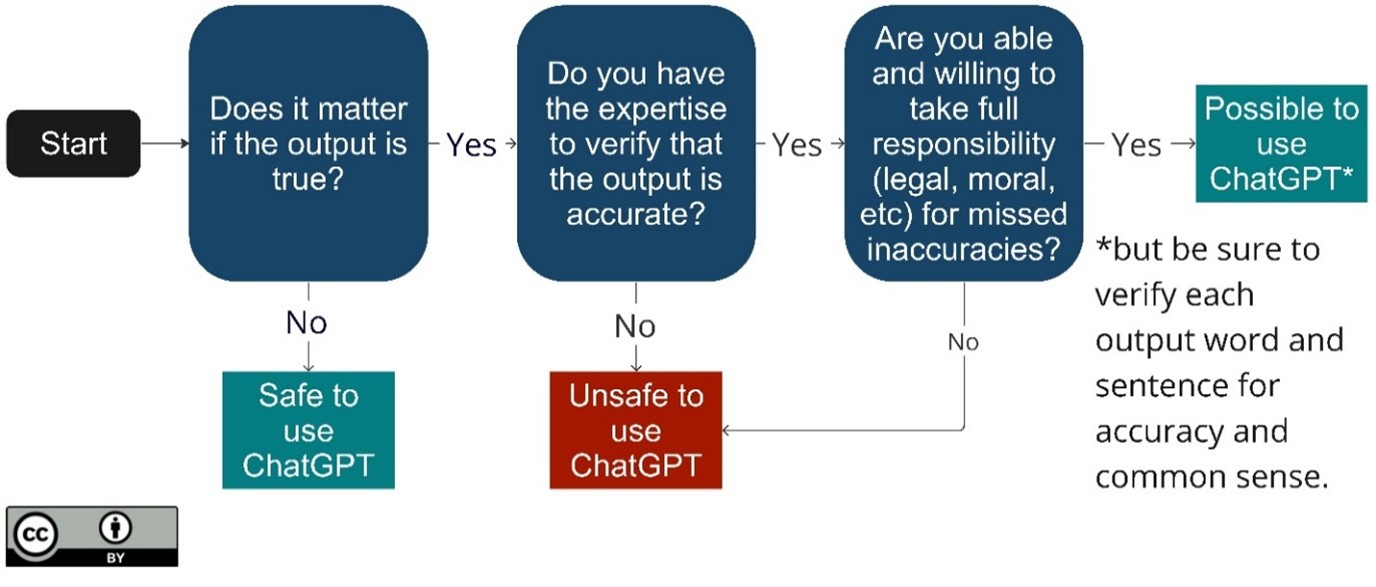
<?xml version="1.0" encoding="UTF-8"?>
<!DOCTYPE html PUBLIC "-//W3C//DTD XHTML 1.1//EN" "http://www.w3.org/TR/xhtml11/DTD/xhtml11.dtd">
<html xmlns="http://www.w3.org/1999/xhtml" xml:lang="en">
<head>
<meta content="text/html; charset=UTF-8" http-equiv="content-type" />
<meta http-equiv="Content-Language" content="en" />
<meta name="generator" content="Pressbooks 6.17.1" />
<meta name="pb-authors" content="BCcampus OER Production Team" />
<meta name="pb-title" content="Getting Started: OER Publishing at BCcampus" />
<meta name="pb-language" content="en-ca" />
<meta name="pb-cover-image" content="https://opentextbc.ca/gettingstarted/wp-content/uploads/sites/355/2023/10/540639028-resource-cover-getting-started_oer-publishing-at-bccampus.png" />
<meta name="pb-book-license" content="cc-by" />
<meta name="pb-publisher" content="BCcampus" />
<meta name="pb-publisher-city" content="Victoria, B.C." />
<meta name="pb-subtitle" content="Resources and Guidelines" />
<meta name="pb-about-50" content="This resource provides an overview of everything you will need to know when creating an open educational resource (OER) that will be published by BCcampus. It provides a high-level overview of things to keep in mind as you work on your project and links to resources that go into more depth so you can easily find the information you need." />
<meta name="pb-publication-date" content="1630972800" />
<meta name="pb-custom-copyright" content="© 2021 BCcampusThe CC licence permits you to retain, reuse, copy, redistribute, and revise this book—in whole or in part—for free providing the author is attributed as follows:Getting Started: OER Publishing at BCcampus by the BCcampus OER Production Team is licensed under a CC BY 4.0 Licence.If you redistribute all or part of this book, it is recommended the following statement be added to the copyright page so readers can access the original book at no cost:Download for free from https://opentextbc.ca/gettingstarted/Sample APA-style citation (7th Edition):BCcampus OER Production Team. (2021). Getting started: OER publishing at BCcampus. BCcampus. https://opentextbc.ca/gettingstarted/Cover image attribution:The textbook cover is by BCcampus and is licensed under a CC BY 4.0 Licence." />
<meta name="pb-primary-subject" content="KNTP1" />
<meta name="pb-additional-subjects" content="CBW" />
<title>Getting Started: OER Publishing at BCcampus</title>
</head>
<body lang='en' >
<div id="half-title-page"><h1 class="title">Getting Started: OER Publishing at BCcampus</h1></div>
<div id="title-page">
			<h1 class="title">Getting Started: OER Publishing at BCcampus</h1>
		<h2 class="subtitle">Resources and Guidelines</h2>
					<p class="author">BCcampus OER Production Team</p>
								<p class="publisher">BCcampus</p>
		<p class="publisher-city">Victoria, B.C.</p>
	</div>
<div id="copyright-page">
	<div class="ugc">
					
<div class="license-attribution"><p><img src="https://opentextbc.ca/gettingstarted/wp-content/themes/pressbooks-book/packages/buckram/assets/images/cc-by.svg" alt="Icon for the Creative Commons Attribution 4.0 International License" /></p><p>Getting Started: OER Publishing at BCcampus Copyright © 2021 by <span>BCcampus OER Production Team</span> is licensed under a <a rel="license" href="https://creativecommons.org/licenses/by/4.0/">Creative Commons Attribution 4.0 International License</a>, except where otherwise noted.</p></div>

							<p>© 2021 BCcampus</p><p>The CC licence permits you to retain, reuse, copy, redistribute, and revise this book—in whole or in part—for free providing the author is attributed as follows:</p><div class="textbox"><a href="https://opentextbc.ca/publishingstyleguide/"><em>Getting Started: OER Publishing at BCcampus</em></a> by the BCcampus OER Production Team is licensed under a <a href="http://creativecommons.org/licenses/by/4.0/">CC BY 4.0 Licence</a>.</div><p>If you redistribute all or part of this book, it is recommended the following statement be added to the copyright page so readers can access the original book at no cost:</p><div class="textbox">Download for free from https://opentextbc.ca/gettingstarted/</div><p><strong>Sample APA-style citation (7th Edition):</strong></p><div class="textbox"><p>BCcampus OER Production Team. (2021). <em>Getting started: OER publishing at BCcampus</em>. BCcampus. https://opentextbc.ca/gettingstarted/</p></div><p><strong>Cover image attribution:</strong></p><div class="textbox"><p>The textbook cover is by BCcampus and is licensed under a <a href="https://creativecommons.org/licenses/by/4.0/">CC BY 4.0 Licence</a>.</p></div>
							</div>
</div>
<div id="toc">
	<h1>Contents</h1>
	<ul>
					<li class="front-matter introduction">
	<a href="#front-matter-introduction">
		<span class="toc-chapter-title">Introduction</span>
							</a>
	</li>

					<li class="part">
	<a href="#part-main-body">
					Main Body
			</a>
</li>

					<li class="chapter standard">
	<a href="#chapter-workflow-responsibilities">
		<span class="toc-chapter-title">Workflow and Responsibilities</span>
							</a>
			<ul class="sections">
							<li class="section">
	<a href="#chapter-24-section-1">
		<span class="toc-subsection-title">Plan</span>
	</a>
</li>
							<li class="section">
	<a href="#chapter-24-section-2">
		<span class="toc-subsection-title">Create or Adapt</span>
	</a>
</li>
							<li class="section">
	<a href="#chapter-24-section-3">
		<span class="toc-subsection-title">Review, Edit, Revise</span>
	</a>
</li>
							<li class="section">
	<a href="#chapter-24-section-4">
		<span class="toc-subsection-title">Final Steps</span>
	</a>
</li>
					</ul>
	</li>

					<li class="chapter standard">
	<a href="#chapter-representation-and-diversity">
		<span class="toc-chapter-title">Equity, Diversity, and Inclusion in OER</span>
							</a>
			<ul class="sections">
							<li class="section">
	<a href="#chapter-29-section-1">
		<span class="toc-subsection-title">Guiding Questions for Creating Equitable OER with Intention</span>
	</a>
</li>
							<li class="section">
	<a href="#chapter-29-section-2">
		<span class="toc-subsection-title">Diverse and Inclusive Representation in OER</span>
	</a>
</li>
							<li class="section">
	<a href="#chapter-29-section-3">
		<span class="toc-subsection-title">OER Equity Rubric</span>
	</a>
</li>
							<li class="section">
	<a href="#chapter-29-section-4">
		<span class="toc-subsection-title">Additional Resources</span>
	</a>
</li>
							<li class="section">
	<a href="#chapter-29-section-5">
		<span class="toc-subsection-title">Attributions</span>
	</a>
</li>
					</ul>
	</li>

					<li class="chapter standard">
	<a href="#chapter-pressbooks">
		<span class="toc-chapter-title">Pressbooks</span>
					<span class="chapter-subtitle">The Publishing Platform</span>
							</a>
			<ul class="sections">
							<li class="section">
	<a href="#chapter-49-section-1">
		<span class="toc-subsection-title">Key Features</span>
	</a>
</li>
							<li class="section">
	<a href="#chapter-49-section-2">
		<span class="toc-subsection-title">Guides and Tutorials</span>
	</a>
</li>
							<li class="section">
	<a href="#chapter-49-section-3">
		<span class="toc-subsection-title">Webinars</span>
	</a>
</li>
							<li class="section">
	<a href="#chapter-49-section-4">
		<span class="toc-subsection-title">Guidelines to Keep in Mind</span>
	</a>
</li>
							<li class="section">
	<a href="#chapter-49-section-5">
		<span class="toc-subsection-title">Examples of Books Published in Pressbooks</span>
	</a>
</li>
					</ul>
	</li>

					<li class="chapter standard">
	<a href="#chapter-accessibility-udl">
		<span class="toc-chapter-title">Accessibility and UDL</span>
							</a>
			<ul class="sections">
							<li class="section">
	<a href="#chapter-37-section-1">
		<span class="toc-subsection-title">New to Accessibility? Start Here</span>
	</a>
</li>
							<li class="section">
	<a href="#chapter-37-section-2">
		<span class="toc-subsection-title">Accessibility Requirements</span>
	</a>
</li>
							<li class="section">
	<a href="#chapter-37-section-3">
		<span class="toc-subsection-title">Document Accessibility: PowerPoint, Microsoft Word, PDF</span>
	</a>
</li>
							<li class="section">
	<a href="#chapter-37-section-4">
		<span class="toc-subsection-title">Tools for Accessibility Testing</span>
	</a>
</li>
							<li class="section">
	<a href="#chapter-37-section-5">
		<span class="toc-subsection-title">Universal Design for Learning</span>
	</a>
</li>
					</ul>
	</li>

					<li class="chapter standard">
	<a href="#chapter-licences-and-permissions">
		<span class="toc-chapter-title">Licences and Permissions</span>
					<span class="chapter-subtitle">When You Can Use the Work of Others</span>
							</a>
			<ul class="sections">
							<li class="section">
	<a href="#chapter-140-section-1">
		<span class="toc-subsection-title">Copyright</span>
	</a>
</li>
							<li class="section">
	<a href="#chapter-140-section-2">
		<span class="toc-subsection-title">Open Licences</span>
	</a>
</li>
							<li class="section">
	<a href="#chapter-140-section-3">
		<span class="toc-subsection-title">Public Domain</span>
	</a>
</li>
							<li class="section">
	<a href="#chapter-140-section-4">
		<span class="toc-subsection-title">Non-Openly Licensed Content (All Rights Reserved)</span>
	</a>
</li>
							<li class="section">
	<a href="#chapter-140-section-5">
		<span class="toc-subsection-title">Webinar</span>
	</a>
</li>
					</ul>
	</li>

					<li class="chapter standard">
	<a href="#chapter-citation-and-attribution">
		<span class="toc-chapter-title">Citation and Attribution</span>
					<span class="chapter-subtitle">How to Credit the Work of Others</span>
							</a>
			<ul class="sections">
							<li class="section">
	<a href="#chapter-143-section-1">
		<span class="toc-subsection-title">Citation</span>
	</a>
</li>
							<li class="section">
	<a href="#chapter-143-section-2">
		<span class="toc-subsection-title">Attribution</span>
	</a>
</li>
					</ul>
	</li>

					<li class="chapter standard">
	<a href="#chapter-supplemental-materials">
		<span class="toc-chapter-title">Supplemental Materials</span>
							</a>
			<ul class="sections">
							<li class="section">
	<a href="#chapter-288-section-1">
		<span class="toc-subsection-title">Things to Keep in Mind</span>
	</a>
</li>
							<li class="section">
	<a href="#chapter-288-section-2">
		<span class="toc-subsection-title">How Supplemental Materials are Shared</span>
	</a>
</li>
					</ul>
	</li>

					<li class="chapter standard">
	<a href="#chapter-oer">
		<span class="toc-chapter-title">Find Open Resources</span>
							</a>
	</li>

					<li class="chapter standard">
	<a href="#chapter-generative-artificial-intelligence">
		<span class="toc-chapter-title">Generative Artificial Intelligence</span>
							<span class="chapter-author">BCcampus Open Education Team</span>
					</a>
			<ul class="sections">
							<li class="section">
	<a href="#chapter-409-section-1">
		<span class="toc-subsection-title">What is Generative Artificial Intelligence (AI)?</span>
	</a>
</li>
							<li class="section">
	<a href="#chapter-409-section-2">
		<span class="toc-subsection-title">Ways You Could Use Generative AI to Create OER</span>
	</a>
</li>
							<li class="section">
	<a href="#chapter-409-section-3">
		<span class="toc-subsection-title">Considerations and Risks</span>
	</a>
</li>
							<li class="section">
	<a href="#chapter-409-section-4">
		<span class="toc-subsection-title">Guidelines and Recommendations</span>
	</a>
</li>
							<li class="section">
	<a href="#chapter-409-section-5">
		<span class="toc-subsection-title">Attributions</span>
	</a>
</li>
							<li class="section">
	<a href="#chapter-409-section-6">
		<span class="toc-subsection-title">References</span>
	</a>
</li>
					</ul>
	</li>

					<li class="back-matter miscellaneous">
	<a href="#back-matter-webinars-oer-production-series">
		<span class="toc-chapter-title">Webinars: OER Production Series</span>
							</a>
			<ul class="sections">
							<li class="section">
	<a href="#back-matter-264-section-1">
		<span class="toc-subsection-title">Find, Use and Share Open Education Resources</span>
	</a>
</li>
							<li class="section">
	<a href="#back-matter-264-section-2">
		<span class="toc-subsection-title">Introduction to Pressbooks</span>
	</a>
</li>
							<li class="section">
	<a href="#back-matter-264-section-3">
		<span class="toc-subsection-title">Technical Accessibility in OER</span>
	</a>
</li>
							<li class="section">
	<a href="#back-matter-264-section-4">
		<span class="toc-subsection-title">Advanced Pressbooks</span>
	</a>
</li>
							<li class="section">
	<a href="#back-matter-264-section-5">
		<span class="toc-subsection-title">Applying Universal Design for Learning to OER</span>
	</a>
</li>
					</ul>
	</li>

					<li class="back-matter miscellaneous">
	<a href="#back-matter-get-more-help">
		<span class="toc-chapter-title">Get More Help</span>
							</a>
			<ul class="sections">
							<li class="section">
	<a href="#back-matter-163-section-1">
		<span class="toc-subsection-title">Support Resources</span>
	</a>
</li>
							<li class="section">
	<a href="#back-matter-163-section-2">
		<span class="toc-subsection-title">Contact Someone</span>
	</a>
</li>
					</ul>
	</li>

					<li class="back-matter appendix">
	<a href="#back-matter-versioning-history">
		<span class="toc-chapter-title">Versioning History</span>
							</a>
	</li>

			</ul>
</div>
<div class="front-matter introduction " id="front-matter-introduction" title="Introduction">
	<div class="front-matter-title-wrap">
		<p class="front-matter-number">1</p>
		<h1 class="front-matter-title">Introduction</h1>
								</div>
	<div class="ugc front-matter-ugc">
				 <p>This resource provides an overview of everything you will need to know when creating an open educational resource (OER) that will be published by BCcampus. It provides a high-level overview of things to keep in mind as you work on your project, specific policies and expectations that BCcampus has in place, and links to resources that go into more depth so you can easily find the information you need.</p> <p>We ask that you read this resource through in its entirety before starting your project and to refer back to it whenever you have questions.</p> <p>It is broken up into main sections:</p> <ul><li><a href="#chapter-workflow-responsibilities" data-url="/gettingstarted/chapter/workflow-responsibilities/">Workflow and Responsibilities</a>: The general process for publishing OER at BCcampus, the responsibilities of authors, and an overview of supports available.</li> <li><a href="#chapter-representation-and-diversity" data-url="/gettingstarted/chapter/representation-and-diversity/">Diverse and Inclusive Representation in OER</a>: Guidelines to help ensure OER content is diverse and inclusive.</li> <li><a href="#chapter-pressbooks" data-url="/gettingstarted/chapter/pressbooks/">Pressbooks</a>: Links to Pressbooks resources.</li> <li><a href="#chapter-accessibility-udl" data-url="/gettingstarted/chapter/accessibility-udl/">Accessibility and UDL</a>: How to make the OER accessible.</li> <li><a href="#chapter-licences-and-permissions" data-url="/gettingstarted/chapter/licences-and-permissions/">Licences and Permissions</a>: Overview of copyright, open licences, and all rights reserved content, and what content you can include in your open resource.</li> <li><a href="#chapter-citation-and-attribution" data-url="/gettingstarted/chapter/citation-and-attribution/">Citation and Attribution</a>: How to properly credit the work of others.</li> <li><a href="#chapter-supplementary-materials" data-url="/gettingstarted/chapter/supplementary-materials/">Supplementary Materials</a>: Things to keep in mind when creating supplementary materials.</li> <li><a href="#chapter-oer" data-url="/gettingstarted/chapter/oer/">Find Open Resources</a>: Links to where you can find different types of openly licensed content.</li> </ul> <p>If you can’t find the answer to your question, check out the <a href="#back-matter-get-more-help" data-url="/gettingstarted/back-matter/get-more-help/">Get More Help</a> page in the back matter.</p> 
	</div>


	</div>
<div class="part-wrapper" id="part-main-body-wrapper">
    <div class="chapter standard with-subsections" id="chapter-workflow-responsibilities" title="Workflow and Responsibilities">
	<div class="chapter-title-wrap">
		<p class="chapter-number">1</p>
		<h1 class="chapter-title">Workflow and Responsibilities</h1>
								</div>
	<div class="ugc chapter-ugc">
				
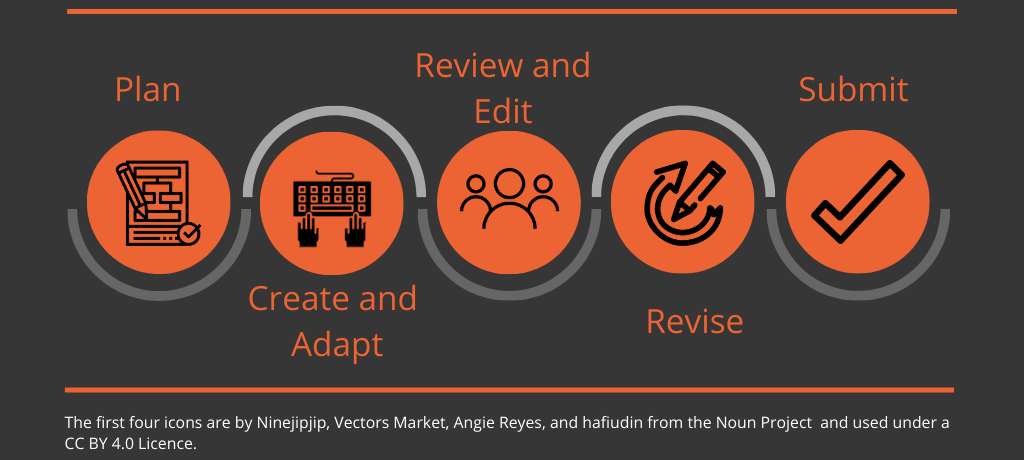
 <p><img class="aligncenter wp-image-23 size-full" src="https://opentextbc.ca/gettingstarted/wp-content/uploads/sites/355/2021/07/OER-Creation-Process1.png" alt="A flow chart of the OER Creation Process: Plan, create and adapt, review and edit, revise, and then submit." width="1024" height="460" srcset="https://opentextbc.ca/gettingstarted/wp-content/uploads/sites/355/2021/07/OER-Creation-Process1.png 1024w, https://opentextbc.ca/gettingstarted/wp-content/uploads/sites/355/2021/07/OER-Creation-Process1-300x135.png 300w, https://opentextbc.ca/gettingstarted/wp-content/uploads/sites/355/2021/07/OER-Creation-Process1-768x345.png 768w, https://opentextbc.ca/gettingstarted/wp-content/uploads/sites/355/2021/07/OER-Creation-Process1-65x29.png 65w, https://opentextbc.ca/gettingstarted/wp-content/uploads/sites/355/2021/07/OER-Creation-Process1-225x101.png 225w, https://opentextbc.ca/gettingstarted/wp-content/uploads/sites/355/2021/07/OER-Creation-Process1-350x157.png 350w" sizes="(max-width: 1024px) 100vw, 1024px" title=""></p> <p>When creating or adapting a new OER, you will go through five general phases:</p> <ol><li>Make a plan.</li> <li>Create and adapt content.</li> <li>Have the work reviewed and edited.</li> <li>Make any necessary revisions.</li> <li>Publish and share widely.</li> </ol> <p>This section provides an overview of each of those phases, the specific things you as the author/project lead are responsible for, and the resources available to help you.</p> <h1 id="chapter-24-section-1" class="section-header">Plan</h1> <h2>Find collaborators</h2> <p>Identify people who can contribute to the project (including students, staff, and/or subject matter experts) as co-authors, reviewers, editors, instructional designers, etc.</p> <div class="textbox">See “<a href="https://opentextbc.ca/selfpublishguide/chapter/contributing-authors/" data-url="https://opentextbc.ca/selfpublishguide/chapter/contributing-authors/">Contributing Authors</a>” in the <em>Self-Publishing Guide </em>and “Building a Team” in the <a href="https://press.rebus.community/the-rebus-guide-to-publishing-open-textbooks/" data-url="https://press.rebus.community/the-rebus-guide-to-publishing-open-textbooks/"><em>Rebus Guide to Publishing Open Textbooks (So Far)</em>.</a></div> <h2>Connect with experts</h2> <p>Connect with the people at your institution who have experience on things like open education, copyright, and instructional design who may be able to help.</p> <h2>Plan your resource</h2> <p>Identify what content you have and what you will need. This can include text, images, videos, etc.</p> <h1 id="chapter-24-section-2" class="section-header">Create or Adapt</h1> <h2>Set up your Pressbook</h2> <p>If applicable, set the resource up in Pressbooks. Determine the resource’s structure, elements, and general style guidelines.</p> <div class="textbox"><ul><li>What is the structure of the resource? What is the structure of each chapter? What are consistent elements that will be included throughout the book? For example, glossary terms, videos, learning objectives, exercises questions.</li> <li>See the section on <a href="#chapter-pressbooks" data-url="/gettingstarted/chapter/pressbooks/">Pressbooks</a> in this resource and “Plan Your Book” in the <a href="https://opentextbc.ca/selfpublishguide/" data-url="https://opentextbc.ca/selfpublishguide/"><em>Self-Publishing Guide</em></a>.</li> <li>For recommended style guidelines, see the “Appearance and Design” section in the BCcampus <em><a href="https://opentextbc.ca/publishingstyleguide/" data-url="https://opentextbc.ca/publishingstyleguide/">Publishing Style Guide</a>.</em> These are the guidelines the production team will follow.</li> </ul> </div> <h2>Find/create open content</h2> <p>Find and/or create content that is open (i.e., learning objectives, text, images, video/audio, glossary terms, H5P activities, exercises).</p> <div class="textbox">See the sections on <a href="#chapter-licences-and-permissions" data-url="/gettingstarted/chapter/licences-and-permissions/">Licences and Permissions</a> and <a href="#chapter-oer" data-url="/gettingstarted/chapter/oer/">Find Open Resources</a> in this resource.</div> <h2>Ensure diversity and inclusion</h2> <p>Ensure all content reflects the human diversity of our world in a way that is inclusive and respectful.</p> <div class="textbox">See the section on <a href="#chapter-representation-and-diversity" data-url="/gettingstarted/chapter/representation-and-diversity/">Diverse and Inclusive Representation in OER</a> in this resource.</div> <h2>Track source information</h2> <p>Track licence and source info for all non-original content. This will be used to provide attribution statements for reused and adapted work.</p> <div class="textbox">See the section on <a href="#chapter-citation-and-attribution" data-url="/gettingstarted/chapter/citation-and-attribution/">Citation and Attribution</a> in this resource.</div> <h2>Select/create media</h2> <p>Select/create video, audio, and images that are accessible.</p> <div class="textbox"><ul><li>See the <a href="https://opentextbc.ca/accessibilitytoolkit/chapter/images/" data-url="https://opentextbc.ca/accessibilitytoolkit/chapter/images/">Accessibility Toolkit’s chapter on Images</a>.</li> <li>See the <a href="https://opentextbc.ca/accessibilitytoolkit/chapter/multimedia/" data-url="https://opentextbc.ca/accessibilitytoolkit/chapter/multimedia/">Accessibility Toolkit’s chapter on Multimedia</a>.</li> </ul> </div> <h1 id="chapter-24-section-3" class="section-header">Review, Edit, Revise</h1> <h2>Edit your own work</h2> <p>Edit your own work for errors and inconsistencies. Ensure language is clear.</p> <div class="textbox">See <em><a href="https://kpu.pressbooks.pub/effectiveediting/" data-url="https://kpu.pressbooks.pub/effectiveediting/">Effective Editing</a></em>.</div> <h2>Set up peer review</h2> <p>Bring in people to give feedback on the work.</p> <div class="textbox">See <a href="https://opentextbc.ca/selfpublishguide/chapter/peer-review/" data-url="https://opentextbc.ca/selfpublishguide/chapter/peer-review/">Peer Review</a> and <a href="https://press.rebus.community/the-rebus-guide-to-publishing-open-textbooks/chapter/peer-review-process-guide/" data-url="https://press.rebus.community/the-rebus-guide-to-publishing-open-textbooks/chapter/peer-review-process-guide/">Peer Review Process</a>.</div> <h2>Incorporate feedback</h2> <p>Incorporate revisions and edits identified by reviewers and editors.</p> <h2>Have work copyedited</h2> <p>Have the resource copy edited and proofread by someone who is not the author. There should be no changes to the content after this point.</p> <div class="textbox">See <a href="https://opentextbc.ca/selfpublishguide/chapter/how-to-copy-edit/" data-url="https://opentextbc.ca/selfpublishguide/chapter/how-to-copy-edit/">How to Copy Edit</a>, <a href="https://opentextbc.ca/selfpublishguide/chapter/how-to-proofread/" data-url="https://opentextbc.ca/selfpublishguide/chapter/how-to-proofread/">How to Proofread</a>, and <a href="https://opentextbc.ca/selfpublishguide/chapter/guideline-for-copy-editors/" data-url="https://opentextbc.ca/selfpublishguide/chapter/guideline-for-copy-editors/">Guidelines for Copy Editors</a> in the <em>Self-Publishing Guide.</em></div> <h1 id="chapter-24-section-4" class="section-header">Final Steps</h1> <h2>Set up book cover and metadata</h2> <p>Select an official title for the resource, have a cover created, and write a short description of the resource. Ensure all metadata for the book is filled out, including the licence, authors, contributors, publish date.</p> <h2>Share publicly</h2> <p>Share your book with the world!</p> <h3>Media Attributions</h3> <ul><li>OER Creation Process graphic by Josie Gray was created in Canva, and as such it cannot be openly licensed. It includes four icons from the Noun Project: <ul><li><a href="https://thenounproject.com/search/?creator=3576426&amp;q=plan&amp;i=1890354" data-url="https://thenounproject.com/search/?creator=3576426&amp;q=plan&amp;i=1890354">Planning</a> by <a href="https://thenounproject.com/ninejipjip" data-url="https://thenounproject.com/ninejipjip">Ninejipjip</a> is licensed under a <a href="https://creativecommons.org/licenses/by/4.0/" data-url="https://creativecommons.org/licenses/by/4.0/">CC BY 4.0 licence</a>.</li> <li><a href="https://thenounproject.com/search/?creator=917040&amp;q=type&amp;i=1861086" data-url="https://thenounproject.com/search/?creator=917040&amp;q=type&amp;i=1861086">Typing</a> by <a href="https://thenounproject.com/vectorsmarket/" data-url="https://thenounproject.com/vectorsmarket/">Vectors Market</a> is licensed under a <a href="https://creativecommons.org/licenses/by/4.0/" data-url="https://creativecommons.org/licenses/by/4.0/">CC BY 4.0 licence</a>.</li> <li><a href="https://thenounproject.com/term/group/449613/" data-url="https://thenounproject.com/term/group/449613/">Group</a> by <a href="https://thenounproject.com/anjreyes" data-url="https://thenounproject.com/anjreyes">Angie Reyes</a> is licensed under a <a href="https://creativecommons.org/licenses/by/4.0/" data-url="https://creativecommons.org/licenses/by/4.0/">CC BY 4.0 licence</a>.</li> <li><a href="https://thenounproject.com/search/?creator=3311077&amp;q=review&amp;i=2563187" data-url="https://thenounproject.com/search/?creator=3311077&amp;q=review&amp;i=2563187">Review</a> by <a href="https://thenounproject.com/mhafiudin/" data-url="https://thenounproject.com/mhafiudin/">hafiudin</a> is licensed under a <a href="https://creativecommons.org/licenses/by/4.0/" data-url="https://creativecommons.org/licenses/by/4.0/">CC BY 4.0 licence</a></li> </ul> </li> </ul> 

	</div>


	</div>
<div class="chapter standard with-subsections" id="chapter-representation-and-diversity" title="Equity, Diversity, and Inclusion in OER">
	<div class="chapter-title-wrap">
		<p class="chapter-number">2</p>
		<h1 class="chapter-title">Equity, Diversity, and Inclusion in OER</h1>
								</div>
	<div class="ugc chapter-ugc">
				
 <p>This page includes a collection of resources designed to support creating OER that have content and approaches that include and respect the diversity and complexity of our world. They include:</p> <ul><li><strong>Guideline Questions for Creating OER with Intention:</strong> This resource is intended to be used during the planning stages of a new OER project to help a project team be intentional about centering equity in their approach to OER development and identifying where they may need support.</li> <li><strong>Diverse and Inclusive Representation in OER:</strong> This provides examples for different ways diversity and inclusion can show up in an OER, including through examples, images, names, etc.</li> <li><strong>OER Equity Rubric:</strong> This resource can be used to evaluate an existing OER to identify how equitable the content is and identify areas for improvement.</li> </ul> <h1 id="chapter-29-section-1" class="section-header">Guiding Questions for Creating Equitable OER with Intention</h1> <p style="text-align: right;">By Josie Gray and Clint Lalonde</p> <h2>About the Guiding Questions and How to Use Them</h2> <p>These guiding questions are intended to support OER authors and contributors in doing the following:</p> <ul><li>Document their vision, intentions, and commitments for the OER from the beginning of the project.</li> <li>Identify areas where more learning, research, and/or support may be needed.</li> <li>Communicate the work and consideration that went into the creation and design of the resource to future users of the OER.</li> </ul> <p>The guiding questions are grouped into six areas of consideration. These areas of consideration are not comprehensive, but they are things BCcampus has identified as being important to improve equity, access, and quality of learning for students.</p> <p>These guiding questions are meant to be used at two points:</p> <ol><li><strong>At the beginning of an OER project</strong>, everyone involved with the project can use these questions to think through different aspects of the project and make a plan for what they want the resource to be and how they are going to do it. Note that many of these guiding questions are complex and don’t have straight forward answers. It is also unlikely that one person will be able to answer them all. Use the questions as a jumping off point for discussion and reflection and to identify where you need more support/resources.</li> <li><strong>At the end of an OER project</strong>, the questions can be used again to reflect on the work and considerations that went into the OER and communicate those things explicitly to future users, including instructors who want to adopt or adapt the resource, students, and the general public. For example, this could take the form of a preface or author statement that is included with the resource.</li> </ol> <h2>Areas of Consideration</h2> <h3>Openness</h3> <ul><li>Why do you want this resource to be “open”?</li> <li>How might you design this resource so it can be easily used and adapted by others?</li> <li>How might openness inform how you approach the creation of the resource?</li> <li>How might this resource support the use of open pedagogy?</li> </ul> <h4 style="text-align: left;">Resources</h4> <ul><li><a href="https://iastate.pressbooks.pub/oerstarterkit/" data-url="https://iastate.pressbooks.pub/oerstarterkit/">The OER Starter Kit</a></li> <li><a href="https://creativecommons.org/choose/" data-url="https://creativecommons.org/choose/">Creative Commons – Choose a License</a></li> <li><a href="https://www.kpu.ca/open/pedagogy" data-url="https://www.kpu.ca/open/pedagogy">What is open pedagogy?</a></li> </ul> <h3>Pedagogy</h3> <ul><li>How will this resource support student learning?</li> <li>What pedagogical frameworks or models guide the creation of this resource?</li> <li>In what learning environments do you expect this resource to be used (i.e., online, blended, face-to-face)?</li> </ul> <h4 style="text-align: left;">Resources</h4> <ul><li>Some examples of pedagogical models or frameworks include experiential learning, reflective practice, didactic instruction, social-constructivist learning, inquiry-based learning, active learning, problem-based learning, place-based learning, learning sciences, authentic learning, and peer instruction.</li> </ul> <h3>Accessibility</h3> <ul><li>How will you ensure people with disabilities will have equal access to learning throughout this resource?</li> <li>How will this resource use plain language practices to ensure information is easy to understand?</li> <li>How will Universal Design for Learning (UDL) be incorporated in this resource?</li> </ul> <ul><li>How might this resource allow people to access it in multiple ways? For example, on both computer and mobile devices and print.</li> </ul> <h4 style="text-align: left;">Resources</h4> <ul><li><a href="#chapter-accessibility-udl" data-url="https://opentextbc.ca/gettingstarted/chapter/accessibility-udl/">Accessibility and UDL</a></li> <li><a href="https://opentextbc.ca/accessibilitytoolkit/" data-url="https://opentextbc.ca/accessibilitytoolkit/">Accessibility Toolkit</a></li> <li><a href="https://www.cast.org/impact/universal-design-for-learning-udl" data-url="https://www.cast.org/impact/universal-design-for-learning-udl">About Universal Design for Learning (UDL)</a></li> <li><a href="http://en.copian.ca/library/learning/nwt/writread/writefor.pdf" data-url="http://en.copian.ca/library/learning/nwt/writread/writefor.pdf">A Plain Language Handbook [PDF]</a></li> </ul> <h3>Positionality</h3> <p>Reflect on your own perspectives, societal position, and experiences. This can include your:</p> <ul><li>Social identities (i.e., race, ethnicity, gender, citizenship, age, class, disability)</li> <li>Relationship to the land you live and work on</li> <li>Experiences of privilege and/or marginalization</li> <li>Academic and/or professional background</li> <li>Political, philosophical and theoretical beliefs and values</li> </ul> <p>With these in mind, consider the following questions:</p> <ul><li>How do your identities and lived experiences influence your approach and understanding of the subject of the OER in general and this resource in particular?</li> <li>If working with a group, whose perspectives are represented in the group? Whose are missing?</li> </ul> <h4 style="text-align: left;">Resources</h4> <ul><li>Definition: Positionality is “the social and political context that creates your identity in terms of race, class, gender, sexuality, and ability status. Positionality also describes how your identity influences, and potentially biases, your understanding of and outlook on the world.”<span class="footnote"><span class="footnote-indirect" data-fnref="29-1"></span></span></li> <li><a href="https://indigenousinitiatives.ctlt.ubc.ca/classroom-climate/positionality-and-intersectionality/" data-url="https://indigenousinitiatives.ctlt.ubc.ca/classroom-climate/positionality-and-intersectionality/">Positionality and Intersectionality</a></li> <li><a href="https://onlinelibrary.wiley.com/doi/full/10.1111/jols.12372" data-url="https://onlinelibrary.wiley.com/doi/full/10.1111/jols.12372">The price of positionality: assessing the benefits and burdens of self-identification in research methods</a></li> </ul> <h3>Indigenous perspectives</h3> <ul><li>How will you ensure this resource incorporates the perspectives, ways of knowing, and pedagogies of local Indigenous nations?</li> <li>Will this resource involve collaboration and building relationships with local Indigenous communities and people?</li> <li>How has colonialism influenced and informed this field of study? How might you address that through this resource?</li> </ul> <h4 style="text-align: left;">Resources</h4> <ul><li><a href="https://opentextbc.ca/indigenizationcurriculumdevelopers/" data-url="https://opentextbc.ca/indigenizationcurriculumdevelopers/">Pulling Together: A Guide for Curriculum Developers</a></li> <li><a href="https://opentextbc.ca/indigenizationinstructors/" data-url="https://opentextbc.ca/indigenizationinstructors/">Pulling Together: A Guide for Teachers and Instructors</a></li> <li><a href="https://www.ecampusontario.ca/wp-content/uploads/2020/08/OEProject-McCracken.pdf" data-url="https://www.ecampusontario.ca/wp-content/uploads/2020/08/OEProject-McCracken.pdf">Community First: Open Practices and Indigenous Knowledge [PDF]</a></li> <li><a href="https://media.bccampus.ca/media/Indigenous+Open+Educational+ResourcesA+Respectfully+Uplifting+Community+Voices/0_2ieayc5s" data-url="https://media.bccampus.ca/media/Indigenous+Open+Educational+ResourcesA+Respectfully+Uplifting+Community+Voices/0_2ieayc5s">Webinar: Indigenous Open Educational Resources</a></li> </ul> <h3>Knowledge Equity and Social Justice</h3> <ul><li>How will you ensure a diversity of perspectives, experiences, and people are present throughout the resource in a way that is inclusive, respectful, and is not othering? This includes things like images, case studies, examples, and names.</li> <li>How might this resource decentre the dominant culture and ways of knowing?</li> <li>How might your resource address social inequities and issues?</li> <li>How will you ensure that you meaningfully engage with the work of authors, researchers, and organizations from a diversity of backgrounds and lived experiences throughout the resource? This includes but is not limited to race, class, gender, ethnicity, geographic location, and disability.</li> </ul> <h4 style="text-align: left;">Resources</h4> <ul><li><a href="https://jl4d.org/index.php/ejl4d/article/view/290" data-url="https://jl4d.org/index.php/ejl4d/article/view/290">Changing our (Dis)Course: A Distinctive Social Justice Aligned Definition of Open Education</a></li> </ul> <ul><li><a href="#dir" data-url="https://opentextbc.ca/gettingstarted/chapter/representation-and-diversity/#dir">Diverse and Inclusive Representation in OER</a></li> <li><a href="https://www.newamerica.org/education-policy/policy-papers/culturally-responsive-teaching-competencies/" data-url="https://www.newamerica.org/education-policy/policy-papers/culturally-responsive-teaching-competencies/">Culturally Responsive Teaching: A Reflection Guide</a></li> <li><a href="https://usq.pressbooks.pub/diversityandinclusionforoer/chapter/researchers-and-references/" data-url="https://usq.pressbooks.pub/diversityandinclusionforoer/chapter/researchers-and-references/">Researchers and References</a></li> <li><a href="https://www.citeblackwomencollective.org/" data-url="https://www.citeblackwomencollective.org/">Cite Black Women</a></li> </ul> <h1 id="chapter-29-section-2" class="section-header  dir">Diverse and Inclusive Representation in OER</h1> <p>Here are some guidelines to keep in mind to ensure that the content of your OER is both diverse and inclusive. For more information about what diversity and inclusion mean, you can read BCcampus’s <a href="https://bccampus.ca/about-us/" data-url="https://bccampus.ca/about-us/">Equity, Diversity, and Inclusion statement</a>.</p> <p>A note about diversity: The term “diversity” refers to the variety of experiences and attributes held by people across all walks of life. No one thing or person is “diverse.” There are no “diverse individuals.” Diversity must always be evaluated on a collective level.</p> <h2>Citational Practices</h2> <p>Consider what authors, researchers, and organizations you are citing. Where possible, aim to diversify your references. Seek out specific efforts and programs that drive inclusive citation, such as <a href="https://www.citeblackwomencollective.org/" data-url="https://www.citeblackwomencollective.org/">Cite Black Women</a>. This may be easier in some disciplines than others, but try to identify specific opportunities in your discipline, and partner with your editors and teams to potentially engage with academic organizations focused on diversity, equity, and inclusion in your field.</p> <h2>Examples and Exercises</h2> <p>Ensure that diverse contexts are included, all examples are comprehensible by everyone, and stereotypes are avoided.</p> <ol><li>Use examples that include a variety of people, organizations, geographies, and situations.</li> <li>Use real-world scenarios that address diverse situations and contexts.</li> <li>Avoid negative stereotypes or sensitive subjects in problems and applications unless the subject matter demands it.</li> <li>Do not make assumptions about prior knowledge, especially around culturally specific examples. For example, not all students may be familiar with Western nursery rhymes or kids’ television from the 1990s.</li> </ol> <h2>Illustrations and Photos</h2> <p>Ensure images throughout the resource reflect diversity and consider the intersectionality and context of the depiction (for example, is anything perpetuating a stereotype or does the context/setting indicate anything negative).</p> <ol><li>Consider the quantity of images and illustrations, and the individuals and populations represented therein.</li> <li>Consider the role, depiction, connotation, and purpose of the people represented and the context that you are using the image in.</li> </ol> <p><strong>Resource:</strong> A list of <a href="https://bccampus.ca/2020/09/21/stock-photos-focused-around-diversity-equity-and-inclusion/" data-url="https://bccampus.ca/2020/09/21/stock-photos-focused-around-diversity-equity-and-inclusion/">openly licensed image collections that include people of various genders, skin tones, abilities, etc</a>.</p> <h2>Key Figures in a Field</h2> <p>When discussing historical, pioneering, or current researchers or studies in the field, recognize contributions from people of all backgrounds.</p> <ol><li>Seek diversity in key figures.</li> <li>Avoid isolating marginalized figures to specific sections (for example, multiculturalism).</li> <li>Where historical figures are not diverse, include current figures from the underrepresented groups.</li> </ol> <h2>Names</h2> <p>Ensure that people’s names used in examples, exercises, and scenarios represent various countries of origin, ethnicities, and genders. Ensure that names with particular ethnic or origin associations are portrayed respectfully and accurately; avoid negative comparisons or stereotypes associated with particular national origins or ethnicities.</p> <ol><li>Include diverse names representing various national origins, ethnicities, genders, etc.</li> <li>Avoid stereotypes associated with certain names or names that present in a certain way.</li> </ol> <p><strong>Resource:</strong> <a href="https://www.babynamewizard.com/international-names-lists-popular-names-from-around-the-world" data-url="https://www.babynamewizard.com/international-names-lists-popular-names-from-around-the-world">Popular Names from Around the World</a></p> <h2>Pronouns</h2> <p>Gender is a spectrum and gender diversity is something that should be reflected in OER. This means using gender-neutral language, using examples that reflect gender diversity, and using people’s correct pronouns.</p> <ol><li>Use a variety of pronouns, including gender-neutral pronouns, for the people included in examples, exercises, and scenarios.</li> <li>When referring to a real person, ensure that you are using their correct pronouns. If unsure, this information can often be found by checking their website or Twitter bio or just by asking.</li> <li>When referring to a non-identified individual, use the singular “they” rather than “he/she.” (For example: A student should ask their teacher about the preferred citation style.)</li> </ol> <h2>Terminology and Language</h2> <p>Ensure that all references to people, groups, populations, categories, conditions, and disabilities use the appropriate terminology and do not contain any derogatory, colloquial, inappropriate, or otherwise incorrect language.</p> <p>For historical uses that should remain in place, consider adding context, such as “a widely used term at the time.” Ensure that quotations or paraphrases using outdated terms are attributed, contextualized, and rare.</p> <ol><li>Replace any outdated, incorrect, or offensive terminology. If needed for historical references or direct quotations, insert context, attribution, and/or quotations.</li> <li>Recognize that appropriate terminology is changing all the time, and do your best to use current terms.</li> <li>Avoid idioms or colloquialisms that may lead to confusion or misunderstanding.</li> </ol> <p><strong>Resource: </strong><a href="https://opentextbc.ca/gettingstarted/wp-content/uploads/sites/355/2021/07/slc-inclusive-and-antiracist-writing-resources-complete_guide.pdf" data-url="https://opentextbc.ca/gettingstarted/wp-content/uploads/sites/355/2021/07/slc-inclusive-and-antiracist-writing-resources-complete_guide.pdf">Inclusive &amp; Antiracist Writing Resources [PDF]</a>. This document was created by SFU Library Student Learning Commons. It includes specific inclusive writing strategies and definitions for terms relating to race, gender, sexuality, and disability.</p> <p><strong>Resource:</strong> <a href="https://transjournalists.org/style-guide/" data-url="https://transjournalists.org/style-guide/">Trans Journalist Association Style Guide</a>. This style guide was written to support reporters, editors and other media makers in improving trans coverage. Although focusing on news reporting, much of it is relevant to OER.</p> <h1 id="chapter-29-section-3" class="section-header">OER Equity Rubric</h1> <p>The BCcampus OER Equity Rubric is a tool to evaluate the equity of an open educational resource (OER) and identify opportunities to adapt and improve.</p> <p>This rubric was informed and influenced by OpenStax’s Improving Representation and Diversity in OER Materials framework and BranchED’s Equity Rubric for OER Evaluation. For more information, see the “Attributions” section at the end of the document.</p> <p>This rubric is organized around five areas of focus:</p> <ul><li><strong>Access and usability:</strong> People with disabilities have equal access to learning throughout this resource and are able to engage with content in ways that best fits their needs</li> <li><strong>Student engagement:</strong> Students are welcomed, supported, and given agency throughout this resource.</li> <li><strong>Language: </strong>The words used throughout this resource are accurate, respectful, inclusive, and reflect the preferred terminology of the person or group being discussed.</li> <li><strong>Representation:</strong> Human diversity is represented throughout this resource in ways that are respectful and do not reinforce stereotypes. Underrepresented people and groups are present throughout the text and not just in specific sections on diversity.</li> <li><strong>Ways of knowing and sources of authority: </strong>This resource highlights and draws on the diversity of knowledge and expertise within and beyond this field of study in a way that is accurate, inclusive, and reflective</li> </ul> <div class="textbox"><p>Download the full rubric here: <a href="https://bccampus.ca/wp-content/uploads/2023/02/OER-Equity-Rubric.pdf" data-url="https://bccampus.ca/wp-content/uploads/2023/02/OER-Equity-Rubric.pdf">BCcampus OER Equity Rubric [PDF]</a></p> </div> <h1 id="chapter-29-section-4" class="section-header">Additional Resources</h1> <ul><li><a href="https://usq.pressbooks.pub/diversityandinclusionforoer/" data-url="https://usq.pressbooks.pub/diversityandinclusionforoer/">Enhancing Inclusion, Diversity, Equity, and Accessibility (IDEA) in Open Educational Resources (OER)</a></li> <li><a href="https://www.oercommons.org/courseware/lesson/82102/overview" data-url="https://www.oercommons.org/courseware/lesson/82102/overview">BranchED Equity Rubric for OER Evaluation</a></li> <li><a href="https://www.k12.wa.us/sites/default/files/public/equity/pubdocs/WA-ScreeningForBiasedContent.pdf" data-url="https://www.k12.wa.us/sites/default/files/public/equity/pubdocs/WA-ScreeningForBiasedContent.pdf">Screening for Biased Content in Instructional Materials [PDF]</a></li> <li><a href="https://www.newamerica.org/education-policy/reports/culturally-responsive-teaching/teacher-competencies-that-promote-culturally-responsive-teaching/" data-url="https://www.newamerica.org/education-policy/reports/culturally-responsive-teaching/teacher-competencies-that-promote-culturally-responsive-teaching/">Culturally Responsive Teaching: A Reflection Guide</a></li> <li><a href="https://c4disc.pubpub.org/guidelines-on-inclusive-language-and-images-in-scholarly-communication" data-url="https://c4disc.pubpub.org/guidelines-on-inclusive-language-and-images-in-scholarly-communication">Guidelines on Inclusive Language and Images in Scholarly Communication</a></li> <li><a href="https://youtu.be/3e11vGa9zRs" data-url="https://youtu.be/3e11vGa9zRs">Video: OER as a Tool to Decentre Whiteness: A Queer Psychology Case Study</a></li> </ul> <h1 id="chapter-29-section-5" class="section-header">Attributions</h1> <p>“Diverse and Inclusive Representation in OER” was adapted from <a href="https://opentextbc.ca/gettingstarted/wp-content/uploads/sites/355/2021/07/Open_Stax_Diversity_Equity_Inclusion_Development_Guidelines_2022_98335f5dbd.pdf" data-url="https://opentextbc.ca/gettingstarted/wp-content/uploads/sites/355/2021/07/Open_Stax_Diversity_Equity_Inclusion_Development_Guidelines_2022_98335f5dbd.pdf">Improving Representation and Diversity in OER Materials [PDF]</a> by Rice University (June 2020 update), which is under a <a href="https://creativecommons.org/licenses/by/4.0/" data-url="https://creativecommons.org/licenses/by/4.0/">CC BY 4.0 licence</a>. It has been adapted by BCcampus for brevity, clarity, and to include considerations around pronouns.</p> 

	</div>
			
				
				<div class="footnotes"><div id='29-1'>
See the Gender &amp; Sexuality Dictionary’s section on <a href="https://www.dictionary.com/e/gender-sexuality/positionality/" data-url="https://www.dictionary.com/e/gender-sexuality/positionality/">Positionality</a>.
</div></div>
	</div>
<div class="chapter standard with-subsections" id="chapter-pressbooks" title="Pressbooks">
	<div class="chapter-title-wrap">
		<p class="chapter-number">3</p>
		<h1 class="chapter-title">Pressbooks</h1>
					<p class="chapter-subtitle">The Publishing Platform</p>
			</div>
	<div class="ugc chapter-ugc">
				
 <p>Pressbooks is the publishing tool that BCcampus uses to create and publish open educational resources. B.C. and Yukon faculty and staff can use their institutional emails to create a free Pressbooks account at <a href="https://pressbooks.bccampus.ca" data-url="https://pressbooks.bccampus.ca">https://pressbooks.bccampus.ca</a>.</p> <h1 id="chapter-49-section-1" class="section-header">Key Features</h1> <p>Here are some features of Pressbooks that make it a great tool:</p> <ul><li>Create a webbook, export to multiple formats (PDF and EPUB), and import into a learning management systems (LMS)</li> <li>Able to create accessible and responsive content.</li> <li>Include text, images, video, and audio all in one spot.</li> <li>Import content from multiple sources.</li> <li>Create a glossary.</li> <li>Incorporate interactivity through H5P activities and web annotation (Hypothes.is).</li> </ul> <h1 id="chapter-49-section-2" class="section-header">Guides and Tutorials</h1> <p><img class="wp-image-121 alignright" src="https://opentextbc.ca/gettingstarted/wp-content/uploads/sites/355/2021/07/Pressbooks-Guide-232x300.jpg" alt="Book cover for the BCcampus Open Education Pressbooks Guide." width="133" height="172" srcset="https://opentextbc.ca/gettingstarted/wp-content/uploads/sites/355/2021/07/Pressbooks-Guide-232x300.jpg 232w, https://opentextbc.ca/gettingstarted/wp-content/uploads/sites/355/2021/07/Pressbooks-Guide-65x84.jpg 65w, https://opentextbc.ca/gettingstarted/wp-content/uploads/sites/355/2021/07/Pressbooks-Guide-225x291.jpg 225w, https://opentextbc.ca/gettingstarted/wp-content/uploads/sites/355/2021/07/Pressbooks-Guide.jpg 350w" sizes="(max-width: 133px) 100vw, 133px" title=""></p> <p>The <a href="https://opentextbc.ca/pressbooks/" data-url="https://opentextbc.ca/pressbooks/"><em>Pressbooks Guide</em></a> is a good place to start. It covers all the basics of Pressbooks and links to many additional resources. This guide is maintained by BCcampus.</p> <p>&nbsp;</p> <p>&nbsp;</p> <p>&nbsp;</p> <p><img class="wp-image-124 alignright" src="https://opentextbc.ca/gettingstarted/wp-content/uploads/sites/355/2021/07/Pressbooks-Video-Tutorial.png" alt="White text on a dark purple background that reads: &amp;quot;Pressbooks video tutorial series.&amp;quot; And a large play button." width="133" height="172" srcset="https://opentextbc.ca/gettingstarted/wp-content/uploads/sites/355/2021/07/Pressbooks-Video-Tutorial.png 500w, https://opentextbc.ca/gettingstarted/wp-content/uploads/sites/355/2021/07/Pressbooks-Video-Tutorial-232x300.png 232w, https://opentextbc.ca/gettingstarted/wp-content/uploads/sites/355/2021/07/Pressbooks-Video-Tutorial-65x84.png 65w, https://opentextbc.ca/gettingstarted/wp-content/uploads/sites/355/2021/07/Pressbooks-Video-Tutorial-225x291.png 225w, https://opentextbc.ca/gettingstarted/wp-content/uploads/sites/355/2021/07/Pressbooks-Video-Tutorial-350x452.png 350w" sizes="(max-width: 133px) 100vw, 133px" title=""></p> <p>The <a href="https://media.bccampus.ca/channel/Pressbooks%2BTutorials/175668" data-url="https://media.bccampus.ca/channel/Pressbooks%2BTutorials/175668"><em>Pressbooks Video Tutorial Series</em></a> provides a complete walk through of everything you will need to know to get going with Pressbooks. All videos are short and organized into playlists to make it easy to find the specific information you need. These videos are maintained by BCcampus.</p> <p>&nbsp;</p> <p>&nbsp;</p> <p>&nbsp;</p> <p>&nbsp;</p> <p><img class="alignright wp-image-392" src="https://opentextbc.ca/gettingstarted/wp-content/uploads/sites/355/2021/07/Pressbooks-User-Guide-Cover-Aug-2022-350x530-1.png" alt="Book cover titled &amp;quot;Pressbooks User Guide.&amp;quot;" width="133" height="201" srcset="https://opentextbc.ca/gettingstarted/wp-content/uploads/sites/355/2021/07/Pressbooks-User-Guide-Cover-Aug-2022-350x530-1.png 350w, https://opentextbc.ca/gettingstarted/wp-content/uploads/sites/355/2021/07/Pressbooks-User-Guide-Cover-Aug-2022-350x530-1-198x300.png 198w, https://opentextbc.ca/gettingstarted/wp-content/uploads/sites/355/2021/07/Pressbooks-User-Guide-Cover-Aug-2022-350x530-1-65x98.png 65w, https://opentextbc.ca/gettingstarted/wp-content/uploads/sites/355/2021/07/Pressbooks-User-Guide-Cover-Aug-2022-350x530-1-225x341.png 225w" sizes="(max-width: 133px) 100vw, 133px" title="">If you still can’t find the answer to your question or want to dig down into tricky formatting, check out the <a href="https://guide.pressbooks.com/" data-url="https://guide.pressbooks.com/"><em>Pressbooks User Guide</em></a>, which is maintained by Pressbooks (the company). It goes into a lot more detail. However, keep in mind that not all of the information will be relevant to the BCcampus instance of Pressbooks.</p> <p>&nbsp;</p> <h1 id="chapter-49-section-3" class="section-header">Webinars</h1> <div class="textbox interactive-content interactive-content--oembed"><span class="interactive-content__icon"></span> <p>One or more interactive elements has been excluded from this version of the text. You can view them online here: <a href="#oembed-3" title="OER Production Series: Introduction to Pressbooks (May 17, 2023)" data-url="https://opentextbc.ca/gettingstarted/?p=49#oembed-3">https://opentextbc.ca/gettingstarted/?p=49#oembed-3</a> </p> </div> <div class="textbox interactive-content interactive-content--oembed"><span class="interactive-content__icon"></span> <p>One or more interactive elements has been excluded from this version of the text. You can view them online here: <a href="#oembed-4" title="OER Production Series: Advanced Pressbooks (May 26, 2023)" data-url="https://opentextbc.ca/gettingstarted/?p=49#oembed-4">https://opentextbc.ca/gettingstarted/?p=49#oembed-4</a> </p> </div> <h1 id="chapter-49-section-4" class="section-header">Guidelines to Keep in Mind</h1> <ul><li><strong>Always insert images full size initially</strong> and then scale them down to the desired size. This ensures the image will display clearly in all export formats.</li> <li><strong>Preview your content in all formats often</strong>. This means reviewing the webbook view and exporting the PDF and EPUB files to see how things look. Sometimes something that looks good in the webbook will not work in the PDF (or will need extra CSS to make it work). If this is the case, it’s better to find the problem earlier rather than later so we can figure out how to fix it.</li> <li><strong>Keep accessibility in mind as you work.</strong> This will make the project go smoother rather than trying to fix accessibility at the end. At the very least, make sure you are describing images as you go. See the chapter on <a href="#chapter-accessibility" data-url="/gettingstarted/chapter/accessibility/">Accessibility</a> for more information.</li> <li><strong>Document the source (attribution information)</strong> of all openly licensed and public domain content you include. See the chapter on <a href="#chapter-citation-and-attribution" data-url="/gettingstarted/chapter/citation-and-attribution/">Citation and Attribution</a> for more information.</li> </ul> <h1 id="chapter-49-section-5" class="section-header">Examples of Books Published in Pressbooks</h1> <p>Here are some other books published in Pressbooks to explore:</p> <ul><li><a href="https://opentextbc.ca/mathfortrades2/" data-url="https://opentextbc.ca/mathfortrades2/">Math for Trades: Volume 2</a><span style="background-color: #ffff99;"><br> </span></li> <li><a href="https://opentextbc.ca/introtourism2e/" data-url="https://opentextbc.ca/introtourism2e/">Introduction to Tourism and Hospitality in BC – 2nd Edition</a></li> <li><a href="https://opentextbc.ca/barberingtechniquesforhairstylists/" data-url="https://opentextbc.ca/barberingtechniquesforhairstylists/">Barbering Techniques for Hairstylists</a></li> <li><a href="https://opentextbc.ca/studentsuccess/" data-url="https://opentextbc.ca/studentsuccess/">Student Success</a></li> </ul> 

	</div>


	</div>
<div class="chapter standard with-subsections" id="chapter-accessibility-udl" title="Accessibility and UDL">
	<div class="chapter-title-wrap">
		<p class="chapter-number">4</p>
		<h1 class="chapter-title">Accessibility and UDL</h1>
								</div>
	<div class="ugc chapter-ugc">
				
 <p>The focus of many OER projects is to provide access to education at low or no cost. If the materials are not accessible for each and every student, they do not fulfill the mandate to deliver fully open educational resources.</p> <p>This section outlines a number of resources that will help ensure your resource will be accessible for all students, including students with disabilities.</p> <h1 id="chapter-37-section-1" class="section-header">New to Accessibility? Start Here</h1> <p>There are two resources available that provide an introduction to accessibility in open educational resources and specifically cover how to make resources published in Pressbooks accessible to disabled students. They cover similar information, so you can choose depending on whether you would like to read or watch a video.</p> <ul><li>Read the <a href="https://opentextbc.ca/accessibilitytoolkit/" data-url="https://opentextbc.ca/accessibilitytoolkit/"><em>Accessibility Toolkit</em></a> or</li> <li>Watch this webinar:</li> </ul> <div class="textbox interactive-content interactive-content--oembed"><span class="interactive-content__icon"></span> <p>One or more interactive elements has been excluded from this version of the text. You can view them online here: <a href="#oembed-3" title="OER Production Series: Technical Accessibility (May 10, 2023)" data-url="https://opentextbc.ca/gettingstarted/?p=37#oembed-3">https://opentextbc.ca/gettingstarted/?p=37#oembed-3</a> </p> </div> <div class="textbox shaded"><p>Here are some additional accessibility resources that may be helpful:</p> <ul><li><a class="external-link" href="https://docs.google.com/document/d/1jFJGi9O9kmuipJPlTO_cjc9D87KMVLXVoChr9CAqEnw/edit#heading=h.ovf5csxda1t1" rel="nofollow" data-url="https://docs.google.com/document/d/1jFJGi9O9kmuipJPlTO_cjc9D87KMVLXVoChr9CAqEnw/edit#heading=h.ovf5csxda1t1">STEM OER Accessibility Framework and Guide</a>: A plain language, check-list overview of web content accessibility guidelines (WCAG) with a specific focus on STEM content.</li> <li><a class="external-link" href="http://bit.ly/accessible_stem" rel="nofollow" data-url="http://bit.ly/accessible_stem">Accessible STEM Resources</a>: A list of resources related to accessibility in STEM content.</li> </ul> </div> <h1 id="chapter-37-section-2" class="section-header">Accessibility Requirements</h1> <p>You should be familiar with the accessibility requirements before you start working on your resource and check back as needed. These are the minimum accessibility requirements that we aim to achieve for all open resources that we publish.</p> <div class="textbox shaded" style="text-align: center;"><a href="https://opentextbc.ca/gettingstarted/wp-content/uploads/sites/355/2021/07/BCcampus-Accessibility-Criteria.pdf" data-url="https://opentextbc.ca/gettingstarted/wp-content/uploads/sites/355/2021/07/BCcampus-Accessibility-Criteria.pdf">BCcampus OER Accessibility Criteria [PDF]</a></div> <p>These requirements apply regardless of what platform you are working in. If you are working in Pressbooks, see the <a href="https://opentextbc.ca/publishingstyleguide/chapter/accessibility/" data-url="https://opentextbc.ca/publishingstyleguide/chapter/accessibility/">Accessibility section in the </a><a href="https://opentextbc.ca/publishingstyleguide/chapter/accessibility/" data-url="https://opentextbc.ca/publishingstyleguide/chapter/accessibility/"><em>BCcampus Open Education Publishing Style Guide</em></a> for technical instructions about how to achieve all of these things in Pressbooks.</p> <p>The OER Production Team is here to help, and we will make sure that your resource meets all of these criteria before publishing. Are you creating something that isn’t covered in the accessibility criteria? Reach out to the OER Production team for input.</p> <div class="textbox textbox--examples"><div class="textbox__header"><p class="textbox__title">BCcampus Image Description Policy</p> </div> <div class="textbox__content"><p>Images are powerful tools that can convey a lot of information in very little space. However, not everyone will be able to access those images, so writing image descriptions is a vital part of making your resource accessible to all students.</p> <p>Because image descriptions are context dependent and can contain a lot of information, they are often best written by someone with subject matter expertise who understands what is going on in the image and what students should be getting out of it. As such, <strong>authors are responsible for writing image descriptions as they add images to the resource</strong>.</p> <p>The OER Production team is available to provide specific guidelines and feedback on your descriptions, but we need your expertise to ensure the descriptions are accurate and useful for students. If you have a lot of complex images, set up a meeting with us so we can talk through strategies for describing images.</p> </div> </div> <h1 id="chapter-37-section-3" class="section-header">Document Accessibility: PowerPoint, Microsoft Word, PDF</h1> <p>If you are creating content in a platform other than Pressbooks, you should familiarize yourself with how to make content in that platform accessible. Here are some resources:</p> <ul><li>Office 365 products (Word, PowerPoint, Excel). <ul><li><a href="https://support.microsoft.com/en-us/office/make-your-word-documents-accessible-to-people-with-disabilities-d9bf3683-87ac-47ea-b91a-78dcacb3c66d" data-url="https://support.microsoft.com/en-us/office/make-your-word-documents-accessible-to-people-with-disabilities-d9bf3683-87ac-47ea-b91a-78dcacb3c66d">Make your Word documents accessible to people with disabilities</a> or <a href="https://opentextbc.ca/gettingstarted/wp-content/uploads/sites/355/2021/07/Word-accessibility-handout.pdf" data-url="https://opentextbc.ca/gettingstarted/wp-content/uploads/sites/355/2021/07/Word-accessibility-handout.pdf">Microsoft Word Accessibility [PDF]</a><span id="page286R_mcid0" class="markedContent"></span></li> <li><a href="https://support.microsoft.com/en-us/office/make-your-powerpoint-presentations-accessible-to-people-with-disabilities-6f7772b2-2f33-4bd2-8ca7-dae3b2b3ef25" data-url="https://support.microsoft.com/en-us/office/make-your-powerpoint-presentations-accessible-to-people-with-disabilities-6f7772b2-2f33-4bd2-8ca7-dae3b2b3ef25">Make your PowerPoint presentation accessible to people with disabilities</a> or watch <a href="https://media.bccampus.ca/media/0_vfgo1obj" data-url="https://media.bccampus.ca/media/0_vfgo1obj">Inclusive Design Webinar Series: Presentations</a></li> <li><a href="https://support.microsoft.com/en-us/office/make-your-excel-documents-accessible-to-people-with-disabilities-6cc05fc5-1314-48b5-8eb3-683e49b3e593" data-url="https://support.microsoft.com/en-us/office/make-your-excel-documents-accessible-to-people-with-disabilities-6cc05fc5-1314-48b5-8eb3-683e49b3e593">Make your Excel documents accessible to people with disabilities</a></li> <li>Note that all Office 365 products include built-in accessibility checkers.</li> </ul> </li> <li>PDF files <ul><li><a href="https://www.adobe.com/accessibility/pdf/pdf-accessibility-overview.html" data-url="https://www.adobe.com/accessibility/pdf/pdf-accessibility-overview.html">PDF Accessibility Overview</a></li> <li>PDFs are generally created in other platforms. The more attention you pay to accessibility in the original platform (i.e., Microsoft Word), the more accessible your PDF will be.</li> </ul> </li> </ul> <div class="textbox">The <a href="https://pressbooks.bccampus.ca/accessibilityhandbook/" data-url="https://pressbooks.bccampus.ca/accessibilityhandbook/"><em>Accessibility Handbook for Teaching and Learning</em></a> by Briana Fraser and Luke McKnight also provide a collection of guidelines for making accessible content in different platforms.</div> <h1 id="chapter-37-section-4" class="section-header">Tools for Accessibility Testing</h1> <ul><li><a href="https://wave.webaim.org/extension/" data-url="https://wave.webaim.org/extension/">WAVE Browser Extension</a>: With a click of a button, the WAVE plugin will assess a webpage for text colour contrast, identify what images do and don’t have alt text, give you an overview of the heading structure, identify links to PDFs, and assess table markup. This tool can be used to assess Pressbooks webbook chapters.</li> <li><a href="https://contrastchecker.com/" data-url="https://contrastchecker.com/">Contrast Checker</a>: This tool is helpful for finding accessible colour combinations and checking colour combinations for accessibility. You can also upload pictures and it pull pull the covers from the picture to check. Colour combinations must meet Level AA (ratio 4.5:1 for regular text).</li> <li><a href="https://www.nvaccess.org/download/" data-url="https://www.nvaccess.org/download/">NVDA</a>: An open source screen reader available for Windows computers. Also <a href="https://www.dessci.com/en/products/mathplayer/download.htm" data-url="https://www.dessci.com/en/products/mathplayer/download.htm">MathPlayer</a> will allow an NVDA screen reader to correctly verbalize LaTeX equations rendered with MathML.</li> </ul> <h1 id="chapter-37-section-5" class="section-header">Universal Design for Learning</h1> <p>Watch this webinar or keep reading — the text and the video cover very similar content.</p> <div class="textbox interactive-content interactive-content--oembed"><span class="interactive-content__icon"></span> <p>One or more interactive elements has been excluded from this version of the text. You can view them online here: <a href="#oembed-4" title="OER Production Series: UDL and Open Educational Resources (May 31, 2023)" data-url="https://opentextbc.ca/gettingstarted/?p=37#oembed-4">https://opentextbc.ca/gettingstarted/?p=37#oembed-4</a> </p> </div> <p>Universal Design for Learning (UDL) is a framework that encourages designing teaching and learning environments and materials in ways that give students flexibility, choice, and support. UDL has three principles:</p> <ol><li><strong>Provide multiple means of engagement.</strong> This is the <em>why</em> of learning. It looks at designing learning experiences that provide options to motivate students to learn.</li> <li><strong>Provide multiple means of representation.</strong> This is the <em>what</em> of learning. It looks at how the content is being presented to students and aims to create content that gives students options in how they engage with that content.</li> <li><strong>Provide multiple means of action and expression.</strong> This is the <em>how</em> of learning. It looks at the options students have for demonstrating and managing their knowledge and learning.</li> </ol> <p>Because we are focusing on designing OER here, this section will focus on how to provide <strong>multiple means of representation</strong> when creating OER.</p> <h2>Multiple Means of Representation in OER</h2> <p>There are three guidelines to consider with multiple means of representation:</p> <div class="textbox"><p style="font-size: 1.1em; text-align: center;"><strong>Perception, Language and Symbols, and Comprehension</strong></p> </div> <h3>Perception</h3> <p>The first guideline is <a href="https://udlguidelines.cast.org/representation/perception" data-url="https://udlguidelines.cast.org/representation/perception">perception</a>, which means providing options for students to interact with content that doesn’t rely on a single sense, like sight, hearing, movement, or touch. A key aspect of the perception guideline is user choice and the ability to customize.</p> <p>Here are some example of how the perception guideline can be applied to OER.</p> <h4>Multimodality</h4> <p>One way to address the perception guideline is to create OER that includes multiple modalities that allow students to choose the one that works best for them. This can look like any of the following:</p> <ul><li>A reading provided as text and audio.</li> <li>Text content that is compatible with text-to-speech tools.</li> <li>A captioned video and a reading that teach the same concept.</li> <li>A recorded lecture that is available as a transcript.</li> </ul> <h4>Multiple Formats</h4> <p>Another way to offer students choice and flexibility in their learning materials is to provide them in multiple formats.</p> <p>For examples, resources published in Pressbooks are available for reading in four different formats, which each have their own strengths and weaknesses and are useful in different situations:</p> <ul><li><strong>Webbook:</strong> Can be accessed in any browser at any time, can include multimedia content, and will work with browser text-to-speech tools. Requires internet access.</li> <li><strong>EPUB:</strong> Can be read on a mobile device and the display of text can be customized. Does not require internet access.</li> <li><strong>Digital PDF:</strong> Can be annotated digitally. Most usable on a large screen. Does not require internet access.</li> <li><strong>Print PDF:</strong> Can be printed and annotated. Does not require internet access.</li> </ul> <p>Alternatively, if you are creating your own documents to share with students, you might share both the PDF and Word versions. The PDF is easier to download and open, but the Word version has built-in accessibility tools like text to speech and the ability to customize the display of text.</p> <div class="textbox textbox--examples"><div class="textbox__header"><p class="textbox__title">Considerations for Print Versions</p> </div> <div class="textbox__content"><p>While there are a lot of benefits to digital educational materials, print access is still important for many students. For example, many students like to physically highlight and annotate while they read. Others feel like they retain information better when reading physical copies. Some may be uncomfortable with computers, have no internet access, or not have their own device. In addition, some disabilities make reading on screens difficult or impossible.</p> <p>As such, it’s important to specifically consider the usability and accessibility of the print version of a resource:</p> <ul><li><strong>Text size</strong>. Text size cannot be adjusted in a print version, so you want to ensure text is at least a size-12 font and even consider providing large-print options.</li> <li><strong>Links</strong> to external websites. Ensure students accessing the print copy can find these URLs. In Pressbooks, there is a <a href="https://opentextbc.ca/accessibilitytoolkit/chapter/links/#provide-links" data-url="https://opentextbc.ca/accessibilitytoolkit/chapter/links/#provide-links">CSS workaround</a> to make this possible. Otherwise, you could provide the full URL in a footnote or at the end of a resource.</li> <li><strong>Multimedia and interactive content</strong>. Ensure students accessing the print copy can find the multimedia and interactive content. One way that Pressbooks supports this is by providing direct links to all H5P activities, audio, and video in the PDF version. Another thing you could do is provide printable alternatives. For example, you could make multiple-choice questions available in regular text in addition to the H5P activity, or include a transcript for an audio recording. That way, students using a print copy can still get the same content. Here is an example: <a href="https://opentextbc.ca/mathfortrades2/chapter/practice-quiz-1/" data-url="https://opentextbc.ca/mathfortrades2/chapter/practice-quiz-1/">Math for Trades Quiz</a>.</li> </ul> </div> </div> <h3>Language and Symbols</h3> <p>The second guideline is around <a href="https://udlguidelines.cast.org/representation/language-symbols" data-url="https://udlguidelines.cast.org/representation/language-symbols">language and symbols</a>. It looks at how to establish a shared understanding of what things mean, whether that be symbols, terms, diagrams, phrases, etc. Here are some ways to apply this guideline:</p> <ul><li>Provide a list of key terms and definitions using the Pressbooks Glossary tool.</li> <li>Use videos, animations, etc., to demonstrate hands-on techniques.</li> <li>Create accessible math content so it can be read with a screen reader.</li> <li>Provide legends that explain what different symbols mean.</li> <li>Avoid using examples or phrases that are specific to a certain generation, culture, or location, or provide explanations for those who are not familiar.</li> <li>Provide support for those less familiar with the language through translation, images, and explanations.</li> </ul> <h3>Comprehension</h3> <p>The third guideline is about building <a href="https://udlguidelines.cast.org/representation/comprehension" data-url="https://udlguidelines.cast.org/representation/comprehension">comprehension</a>. With this guideline, the goal is to support students in understanding and applying knowledge.</p> <p>This can include:</p> <ul><li>Helping students make connections to their background knowledge.</li> <li>Identifying patterns, relationships, and big ideas.</li> <li>Assisting students in working through and applying information.</li> </ul> <p>Here is how this can be applied in your OER:</p> <ul><li>Create infographics, diagrams, and models that illustrate main ideas.</li> <li>Use textboxes to highlight learning objectives, examples, or theories from the rest of the text.</li> <li>Provide interactive H5P activities to allow students to practice and self-assess their learning.</li> <li>Use visual cues to identify different types of information.</li> </ul> <h2>More Information about UDL</h2> <p>If you want to dig into Universal Design for Learning in more detail, here are some places to start:</p> <ul><li><a href="https://udlguidelines.cast.org/" data-url="https://udlguidelines.cast.org/">The UDL Guidelines</a></li> <li><a href="http://udloncampus.cast.org/home" data-url="http://udloncampus.cast.org/home">UDL on Campus</a></li> <li><a href="https://pressbooks.bccampus.ca/jibcudl/" data-url="https://pressbooks.bccampus.ca/jibcudl/">A Comprehensive Guide to Applying Universal Design for Learning</a></li> </ul> <h3>References</h3> <p class="hanging-indent">CAST (2018). Universal Design for Learning Guidelines version 2.2. Retrieved from http://udlguidelines.cast.org</p> 

	</div>


	</div>
<div class="chapter standard with-subsections" id="chapter-licences-and-permissions" title="Licences and Permissions">
	<div class="chapter-title-wrap">
		<p class="chapter-number">5</p>
		<h1 class="chapter-title">Licences and Permissions</h1>
					<p class="chapter-subtitle">When You Can Use the Work of Others</p>
			</div>
	<div class="ugc chapter-ugc">
				
 <p>This section offers an overview of what content you can include in your open resource and in what contexts. We give a brief introduction to copyright as it functions in Canada, discuss how open licences work, and then get into the options and limitations around including content that is not openly licensed. This includes guidelines around the following:</p> <ul><li>Linking to external sources</li> <li>Embedding media (i.e., videos, audio)</li> <li>Fair dealing as it applies to direct quotes and poetry</li> <li>Getting permission to include all rights reserved content</li> </ul> <div class="textbox">Note that as the author of an resource, it is your responsibility to ensure that you follow all licence terms and that you do not infringe on the copyrights of others.</div> <h1 id="chapter-140-section-1" class="section-header">Copyright</h1> <p>Copyright is the legal framework protecting the intellectual property of creative works. In Canada, copyright is defined under the <em>Copyright Act. </em>There are a few important things to keep in mind about copyright in Canada:</p> <ol><li>Only the copyright holder has permission to distribute and adapt a work.</li> <li>The copyright holder is usually the author/creator of a work, but not always.</li> <li>Copyright protection is automatic. It is not something you have to apply for.</li> <li>If others want to use, share, or adapt the work, they need to get <strong>permission or a licence</strong> from the copyright holder that specifies the terms of use.</li> </ol> <p>For more information, see <a href="https://opentextbc.ca/selfpublishguide/chapter/copyright-and-open-licenses/" data-url="https://opentextbc.ca/selfpublishguide/chapter/copyright-and-open-licenses/">Copyright and Open Licences</a> in the <em>Self-Publishing Guide.</em></p> <h1 id="chapter-140-section-2" class="section-header">Open Licences</h1> <p>Open licences are how copyright holders let the world know that they are okay with people taking, reusing, and adapting their creative works. Note that the creator maintains the copyright for their original work: the open licence simply means that they give others permission to use the work as well. These licences specify exactly what others are allowed to do with the work and in what contexts without needing to contact the copyright holder to ask permission.</p> <p style="text-align: center;"><strong style="font-size: 1.3em;">As a general rule, only openly licensed content or content that is in the public domain may be included in an open resource.</strong></p> <p>If you’re not sure whether the content you want to use is openly licensed, read <a href="https://opentextbc.ca/selfpublishguide/chapter/resources-only-the-open/" data-url="https://opentextbc.ca/selfpublishguide/chapter/resources-only-the-open/">Resources: Only the Open</a> in the <em>Self-Publishing Guide</em>.</p> <h2>Creative Commons Licences</h2> <p><img class="alignright wp-image-58 size-medium" title="CC BY licenceicon." src="https://opentextbc.ca/gettingstarted/wp-content/uploads/sites/355/2021/07/CC-BY-300x105.png" alt="CC BY licenceicon." width="300" height="105" data-popupalt-original-title="null" srcset="https://opentextbc.ca/gettingstarted/wp-content/uploads/sites/355/2021/07/CC-BY-300x105.png 300w, https://opentextbc.ca/gettingstarted/wp-content/uploads/sites/355/2021/07/CC-BY-65x23.png 65w, https://opentextbc.ca/gettingstarted/wp-content/uploads/sites/355/2021/07/CC-BY-225x79.png 225w, https://opentextbc.ca/gettingstarted/wp-content/uploads/sites/355/2021/07/CC-BY-350x122.png 350w, https://opentextbc.ca/gettingstarted/wp-content/uploads/sites/355/2021/07/CC-BY.png 403w" sizes="(max-width: 300px) 100vw, 300px">Creative Commons licences are probably the most common open licences that you will encounter. There are seven licences in total, which come with different combinations of restrictions:</p> <ul><li><strong>Attribution:</strong> This requires you to attribute (give credit to) the original creator.</li> <li><strong>ShareAlike:</strong> This requires you to use the same licence for any work that you create based on their original work.</li> <li><strong>NonCommercial:</strong> This restricts you from profiting off of their work.</li> <li><strong>NoDerivatives:</strong> This restricts you from making any changes to their work.</li> </ul> <p>To learn more about each of the seven licences, read <a href="https://creativecommons.org/about/cclicenses/" data-url="https://creativecommons.org/about/cclicenses/">About CC Licences</a>.</p> <h2>Other Open Licences</h2> <p>There are many other open licences that you may come across:</p> <ul><li>Openly licensed stock image collections often have their own site-specific open licences. This includes <a href="https://pixabay.com/service/license/" data-url="https://pixabay.com/service/license/">Pixabay</a> and <a href="https://www.pexels.com/license/" data-url="https://www.pexels.com/license/">Pexels</a>.</li> <li>The Government of Canada has its own open licence: <a href="https://open.canada.ca/en/open-government-licence-canada" data-url="https://open.canada.ca/en/open-government-licence-canada">Open Government Licence – Canada</a>.</li> <li><a href="https://choosealicense.com/licenses/" data-url="https://choosealicense.com/licenses/">Open source software</a> generally uses licenses like GNU AGPLv3 or MIT License.</li> </ul> <p>Always make sure you review the terms/licences conditions when using an open licence, especially when you are not familiar with it. Different open licences have different restrictions and requirements, so you should never assume.</p> <h2>Attribution</h2> <p>One of the most common requirements of open licences is to give attribution to the original creator. See the section on <a href="#chapter-citation-and-attribution" data-url="/gettingstarted/chapter/citation-and-attribution/">Citation and Attribution</a> for more information.</p> <h1 id="chapter-140-section-3" class="section-header">Public Domain</h1> <p>When copyright expires (in Canada, this is 70 years after the death of the creator), the work enters the public domain. This means that anyone is allowed to use the work without obtaining permission, but no one can own it. Some creators choose to place or “dedicate” their works to the public domain. For this, Creative Commons has created the <a href="https://creativecommons.org/publicdomain/zero/1.0/" data-url="https://creativecommons.org/publicdomain/zero/1.0/">CC0 Universal Public Domain Dedication</a>.</p> <p>Works in the public domain may be included in an open resource. Although they don’t legally require attribution, you should still attribute public domain and CC0 content so others using your resource know where you got that content from. See the section on <a href="#chapter-citation-and-attribution" data-url="/gettingstarted/chapter/citation-and-attribution/">Citation and Attribution</a> for more information.</p> <h1 id="chapter-140-section-4" class="section-header">Non-Openly Licensed Content (All Rights Reserved)</h1> <p>Content that is not openly licensed, meaning it is “all rights reserved,” is covered by the regular terms and restrictions of copyright law. As such, <strong>it cannot be included in an open resource</strong> except under the following exceptions:</p> <ul><li><strong>Linking:</strong> You may link to external websites from within your open resource.</li> <li><strong>Embedding:</strong> You may embed media (video, audio, etc.) that are hosted on an external site by the copyright holder within your open resource. If embedding, you will need to attribute the content (See <a href="#chapter-citation-and-attribution" data-url="/gettingstarted/chapter/citation-and-attribution/">Citation and Attribution</a>). Note that some creators restrict embedding, in which case their resources may not be included.</li> <li><strong>Fair Dealing:</strong> This is an exception in the <em>Copyright Act</em> that allows you to use all rights reserved material for the purpose of research, private study, education, satire, parody, criticism, review, or news reporting, provided that what you do with the work is “fair.” Unfortunately, the <em>Copyright Act</em> does not define what counts as “fair.” It is a subjective evaluation based on a number of factors (how much is used, how many copies, commercial/non-commercial, etc). For more information on how you might use fair dealing to incorporate all rights reserved content into your OER, see the <a href="https://www.carl-abrc.ca/wp-content/uploads/2024/02/CARL_Code_Best_Practices_FD_OER.pdf" data-url="https://www.carl-abrc.ca/wp-content/uploads/2024/02/CARL_Code_Best_Practices_FD_OER.pdf">Code of Best Practices in Fair Dealing for Open Educational Resources [PDF]</a>.<span style="color: #0000ff;"><br> </span></li> </ul> <div class="textbox textbox--examples"><div class="textbox__header"><p class="textbox__title">BCcampus Fair Dealing Policy</p> </div> <div class="textbox__content"><p>Here are the limits on how much all rights reserved content you may include in an open resource funded by BCcampus without needing to ask permission from the copyright holder:</p> <ul><li>Poetry: No more than 5% of a poem.</li> <li>Text (published and unpublished): Block quotes cannot exceed 200 words. You cannot quote more than 500 words from one resource in total.</li> </ul> <p>Ensure that quoted content is cited according to the citation style you have chosen (see <a href="#chapter-citation-and-attribution" data-url="/gettingstarted/chapter/citation-and-attribution/">Citation and Attribution</a>). If you want to exceed any of these limits (or include non-text content from an all rights reserved resource), you will need to obtain permission from the copyright holder.</p> </div> </div> <p>Because open resources are publicly available on the internet, our fair dealing policy was informed by the policies of Canadian university presses.<span class="footnote"><span class="footnote-indirect" data-fnref="140-1"></span></span> Note that fair dealing is interpreted much more liberally for instructors wanting to share content with their students within a learning management system (LMS).</p> <h2>Permission to Include All Rights Reserved Content in an Open Resource</h2> <p>We strongly discourage including all rights reserved content in open resources. This is because it makes it difficult for people to use and adapt the resource for their own purposes. Each person would have to get their own permission to adapt the content. As much as possible, use existing open content or create new content.</p> <p>If this is not possible, please connect with your project manager and the OER Production Team to discuss the possibility of obtaining permission to include the content.</p> <div class="textbox">Resource: <a href="https://opentextbc.ca/gettingstarted/wp-content/uploads/sites/355/2021/09/Permission-to-Include-Copyrighted-Material-in-Open-Resource-Template.docx" data-url="https://opentextbc.ca/gettingstarted/wp-content/uploads/sites/355/2021/09/Permission-to-Include-Copyrighted-Material-in-Open-Resource-Template.docx">Permission-to-Include-Copyrighted-Material-in-Open-Resource-Template [Word file]</a></div> <h2>Paid Stock-Images</h2> <p>Stock images where you have to pay for a licence should not be included in an OER. Wherever possible, use existing open content or create your own. This will ensure that people who adapt the resource in the future will be able to use that content as well.</p> <p>If that is not possible, connect with your project manager and the OER Production Team and we will see if we can figure something out.</p> <h1 id="chapter-140-section-5" class="section-header">Webinar</h1> <div class="textbox interactive-content interactive-content--oembed"><span class="interactive-content__icon"></span> <p>One or more interactive elements has been excluded from this version of the text. You can view them online here: <a href="#oembed-2" title="OER Production Series: Find, Use, Share OER (July 21, 2022)" data-url="https://opentextbc.ca/gettingstarted/?p=140#oembed-2">https://opentextbc.ca/gettingstarted/?p=140#oembed-2</a> </p> </div> 
	</div>
			
				
				<div class="footnotes"><div id='140-1'>
See <a href="https://www.wlupress.wlu.ca/About-Us/Publishing-with-Wilfrid-Laurier-University-Press" data-url="https://www.wlupress.wlu.ca/About-Us/Publishing-with-Wilfrid-Laurier-University-Press">Publishing with Wilfred Laurier University Press</a>, <a href="https://www.uap.ualberta.ca/images/pdfs/UAPPermissionsPolicy.pdf" data-url="https://www.uap.ualberta.ca/images/pdfs/UAPPermissionsPolicy.pdf">University of Alberta Press Copyright and Permissions Policy [PDF]</a>, and <a href="https://www.ubcpress.ca/asset/1528/permissions-guidelines-oct-2016.pdf" data-url="https://www.ubcpress.ca/asset/1528/permissions-guidelines-oct-2016.pdf">UBC Press Permission Guidelines [PDF]</a>.
</div></div>
	</div>
<div class="chapter standard with-subsections" id="chapter-citation-and-attribution" title="Citation and Attribution">
	<div class="chapter-title-wrap">
		<p class="chapter-number">6</p>
		<h1 class="chapter-title">Citation and Attribution</h1>
					<p class="chapter-subtitle">How to Credit the Work of Others</p>
			</div>
	<div class="ugc chapter-ugc">
				
 <p>In this section, we will be going over some basic guidelines around citation and attribution. If you are not sure what the difference between these two things is, start by reading the following section in the <em>Self-Publishing Guide</em>: <a href="https://opentextbc.ca/selfpublishguide/chapter/citation-vs-attribution/" data-url="https://opentextbc.ca/selfpublishguide/chapter/citation-vs-attribution/">Citation vs. Attribution</a>.</p> <h1 id="chapter-143-section-1" class="section-header">Citation</h1> <p>As you would with any academic writing, you should cite your sources throughout the resource. This means providing in-line citations or footnotes and some type of reference list. The citation style you use is up to you, as long as it is consistent. Generally, people use APA or Chicago style.</p> <p>Reach out to the OER Production Team if you need help setting up or formatting your citations in Pressbooks.</p> <p>Resources:</p> <ul><li><a href="https://style.mla.org/" data-url="https://style.mla.org/">MLA Style Center</a> (see “citing sources”)</li> <li><a href="https://apastyle.apa.org/style-grammar-guidelines" data-url="https://apastyle.apa.org/style-grammar-guidelines">APA Style and Grammar Guidelines</a> (see “in-text citations” and “references”)</li> <li><a href="https://langara.libguides.com/apa-7/indigenous" data-url="https://langara.libguides.com/apa-7/indigenous">Cite Indigenous Elders and Knowledge Keepers in APA Style</a></li> </ul> <h1 id="chapter-143-section-2" class="section-header">Attribution</h1> <div class="textbox textbox--sidebar">T: Title<br> A: Author<br> S: Source<br> L: Licence</div> <p>If you are creating an OER that includes openly licensed content created by other people (whether that be text, images, or videos), you <strong>must</strong> attribute (give credit to) the original creator. This is a minimum requirement for materials licensed under a Creative Commons licence. See <a href="#chapter-licences-and-permissions" data-url="/gettingstarted/chapter/licences-and-permissions/">Licences and Permissions</a> for more information.</p> <p>When attributing the creator, you should remember the acronym <strong>TASL</strong>, which stands for <strong>Title</strong>, <strong>Author</strong>, <strong>Source</strong>, and&nbsp;<strong>Licence</strong>. These are the four things you need to include in an attribution statement.</p> <div class="textbox textbox--exercises"><div class="textbox__header"><p class="textbox__title">Sample attribution statement for an image</p> </div> <div class="textbox__content"><p><img class="alignright wp-image-114" src="https://opentextbc.ca/gettingstarted/wp-content/uploads/sites/355/2021/07/44281863810_8c9c105506_c-300x200.jpg" alt="A small bouquet of purple flowers." width="150" height="100" srcset="https://opentextbc.ca/gettingstarted/wp-content/uploads/sites/355/2021/07/44281863810_8c9c105506_c-300x200.jpg 300w, https://opentextbc.ca/gettingstarted/wp-content/uploads/sites/355/2021/07/44281863810_8c9c105506_c-768x511.jpg 768w, https://opentextbc.ca/gettingstarted/wp-content/uploads/sites/355/2021/07/44281863810_8c9c105506_c-65x43.jpg 65w, https://opentextbc.ca/gettingstarted/wp-content/uploads/sites/355/2021/07/44281863810_8c9c105506_c-225x150.jpg 225w, https://opentextbc.ca/gettingstarted/wp-content/uploads/sites/355/2021/07/44281863810_8c9c105506_c-350x233.jpg 350w, https://opentextbc.ca/gettingstarted/wp-content/uploads/sites/355/2021/07/44281863810_8c9c105506_c.jpg 800w" sizes="(max-width: 150px) 100vw, 150px" title=""></p> <p>“<a href="https://www.flickr.com/photos/30478819@N08/44281863810" data-url="https://www.flickr.com/photos/30478819@N08/44281863810">Small bouquet of purple flowers</a>” by <a href="https://www.flickr.com/photos/30478819@N08/" data-url="https://www.flickr.com/photos/30478819@N08/">Marco Verch</a> is licensed under a <a href="https://creativecommons.org/licenses/by/2.0/" data-url="https://creativecommons.org/licenses/by/2.0/">CC BY 2.0 licence</a>.</p> <p>In this example, the attribution statement includes the title of the image, the photographer, and the licence. In addition, it links to the source of the photo, the photographer’s page, and information about the licence.​</p> </div> <p>&nbsp;</p> </div> <h2>What if I adapt (make changes to) the resource?</h2> <p>If you edit an openly licensed resource, you should include that in your attribution statement. This can look like a brief description of what the change was and who made the change. Here are some examples:</p> <div class="textbox"><h3>Text Attributions</h3> <ul><li>Text under the “What Are Your Learning Preferences” and “VARK Learning Styles” headings is from “<a class="internal" href="https://openpress.usask.ca/universitysuccess/chapter/1-3-how-you-learn/" data-url="https://openpress.usask.ca/universitysuccess/chapter/1-3-how-you-learn/">How You Learn</a>” in <em>University Success</em>&nbsp;by N. Mahoney, B. Klassen, and M. D’Eon. Adapted by Mary Shier.&nbsp;Licensed under a&nbsp;<a class="internal" href="https://creativecommons.org/licenses/by-nc-sa/4.0/" data-url="https://creativecommons.org/licenses/by-nc-sa/4.0/">CC BY-NC-SA 4.0 licence</a>.</li> </ul> <h3>Media Attributions</h3> <ul><li>“<a href="https://www.flickr.com/photos/30478819@N08/44281863810" data-url="https://www.flickr.com/photos/30478819@N08/44281863810">Small bouquet of purple flowers</a>” by <a href="https://www.flickr.com/photos/30478819@N08/" data-url="https://www.flickr.com/photos/30478819@N08/">Marco Verch</a> is licensed under a <a href="https://creativecommons.org/licenses/by/2.0/" data-url="https://creativecommons.org/licenses/by/2.0/">CC BY 2.0 licence</a>. Cropped by Josie Gray.</li> <li>“<a href="https://youtu.be/yeIU7tuKkqc" data-url="https://youtu.be/yeIU7tuKkqc">Introduction to Open Educational Resources</a>” by Abbey Elder and adapted by Josie Gray is licensed under a <a href="https://creativecommons.org/licenses/by/4.0/" data-url="https://creativecommons.org/licenses/by/4.0/">CC BY 4.0 licence</a>. In this adapted version, two slides were replaced with Canadian-specific content and sections were removed that were not relevant to the context of this project.</li> </ul> </div> <h2>Do I need to attribute my original content?</h2> <p>Usually, no. However, if you are using a mix of your own content and content from others (for example, using some of your own images) attributing your content will help make it clear to those who adopt and adapt the resource in the future who created what materials.</p> <h2>Do I need to attribute public domain or CC0 content?</h2> <div class="textbox textbox--examples"><div class="textbox__header"><p class="textbox__title">BCcampus Public Domain Attribution Policy</p> </div> <div class="textbox__content"><p>Attribution is not legally required for public domain and CC0 content; however, BCcampus still requires you to attribute this content.</p> <p>This will help make it clear to those who adopt and adapt the resource in the future who created what materials and what they are allowed to do with them. In addition, giving people credit for their work is good practice, even when not required.</p> </div> </div> <h2>Track all attribution information</h2> <p>When using and adapting openly licensed and public domain content from multiple sources, it is really important to keep track of what content is coming from where and the kinds of changes you are making so you can properly attribute everyone whose work you are drawing on. This is really hard to figure out later, so tracking this information from the beginning will make it easier in the long run.</p> <div class="textbox">Here is a template you can use to track this information: <a href="https://opentextbc.ca/gettingstarted/wp-content/uploads/sites/355/2021/07/Attribution-Tracking-Template.xlsx" data-url="https://opentextbc.ca/gettingstarted/wp-content/uploads/sites/355/2021/07/Attribution-Tracking-Template.xlsx">Attribution Tracking Template [Excel]</a></div> <h2>Attribution style guidelines</h2> <p>Refer to the following section in the BCcampus Open Education <em>Publishing Style Guide</em> for specific guidelines about where to put attribution statements in your resource and how to word them: <a href="https://opentextbc.ca/publishingstyleguide/chapter/attributions/" data-url="https://opentextbc.ca/publishingstyleguide/chapter/attributions/">Attribution Style Guidelines</a>.</p> <div><h3>Media Attributions</h3> <ul><li>“<a href="https://www.flickr.com/photos/30478819@N08/44281863810" data-url="https://www.flickr.com/photos/30478819@N08/44281863810">Small bouquet of purple flowers</a>” by <a href="https://www.flickr.com/photos/30478819@N08/" data-url="https://www.flickr.com/photos/30478819@N08/">Marco Verch</a> is licensed under a <a href="https://creativecommons.org/licenses/by/2.0/" data-url="https://creativecommons.org/licenses/by/2.0/">CC BY 2.0 licence</a>.</li> </ul> </div> 

	</div>


	</div>
<div class="chapter standard with-subsections" id="chapter-supplemental-materials" title="Supplemental Materials">
	<div class="chapter-title-wrap">
		<p class="chapter-number">7</p>
		<h1 class="chapter-title">Supplemental Materials</h1>
								</div>
	<div class="ugc chapter-ugc">
				
 <p>Supplemental materials (sometimes referred to as ancillary materials) are anything that might accompany an open textbook or open course. Common supplemental materials include:</p> <ul class="twocolumn"><li>Presentation slides and lecture notes</li> <li>Assignment descriptions</li> <li>Flash cards</li> <li>Instructor guides</li> <li>Study guides</li> <li>Test banks</li> <li>Case studies</li> <li>Rubrics</li> </ul> <h1 id="chapter-288-section-1" class="section-header">Things to Keep in Mind</h1> <ul><li><strong>File type/format:</strong> What file type or format you choose to use will depend on the type of supplemental material you are creating. However, aim to create supplemental materials in files that can be easily edited by others in the future. For example, Word files are easier to edit than PDFs.</li> <li><strong>Accessibility:</strong> Supplemental resources still need to be accessible. Ensure you follow the guidelines described in the <a href="#chapter-accessibility-udl" data-url="/gettingstarted/chapter/accessibility-udl/">Accessibility and UDL chapter</a>. In particular, review the section on “Document Accessibility” for accessibility resources for different file formats.</li> <li><strong>Attribution:</strong> Ensure you attribute all non-original content (see <a href="#chapter-citation-and-attribution" data-url="/gettingstarted/chapter/citation-and-attribution/">Citation and Attribution</a> for more information). In addition, make sure that your name and the licence for the supplemental material as a whole is put at the beginning of the file (or in a footer) so people know who created the content.</li> </ul> <h1 id="chapter-288-section-2" class="section-header">How Supplemental Materials are Shared</h1> <ul><li>The file can be uploaded directly to a chapter in Pressbooks, which will allow anyone viewing the webbook to download the file.</li> <li>The file can be uploaded as a separate file in the BC Open Collection.</li> </ul> 

	</div>


	</div>
<div class="chapter standard with-subsections" id="chapter-oer" title="Find Open Resources">
	<div class="chapter-title-wrap">
		<p class="chapter-number">8</p>
		<h1 class="chapter-title">Find Open Resources</h1>
								</div>
	<div class="ugc chapter-ugc">
				 <div class="textbox textbox--examples"><div class="textbox__header"><p class="textbox__title">What are open educational resources?</p> </div> <div class="textbox__content">OER stands for open educational resources, which are any resources used for teaching and learning that are either in the public domain or under an open licence that gives anyone, anywhere permission to <strong>keep, share, edit, and remix</strong> the resource’s content. An OER could be a textbook, a case study, a slide show, an image, a video, a podcast, etc.</div> </div> <p>Here is a list of places to look to find existing openly licensed content:</p> <ul><li><a href="https://open.bccampus.ca/browse-our-collection/find-open-textbooks/" data-url="https://open.bccampus.ca/browse-our-collection/find-open-textbooks/">B.C. Open Textbook Collection</a>: A collection of over 300 open textbooks that prioritizes Canadian content and includes multiple textbooks written by B.C. faculty.</li> <li><a href="https://pressbooks.directory/" data-url="https://pressbooks.directory/">Pressbooks Directory</a>: Search and filter through over 2,500 books that have been published in Pressbooks.</li> <li><a href="https://opentextbc.ca/oerdiscipline/" data-url="https://opentextbc.ca/oerdiscipline/">OER by Discipline Directory</a>: A directory of open educational resources organized by discipline.</li> <li><a href="https://opentextbc.ca/oerdiscipline/chapter/multimedia-collections/" data-url="https://opentextbc.ca/oerdiscipline/chapter/multimedia-collections/">Multimedia</a>: A list of where you can find openly licensed images, videos, and audio. Note that it also includes sites like Google Images, Flickr, and YouTube that have Creative Commons search filters.</li> </ul> <div class="textbox"><p>Skip to 10:50 in the following video to watch a demonstration on how to find OER:</p> <div class="textbox interactive-content interactive-content--oembed"><span class="interactive-content__icon"></span> <p>One or more interactive elements has been excluded from this version of the text. You can view them online here: <a href="#oembed-2" title="Finding, Using, and Sharing Open Educational Resources" data-url="https://opentextbc.ca/gettingstarted/?p=34#oembed-2">https://opentextbc.ca/gettingstarted/?p=34#oembed-2</a> </p> </div> </div> 
	</div>


	</div>
<div class="chapter standard with-subsections" id="chapter-generative-artificial-intelligence" title="Generative Artificial Intelligence">
	<div class="chapter-title-wrap">
		<p class="chapter-number">9</p>
		<h1 class="chapter-title">Generative Artificial Intelligence</h1>
					<p class="chapter-author">BCcampus Open Education Team</p>
			</div>
	<div class="ugc chapter-ugc">
				
 <p>Here are guidelines to consider if you plan to use generative AI tools during the OER content creation process.</p> <p>As the technology in this space is evolving rapidly, these guidelines will continually be reviewed and updated. This is a living resource that will be updated as new developments unfold.</p> <h1 id="chapter-409-section-1" class="section-header">What is Generative Artificial Intelligence (AI)?</h1> <p>For the purposes of this document, we define generative artificial intelligence (AI) as a type of artificial intelligence that is used to create images, text, audio, video, computer code and other types of content via text prompts from a user. Generative AI can be in the form of a standalone tool or can be incorporated or integrated into other content creation tools.</p> <h2>Examples of generative AI tools</h2> <p>There are hundreds of generative AI tools with more being developed each day, so it is impossible to provide a definitive list of all the tools that are covered by these guidelines. Instead, to help define what we mean by generative AI further, we are providing some examples of the types of tools that are considered generative AI for the purposes of these guidelines.</p> <table class="aligncenter" style="border-collapse: collapse; width: 50%;"><tbody><tr><th style="width: 50%;" scope="col">Tool</th> <th style="width: 50%;" scope="col">Output</th> </tr> <tr><td style="width: 50%;">ChatGPT</td> <td style="width: 50%;">Text</td> </tr> <tr><td style="width: 50%;">Dall-e or midjourney</td> <td style="width: 50%;">Images</td> </tr> <tr><td style="width: 50%;">Eleven Labs</td> <td style="width: 50%;">Voice/speech</td> </tr> <tr><td style="width: 50%;">Make a Video</td> <td style="width: 50%;">Video</td> </tr> <tr><td style="width: 50%;">Riffusion</td> <td style="width: 50%;">Music</td> </tr> <tr><td style="width: 50%;">GitHub Copilot</td> <td style="width: 50%;">Computer code</td> </tr> </tbody> </table> <p>While this is not an exhaustive list, it should provide you with a general idea as to the types of tools and outputs we are referring to with this set of guidelines.</p> <h1 id="chapter-409-section-2" class="section-header">Ways You Could Use Generative AI to Create OER</h1> <p>Here are some ways that generative AI could be used when creating or adapting OER:</p> <ul><li>To create questions sets, case studies, and other types of instructional resources.</li> <li>To analyze a photo to create alt text for accessibility purposes.</li> <li>To create illustrations and photo-realistic images for both decorative and instructional purposes.</li> <li>To generate scripts that can be used for videos and podcasts.</li> <li>To create instructional videos.</li> <li>To generate sentences, paragraphs, and chapters for a textbook.</li> <li>To analyze and create summaries of longer sections of text.</li> <li>To automate the creation of an audio version of text, usually for accessibility purposes.</li> <li>To translate text to another language.</li> </ul> <h2>Intentional vs. unintentional use</h2> <p>With the proliferation of generative AI tools and the continual integration of these tools into other software packages, you may not know that a tool you are using to create learning materials is using generative AI. Therefore, these guidelines are intended to be interpreted with leniency and flexibility to allow for the possibility that generative AI use may not always be visible or apparent to the person who is using a tool.</p> <h1 id="chapter-409-section-3" class="section-header">Considerations and Risks</h1> <p>While these tools can be of great value, there are numerous ethical concerns and potential risks you should be aware of when you consider using generative AI tools to develop OER.</p> <ol><li><strong>Lack of transparency.</strong> The source of the training data and the programming logic used by many generative AI tools is not always made available to the public. Indeed, even the companies that develop the tools may not be able to explain exactly how they work, or how they arrived at the outputs they did.</li> <li><strong>Bias.</strong> Because there is a lack of transparency in how the tools are constructed and what data is used to train them, this can lead to biases being present in the output.</li> <li><strong>Accuracy.</strong> Generative AI systems can sometimes produce inaccurate or made-up answers (also referred to as hallucinations).</li> <li><strong>Intellectual property (IP) and copyright.</strong> There are three areas where copyright and IP should be considered; the content that the AI tool has been trained with, the content that the AI tool generates, and using AI to generate summaries of copyrighted content. <ol type="a"><li><strong>Use of content to train AI models.</strong> Many generative AI tools have been trained on copyrighted works often without the permission of copyright holders. While organizations such as Creative Commons argue that this use is considered fair use under current copyright legislation, there are a number of lawsuits where creators are arguing that AI tools are creating unauthorized derivatives. This also means that AI-generated content could be subject to copyright claims.</li> <li><strong>Applying copyright to generated output.</strong> Legal decision and rulings around copyrighting AI generated content has been very clear in the United States. AI generated content is not human made and therefore cannot be protected by copyright. In Canada there has not been as definitive legal rulings around this, although the emerging consensus in Canada is that Canadian copyright law will follow closely with the US when it comes to copyright and AI due to the shared international copyright and trades agreements the two countries have with each other.</li> <li><strong>Using AI to generate summaries of copyright work.</strong> It is unlikely that using generative AI to summarize copyrighted content is a violation of copyright as the AI generated summary is machine and not human generated.</li> </ol> </li> <li><strong>Sustainability.</strong> Generative AI uses massive amounts of electricity to operate, which has led to examinations as to how environmentally sustainable generative AI is.</li> </ol> <h1 id="chapter-409-section-4" class="section-header">Guidelines and Recommendations</h1> <ol><li>Be cautious with your use of AI generated content. While we do provide some guidelines and suggestions, AI generated content is an area that is in considerable flux right now and these guidelines and recommendations may change as the field evolves.</li> <li>Manually review and assess all AI generated content for accuracy, appropriateness, and usefulness before including it in any OER. AI generated content should be reviewed by more than one subject matter expert to ensure the validity of the content. As an OER author, you are ultimately accountable for the content that you share in your OER, therefore you must manually verify the accuracy of the content.<a id="retdecisiontree" data-url=""></a><br> <div class="wp-caption alignnone" id="attachment_410" aria-describedby="caption-attachment-410" style="width: 1376px"><img class="wp-image-410 size-full" title="A decision tree to help identify if it&amp;#039;s safe to use ChatGPT." src="https://opentextbc.ca/gettingstarted/wp-content/uploads/sites/355/2023/11/When-is-it-safe-to-use-ChatGPT.jpg" alt="A decision tree to help identify if it&amp;#039;s safe to use ChatGPT. Fill image description linked below." width="1376" height="587" data-popupalt-original-title="null"><div class="wp-caption-text" id="caption-attachment-410"><a href="#decisiontree" data-url="https://opentextbc.ca/gettingstarted/chapter/generative-artificial-intelligence/#decisiontree">[Is it safe to use ChatGPT? image description]</a></div></div> </li> <li>Closely review any AI generated content for bias, including language or images that reinforce cultural or societal stereotypes around race, ethnicity, colour, ancestry, place of origin, political beliefs, religion, marital status, family status, ability, sex, gender identity and expression, sexual orientation, age, and class and/or socioeconomic status. Consider reviewing and assessing the outputs of AI generated content using the <a href="https://bccampus.ca/about-us/bccampus-edi-statement/" data-url="https://bccampus.ca/about-us/bccampus-edi-statement/">BCcampus EDI statement</a> and ask whether the content aligns with these considerations.</li> <li>Do not use generative AI to generate content for an area or subject where you do not have the appropriate level of knowledge or understanding to verify the accuracy of the content.</li> <li>Be transparent about your use of generative AI. Just like attributing the reuse of open content, you should include statements within the OER that let others know that you have used generative AI in the creation of the OER. This should include; <ol type="a"><li>what content was generated</li> <li>what tools were used to generate the content, including links to the tool,</li> <li>how you used that tool (ie what prompts was the tool given that generated the content)</li> <li>the date the content was generated</li> <li>what steps were taken to review the content to ensure it was valid and correct.</li> </ol> </li> <li>As much of the legal consensus around AI generated content suggests AI created content is not copyrightable, you should not apply a Creative Commons license to AI generated content as Creative Commons licenses can only be applied to content that is copyrightable.</li> <li>You should avoid generating content that may include content that is protected by a trademark or patent. For example, you should avoid creating an image using an AI image generator that includes a trademarked corporate logo unless you are doing so under the purposes of Fair Use.</li> <li>If you use AI to create a summary of another work, you should ensure that you are familiar enough with the original work to determine whether or not the generated summary is an accurate representation of the original work before using the summary.</li> </ol> <p><a id="decisiontree" data-url=""></a><strong>Is it safe to use ChatGPT image description:</strong></p> <ol><li>Does it matter if the output is true? <ol><li>No. It is safe to use ChatGPT.</li> <li>Yes. Continue to next question.</li> </ol> </li> <li>Do you have expertise to verify that the output is accurate? <ol><li>No. It is unsafe to use ChatGPT.</li> <li>Yes. Continue to next question.</li> </ol> </li> <li>Are you able willing to take full responsibility (legal, moral, etc.) for missed inaccuracies? <ol><li>No. It is unsafe to use ChatGPT.</li> <li>Yes. It’s possible to use ChatGPT, but be sure to verify each output word and sentence for accuracy and common sense.</li> </ol> </li> </ol> <p><a href="#retdecisiontree" data-url="https://opentextbc.ca/gettingstarted/chapter/generative-artificial-intelligence/#retdecisiontree">[Return to image]</a></p> <h1 class="section-header eocp" id="chapter-409-section-5">Attributions</h1> <p>“When is it safe to use ChatGPT” flowchart by Aleksandr Tiulkanov in <a href="https://www.iesalc.unesco.org/wp-content/uploads/2023/04/ChatGPT-and-Artificial-Intelligence-in-higher-education-Quick-Start-guide_EN_FINAL.pdf" data-url="https://www.iesalc.unesco.org/wp-content/uploads/2023/04/ChatGPT-and-Artificial-Intelligence-in-higher-education-Quick-Start-guide_EN_FINAL.pdf"><em>ChatGPT and Artificial Intelligence in higher education: a quick start guide</em> [PDF]</a> by UNESCO is licensed under a <a href="https://creativecommons.org/licenses/by/4.0/" data-url="https://creativecommons.org/licenses/by/4.0/">CC BY 4.0 licence</a>. Flow chart recreated by BCcampus to improve readability.</p> <h1 class="section-header eoc" id="chapter-409-section-6">References</h1> <p class="hanging-indent">Bommasani, R., Klyman, K., Longpre, S., Kapoor, S., Maslej, N., Xiong, B., Zhang, D., &amp; Liang, P. (2023). <a href="https://doi.org/10.48550/arXiv.2310.12941" data-url="https://doi.org/10.48550/arXiv.2310.12941"><em>The Foundation Model Transparency Index</em></a> (arXiv:2310.12941). arXiv. https://doi.org/10.48550/arXiv.2310.12941</p> <p class="hanging-indent">Gartner. (n.d.). <a href="https://www.gartner.com/en/topics/generative-ai" data-url="https://www.gartner.com/en/topics/generative-ai"><em>Generative AI: What Is It, Tools, Models, Applications and Use Cases</em></a>. Gartner. Retrieved July 5, 2023, from https://www.gartner.com/en/topics/generative-ai</p> <p class="hanging-indent">Lalonde, C. (2023, March 6). <a href="https://bccampus.ca/2023/03/06/chatgpt-and-open-education/" data-url="https://bccampus.ca/2023/03/06/chatgpt-and-open-education/"><em>ChatGPT and Open Education</em></a>. https://bccampus.ca/2023/03/06/chatgpt-and-open-education/</p> <p class="hanging-indent">Li, P., Yang, J., Islam, M. A., &amp; Ren, S. (2023). <a href="https://doi.org/10.48550/arXiv.2304.03271" data-url="https://doi.org/10.48550/arXiv.2304.03271"><em>Making AI Less “Thirsty”: Uncovering and Addressing the Secret Water Footprint of AI Models</em></a> (arXiv:2304.03271). arXiv. https://doi.org/10.48550/arXiv.2304.03271</p> <p class="hanging-indent">Sabzalieva, E.,, &amp; Valentini, A. (2023). <a href="https://www.iesalc.unesco.org/wp-content/uploads/2023/04/ChatGPT-and-Artificial-Intelligence-in-higher-education-Quick-Start-guide_EN_FINAL.pdf" data-url="https://www.iesalc.unesco.org/wp-content/uploads/2023/04/ChatGPT-and-Artificial-Intelligence-in-higher-education-Quick-Start-guide_EN_FINAL.pdf"><em>ChatGPT and Artificial Intelligence: A Quick Start Guide</em> [PDF]</a>. UNESCO. https://www.iesalc.unesco.org/wp-content/uploads/2023/04/ChatGPT-and-Artificial-Intelligence-in-higher-education-Quick-Start-guide_EN_FINAL.pdf</p> <p class="hanging-indent">United Nations Educational, Scientific and Cultural Organization. (2023). <a href="https://unesdoc.unesco.org/ark:/48223/pf0000386693" data-url="https://unesdoc.unesco.org/ark:/48223/pf0000386693"><em>Guidance for generative AI in education and research</em></a> (p. 45). https://unesdoc.unesco.org/ark:/48223/pf0000386693</p> <p class="hanging-indent">University of Waterloo Copyright Advisory Committee. (2023, August 15). <a href="https://uwaterloo.ca/copyright-at-waterloo/teaching/generative-artificial-intelligence" data-url="https://uwaterloo.ca/copyright-at-waterloo/teaching/generative-artificial-intelligence"><em>Generative artificial intelligence</em></a>. https://uwaterloo.ca/copyright-at-waterloo/teaching/generative-artificial-intelligence</p> <p class="hanging-indent">Wolfson, S. (2023, February 17). <em><a href="https://creativecommons.org/2023/02/17/fair-use-training-generative-ai/" data-url="https://creativecommons.org/2023/02/17/fair-use-training-generative-ai/">Fair Use: Training Generative AI</a></em>. Creative Commons. https://creativecommons.org/2023/02/17/fair-use-training-generative-ai/</p> <p class="hanging-indent">Wolfson, S. (2023, February 21). <em><a href="https://creativecommons.org/2023/02/21/this-is-not-a-bicycle-human-creativity-and-generative-ai/" data-url="https://creativecommons.org/2023/02/21/this-is-not-a-bicycle-human-creativity-and-generative-ai/">This Is Not a Bicycle: Human Creativity and Generative AI</a></em>. Creative Commons. https://creativecommons.org/2023/02/21/this-is-not-a-bicycle-human-creativity-and-generative-ai/</p> 

	</div>


	</div>

</div>
<div class="back-matter miscellaneous with-subsections" id="back-matter-webinars-oer-production-series" title="Webinars: OER Production Series">
	<div class="back-matter-title-wrap">
		<p class="back-matter-number">1</p>
		<h1 class="back-matter-title">Webinars: OER Production Series</h1>
								</div>
	<div class="ugc back-matter-ugc">
				
 <p>Below are webinar recordings from the OER Production Webinar Series.</p> <h1 id="back-matter-264-section-1" class="section-header">Find, Use and Share Open Education Resources</h1> <p>This webinar provides an introduction to how to find, use, and share open educational resources (OER). Are you new to open education and not sure where to start? Or are you just starting your own OER project and wondering where to find other openly licensed materials and what to do with them? This webinar answers all these questions by providing an introduction to open education and OERs, discussing copyright and Creative Commons licenses, and going over how you can find, use, and properly attribute OERs.</p> <div class="textbox interactive-content interactive-content--oembed"><span class="interactive-content__icon"></span> <p>One or more interactive elements has been excluded from this version of the text. You can view them online here: <a href="#oembed-6" title="OER Production Series: Find, Use, and Share Open Educational Resources (August 1, 2024)" data-url="https://opentextbc.ca/gettingstarted/?p=264#oembed-6">https://opentextbc.ca/gettingstarted/?p=264#oembed-6</a> </p> </div> <h1 id="back-matter-264-section-2" class="section-header">Introduction to Pressbooks</h1> <p>This webinar is part one of two that discusses how to use Pressbooks to create and share open educational resources (OER). We will introduce Pressbooks and show you how to create and share OER with students and fellow educators. Pressbooks is an online self-publishing tool available to all post-secondary faculty and staff in B.C. and the Yukon. Topics include an introduction to Pressbooks, how to create an account, how to create a book in Pressbooks, and an overview of the Pressbooks editor. The webinar also introduces such topics as creating math equations using MathJax, importing content, H5P, and sharing books in multiple formats.</p> <div class="textbox interactive-content interactive-content--oembed"><span class="interactive-content__icon"></span> <p>One or more interactive elements has been excluded from this version of the text. You can view them online here: <a href="#oembed-7" title="OER Production Series: Introduction to Pressbooks (August 15, 2024)" data-url="https://opentextbc.ca/gettingstarted/?p=264#oembed-7">https://opentextbc.ca/gettingstarted/?p=264#oembed-7</a> </p> </div> <h1 id="back-matter-264-section-3" class="section-header">Technical Accessibility in OER</h1> <p>This webinar is part 1 of our exploration of accessibility and Universal Design for Learning (UDL) in open educational resources (OER). In this webinar, we introduce how to design OER so they meet Web Content Accessibility Guidelines (WCAG). We describe the principles behind WCAG, introduce some different assistive technologies, and explain how to create accessible tables, images, videos, audio, links, and math equations. By creating educational materials with accessibility in mind, we can ensure these resources are more useful, powerful, and accessible to all. This session will include lots of concrete examples and opportunities to apply learning.</p> <div class="textbox interactive-content interactive-content--oembed"><span class="interactive-content__icon"></span> <p>One or more interactive elements has been excluded from this version of the text. You can view them online here: <a href="#oembed-8" title="OER Production Series: Technical Accessibility (August 8, 2024)" data-url="https://opentextbc.ca/gettingstarted/?p=264#oembed-8">https://opentextbc.ca/gettingstarted/?p=264#oembed-8</a> </p> </div> <h1 id="back-matter-264-section-4" class="section-header">Advanced Pressbooks</h1> <p>This webinar is the second in a two-part series that discusses how to use Pressbooks to create and share open educational resources. <a href="https://pressbooks.bccampus.ca/" data-url="https://pressbooks.bccampus.ca/">Pressbooks</a> is an online self-publishing tool available to all post-secondary faculty and staff in B.C. and the Yukon. This webinar explores various advanced features of Pressbooks. You will get to see a Pressbooks webbook edited in real-time to demonstrate complex Pressbooks topics in a hands-on way. Topics included are basic H5P, LaTeX, internal links and anchors, footnotes, the glossary tool, and customizing the appearance of a book.</p> <div class="textbox interactive-content interactive-content--oembed"><span class="interactive-content__icon"></span> <p>One or more interactive elements has been excluded from this version of the text. You can view them online here: <a href="#oembed-9" title="OER Production Series: Advanced Pressbooks (August 22, 2024)" data-url="https://opentextbc.ca/gettingstarted/?p=264#oembed-9">https://opentextbc.ca/gettingstarted/?p=264#oembed-9</a> </p> </div> <h1 id="back-matter-264-section-5" class="section-header">Applying Universal Design for Learning to OER</h1> <p>This webinar is part two of our exploration of accessibility and Universal Design for Learning (UDL) in open educational resources (OER). In this session, we build on what we know about technical accessibility to explore how we can go beyond minimum accessibility requirements. We dig into concepts like the social model of disability and how UDL can be applied in the design of OER. We explore multimodality as well as the benefits, challenges, and considerations of digital vs. print formats. And we dive more into math accessibility and how to write effective image descriptions. This session will include lots of concrete examples and opportunities to apply learning.</p> <div class="textbox interactive-content interactive-content--oembed"><span class="interactive-content__icon"></span> <p>One or more interactive elements has been excluded from this version of the text. You can view them online here: <a href="#oembed-10" title="OER Production Series: Universal Design for Learning and Open Education Resources (August 29, 2024)" data-url="https://opentextbc.ca/gettingstarted/?p=264#oembed-10">https://opentextbc.ca/gettingstarted/?p=264#oembed-10</a> </p> </div> 

	</div>


	</div>
<div class="back-matter miscellaneous with-subsections" id="back-matter-get-more-help" title="Get More Help">
	<div class="back-matter-title-wrap">
		<p class="back-matter-number">2</p>
		<h1 class="back-matter-title">Get More Help</h1>
								</div>
	<div class="ugc back-matter-ugc">
				
 <h1 id="back-matter-163-section-1" class="section-header">Support Resources</h1> <table class="grid" style="border-collapse: collapse; width: 100%; height: 508px;"><tbody><tr style="height: 103px;"><th style="width: 30%; height: 103px;">Publishing Process</th> <td style="width: 70%; height: 103px;"><ul><li><a href="https://opentextbc.ca/selfpublishguide/" data-url="https://opentextbc.ca/selfpublishguide/"><em>Self-Publishing Guide</em></a> (Maintained by BCcampus)</li> <li><em><a href="https://press.rebus.community/the-rebus-guide-to-publishing-open-textbooks/" data-url="https://press.rebus.community/the-rebus-guide-to-publishing-open-textbooks/">The Rebus Guide to Publishing Open Textbooks (So Far)</a></em></li> </ul> <p>These resources address topics including but not limited to project planning, building and managing teams, writing, editing, peer review, and maintenance.</p></td> </tr> <tr style="height: 103px;"><th style="width: 30%; height: 103px;" scope="row">Pressbooks</th> <td style="width: 70%; height: 103px;"><ul><li><em><a href="https://opentextbc.ca/pressbooks/" data-url="https://opentextbc.ca/pressbooks/">Pressbooks Guide</a></em> (Maintained by BCcampus)</li> <li><a href="https://guide.pressbooks.com/" data-url="https://guide.pressbooks.com/"><em>Pressbooks User Guide</em></a> (Maintained by Pressbooks)</li> <li><a href="https://media.bccampus.ca/channel/Tutorials/144324" data-url="https://media.bccampus.ca/channel/Tutorials/144324">Pressbooks Video Tutorial Series</a></li> <li><a href="https://opentextbc.ca/catalog/bccampus" data-url="https://opentextbc.ca/catalog/bccampus">List of previous books published by BCcampus in Pressbooks</a></li> </ul> </td> </tr> <tr style="height: 56px;"><th style="width: 30%; height: 56px;" scope="row">Accessibility</th> <td style="width: 70%; height: 56px;"><ul><li><a href="https://opentextbc.ca/accessibilitytoolkit/" data-url="https://opentextbc.ca/accessibilitytoolkit/"><em>Accessibility Toolkit</em></a></li> <li>This resource’s chapter on <a href="#chapter-accessibility" data-url="/gettingstarted/chapter/accessibility/">Accessibility</a>.</li> </ul> </td> </tr> <tr style="height: 88px;"><th style="width: 30%; height: 88px;" scope="row">Open Licences and Attribution</th> <td style="width: 70%; height: 88px;"><ul><li>Chapter on <a href="https://opentextbc.ca/selfpublishguide/chapter/copyright-and-open-licenses/" data-url="https://opentextbc.ca/selfpublishguide/chapter/copyright-and-open-licenses/">Copyright and Open Licences</a> in the <em>Self-Publishing Guide</em></li> <li>Chapter on <a href="https://opentextbc.ca/selfpublishguide/chapter/citation-vs-attribution/" data-url="https://opentextbc.ca/selfpublishguide/chapter/citation-vs-attribution/">Citation vs. Attribution</a> in the <em>Self-Publishing Guide</em></li> <li>This resource’s chapter on <a href="#chapter-citation-and-attribution" data-url="/gettingstarted/chapter/citation-and-attribution/">Attributions</a></li> </ul> </td> </tr> <tr style="height: 87px;"><th style="width: 30%; height: 87px;" scope="row">Find Open Content</th> <td style="width: 70%; height: 87px;"><ul><li><a href="https://opentextbc.ca/oerdiscipline/" data-url="https://opentextbc.ca/oerdiscipline/"><em>OER by Discipline Directory</em></a></li> <li><a href="https://media.bccampus.ca/id/0_cuibkfvt?width=608&amp;height=402&amp;playerId=23449753" data-url="https://media.bccampus.ca/id/0_cuibkfvt?width=608&amp;height=402&amp;playerId=23449753">Video: Find and User OER in Your Online Course</a></li> <li><a href="https://pressbooks.directory/" data-url="https://pressbooks.directory/">Pressbooks Directory</a></li> </ul> </td> </tr> <tr style="height: 71px;"><th style="width: 30%; height: 71px;" scope="row">H5P</th> <td style="width: 70%; height: 71px;"><ul><li><a href="https://h5p.org/content-types-and-applications" data-url="https://h5p.org/content-types-and-applications">List of H5P content types</a></li> <li><a href="https://kitchen.opened.ca/" data-url="https://kitchen.opened.ca/">The H5P Pressbooks Kitchen</a></li> </ul> </td> </tr> <tr><th style="width: 30%;" scope="row">Institution-Specific Publishing Support</th> <td style="width: 70%;">If you work at one of the following institutions, we also recommend checking out the resources they provide: <ul><li><a href="https://www.kpu.ca/library/OPUS" data-url="https://www.kpu.ca/library/OPUS">Kwantlen Polytechnic University: OPUS (Open Publishing Suite)</a></li> <li><a href="https://open-2019.sites.olt.ubc.ca/files/2020/10/OER-Fund-Library-Support_Budget.pdf" data-url="https://open-2019.sites.olt.ubc.ca/files/2020/10/OER-Fund-Library-Support_Budget.pdf">UBC Library Open Education Services [PDF]</a> and <a href="https://open.ubc.ca/open-textbook-publishing-guide/" data-url="https://open.ubc.ca/open-textbook-publishing-guide/">Open Textbook Publishing Guide</a></li> <li><a href="https://open.bcit.ca/" data-url="https://open.bcit.ca/">Open Education at BCIT</a></li> <li><a href="https://langara.libguides.com/open-education/open-langara" data-url="https://langara.libguides.com/open-education/open-langara">Open Langara</a></li> <li><a href="https://www.tru.ca/ipo/how-can-we-help/open-education-resource-projects.html" data-url="https://www.tru.ca/ipo/how-can-we-help/open-education-resource-projects.html">TRU Open Educational Resources</a></li> </ul> </td> </tr> </tbody> </table> <h1 id="back-matter-163-section-2" class="section-header">Contact Someone</h1> <table class="grid" style="border-collapse: collapse; width: 100%;"><tbody><tr><th style="width: 50%;">What do you need help with?</th> <th style="width: 50%;">Who to contact</th> </tr> <tr><td style="width: 50%;">Your contract, deadlines, funding/budget, project goals, etc.</td> <td style="width: 50%;">Your BCcampus project manager</td> </tr> <tr><td style="width: 50%;">Pressbooks, accessibility, publishing practices, copyright/attribution</td> <td style="width: 50%;">BCcampus Production Team: <a href="mailto:oerproduction@bccampus.ca" data-url="mailto:oerproduction@bccampus.ca">oerproduction@bccampus.ca</a></td> </tr> <tr><td style="width: 50%;">Mathematics and equations (LaTeX, MathJax, WP QuickLaTeX)</td> <td style="width: 50%;">LaTeX Support: <a href="mailto:latexsupport@bccampus.ca" data-url="mailto:latexsupport@bccampus.ca">latexsupport@bccampus.ca</a></td> </tr> </tbody> </table> 

	</div>


	</div>
<div class="back-matter appendix " id="back-matter-versioning-history" title="Versioning History">
	<div class="back-matter-title-wrap">
		<p class="back-matter-number">3</p>
		<h1 class="back-matter-title">Versioning History</h1>
								</div>
	<div class="ugc back-matter-ugc">
				 <table style="border-collapse: collapse; width: 100%; height: 486px;"><tbody><tr style="height: 18px;"><th style="width: 15%; height: 18px;" scope="col">Date</th> <th style="width: 35%; height: 18px;" scope="col">Section</th> <th style="width: 40%; height: 18px;" scope="col">Change</th> </tr> <tr style="height: 18px;"><td style="width: 15%; height: 18px;">September 7, 2021</td> <td style="width: 35%; height: 18px;">N/A</td> <td style="width: 40%; height: 18px;">Book published.</td> </tr> <tr style="height: 18px;"><td style="width: 15%; height: 18px;">September 16, 2021</td> <td style="width: 35%; height: 18px;"><a href="#chapter-licences-and-permissions" data-url="/gettingstarted/chapter/licences-and-permissions/">Licences and Permissions</a> and <a href="#chapter-citation-and-attribution" data-url="/gettingstarted/chapter/citation-and-attribution/">Citation and Attribution</a></td> <td style="width: 40%; height: 18px;">Added information regarding public domain and CC0 content.</td> </tr> <tr style="height: 18px;"><td style="width: 15%; height: 18px;">September 22, 2021</td> <td style="width: 35%; height: 18px;"><a href="#chapter-workflow-responsibilities" data-url="/gettingstarted/chapter/workflow-responsibilities/">Workflow and Responsibilities</a></td> <td style="width: 40%; height: 18px;">Added an intro section.</td> </tr> <tr style="height: 18px;"><td style="width: 15%; height: 18px;">September 22, 2021</td> <td style="width: 35%; height: 18px;"><a href="#chapter-representation-and-diversity" data-url="/gettingstarted/chapter/representation-and-diversity/">Diverse and Inclusive Representation in OER</a></td> <td style="width: 40%; height: 18px;">Made small edits throughout to clarify guidelines. Updated the link to the SFU resource.</td> </tr> <tr style="height: 18px;"><td style="width: 15%; height: 18px;">September 22, 2021</td> <td style="width: 35%; height: 18px;"><a href="#chapter-accessibility-udl" data-url="/gettingstarted/chapter/accessibility-udl/">Accessibility and UDL</a></td> <td style="width: 40%; height: 18px;">Clarified expectations around writing image descriptions for authors.</td> </tr> <tr style="height: 18px;"><td style="width: 15%; height: 18px;">October 19, 2021</td> <td style="width: 35%; height: 18px;"><a href="#chapter-representation-and-diversity" data-url="/gettingstarted/chapter/representation-and-diversity/">Diverse and Inclusive Representation in OER</a></td> <td style="width: 40%; height: 18px;">Added links to three additional resources.</td> </tr> <tr style="height: 18px;"><td style="width: 15%; height: 18px;">October 19, 2021</td> <td style="width: 35%; height: 18px;"><a href="#back-matter-upcoming-webinars-oer-production-series" data-url="/gettingstarted/back-matter/upcoming-webinars-oer-production-series/">Upcoming Webinars: OER Production Series</a></td> <td style="width: 40%; height: 18px;">Added info about upcoming November webinars.</td> </tr> <tr style="height: 18px;"><td style="width: 15%; height: 18px;">October 27, 2021</td> <td style="width: 35%; height: 18px;">Multiple</td> <td style="width: 40%; height: 18px;">Made edits so content works for people working on open courses as well.</td> </tr> <tr style="height: 18px;"><td style="width: 15%; height: 18px;">November 2, 2021</td> <td style="width: 35%; height: 18px;"><a href="#chapter-licences-and-permissions" data-url="/gettingstarted/chapter/licences-and-permissions/">Licences and Permissions</a></td> <td style="width: 40%; height: 18px;">Added a section titled “Other Open Licences.”</td> </tr> <tr style="height: 36px;"><td style="width: 15%; height: 36px;">November 2, 2021</td> <td style="width: 35%; height: 36px;"><a href="#chapter-representation-and-diversity" data-url="/gettingstarted/chapter/representation-and-diversity/">Diverse and Inclusive Representation in OER</a></td> <td style="width: 40%; height: 36px;">Added a link to the Trans Journalists Association’s style guide under “Terminology and Language.”</td> </tr> <tr style="height: 18px;"><td style="width: 15%; height: 18px;">November 4, 2021</td> <td style="width: 35%; height: 18px;"><a href="#chapter-supplementary-materials" data-url="/gettingstarted/chapter/supplementary-materials/">Supplementary Materials</a></td> <td style="width: 40%; height: 18px;">Added a new chapter on supplementary/ancillary materials.</td> </tr> <tr style="height: 36px;"><td style="width: 15%; height: 36px;">November 4, 2021</td> <td style="width: 35%; height: 36px;"><a href="#chapter-workflow-responsibilities" data-url="/gettingstarted/chapter/workflow-responsibilities/">Workflow and Responsibilities</a></td> <td style="width: 40%; height: 36px;">Added information specific to online courses and information about supplementary materials.</td> </tr> <tr style="height: 18px;"><td style="width: 15%; height: 18px;">December 2, 2021</td> <td style="width: 35%; height: 18px;">Multiple</td> <td style="width: 40%; height: 18px;">Embedded recordings from most recent webinars (replaced previous recordings).</td> </tr> <tr style="height: 36px;"><td style="width: 15%; height: 36px;">December 9, 2021</td> <td style="width: 35%; height: 36px;"><a href="#chapter-workflow-responsibilities" data-url="https://opentextbc.ca/gettingstarted/chapter/workflow-responsibilities/">Workflow and Responsibilities</a></td> <td style="width: 40%; height: 36px;">Added a resource for editing your own work.</td> </tr> <tr style="height: 18px;"><td style="width: 15%; height: 18px;">December 9, 2021</td> <td style="width: 35%; height: 18px;"><a href="#chapter-citation-and-attribution" data-url="https://opentextbc.ca/gettingstarted/chapter/citation-and-attribution/">Citation and Attribution</a></td> <td style="width: 40%; height: 18px;">Added links to APA and MLA style guides.</td> </tr> <tr style="height: 36px;"><td style="width: 15%; height: 36px;">February 18, 2022</td> <td style="width: 35%; height: 36px;"><a href="#chapter-accessibility-udl" data-url="https://opentextbc.ca/gettingstarted/chapter/accessibility-udl/">Accessibility and UDL</a></td> <td style="width: 40%; height: 36px;">Added content related to the UDL section that had not been inserted yet.</td> </tr> <tr style="height: 36px;"><td style="width: 15%; height: 36px;">February 22, 2022</td> <td style="width: 35%; height: 36px;"><a href="#chapter-licences-and-permissions" data-url="https://opentextbc.ca/gettingstarted/chapter/licences-and-permissions/">Licences and Permissions</a></td> <td style="width: 40%; height: 36px;">Added a template for asking permission to include all rights reserved content.</td> </tr> <tr style="height: 36px;"><td style="width: 15%; height: 36px;">September 7, 2022</td> <td style="width: 35%; height: 36px;"><a href="#chapter-representation-and-diversity" data-url="https://opentextbc.ca/gettingstarted/chapter/representation-and-diversity/">Diverse and Inclusive Representation in OER</a></td> <td style="width: 40%; height: 36px;">Added a link to <em>Enhancing Inclusion, Diversity, Equity and Accessibility (IDEA) in Open Educational Resources (OER)</em></td> </tr> <tr style="height: 36px;"><td style="width: 15%; height: 36px;">February 8, 2023</td> <td style="width: 35%; height: 36px;"><a href="#chapter-representation-and-diversity" data-url="https://opentextbc.ca/gettingstarted/chapter/representation-and-diversity/">Diverse and Inclusive Representation in OER</a></td> <td style="width: 40%; height: 36px;">Added a link to <em>Guidelines on Inclusive Language and Images in Scholarly Communication.</em></td> </tr> <tr><td style="width: 15%;">March 14, 2023</td> <td style="width: 35%;"><a href="#chapter-supplemental-materials" data-url="https://opentextbc.ca/gettingstarted/chapter/supplemental-materials/">Supplemental Materials</a></td> <td style="width: 40%;">Removed mention of restricted files from this page.</td> </tr> <tr><td style="width: 15%;">July 4, 2023</td> <td style="width: 35%;"><a href="#chapter-licences-and-permissions" data-url="https://opentextbc.ca/gettingstarted/chapter/licences-and-permissions/">Licences and Permissions</a></td> <td style="width: 40%;">Changed the time for work to enter the public domain in Canada from 50 years after death of the author to 70 years after the death of the author (this change came into affect December 30, 2022).</td> </tr> <tr><td style="width: 15%;">October 31, 2023</td> <td style="width: 35%;">N/A</td> <td style="width: 40%;">Updated cover image.</td> </tr> <tr><td style="width: 15%;">November 14, 2023</td> <td style="width: 35%;"><a href="#chapter-generative-artificial-intelligence" data-url="https://opentextbc.ca/gettingstarted/chapter/generative-artificial-intelligence/">Generative Artificial Intelligence</a></td> <td style="width: 40%;">Added a new chapter on AI.</td> </tr> <tr><td style="width: 15%;">March 4, 2024</td> <td style="width: 35%;"><a href="#chapter-licences-and-permissions" data-url="https://opentextbc.ca/gettingstarted/chapter/licences-and-permissions/">Licences and Permissions</a></td> <td style="width: 40%;">Added a link to the Code of Best Practices in Fair Dealing for Open Educational Resources.</td> </tr> <tr><td style="width: 15%;">September 5, 2024</td> <td style="width: 35%;"><a href="#chapter-representation-and-diversity" data-url="https://opentextbc.ca/gettingstarted/chapter/representation-and-diversity/">Equity, Diversity, and Inclusion in OER</a></td> <td style="width: 40%;">Renamed “Diverse and Inclusive Representation in OER” to “Equity, Diversity, and Inclusion in OER” and added the following sections: “Guideline Questions for Creating OER with Intention” and “OER Equity Rubric.”</td> </tr> <tr><td style="width: 15%;">September 6, 2024</td> <td style="width: 35%;">Updated webinar recording links.</td> <td style="width: 40%;">Updated <a class="internal" href="#back-matter-webinars-oer-production-series" data-url="https://opentextbc.ca/gettingstarted/back-matter/webinars-oer-production-series/">Webinars: OER Production Series</a> to include links to the most recent iteration of the series, delivered in August 2024.</td> </tr> </tbody> </table> 
	</div>


	</div>

</body>
</html>