<?xml version="1.0" encoding="UTF-8"?>
<!DOCTYPE html PUBLIC "-//W3C//DTD XHTML 1.1//EN" "http://www.w3.org/TR/xhtml11/DTD/xhtml11.dtd">
<html xmlns="http://www.w3.org/1999/xhtml" xml:lang="en">
<head>
<meta content="text/html; charset=UTF-8" http-equiv="content-type" />
<meta http-equiv="Content-Language" content="en" />
<meta name="generator" content="Pressbooks 6.31.4" />
<meta name="pb-authors" content="Suzan Last" />
<meta name="pb-contributors" content="Candice Neveu" />
<meta name="pb-contributors" content="Monika Smith" />
<meta name="pb-contributors" content="Deb Nielsen" />
<meta name="pb-title" content="Technical Writing Essentials - H5P Edition" />
<meta name="pb-language" content="en-ca" />
<meta name="pb-cover-image" content="https://opentextbc.ca/technicalwritingh5p/wp-content/uploads/sites/387/2023/01/OTB223-02-Technical-Writing-Essentials-H5P-Edition-COVER-STORE-1.jpg" />
<meta name="pb-subtitle" content="Introduction to Professional Communications in the Technical Fields" />
<meta name="pb-copyright-year" content="2022" />
<meta name="pb-about-50" content="This open textbook is designed to introduce readers to the basics of technical communication: audience and task analysis in workplace contexts, clear and concise communications style, effective document design, teamwork and collaboration, and fundamental research skills. This text includes over 40 interactive H5P activities." />
<meta name="pb-is-based-on" content="https://pressbooks.bccampus.ca/technicalwritingh5p" />
<meta name="pb-primary-subject" content="CJPG" />
<meta name="pb-publisher" content="BCcampus" />
<meta name="pb-publisher-city" content="Victoria, B.C." />
<meta name="pb-copyright-holder" content="Suzan Last" />
<meta name="pb-book-license" content="cc-by" />
<meta name="pb-custom-copyright" content="© 2022 Suzan LastTechnical Writing Essentials – H5P Edition was adapted from Technical Writing Essentials by Suzan Last, originally published in 2019 by the University of Victoria. In 2022, the H5P Edition was published by BCcampus. This edition includes over 40 interactive H5P activities by Deb Nielsen, which are licensed under a CC BY 4.0 licence. In addition, BCcampus fixed formatting issues and remediated the book for accessibility.The CC licence permits you to retain, reuse, copy, redistribute, and revise this book—in whole or in part—for free providing the author is attributed as follows:Technical Writing Essentials – H5P Edition by Suzan Last is licensed under a CC BY 4.0 licence.Exceptions to the Creative Commons licence:S.1. Excerpt from T. Wells, Scientific Sailboat Racing, New York: Dodd, Mead, and Co., 1950, pp. 94-96. This book is out of print, and every attempt has been made to locate the copyright owner. For noncommercial, educational use only.Fig. 1.5.1. Tufts University. “The Engineering design process”. Every attempt has been made to locate the copyright owner. For noncommercial, educational use only.Fig. 3.4.1; 3.4.2. EPCOR, Edmonton’s Water Utility. “Water Consumption in Edmonton during 2010 Gold Medal hockey game”. This data is credited to EPCOR. Publication details of the originating report are unavailable. For noncommercial, educational use only.Fig. 5.2.1. Cover images from journals are used to illustrate difference between popular and scholarly journals, and are for noncommercial, educational use only.Fig. 5.2.2. DeSmog Blog. “Why climate deniers have no credibility — in one pie chart”. For noncommercial, educational use only.Fig. 5.3.1. “Concept map for refining a topic on climate change”. Every attempt has been made to locate the copyright owner. For noncommercial, educational use only.Fig. 7.4.1. Thumbnail cover of R. Sturnback and M. Okuna, Star Trek: The Next Generation: Technical Manual. New York: Pocket Books, 1991. For noncommercial, educational use only.If you have any questions about the above, please contact press@uvic.caIf you redistribute all or part of this book, it is recommended the following statement be added to the copyright page so readers can access the original book at no cost:Download for free from the B.C. Open Collection.Sample APA-style citation (7th Edition):Last, S. (2022). Technical writing essentials (H5P edition). BCcampus. https://opentextbc.ca/technicalwritingh5p/Cover image attribution:“Water Housing Skyline Buildings” by Art Tower is licensed under the Pixabay licence.Ebook ISBN: 978-1-77420-171-8Print ISBN: 978-1-77420-170-1Visit BCcampus Open Education to learn about open education in British Columbia." />
<meta name="pb-publication-date" content="1659398400" />
<meta name="pb-ebook-isbn" content="978-1-77420-171-8" />
<meta name="pb-print-isbn" content="978-1-77420-170-1" />
<meta name="pb-additional-subjects" content="CBW" />
<title>Technical Writing Essentials - H5P Edition</title>
</head>
<body lang='en' >
<div id="half-title-page"><h1 class="title">Technical Writing Essentials - H5P Edition</h1></div>
<div id="title-page">
			<h1 class="title">Technical Writing Essentials - H5P Edition</h1>
		<h2 class="subtitle">Introduction to Professional Communications in the Technical Fields</h2>
					<p class="author">Suzan Last</p>
								<p class="publisher">BCcampus</p>
		<p class="publisher-city">Victoria, B.C.</p>
	</div>
<div id="copyright-page">
	<div class="ugc">
					
<div class="license-attribution"><p><img src="https://opentextbc.ca/technicalwritingh5p/wp-content/themes/pressbooks-book/packages/buckram/assets/images/cc-by.svg" alt="Icon for the Creative Commons Attribution 4.0 International License" role="presentation" /></p><p>Technical Writing Essentials - H5P Edition Copyright © 2022 by <span>Suzan Last</span> is licensed under a <a rel="license" href="https://creativecommons.org/licenses/by/4.0/">Creative Commons Attribution 4.0 International License</a>, except where otherwise noted.</p></div>

							<p>© 2022 Suzan Last</p><p><em>Technical Writing Essentials – H5P Edition </em>was adapted from <em><a href="https://pressbooks.bccampus.ca/technicalwriting/">Technical Writing Essentials</a></em> by Suzan Last, originally published in 2019 by the University of Victoria. In 2022, the H5P Edition was published by BCcampus. This edition includes over 40 <a href="https://opentextbc.ca/technicalwritingh5p/h5p-listing/">interactive H5P activities</a> by Deb Nielsen, which are licensed under a <a href="https://creativecommons.org/licenses/by/4.0/">CC BY 4.0 licence</a>. In addition, BCcampus fixed formatting issues and remediated the book for accessibility.</p><p>The CC licence permits you to retain, reuse, copy, redistribute, and revise this book—in whole or in part—for free providing the author is attributed as follows:</p><div class="textbox"><em>Technical Writing Essentials &#8211; H5P Edition</em> by Suzan Last is licensed under a <a href="http://creativecommons.org/licenses/by/4.0/">CC BY 4.0 licence</a>.</div><div><p><strong>Exceptions to the Creative Commons licence:</strong></p><ul><li>S.1. Excerpt from T. Wells, <em>Scientific Sailboat Racing</em>, New York: Dodd, Mead, and Co., 1950, pp. 94-96. <em>This book is out of print, and every attempt has been made to locate the copyright owner</em>. <em>For noncommercial, educational use only.</em></li><li>Fig. 1.5.1. Tufts University. “The Engineering design process”. <em>Every attempt has been made to locate the copyright owner. For noncommercial, educational use only.</em></li><li>Fig. 3.4.1; 3.4.2. EPCOR, Edmonton’s Water Utility. “Water Consumption in Edmonton during 2010 Gold Medal hockey game”. <em>This data is credited to EPCOR. Publication details of the originating report are unavailable. For noncommercial, educational use only.</em></li><li>Fig. 5.2.1. <em>Cover images from journals are used to illustrate difference between popular and scholarly journals, and are for noncommercial, educational use only.</em></li><li>Fig. 5.2.2. DeSmog Blog<em>. </em>“Why climate deniers have no credibility — in one pie chart”. <em>For noncommercial, educational use only.</em></li><li>Fig. 5.3.1. “Concept map for refining a topic on climate change”<em>. Every attempt has been made to locate the copyright owner. For noncommercial, educational use only.</em></li><li>Fig. 7.4.1. Thumbnail cover of R. Sturnback and M. Okuna, <em>Star Trek: The Next Generation: Technical Manual</em>. New York: Pocket Books, 1991. <em>For noncommercial, educational use only.</em></li></ul><p>If you have any questions about the above, please contact press@uvic.ca</p></div><p>If you redistribute all or part of this book, it is recommended the following statement be added to the copyright page so readers can access the original book at no cost:</p><div class="textbox">Download for free from the <a href="https://collection.bccampus.ca/">B.C. Open Collection</a>.</div><p><strong>Sample APA-style citation (7th Edition):</strong></p><div class="textbox">Last, S. (2022). <i>Technical writing essentials</i> (H5P edition). BCcampus. https://opentextbc.ca/technicalwritingh5p/</div><p><strong>Cover image attribution:</strong></p><div class="textbox">&#8220;<a href="https://pixabay.com/photos/water-housing-skyline-buildings-52746/">Water Housing Skyline Buildings</a>&#8221; by <a href="https://pixabay.com/users/arttower-5337/">Art Tower</a> is licensed under the <a href="https://pixabay.com/service/license/">Pixabay licence</a>.</div><p><strong>Ebook ISBN: </strong>978-1-77420-171-8</p><p><strong>Print ISBN: </strong>978-1-77420-170-1</p><p>Visit <a href="http://open.bccampus.ca/">BCcampus Open Education</a> to learn about open education in British Columbia.</p>
							</div>
</div>
<div id="toc">
	<h1>Contents</h1>
	<ul>
					<li class="front-matter miscellaneous">
	<a href="#front-matter-accessibility-statement">
		<span class="toc-chapter-title">Accessibility Statement</span>
							</a>
	</li>

					<li class="front-matter miscellaneous">
	<a href="#front-matter-for-students-how-to-access-and-use-this-textbook">
		<span class="toc-chapter-title">For Students: How to Access and Use this Textbook</span>
							</a>
	</li>

					<li class="front-matter miscellaneous">
	<a href="#front-matter-about-bccampus-open-education">
		<span class="toc-chapter-title">About BCcampus Open Education</span>
							</a>
	</li>

					<li class="front-matter miscellaneous">
	<a href="#front-matter-acknowledgements">
		<span class="toc-chapter-title">Acknowledgements</span>
							</a>
	</li>

					<li class="front-matter introduction">
	<a href="#front-matter-introduction">
		<span class="toc-chapter-title">Introduction</span>
							</a>
	</li>

					<li class="part">
	<a href="#part-what-is-technical-communication">
					1. What is Technical Communication?
			</a>
</li>

					<li class="chapter numberless">
	<a href="#chapter-problem-solving-approach-to-communications-tasks">
		<span class="toc-chapter-title">1.1 KEY CONCEPT: Problem-Solving Approach to Communications Tasks</span>
							</a>
	</li>

					<li class="chapter numberless">
	<a href="#chapter-conventions-and-characteristics">
		<span class="toc-chapter-title">1.2 Conventions and Characteristics</span>
							</a>
	</li>

					<li class="chapter numberless">
	<a href="#chapter-understanding-the-rhetorical-situation">
		<span class="toc-chapter-title">1.3 Understanding the Rhetorical Situation</span>
							<span class="chapter-author">Suzan Last and Candice Neveu</span>
					</a>
	</li>

					<li class="chapter numberless">
	<a href="#chapter-case-study-the-cost-of-poor-communication">
		<span class="toc-chapter-title">1.4 Case Study: The Cost of Poor Communication</span>
							</a>
	</li>

					<li class="chapter standard">
	<a href="#chapter-writing-processes">
		<span class="toc-chapter-title">1.5 Writing Processes</span>
							</a>
	</li>

					<li class="part">
	<a href="#part-professional-style">
					2. Professional Style
			</a>
</li>

					<li class="chapter numberless">
	<a href="#chapter-reader-centred-writing">
		<span class="toc-chapter-title">2.1 KEY CONCEPT: Reader-Centred Writing</span>
							</a>
	</li>

					<li class="chapter numberless">
	<a href="#chapter-communicating-with-precision">
		<span class="toc-chapter-title">2.2 Communicating with Precision</span>
							</a>
	</li>

					<li class="chapter standard">
	<a href="#chapter-writing-to-persuade">
		<span class="toc-chapter-title">2.3 Writing To Persuade</span>
							</a>
	</li>

					<li class="chapter numberless">
	<a href="#chapter-the-importance-of-verbs">
		<span class="toc-chapter-title">2.4 The Importance of Verbs</span>
							</a>
	</li>

					<li class="part">
	<a href="#part-document-design">
					3. Document Design
			</a>
</li>

					<li class="chapter numberless">
	<a href="#chapter-readability">
		<span class="toc-chapter-title">3.1 KEY CONCEPT: Readability</span>
							</a>
	</li>

					<li class="chapter numberless">
	<a href="#chapter-headings">
		<span class="toc-chapter-title">3.2 Headings</span>
							</a>
	</li>

					<li class="chapter numberless">
	<a href="#chapter-lists">
		<span class="toc-chapter-title">3.3 Lists</span>
							</a>
	</li>

					<li class="chapter numberless">
	<a href="#chapter-figures-and-tables">
		<span class="toc-chapter-title">3.4  Figures and Tables</span>
							</a>
	</li>

					<li class="chapter numberless">
	<a href="#chapter-style-tips-revising-to-enhance-readability">
		<span class="toc-chapter-title">3.5 Style Tips: Revising to Enhance Readability</span>
							</a>
	</li>

					<li class="part">
	<a href="#part-teamwork-and-communication">
					4. Teamwork and Communication
			</a>
</li>

					<li class="chapter numberless">
	<a href="#chapter-teampmtools">
		<span class="toc-chapter-title">4.1 Team Project Management Tools and Strategies</span>
							<span class="chapter-author">Suzan Last and Candice Neveu</span>
					</a>
	</li>

					<li class="chapter numberless">
	<a href="#chapter-models-for-understanding-team-dynamics">
		<span class="toc-chapter-title">4.2 Models for Understanding Team Dynamics</span>
							</a>
	</li>

					<li class="chapter numberless">
	<a href="#chapter-collaborative-writing">
		<span class="toc-chapter-title">4.3 Collaborative Writing</span>
							<span class="chapter-author">Suzan Last and Candice Neveu</span>
					</a>
	</li>

					<li class="part">
	<a href="#part-research-methods">
					5. Research Methods
			</a>
</li>

					<li class="chapter numberless">
	<a href="#chapter-research-terminology">
		<span class="toc-chapter-title">5.1 Research Terminology</span>
							</a>
	</li>

					<li class="chapter numberless">
	<a href="#chapter-finding-and-evaluating-research-sources">
		<span class="toc-chapter-title">5.2 Finding and Evaluating Research Sources</span>
							</a>
	</li>

					<li class="chapter numberless">
	<a href="#chapter-defining-the-scope-of-your-project">
		<span class="toc-chapter-title">5.3 Defining the Scope of your Project</span>
							</a>
	</li>

					<li class="chapter standard">
	<a href="#chapter-human-research-ethics">
		<span class="toc-chapter-title">5.4 Human Research Ethics</span>
							</a>
	</li>

					<li class="chapter standard">
	<a href="#chapter-stakeholder-engagement-and-consultation">
		<span class="toc-chapter-title">5.5 Stakeholder Engagement and Consultation</span>
							</a>
	</li>

					<li class="part">
	<a href="#part-citing-and-documenting-sources-in-ieee-style">
					6. Citing and Documenting Sources in IEEE Style
			</a>
</li>

					<li class="chapter numberless">
	<a href="#chapter-frequently-asked-questions">
		<span class="toc-chapter-title">6.1 Frequently Asked Questions</span>
							</a>
	</li>

					<li class="chapter numberless">
	<a href="#chapter-setting-up-a-reference-list-sample-entries">
		<span class="toc-chapter-title">6.2 Setting Up A Reference List – Sample Entries</span>
							</a>
	</li>

					<li class="part">
	<a href="#part-common-document-types">
					7. Common Document Types
			</a>
</li>

					<li class="chapter numberless">
	<a href="#chapter-correspondence-text-messages-emails-memos-and-letters">
		<span class="toc-chapter-title">7.1 Correspondence: Text Messages, Emails, Memos, and Letters</span>
							</a>
	</li>

					<li class="chapter numberless">
	<a href="#chapter-proposals">
		<span class="toc-chapter-title">7.2 Proposals</span>
							</a>
	</li>

					<li class="chapter numberless">
	<a href="#chapter-progress-reports">
		<span class="toc-chapter-title">7.3 Progress Reports</span>
							</a>
	</li>

					<li class="chapter numberless">
	<a href="#chapter-technical-descriptions-and-definitions">
		<span class="toc-chapter-title">7.4 Technical Descriptions and Definitions</span>
							</a>
	</li>

					<li class="chapter numberless">
	<a href="#chapter-long-reports-recommendation-reports-and-feasibility-studies">
		<span class="toc-chapter-title">7.5 Long Reports – Recommendation Reports and Feasibility Studies</span>
							</a>
	</li>

					<li class="chapter standard">
	<a href="#chapter-lab-reports">
		<span class="toc-chapter-title">7.6 Lab Reports</span>
							</a>
	</li>

					<li class="chapter standard">
	<a href="#chapter-writing-instructions">
		<span class="toc-chapter-title">7.7 Writing Instructions</span>
							</a>
	</li>

					<li class="part">
	<a href="#part-oral-and-visual-presentation">
					8. Oral and Visual Presentation
			</a>
</li>

					<li class="chapter standard">
	<a href="#chapter-building-confidence-as-a-presenter">
		<span class="toc-chapter-title">8.1 Building Confidence as a Presenter</span>
							<span class="chapter-author">Monika Smith and Suzan Last</span>
					</a>
	</li>

					<li class="chapter standard">
	<a href="#chapter-developing-presentation-skills">
		<span class="toc-chapter-title">8.2 Developing Presentation Skills</span>
							<span class="chapter-author">Suzan Last and Monika Smith</span>
					</a>
	</li>

					<li class="chapter standard">
	<a href="#chapter-presenting-as-a-team">
		<span class="toc-chapter-title">8.3 Presenting as a Team</span>
							<span class="chapter-author">Suzan Last and Candice Neveu</span>
					</a>
	</li>

					<li class="part">
	<a href="#part-academic-writing-basics">
					APPENDICES: Academic Writing Basics
			</a>
</li>

					<li class="chapter standard">
	<a href="#chapter-referring-to-authors-and-titles">
		<span class="toc-chapter-title">Appendix A: Referring to Authors and Titles</span>
							</a>
	</li>

					<li class="chapter standard">
	<a href="#chapter-writing-a-summary">
		<span class="toc-chapter-title">Appendix B: Writing a Summary</span>
							</a>
	</li>

					<li class="chapter numberless">
	<a href="#chapter-integrating-source-evidence-into-your-writing">
		<span class="toc-chapter-title">Appendix C: Integrating Source Evidence into Your Writing</span>
							<span class="chapter-author">Suzan Last and Candice Neveu</span>
					</a>
	</li>

					<li class="chapter standard">
	<a href="#chapter-transitional-words-and-phrases-for-university-writing">
		<span class="toc-chapter-title">Appendix D: Transitional Words and Phrases for University Writing</span>
							</a>
	</li>

					<li class="chapter standard">
	<a href="#chapter-sentence-structure">
		<span class="toc-chapter-title">Appendix E: Sentence Structure</span>
							</a>
	</li>

					<li class="chapter standard">
	<a href="#chapter-punctuation-matters">
		<span class="toc-chapter-title">Appendix F: Punctuation Matters</span>
							</a>
	</li>

					<li class="chapter standard">
	<a href="#chapter-writing-comparisons">
		<span class="toc-chapter-title">Appendix G: Writing Comparisons</span>
							</a>
	</li>

					<li class="chapter standard">
	<a href="#chapter-peer-review-essentials">
		<span class="toc-chapter-title">Appendix H: Peer Review Essentials</span>
							</a>
	</li>

					<li class="back-matter miscellaneous">
	<a href="#back-matter-versioning-history">
		<span class="toc-chapter-title">Versioning History</span>
							</a>
	</li>

			</ul>
</div>
<div class="front-matter miscellaneous " id="front-matter-accessibility-statement" title="Accessibility Statement">
	<div class="front-matter-title-wrap">
		<p class="front-matter-number">1</p>
		<h1 class="front-matter-title">Accessibility Statement</h1>
								</div>
	<div class="ugc front-matter-ugc">
				<p>BCcampus Open Education believes that education must be available to everyone. This means supporting the creation of free, open, and accessible educational resources. We are actively committed to increasing the accessibility and usability of the resources we produce.</p> <h1>Accessibility of This Resource</h1> <p>The web version of this resource <em><a class="external" href="https://opentextbc.ca/technicalwritingh5p/">Technical Writing Essentials – H5P Edition</a></em> has been designed to meet <a href="https://www.w3.org/TR/WCAG20/">Web Content Accessibility Guidelines 2.0</a>, level AA. In addition, it follows all guidelines in <a href="https://opentextbc.ca/accessibilitytoolkit/back-matter/appendix-checklist-for-accessibility-toolkit/">Appendix A: Checklist for Accessibility</a> of the <a href="https://opentextbc.ca/accessibilitytoolkit/"><em>Accessibility Toolkit – 2nd Edition</em></a>. It includes:</p> <ul><li><strong>Easy navigation</strong>. This resource has a linked table of contents and uses headings in each chapter to make navigation easy.</li> <li><strong>Accessible videos</strong>. All videos in this resource have captions.</li> <li><strong>Accessible images</strong>. All images in this resource that convey information have alternative text. Images that are decorative have empty alternative text.</li> <li><strong>Accessible links</strong>. All links use descriptive link text.</li> </ul> <table class="grid" style="width: 100%;"><caption>Accessibility Checklist</caption> <tbody><tr><th scope="col">Element</th> <th scope="col">Requirements</th> <th scope="col">Pass?</th> </tr> <tr><th scope="row">Headings</th> <td>Content is organized under headings and subheadings that are used sequentially.</td> <td>Yes</td> </tr> <tr><th scope="row">Images</th> <td>Images that convey information include alternative text descriptions. These descriptions are provided in the alt text field, in the surrounding text, or linked to as a long description.</td> <td>Yes</td> </tr> <tr><th scope="row">Images</th> <td>Images and text do not rely on colour to convey information.</td> <td>Yes</td> </tr> <tr><th scope="row">Images</th> <td>Images that are purely decorative or are already described in the surrounding text contain empty alternative text descriptions. (Descriptive text is unnecessary if the image doesn’t convey contextual content information.)</td> <td>Yes</td> </tr> <tr><th scope="row">Tables</th> <td>Tables include row and/or column headers that have the correct scope assigned.</td> <td>Yes</td> </tr> <tr><th scope="row">Tables</th> <td>Tables include a title or caption.</td> <td>Yes</td> </tr> <tr><th scope="row">Tables</th> <td>Tables do not have merged or split cells.</td> <td>No</td> </tr> <tr><th scope="row">Tables</th> <td>Tables have adequate cell padding.</td> <td>Yes</td> </tr> <tr><th scope="row">Links</th> <td>The link text describes the destination of the link.</td> <td>Yes</td> </tr> <tr><th scope="row">Links</th> <td>Links do not open new windows or tabs. If they do, a textual reference is included in the link text.</td> <td>Yes</td> </tr> <tr><th><strong>Links</strong></th> <td>Links to files include the file type in the link text.</td> <td>Yes</td> </tr> <tr><th scope="row">Video</th> <td>All videos include high-quality (i.e., not machine generated) captions of all speech content and relevant non-speech content.</td> <td>Yes</td> </tr> <tr><th scope="row">Video</th> <td>All videos with contextual visuals (graphs, charts, etc.) are described audibly in the video.</td> <td>Yes</td> </tr> <tr><th>H5P</th> <td>All H5P activities have been tested for accessibility by the H5P team and have passed their testing.</td> <td>Yes</td> </tr> <tr><th>H5P</th> <td>All H5P activities that include images, videos, and/or audio content meet the accessibility requirements for those media types.</td> <td>Yes</td> </tr> <tr><th scope="row">Font</th> <td>Font size is 12 point or higher for body text.</td> <td>Yes</td> </tr> <tr><th scope="row">Font</th> <td>Font size is 9 point for footnotes or endnotes.</td> <td>Yes</td> </tr> <tr><th scope="row">Font</th> <td>Font size can be zoomed to 200% in the webbook or eBook formats.</td> <td>Yes</td> </tr> </tbody> </table> <h1>Known Accessibility Issues and Areas for Improvement</h1> <ul><li>Tables use merged cells but they have been structured to work properly with screen readers.</li> </ul> <h1>Let Us Know if You are Having Problems Accessing This Book</h1> <p>We are always looking for ways to make our resources more accessible. If you have problems accessing this resource, please contact us to let us know so we can fix the issue.</p> <p>Please include the following information:</p> <ul><li>The name of the resource</li> <li>The location of the problem by providing a web address or page description.</li> <li>A description of the problem</li> <li>The computer, software, browser, and any assistive technology you are using that can help us diagnose and solve your issue (e.g., Windows 10, Google Chrome (Version 65.0.3325.181), NVDA screen reader)</li> </ul> <p>You can contact us one of the following ways:</p> <ul><li>Web form: <a class="external" href="https://collection.bccampus.ca/contact">BCcampus Open Ed Help</a></li> <li>Web form: <a class="external" href="https://open.bccampus.ca/browse-our-collection/reporting-an-error/">Report an Error</a></li> </ul> <p>This statement was last updated on August 2, 2022.</p> <p>The Accessibility Checklist table was adapted from one originally created by the <a href="https://press.rebus.community/the-rebus-guide-to-publishing-open-textbooks/back-matter/accessibility-assessment/">Rebus Community</a> and shared under a <a href="https://creativecommons.org/licenses/by/4.0/">CC BY 4.0 License</a>.</p> 
	</div>


	</div>
<div class="front-matter miscellaneous " id="front-matter-for-students-how-to-access-and-use-this-textbook" title="For Students: How to Access and Use this Textbook">
	<div class="front-matter-title-wrap">
		<p class="front-matter-number">2</p>
		<h1 class="front-matter-title">For Students: How to Access and Use this Textbook</h1>
								</div>
	<div class="ugc front-matter-ugc">
				<p>This textbook is available in the following formats:</p> <ul><li><strong>Online webbook</strong>. You can read this textbook online on a computer or mobile device in one of the following browsers: Chrome, Firefox, Edge, and Safari.</li> <li><strong>PDF</strong>. You can download this book as a PDF to read on a computer (Digital PDF) or print it out (Print PDF).</li> <li><strong>Mobile</strong>. If you want to read this textbook on your phone or tablet, you can use the EPUB (eReader) file.</li> <li><strong>HTML</strong>. An HTML file can be opened in a browser. It has very little style so it doesn&#8217;t look very nice, but some people might find it useful.</li> </ul> <p>For more information about the accessibility of this textbook, see the Accessibility Statement.</p> <p>You can access the online webbook and download any of the formats for free here: <em><a class="external" href="https://opentextbc.ca/technicalwritingh5p/">Technical Writing Essentials – H5P Edition</a></em>. To download the book in a different format, look for the &#8220;Download this book&#8221; drop-down menu and select the file type you want.</p> <table><caption>How can I use the different formats?</caption> <tbody><tr><th scope="col">Format</th> <th scope="col">Internet required?</th> <th scope="col">Device</th> <th scope="col">Required apps</th> <th scope="col">Accessibility Features</th> <th scope="col">Screen reader compatible</th> </tr> <tr><td>Online webbook</td> <td>Yes</td> <td>Computer, tablet, phone</td> <td>An Internet browser (Chrome, Firefox, Edge, or Safari)</td> <td>WCAG 2.0 AA compliant, option to enlarge text, and compatible with browser text-to-speech tools</td> <td>Yes</td> </tr> <tr><td>PDF</td> <td>No</td> <td>Computer, print copy</td> <td>Adobe Reader (for reading on a computer) or a printer</td> <td>Ability to highlight and annotate the text. If reading on the computer, you can zoom in.</td> <td>Unsure</td> </tr> <tr><td>EPUB</td> <td>No</td> <td>Computer, tablet, phone</td> <td>An eReader app</td> <td>Option to enlarge text, change font style, size, and colour.</td> <td>Unsure</td> </tr> <tr><td>HTML</td> <td>No</td> <td>Computer, tablet, phone</td> <td>An Internet browser (Chrome, Firefox, Edge, or Safari)</td> <td>WCAG 2.0 AA compliant and compatible with browser text-to-speech tools.</td> <td>Yes</td> </tr> </tbody> </table> <h1>Tips for Using This Textbook</h1> <ul><li><strong>Search the textbook</strong>. <ul><li>If using the online webbook, you can use the search bar in the top right corner to search the entire book for a key word or phrase. To search a specific chapter, open that chapter and use your browser&#8217;s search feature by hitting <strong>[Cntr] + [f]</strong> on your keyboard if using a Windows computer or <strong>[Command] + [f] </strong>if using a Mac computer.</li> <li>The <strong>[Cntr] + [f]</strong> and <strong>[Command] + [f]</strong> keys will also allow you to search a PDF, HTML, and EPUB files if you are reading them on a computer.</li> <li>If using an eBook app to read this textbook, the app should have a built-in search tool.</li> </ul> </li> <li><strong>Navigate the textbook</strong>. <ul><li>This textbook has a table of contents to help you navigate through the book easier. If using the online webbook, you can find the full table of contents on the book&#8217;s homepage or by selecting &#8220;Contents&#8221; from the top menu when you are in a chapter.</li> </ul> </li> <li><strong>Annotate the textbook</strong>. <ul><li>If you like to highlight or write on your textbooks, you can do that by getting a print copy, using the Digital PDF in Adobe Reader, or using the highlighting tools in eReader apps.</li> </ul> </li> </ul> <h1>Webbook vs. All Other Formats</h1> <p>The webbook includes over 40 <a href="https://opentextbc.ca/technicalwritingh5p/h5p-listing/">interactive H5P activities</a>. If you are not using the webbook to access this textbook, you will see a non-interactive version of the activity instead. To access the interactive version, open the webbook in your browser and find the chapter that the activity appears in: <a class="external" href="https://opentextbc.ca/technicalwritingh5p/"><em>Technical Writing Essentials – H5P Edition</em></a></p> <p>Even if you decide to use a PDF or a print copy to access the textbook, you can access the webbook and download any other formats at any time.</p> 
	</div>


	</div>
<div class="front-matter miscellaneous " id="front-matter-about-bccampus-open-education" title="About BCcampus Open Education">
	<div class="front-matter-title-wrap">
		<p class="front-matter-number">3</p>
		<h1 class="front-matter-title">About BCcampus Open Education</h1>
								</div>
	<div class="ugc front-matter-ugc">
				<p>The adaptation of <em><a href="https://pressbooks.bccampus.ca/technicalwriting/">Technical Writing Essentials</a></em> by Suzan Last to create <em><a href="https://opentextbc.ca/technicalwritingh5p/">Technical Writing Essentials &#8211; H5P Edition</a></em> was funded by BCcampus Open Education. The H5P activities were created by Deb Nielsen.</p> <p><a href="https://open.bccampus.ca/">BCcampus Open Education</a> began in 2012 as the B.C. Open Textbook Project with the goal of making post-secondary education in British Columbia more accessible by reducing students’ costs through the use of open textbooks and other OER. <a href="https://bccampus.ca/" rel="noopener">BCcampus</a> supports the post-secondary institutions of British Columbia as they adapt and evolve their teaching and learning practices to enable powerful learning opportunities for the students of B.C. BCcampus Open Education is funded by the <a href="https://www2.gov.bc.ca/gov/content/governments/organizational-structure/ministries-organizations/ministries/post-secondary-education-and-future-skills" rel="noopener">Ministry of Post-Secondary Education and Future Skills</a> and the <a href="http://www.hewlett.org/" rel="noopener">Hewlett Foundation</a>.</p> <p>Open educational resources (OER) are teaching, learning, and research resources that, through permissions granted by the copyright holder, allow others to use, distribute, keep, or make changes to them. Our open textbooks are openly licensed using a <a href="https://creativecommons.org/licenses/">Creative Commons licence</a> and are offered in various eBook formats free of charge, or as printed books that are available at cost.</p> <p>For more information about open education in British Columbia, please visit the <a class="external" href="https://open.bccampus.ca/">BCcampus Open Education website</a>. If you are an instructor who is using this book for a course, please fill out our <a class="external" href="https://open.bccampus.ca/use-open-textbooks/tell-us-youre-using-an-open-textbook/">Adoption of an Open Textbook</a> form.</p> 
	</div>


	</div>
<div class="front-matter miscellaneous " id="front-matter-acknowledgements" title="Acknowledgements">
	<div class="front-matter-title-wrap">
		<p class="front-matter-number">4</p>
		<h1 class="front-matter-title">Acknowledgements</h1>
								</div>
	<div class="ugc front-matter-ugc">
				<p>This work, first and foremost, has been a student-driven endeavor. Over the years, numerous students have requested an open, online resource, and have presented compelling research supporting the benefits of such a work. So it is thanks to them that this work first came into being.</p> <p>It would not have made it this far without the generous support, collaboration, and peer review of many colleagues in the Humanities, Engineering, and Science faculties at the University of Victoria. Thanks is also due to the funding provided by an Open Education Resource grant from the University of Victoria&#8217;s <a href="https://www.uvic.ca/research/index.php">Office of Research Services</a> and <a href="https://www.uvic.ca/learningandteaching/index.php" target="_blank" rel="noopener">Learning and Teaching Support and Innovation</a> Division.</p> <p>Finally, I would like to acknowledge the invaluable help and guidance of Inba Kehoe and her colleagues at the Copyright and Scholarly Communications Office at the University of Victoria, whose sharp editorial eyes and diligent quality control helped ensure that this book will be a valuable resource for students.</p> 
	</div>


	</div>
<div class="front-matter introduction " id="front-matter-introduction" title="Technical Writing Essentials">
	<div class="front-matter-title-wrap">
		<p class="front-matter-number">5</p>
		<h1 class="front-matter-title">Introduction</h1>
								</div>
	<div class="ugc front-matter-ugc">
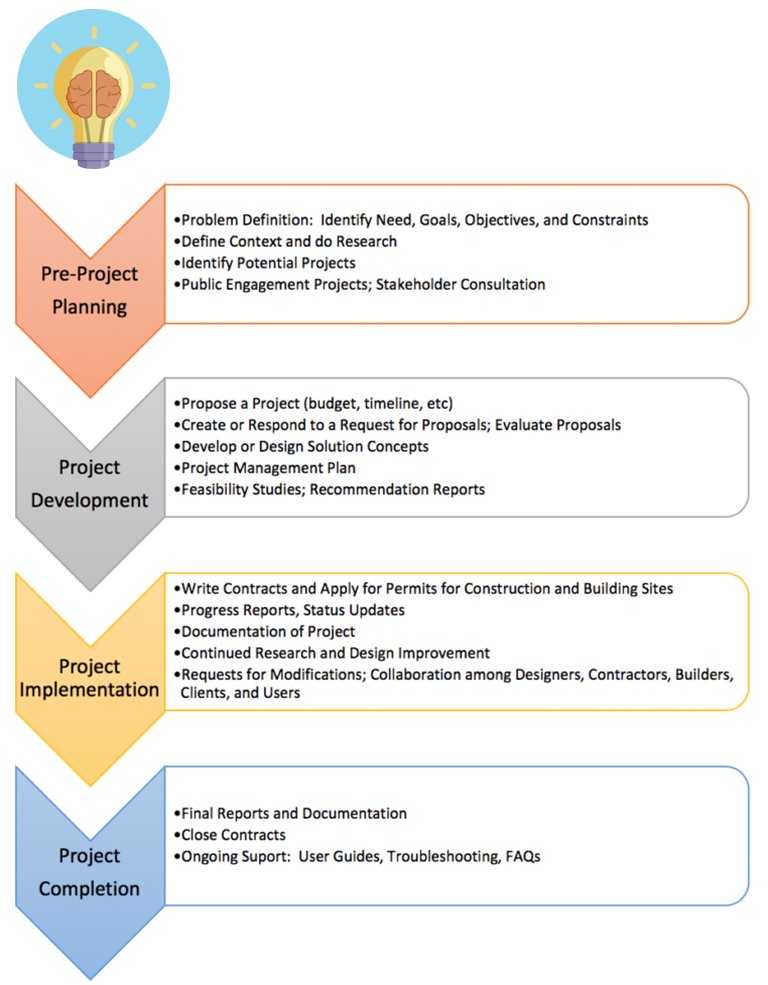
				 <p>In our increasingly technological and internationalized workplaces, communications skills are among the most sought-after competencies employers require of job candidates. Every job posting you see will almost certainly ask for candidates with <strong>excellent communications skills</strong> and the ability to <strong>work effectively in teams</strong>. The ability to communicate clearly and effectively in written, verbal, visual, and interpersonal contexts is vital for success and advancement in the workplace.</p> <p>No matter how brilliant or innovative an idea may be, if it is not communicated clearly and promoted effectively to the right audience, it will not become a reality. For an innovative idea to move from concept to project to completion requires many stages in a design process (see <strong>Figure 1</strong>), almost all of which require clear communication and effective teamwork.<a id="retfig1"></a></p> <div class="bc-figure figure"><div class="wp-caption aligncenter" id="attachment_18" aria-describedby="caption-attachment-18" style="width: 600px"><img class="wp-image-18" src="https://opentextbc.ca/technicalwritingh5p/wp-content/uploads/sites/387/2019/01/PhasesOfAProject_REV-e1659044901459.png" alt="The four phases of a project and associated communications tasks. Image description available." width="600" height="770" srcset="https://opentextbc.ca/technicalwritingh5p/wp-content/uploads/sites/387/2019/01/PhasesOfAProject_REV-e1659044901459.png 768w, https://opentextbc.ca/technicalwritingh5p/wp-content/uploads/sites/387/2019/01/PhasesOfAProject_REV-e1659044901459-234x300.png 234w, https://opentextbc.ca/technicalwritingh5p/wp-content/uploads/sites/387/2019/01/PhasesOfAProject_REV-e1659044901459-65x83.png 65w, https://opentextbc.ca/technicalwritingh5p/wp-content/uploads/sites/387/2019/01/PhasesOfAProject_REV-e1659044901459-225x289.png 225w, https://opentextbc.ca/technicalwritingh5p/wp-content/uploads/sites/387/2019/01/PhasesOfAProject_REV-e1659044901459-350x449.png 350w" sizes="(max-width: 600px) 100vw, 600px" /><div class="wp-caption-text" id="caption-attachment-18"><strong>Figure 1</strong> Phases of a project and some accompanying communications tasks. <a href="#fig1">[Image Description]</a></div></div> </div> <p>If the design and implementation teams cannot work and communicate effectively with each other, their final product will fail to meet its potential.</p> <p><em>Technical Writing Essentials</em> introduces the key elements of professional style, document design, collaboration, oral presentation, and research skills needed to design productive workplace documents and presentations for a variety of purposes and audiences.</p> <h3>Image Description</h3> <p><strong><a id="fig1"></a>Figure 1 Phases of a project and some accompanying communications tasks.</strong></p> <p>Once there is an idea, a project goes through a design process made up of four stages.</p> <ol><li>Pre-project planning. <ul><li>Problem Definition – identifying needs, goals, objectives, and constraints.</li> <li>Define context and do research.</li> <li>Identify potential projects.</li> <li>Public engagement projects; Stakeholder consultation.</li> </ul> </li> <li>Project Development. <ul><li>Propose a project (budget, timeline, etc.).</li> <li>Create or respond to a request for proposals, evaluate proposals.</li> <li>Develop or design solution concepts.</li> <li>Project management plan.</li> <li>Feasibility Studies, Recommendation Reports).</li> </ul> </li> <li>Project Implementation. <ul><li>Write contracts and apply for permits for construction and building sites.</li> <li>Progress reports, status updates.</li> <li>Documentation of project.</li> <li>Continued research and design improvements.</li> </ul> </li> <li>Project completion. <ul><li>Final reports and documentation.</li> <li>Close contracts.</li> <li>Ongoing Support: User Guides, Troubleshooting, FAQs.</li> </ul> </li> </ol> <p><a class="internal" href="#retfig1">[Return to Figure 1]</a></p> <h3>Media Attributionss</h3> <ul><li>Figure 1 Phases of a project and some accompanying communications tasks by Suzan Last is licensed under a <a href="https://creativecommons.org/licenses/by/4.0/">CC BY 4.0 licence</a>. <a href="https://www.iconfinder.com/icons/667355/brilliance_idea_think_thought_lightbulb_icon">Brilliance, idea, think icon</a> by <a href="https://www.iconfinder.com/bluewolfski">The Pictographers</a>, <a href="https://docs.google.com/spreadsheets/u/1/d/1E8X2_xmJkkoeZwa1HPNG6jT3ytAZlcAgzTDRX0jDF-Q/pubhtml?gid=0&amp;single=true">free for commercial use</a>.</li> </ul> 
	</div>


	</div>
<div class="part-wrapper" id="part-what-is-technical-communication-wrapper">
    <div class="part  " id="part-what-is-technical-communication">
	<div class="part-title-wrap">
		<p class="part-number">I</p>
		<h1 class="part-title">1. What is Technical Communication?</h1>
	</div>
	<div class="ugc part-ugc">
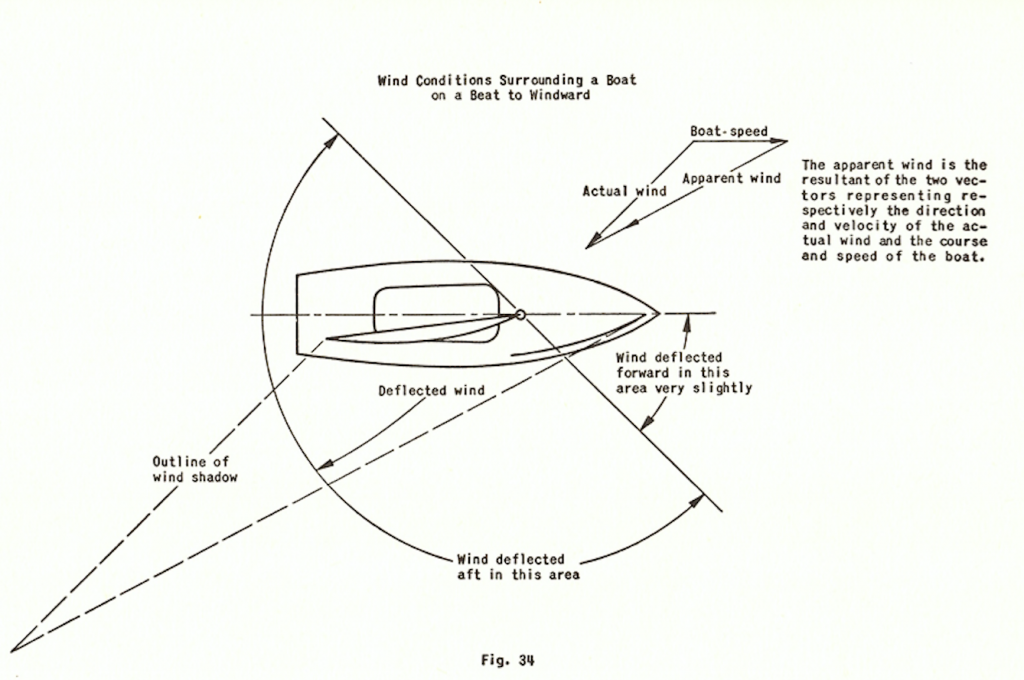
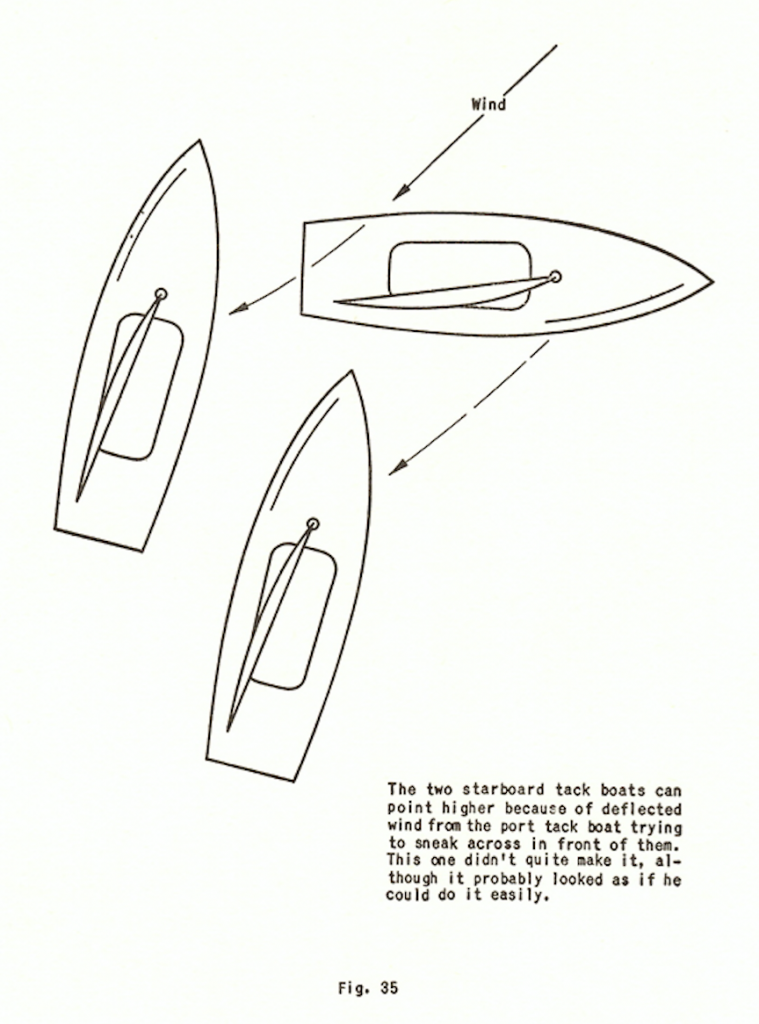
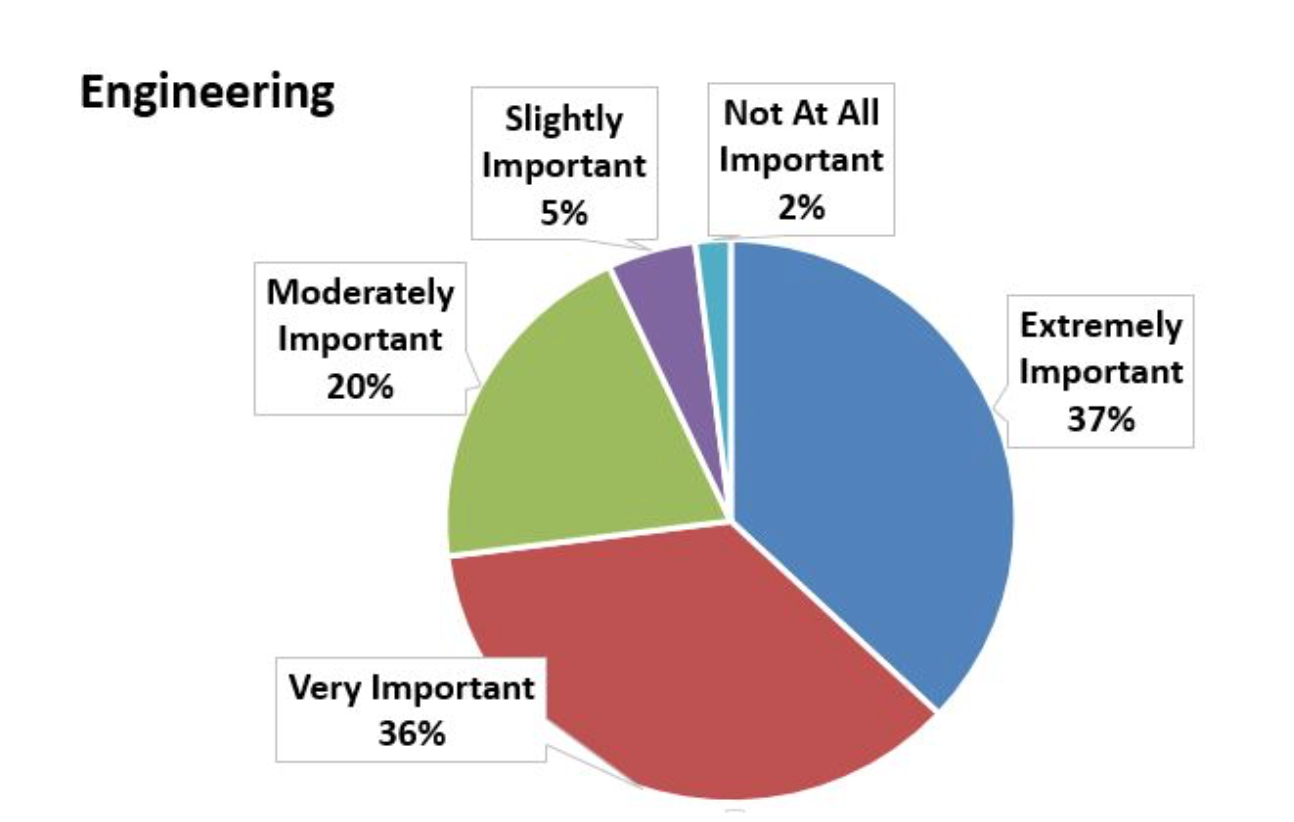
		<div class="textbox textbox--learning-objectives"><div class="textbox__header"><p class="textbox__title">Chapter 1 Learning Objectives</p> </div> <div class="textbox__content"><p>This chapter will help you</p> <ol><li>Understand what technical writing is, why its important, and what it looks like</li> <li>Apply a “<a href="#chapter-problem-solving-approach-to-communications-tasks" target="_blank" rel="noopener" data-url="/technicalwritingh5p/chapter/problem-solving-approach-to-communications-tasks/">problem-solving” approach</a> to communications tasks, starting by learning how to fully define the problem before looking for solutions</li> <li>Recognize the main <a href="#chapter-conventions-and-characteristics" target="_blank" rel="noopener" data-url="/technicalwritingh5p/chapter/conventions-and-characteristics/">conventions and characteristics</a> of technical writing, and how they differ from other forms, such as academic and journalistic writing</li> <li>Understand the importance of defining the “<a href="#chapter-understanding-the-rhetorical-situation" target="_blank" rel="noopener" data-url="/technicalwritingh5p/chapter/understanding-the-rhetorical-situation/">rhetorical situation</a>” in which you are communicating</li> <li>Apply what you have learned so far by examining “<a href="#chapter-case-study-the-cost-of-poor-communication" target="_blank" rel="noopener" data-url="/technicalwritingh5p/chapter/case-study-the-cost-of-poor-communication/">case studies</a>” that demonstrate the costs of poor communication</li> <li>Appreciate the complexity and iterative nature of a <a href="#chapter-writing-processes" target="_blank" rel="noopener" data-url="/technicalwritingh5p/chapter/writing-processes/">writing process</a> in determining what writing process works best for you.</li> </ol> </div> </div> <div class="textbox shaded">This book has been enhanced with H5P content. What does that mean for you as a reader? Throughout the book, you will find embedded interactive activities that will help you practice your new learning and test your skills. These will provide you with immediate feedback and you can complete them as many times as you like. You are encouraged to check your answers as you proceed by clicking the Check button after each question to check your answer and receive feedback. Click the Retry or Show Solutions buttons for any questions that you cannot solve. Click Finish at the end of the questions to see your overall results. Note: If you see a speech bubble with an I in it, this will provide you with more information. This first one is simply a demonstration.</div> <div class="h5p"><div class="textbox interactive-content"><span class="interactive-content__icon"></span> <p>An interactive H5P element has been excluded from this version of the text. You can view it online here:<br /> <a href="https://opentextbc.ca/technicalwritingh5p/?p=22#h5p-1" title="Introduction to Technical Writing" data-url="https://opentextbc.ca/technicalwritingh5p/?p=22#h5p-1">https://opentextbc.ca/technicalwritingh5p/?p=22#h5p-1</a> </p> </div> </div> <div class="pdf"><div class="textbox"><p><strong>H5P: Introduction to Technical Writing</strong></p> <p>Technical writing is … (choose all that apply)</p> <ul><li>manuals, instructions, specifications, and software documentation.</li> <li>a genre of non-fiction writing.</li> <li>writing produced in day-to-day business operations such as proposals, media releases, and correspondence.</li> </ul> </div> </div> <p>When you hear the term “technical communication,” what comes to mind? Perhaps you think of scientific reports, specifications, instructions, software documentation, or technical manuals. And you would be correct. However, technical communication is so much more than that. Technical Writing is a genre of non-fiction writing that encompasses not only technical materials such as manuals, instructions, specifications, and software documentation, but it also includes writing produced in day-to-day business operations such as correspondence, proposals, internal communications, media releases, and many kinds of reports. It includes the communication of specialized technical information, whether relating to computers and scientific instruments, or the intricacies of meditation. And because oral and visual presentations are such an important part of professional life, technical communication also encompasses these as well.</p> <h1>Why are Technical Communication Skills Important?</h1> <p>In a recent presentation on the topic of Co-op Work Term Reports, <span class="footnote"><span class="footnote-indirect" data-fnref="22-1"></span></span> the Engineering co-op coordinator for the University of Victoria presented the following statistics regarding the importance of communication skills in the professional world of engineering:</p> <div class="textbox"><p><strong>The Reality: Technical Writing and Communication</strong></p> <ul><li>How graduate engineers spend their time: <ul><li>25-50% Problem solving of some kind</li> <li>50-75% Communicating (Writing and reading reports, letters, memos, proposals, presentations, discussions w/colleagues, managers, clients)</li> </ul> </li> <li>Performance evaluations and job advancement usually depend more on communications skills than on technical skills</li> </ul> </div> <p>He added that engineers who are more advanced in their careers spend only 5-10% of their time engaged in problem solving of some kind and 90-95% of their time engaging in related communications tasks:&nbsp; researching, writing and reading reports, proposals, emails, letters, memos; giving or attending presentations; discussing and meeting with colleagues, team mates, managers, clients, and so forth. In a recent survey of over 1000 professionals from various professions, over 70% of engineers and almost 50% of programmers rated the quality of their writing as either “very important” or “extremely important” to the performance of their jobs.<span class="footnote"><span class="footnote-indirect" data-fnref="22-2"></span></span>&nbsp; Clearly, as Barry Hyman asserts in <em>Fundamentals of Engineering Design</em>, “the stereotype that engineering is for inarticulate nerds is way off base.” <span class="footnote"><span class="footnote-indirect" data-fnref="22-3"></span></span></p> <p class="import-Normal">Technical communication is “transactional” – it entails a purposeful transaction between sender and receiver that provides specific information for practical and specific purposes (informing, instructing, persuading) and is usually geared towards the needs of a specific audience. Technical communicators produce a wide variety of documents and other products, such as</p> <ul><li>Proposals and requests for proposals (RFPs)</li> <li>Technical or research reports</li> <li>Documentation records and product specifications</li> <li>User guides (step-by-step instructions, procedures, manuals)</li> <li>Online help, technical support</li> <li>Reference information (encylopedia-style information)</li> <li>Consumer literature (information for the public about regulations, safety issues, <em>etc</em>.)</li> <li>Marketing literature (product specifications, brochures, promotional literature)</li> <li>Technical journalism (found in trade magazines, media releases, <em>etc.</em>)</li> </ul> <p>Thus, it is a highly “designed” form of communication that requires practitioners to have a heightened awareness of the <a href="#chapter-conventions" target="_blank" rel="noopener" data-url="/technicalwritingh5p/chapter/conventions/">conventions</a> (rules and expectations) and <a href="#chapter-understandingrhetoricalsituation" target="_blank" rel="noopener" data-url="/technicalwritingh5p/chapter/understandingrhetoricalsituation/">rhetorical situations</a> (audience, purpose, context) in which they are communicating.</p> <div class="h5p"><div class="textbox interactive-content"><span class="interactive-content__icon"></span> <p>An interactive H5P element has been excluded from this version of the text. You can view it online here:<br /> <a href="https://opentextbc.ca/technicalwritingh5p/?p=22#h5p-2" title="Rhetorical situation" data-url="https://opentextbc.ca/technicalwritingh5p/?p=22#h5p-2">https://opentextbc.ca/technicalwritingh5p/?p=22#h5p-2</a> </p> </div> </div> <div class="pdf"><div class="textbox"><p><strong>H5P: Rhetorical situation</strong></p> <p>A rhetorical situation is … (choose all that apply).</p> <ul><li>The reader’s need from the writing.</li> <li>A writing situation.</li> <li>The form of the writing, such as an email.</li> <li>The purpose of the writing.</li> <li>The grammar of the writing.</li> </ul> </div> </div> <p>This textbook aims to provide you with that heightened awareness – that is, to introduce you to the basic conventions of technical communications, and to train you to take a <a href="#chapter-readercentred" target="_blank" rel="noopener" data-url="/technicalwritingh5p/chapter/readercentred/">reader-centred or audience-centred approach</a> to communications tasks, to find the tools and methods that will work best to communicate your ideas to your target audience, and to achieve the desired results.</p> <h1>What Does Technical Writing Look Like?</h1> <p>Technical communications can take many forms, depending on the purpose and intended audience.&nbsp; Consider the following example of technical writing, which is an excerpt adapted from a book called <em>Scientific Sailboat Racing </em>by Ted Wells. <span class="footnote"><span class="footnote-indirect" data-fnref="22-4"></span></span> From the excerpt in the box below, what can you tell about the intended audience?</p> <div class="textbox shaded"><p>The most common question asked by skippers wanting to get to the windward mark faster than they have been doing is “<strong>How can I make my boat point higher?”</strong>&nbsp; Getting to the windward mark first depends primarily on the skill and experience of the skipper; however, having a well-rigged boat will make a significant difference.&nbsp; Look for the following, in order of importance:</p> <ol><li><strong>Sails:</strong> Have good quality sails, and use the appropriate sails for the wind conditions expected.&nbsp; No one can win races with poor sails, so use the best you can afford.&nbsp; Keep in mind that the leeches of all sails flutter a little, the jib will backwind the luff of the main on any full or medium sail, and in very light wind, even a perfectly cut sail will probably develop a wrinkle along the front of the battens.&nbsp; If the sails are obviously no good, replace them.</li> <li><strong>Mast and Centerboard:</strong> Ensure that the mast is far enough forward and the centerboard is far enough back so that there is little or no weather helm.&nbsp; Make sure the stiffness of the mast suits the sails.</li> <li><strong>Jib Fairleads</strong>: Ensure jib fairleads are properly located for the type of jib being used and the strength of wind expected.</li> <li><strong>Cleats:</strong> Have cleats for both jib and mainsheet; place cleats so that crew can easily make small adjustments for varying wind velocities and hang on the to the jib sheet without having it pop out of the cleat.</li> <li><strong>Traveler</strong>: Have a mainsheet traveler that allows the main to be pulled down without pulling the boom in too far; it should allow the sail to be pulled down tightly enough so that the leech does not fall off without pulling the boom in any further than it should be.</li> <li><strong>Tiller:</strong> Have a flexible tiller extension that allows you to sit well forward, but can be adjusted so that it does not get in the way when coming about.</li> <li><strong>Boat Weight:</strong> Keep the boat as close to minimum weight as possible.&nbsp; Clearly, a lighter boat is easier to handle, but this is not as critical as other factors.&nbsp; If choosing between a lighter crew member with less skill and experience, and a heavier crew member who has greater skill, the latter is usually preferable.</li> </ol> <p>Once the boat is properly set up, a skilled and experienced skipper can point significantly higher than expected by understanding and using wind deflection from other boats.&nbsp; Immediately to leeward of any boat and extending for a distance of about three mast lengths, there is a wind shadow where the wind velocity is greatly decreased.&nbsp; To leeward of the bow of the boat there is a very small region where the direction of the wind is deflected opposite to the normal deflection and where the velocity is accelerated slightly (see Figure 34).&nbsp; Except in the direct wind shadow, the deflection of the wind is more important than the decrease in wind velocity, as the decrease in velocity is very slight except in the immediate shadow of the sails of the windward boat.</p> <p><img class="aligncenter wp-image-20" src="https://opentextbc.ca/principlesofmarketingh5p/wp-content/uploads/sites/387/2017/12/Fig.-34-1024x680.png" alt="Wind conditions surrounding a boat" width="613" height="407" srcset="https://opentextbc.ca/technicalwritingh5p/wp-content/uploads/sites/387/2017/12/Fig.-34-1024x680.png 1024w, https://opentextbc.ca/technicalwritingh5p/wp-content/uploads/sites/387/2017/12/Fig.-34-300x199.png 300w, https://opentextbc.ca/technicalwritingh5p/wp-content/uploads/sites/387/2017/12/Fig.-34-768x510.png 768w, https://opentextbc.ca/technicalwritingh5p/wp-content/uploads/sites/387/2017/12/Fig.-34-65x43.png 65w, https://opentextbc.ca/technicalwritingh5p/wp-content/uploads/sites/387/2017/12/Fig.-34-225x149.png 225w, https://opentextbc.ca/technicalwritingh5p/wp-content/uploads/sites/387/2017/12/Fig.-34-350x232.png 350w, https://opentextbc.ca/technicalwritingh5p/wp-content/uploads/sites/387/2017/12/Fig.-34.png 1338w" sizes="(max-width: 613px) 100vw, 613px" /></p> <p>Because of this wind deflection, a boat on the opposite tack cutting behind another boat will be able to point appreciably higher than it normally would.&nbsp; Many skippers on port tacks who thought they could clear starboard tackers have been fooled by not realizing this fact.&nbsp; The deflection of their wind in trying to cross in front of the starboard tacker will enable the starboard tacker to point higher without luffing than he normally would be able to do, and the port tacker who thought he could squeeze by suddenly finds that he cannot (See Figure 35).</p> <p><img class="aligncenter wp-image-21" src="https://opentextbc.ca/principlesofmarketingh5p/wp-content/uploads/sites/387/2022/01/Fig.-35-759x1024.png" alt="" width="460" height="621" srcset="https://opentextbc.ca/technicalwritingh5p/wp-content/uploads/sites/387/2022/01/Fig.-35-759x1024.png 759w, https://opentextbc.ca/technicalwritingh5p/wp-content/uploads/sites/387/2022/01/Fig.-35-222x300.png 222w, https://opentextbc.ca/technicalwritingh5p/wp-content/uploads/sites/387/2022/01/Fig.-35-768x1036.png 768w, https://opentextbc.ca/technicalwritingh5p/wp-content/uploads/sites/387/2022/01/Fig.-35-65x88.png 65w, https://opentextbc.ca/technicalwritingh5p/wp-content/uploads/sites/387/2022/01/Fig.-35-225x304.png 225w, https://opentextbc.ca/technicalwritingh5p/wp-content/uploads/sites/387/2022/01/Fig.-35-350x472.png 350w, https://opentextbc.ca/technicalwritingh5p/wp-content/uploads/sites/387/2022/01/Fig.-35.png 864w" sizes="(max-width: 460px) 100vw, 460px" /></p> </div> <div class="textbox textbox--exercises"><div class="textbox__header"><p class="textbox__title">EXERCISE 1.1 Draft some technical writing related to your interests</p> </div> <div class="textbox__content"><p>Reflect on the description and example of technical writing above in relation to your experience as an employee, as a student, or as a practitioner of a hobby. What kinds of documents have you written that could fall under the genre of Technical Writing?</p> <p>Write a paragraph or two on a topic about which you have specialized knowledge, and can use specialized terminology to explain the idea or instruct the reader. For example, you might write about effective techniques for executing certain skateboard maneuvers or how to execute a yoga position such as a “downward facing dog.” Consider your audience when choosing how to write this. Will the audience have to be familiar with the terminology used, as in the above sailing example? See if you can “baffle me with your techno-jargon” and then re-write for a general audience, using plain language.</p> </div> </div> <h3>Text Attributions</h3> <ul><li>S.1. Excerpt from T. Wells, Scientific Sailboat Racing, New York: Dodd, Mead, and Co., 1950, pp. 94-96. This book is out of print, and every attempt has been made to locate the copyright owner. For noncommercial, educational use only.</li> </ul>
	</div>
			
				<div class="footnotes"><div id='22-1'><p>S. McConkey, “Writing a work term report,” <em>ENGR 120 Plenary Lecture</em>, University of Victoria, March 3, 2017.</p>
</div><div id='22-2'><p>J. Swartz, S. Pigg, J. Larsen, J. Helo Gonzalez, R. De Haas, and E. Wagner, &#8220;Communication in the workplace: What can NC State students expect?&#8221; Professional Writing Program, North Carolina State University, 2018 [Online]. Available: <a href="https://docs.google.com/document/d/1pMpVbDRWIN6HssQQQ4MeQ6U-oB-sGUrtRswD7feuRB0/edit" target="_blank" rel="noopener">https://docs.google.com/document/d/1pMpVbDRWIN6HssQQQ4MeQ6U-oB-sGUrtRswD7feuRB0/edit</a></p>
</div><div id='22-3'><p>B. Hyman, “Ch. 2: Problem formulation,” in <em>Fundamentals of Engineering Design</em>, Upper Saddle River, NJ: Prentice Hall, 2002, p. 42.</p>
</div><div id='22-4'><p>T. Wells, <em>Scientific Sailboat Racing</em>, New York: Dodd, Mead, and Co., 1950, pp. 94-96.</p>
</div></div>
	</div>
<div class="chapter numberless " id="chapter-problem-solving-approach-to-communications-tasks" title="1.1 KEY CONCEPT: Problem-Solving Approach to Communications Tasks">
	<div class="chapter-title-wrap">
		<p class="chapter-number"></p>
		<h1 class="chapter-title">1.1 KEY CONCEPT: Problem-Solving Approach to Communications Tasks</h1>
								</div>
	<div class="ugc chapter-ugc">
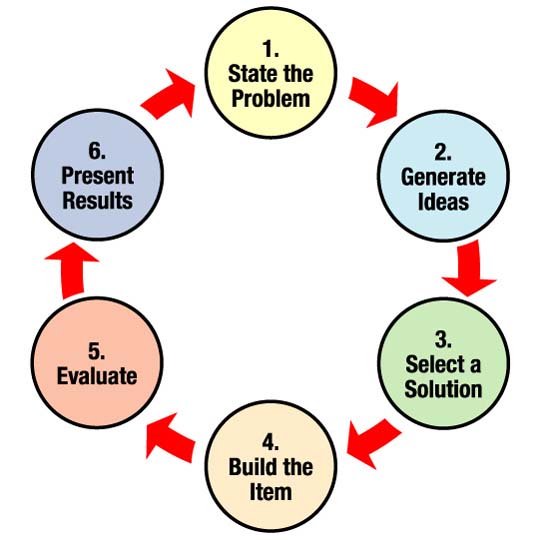
				 <p class="textbox__title">In the workplace, many of the communications tasks you perform are designed to solve a problem or improve a situation. Whether you are doing work for a client, for your employer, with your team, or for someone else, you will typically use some sort of design process to tackle and solve the problem. A clearly-articulated design process provides you with a clear, step-by-step plan for finding the best solution for your situation.</p> <p>Take a moment to search the Internet for the term “design process” and look at “images.” You will find many variations. Have a look at several of them and see if you can find a common pattern.</p> <p class="import-BodyText">One commonality you will likely find in examining other people’s design process diagrams is this: the first step in designing any solution is to clearly <strong>define the problem</strong>. <strong>Figure 1.1.1</strong> shows NASA’s basic design process. Think about the kind of communication that each step of this process might entail.</p> <div class="bc-figure figure"><div class="bc-figcaption figcaption"><div class="wp-caption aligncenter" id="attachment_23" aria-describedby="caption-attachment-23" style="width: 540px"><img class="wp-image-23 size-full" src="https://opentextbc.ca/technicalwritingh5p/wp-content/uploads/sites/387/2017/12/Nasa-Design-Process.jpg" alt="State the problem, generate ideas, select a solution, build the item, evaluate, present results, and repeat" width="540" height="540" srcset="https://opentextbc.ca/technicalwritingh5p/wp-content/uploads/sites/387/2017/12/Nasa-Design-Process.jpg 540w, https://opentextbc.ca/technicalwritingh5p/wp-content/uploads/sites/387/2017/12/Nasa-Design-Process-300x300.jpg 300w, https://opentextbc.ca/technicalwritingh5p/wp-content/uploads/sites/387/2017/12/Nasa-Design-Process-150x150.jpg 150w, https://opentextbc.ca/technicalwritingh5p/wp-content/uploads/sites/387/2017/12/Nasa-Design-Process-65x65.jpg 65w, https://opentextbc.ca/technicalwritingh5p/wp-content/uploads/sites/387/2017/12/Nasa-Design-Process-225x225.jpg 225w, https://opentextbc.ca/technicalwritingh5p/wp-content/uploads/sites/387/2017/12/Nasa-Design-Process-350x350.jpg 350w" sizes="auto, (max-width: 540px) 100vw, 540px" /><div class="wp-caption-text" id="caption-attachment-23"><strong>Figure 1.1.1</strong> NASA’s Design Process Diagram.</div></div> </div></div> <p class="import-BodyText">You cannot begin to work on solutions until you have a clear definition of the problem and goals you want to achieve. This critical first stage of the design process requires that you effectively communicate with the “client” or whoever has the “problem” that needs solving. Poor communication at this stage can derail a project from the start.</p> <p class="import-BodyText">For our purposes, we will use Barry Hyman’s Problem Formulation model&nbsp;<span class="footnote"><span class="footnote-indirect" data-fnref="24-1"></span></span> to clearly define a problem. Hyman’s Problem Formulation model consists of 4 elements:</p> <ol><li><strong>Need</strong> <strong>Statement: </strong>recognizes and describes the need for a solution or improvement to an “unsatisfactory situation.”&nbsp; It answers the questions, “what is wrong with the way things are currently? What is unsatisfactory about it? What negative effects does this situation cause?” You may need to do research and supply data to quantify the negative effects.</li> <li><strong>Goal</strong> <strong>Statement:</strong>&nbsp; describes what the improved situation would look like once a solution has been implemented. The goal statement defines the scope of your search for a solution. At this point, do <strong>not</strong> describe your solution, only the goal that <em>any</em> proposed solution should achieve. The broader you make your goal, the more numerous and varied the solution can be; a narrowly focused goal limits the number and variety of possible solutions.</li> <li><strong>Objectives</strong><strong>:&nbsp;</strong> define measurable, specific outcomes that any feasible solution <em><strong>should</strong></em> optimize (aspects you can use to “grade” the effectiveness of the solution). Objectives provide you with ways to quantifiably measure <strong><em>how well</em></strong> any solution will solve the problem; ideally, they will allow you to compare multiple solutions and figure out which one is most effective (which one gets the highest score on meeting the objectives?).</li> <li><strong>Constraints</strong><strong>:&nbsp;</strong> define the limits that any feasible solution <em><strong>must</strong></em> adhere to in order to be acceptable (pass/fail conditions, range limits, <em>etc</em>.). The key word here is <em><strong>must</strong></em> — constraints are the “go/no go” conditions that determine whether a solution is acceptable or not.&nbsp; These often include budget and time limits, as well as legal, safety and other regulatory requirements.</li> </ol> <h1>Communication as Solution</h1> <p class="import-BodyText">This model can apply to a communications task as well as more physical design tasks. Imagine your communications task as something that will solve a problem or improve a situation. Before you begin drafting this document or presentation, define the problem you want to solve with this document:</p> <ul><li><strong>Understand the Need:</strong> consider what gave rise to the need to communicate. Does someone lack sufficient information to make a decision or take a position on an issue? Did someone request information? Is there some unsatisfactory situation that needs to be remedied by communicating with your audience? What specifically is unsatisfactory about it? Consider your audience.&nbsp; For example <ul><li><em>A </em><em>potential client lacks sufficient information on whether the solution I have proposed to solve the client’s problem will be feasible, affordable, and effective.</em></li> <li><em>My instructor lacks sufficient examples of my written work to assign a grade for how well I met the course learning objectives.&nbsp;</em></li> </ul> </li> <li><strong>Establish a Goal: </strong>consider your purpose in writing. What do you want your reader to do, think, or know? Do you want your reader to make a decision? Change their opinion or behaviour? Follow a course of action? What is your desired outcome? And what form and style of communication will best lead to that outcome?&nbsp; For example <ul><li><em>Provide the client with enough information, in an effective and readable format, to make a decision (ideally, to hire you to build the solution for the problem).<br /> </em></li> <li><em>Provide my instructor with samples of my writing that demonstrate my achievement of the course learning objectives (provide relevant and complete&nbsp; information in a professionally</em> <em>appropriate</em> <em>forma</em><em>t, using evidence-based argument; earn an A+ grade on the assignment.</em>)</li> </ul> </li> <li><strong>Define Objectives: </strong>consider the specifics of your message and your audience to determine what criteria you should meet. What form should it take? What content elements will you need to include? What kind of research will be required? What information does your audience want/need? What do they already know? <ul><li><em>Review the client’s RFP to see what specific objectives it lists and how your proposal will be assessed.</em></li> <li><em>Review </em><em>the Assignment Description and G</em><em>rading Rubric for your assignment to determin</em><em>e specific </em><em>requirements and </em><em>objectives that your instructor will use to evaluate your work.<br /> </em></li> </ul> </li> <li><strong>Identify Constraints: </strong>what are the pass/fail conditions of this document?&nbsp; Consider your rhetorical situation. What conditions exist that present barriers or challenges to communication? How can you address them? For example, <ul><li>how much time is your audience willing to spend on this? How long can you make your document or presentation? (word length/time limit)</li> <li>What format and style do they require? Is there a Style Guide you must follow? A template you can use?</li> <li>How much time do you have to create it?&nbsp; Do you have a deadline? (due date)</li> <li>Are there requirements for using sources? (academic integrity rules)</li> </ul> </li> </ul> <p>Keep in mind that the document you produce is evaluated in terms of how well it responds to the “problem” — that is, how well it meets the overall goal and demonstrates achievement of specific objectives while abiding by constraints.</p> <div class="textbox textbox--exercises"><div class="textbox__header"><p class="textbox__title">EXERCISE 1.2 Define a problem</p> </div> <div class="textbox__content"><p>Think of a problem or an “unsatisfactory situation” that you have recently experienced.&nbsp; It could be as simple as <strong>it’s 8pm, I haven’t had dinner yet, and I’m hungry</strong>. Use Hymen’s Problem Formulation schema to formally define the problem — without proposing any particular solutions. Your problem definition should ideally allow a multitude of possible solutions that adhere to the following:</p> <ol><li>Need/Unsatisfactory situation:</li> <li>What is your goal?</li> <li>What are some measurable objectives you want to achieve?</li> <li>What are your constraints?</li> </ol> <p>Download and use the attached <a href="https://opentextbc.ca/technicalwritingh5p/wp-content/uploads/sites/387/2017/12/Problem-Definition-Template.docx">Problem Definition Template [Word doc]</a>.</p> </div> </div> <h3>Media Attributionss</h3> <ul><li>Figure 1.1.1 NASA design process by <a href="https://www.nasa.gov/audience/foreducators/best/index.html">NASA STEM Engagement</a>. Used for educational and non-commercial purposes.</li> </ul> 
	</div>
			
				
				<div class="footnotes"><div id='24-1'><p>B. Hyman, “Ch. 2: Problem formulation,” in <em>Fundamentals of Engineering Design</em>, Upper Saddle River, NJ: Prentice Hall, 2002, pp. 40-54.</p>
</div></div>
	</div>
<div class="chapter numberless " id="chapter-conventions-and-characteristics" title="1.2 Conventions and Characteristics">
	<div class="chapter-title-wrap">
		<p class="chapter-number"></p>
		<h1 class="chapter-title">1.2 Conventions and Characteristics</h1>
								</div>
	<div class="ugc chapter-ugc">
				 <p class="import-BodyText">Every genre of writing has unique characteristics and rules, called <strong>conventions</strong>, that help readers classify a document as belonging to a particular genre. This also applies to film and music. Think about the last movie you saw. What type of movie was it? What about that movie gave you that impression? Did the characters wear Stetson hats, ride horses, and carry guns? Did they fly in space ships, encounter alien beings, and use futuristic technology? Those elements are typical conventions of Western and Science Fiction genres.</p> <p class="import-BodyText">Non-fiction is a category that can be broken into various genres. The main genres that are relevant to us are journalism (newspaper writing), academic writing (written by scholars and published in peer reviewed academic journals or books), and technical writing. Before we get into the specific conventions that characterize technical writing, take a moment to think back to your academic writing course and list some conventions typical of journalism (popular press) and academic writing in <strong>Table 1.1.1</strong>.</p> <table class="grid" style="border-collapse: collapse; width: 100%;"><caption>TABLE 1.1.1 Identify the conventions for journalistic and academic writing</caption> <tbody><tr style="height: 15px;"><th class="shaded" style="width: 28%; text-align: center; height: 15px;" scope="col"><strong>Criteria</strong></th> <th class="shaded" style="width: 36%; text-align: center; height: 15px;" scope="col"><strong>Journalistic</strong></th> <th class="shaded" style="width: 36%; text-align: center; height: 15px;" scope="col"><strong>Academic</strong></th> </tr> <tr style="height: 15px;"><th style="width: 28%; height: 15px;" scope="row"><strong>Purpose</strong></th> <td style="width: 36%; height: 15px;"></td> <td style="width: 36%; height: 15px;"></td> </tr> <tr style="height: 15px;"><th style="width: 28%; height: 15px;" scope="row"><strong>Audience</strong></th> <td style="width: 36%; height: 15px;"></td> <td style="width: 36%; height: 15px;"></td> </tr> <tr style="height: 15px;"><th style="width: 28%; height: 15px;" scope="row"><strong>Writing Style</strong></th> <td style="width: 36%; height: 15px;"></td> <td style="width: 36%; height: 15px;"></td> </tr> <tr style="height: 15px;"><th style="width: 28%; height: 15px;" scope="row"><strong>Tone</strong></th> <td style="width: 36%; height: 15px;"></td> <td style="width: 36%; height: 15px;"></td> </tr> <tr style="height: 15px;"><th style="width: 28%; height: 15px;" scope="row"><strong>Structure</strong></th> <td style="width: 36%; height: 15px;"></td> <td style="width: 36%; height: 15px;"></td> </tr> <tr style="height: 15px;"><th style="width: 28%; height: 15px;" scope="row"><strong>Format/Formatting</strong></th> <td style="height: 15px;"></td> <td style="height: 15px;"></td> </tr> <tr style="height: 15px;"><th style="width: 28%; height: 15px;" scope="row"><strong>Other Features</strong></th> <td style="width: 36%; height: 15px;"></td> <td style="height: 15px;"></td> </tr> </tbody> </table> <p class="import-BodyText">Like journalism and scholarly writing, technical writing also has distinct features that readers expect to see in documents that fall within this genre. These include (a) use of headings to organize information into coherent sections, (b) use of lists to present information concisely, (c) use of figures and tables to present data and information visually, and (d) use of visual design to enhance readability (all of these topics are covered in <a href="#part-document-design" target="_blank" rel="noopener noreferrer" data-url="/technicalwritingh5p/part/document-design/">Chapter 3: Document Design</a>). These conventions are connected to the <strong>main purposes</strong> of technical writing, which include communicating the following:</p> <ul><li>Technical or specialized information in an accessible and usable ways</li> <li>Clear instructions on how to do something in a clear manner</li> <li>Information that advances the goals of the company or organization.</li> </ul> <p class="import-BodyText">Technical documentation is intended to communicate information to the people who need it in a way that is clear and easy to read, at the right time to help make decisions and to support productivity. Designing technical communication is like designing any other product for an intended user:&nbsp; the ultimate goal is to make it “user friendly.”</p> <p class="import-BodyText">Key words here are <em>accessible</em>, <em>usable, clear, goal-oriented</em>, <em>effective</em>, and <em>reader-centred</em>.&nbsp; The characteristics of technical writing support these goals and concepts.</p> <p class="import-BodyText">If we filled in <strong>Table 1.1.1</strong> with typical characteristics of technical writing, it might look something like <strong>Table 1.1.2</strong>:</p> <table class="grid" style="border-collapse: collapse; width: 100%;"><caption>TABLE 1.1.2 Conventions of technical writing</caption> <tbody><tr><th class="shaded" style="width: 28%; text-align: center;" scope="col"><strong>Criteria</strong></th> <th class="shaded" style="width: 72%; text-align: center;" scope="col"><strong>Technical Writing<br /> </strong></th> </tr> <tr><th style="width: 28%;" scope="row"><strong>Purpose</strong></th> <td style="width: 72%;">To communicate technical and specialized information in a clear, accessible, usable manner to people who need to use it to make decisions, perform processes, or support company goals.</td> </tr> <tr><th style="width: 28%;" scope="row"><strong>Audience</strong></th> <td style="width: 72%;">Varied, but can include fellow employees such as subordinates, colleagues, managers, and executives, as well as clients and other stakeholders, the general public, and even readers within the legal system.</td> </tr> <tr><th style="width: 28%;" scope="row"><strong>Writing Style</strong></th> <td style="width: 72%;">Concise, clear, plain, and direct language; may include specialized terminology; typically uses short sentences and paragraphs; uses active voice; makes purpose immediately clear.</td> </tr> <tr><th class="border" style="width: 28%;" scope="row"><strong>Tone</strong></th> <td style="width: 72%;">Business/professional in tone, which falls between formal and informal; may use first person or second person if appropriate; courteous and constructive.</td> </tr> <tr><th class="border" style="width: 28%;" scope="row"><strong>Structure</strong></th> <td style="width: 72%;">Highly structured; short paragraphs; clear transitions and structural cues (headings and sub-headings) to move the reader through and direct the reader.</td> </tr> <tr><th style="width: 28%;" scope="row"><strong>Format/Formatting</strong></th> <td style="width: 72%;">Can be in electronic, visual, or printed formats; may be long (reports) or short (emails, letters, memos); often uses style guides to describe required formatting features; uses headings, lists, figures and tables.</td> </tr> <tr><th style="width: 28%;" scope="row"><strong>Other Features</strong></th> <td style="width: 72%;">Typically objective and neutral; ideas are evidence and data-driven; descriptors are precise and quantitative whenever possible.</td> </tr> </tbody> </table> <p>Use this practice activity to test your understanding.</p> <div class="h5p"><div class="textbox interactive-content"><span class="interactive-content__icon"></span> <p>An interactive H5P element has been excluded from this version of the text. You can view it online here:<br /> <a href="https://opentextbc.ca/technicalwritingh5p/?p=26#h5p-3" title="Conventions and Characteristics based on Table 1.1.2" data-url="https://opentextbc.ca/technicalwritingh5p/?p=26#h5p-3">https://opentextbc.ca/technicalwritingh5p/?p=26#h5p-3</a> </p> </div> </div> <div class="pdf"><div class="textbox"><p><strong>H5P: Conventions and Characteristics based on Table 1.1.2</strong></p> <p>Review the conventions of technical writing and then use your knowledge to match the appropriate word into the correct blank.</p> <p>Words: format, audience, quantitative, structured, objective, tone, evidence-based, writing style, purpose.</p> <ul><li>The&nbsp; <span style="text-decoration: underline;" aria-label="blank">&nbsp; &nbsp; &nbsp; &nbsp; &nbsp; &nbsp; &nbsp; &nbsp; &nbsp; &nbsp; &nbsp;</span> of technical writing is to communicate technical and specialized information in a clear, accessible, usable manner.</li> <li>The varied&nbsp; <span style="text-decoration: underline;" aria-label="blank">&nbsp; &nbsp; &nbsp; &nbsp; &nbsp; &nbsp; &nbsp; &nbsp; &nbsp; &nbsp; &nbsp;</span> might include fellow employees as well as clients, other stakeholders, the general public, and even readers within the legal system.</li> <li>This requires a concise, clear&nbsp; <span style="text-decoration: underline;" aria-label="blank">&nbsp; &nbsp; &nbsp; &nbsp; &nbsp; &nbsp; &nbsp; &nbsp; &nbsp; &nbsp; &nbsp;</span> that uses plain and direct language. It typically uses short sentences and paragraphs, the active voice, and a clear purpose.</li> <li>Written in a business/professional&nbsp; <span style="text-decoration: underline;" aria-label="blank">&nbsp; &nbsp; &nbsp; &nbsp; &nbsp; &nbsp; &nbsp; &nbsp; &nbsp; &nbsp; &nbsp;</span> which lies somewhere between formal and informal, it is always courteous and constructive.</li> <li>With short paragraphs, clear transitions, and structural cues such as headings and sub-headings, technical writing is highly&nbsp; <span style="text-decoration: underline;" aria-label="blank">&nbsp; &nbsp; &nbsp; &nbsp; &nbsp; &nbsp; &nbsp; &nbsp; &nbsp; &nbsp; &nbsp;</span> .</li> <li>The&nbsp; <span style="text-decoration: underline;" aria-label="blank">&nbsp; &nbsp; &nbsp; &nbsp; &nbsp; &nbsp; &nbsp; &nbsp; &nbsp; &nbsp; &nbsp;</span> can be electronic, visual, or printed. It may be long such as reports or short as in emails.</li> <li>Technical writing is typically&nbsp; <span style="text-decoration: underline;" aria-label="blank">&nbsp; &nbsp; &nbsp; &nbsp; &nbsp; &nbsp; &nbsp; &nbsp; &nbsp; &nbsp; &nbsp;</span> and neutral. Ideas are&nbsp; <span style="text-decoration: underline;" aria-label="blank">&nbsp; &nbsp; &nbsp; &nbsp; &nbsp; &nbsp; &nbsp; &nbsp; &nbsp; &nbsp; &nbsp;</span> and data-driven. Descriptors are precise and&nbsp; <span style="text-decoration: underline;" aria-label="blank">&nbsp; &nbsp; &nbsp; &nbsp; &nbsp; &nbsp; &nbsp; &nbsp; &nbsp; &nbsp; &nbsp;</span> whenever possible.</li> </ul> </div> </div> 
	</div>


	</div>
<div class="chapter numberless " id="chapter-understanding-the-rhetorical-situation" title="1.3 Understanding the Rhetorical Situation">
	<div class="chapter-title-wrap">
		<p class="chapter-number"></p>
		<h1 class="chapter-title">1.3 Understanding the Rhetorical Situation</h1>
					<p class="chapter-author">Suzan Last and Candice Neveu</p>
			</div>
	<div class="ugc chapter-ugc">
				 <p class="import-BodyText">It is common knowledge in the workplace that no one really <em>wants</em> to read what you write, and even if they want to or have to read it, they will likely not read all of it. So how do you get your reader to understand what you need quickly and efficiently? Start by doing a detailed <strong>Task and Audience Analysis</strong> — make sure you understand the “rhetorical situation.” Before you begin drafting a document, determine the needs of your rhetorical situation (See <strong>Figure 1.3.1</strong>).</p> <div class="wp-caption aligncenter" id="attachment_28" aria-describedby="caption-attachment-28" style="width: 450px"><img class="wp-image-28" src="https://opentextbc.ca/principlesofmarketingh5p/wp-content/uploads/sites/387/2017/12/1.2_RhetoricalSituation01.jpg" alt="In a rhetorical situation, you have to consider the Writer, Purpose, Audience, Message, and Context &amp;amp; Culture" width="450" height="450" srcset="https://opentextbc.ca/technicalwritingh5p/wp-content/uploads/sites/387/2017/12/1.2_RhetoricalSituation01.jpg 600w, https://opentextbc.ca/technicalwritingh5p/wp-content/uploads/sites/387/2017/12/1.2_RhetoricalSituation01-300x300.jpg 300w, https://opentextbc.ca/technicalwritingh5p/wp-content/uploads/sites/387/2017/12/1.2_RhetoricalSituation01-150x150.jpg 150w, https://opentextbc.ca/technicalwritingh5p/wp-content/uploads/sites/387/2017/12/1.2_RhetoricalSituation01-65x65.jpg 65w, https://opentextbc.ca/technicalwritingh5p/wp-content/uploads/sites/387/2017/12/1.2_RhetoricalSituation01-225x225.jpg 225w, https://opentextbc.ca/technicalwritingh5p/wp-content/uploads/sites/387/2017/12/1.2_RhetoricalSituation01-350x350.jpg 350w" sizes="auto, (max-width: 450px) 100vw, 450px" /><div class="wp-caption-text" id="caption-attachment-28"><em><strong>Figure 1.3.1</strong> The Rhetorical Situation.</em></div></div> <p class="import-BodyText">The “rhetorical situation” is a term used to describe the components of any situation in which you may want to communicate, whether in written or oral form. To define a “rhetorical situation,” ask yourself this question:&nbsp; <strong>“who is talking to whom about what, how, and why?”</strong> There are five main components:</p> <ul><li>Purpose</li> <li>Writer</li> <li>Audience</li> <li>Message</li> <li>Context/Culture</li> </ul> <p class="import-BodyText"><strong>PURPOSE </strong>refers to the <em>why</em> you are writing. Determining your purpose requires that you engage in <em><strong>Task Analysis</strong></em> — that is, determine what you hope to accomplish by writing this document. Ask yourself what you hope the reader(s) will do/think/decide/ or how they will behave as a result of reading the text. There are three general purposes for communication in the workplace: 1) to create a record, 2) to give or request information, and 3) to persuade.</p> <p class="import-BodyText">Within those general purposes, you will find a myriad of specific purposes. For example, your purpose may be to&nbsp; propose an innovative solution to a specific problem. In this case, you want the reader to agree to explore the idea further, or approve funding for further research and development, which would fall under the general purpose of writing to persuade.</p> <p class="import-BodyText"><strong>WRITER</strong> refers to you, the writer/creator/designer of the communication. It is important to examine your own motivation for writing and any biases, past experiences, and knowledge you bring to the writing situation. These elements will influence how you craft the message, whether positively or negatively. This examination should also include your role within the organization, as well as your position relative to your target audience.</p> <p class="import-BodyText"><strong>AUDIENCE</strong> refers to your readers/listeners/viewers/users. <em><strong>Audience Analysis</strong></em> is possibly the most critical part of understanding the rhetorical situation.&nbsp; Consider <strong>Figure 1.3.2</strong> below. Is your audience internal (within your company) or external (such as clients, suppliers, customers, other stakeholders)? Are they lateral to you (at the same position or level), upstream from you (management), or downstream from you (employees, subordinates)? Who is the primary audience? Who are the secondary audiences? These questions, and others, help you to create an understanding of your audience that will help you craft a message that is designed to effectively communicate specifically to them.</p> <div class="wp-caption aligncenter" id="attachment_29" aria-describedby="caption-attachment-29" style="width: 450px"><img class="wp-image-29" src="https://opentextbc.ca/principlesofmarketingh5p/wp-content/uploads/sites/387/2022/01/1.3_you.jpg" alt="You have relationships with Supervisors; Colleagues and Team Members; Subordinates; and the public, clients, supplies, and government." width="450" height="405" srcset="https://opentextbc.ca/technicalwritingh5p/wp-content/uploads/sites/387/2022/01/1.3_you.jpg 800w, https://opentextbc.ca/technicalwritingh5p/wp-content/uploads/sites/387/2022/01/1.3_you-300x270.jpg 300w, https://opentextbc.ca/technicalwritingh5p/wp-content/uploads/sites/387/2022/01/1.3_you-768x691.jpg 768w, https://opentextbc.ca/technicalwritingh5p/wp-content/uploads/sites/387/2022/01/1.3_you-65x59.jpg 65w, https://opentextbc.ca/technicalwritingh5p/wp-content/uploads/sites/387/2022/01/1.3_you-225x203.jpg 225w, https://opentextbc.ca/technicalwritingh5p/wp-content/uploads/sites/387/2022/01/1.3_you-350x315.jpg 350w" sizes="auto, (max-width: 450px) 100vw, 450px" /><div class="wp-caption-text" id="caption-attachment-29"><em><strong>Figure 1.3.2</strong> Understanding your relationship to your audience.</em></div></div> <p class="import-BodyText">Keep in mind that your different audiences will also have a specific purpose in reading your document. Consider what their various purposes might be, and how you can best help them achieve their purpose. Considering what they are expected to do with the information you provide will help you craft your message effectively. Consider also that technical writing often has a long “life-span” – a document you write today could be filed away and reviewed months or even years down the road. Consider the needs of that audience as well.</p> <table class="grid" style="border-collapse: collapse; width: 100%;"><tbody><tr><th scope="col">Audience</th> <th scope="col">Purpose for Reading</th> </tr> <tr><td style="width: 40%;">Executives</td> <td style="width: 60%;">Make decisions</td> </tr> <tr><td style="width: 40%;">Supervising Experts/Managers</td> <td style="width: 60%;">Advise decision makers; direct subordinates</td> </tr> <tr><td style="width: 40%;">Technical Experts/Co-workers</td> <td style="width: 60%;">Implement decisions; advise</td> </tr> <tr><td style="width: 40%;">Lay People/Public/Clients</td> <td style="width: 60%;">Become informed; choose options; make decisions</td> </tr> </tbody> </table> <p class="import-BodyText">Some companies develop audience profiles to help guide their communications. This is a good exercise whenever you have something to communicate, especially if the information is complex. Here are some questions to consider as part of the audience profile:</p> <div class="textbox shaded"><p><strong>Developing an Audience Profile</strong></p> <ul><li>Who are your primary readers? (specific names and titles, or general roles)</li> <li>Are they above you in the organizational hierarchy? Lateral, subordinate? Outside of your organization?</li> <li>Who else might read this document? (secondary readers)</li> <li>Do you know what their attitude towards the topic is?</li> <li>How might cultural differences affect their expectations and interpretations?</li> <li>How much technical background do the readers have?</li> <li>How much do they already know about the topic?</li> <li>What situation gave rise to this document?</li> </ul> </div> <p class="import-BodyText"><strong>MESSAGE</strong> refers to what information you want to communicate. This is the content of your document. It should be aligned to your purpose and targeted to your audience. While it is important to carefully choose what content your audience needs, it is equally critical to cut out content that your audience does not need or want. “Time is money” may be a tired old cliché, but it is important to avoid wasting your audience’s time with information that is unnecessary or irrelevant to them. Your message should be professional, and expressed in an appropriate <strong>tone</strong> for the audience, purpose, and context. We will discuss aspects of using a professional style and tone in crafting your message more in <a href="#part-professional-style" target="_blank" rel="noopener noreferrer" data-url="/technicalwritingh5p/part/professional-style/">Chapter 2</a>.</p> <p class="import-BodyText"><strong>CONTEXT </strong>refers to the situation that creates the need for the writing. In other words, what has happened or needs to happen that creates the need for communication? The context is influenced by timing, location, current events, and culture, which can be organizational or social. Ignoring the context for your communication could result in awkward situations, or possibly offensive ones. It will almost certainly impact your ability to clearly convey your message to your audience.</p> <p>Consider the subtle (and not so subtle) similarities and differences in the rhetorical situation when you offer feedback on Course Experience Surveys vs when you evaluate an instructor on Ratemyprofessor.com.</p> <div class="textbox textbox--exercises"><div class="textbox__header"><p class="textbox__title">EXERCISE 1.3 Identify the differences in the rhetorical situations</p> </div> <div class="textbox__content"><table class="grid" style="border-collapse: collapse; width: 100%;"><tbody><tr><td></td> <th scope="col">Course Evaluation Survey</th> <th scope="col">Ratemyprofessor.com</th> </tr> <tr><th scope="row">Purpose</th> <td></td> <td></td> </tr> <tr><th scope="row">Audience</th> <td></td> <td></td> </tr> <tr><th scope="row">Writer</th> <td></td> <td></td> </tr> <tr><th scope="row">Message</th> <td></td> <td></td> </tr> <tr><th scope="row">Context</th> <td></td> <td></td> </tr> </tbody> </table> </div> </div> <p><strong>H5P Instructions:</strong> You are writing up various documents related to your current research project on rising sea levels. Think about what type of information would interest which audience. In this activity, some of this information may be of interest to more than one group, but choose the <strong>most</strong>&nbsp;appropriate audience for the information you are presenting. Also reflect on how the information might be presented differently to multiple audiences.&nbsp;There are 10 questions.</p> <div class="h5p"><div class="textbox interactive-content"><span class="interactive-content__icon"></span> <p>An interactive H5P element has been excluded from this version of the text. You can view it online here:<br /> <a href="https://opentextbc.ca/technicalwritingh5p/?p=30#h5p-4" title="Task and Audience Analysis Exercise based Exercise 1.4" data-url="https://opentextbc.ca/technicalwritingh5p/?p=30#h5p-4">https://opentextbc.ca/technicalwritingh5p/?p=30#h5p-4</a> </p> </div> </div> <div class="pdf"><div class="textbox"><p><strong>H5P: Which audience would be most appropriate for this information?</strong></p> <ol><li>The implications on tax dollars caused by sea level increases each year. (Think about who is concerned about tax dollars.) <ol type="a"><li>Politician</li> <li>Your supervisor and/or employer</li> <li>High school student</li> </ol> </li> <li>A literature review of previous research on rising sea levels. (Think about who this information would be helpful for.) <ol type="a"><li>A politician</li> <li>Fellow scientists</li> <li>The general public</li> </ol> </li> <li>The budget for the project and whether you are on target with the cost. <ol type="a"><li>High school student</li> <li>Your supervisor and/or employer</li> <li>Fellow scientists at other institutions.</li> </ol> </li> <li>A field project with young people to help revegetate the shore area. <ol type="a"><li>Politicians</li> <li>Fellow scientists all over the country.</li> <li>High school students.</li> </ol> </li> <li>The results of rising sea levels on a favourite beach that hosts the annual community picnic. (Think about who would be impacted the most by this information.) <ol type="a"><li>General public</li> <li>Fellow scientists</li> <li>Your supervisor and/or employer</li> </ol> </li> <li>Specifications of a new instrument to measure water levels. <ol type="a"><li>High school students</li> <li>Fellow scientists</li> <li>Politician</li> </ol> </li> <li>A log of all your measurements and data collection for the entire project. <ol type="a"><li>Your supervisor and/or employer</li> <li>Politician</li> <li>General public</li> </ol> </li> <li>New research that shows an impact on a new local development by the city council. <ol type="a"><li>Fellow scientists around the globe.</li> <li>Politician</li> <li>High school students</li> </ol> </li> <li>Presentation of basic physics showing how tides and currents work. <ol type="a"><li>Fellow scientists</li> <li>Your supervisor and/or employer</li> <li>High school students</li> </ol> </li> <li>Complicated physics principles that will impact future research in rising sea levels. <ol type="a"><li>Fellow scientists</li> <li>Politician</li> <li>General public</li> </ol> </li> </ol> </div> </div> <div class="textbox textbox--exercises"><div class="textbox__header"><p class="textbox__title">EXERCISE 1.4 Task and audience analysis</p> </div> <div class="textbox__content"><p>Download <a href="https://opentextbc.ca/technicalwritingh5p/wp-content/uploads/sites/387/2017/12/Task-and-Audience-Analysis-Exercises.docx" data-url="https://opentextbc.ca/technicalwritingh5p/wp-content/uploads/sites/387/2017/12/Task-and-Audience-Analysis-Exercises.docx">Task and Audience Analysis Exercises [Word doc]</a>.</p> <p>The table below contains a collection of details about a research project you have just completed on rising sea levels. Imagine that you’re writing documents for each of the 5 following audiences:</p> <ol><li><strong>Your supervisor/boss</strong></li> <li><strong>Scientists </strong></li> <li><strong>The general public </strong></li> <li><strong>Politician</strong></li> <li><strong>High school students </strong></li> </ol> <p>What information about rising sea levels might each audience be interested in? As you go down the list, write in the blank spaces in front of each detail the letter that corresponds to the audiences that you think would find this detail most relevant.</p> <p>Consider what kind of document might contain that information for that audience.</p> <table class="grid" style="border-collapse: collapse; width: 100%;"><tbody><tr style="height: 33px;"><th scope="col">Interested Audience</th> <th scope="col">Categories of Information on Sea Level Rise</th> </tr> <tr style="height: 33px;"><td></td> <td>The dollar damage caused by sea level increases each year.</td> </tr> <tr style="height: 33px;"><td></td> <td>A literature review of previous research on rising sea levels.</td> </tr> <tr style="height: 33px;"><td></td> <td>Descriptions of calibration procedures for your instruments.</td> </tr> <tr style="height: 33px;"><td></td> <td>Some basic physics of how tides and currents work.</td> </tr> <tr style="height: 16px;"><td></td> <td>How much your project costs.</td> </tr> <tr style="height: 33px;"><td></td> <td>A log of all your measurements during the whole project.</td> </tr> <tr style="height: 16px;"><td></td> <td>A list of people who worked on the project.</td> </tr> <tr style="height: 33px;"><td></td> <td>Specifications of a new instrument to measure water conditions.</td> </tr> <tr style="height: 33px;"><td></td> <td>A new result showing a connection between sea level and coastal developments.</td> </tr> <tr style="height: 33px;"><td></td> <td>Procedures you used to avoid statistical biases in your data.</td> </tr> <tr style="height: 16px;"><td></td> <td>Your plans for further measurements.</td> </tr> <tr style="height: 16px;"><td></td> <td>Your recommendations for future research.</td> </tr> </tbody> </table> </div> </div> <h3>Media Attributions</h3> <ul><li>Figure 1.3.1 The Rhetorical Situation by Suzan Last is licensed under a <a href="https://creativecommons.org/licenses/by/4.0/" data-url="https://creativecommons.org/licenses/by/4.0/">CC BY 4.0 licence</a>.</li> </ul> 
	</div>


	</div>
<div class="chapter numberless " id="chapter-case-study-the-cost-of-poor-communication" title="1.4 Case Study: The Cost of Poor Communication">
	<div class="chapter-title-wrap">
		<p class="chapter-number"></p>
		<h1 class="chapter-title">1.4 Case Study: The Cost of Poor Communication</h1>
								</div>
	<div class="ugc chapter-ugc">
				 <p>No one knows exactly how much poor communication costs business, industry and government each year, but estimates suggest billions.&nbsp; In fact, a recent estimate claims that the cost in the U.S. alone are close to $4 billion annually!<span class="footnote"><span class="footnote-indirect" data-fnref="33-1"></span></span> Poorly-worded or inefficient emails, careless reading or listening to instructions, documents that go unread due to poor design, hastily presenting inaccurate information, sloppy proofreading — all of these examples result in inevitable costs. The problem is that these costs aren’t usually included on the corporate balance sheet at the end of each year, so often the problem remains unsolved.</p> <p>You may have seen the Project Management Tree Cartoon before (<strong>Figure 1.4.1</strong>); it has been used and adapted widely to illustrate the perils of poor communication during a project.</p> <div class="bc-figure figure"><div class="wp-caption aligncenter" style="width: 674px"><a href="https://opentextbc.ca/principlesofmarketingh5p/wp-content/uploads/sites/387/2017/12/Project-Management-Tree-Swing.png"><img class="center4" src="https://opentextbc.ca/principlesofmarketingh5p/wp-content/uploads/sites/387/2017/12/Project-Management-Tree-Swing.png" alt="Different interpretations of how to design a tree swing by different members of a team and communication failures can lead to problems during the project." width="674" height="488" /></a><div class="wp-caption-text"><strong>Figure 1.4.1</strong> Project Management Tree Swing Cartoon. [Click to see image full size]</div></div> </div> <p>The waste caused by imprecisely worded regulations or instructions, confusing emails, long-winded memos, ambiguously written contracts, and other examples of poor communication is not as easily identified as the losses caused by a bridge collapse or a flood. But the losses are just as real—in reduced productivity, inefficiency, and lost business. In more personal terms, the losses are measured in wasted time, work, money, and ultimately, professional recognition. In extreme cases, losses can be measured in property damage, injuries, and even deaths.</p> <p>The following “case studies” show how poor communications can have real world costs and consequences. For example, consider the “<a href="https://www.theglobeandmail.com/report-on-business/comma-quirk-irks-rogers/article1101686/" target="_blank" rel="noopener noreferrer">Comma Quirk</a>” in the Rogers Contract that cost $2 million.<span class="footnote"><span class="footnote-indirect" data-fnref="33-2"></span></span>&nbsp; A small <a href="https://www.theguardian.com/law/shortcuts/2015/jan/28/typo-how-one-mistake-killed-a-family-business-taylor-and-sons" target="_blank" rel="noopener noreferrer">error in spelling a company name</a> cost £8.8 million.<span class="footnote"><span class="footnote-indirect" data-fnref="33-3"></span></span>&nbsp; Examine <a href="https://www.inf.ed.ac.uk/teaching/courses/pi/2016_2017/phil/tufte-powerpoint.pdf">Tufte’s discussion [PDF]</a> of the failed PowerPoint presentation that attempted to prevent the Columbia Space Shuttle disaster.<span class="footnote"><span class="footnote-indirect" data-fnref="33-4"></span></span> The failure of project managers and engineers to communicate effectively resulted in the deadly <a href="https://interestingengineering.com/understanding-hyatt-regency-walkway-collapse" target="_blank" rel="noopener noreferrer">Hyatt Regency walkway collapse.</a><span class="footnote"><span class="footnote-indirect" data-fnref="33-5"></span></span>&nbsp; The case studies below offer a few more examples that might be less extreme, but much more common.</p> <p><strong>In small groups, examine each “case” and determine the following:</strong></p> <ol><li>Define the <strong>rhetorical situation</strong>: Who is communicating to whom about what, how, and why? What was the goal of the communication in each case?</li> <li>Identify the <strong>communication error</strong> (poor task or audience analysis? Use of inappropriate language or style? Poor organization or formatting of information? Other?)</li> <li>Explain what <strong>costs/losses</strong> were incurred by this problem.</li> <li>Identify <strong>possible solution</strong>s or strategies that would have prevented the problem, and what benefits would be derived from implementing solutions or preventing the problem.</li> </ol> <p>Present your findings in a brief, informal presentation to the class.</p> <p>Exercises adapted from T.M Georges’ <em>Analytical Writing for Science and Technology.</em><span class="footnote"><span class="footnote-indirect" data-fnref="33-6"></span></span></p> <p><strong>H5P Instructions:</strong> Before you attempt the case studies on your own. Let’s work through Case 2: The Unaccepted Current Regulator Proposal as an H5P activity. Read through the case and then answer the following Quiz set.</p> <div class="h5p"><div class="textbox interactive-content"><span class="interactive-content__icon"></span> <p>An interactive H5P element has been excluded from this version of the text. You can view it online here:<br /> <a href="https://opentextbc.ca/technicalwritingh5p/?p=33#h5p-5" title="Cost of Poor Communication">https://opentextbc.ca/technicalwritingh5p/?p=33#h5p-5</a> </p> </div> </div> <div class="pdf"><div class="textbox"><p><strong>H5P: Multiple Choices – Case 2: The Unaccepted Current Regulator Proposal</strong></p> <ol><li>Who was the communication for? In other words, who was the audience? <ol type="a"><li>The Acme development team.</li> <li>Three major aluminum manufacturers</li> <li>The competition</li> </ol> </li> <li>In the case study, how was the communication delivered? <ol type="a"><li>A brief 20 page report</li> <li>A 120-page report.</li> <li>An email</li> </ol> </li> <li>What was the goal of the communication? <ol type="a"><li>To convince company plants to buy these regulators and install them in their plants.</li> <li>To explain the process to the competitors.</li> <li>To explain the process to fellow engineers.</li> </ol> </li> <li>Identify the communication error. Think about the content in this chapter and choose all that apply. <ol type="a"><li>Inappropriate choice of language.</li> <li>Poor formatting.</li> <li>Poor audience analysis.</li> </ol> </li> <li>What was the cost/loss incurred by this poor communication? Choose all that apply. <ol type="a"><li>The cost of research and development for Acme.</li> <li>Loss of sale but no long-term implications.</li> <li>There was no loss incurred.</li> <li>Failed to persuade the companies to buy their regulator.</li> <li>In the long-term, Acme went bankrupt.</li> <li>Environmental impact.</li> </ol> </li> <li>What possible solutions or strategies would have prevented the problem? Choose all that apply. <ol type="a"><li>There are no solutions or strategies needed.</li> <li>Proofreading by another team member.</li> <li>Using plain language.</li> <li>Formatting the document differently.</li> <li>Spending more time creating a professional looking graph showing the financial savings.</li> <li>More time spent writing the communication.</li> </ol> </li> </ol> </div> </div> <div class="textbox textbox--exercises"><div class="textbox__header"><p class="textbox__title">CASE 1: The promising chemist who buried his results</p> </div> <div class="textbox__content"><p>Bruce, a research chemist for a major petro-chemical company, wrote a dense report about some new compounds he had synthesized in the laboratory from oil-refining by-products. The bulk of the report consisted of tables listing their chemical and physical properties, diagrams of their molecular structure, chemical formulas and computer printouts of toxicity tests. Buried at the end of the report was a casual speculation that one of the compounds might be a particularly effective insecticide.</p> <p>Seven years later, the same oil company launched a major research program to find more effective but environmentally safe insecticides. After six months of research, someone uncovered Bruce’s report and his toxicity tests. A few hours of further testing confirmed that one of Bruce’s compounds was the safe, economical insecticide they had been looking for.</p> <p>Bruce had since left the company, because he felt that the importance of his research was not being appreciated.</p> </div> </div> <div class="textbox textbox--exercises"><div class="textbox__header"><p class="textbox__title">CASE 2: The unaccepted current regulator proposal</p> </div> <div class="textbox__content"><p>The Acme Electric Company worked day and night to develop a new current regulator designed to cut the electric power consumption in aluminum plants by 35%. They knew that, although the competition was fierce, their regulator could be produced more cheaply, was more reliable, and worked more efficiently than the competitors’ products.</p> <p>The owner, eager to capture the market, personally but somewhat hastily put together a 120-page proposal to the three major aluminum manufacturers, recommending that their regulators be installed at all company plants.</p> <p>She devoted the first 87 pages of the proposal to the mathematical theory and engineering design behind his new regulator, and the next 32 to descriptions of the new assembly line she planned to set up to produce regulators quickly. Buried in an appendix were the test results that compared her regulator’s performance with present models, and a poorly drawn graph showed how much the dollar savings would be.</p> <p>Acme Electric didn’t get the contracts, despite having the best product. Six months later, the company filed for bankruptcy.</p> </div> </div> <div class="textbox textbox--exercises"><div class="textbox__header"><p class="textbox__title">CASE 3: The instruction manual the scared customers away</p> </div> <div class="textbox__content"><p>As one of the first to enter the field of office automation, Sagatec Software, Inc. had built a reputation for designing high-quality and user-friendly database and accounting programs for business and industry. When they decided to enter the word-processing market, their engineers designed an effective, versatile, and powerful program that Sagatec felt sure would outperform any competitor.</p> <p>To be sure that their new word-processing program was accurately documented, Sagatec asked the senior program designer to supervise writing the instruction manual. The result was a thorough, accurate and precise description of every detail of the program’s operation.</p> <p>When Sagatec began marketing its new word processor, cries for help flooded in from office workers who were so confused by the massive manual that they couldn’t even find out how to get started. Then several business journals reviewed the program and judged it “too complicated” and “difficult to learn.” After an impressive start, sales of the new word processing program plummeted.</p> <p>Sagatec eventually put out a new, clearly written training guide that led new users step by step through introductory exercises and told them how to find commands quickly. But the rewrite cost Sagatec $350,000, a year’s lead in the market, and its reputation for producing easy-to-use business software.</p> </div> </div> <div class="textbox textbox--exercises"><div class="textbox__header"><p class="textbox__title">CASE 4: One garbled memo – 26 baffled phone calls</p> </div> <div class="textbox__content"><p>Joanne supervised 36 professionals in 6 city libraries. To cut the costs of unnecessary overtime, she issued this one-sentence memo to her staff:</p> <div class="textbox">When workloads increase to a level requiring hours in excess of an employee’s regular duty assignment, and when such work is estimated to require a full shift of eight (8) hours or more on two (2) or more consecutive days, even though unscheduled days intervene, an employee’s tour of duty shall be altered so as to include the hours when such work must be done, unless an adverse impact would result from such employee’s absence from his previously scheduled assignment.</div> <p>After the 36 copies were sent out, Joanne’s office received 26 phone calls asking what the memo meant. What the 10 people who didn’t call&nbsp; about the memo thought is uncertain. It took a week to clarify the new policy.</p> </div> </div> <div class="textbox textbox--exercises"><div class="textbox__header"><p class="textbox__title">CASE 5: Big science — Little rhetoric</p> </div> <div class="textbox__content"><p>The following excerpt is from Carl Sagan’s book, <em>The Demon-Haunted World: Science as a Candle in the Dark,</em><span class="footnote"><span class="footnote-indirect" data-fnref="33-7"></span></span> itself both a plea for and an excellent example of clear scientific communication:</p> <blockquote><p>The Superconducting Supercollider (SSC) would have been the preeminent instrument on the planet for probing the fine structure of matter and the nature of the early Universe. Its price tag was $10 to $15 billion. It was cancelled by Congress in 1993 after about $2 billion had been spent — a worst of both worlds outcome. But <em>this </em>debate was not, I think, mainly about declining interest in the support of science. Few in Congress understood what modern high-energy accelerators are for. They are not for weapons. They have no practical applications. They are for something that is, worrisomely from the point of view of many, called “the theory of everything.” Explanations that involve entities called quarks, charm, flavor, color, etc., sound as if physicists are being cute. The whole thing has an aura, in the view of at least some Congresspeople I’ve talked to, of “nerds gone wild” — which I suppose is an uncharitable way of describing curiosity-based science. No one asked to pay for this had the foggiest idea of what a Higgs boson is. I’ve read some of the material intended to justify the SSC. At the very end, some of it wasn’t too bad, but there was nothing that really addressed what the project was about on a level accessible to bright but skeptical non-physicists. If physicists are asking for 10 or 15 billion dollars to build a machine that has no practical value, at the very least they should make an extremely serious effort, with dazzling graphics, metaphors, and capable use of the English language, to justify their proposal. More than financial mismanagement, budgetary constraints, and political incompetence, I think this is the key to the failure of the SSC.</p></blockquote> </div> </div> <div class="textbox textbox--exercises"><div class="textbox__header"><p class="textbox__title">CASE 6: The co-op student who mixed up genres</p> </div> <div class="textbox__content"><p>Chris was simultaneously enrolled in a university writing course and working as a co-op student at the Widget Manufacturing plant. As part of his co-op work experience, Chris shadowed his supervisor/mentor on a safety inspection of the plant, and was asked to write up the results of the inspection in a <strong>compliance memo</strong>. In the same week, Chris’s writing instructor assigned the class to write a narrative essay based on some personal experience. Chris, trying to be efficient, thought that the plant visit experience could provide the basis for his essay assignment as well.</p> <p>He wrote the essay first, because he was used to writing essays and was pretty good at it. He had never even seen a compliance memo, much less written one, so was not as confident about that task. He began the essay like this:</p> <blockquote><p>On June 1, 2018, I conducted a safety audit of the Widget Manufacturing plant in New City. The purpose of the audit was to ensure that all processes and activities in the plant adhere to safety and handling rules and policies outlined in the Workplace Safety Handbook and relevant government regulations. I was escorted on a 3-hour tour of the facility by…</p></blockquote> <p>Chris finished the essay and submitted it to his writing instructor. He then revised the essay slightly, keeping the introduction the same, and submitted it to his co-op supervisor. He “aced” the essay, getting an A grade, but his supervisor told him that the report was unacceptable and would have to be rewritten – especially the beginning, which should have clearly indicated whether or not the plant was in compliance with safety regulations. Chris was aghast! He had never heard of putting the “conclusion” at the <strong>beginning</strong>. He missed the company softball game that Saturday so he could rewrite the report to the satisfaction of his supervisor.</p> </div> </div> <h3>Media Attributions</h3> <ul><li>Figure 1.4.1 The Project Management Tree Cartoon by <a href="https://web.archive.org/web/20171209093510/http://projectcartoon.com/about/">The Project Cartoon</a> is licensed under a <a href="https://creativecommons.org/licenses/by/3.0/">CC BY 3.0 Unported licence</a>.</li> </ul> 
	</div>
			
				
				<div class="footnotes"><div id='33-1'><p>J. Bernoff, &#8220;Bad writing costs business billions,&#8221; <em>Daily Beast</em>, Oct. 16, 2016 [Online]. Available: <a href="https://www.thedailybeast.com/bad-writing-costs-businesses-billions?ref=scroll" target="_blank" rel="noopener noreferrer">https://www.thedailybeast.com/bad-writing-costs-businesses-billions?ref=scroll</a></p>
</div><div id='33-2'><p>G. Robertson, “Comma quirk irks Rogers,” <em>Globe and Mail</em>, Aug. 6, 2006 [Online]. Available: <a href="https://www.theglobeandmail.com/report-on-business/comma-quirk-irks-rogers/article1101686/" target="_blank" rel="noopener noreferrer">https://www.theglobeandmail.com/report-on-business/comma-quirk-irks-rogers/article1101686/</a></p>
</div><div id='33-3'><p>“The £8.8m typo: How one mistake killed a family business,” (28 Jan. 2015). <em>The Guardian</em> [online]. Available: <a href="https://www.theguardian.com/law/shortcuts/2015/jan/28/typo-how-one-mistake-killed-a-family-business-taylor-and-sons" target="_blank" rel="noopener noreferrer">https://www.theguardian.com/law/shortcuts/2015/jan/28/typo-how-one-mistake-killed-a-family-business-taylor-and-sons</a></p>
</div><div id='33-4'><p>E. Tufte, <em>The Cognitive Style of PowerPoint</em>, 2001 [Online]. Available: <a href="https://www.inf.ed.ac.uk/teaching/courses/pi/2016_2017/phil/tufte-powerpoint.pdf" target="_blank" rel="noopener noreferrer">https://www.inf.ed.ac.uk/teaching/courses/pi/2016_2017/phil/tufte-powerpoint.pdf</a></p>
</div><div id='33-5'><p>C. McFadden, &#8220;Understanding the tragic Hyatt Regency walkway collapse,&#8221; <em>Interesting Engineering</em>, July 4, 2017 [Online]: <a href="https://interestingengineering.com/understanding-hyatt-regency-walkway-collapse" target="_blank" rel="noopener noreferrer">https://interestingengineering.com/understanding-hyatt-regency-walkway-collapse</a></p>
</div><div id='33-6'><p>T.M. Goerges (1996), <em>Analytical Writing for Science and Technology [Online], </em>Available: <a href="https://www.scribd.com/document/96822930/Analytical-Writing" target="_blank" rel="noopener noreferrer">https://www.scribd.com/document/96822930/Analytical-Writing</a></p>
</div><div id='33-7'><p>C. Sagan, <em>The Demon-Haunted World: Science as a Candle in the Dark, </em>New York, NY: Random House, 1995.</p>
</div></div>
	</div>
<div class="chapter standard " id="chapter-writing-processes" title="1.5 Writing Processes">
	<div class="chapter-title-wrap">
		<p class="chapter-number">1</p>
		<h1 class="chapter-title">1.5 Writing Processes</h1>
								</div>
	<div class="ugc chapter-ugc">
				 <p>Just as we use design processes to creatively solve complex problems, we use writing processes to create complex documents. In both cases, there are steps or stages, but we don’t always proceed directly from one step to next in a chronological manner. These processes are often iterative, meaning we might return to previous stages in the process from time to time. The more complex the task, the more iteration might be needed. Examine the Design Process (<strong>Figure 1.5.1</strong>) and Writing Process (<strong>Figure 1.5.2</strong>) diagrams below. What similarities and differences can you see in these two processes?<a id="retfig1.5.1"></a></p> <div class="wp-caption aligncenter" id="attachment_35" aria-describedby="caption-attachment-35" style="width: 600px"><img class="wp-image-35" src="https://opentextbc.ca/technicalwritingh5p/wp-content/uploads/sites/387/2017/12/Design-Process.png" alt="An Iterative design process. Image description available" width="600" height="629" srcset="https://opentextbc.ca/technicalwritingh5p/wp-content/uploads/sites/387/2017/12/Design-Process.png 1044w, https://opentextbc.ca/technicalwritingh5p/wp-content/uploads/sites/387/2017/12/Design-Process-286x300.png 286w, https://opentextbc.ca/technicalwritingh5p/wp-content/uploads/sites/387/2017/12/Design-Process-977x1024.png 977w, https://opentextbc.ca/technicalwritingh5p/wp-content/uploads/sites/387/2017/12/Design-Process-768x805.png 768w, https://opentextbc.ca/technicalwritingh5p/wp-content/uploads/sites/387/2017/12/Design-Process-65x68.png 65w, https://opentextbc.ca/technicalwritingh5p/wp-content/uploads/sites/387/2017/12/Design-Process-225x236.png 225w, https://opentextbc.ca/technicalwritingh5p/wp-content/uploads/sites/387/2017/12/Design-Process-350x367.png 350w" sizes="auto, (max-width: 600px) 100vw, 600px" /><div class="wp-caption-text" id="caption-attachment-35"><em>Figure 1.5.1</em> Design Process.<a href="#fig1.5.1">[Image description]</a><a id="retfig1.5.2"></a>&nbsp;</div></div> <div class="bc-figure figure"><div class="wp-caption aligncenter" style="width: 668px"><img class="center4" src="https://opentextbc.ca/principlesofmarketingh5p/wp-content/uploads/sites/387/2022/01/1.6-writing-process.png" alt="An iterative Writing Process Diagram. Image description available." width="668" height="495" /><div class="wp-caption-text">Figure 1.5.2&nbsp;Writing Process Diagram. <a href="#fig1.5.2">[Image description]</a></div></div> </div> <p>You may have come across a “writing process” before, and it may or may not have worked well for you. There is no single process that works for everyone in every situation. The key is to recognize the various steps in a typical writing process and figure out how to use or adapt them most effectively for your situation.</p> <p class="textbox__title">For example, you may have come across the 40-20-40 writing process, which suggests that you should break up the amount of time you spend on the writing task into three distinct stages of planning, drafting and revising, and give each one a specific percentage of the time you have available.</p> <div class="textbox"><p><strong>40-20-40 Writing Process</strong></p> <p class="hanging-indent" style="padding-left: 30px;"><strong>Stage 1 – Planning:</strong>&nbsp; spend 40% of your time planning your document (task analysis, thinking, discussing, free-writing, researching, brainstorming, concept mapping, focusing ideas, outlining, <em>etc</em>.)</p> <p class="hanging-indent" style="padding-left: 30px;"><strong>Stage 2 – Drafting:</strong>&nbsp; spend 20% of your time writing a rough draft (quickly getting all your ideas down in print, in more or less complete sentences and paragraphs, in more or less the right order, without agonizing over style or grammar choices)</p> <p class="hanging-indent" style="padding-left: 30px;"><strong>Stage 3 – Revising:&nbsp;</strong> spend 40% of your time revising, editing, and proofreading (polishing your draft, making sure the content is complete and well supported, ideas flow logically, formatting meets expectations, expression is grammatically correct and has the appropriate tone and vocabulary).</p> </div> <p>These percentages are a helpful guideline, as they emphasize the need to allot significant time for revision, but don’t always work for all people in all situations (think of a final exam situation!). It also does not clearly account for the need to iterate; sometimes while revising your draft (stage 3), you may have to go back to the planning stage (stage 1) to do additional research, adjust your focus, or reorganize ideas to create a more logical flow. Writing, like any kind of design work, demands an organic and dynamic process.</p> <p>As with the design process, the writing process must begin with an understanding of the problem you are trying to solve. In an educational context, this means understanding the assignment you’ve been given, the specifications of that assignment, the objectives you are meant to achieve, and the constraints you must work within (due dates, word limits, research requirements, <em>etc</em>.). This is often referred to as “Task Analysis.” In professional contexts, you must also consider who your intended reader(s) will be, why they will be reading this document, and what their needs are, as well as deadlines and documentation requirements.</p> <div class="textbox textbox--exercises"><div class="textbox__header"><p class="textbox__title">EXERCISE 1.5</p> </div> <div class="textbox__content"><p>Consider an upcoming writing assignment or task you must complete. To avoid putting it off until the last minute (and possibly doing a poor job), try planning a writing process for this task, and build in milestones. Anticipate how long various sub-tasks and stages might take. Make sure to include time for “task and audience analysis” to fully understand what’s involved before you start. Consider the following:</p> <ul><li>What is the purpose of the document? What are the specific requirements? Who will read it and why?</li> <li>How much planning is needed? What will this entail? Will you need to do research? Do you need to come up with a topic or focus, or has one been assigned to you?</li> <li>How complicated will the document be? Will it have several sections? Graphics? How much revision will be needed to perfect your document? Will you have time for a peer/tutor review?</li> </ul> <p>Now try using the <strong><a href="https://www.uvic.ca/library/research/tips/freecal/index.php" target="_blank" rel="noopener">Assignment Calculator</a> </strong>to see if it offers something similar to your planned writing process.</p> </div> </div> <h3>Image Descriptions</h3> <p><strong><a id="fig1.5.1"></a>Figure 1.5.1 Design Process</strong></p> <p>A design process flow chart that encourages you to revisit previous steps as needed.</p> <ol><li><strong>Define the problem.</strong> This involves a needs assessment, problem statement, designing criteria and goals and background research.</li> <li><strong>Generate possible solutions.</strong> Brainstorming using the idea trigger method, thumbnail sketching, and creative thinking. At this point, you may need to revisit your problem definition. Once you have a number of possible solutions, move on to the next step.</li> <li><strong>Evaluate possible solutions.</strong> Do ideas meet design criteria? List the advantages and disadvantages. Select the best design alternatives. Use a decision matrix to evaluation. At this point, you may need to revisit your problem definition or brainstorm some more. Once you have evaluated possible solutions, move on to the next step.</li> <li><strong>Make and test a model.</strong> Create detailed technical drawings, prototype or scale model, mathematical and computer models, Conduct performance and user tests. At this point, you made need to go back to brainstorming solutions or evaluating possible solutions. Once you have a model you are happy with, move on to the next step.</li> <li><strong>Modify and improve design.</strong> Fix problems, improve design, do more testing if needed. In the worse case, scrap the design. You may need to go back to evaluating possible solutions to making and testing the model. Once you have a design you are happy with, move on to the next step.</li> <li><strong>Communicate final design.</strong> Create final technical drawings, and technical manuals for assembly, operation, and maintenance.</li> </ol> <p><a href="#retfig1.5.1">[Return to Figure 1.5.1]</a></p> <p><strong><a id="fig1.5.2"></a>Figure 1.5.2&nbsp;Writing Process Diagram</strong></p> <p>A writing process diagram that encourages constantly revisiting previous stages.</p> <ol><li><strong>Prewriting.</strong> This stage is for generating ideas, understanding the ideas of others, and collecting information (note taking, free-writing, brainstorming, looping).</li> <li><strong>Planning.</strong> Here, you are organizing and focusing ideas. This may involve mind mapping, clustering, listing, and creating outlines.</li> <li><strong>Drafting.</strong> In the drafting stage you are writing initial drafts of a text focusing mainly on the development, organization, and elaboration of ideas.</li> <li><strong>Reflection.</strong> In the reflection stage, you can let the work sit and come back to it at a later point. You may cycle back between drafting a reflection a number of times before moving on.</li> <li><strong>Peer/tutor review.</strong> Now you can get feedback from others. This may require you to return to the drafting and reflecting stages.</li> <li><strong>Revision.</strong> Here you are further developing and clarifying ideas and the structure of the text. This may require you to return to the drafting and reflecting stages. If the work requires additional research or idea generation, return to the planning stage.</li> <li><strong>Editing and proofreading.</strong> Here the focus is on surface-level features of the text.</li> </ol> <p><a href="#retfig1.5.2">[Return to Figure 1.5.2]</a></p> <h3>Media Attributions</h3> <ul><li>Figure 1.5.1 <a href="https://engineering.tufts.edu/ggs/designprocess.htm">The Engineering design process</a> by Tufts University. Every attempt has been made to locate the copyright owner. For noncommercial, educational use only.</li> <li>Figure 1.5.2 Writing Process Diagram is from M.J. Curry and A. Hewings “Approaches to teaching writing,” in Teaching Academic Writing: A Toolkit for Higher Education. New York: Routledge, 2003. Used with permission.</li> </ul> 
	</div>


	</div>

</div>
<div class="part-wrapper" id="part-professional-style-wrapper">
    <div class="part  " id="part-professional-style">
	<div class="part-title-wrap">
		<p class="part-number">II</p>
		<h1 class="part-title">2. Professional Style</h1>
	</div>
	<div class="ugc part-ugc">
		<div class="textbox textbox--learning-objectives"><div class="textbox__header"><p class="textbox__title">Chapter 2 Learning Objectives</p> </div> <div class="textbox__content"><p><a href="#chapter-reader-centred-writing" target="_blank" rel="noopener noreferrer" data-url="/technicalwritingh5p/chapter/reader-centred-writing/">2.1 Reader-Centered Writing</a>: Understand how to take a reader-centred approach (rather than a writer-centred one) that focuses on knowing your audience and writing specifically to meet their needs.</p> <p><a href="#chapter-communicating-with-precision" target="_blank" rel="noopener noreferrer" data-url="/technicalwritingh5p/chapter/communicating-with-precision/">2.2 Communicating with Precision</a>: Review and practice techniques to make your writing more precise and concise.</p> <p><a href="#chapter-writing-to-persuade" target="_blank" rel="noopener noreferrer" data-url="/technicalwritingh5p/chapter/writing-to-persuade/">2.3 Writing to Persuade</a>: Understand how to use rhetoric in a professional context, avoiding logical fallacies and inappropriate marketing language.</p> <p><a href="#chapter-the-importance-of-verbs" target="_blank" rel="noopener noreferrer" data-url="/technicalwritingh5p/chapter/the-importance-of-verbs/">2.4 The Importance of Verbs</a>: Recognize how to choose strong verbs as the “engines” that drive efficient and effective sentences; revise passages to improve concision and flow.</p> </div> </div> <p>In the previous chapter, we defined technical writing as a “transactional” and primarily “problem-solving” genre and described some of the key conventions and considerations technical writers must keep in mind. In this chapter, we will look more deeply into the style of writing expected of this genre.</p> <p>For review of grammar basics, see <a href="#chapter-sentence-structure" target="_blank" rel="noopener noreferrer" data-url="/technicalwritingh5p/chapter/sentence-structure/">Appendix E: Sentence Structure</a> and <a href="#chapter-punctuation-matters" target="_blank" rel="noopener noreferrer" data-url="/technicalwritingh5p/chapter/punctuation-matters/">Appendix F: Punctuation Matters</a>.</p> <p>To start off, complete the exercise below.</p> <div class="textbox textbox--exercises"><div class="textbox__header"><p class="textbox__title">EXERCISE 2.1 Describe some differences between writing for school vs. writing for work</p> </div> <div class="textbox__content"><table class="grid" style="border-collapse: collapse; width: 100%;"><tbody><tr><td style="width: 33.3333%;"></td> <th style="width: 33.3333%;" scope="col">Writing for School</th> <th style="width: 33.3333%;" scope="col">Writing for Work</th> </tr> <tr><th style="width: 33.3333%;" scope="row">Purpose</th> <td style="width: 33.3333%;"></td> <td style="width: 33.3333%;"></td> </tr> <tr><th style="width: 33.3333%;" scope="row">Audience</th> <td style="width: 33.3333%;"></td> <td style="width: 33.3333%;"></td> </tr> <tr><th style="width: 33.3333%;" scope="row">Content</th> <td style="width: 33.3333%;"></td> <td style="width: 33.3333%;"></td> </tr> <tr><th style="width: 33.3333%;" scope="row">Document Life Span</th> <td style="width: 33.3333%;"></td> <td style="width: 33.3333%;"></td> </tr> <tr><th style="width: 33.3333%;" scope="row">Liability</th> <td style="width: 33.3333%;"></td> <td style="width: 33.3333%;"></td> </tr> <tr><th style="width: 33.3333%;" scope="row">Format &amp; Design Elements</th> <td style="width: 33.3333%;"></td> <td style="width: 33.3333%;"></td> </tr> <tr><th style="width: 33.3333%;" scope="row">Writing Style</th> <td style="width: 33.3333%;"></td> <td style="width: 33.3333%;"></td> </tr> </tbody> </table> <p>What key differences do you note between the two writing contexts? What do you think accounts for those differences?</p> </div> </div>
	</div>
			
				
	</div>
<div class="chapter numberless " id="chapter-reader-centred-writing" title="2.1 KEY CONCEPT: Reader-Centred Writing">
	<div class="chapter-title-wrap">
		<p class="chapter-number"></p>
		<h1 class="chapter-title">2.1 KEY CONCEPT: Reader-Centred Writing</h1>
								</div>
	<div class="ugc chapter-ugc">
				<p class="textbox__title">Writing can be conceptualized as <strong>writer-centred</strong> or <strong>reader-centred</strong>. Things like diaries and journals are primarily writer-centred, in that they are written for the benefit of the writer. Your schoolwork may also have been somewhat writer-centred, in that often your goal was to “show what you know&#8221; and thereby “get a good grade.” Technical communications require that you shift this mindset and write for the benefit of your reader—or design the content and structure of your communication for your &#8220;user.&#8221; This mindset should be informed by an understanding of your audience.  Use these guidelines and ask yourself the following questions:</p> <ul><li><strong>Who is my target audience? </strong>Are they internal or external readers? Upstream, downstream or lateral from you? Do I have multiple readers?</li> <li><strong>What is their perspectives on the topic, on me, and on the document I will write?</strong> What are they expecting to do with the document? What is the document meant to accomplish? Why has it been requested? What is my role and relationship to my readers? What does the reader need to know? Already know? What does my reader NOT need to have explained?</li> <li><strong xml:lang="en-US">What is my goal or purpose in writing to these readers?</strong> What am I trying to communicate? What do I want them to do as a result of reading this document? How can I plan the content to meet my readers’ needs?</li> <li><strong>What is my reader&#8217;s goal?</strong> Why does this audience want or need to read this document?</li> </ul> <p>Getting a clear understanding of your audience is important in communicating effectively. It also enables you to imagine your audience as you write and revise. Keep asking yourself whether what you have said would be clear to your audience. How could you say it better?</p> <div class="textbox textbox--exercises"><div class="textbox__header"><p class="textbox__title">EXERCISE 2.2 Audience analysis</p> </div> <div class="textbox__content"><p>Choose one of the topics below. Then perform an audience analysis, using the questions above to gain an understanding of the needs of different audiences. Write a profile of your intended reader(s) and consider what sort of information they will need and why?</p> <ol><li>You have been asked to write a report on <strong>Maintaining Internet Privacy</strong> for <ol type="a"><li>A new internet user who just signed up for internet service</li> <li>A start up e-commerce website developer</li> </ol> </li> <li>Prepare a document on <strong>Food-born Diseases</strong> for <ol type="a"><li>Restaurant workers (servers and kitchen staff)</li> <li>For a health inspector training course</li> </ol> </li> <li>Provide information on a proposed <strong>New Bus Shelter Design</strong> to <ol type="a"><li>Mayor’s office</li> <li>Contractor</li> <li>Newspaper reporter writing an article on the issue</li> </ol> </li> </ol> </div> </div> <h1>Professional Tone</h1> <p>“Tone” refers to the attitude that a document conveys towards the topic and/or the reader. You have likely read something that sounded angry, or optimistic, or humorous, or cynical, or enthusiastic. These words characterize the tone.  Technical communication tends to avoid displaying an obvious emotion, and instead strives for a neutral tone.</p> <p>Tone is created through word choice (diction), word order (syntax), sentence construction, and viewpoint. Consider a piece of academic writing that you may have read. It creates a formal tone through its use of specialized terminology, sophisticated vocabulary, complex sentence structures, and third person voice. This style suits the genre because it is directed at experts and scholars in the field, and seeks to convey complex information densely and objectively, with an emphasis on reason, logic, and evidence.</p> <p>Now consider a piece of business writing that you may have read. The tone may be sightly less formal but not colloquial. The language is direct and plain, and the sentences are shorter and more straightforward. It may make use of the second person (“you”). This style suits business writing because it is directed at colleagues, management, or clients who are seeking information clearly and quickly and who may need to take action on it.</p> <h1>Writing Constructively</h1> <p>Striking the appropriate tone involves understanding your purpose, context, and audience. It also involves an understanding that workplaces are often hierarchical, and that cooperation and teamwork are required. Therefore, it is important to consider how you want your reader to feel, and what may make your reader feel that way. Your goal is to write constructively, which means to use positive phrasing to convey your message to your reader. <strong>Table 2.1.1</strong> illustrates the differences between destructive/negative and constructive/positive feelings the reader may experience as a result of the tone used in a document.</p> <table class="grid" style="border-collapse: collapse; width: 100%;"><caption>TABLE 2.1.1 Differences between destructive/negative and constructive/positive</caption> <tbody><tr><th scope="col">Negative</th> <th scope="col">Constructive</th> </tr> <tr><td style="width: 50%;">misunderstood</td> <td style="width: 50%;">understood</td> </tr> <tr><td style="width: 50%;">outraged</td> <td style="width: 50%;">conciliatory</td> </tr> <tr><td style="width: 50%;">disgusted</td> <td style="width: 50%;">pleased</td> </tr> <tr><td style="width: 50%;">guilty</td> <td style="width: 50%;">capable</td> </tr> <tr><td style="width: 50%;">belittled</td> <td style="width: 50%;">empowered</td> </tr> <tr><td style="width: 50%;">patronized</td> <td style="width: 50%;">respected</td> </tr> <tr><td style="width: 50%;">defensive</td> <td style="width: 50%;">proud</td> </tr> <tr><td style="width: 50%;">chastised</td> <td style="width: 50%;">valued</td> </tr> <tr><td style="width: 50%;">humiliated</td> <td style="width: 50%;">honoured</td> </tr> <tr><td style="width: 50%;">excluded</td> <td style="width: 50%;">a sense of belonging</td> </tr> <tr><td style="width: 50%;">resentment</td> <td style="width: 50%;">contentment</td> </tr> </tbody> </table> <p>Considering how your reader may feel after reading your document is an important part of revision. Did your tone come across like you hoped it would? Could it be misconstrued? Often this is where peer reviewing can be helpful. Asking a colleague to review your document before sending it off to its intended audience is a common professional practice.</p> <p>Sometimes, you will need to communicate information that is unpleasant, such as delivering bad news or rejecting a request. Communicating constructively is possible—and arguably even more important—in these situations. Regardless of message, how can you ensure you are communicating constructively?</p> <ul><li><strong>Adopt an adult-to-adult approach:</strong> that is to say, avoid talking down to your reader in a patronizing tone, and likewise avoid sounding petulant or unwilling to take responsibility. Aim to communicate respectfully, responsibly, confidently, and cooperatively &#8212; as one responsible adult to another.</li> <li><strong>Be courteous:  </strong>focus on the reader as much as possible. Use “you” unless it results in blaming (one effective use of passive verbs is to avoid assigning blame:  &#8220;mistakes were made&#8221;). Use traditionally accepted forms of courtesy and politeness. Use gender-neutral phrasing and plural forms, unless you are referring to a specific person and you know their gender.</li> <li><strong>Focus on the positive:</strong>  emphasize what you <em>can</em> do rather than what you can’t. Try to avoid negative wording and phrasing (no, not, never, none, isn&#8217;t, can&#8217;t, don&#8217;t, <em>etc</em>.). Focus on what <em>can</em> be improved.</li> <li><strong>Be genuine:  </strong>apologize if you have made a mistake. Take responsibility and promise to do better. Be authentic in your expression. Avoid sounding like marketing material (ad-speak). Make reasonable claims that can be backed with evidence.</li> </ul> <p>Consider the following perspectives:</p> <table class="grid" style="border-collapse: collapse; width: 100%;"><tbody><tr style="height: 15px;"><th scope="col">Writer-Centred (I, we)</th> <th scope="col">Reader-Centred (you)</th> </tr> <tr style="height: 15px;"><td style="width: 50%; height: 15px;">If I can answer any questions, I&#8217;ll be happy to do so.</td> <td style="width: 50%; height: 15px;">If you have any questions, please ask.</td> </tr> <tr style="height: 15px;"><td style="width: 50%; height: 15px;">We shipped the order this morning.</td> <td style="width: 50%; height: 15px;">Your order was shipped this morning.</td> </tr> <tr style="height: 15px;"><td style="width: 50%; height: 15px;">I&#8217;m happy to report that &#8230;</td> <td style="width: 50%; height: 15px;">You&#8217;ll be glad to know that &#8230;</td> </tr> </tbody> </table> <p>Use this H5P activity to practice identifying writer-centred and reader-centred perspectives.</p> <div class="h5p"><div class="textbox interactive-content"><span class="interactive-content__icon"></span> <p>An interactive H5P element has been excluded from this version of the text. You can view it online here:<br /> <a href="https://opentextbc.ca/technicalwritingh5p/?p=40#h5p-6" title="Writer-Centred or Reader-Centred">https://opentextbc.ca/technicalwritingh5p/?p=40#h5p-6</a> </p> </div> </div> <div class="pdf"><div class="textbox"><p><strong>H5P: Writer-Centred or Reader-Centred</strong></p> <p>Identify the following sentences as either writer-centred or reader-centred. Add the word, <strong>writer</strong> or <strong>reader</strong> in the blank space at the end of the sentence. Remember to look at which pronouns are used. After you identify the perspective, reflect on how the perspective influences the tone of the message.</p> <ul><li>We are happy to offer you a position with our company.</li> <li>You were the successful applicant for the scholarship.</li> <li>You are welcome to make an appointment any time Monday through Thursday.</li> <li>We are closed Fridays.</li> <li>Here are the documents you need. Please sign them at your convenience.</li> <li>I have attached all the documents we need signed.</li> </ul> </div> </div> <table class="grid" style="border-collapse: collapse; width: 100%; height: 145px;"><tbody><tr style="height: 18px;"><th scope="col">Negative Phrasing</th> <th scope="col">Constructive Phrasing</th> </tr> <tr style="height: 36px;"><td style="width: 50%; height: 36px;">We cannot process your claim because the necessary forms have not been completed</td> <td style="width: 50%; height: 36px;">Your claim can be processed as soon as we receive the necessary forms</td> </tr> <tr style="height: 36px;"><td style="width: 50%; height: 36px;">We do not take phone calls after 3:00pm on Fridays</td> <td style="width: 50%; height: 36px;"><em>You try &#8230;</em></td> </tr> <tr style="height: 55px;"><td style="width: 50%; height: 55px;">We closed your case because we never received the information requested in our letter of April &#8230;</td> <td style="width: 50%; height: 55px;"></td> </tr> </tbody> </table> <p>Use this H5P activity to practice identifying constructive and negative phrasing.</p> <div class="h5p"><div class="textbox interactive-content"><span class="interactive-content__icon"></span> <p>An interactive H5P element has been excluded from this version of the text. You can view it online here:<br /> <a href="https://opentextbc.ca/technicalwritingh5p/?p=40#h5p-7" title="Negative and Constructive Phrasing">https://opentextbc.ca/technicalwritingh5p/?p=40#h5p-7</a> </p> </div> </div> <div class="pdf"><div class="textbox"><p><strong>H5P: Negative and Constructive Phrasing</strong></p> <p>Choose the sentences that use constructive phrasing.</p> <ul><li>If the bus hadn&#8217;t been late, we wouldn&#8217;t have missed class.</li> <li>Once you pay your outstanding parking tickets, they will release your car from the impound.</li> <li>Class starts at 6:00 pm.</li> <li>Class doesn&#8217;t start until 6:00 pm.</li> <li>If the bus had been on time, we would have been in class.</li> <li>Until you pay your outstanding parking tickets, they will not release your car from the impound.</li> </ul> </div> </div> <p><strong>H5P Instructions: </strong>Read the following the email from Jake Burns and his boss, J. Parson. Jake has been working at ABC Company for approximately a month now. His position is a new one and therefore they do not have a permanent space for him. He has only met his boss, Ms. Parson, twice and they do not know each other well.When you read the email, think about the tone, the proper way to address people, and what would be respectful language to use with your employer. Also look at punctuation and capitalization and how those may influence the tone of the email. Consider what information needs to be shared and how the email conveys that. Identify 8 errors in these areas that you would revise in this email.</p> <div class="h5p"><div class="textbox interactive-content"><span class="interactive-content__icon"></span> <p>An interactive H5P element has been excluded from this version of the text. You can view it online here:<br /> <a href="https://opentextbc.ca/technicalwritingh5p/?p=40#h5p-8" title="Proofread Email">https://opentextbc.ca/technicalwritingh5p/?p=40#h5p-8</a> </p> </div> </div> <div class="pdf"><div class="textbox"><p><strong>H5P: Proofread Email</strong></p> <p>Select on all of the words that you would revise.</p> <p>From: Jake Burns</p> <p>To: J. Parson, Project Co-ordinator</p> <p>Date: 12 Deccember 2021</p> <p>Subject: Two Problems</p> <p>Hi Ms. P</p> <p>Say, we may need to increase the budget on this project by $12,000. Sam screwed up when he calculated material costs. Now we don&#8217;t have enough budgeted to add the additional G3 servers with 36GB 15k hot pluggable hard drives. I know you don&#8217;t know what all that means , but trust me. WE NEED THOSE SERVER UPGRADES !!!</p> <p>Also, I would like to talk about getting my office moved closer to the rest of the IT department. All the running back and forth is disturbing other employees. I am so far away from everyone that I figure I must need to change deodorant or something. 🙂</p> <p>JB</p> </div> </div> <div class="textbox textbox--exercises"><div class="textbox__header"><p class="textbox__title">EXERCISE 2.3 Revise an email for appropriate tone</p> </div> <div class="textbox__content"><p class="no-indent">A colleague has asked you to review his email before sending. What revisions to content, tone, and style would you suggest?</p> <div class="textbox"><p>From:        Jake Burns<br /> To:            J. Parsons, Project Co-ordinator<br /> Date:        12 December 2015<br /> Subject:   Two Problems</p> <p>&nbsp;</p> <p>Hi Ms. P</p> <p>Say, we may need to increase the budget on this project by $12,000. Sam screwed up when he calculated material costs. Now we don’t have enough budgeted to add the additional G3 servers with the 36GB 15k hot pluggable hard drives. I know you don’t know what all that means, but trust me. WE NEED THOSE SERVER UPGRADES!!!</p> <p>Also, I would like to talk about getting my office moved closer to the rest of the IT department. All the running back and forth is disturbing other employees. I am so far away from everyone that I figure I must need to change deodorant or something. ; )</p> <p>JB</p> </div> </div> </div> <div class="textbox textbox--exercises"><div class="textbox__header"><p class="textbox__title">EXERCISE 2.4 Revise for constructive tone</p> </div> <div class="textbox__content"><p>How do you think the following memo will make the recipients feel? How would you revise the following memo to more constructively address the problem?</p> <div class="textbox"><p>From:     Ann Onymous<br /> To:          All Employees<br /> Date:       Feb. 3, 2011<br /> Subject:   Littering</p> <p>&nbsp;</p> <p>For some time now, smoking has been strictly prohibited within five metres of the Main Building entrance. Do NOT smoke anywhere near the doors!</p> <p>Some of you still insist on smoking and have been doing so inside this area. As a result, the areas near the rear exit and around the picnic tables are constantly littered with smoking-related debris (filter tips, half-smoked cigarettes, empty lighters, etc.), creating an eyesore and making more work for my staff, who have to keep cleaning up this mess.</p> <p>Starting Monday, sand buckets will be provided outside the read doors and in the picnic area. Use them!</p> </div> </div> </div> <div class="textbox shaded"><p>For further reading, see “<a href="https://docs.google.com/document/d/1pMpVbDRWIN6HssQQQ4MeQ6U-oB-sGUrtRswD7feuRB0/edit" target="_blank" rel="noopener">Communication in the Workplace: What Can NC State Students Expect?</a>” a study based on the responses of over 1000 professionals from various fields, including engineering, on how important business, technical and scientific communication is to their work.</p> <p>This work is included with permission and is licensed under a <a href="http://creativecommons.org/licenses/by/4.0/">Creative Commons Attribution 4.0 International License</a>.</p> </div> 
	</div>


	</div>
<div class="chapter numberless " id="chapter-communicating-with-precision" title="2.2 Communicating with Precision">
	<div class="chapter-title-wrap">
		<p class="chapter-number"></p>
		<h1 class="chapter-title">2.2 Communicating with Precision</h1>
								</div>
	<div class="ugc chapter-ugc">
				 <p>So far we have discussed the importance of writing with the reader in mind; of striking the right tone for your audience, message, and purpose; of writing constructively; and of writing persuasively. Now we move onto the actual writing itself.&nbsp; Two key characteristics of professional technical communication are that it is precise and concise. This precision and concision must be evident at all levels, from the overall document, to paragraphing, to sentence structure to word choice, and even to punctuation. Every word or phrase should have a distinct and useful purpose.&nbsp; If it doesn’t, cut it or revise.</p> <h1>The 7 Cs of Professional Writing</h1> <p class="import-BodyText">The 7 C’s are simply seven words that begin with C that characterize strong professional style. Applying the 7 C’s of professional communication will result in writing that is</p> <ul><li>Clear</li> <li>Coherent</li> <li>Concise</li> <li>Concrete</li> <li>Correct</li> <li>Complete</li> <li>Courteous.</li> </ul> <p class="hanging-indent"><strong>CLEAR </strong>writing involves knowing what you want to say before you say it because often a lack of clarity comes from unclear thinking or poor planning; this, unfortunately, leads to confused or annoyed readers. Clear writing conveys the purpose of the document immediately to the reader; it matches vocabulary to the audience, avoiding jargon and unnecessary technical or obscure language while at the same time being precise. In clarifying your ideas, ensure that each sentence conveys one idea, and that each paragraph thoroughly develops one unified concept.</p> <p class="hanging-indent"><strong>COHERENT </strong>writing ensures that the reader can easily follow your ideas and your train of thought. One idea should lead logically into the next through the use of transitional words and phrases, structural markers, planned repetition, sentences with clear subjects, headings that are clear, and effective and parallel lists. Writing that lacks coherence often sounds “choppy” and ideas seem disconnected or incomplete. Coherently connecting ideas is like building bridges between islands of thought so the reader can easily move from one idea to the next.</p> <p class="hanging-indent"><strong>CONCISE </strong>writing uses the least words possible to convey the most meaning while still maintaining clarity. Avoid unnecessary padding, awkward phrasing, overuse of “to be” forms (<em>is, are, was, were, am, be, being</em>), long preposition strings, vagueness, unnecessary repetition and redundancy. Use active verbs whenever possible, and take the time to choose a single word rather than a long phrase or cliched expression. Think of your word count like a budget; be cost effective by making sure every word you choose does effective work for you.&nbsp; Cut a word, save a buck! As William Zinsser asserts, “the secret of good writing is to strip every sentence to its cleanest components.”<span class="footnote"><span class="footnote-indirect" data-fnref="43-1"></span></span></p> <p class="hanging-indent"><strong>CONCRETE </strong>writing involves using specific, precise language to paint a picture for your readers so that they can more easily understand your ideas. If you have to explain an abstract concept or idea, try to use examples, analogies, and precise language to illustrate it. Use measurable descriptors whenever possible; avoid vague terms like “big” or “good.” Try to get your readers to “see” your ideas by using specific terms and descriptions.</p> <p class="hanging-indent"><strong>CORRECT </strong>writing uses standard English punctuation, sentence structure, usage, and grammar. Being correct also means providing accurate information, as well as using the right document type and form for the task.</p> <p class="hanging-indent"><strong>COMPLETE</strong> writing includes all requested information and answers all relevant questions. The more concrete and specific you are, the more likely your document will be complete as well. Review your checklist of specifications before submitting your document to its intended reader.</p> <p class="hanging-indent"><strong>COURTEOUS </strong>writing entails designing a reader-friendly, easy-to-read document; using tactful language and appropriate modes of addressing the audience; and avoiding potentially offensive terminology, usage, and tone. As we have discussed in an early section, without courtesy you cannot be constructive.</p> <p>In some cases, some of these might come into conflict: what if being too concise results in a tone that sounds terse, or an idea that seems incomplete? <strong>Figure 2.2.1</strong> illustrates one method of putting all the 7Cs together.<a id="retfig2.2.1" data-url=""></a></p> <div class="bc-figure figure"><div class="wp-caption alignnone" id="attachment_42" aria-describedby="caption-attachment-42" style="width: 1024px"><img class="wp-image-42 size-large" src="https://opentextbc.ca/technicalwritingh5p/wp-content/uploads/sites/387/2017/12/7-Cs-graphic-1024x525.png" alt="An ordered list of all the 7Cs with summarized tips for each one. Image description available." width="1024" height="525" srcset="https://opentextbc.ca/technicalwritingh5p/wp-content/uploads/sites/387/2017/12/7-Cs-graphic-1024x525.png 1024w, https://opentextbc.ca/technicalwritingh5p/wp-content/uploads/sites/387/2017/12/7-Cs-graphic-300x154.png 300w, https://opentextbc.ca/technicalwritingh5p/wp-content/uploads/sites/387/2017/12/7-Cs-graphic-768x394.png 768w, https://opentextbc.ca/technicalwritingh5p/wp-content/uploads/sites/387/2017/12/7-Cs-graphic-1536x787.png 1536w, https://opentextbc.ca/technicalwritingh5p/wp-content/uploads/sites/387/2017/12/7-Cs-graphic-2048x1050.png 2048w, https://opentextbc.ca/technicalwritingh5p/wp-content/uploads/sites/387/2017/12/7-Cs-graphic-65x33.png 65w, https://opentextbc.ca/technicalwritingh5p/wp-content/uploads/sites/387/2017/12/7-Cs-graphic-225x115.png 225w, https://opentextbc.ca/technicalwritingh5p/wp-content/uploads/sites/387/2017/12/7-Cs-graphic-350x179.png 350w" sizes="auto, (max-width: 1024px) 100vw, 1024px" /><div class="wp-caption-text" id="caption-attachment-42"><strong>Figure 2.2.1</strong> Putting all the 7Cs together <a href="#fig2.2.1" data-url="https://opentextbc.ca/technicalwritingh5p/chapter/communicating-with-precision/#fig2.2.1">[Image description]</a></div></div> </div> <p>Be mindful of the tradeoffs, and always give priority to being <strong>clear</strong>: writing that lacks clarity cannot be understood and therefore cannot achieve its purpose. Writing that adheres to the 7 C’s helps to establish your <strong>credibility</strong> as a technical professional.</p> <p><strong>H5P Instructions</strong>: Review and practice the 7 C’s of Professional Writing by taking this short quiz. There are 14 questions.</p> <div class="h5p"><div class="textbox interactive-content"><span class="interactive-content__icon"></span> <p>An interactive H5P element has been excluded from this version of the text. You can view it online here:<br /> <a href="https://opentextbc.ca/technicalwritingh5p/?p=43#h5p-9" title="Practicing the 7 C&amp;#039;s of Communication" data-url="https://opentextbc.ca/technicalwritingh5p/?p=43#h5p-9">https://opentextbc.ca/technicalwritingh5p/?p=43#h5p-9</a> </p> </div> </div> <div class="pdf"><div class="textbox"><p><strong>H5P: Practicing the 7 C’s of Communication</strong></p> <p>This short quiz will test your knowledge of the 7 C’s of communication and offer practice exercises.</p> <ol><li>Which of the following strategies will ensure your writing is clear? Choose all that apply. <ol type="a"><li>Avoiding jargon and unnecessarily techincal or obsure language.</li> <li>Matching the vocabulary to the audience.</li> <li>Planning what to say.</li> <li>Showing purpose.</li> </ol> </li> <li>Mark the words that could be removed from this sentence without losing the meaning of the sentence and making the meaning clearer. *Hint: You can remove 12 words. <ul><li>He dropped out of school on account of the fact that it was necessary for him to help support his family.</li> </ul> </li> <li>Which strategies will ensure your writing is coherent? Choose all that apply. <ol type="a"><li>Using parallel lists or parallelism.</li> <li>Logical organization.</li> <li>Proper use of transition words.</li> <li>Using planned repetition of words.</li> <li>Using sentences with clear subjects.</li> </ol> </li> <li>Which of the following sentences shows a good parallel list? Choose all that apply. *Look at the form of the verbs. <ol type="a"><li>I like to swim, to read, and to cook.</li> <li>I like swimming, reading, and to cook.</li> <li>I like swimming, reading, and cooking.</li> </ol> </li> <li>Which strategies would you undertake to ensure your writing is concise? Choose all that apply. <ol type="a"><li>Avoiding unnecessary padding such as “there are,” “really,” or “a lot.”</li> <li>Avoid the overuse of “to be” verb forms.</li> <li>Using active verbs.</li> <li>Choosing a single word rather than a long phrase.</li> </ol> </li> <li>Drag the more concise synonym into the correct boxes. <ol class="twocolumn"><li>Very noisy</li> <li>Very often</li> <li>Very simple</li> <li>Very open</li> <li>Very detailed</li> <li>Very angry</li> <li>Very rich</li> <li>Very dull</li> <li>Very scared</li> <li>Very shiny</li> </ol> <ol class="twocolumn" type="a"><li>Deafening</li> <li>Transparent</li> <li>Meticulous</li> <li>Gleaming</li> <li>Tedious</li> <li>Wealthy</li> <li>Frequently</li> <li>Petrified</li> <li>Basic</li> <li>Furious</li> </ol> </li> <li>Which of the following are strategies to ensure your writing is concrete? Choose all that apply. <ol type="a"><li>Use short sentences to break your complex ideas into manageable chunks.</li> <li>Use measurable terms.</li> <li>Use examples and analogies to explain abstract concepts and ideas.</li> <li>Use specific, precise language.</li> </ol> </li> <li>Mark the specific, precise, or measurable language in the following set of sentences. <ol type="a"><li>We ate the whole carton of Ben and Jerry’s Chunky Monkey ice cream. (3 words)</li> <li>The mother grizzly bear had three cubs with her. (2 words)</li> <li>Put the cookies in a 350 degrees Fahrenheit oven for twelve minutes. (4 words)</li> <li>He took the 7:00 am flight with Air Canada to Vancouver. (3 words)</li> <li>The Vancouver Canucks won the game with a 4 point lead. (2 words)</li> </ol> </li> <li>Which strategies will ensure your writing is correct? Choose all that apply. <ol type="a"><li>Providing accurate information.</li> <li>Using proper referencing styles, such as APA or MLA.</li> <li>Using proper punctuation and sentence structure.</li> <li>Using the right document type and form for the task.</li> </ol> </li> <li>Which strategies will ensure your writing is correct? Choose all that apply. <ol type="a"><li>Providing accurate information.</li> <li>Using proper referencing styles, such as APA or MLA.</li> <li>Using proper punctuation and sentence structure.</li> <li>Using the right document type and form for the task.</li> </ol> </li> <li>Which strategies will ensure your writing is complete? Choose all that apply. <ol type="a"><li>Is as concrete and specific as possible.</li> <li>Answers all relevant questions.</li> <li>Includes all requested information.</li> </ol> </li> <li>One way to ensure complete communication is to avoid cliches and use concrete and specific terms instead. Identify the clichés in the sentences below and reflect on what would be a better word/term to use. <ol type="a"><li>The ballpark figure for my new apartment is $2,000.00 per month.</li> <li>I am dog tired from the move yesterday.</li> <li>We went flat out for eight hours straight.</li> <li>It was better than forking out another $500.00 for a moving company.</li> </ol> </li> <li>Courteous writing includes which of the following strategies: Choose all that apply. <ol type="a"><li>Is easy-to-read.</li> <li>Uses tactful language.</li> <li>Avoid potentially offensive terminology.</li> <li>Designing a reader-friendly document.</li> </ol> </li> <li>Potentially offensive terminology includes stereotypes, biased, or sexist language. Match the more courteous word into the revised sentences below. Words: Humanity, chairperson, impaired night vision. <ol type="a"><li>Elderly drivers should have their license limited to daytime driving only. Drivers with <span style="text-decoration: underline;" aria-label="blank">&nbsp; &nbsp; &nbsp; &nbsp; &nbsp; &nbsp; &nbsp; &nbsp;</span> should have their licenses limited to daytime driving only.</li> <li>The chairman called the meeting to order. The <span style="text-decoration: underline;" aria-label="blank">&nbsp; &nbsp; &nbsp; &nbsp; &nbsp; &nbsp; &nbsp; &nbsp;</span> called the meeting to order.</li> <li>Man has not reached the limits of social justice.&nbsp; <span style="text-decoration: underline;" aria-label="blank">&nbsp; &nbsp; &nbsp; &nbsp; &nbsp; &nbsp; &nbsp; &nbsp;</span> has not reached the limits of social justice</li> </ol> </li> </ol> </div> </div> <div class="textbox textbox--exercises"><div class="textbox__header"><p class="textbox__title">EXERCISE 2.5 Revise for clarity</p> </div> <div class="textbox__content"><p>Remember the librarian’s “garbled memo” from the Case Studies in <a href="#chapter-case-study-the-cost-of-poor-communication" data-url="/technicalwritingh5p/chapter/case-study-the-cost-of-poor-communication/">1.4 Case Study: The Cost of Poor Communication</a>? Try revising it so that it adheres to the 7 Cs; make it clear, coherent, concrete and concise, while also being complete, courteous and correct.</p> <div class="textbox"><p><strong>MEMO</strong></p> <p>When workloads increase to a level requiring hours in excess of an employee’s regular duty assignment, and when such work is estimated to require a full shift of eight (8) hours or more on two (2) or more consecutive days, even though unscheduled days intervene, an employee’s tour of duty shall be altered so as to include the hours when such work must be done, unless an adverse impact would result from such employee’s absence from his previously scheduled assignment.</p> </div> </div> </div> <h1 class="import-Normal">Sentence Variety and Length</h1> <p class="import-BodyText">While variety makes for interesting writing, too much of it can also reduce clarity and precision. Technical writing tends to use simple sentence structures more often than the other types. That said, simple does not necessarily mean “simplistic,” short, or lacking in density. Remember that in grammatical terms, simple just means that it has one main clause (one subject and one predicate). You can still convey quite a bit of concrete information in a simple sentence.</p> <p>The other consideration for precise writing is length. Your sentences should vary in length just as they can vary in type. However, you want to avoid having too many long sentences because they take longer to read and are often more complex. That is appropriate in academic writing but less so in technical writing. The goal is to aim for an average of around 20 to 30 words per sentence. Reserve the short sentences for main points and use longer sentences for supporting points that clarify or explain cause and effect relationships. If you feel the sentence is too long, break it into two sentences. You do not want your reader to have to read a sentence twice to understand it. If you make compound or complex sentences, ensure that you use appropriate coordinating or subordinating strategies to make the relationship between clauses perfectly clear. See <a href="#chapter-sentence-structure" target="_blank" rel="noopener noreferrer" data-url="/technicalwritingh5p/chapter/sentence-structure/">Appendix E</a> to review specific information on simple, compound, and complex sentence structures.</p> <h1 class="import-Normal">Precise Wording</h1> <p class="import-BodyText">Technical writing is precise writing. Vague, overly general, hyperbolic or subjective/ambiguous terms are simply not appropriate in this genre. You do not want to choose words and phrasing that could be interpreted in more than one way. For example, if you asked someone to define what makes a “good dog,” you might get responses like “obedient, effective hunter/retriever, well-behaved, affectionate, loyal, therapeutic, goofy” and “all dogs are good!” Choose words that most precisely, concisely, and accurately convey the idea you want to convey. Below are some guidelines and examples to follow for using precise wording.</p> <h2>1. Replace Abstract Nouns with Verbs.</h2> <p>Verbs, more than nouns, help convey ideas concisely, so where possible, avoid using nouns derived from verbs. Often these abstract nouns end in –<strong><em>tion</em></strong> and –<strong><em>ment</em></strong>. See examples in the following chart.</p> <table class="grid aligncenter" style="border-collapse: collapse; width: 100%;"><tbody><tr><td style="width: 50%; text-align: left;"><strong>Abstract Noun</strong></td> <td style="width: 50%; text-align: left;"><strong>Verb</strong></td> </tr> <tr><td style="width: 50%;">acquisition</td> <td style="width: 50%;">acquire</td> </tr> <tr><td style="width: 50%;">analysis</td> <td style="width: 50%;">analyze</td> </tr> <tr><td style="width: 50%;">recommendation</td> <td style="width: 50%;">recommend</td> </tr> <tr><td style="width: 50%;">observation</td> <td style="width: 50%;">observe</td> </tr> <tr><td style="width: 50%;">application</td> <td style="width: 50%;">apply</td> </tr> <tr><td style="width: 50%;">confirmation</td> <td style="width: 50%;">confirm</td> </tr> <tr><td style="width: 50%;">development</td> <td style="width: 50%;">develop</td> </tr> <tr><td style="width: 50%;">ability</td> <td style="width: 50%;">able, can</td> </tr> <tr><td style="width: 50%;">assessment</td> <td style="width: 50%;">assess</td> </tr> </tbody> </table> <h2>2. Prefer Short Words to Long Words and Phrases.</h2> <p>The goal is to communicate directly and plainly so use short, direct words whenever possible. In other words, don’t use long words or phrases when short ones will do. Write to <em>express</em>, not impress.</p> <table class="grid aligncenter" style="border-collapse: collapse; width: 100%; height: 180px;"><tbody><tr style="height: 18px;"><td style="width: 50%; text-align: left; height: 18px;"><strong>Long</strong></td> <td style="width: 50%; text-align: left; height: 18px;"><strong>Short</strong></td> </tr> <tr style="height: 18px;"><td style="width: 50%; height: 18px;">cognizant; be cognizant of</td> <td style="width: 50%; height: 18px;">aware, know</td> </tr> <tr style="height: 18px;"><td style="width: 50%; height: 18px;">commence; commencement</td> <td style="width: 50%; height: 18px;">begin, beginning</td> </tr> <tr style="height: 18px;"><td style="width: 50%; height: 18px;">utilize; utilization</td> <td style="width: 50%; height: 18px;">use (v), use (n)</td> </tr> <tr style="height: 18px;"><td style="width: 50%; height: 18px;">inquire; make an inquiry</td> <td style="width: 50%; height: 18px;">ask</td> </tr> <tr style="height: 18px;"><td style="width: 50%; height: 18px;">finalize; finalization</td> <td style="width: 50%; height: 18px;">complete, end</td> </tr> <tr style="height: 18px;"><td style="width: 50%; height: 18px;">afford an opportunity to</td> <td style="width: 50%; height: 18px;">permit, allow</td> </tr> <tr style="height: 18px;"><td style="width: 50%; height: 18px;">at this point in time</td> <td style="width: 50%; height: 18px;">now, currently</td> </tr> <tr style="height: 18px;"><td style="width: 50%; height: 18px;">due to the fact that</td> <td style="width: 50%; height: 18px;">because, due to</td> </tr> <tr style="height: 18px;"><td style="width: 50%; height: 18px;">has the ability to</td> <td style="width: 50%; height: 18px;">can</td> </tr> </tbody> </table> <h2>3. Avoid Clichés.</h2> <p>Clichés are expressions that you have probably heard and used hundreds of times. They are over-used expressions that have largely lost their meaning and impact.</p> <table class="grid aligncenter" style="border-collapse: collapse; width: 100%;"><tbody><tr><td style="width: 50%; text-align: left;"><strong>Clichés</strong></td> <td style="width: 50%; text-align: left;"><strong>Alternatives</strong></td> </tr> <tr><td style="width: 50%;">as plain as day</td> <td style="width: 50%;">plainly, obvious, clear</td> </tr> <tr><td style="width: 50%;">ballpark figure</td> <td style="width: 50%;">about, approximately</td> </tr> <tr><td style="width: 50%;">few and far between</td> <td style="width: 50%;">rare, infrequent</td> </tr> <tr><td style="width: 50%;">needless to say</td> <td style="width: 50%;">of course, obviously</td> </tr> <tr><td style="width: 50%;">last but not least</td> <td style="width: 50%;">finally, lastly</td> </tr> <tr><td style="width: 50%;">as far as&nbsp; <span style="text-decoration: underline;" aria-label="blank">&nbsp; &nbsp; </span> is concerned</td> <td style="width: 50%;">?</td> </tr> </tbody> </table> <h2>4. Avoid Cluttered Constructions.</h2> <p>This category includes redundancies, repetitions, and “there is/are” and “it is” constructions.</p> <table style="border-collapse: collapse; width: 100%; height: 378px;"><caption>Redundancies</caption> <tbody><tr style="height: 18px;"><th style="width: 50%; height: 18px;" scope="col">Redundant phrase</th> <th style="width: 50%; height: 18px;" scope="col">Redundancy removed</th> </tr> <tr style="height: 18px;"><td style="width: 50%; height: 18px;">combine/join together</td> <td style="width: 50%; height: 18px;">combine/join</td> </tr> <tr style="height: 18px;"><td style="width: 50%; height: 18px;">fill completely</td> <td style="width: 50%; height: 18px;">fill</td> </tr> <tr style="height: 18px;"><td style="width: 50%; height: 18px;">finish entirely</td> <td style="width: 50%; height: 18px;">finish</td> </tr> <tr style="height: 18px;"><td style="width: 50%; height: 18px;">refer/return/revert back to</td> <td style="width: 50%; height: 18px;">refer/return/revert to</td> </tr> <tr style="height: 18px;"><td style="width: 50%; height: 18px;">suddenly interrupt</td> <td style="width: 50%; height: 18px;">interrupt</td> </tr> <tr style="height: 18px;"><td style="width: 50%; height: 18px;">eventually evolve over time</td> <td style="width: 50%; height: 18px;">evolve</td> </tr> <tr style="height: 18px;"><td style="width: 50%; height: 18px;">strictly forbid</td> <td style="width: 50%; height: 18px;">forbid</td> </tr> <tr style="height: 18px;"><td style="width: 50%; height: 18px;">plan ahead</td> <td style="width: 50%; height: 18px;">plan</td> </tr> <tr style="height: 18px;"><td style="width: 50%; height: 18px;">harshly condemn</td> <td style="width: 50%; height: 18px;">condemn</td> </tr> <tr style="height: 18px;"><td style="width: 50%; height: 18px;">completely surround on all sides</td> <td style="width: 50%; height: 18px;">surround</td> </tr> <tr style="height: 18px;"><td style="width: 50%; height: 18px;">estimate/approximate <del>roughly</del></td> <td style="width: 50%; height: 18px;">estimate/approximate</td> </tr> <tr style="height: 18px;"><td style="width: 50%; height: 18px;">clearly articulate</td> <td style="width: 50%; height: 18px;">articulate</td> </tr> <tr style="height: 18px;"><td style="width: 50%; height: 18px;">carefully consider</td> <td style="width: 50%; height: 18px;">consider</td> </tr> <tr style="height: 18px;"><td style="width: 50%; height: 18px;">future plan</td> <td style="width: 50%; height: 18px;">plan</td> </tr> <tr style="height: 18px;"><td style="width: 50%; height: 18px;">mutual agreement</td> <td style="width: 50%; height: 18px;">agreement</td> </tr> <tr style="height: 18px;"><td style="width: 50%; height: 18px;">in actual fact</td> <td style="width: 50%; height: 18px;">in fact</td> </tr> <tr style="height: 18px;"><td style="width: 50%; height: 18px;">positive benefits</td> <td style="width: 50%; height: 18px;">&nbsp;benefits</td> </tr> <tr style="height: 18px;"><td style="width: 50%; height: 18px;">unite as one</td> <td style="width: 50%; height: 18px;">unite</td> </tr> <tr style="height: 18px;"><td style="width: 50%; height: 18px;">emphasize/stress strongly</td> <td style="width: 50%; height: 18px;">emphasize/stress</td> </tr> <tr style="height: 18px;"><td style="width: 50%; height: 18px;">better/further enhance</td> <td style="width: 50%; height: 18px;">enhance</td> </tr> <tr><td style="width: 50%;">rely/depend heavily</td> <td style="width: 50%;">rely/depend</td> </tr> <tr><td style="width: 50%;">gather/assemble together</td> <td style="width: 50%;">gather/assemble</td> </tr> <tr><td style="width: 50%;">successfully prove</td> <td style="width: 50%;">prove</td> </tr> <tr><td style="width: 50%;">protest against</td> <td style="width: 50%;">protest</td> </tr> <tr><td style="width: 50%;">years of age</td> <td style="width: 50%;">years</td> </tr> <tr><td style="width: 50%;">end result/product</td> <td style="width: 50%;">result/product</td> </tr> </tbody> </table> <h2>5. Use Accurate Wording.</h2> <p>Sometimes this requires <em>more</em> words instead of fewer, so do not sacrifice clarity for concision. Make sure your words convey the meaning you intend. Avoid using words that have several possible meanings; do not leave room for ambiguity or alternate interpretations of your ideas. Keep in mind that readers of technical writing tend to choose literal meanings, so avoid figurative language that might be confusing (for example, using the word “decent” to describe something you like or think is good). Separate facts from opinions by using phrases like “we recommend,” “we believe,” or “in our opinion.” Use consistent terminology rather than looking for synonyms that may be less precise.</p> <p>Qualify statements that need qualifying, especially if there is possibility for misinterpretation. Do not overstate through the use of absolutes and intensifiers.&nbsp; Avoid overusing intensifiers like “extremely,” and avoid absolutes like “never, always, all, none” as these are <em>almost</em> never accurate. Remember Obiwan Kenobi’s warning:</p> <blockquote><p style="text-align: center;">“Only a Sith deals in absolutes.”<span class="footnote"><span class="footnote-indirect" data-fnref="43-2"></span></span></p> </blockquote> <p>We tend to overuse qualifiers and intensifiers, so below are some that you should be aware of and consider whether you are using them effectively.</p> <h3>Overused Intensifiers</h3> <ul class="threecolumn"><li>absolutely</li> <li>actually</li> <li>assuredly</li> <li>certainly</li> <li>clearly</li> <li>completely</li> <li>considerably</li> <li>definitely</li> <li>effectively</li> <li>extremely</li> <li>fundamentally</li> <li>drastically</li> <li>highly</li> <li>in fact</li> <li>incredibly</li> <li>inevitably</li> <li>indeed</li> <li>interestingly</li> <li>markedly</li> <li>naturally</li> <li>of course</li> <li>particularly</li> <li>significantly</li> <li>surely</li> <li>totally</li> <li>utterly</li> <li>very</li> <li>really</li> <li>remarkably</li> <li>tremendously</li> </ul> <h3>Overused Qualifiers</h3> <ul class="threecolumn"><li>apparently</li> <li>arguably</li> <li>basically</li> <li>essentially</li> <li>generally</li> <li>hopefully</li> <li>in effect</li> <li>in general</li> <li>kind of</li> <li>overall</li> <li>perhaps</li> <li>quite</li> <li>rather</li> <li>relatively</li> <li>seemingly</li> <li>somewhat</li> <li>sort of</li> <li>virtually</li> </ul> <p>For a comprehensive list of words and phrases that should be used with caution, see Kim Blank’s “<a class="external" href="https://web.uvic.ca/~gkblank/wordiness.html" target="_blank" rel="noopener noreferrer" data-url="https://web.uvic.ca/~gkblank/wordiness.html">Wordiness, Wordiness, Wordiness List</a>.”&nbsp;<span class="footnote"><span class="footnote-indirect" data-fnref="43-3"></span></span></p> <h2>6. Prefer the Active Voice.</h2> <p>The active voice emphasizes the person/thing doing the action in a sentence. For example, <em>The outfielder throws the ball</em>. The subject, “outfielder” actively performs the action of the verb “throw.” The passive voice emphasizes the recipient of the action. In other words, something is being done to something by somebody: <em>The ball was thrown</em> <em>(by the outfielder). </em>Passive constructions are generally wordier and often leave out the person/thing doing the action.</p> <table class="grid aligncenter" style="border-collapse: collapse; width: 100%;"><tbody><tr><td style="width: 50%; text-align: center;"><strong>Active</strong></td> <td style="width: 50%; text-align: center;"><strong>Passive</strong></td> </tr> <tr><td style="width: 50%;"><strong>S →V →O</strong></td> <td style="width: 50%;"><strong>S ←V ←O</strong></td> </tr> <tr><td style="width: 50%;">Subject → actively does the action of the verb → to the object of the sentence</td> <td style="width: 50%;">Subject ← passively receives the action of the verb ← from the object</td> </tr> <tr><td style="width: 50%;">Subject → acts → on object</td> <td style="width: 50%;">Subject ← is acted upon ← by the object</td> </tr> </tbody> </table> <p>While the passive voice has a place—particularly if you want to emphasize the receiver of an action as the subject of the sentence, or the action itself, or you want to avoid using first person—its overuse results in writing that is wordy, vague, and stuffy. When possible, use the active voice to convey who or what performs the action of the verb.</p> <p>Use the following H5P activity to practice identifying sentences written in the active or passive voice.</p> <div class="h5p"><div class="textbox interactive-content"><span class="interactive-content__icon"></span> <p>An interactive H5P element has been excluded from this version of the text. You can view it online here:<br /> <a href="https://opentextbc.ca/technicalwritingh5p/?p=43#h5p-10" title="Recognizing Active and Passive Voice" data-url="https://opentextbc.ca/technicalwritingh5p/?p=43#h5p-10">https://opentextbc.ca/technicalwritingh5p/?p=43#h5p-10</a> </p> </div> </div> <div class="pdf"><div class="textbox"><p><strong>H5P: Recognizing Active and Passive Voice</strong></p> <p>Review the following sentences and identify if they are written in active or passive voice. If you are unsure, look at how the sentences are structured and identify the subject.</p> <ol><li>The project team will discuss the report.</li> <li>The report will be discussed by the project team.</li> <li>Scholarship funding will be managed by the university.</li> <li>The university manages all scholarship funding.</li> <li>The scholarship officer must review your application.</li> <li>Your application will be reviewed by the scholarship officer.</li> </ol> </div> </div> <p>Precise writing encapsulates many of the 7 C’s; it is clear, concise, concrete, and correct. But it is also accurate and active. To write precisely and apply the 7 C’s, it is important to look critically at your sentences, perhaps in a way you may not have done before. You need to consider the design of those sentences, from the words to the phrases to the clauses, to ensure that you are communicating your message effectively.</p> <h3>Image Descriptions</h3> <p><strong><a id="fig2.2.1" data-url=""></a>Figure 2.2.1 Putting all the 7Cs together</strong></p> <p>A priority list of the 7 Cs.</p> <ol><li>Clear: Plan ahead! Know your purpose and convey your ideas in a unified manner.</li> <li>Coherent: Organize your thoughts in a logical, structured progression.</li> <li>Concise: Budget your words wisely; ensure your writing contains only what’s necessary.</li> <li>Concrete: Use specific and precise language, use measurable descriptors and avoid vague language.</li> <li>Correct: Adhere to proper grammar, punctuation, and document structure.</li> <li>Complete: Give all the important information and answer all relevant questions.</li> <li>Courteous: Format so that the document is easy to read. Use appropriate and tactful language.</li> </ol> <p><a href="#retfig2.2.1" data-url="https://opentextbc.ca/technicalwritingh5p/chapter/communicating-with-precision/#retfig2.2.1">[Return to Figure 2.2.1]</a></p> <h3>Media Attributions</h3> <ul><li>Figure 2.2.1 Putting all the 7Cs together created by Alyssa Zicari and Jenna Hildemann; used with permission.</li> </ul> 
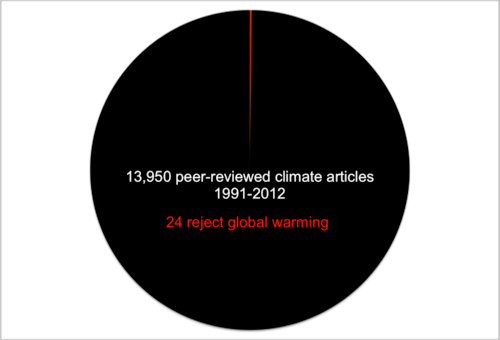
	</div>
			
				
				<div class="footnotes"><div id='43-1'><p>W. Zinsser, “Simplicity,” [Online]. Available: <a href="http://www.geo.umass.edu/faculty/wclement/Writing/zinsser.html" target="_blank" rel="noopener noreferrer">http://www.geo.umass.edu/faculty/wclement/Writing/zinsser.html</a></p>
</div><div id='43-2'><p><em>Star Wars: Episode III &#8211; Revenge of the Sith </em>(2005). [Film]. Directed by G. Lucas</p>
</div><div id='43-3'><p>K. G. Blank, “Wordiness list,” Department of English, University of Victoria [Online]. Available: <a href="http://web.uvic.ca/~gkblank/wordiness.html" target="_blank" rel="noopener noreferrer">http://web.uvic.ca/~gkblank/wordiness.html</a></p>
</div></div>
	</div>
<div class="chapter standard " id="chapter-writing-to-persuade" title="2.3 Writing To Persuade">
	<div class="chapter-title-wrap">
		<p class="chapter-number">2</p>
		<h1 class="chapter-title">2.3 Writing To Persuade</h1>
								</div>
	<div class="ugc chapter-ugc">
				 <p class="import-BodyTextFirstIndent2">Sometimes, you may want to persuade your reader to take a particular action or position on an issue. To be effective, you should consider the following elements of persuasion, often referred to as Rhetorical Appeals. The ancient Greek words are <em>ethos, pathos, logos</em>, and <em>kairos</em>. These concepts are still critical in rhetoric studies today (see <strong>Figure 2.3.1</strong>):</p> <ul><li class="import-BodyTextFirstIndent2"><strong><em>Ethos</em> – Appeal to Credibility/Authority: </strong>this element of persuasion involves establishing your credibility, expertise, or authority to be making the argument. What experience or expertise do you have? What knowledge or skills do you possess? What’s your role within the organization, and/or in relation to the reader? Why should the reader trust you as a reliable, knowledgeable, authoritative, and ethical source of information?</li> <li class="import-BodyTextFirstIndent2"><strong><em>Pathos</em> – Appeal to Emotion/Interest/Values: </strong>this element involves appealing to the emotions, values, and/or interests of the reader. How does your proposal benefit them? Why should they care about it? How does it relate to the goals of the organization? How can you build “common ground” with your reader? What will make your reader feel “good” about your project? How can you evoke emotions such as pride or outrage?</li> <li class="import-BodyTextFirstIndent2"><strong><em>Logos</em> – Appeal to Reason/Logic: </strong>this element involves grounding your argument in logic, reason, and evidence. What evidence supports your claims? On what facts and data is your reasoning based? Arguments grounded in reason and evidence are often considered the strongest. Government organizations and companies alike generally like to make “evidence-based decisions.”</li> <li><strong><em>Kairos</em> – Appeal to Timeliness/Appropriateness</strong>:&nbsp; using this appeal means being aware of what is appropriate and timely in a given rhetorical situation. Sometimes, a well-crafted argument can fail because it comes at the wrong time. <em>Kairos</em> involves knowing what is “in” or “hot” right now, what is an important topic or issue, and how best to discuss it; knowing when it is the “right time” to broach a topic or propose an idea; knowing how to use the appropriate tone, level of formality and decorum for the specific situation.</li> </ul> <p>Finding the appropriate blend of appeals is critical to making a successful argument; consider that when making your case, you often have to “win both hearts and minds”—so you’ll need to appeal to both emotions and logic, do whatever you can to show the reader that you are a trustworthy source of information, and present your argument at the most opportune time. In addition to these elements, you should also be mindful of the word choice and tone so that you are presenting a persuasive argument that is also constructive and conveys the appropriate tone for your intended audience, message, and purpose.<a id="retfig2.3.1"></a></p> <div class="wp-caption aligncenter" id="attachment_47" aria-describedby="caption-attachment-47" style="width: 1024px"><img class="size-large wp-image-45" src="https://opentextbc.ca/principlesofmarketingh5p/wp-content/uploads/sites/387/2017/12/Rhetorical-Appeals-Flow-Chart-1024x734.png" alt="Flow chart showing how to use appeals to logic, emotion, credibility, and timeliness to convine an audience" width="1024" height="734" srcset="https://opentextbc.ca/technicalwritingh5p/wp-content/uploads/sites/387/2017/12/Rhetorical-Appeals-Flow-Chart-1024x734.png 1024w, https://opentextbc.ca/technicalwritingh5p/wp-content/uploads/sites/387/2017/12/Rhetorical-Appeals-Flow-Chart-300x215.png 300w, https://opentextbc.ca/technicalwritingh5p/wp-content/uploads/sites/387/2017/12/Rhetorical-Appeals-Flow-Chart-768x551.png 768w, https://opentextbc.ca/technicalwritingh5p/wp-content/uploads/sites/387/2017/12/Rhetorical-Appeals-Flow-Chart-1536x1101.png 1536w, https://opentextbc.ca/technicalwritingh5p/wp-content/uploads/sites/387/2017/12/Rhetorical-Appeals-Flow-Chart-65x47.png 65w, https://opentextbc.ca/technicalwritingh5p/wp-content/uploads/sites/387/2017/12/Rhetorical-Appeals-Flow-Chart-225x161.png 225w, https://opentextbc.ca/technicalwritingh5p/wp-content/uploads/sites/387/2017/12/Rhetorical-Appeals-Flow-Chart-350x251.png 350w, https://opentextbc.ca/technicalwritingh5p/wp-content/uploads/sites/387/2017/12/Rhetorical-Appeals-Flow-Chart.png 1696w" sizes="auto, (max-width: 1024px) 100vw, 1024px" /><div class="wp-caption-text" id="caption-attachment-47"><em><strong>Figure 2.3.1</strong> Using the rhetorical appeals to convince an audience <a href="#fig2.3.1">[Image description]</a><br /></em></div></div> <p>Review your understanding of the rhetorical appeals by dragging the correct appeals and questions to the appropriate category.</p> <div class="h5p"><div class="textbox interactive-content"><span class="interactive-content__icon"></span> <p>An interactive H5P element has been excluded from this version of the text. You can view it online here:<br /> <a href="https://opentextbc.ca/technicalwritingh5p/?p=48#h5p-11" title="Review your understanding of the rhetorical appeals by dragging the correct appeals and questions to the appropriate category.">https://opentextbc.ca/technicalwritingh5p/?p=48#h5p-11</a> </p> </div> </div> <div class="pdf"><div class="textbox"><p><strong>H5P: Ethos Pathos Logos Kairos</strong></p> <p>Review your understanding of the rhetorical appeals by dragging the correct appeals and questions to the appropriate category.</p> <table class="grid" style="border-collapse: collapse; width: 100%;"><tbody><tr><td style="width: 20%;"></td> <th style="width: 20%;" scope="col">Ethos</th> <th style="width: 20%;" scope="col">Pathos</th> <th style="width: 20%;" scope="col">Logos</th> <th style="width: 20%;" scope="col">Kairos</th> </tr> <tr><th style="width: 20%;" scope="row">Appeals to</th> <td style="width: 20%;"></td> <td style="width: 20%;"></td> <td style="width: 20%;"></td> <td style="width: 20%;"></td> </tr> <tr><th style="width: 20%;" scope="row">Question</th> <td style="width: 20%;"></td> <td style="width: 20%;"></td> <td style="width: 20%;"></td> <td style="width: 20%;"></td> </tr> </tbody> </table> <p>Questions:</p> <ul><li>What expertise do you have?</li> <li>What is a hot topic right now?</li> <li>What evidence supports your claim?</li> <li>Why should I care?</li> </ul> <p>Appeals to:</p> <ul><li>Reason and Logic</li> <li>Emotions/Values</li> <li>Timelines</li> <li>Credibility</li> </ul> </div> </div> <h1>Avoiding Ad-Speak</h1> <p>“Ad-speak” refers to the kind of language often used in advertisements.&nbsp; Its aim is to convince consumers to buy something, whether they need it or not, hopefully without thinking too much about it. Because we hear this kind of rhetoric all the time, it easily becomes habit to use it ourselves. We must break this habit when communicating in professional contexts.</p> <p>Ad-Speak tends to use strategies such as</p> <ul><li>Emotional manipulation</li> <li>Logical fallacies</li> <li>Hyperbole, exaggeration, or dishonesty</li> <li>Vague claims</li> <li>Incomplete or cherry-picked data</li> <li>Biased viewpoints</li> <li>Hired actors rather than professionals or experts as spokespeople.</li> </ul> <p>As a student in a professionalizing program learning the specialized skills and developing the sense of social obligation needed to become a trusted professional, you should avoid using “sensational” language characteristic of marketing languge. Instead, when trying to persuade your reader, make sure you use <strong>quantifiable, measurable descriptors</strong> and objective language in your writing. You cannot determine how many units of “excellence” something has, or its quantifiable amount of “awesomeness,” “fantastic-ness,” or “extraordinariness.” Describing something as “incredible” literally means it’s unbelievable.&nbsp; So avoid using these kinds of words shown in <strong>Figure 2.3.2</strong>.</p> <div class="wp-caption aligncenter" aria-describedby="caption-attachment-47" style="width: 500px"><img class="wp-image-46" src="https://opentextbc.ca/principlesofmarketingh5p/wp-content/uploads/sites/387/2022/01/Ad-Speak-Word-cloud-e1525827497495.png" alt="awesome, wonderful, fantastic, outstanding, great, excellent, fabulous, ideal, shiny, marvellous, amazing, intense, tasty, decent" width="500" height="321" srcset="https://opentextbc.ca/technicalwritingh5p/wp-content/uploads/sites/387/2022/01/Ad-Speak-Word-cloud-e1525827497495.png 800w, https://opentextbc.ca/technicalwritingh5p/wp-content/uploads/sites/387/2022/01/Ad-Speak-Word-cloud-e1525827497495-300x193.png 300w, https://opentextbc.ca/technicalwritingh5p/wp-content/uploads/sites/387/2022/01/Ad-Speak-Word-cloud-e1525827497495-768x493.png 768w, https://opentextbc.ca/technicalwritingh5p/wp-content/uploads/sites/387/2022/01/Ad-Speak-Word-cloud-e1525827497495-65x42.png 65w, https://opentextbc.ca/technicalwritingh5p/wp-content/uploads/sites/387/2022/01/Ad-Speak-Word-cloud-e1525827497495-225x145.png 225w, https://opentextbc.ca/technicalwritingh5p/wp-content/uploads/sites/387/2022/01/Ad-Speak-Word-cloud-e1525827497495-350x225.png 350w" sizes="auto, (max-width: 500px) 100vw, 500px" /><div class="wp-caption-text"><em><strong>Figure 2.3.2</strong> Ad-Speak Word Cloud.</em></div></div> <p>Find measurable terms like “efficiency” (in time or energy use), “effectiveness” at fulfilling a specific task, measurable benefits and/or costs, or even “popularity” as measured by a survey.</p> <h1>Communicating Ethically</h1> <p>In professional writing, communicating ethically is critically important. Ethical communications involves communicating from a place of accountability, responsibility, integrity, and values. If you are communicating ethically, you are demonstrating respect for your reader, the organizations you work for and with, and the culture and context within which you work. You also foster fairness and trust through honesty. Failure to maintain integrity and ethics can result in consequences ranging from damage to reputation, loss of work, lawsuits, criminal charges, and even tragic loss of life.</p> <p class="textbox__title">This is precisely why many professional associations have guidelines that govern the ethical behavior of their membership. Two such documents that may be relevant to you are the Faculty of Engineering’s <a class="external" href="https://www.uvic.ca/engineering/assets/docs/professional-behaviour.pdf">“Standards for Professional Behavior” [PDF]</a> and the Association of Professional Engineers and Geoscientists of BC <a class="external" href="https://opentextbc.ca/technicalwritingh5p/wp-content/uploads/sites/296/2018/11/APEGBC-Code-of-Ethics.pdf" target="_blank" rel="noopener noreferrer">APEGBC Code-of-Ethics [PDF]</a>. For example, take note of the portions of the APEGBC Code of Ethics that relate specifically to ethical communication.</p> <div class="textbox textbox--key-takeaways"><div class="textbox__header">“Members and licensees shall act at all times with fairness, courtesy and good faith to their associates, employers, employees and clients, and with fidelity to the public needs. They shall uphold the values of truth, honesty and trustworthiness and safeguard human life and welfare and the environment…. Members and licencees shall:</div> <div class="textbox__content"><ul><li>Provide an opinion on a professional subject only when it is founded upon adequate knowledge and honest conviction;</li> <li>Conduct themselves with fairness, courtesy and good faith towards clients, colleagues and others, give credit where it is due and accept, as well as give, honest and fair professional comment;</li> <li>Present clearly to employers and clients the possible consequences if professional decisions or judgments are overruled or disregarded;</li> <li>Extend public knowledge and appreciation of engineering and geoscience and protect the profession from misrepresentation and misunderstanding.”</li> </ul> </div> </div> <p>It is important to become familiar with these standards of practice, and to consider how they impact communication practices. Remember that you are communicating in a professional</p> <p>context, and that comes with responsibility.&nbsp; Consider the different rhetorical situations diagrammed in <strong>Figure 2.3.3</strong>, one for a marketer and one for an engineer.<a id="retfig2.3.3"></a></p> <div class="wp-caption aligncenter" aria-describedby="caption-attachment-47" style="width: 1024px"><img class="wp-image-47 size-large" src="https://opentextbc.ca/principlesofmarketingh5p/wp-content/uploads/sites/387/2022/01/Marketer-vs-Engineer-Rhetorical-Situation-1024x418.png" alt="Two Rhetorical triangles: one with the author as &amp;quot;Marketer,&amp;quot; audience as &amp;quot;Consumer,&amp;quot; and message as &amp;quot;Information about the product&amp;quot;; the other with the author as &amp;quot;Engineer, the audience as &amp;quot;clients, colleagues, etc),&amp;quot; and the message as &amp;quot;information about the design&amp;quot;. There is some overlap between the two messages." width="1024" height="418" srcset="https://opentextbc.ca/technicalwritingh5p/wp-content/uploads/sites/387/2022/01/Marketer-vs-Engineer-Rhetorical-Situation-1024x418.png 1024w, https://opentextbc.ca/technicalwritingh5p/wp-content/uploads/sites/387/2022/01/Marketer-vs-Engineer-Rhetorical-Situation-300x122.png 300w, https://opentextbc.ca/technicalwritingh5p/wp-content/uploads/sites/387/2022/01/Marketer-vs-Engineer-Rhetorical-Situation-768x314.png 768w, https://opentextbc.ca/technicalwritingh5p/wp-content/uploads/sites/387/2022/01/Marketer-vs-Engineer-Rhetorical-Situation-65x27.png 65w, https://opentextbc.ca/technicalwritingh5p/wp-content/uploads/sites/387/2022/01/Marketer-vs-Engineer-Rhetorical-Situation-225x92.png 225w, https://opentextbc.ca/technicalwritingh5p/wp-content/uploads/sites/387/2022/01/Marketer-vs-Engineer-Rhetorical-Situation-350x143.png 350w, https://opentextbc.ca/technicalwritingh5p/wp-content/uploads/sites/387/2022/01/Marketer-vs-Engineer-Rhetorical-Situation.png 1460w" sizes="auto, (max-width: 1024px) 100vw, 1024px" /><div class="wp-caption-text"><em><strong>Figure 2.3.3</strong> Comparison of the rhetorical situation for a marketer vs. an engineer. <a href="#fig2.3.3">[Image Description]</a><br /></em></div></div> <p>Clearly, there may be some overlap, but there will also be significant differences based on the needs and expectations of the audience and the kind of message being delivered. We hear marketing language so often that it is easy to fall into the habit of using it, even when it’s not appropriate. Make sure you are not using “ad-speak” when trying to persuade in a professional context.</p> <h3>Image Descriptions</h3> <p><strong><a id="fig2.3.1"></a>Figure 2.3.1 Using the rhetorical appeals to convince an audience </strong></p> <p>Use rhetorical appeals to convince your audience of a claim or recommendation you’ve made or a position you’ve taken. From there, you can support your claim using different types of appeals or address and refute opposing ideas.</p> <p>To support the claim, position, or recommendation, you can use different types of appeals:</p> <ul><li>Logical appeals: Use logical reasoning, supporting facts and statistics.</li> <li>Emotional appeals: Appeal to sympathy, humour, shared values, evoke pride, anger, guilt, or outrage, etc.</li> <li>Credibility appeals: Demonstrate that you are qualified, experienced, reliable, and an unbiased source of information.</li> <li>Timing and Decorum.</li> <li>Use a combination of appeals to win both “hearts and minds” as well as trust, and deliver your message at the time in the most effective way.</li> </ul> <p>When addressing and/or refuting opposing ideas, it’s okay to concede where appropriate. Conceding strengthens credibility appeal by making you seem fair-minded and unbiased. You may need to draw on credibility appeals to show that you are qualified, experienced, and a reliable, unbiased source of information.</p> <p>Supporting your position using different types of appeals and addressing opposing ideas will allow you to convince your audience.</p> <p><a href="#retfig2.3.1">[Return to Figure 2.3.1]</a></p> <p><strong><a id="fig2.3.3"></a>Figure 2.3.3 Comparison of the rhetorical situation for a marketer vs. an engineer.</strong></p> <p>When the marketer is the author, their audience is the consumer and their message is information about the product. When the engineer is the author, their audience could be a client or colleague, and their message is information about the design. There may be some overlap between the messages of the marketer and the engineer.</p> <p><a href="#retfig2.3.3">[Return to Figure 2.3.3]</a></p> <h3>Media Attributions</h3> <ul><li>Figure 2.3.1 Using the rhetorical appeals to convince an audience&nbsp;by Suzan Last is licensed under a <a href="https://creativecommons.org/licenses/by/4.0/">CC BY 4.0 licence</a>.</li> <li>Figure 2.3.2 Ad-Speak Word Cloud by Suzan Last is licensed&nbsp;under a <a href="https://creativecommons.org/licenses/by/4.0/">CC BY 4.0 licence</a>.</li> <li>Figure 2.3.3 Comparison of the rhetorical situation for a marketer vs. an engineer&nbsp;by Suzan Last is licensed&nbsp;under a&nbsp;<a href="https://creativecommons.org/licenses/by/4.0/">CC BY 4.0 licence</a>.</li> </ul> 
	</div>


	</div>
<div class="chapter numberless " id="chapter-the-importance-of-verbs" title="2.4 The Importance of Verbs">
	<div class="chapter-title-wrap">
		<p class="chapter-number"></p>
		<h1 class="chapter-title">2.4 The Importance of Verbs</h1>
								</div>
	<div class="ugc chapter-ugc">
				 <p>Much of the style advice given so far revolves around the importance of verbs. Think of your sentence as a machine, and the verb as the engine that makes the machine work. Like machines, sentences can function efficiently or inefficiently, and the use of a strong verb is one way to make them work effectively. Here are some key principles regarding the effective use of verbs in your sentences. While effective sentences may occasionally deviate from the suggestions in this list, try to follow these guidelines as often as possible:</p> <ul><li>Keep the subject and the verb close together; avoid separating them with words or phrases that could create confusion</li> <li>Place the verb near the beginning of the sentence (and close to the subject)</li> <li>Maintain a high verb/word ratio in your sentence</li> <li>Prefer active verb constructions over passive ones</li> <li>Avoid “to be” verbs (am, is, are, was, were, being, been, be)</li> <li>Try to turn nominalizations (abstract nouns) back into verbs.</li> </ul> <p>Use the verb strength chart in <strong>Table 2.4.1</strong> as a guide to “elevate” weaker verbs (or words with implied action) in a sentence to stronger forms.</p> <table class="grid" style="border-collapse: collapse; width: 100%;"><caption>TABLE 2.4.1 Verb strength chart</caption> <tbody><tr><th class="shaded" style="width: 35%; text-align: center;" scope="col"><strong>Verb Forms (Strong to Weak)<br /> </strong></th> <th class="shaded" style="width: 45%; text-align: center;" scope="col"><strong>Examples</strong></th> </tr> <tr><td class="border" style="width: 35%;">Command/Imperative</td> <td class="border" style="width: 45%;"><p class="table-para"><strong>Maintain</strong> the machine properly!</p> <p class="table-para"><strong>Write</strong> the report!</p> </td> </tr> <tr><td class="border" style="width: 35%;"><strong>Active Indicative</strong><span class="footnote"><span class="footnote-indirect" data-fnref="51-1"></span></span> <p>(S → V)</p></td> <td class="border" style="width: 45%;"><p class="table-para">He <strong>maintains</strong> the machine regularly.</p> <p class="table-para">She <strong>writes</strong> reports frequently.</p> </td> </tr> <tr><td class="border" style="width: 35%;">Active conditional</td> <td class="border" style="width: 45%;"><p class="table-para">She <strong>would maintain</strong> the machine <strong>if</strong> he would let her.</p> <p class="table-para">He <strong>would write</strong> reports if he had more training.</p> </td> </tr> <tr><td class="border" style="width: 35%;">Gerunds (<span style="text-decoration: underline;" aria-label="blank">&nbsp; &nbsp; &nbsp;</span> -ing) <p>Infinitives (to <span style="text-decoration: underline;" aria-label="blank">&nbsp; &nbsp; &nbsp;</span>)</p> <p>(<em>these do not function as verbs in your sentence; actual verbs are <span style="background-color: #ffff99;">highlighted</span></em>)</p></td> <td class="border" style="width: 45%;"><p class="table-para">While <strong>maintaining</strong> the machine, he <span style="background-color: #ffff99;">gets</span> quite dirty.</p> <p class="table-para">Report <strong>writing</strong> <span style="background-color: #ffff99;">takes</span> skill.</p> <p class="table-para">It <span style="background-color: #ffff99;">takes</span> a lot of time <strong>to maintain</strong> this machine.</p> <p class="table-para"><strong>To write</strong> effectively, one must <span style="background-color: #ffff99;">get</span> a sense of the audience.</p> <p><em>In these sentences, “gets” and “takes” are the verbs.</em></p></td> </tr> <tr><td class="border" style="width: 35%;">Passive&nbsp;&nbsp; (S ← V) <p>Passive Conditional</p></td> <td class="border" style="width: 45%;"><p class="table-para">The machine <strong>is maintained</strong> by him.</p> <p class="table-para">It <strong>would be maintained</strong> by her if…</p> <p class="table-para">The report <strong>was written</strong> by her.</p> <p class="table-para">Reports <strong>would be written</strong> by him if…</p> </td> </tr> <tr><td class="border" style="width: 35%;">Nominalizations (<em>verbs turned into abstract nouns)</em> <p>Participles (<em>nouns or adjectives that used to be verbs</em>)</p></td> <td class="border" style="width: 45%;"><p class="table-para">Machine <strong>maintenance</strong> <span style="background-color: #ffff99;">is</span> dirty work.</p> <p class="table-para">A well-<strong>maintained</strong> machine <span style="background-color: #ffff99;">is</span> a thing of beauty.</p> <p class="table-para"><strong>Written</strong> work must <span style="background-color: #ffff99;">be</span> free of errors.</p> <p><em>In these sentences, “is” and “be” are the verbs.</em></p></td> </tr> </tbody> </table> <p>Part of the skill of using active verbs lies in choosing the verbs that precisely describes the action you want to convey. English speakers have become somewhat lazy in choosing a small selection of verbs most of the time (<em>to</em> <em>be, to do, to get, to make, to have, to put</em>); as a result, these often-used verbs have come to have so many possible meanings that they are almost meaningless. Try looking up “make” or “have” in the dictionary; you will see pages and pages of possible meanings! Whenever possible, avoid these <strong>bland</strong> verbs and use more precise, descriptive verbs, as indicated in <strong>Table 2.4.2</strong>.</p> <table class="grid" style="border-collapse: collapse; width: 100%;"><caption>TABLE 2.4.2 Bland vs. descriptive verbs</caption> <tbody><tr><th class="shaded" style="width: 30%; text-align: center;" scope="col"><strong>Bland Verbs</strong></th> <th class="shaded" style="width: 70%; text-align: center;" scope="col"><strong>Descriptive Verbs</strong></th> </tr> <tr><td style="width: 30%;"><p class="table-para">Signal Verbs:</p> <p class="table-para" style="padding-left: 30px;">Says<br /> States<br /> Talks about<br /> Discusses<br /> Writes</p> </td> <td style="width: 70%;"><p class="table-para">Describe the rhetorical purpose behind what the author/speaker “says”:</p> <p class="table-para" style="padding-left: 30px;">Explains, clarifies<br /> Describes, illustrates<br /> Claims, argues, maintains<br /> Asserts, stresses, emphasizes<br /> Recommends, urges, suggests</p> </td> </tr> <tr><td style="width: 30%;"><p class="table-para">Is, are, was, were being been</p> <p class="table-para">Is <span style="text-decoration: underline;"><em>verb</em></span>-ing</p> </td> <td style="width: 70%;"><p class="table-para">Instead of indicating what or how something “<strong>is</strong>,” describe what it <strong>DOES</strong>, by choosing a precise, active verb.</p> <p class="table-para">Replace progressive form (<em>is verb-ing</em>) with indicative form</p> <p class="table-para" style="padding-left: 30px;"><em>She is describing</em> → <em>She describes</em></p> </td> </tr> <tr><td style="width: 30%;"><p class="table-para">Get, gets</p> </td> <td style="width: 70%;"><p class="table-para">Usually too colloquial (or passive); instead you could use more specific verbs such as</p> <p class="table-para" style="padding-left: 30px;">Become, acquire, obtain, receive, prepare, achieve, earn, contract, catch, understand, appreciate, <em>etc</em>.</p> </td> </tr> <tr><td style="width: 30%;"><p class="table-para">Do, does</p> </td> <td style="width: 70%;"><p class="table-para">Avoid using the <em>emphatic</em> tense in formal writing:</p> <p style="padding-left: 30px;">It <em>does</em> work&nbsp;→&nbsp; it <strong>works</strong>.</p> <p class="table-para" style="padding-left: 30px;">I <em>do </em>crack when I see apostrophe errors → I <strong>crack</strong> when I see apostrophe errors.</p> <p class="table-para">Instead:&nbsp; Perform, prepare, complete, <em>etc</em>.</p> </td> </tr> <tr><td style="width: 30%;"><p class="table-para">Has, have</p> <p class="table-para">Has to, have to</p> </td> <td style="width: 70%;">This verb has many potential meanings! Try to find a more specific verb that “have/has” or “has to”: <ul><li class="table-para">She <strong>owns</strong> a car</li> <li class="table-para">They <strong>consume/eat</strong> a meal</li> <li class="table-para">The product <strong>includes</strong> many optional features</li> <li class="table-para">The process <strong>entails</strong> several steps</li> </ul> <p class="table-para">Instead of “have to” try:&nbsp; Must, require, need, <em>etc</em>.</p> </td> </tr> <tr><td style="width: 30%;"><p class="table-para">Make</p> </td> <td style="width: 70%;"><p class="table-para">Build, construct, erect, devise, create, design, manufacture, produce, prepare, earn, <em>etc</em>.</p> <p class="table-para" style="padding-left: 30px;">Make a recommendation → recommend<br /> Make a promise → promise<br /> Make a plan → plan</p> </td> </tr> </tbody> </table> <p><a id="02" data-url=""></a>For more detailed information on using signal verbs when introducing quotations, see <a href="#chapter-integrating-source-evidence-into-your-writing" target="_blank" rel="noopener noreferrer" data-url="/technicalwritingh5p/chapter/integrating-source-evidence-into-your-writing/">Appendix C: Integrating Source Evidence into Your Writing</a>.</p> <div class="textbox textbox--exercises"><div class="textbox__header"><p class="textbox__title">EXERCISE 2.6 Improve the following sentences by elevating the verb and cutting clutter</p> </div> <div class="textbox__content"><ol><li>Market share <strong>is being lost</strong> by the company, as <strong>is shown</strong> in the graph in Figure 3.</li> <li>A descrip<strong>tion</strong> of the product <strong>is given</strong> by the author.</li> <li>An investiga<strong>tion</strong> of the issue <strong>has been conducted </strong>by her.</li> <li>His task is <strong>regional database systems troubleshooting handbook preparation.</strong></li> <li>While a recommendat<strong>ion</strong> <strong>has been made</strong> by the committee, an agree<strong>ment</strong> to increase the budget will have <strong>to be approved</strong> by the committee.</li> </ol> </div> </div> <div class="textbox textbox--exercises"><div class="textbox__header"><p class="textbox__title">EXERCISE 2.7 Revision practice</p> </div> <div class="textbox__content"><p>The following paragraph on <strong>The Effects of Energy Drinks</strong> does not conform to the 7Cs and contains far too many “to be” verbs. Revise this paragraph so that it has a clear topic sentence, coherent transitions, correct grammar, and concise phrasing. In particular, try to eliminate all “to be” verbs (am, is, are, was, were, being, been, be), and rephrase using strong, descriptive, active verbs. The first 7 are highlighted for you. Try to cut the word count (260) in half.</p> <div class="textbox">Energy Drinks <span style="background-color: #ffff00;">are</span> able <span style="background-color: #ffff00;">to be</span> consumed in many varied and different ways by people all over the world. Moreover, drinking these energy drinks <span style="background-color: #ffff00;">is</span> able to provide people in today’s society with the helpful benefits of increased awareness and energy. Besides, even though there <span style="background-color: #ffff00;">are</span> enhancements that may <span style="background-color: #ffff00;">be</span> present from drinking an energy drink, the negative side effects <span style="background-color: #ffff00;">are</span> posing more of a threat to a person than the energy boost that <span style="background-color: #ffff00;">is</span> able to <span style="background-color: #ffff00;">be</span> achieved. In a survey that was taken in the United States at an American university, it was reported that fifty one percent of participants were consuming greater than three energy drinks each month in the semester [1]. Looking at this statistic, it can be seen that a majority of students in university are drinking energy a large amount of drinks on a very regular basis. Which can be the cause of some health problems experienced by students. In the same study, it was also shown that energy drinks are capable of helping to increase energy and athletic endurance; for those who drank it. Despite the fact that there are some benefits to be had from drinking energy drinks, there is the problem of the negative side affects that are caused by the drinking of these energy drinks. However, the side affects that were commonly reported in the study are: headaches, and “energy crashes” (Smith 5). Being a potentially more severe problem than the minor problems of headaches and “crashes;” there is definitely the possibility of people which are becoming addicted to caffeine.</div> </div> </div> <p>Here is the exercise in a Word document for you to download and revise: <a href="https://opentextbc.ca/technicalwritingh5p/wp-content/uploads/sites/387/2017/12/Revision-Exercise-Energy-Drinks.docx" data-url="https://opentextbc.ca/technicalwritingh5p/wp-content/uploads/sites/387/2017/12/Revision-Exercise-Energy-Drinks.docx">Revision Exercise – Energy Drinks [Word doc]</a></p> <p>After trying the exercise, click on the link below to compare your revision to effective revisions of this passage done by other students: <a href="https://opentextbc.ca/technicalwritingh5p/wp-content/uploads/sites/387/2017/12/Sample-Revisions-of-Exercise-2.7.docx" data-url="https://opentextbc.ca/technicalwritingh5p/wp-content/uploads/sites/387/2017/12/Sample-Revisions-of-Exercise-2.7.docx">Sample Revisions of Exercise 2.7 [Word doc]</a></p> <p><strong>Table 2.4.3</strong> sums up many key characteristics of effective professional style that you should try to avoid (poor style) and implement (effective style) while writing technical documents.</p> <div><table class="grid" style="border-collapse: collapse; width: 100%;"><caption>TABLE 2.4.3 Key characteristics of effective professional style</caption> <tbody><tr><th class="shaded" style="width: 50%; text-align: center;" scope="col"><strong>Poor Style</strong></th> <th class="shaded" style="width: 50%; text-align: center;" scope="col"><strong>Effective Style</strong></th> </tr> <tr><td class="border" style="width: 50%;">Low VERB/WORD ratio per sentence</td> <td class="border" style="width: 50%;">High VERB/WORD ratio per sentence</td> </tr> <tr><td class="border" style="width: 50%;">Excessive ‘is/are’ verbs</td> <td class="border" style="width: 50%;">Concrete, descriptive verbs</td> </tr> <tr><td class="border" style="width: 50%;">Excessive passive verb constructions</td> <td class="border" style="width: 50%;">Active verb constructions</td> </tr> <tr><td class="border" style="width: 50%;">Abstract or vague nouns</td> <td class="border" style="width: 50%;">Concrete and specific nouns</td> </tr> <tr><td class="border" style="width: 50%;">Many prepositional phrases</td> <td class="border" style="width: 50%;">Few prepositional phrases</td> </tr> <tr><td class="border" style="width: 50%;">Subject and verb are separated by words or phrases</td> <td class="border" style="width: 50%;">Subject and verb are close together</td> </tr> <tr><td class="border" style="width: 50%;">Verb is near the end of the sentence</td> <td class="border" style="width: 50%;">Verb is near the beginning of the sentence</td> </tr> <tr><td class="border" style="width: 50%;">Main idea (subject-verb relationship) is difficult to find</td> <td class="border" style="width: 50%;">Main idea is clear</td> </tr> <tr><td class="border" style="width: 50%;">Sentence must be read more than once to understand it</td> <td class="border" style="width: 50%;">Meaning is clear the first time you read it</td> </tr> <tr><td class="border" style="width: 50%;">Long, rambling sentences</td> <td class="border" style="width: 50%;">Precise, specific sentences</td> </tr> </tbody> </table> </div> 
	</div>
			
				
				<div class="footnotes"><div id='51-1'><p>While you are not likely to use the command form very often, unless you are writing instructions, the second strongest form, Active Indicative, is the one you want to use most often (say, in about 80% of your sentences).</p>
</div></div>
	</div>

</div>
<div class="part-wrapper" id="part-document-design-wrapper">
    <div class="part  " id="part-document-design">
	<div class="part-title-wrap">
		<p class="part-number">III</p>
		<h1 class="part-title">3. Document Design</h1>
	</div>
	<div class="ugc part-ugc">
		<div class="textbox textbox--learning-objectives"><div class="textbox__header"><p class="textbox__title">Chapter 3 Learning Objectives</p> </div> <div class="textbox__content"><p>This chapter covers the following topics:</p> <ul><li><a href="#chapter-readability" target="_blank" rel="noopener" data-url="/technicalwritingh5p/chapter/readability/">3.1&nbsp; Readability</a>: Understand the importance of “readability” to your technical audience, and what that looks like in technical documents.</li> <li><a href="#chapter-headings" target="_blank" rel="noopener" data-url="/technicalwritingh5p/chapter/headings/">3.2&nbsp; Headings</a> (See the <a class="external" href="https://opentextbc.ca/principlesofmarketingh5p/wp-content/uploads/sites/387/2022/01/Headings.ppt" data-url="https://opentextbc.ca/principlesofmarketingh5p/wp-content/uploads/sites/387/2022/01/Headings.ppt">Headings [PPTX]</a>): Understand how to use headings to organize information logically to enhance readers’ comprehension.</li> <li><a href="#chapter-lists" target="_blank" rel="noopener" data-url="/technicalwritingh5p/chapter/lists/">3.3&nbsp; Lists</a> (See the <a class="external" href="https://opentextbc.ca/principlesofmarketingh5p/wp-content/uploads/sites/387/2022/01/Lists.pptx" data-url="https://opentextbc.ca/principlesofmarketingh5p/wp-content/uploads/sites/387/2022/01/Lists.pptx">Lists [PPTX]</a>): Understand the rules for embedding various kinds of lists in your documents to emphasize key points and simplify text.</li> <li><a href="#chapter-figures-and-tables" target="_blank" rel="noopener" data-url="/technicalwritingh5p/chapter/figures-and-tables/">3.4&nbsp; Figures and Tables</a> (see the <a class="external" href="https://opentextbc.ca/principlesofmarketingh5p/wp-content/uploads/sites/387/2017/12/Visuals-Tables-and-Figures-in-Reports.pptx" data-url="https://opentextbc.ca/principlesofmarketingh5p/wp-content/uploads/sites/387/2017/12/Visuals-Tables-and-Figures-in-Reports.pptx">Visuals Tables and Figures in Reports [PPTX]</a>): Understand how to integrate various kinds of figures and tables into documents to effectively present visual data and images.</li> <li><a href="#chapter-style-tips-revising-to-enhance-readability" target="_blank" rel="noopener" data-url="/technicalwritingh5p/chapter/style-tips-revising-to-enhance-readability/">3.5 Style Tips</a>: Apply revision strategies to enhance clarity and readability.</li> </ul> </div> </div> <p>Document design is the “nuts and bolts” of technical writing. No matter how brilliant or important the content, if it is not formatted in way that enhances readability, it will likely not receive the attention it deserves. This section includes the information on how technical writers use formatting features to optimize readability.</p>
	</div>
			
				
	</div>
<div class="chapter numberless " id="chapter-readability" title="3.1 KEY CONCEPT: Readability">
	<div class="chapter-title-wrap">
		<p class="chapter-number"></p>
		<h1 class="chapter-title">3.1 KEY CONCEPT: Readability</h1>
								</div>
	<div class="ugc chapter-ugc">
				 <p>All documents have a purpose—to persuade, to inform, to instruct, to entertain—but the first and foremost purpose of any document is to be <strong><em>read</em></strong>. Choosing effective document design enhances the <strong><em>readability</em></strong> or <strong><em>usability</em></strong> of your document so that the target audience is more likely to get the message you want them to receive, and your document is more likely to achieve your intended purpose.</p> <p>Choose document design elements that make your document “user friendly” for the target audience. Keep in mind that people do not read technical writing for pleasure; they read it because they have to; it’s part of their job. And since “time is money,” the longer it takes to read the document, the higher the “cost.” Your job as the document designer is to make their reading process as easy, clear, useful and efficient as possible by using all the tools at your disposal.</p> <p>Designing a document is like designing anything else:&nbsp; you must define your purpose (the goals and objectives you hope your document achieves, as well as the constraints — such as word count and format — that you must abide by), understand your audience (who will read this document and why), and choose design features that will best achieve your purpose and best suite the target audience. In essence, you must understand the <strong>Rhetorical Situation</strong> (see <a href="#chapter-understanding-the-rhetorical-situation" target="_blank" rel="noopener noreferrer" data-url="/technicalwritingh5p/chapter/understanding-the-rhetorical-situation/">1.3 Understanding the Rhetorical Situation</a>) in which you find yourself: <em>Who is communicating with whom about </em><em>what and why?</em> What kind of document design and formatting can help you most effectively convey the desired message to that audience? You want to use the most effective rhetorical strategies at your disposal; document design is one of those strategies.</p> <h1>Genres and Conventions</h1> <p>As you learned in previous writing classes, readers in different contexts expect different textual features, depending on the type of document they are reading and their purpose. A reader of an online editorial can expect strongly worded arguments that may rely on inflammatory emotional language, but not be backed up with much empirical evidence;&nbsp; we do not expect an online editorial to cite reliable sources in a scholarly format. In contrast, an academic reader expects the opposite: neutral, unemotional language, and plenty of empirical evidence to logically and validly support claims, with sources cited and documented in an appropriately academic bibliographical formats. These are some of the conventional expectations of the genres.</p> <p class="textbox__title">It’s not only the content and rhetorical strategies that have differing conventions; documents also differ in how they are designed and formatted. All genres of writing adhere to certain conventions, in terms of content, the style of language used to express that content, and how the content is presented visually. If you look at an online news article (or an article in an actual newspaper), you will often notice consistent formatting features.</p> <div class="textbox textbox--key-takeaways"><div class="textbox__header"><p class="textbox__title">Typical Newspaper Formatting Conventions</p> </div> <div class="textbox__content"><ul><li>Large headlines, often using rhyme, alliteration, exaggeration or some other rhetorical device to grab attention (sometimes called “click bait”)</li> <li>Very short paragraphs (generally 1-3 sentences long)</li> <li>Pictures related to the article</li> <li>A cut out box with a particularly attention-grabbing quotation from the article in larger, bolder print (to get readers interested in the article)</li> <li>Advertisements on the side.</li> </ul> </div> </div> <p>It is important for writers to understand the conventions of the genre in which they are writing. Conventions are the “rules” or expectations that readers/viewers have for that particular genre or medium. If you do not follow the target readers’ expectations, you run the risk of confusing them—or worse, damaging your credibility—and therefore not effectively conveying your message and fulfilling your purpose. Think of document design as “visual rhetoric.”&nbsp; Make document design choices that best conform to the expectations of the genre and audience, and that most effectively convey the message you want to send.</p> <h1>Style Guides and Templates</h1> <p>In many writing contexts, style guides and templates will be available. Style guides dictate the general rules and guidelines that should be followed; templates offer specific content and formatting requirements for specific kinds of documents. Academic publishers make style guides available to prospective authors so that they know how to properly write and format documents they submit for publication. Newspapers, academic journals, organizations, and businesses often have their own “in house” style that must be followed by all writers within that organization. A company may have specific templates, for example, a Memo template, that all employees must follow, in order to ensure consistency of messaging.</p> <p>You likely had a style guide to help you format your written assignments for your Academic Writing class, and in Science classes, you likely had a template to help you organize Lab Reports.</p> <p>Examine the formatting of academic writing in the H5P interaction below. Reflect on some of the characteristics that adhere to academic writing format requirements that you are familiar with. Do not worry about reading the text, simply examine the formatting. Click on the hotspots (designated by the + signs) for more information.</p> <div class="h5p"><div class="textbox interactive-content"><span class="interactive-content__icon"></span> <p>An interactive H5P element has been excluded from this version of the text. You can view it online here:<br /> <a href="https://opentextbc.ca/technicalwritingh5p/?p=59#h5p-12" title="Academic writing formatting_3.1.1" data-url="https://opentextbc.ca/technicalwritingh5p/?p=59#h5p-12">https://opentextbc.ca/technicalwritingh5p/?p=59#h5p-12</a> </p> </div> </div> <div class="pdf"><img class="wp-image-242 size-full aligncenter" src="https://opentextbc.ca/technicalwritingh5p/wp-content/uploads/sites/387/2017/12/H5P12-e1656113383589.png" alt="academic formatting has student information, centred title, double space, and larger paragraphs" width="1219" height="734" srcset="https://opentextbc.ca/technicalwritingh5p/wp-content/uploads/sites/387/2017/12/H5P12-e1656113383589.png 1219w, https://opentextbc.ca/technicalwritingh5p/wp-content/uploads/sites/387/2017/12/H5P12-e1656113383589-300x181.png 300w, https://opentextbc.ca/technicalwritingh5p/wp-content/uploads/sites/387/2017/12/H5P12-e1656113383589-1024x617.png 1024w, https://opentextbc.ca/technicalwritingh5p/wp-content/uploads/sites/387/2017/12/H5P12-e1656113383589-768x462.png 768w, https://opentextbc.ca/technicalwritingh5p/wp-content/uploads/sites/387/2017/12/H5P12-e1656113383589-65x39.png 65w, https://opentextbc.ca/technicalwritingh5p/wp-content/uploads/sites/387/2017/12/H5P12-e1656113383589-225x135.png 225w, https://opentextbc.ca/technicalwritingh5p/wp-content/uploads/sites/387/2017/12/H5P12-e1656113383589-350x211.png 350w" sizes="auto, (max-width: 1219px) 100vw, 1219px" /></div> <p>Now look at the technical writing in the H5P interaction below. What differences do you notice? Reflect on some of the features that differ from the academic writing sample above. Consider why typical readers of technical writing would find these desirable. Which document would you rather read?</p> <div class="h5p"><div class="textbox interactive-content"><span class="interactive-content__icon"></span> <p>An interactive H5P element has been excluded from this version of the text. You can view it online here:<br /> <a href="https://opentextbc.ca/technicalwritingh5p/?p=59#h5p-13" title="Technical Writing Formatting" data-url="https://opentextbc.ca/technicalwritingh5p/?p=59#h5p-13">https://opentextbc.ca/technicalwritingh5p/?p=59#h5p-13</a> </p> </div> </div> <div class="pdf"><img class="size-full wp-image-243 aligncenter" src="https://opentextbc.ca/technicalwritingh5p/wp-content/uploads/sites/387/2017/12/H5P13-e1656113679835.png" alt="Technical writing formatting has heading, subheading, bullet list, short paragraphs, illustration, heading and legend for illustration" width="1199" height="753" srcset="https://opentextbc.ca/technicalwritingh5p/wp-content/uploads/sites/387/2017/12/H5P13-e1656113679835.png 1199w, https://opentextbc.ca/technicalwritingh5p/wp-content/uploads/sites/387/2017/12/H5P13-e1656113679835-300x188.png 300w, https://opentextbc.ca/technicalwritingh5p/wp-content/uploads/sites/387/2017/12/H5P13-e1656113679835-1024x643.png 1024w, https://opentextbc.ca/technicalwritingh5p/wp-content/uploads/sites/387/2017/12/H5P13-e1656113679835-768x482.png 768w, https://opentextbc.ca/technicalwritingh5p/wp-content/uploads/sites/387/2017/12/H5P13-e1656113679835-65x41.png 65w, https://opentextbc.ca/technicalwritingh5p/wp-content/uploads/sites/387/2017/12/H5P13-e1656113679835-225x141.png 225w, https://opentextbc.ca/technicalwritingh5p/wp-content/uploads/sites/387/2017/12/H5P13-e1656113679835-350x220.png 350w" sizes="auto, (max-width: 1199px) 100vw, 1199px" /></div> <div class="textbox textbox--exercises"><div class="textbox__header"><p class="textbox__title">EXERCISE 3.1 List some conventions of academic formatting</p> </div> <div class="textbox__content"><p>Examine the formatting in <strong>Figure 3.1.1</strong> below and list some of characteristics that adhere to academic writing format requirements that you are familiar with. It does not matter if you cannot read the text; simply examine the formatting.</p> </div> </div> <div class="wp-caption aligncenter" id="attachment_57" aria-describedby="caption-attachment-57" style="width: 884px"><img class="wp-image-57 size-full" src="https://opentextbc.ca/technicalwritingh5p/wp-content/uploads/sites/387/2017/12/image1-3-e1657129331878.png" alt="A page from a typical academic essay, showing typical academic formatting. It contains info about the student and course, a centred title, and double-spaced text with the first line of each paragraph indented" width="884" height="563" srcset="https://opentextbc.ca/technicalwritingh5p/wp-content/uploads/sites/387/2017/12/image1-3-e1657129331878.png 884w, https://opentextbc.ca/technicalwritingh5p/wp-content/uploads/sites/387/2017/12/image1-3-e1657129331878-300x191.png 300w, https://opentextbc.ca/technicalwritingh5p/wp-content/uploads/sites/387/2017/12/image1-3-e1657129331878-768x489.png 768w, https://opentextbc.ca/technicalwritingh5p/wp-content/uploads/sites/387/2017/12/image1-3-e1657129331878-65x41.png 65w, https://opentextbc.ca/technicalwritingh5p/wp-content/uploads/sites/387/2017/12/image1-3-e1657129331878-225x143.png 225w, https://opentextbc.ca/technicalwritingh5p/wp-content/uploads/sites/387/2017/12/image1-3-e1657129331878-350x223.png 350w" sizes="auto, (max-width: 884px) 100vw, 884px" /><div class="wp-caption-text" id="caption-attachment-57"><strong>Figure 3.1.1</strong> Page Excerpt from an Academic Essay</div></div> <p>Now examine the document in <strong>Figure 3.1.2</strong>. What differences do you notice? List some of the features that differ from the academic writing sample above. Consider why typical readers of technical writing would find these features desirable. Which document would you rather read?</p> <div class="wp-caption aligncenter" id="attachment_58" aria-describedby="caption-attachment-58" style="width: 880px"><img class="size-full wp-image-58" src="https://opentextbc.ca/technicalwritingh5p/wp-content/uploads/sites/387/2022/01/image2-3-e1657129479635.png" alt="Excerpt from a Technical Report; document includes headings and sub-headings, a figure, a bullet list and a labelled list." width="880" height="566" srcset="https://opentextbc.ca/technicalwritingh5p/wp-content/uploads/sites/387/2022/01/image2-3-e1657129479635.png 880w, https://opentextbc.ca/technicalwritingh5p/wp-content/uploads/sites/387/2022/01/image2-3-e1657129479635-300x193.png 300w, https://opentextbc.ca/technicalwritingh5p/wp-content/uploads/sites/387/2022/01/image2-3-e1657129479635-768x494.png 768w, https://opentextbc.ca/technicalwritingh5p/wp-content/uploads/sites/387/2022/01/image2-3-e1657129479635-65x42.png 65w, https://opentextbc.ca/technicalwritingh5p/wp-content/uploads/sites/387/2022/01/image2-3-e1657129479635-225x145.png 225w, https://opentextbc.ca/technicalwritingh5p/wp-content/uploads/sites/387/2022/01/image2-3-e1657129479635-350x225.png 350w" sizes="auto, (max-width: 880px) 100vw, 880px" /><div class="wp-caption-text" id="caption-attachment-58"><strong>Figure 3.1.2</strong> Excerpt from a Technical Report</div></div> <p>Technical writing makes use of several typical design features to organize information efficiently and enhance readability. These include headings, lists, figures, and tables, as well as strategic use of passive space around all of these features and text. Each company, publisher, or organization may have its own style guide to which all writers within that organization, or those wishing to contribute written material, must adhere. All work written for ENGR 120 and 240 should adhere to the ENGR 120/240 style guide. An excerpt from this style guide, listing the main formatting requirements for all assignments, is presented below.</p> <div class="textbox shaded"><h2 class="import-Normal"><strong>Style Guide For ENGR 120 and 240 Written Assignments<br /> </strong></h2> <p class="import-Normal no-indent">Most workplace documents are created using Microsoft Office products (Word, Excel, and PowerPoint). This is generally industry standard, so it is crucial that you learn how to use these programs effectively to create sophisticated workplace documents.</p> <p class="import-Normal no-indent">The general specifications of technical writing documents in WORD are as follows:</p> <table class="grid aligncenter" style="border-collapse: collapse; width: 100%;"><tbody><tr><th style="width: 25%;" scope="row"><strong>Margins</strong></th> <td style="width: 75%;">1-1.5 inches on all sides<br /> If you are binding a hard copy report, leave a 2-inch left margin</td> </tr> <tr><th style="width: 25%;" scope="row"><strong>Body Text Font</strong></th> <td style="width: 75%;">A <em>serif</em> font such as Times, Times New Roman, Cambria, etc.<strong>**</strong></td> </tr> <tr><th style="width: 25%;" scope="row"><strong>Heading Font</strong></th> <td style="width: 75%;">A <em>sans serif</em> font such as Ariel or Calibri</td> </tr> <tr><th style="width: 25%;" scope="row"><strong>Font Size</strong></th> <td style="width: 75%;">11-12 point <em>serif</em> font (12 is preferred) for body text<br /> 12-20 point <em>sans serif</em> font for headings</td> </tr> </tbody> </table> <p class="import-Normal">Generally technical writing is single spaced, the first line of each paragraph is not indented, and an extra space is placed between paragraphs. Letters and memos are always single spaced; reports may be single or 1.5 spaced. Drafts are often double spaced to make room for comments. Paragraphs tend to be no longer than 10 lines long, and each line should avoid having more than 15-20 words.</p> <p class="import-Normal">Justify your <strong>left</strong> margin only; leave a “ragged right” edge. This is considered much more “reader friendly” than fully justified margins.&nbsp;In some cases, fully justifying your left and right margins results in odd spacing between words that can be disorienting to the reader.</p> <p class="import-Normal"><strong><em>NOTE</em></strong><em>: For specific document elements such as title page, letter of transmittal, and table of contents, see </em><em><a class="external" href="/technicalwritingh5p/wp-content/uploads/sites/296/2017/12/Engineering-WTR-Guideline-2017.pdf" data-url="/technicalwritingh5p/wp-content/uploads/sites/296/2017/12/Engineering-WTR-Guideline-2017.pdf">“Engineering Co-op Work Term Report Guideline” (PDF)</a></em>.</p> </div> <p>The rest of this chapter offers specific and detailed information on how and why technical writers use the following document design features:</p> <ol><li><strong>Headings</strong>: headings and subheadings provide a clearly visible organization and structure that allows readers to read selectively and preview information. There are several guidelines for font style, size and colour to help design headings effectively.</li> <li><strong>Lists</strong>: lists provide a way to concisely and efficiently convey information and emphasize ideas. There are several kinds of lists, each used for specific purposes.</li> <li><strong>Figures and Tables</strong>: visual representations of data and concepts offer a reader a break from sentence and paragraphs, and provide additional ways to understand information.</li> <li><strong>Passive Space:</strong> leaving blank spaces strategically on the page (around lists, figures, and headings, and between paragraphs) helps the reader to absorb the information in the “active” space more effectively, and helps create a visually appealing look.</li> </ol> <p><em><strong>**</strong> NOTE: Traditionally, serif fonts have been preferred for body text as they were considered more “readable” in paragraph form, especially in print media. However, recent research has suggested that the serif fonts are less readable for people who have visual impairments or disabilities related to perceiving written text.&nbsp; In addition, sans serif fonts are considered more readable on a screen.<span class="footnote"><span class="footnote-indirect" data-fnref="59-1"></span></span> This is one reason why Microsoft Word has changed its default body font from Cambria or Times New Roman to Calibri, which is a sans serif font. It is wise to check with the intended audience to see which is preferred.<br /> </em></p> <h3>Media Attributions</h3> <ul><li>Figure 3.1.1 Page Excerpt from an Academic Essay&nbsp;by Suzan Last is licensed&nbsp;under a&nbsp;<a href="https://creativecommons.org/licenses/by/4.0/" data-url="https://creativecommons.org/licenses/by/4.0/">CC BY 4.0 licence</a>.</li> <li>Figure 3.1.2 Excerpt from a Technical Report&nbsp;by Suzan Last is licensed&nbsp;under a&nbsp;<a href="https://creativecommons.org/licenses/by/4.0/" data-url="https://creativecommons.org/licenses/by/4.0/">CC BY 4.0 licence</a>.</li> </ul> 
	</div>
			
				
				<div class="footnotes"><div id='59-1'><p>AbilityNet, “Producing accessible materials for print and online,” [Online]. Available: https://www.abilitynet.org.uk/quality/documents/StandardofAccessibility.pdf</p>
</div></div>
	</div>
<div class="chapter numberless " id="chapter-headings" title="3.2 Headings">
	<div class="chapter-title-wrap">
		<p class="chapter-number"></p>
		<h1 class="chapter-title">3.2 Headings</h1>
								</div>
	<div class="ugc chapter-ugc">
				 <p>Headings are standard features of technical documents that serve several important functions:</p> <ul><li>Provide organizational overview of the document</li> <li>Show logical development of ideas</li> <li>Show hierarchical relationship of ideas (headings, sub-headings)</li> <li>Allow the reader to scan and read selectively</li> <li>Increase readability of the document by providing breaks and white space.</li> </ul> <p>Effective headings use concrete, descriptive language to tell the reader what to expect from the content of each section. Avoid “function” headings when writing technical reports. Function headings are used in documents that have consistent structures, such as science <a href="#chapter-labreports" target="_blank" rel="noopener noreferrer" data-url="/technicalwritingh5p/chapter/labreports/">lab reports</a>, when each section must fulfill a particular function. For example,</p> <ol><li>Introduction</li> <li>Materials</li> <li>Procedure/Methodology</li> <li>Data/Results</li> <li>Discussion/Conclusions</li> <li>References</li> </ol> <p>Technical reports are usually not so strictly organized or predictable.&nbsp; Readers will find it much more helpful if headings concretely describe the <strong>content</strong> of each section rather than the <strong>function</strong>.</p> <p>Note the differences in the two Tables of Contents in <strong>Figure 3.2.1</strong>, each generated automatically from headings within their respective documents. Which one gives a clear idea of the content of the report?<a id="retfig3.2.1" data-url=""></a></p> <div class="wp-caption aligncenter" id="attachment_61" aria-describedby="caption-attachment-61" style="width: 1024px"><img class="wp-image-61 size-large" src="https://opentextbc.ca/principlesofmarketingh5p/wp-content/uploads/sites/387/2017/12/function-vs-concrete-headings-1024x427.png" alt="the box on the left shows a table of contents using only function based headings (Introduction, Problem Definition, Proposed Solution, Benefits, Conclusion, Recommendation, References. Table 1. Figure 1. The box on the right contains a table of contents using descriptive headings and captions: Ski Lift Safety Issues, Deropement Problems in Tow Lifts, Propsed Rope Catcher Solution, Benefits of Implementation, Resolving the Safety Issues, Recommendation, References. Table 1. Cost breakdown for one tower installation. Figure 1. Proposed Retainment Device" width="1024" height="427" srcset="https://opentextbc.ca/technicalwritingh5p/wp-content/uploads/sites/387/2017/12/function-vs-concrete-headings-1024x427.png 1024w, https://opentextbc.ca/technicalwritingh5p/wp-content/uploads/sites/387/2017/12/function-vs-concrete-headings-300x125.png 300w, https://opentextbc.ca/technicalwritingh5p/wp-content/uploads/sites/387/2017/12/function-vs-concrete-headings-768x320.png 768w, https://opentextbc.ca/technicalwritingh5p/wp-content/uploads/sites/387/2017/12/function-vs-concrete-headings-65x27.png 65w, https://opentextbc.ca/technicalwritingh5p/wp-content/uploads/sites/387/2017/12/function-vs-concrete-headings-225x94.png 225w, https://opentextbc.ca/technicalwritingh5p/wp-content/uploads/sites/387/2017/12/function-vs-concrete-headings-350x146.png 350w, https://opentextbc.ca/technicalwritingh5p/wp-content/uploads/sites/387/2017/12/function-vs-concrete-headings.png 1522w" sizes="auto, (max-width: 1024px) 100vw, 1024px" /><div class="wp-caption-text" id="caption-attachment-61"><em><strong>Figure 3.2.1</strong>&nbsp;Function-based vs Descriptive Headings. <a href="#fig3.2.1" data-url="https://opentextbc.ca/technicalwritingh5p/chapter/headings/#fig3.2.1">[Image description]</a><br /></em></div></div> <h1>General Principles for Designing Headings</h1> <p>When designing the headings in your document, keep in mind these general principles:</p> <ul><li><strong>Hierarchical Relationship of Ideas</strong>: use font size, boldness, typography and color to indicate the relative importance of ideas and how they inter-connect. In general, first level headings are larger and bolder than second and subsequent level headings.</li> <li><strong>Consistency</strong>: if you use headings, every section must have a heading. Make sure your headings at each level are consistent in design (font, size, color, indentation, etc.) Use the STYLES function in Word to help design and maintain effective and consistent headings throughout your document. Use consistent, parallel phrasing as well.</li> <li><strong>Readability</strong>: leave passive space above and below headings. There should always be slightly more space above the heading than below it. As a general guideline, use 2-4 headings per page in short reports. Avoid overusing headings.</li> <li><strong>Specificity</strong>: use <strong>descriptive</strong> headings that inform the reader of the content of each section. Avoid vague headings, and avoid using too many headings. Headings may use a numeric system, if there are many sub-sections. According the&nbsp;<a class="external" href="/technicalwritingh5p/wp-content/uploads/sites/296/2017/12/Engineering-WTR-Guideline-2017.pdf" data-url="/technicalwritingh5p/wp-content/uploads/sites/296/2017/12/Engineering-WTR-Guideline-2017.pdf">Engineering Work Term Report Guideline [PDF]</a>, headings may be numbered using Arabic numerals only—<strong>not</strong> Roman Numerals or letters.</li> </ul> <div class="textbox textbox--key-takeaways"><div class="textbox__header"><p class="textbox__title">SUMMARY: DO and DON’T rules when designing headings</p> </div> <div class="textbox__content"><p><strong>DO</strong> the following:</p> <ul><li>Use a <em>sans serif</em> font for your headings</li> <li>Use descriptive (rather than functional) headings</li> <li>Make sure there is slightly more white space <em>above</em> a heading than below it</li> <li>A heading <strong>must</strong> have a block of text below it</li> <li>Use the <strong>Styles</strong> function in MS Word to create your headings (see this helpful video on “<a class="external" href="https://www.youtube.com/watch?v=OnmETSz7q9A&amp;feature=emb_logo" target="_blank" rel="noopener noreferrer" data-url="https://www.youtube.com/watch?v=OnmETSz7q9A&amp;feature=emb_logo">How to Create and Customize Headings</a>” using Styles</li> </ul> <p class="import-Normal"><strong>DON’T</strong> do the following:</p> <ul><li><strong>Do not “stack” headings.</strong> Avoid stacking one heading directly below another. A heading is like a chapter title; it must have <em>at least</em> a sentence of information below it.&nbsp; Stacked headings can indicate inefficient organization of information.</li> <li><strong>Do not overuse headings.</strong> Keep in mind that every sentence does not require its own heading, nor does every paragraph. Ideally, a heading should have at least one, often several, paragraphs of text below it. A heading defines a SECTION of the document. Overuse of headings indicates an inefficient organization of ideas that needs revision. As a general guideline, aim for roughly 2-4 headings and sub-headings per page.</li> </ul> <ul><li><strong>Do not use a heading to introduce a table, figure, or list. </strong>You must have text below a heading that introduces and explains the figure or table. A list requires a lead-in sentence to explain what this is a list of.</li> </ul> <ul><li><strong>Avoid creating “lone headings”</strong> at any level of your document. In the example below, there are 2 first-level headings, 2 second-level headings, and 2 third-level headings. Having only one heading at a level is like having only one item in a list. Try to avoid it.</li> </ul> <ul><li><strong>Avoid creating “widows and orphans”</strong> by leaving a heading at the bottom of the page with no body text below it. Insert a hard page break before your heading to avoid this.</li> <li><strong>Don’t refer to a heading as “this”</strong> in the body text below it. Begin your sentence as if the heading were not there. Never start a new section with a pronoun that refers to a previous idea.</li> <li>Avoid manually designing your headings.</li> </ul> </div> </div> <p>The examples below illustrate the use of heading sizes and font types, with numbered headings and without, to show the relationship of ideas within the report. The headings were created using the <strong>Styles</strong> option in Word.</p> <table class="shaded" style="border-collapse: collapse; width: 100%; height: 317px;"><tbody><tr style="height: 317px;"><td style="width: 100%; height: 317px;"><h1 style="padding-left: 30px;"><span style="font-size: x-large;"><strong>Level One Headings</strong></span></h1> <p style="padding-left: 30px;">First level headings should be the largest, and should be bolded. You might consider using ALL CAPS, but avoid this if the headings are along.</p> <h2 style="padding-left: 60px;"><strong>Level Two Headings</strong></h2> <p style="padding-left: 60px;">Second level headings should be slightly smaller or in some way distinguished from first level headings. You might consider indenting the heading and aligning the subsequent blocks of text.</p> <h3 style="padding-left: 90px; text-align: left;"><em><strong>Level Three Headings</strong></em></h3> <p style="padding-left: 90px;">Third level headings, if you use them should be further distinguished by smaller size, italicizing, and/or indenting them. And so on…</p> </td> </tr> </tbody> </table> <p>Using the <strong>Styles</strong> function in Word, rather than simply making text larger or bold manually, offers you may advantages.&nbsp; For example, the algorithm created using Styles allows you to</p> <ul><li>Create and automatic table of contents from your headings and sub-headings</li> <li>Create bookmarks in a .pdf document</li> <li>Use Word’s Navigation Pane</li> <li>Use Words’ “outline” feature when drafting your document</li> <li>Enable Screen Reading software to identify your heading hierarchy</li> </ul> <p>Enabling screen reader software helps make your documents more accessible. Creating an automatic table of contents will save you tons of time!&nbsp; In addition, the TOC will automatically update as you revise your document and add sections, which will help when you are collaborating with other writers.&nbsp; Similarly, you can also create an automatic <strong>Table of Figures</strong> if you use the <strong>Caption</strong> function. Learning how to use the Styles formatting tool will make your report writing much easier, and will allow you combine sections written by different team members easily and effectively. Use the tutorials in Word, or search for current online video tutorials showing how to use these tools.</p> <table class="shaded" style="border-collapse: collapse; width: 100%;"><tbody><tr><td style="width: 100%;"><h1 class="import-Normal" style="padding-left: 30px;"><strong xml:lang="en-US"><span style="font-size: x-large;">1. Straw Bale Construction</span></strong></h1> <p class="import-Normal" style="padding-left: 30px;"><span class="very-loose"><span class="loose"><span xml:lang="en-US">Under this first level heading you will find text all about straw bale construc</span></span></span><span class="very-loose"><span class="loose"><span xml:lang="en-US">tion. It will go on for several lines. If there is a Section numbered “1”, there will also be a </span></span></span><span class="very-loose"><span class="loose"><span xml:lang="en-US">2. Section. Avoid lone headings.</span></span></span></p> <h2 class="import-Normal" style="padding-left: 30px;"><strong>1.1. Post and Beam with Straw Bale Infill</strong></h2> <p class="import-Normal" style="padding-left: 30px;"><span xml:lang="en-US">This section may align directly under the </span><span xml:lang="en-US">previous heading, or be indented. </span></p> <p class="import-Normal" style="padding-left: 30px;"><span xml:lang="en-US">This will not be a lone heading; this section will have a </span><span xml:lang="en-US">more than one </span><span xml:lang="en-US">heading</span> <span xml:lang="en-US">at this level (1.2 and maybe a 1.3)</span><span xml:lang="en-US">.</span></p> <h3 class="import-Normal" style="padding-left: 60px; text-align: left;"><strong><em>1.1.1. Relevance</em></strong></h3> <p class="import-Normal" style="padding-left: 60px;"><span xml:lang="en-US">This third level heading is indented, and smaller or </span>i<span xml:lang="en-US">n italics to set it </span><span xml:lang="en-US">off</span> <span xml:lang="en-US">from second level heading. Again, if </span>y<span xml:lang="en-US">ou</span> <span xml:lang="en-US">have a number 1</span><span xml:lang="en-US">.1.1 </span><span xml:lang="en-US">heading</span><span xml:lang="en-US">, you </span><span xml:lang="en-US">should</span> <span xml:lang="en-US">have a number </span><span xml:lang="en-US">1.1.</span><span xml:lang="en-US">2, etc. </span></p> <h3 class="import-Normal" style="padding-left: 60px; text-align: left;"><strong><em>1.1.2. Additional Third Level Heading</em></strong></h3> <p class="import-Normal" style="padding-left: 60px;"><span xml:lang="en-US">Text should added below each heading. Avoid stacked headings.</span></p> <h2 class="import-Normal" style="padding-left: 30px;"><strong xml:lang="en-US">1.2. Additional Second Level Heading</strong></h2> <p class="import-Normal" style="padding-left: 30px;"><span xml:lang="en-US">Text, text </span><span xml:lang="en-US">text</span><span xml:lang="en-US">…</span></p> <h1 class="import-Normal" style="padding-left: 30px;"><strong xml:lang="en-US"><span style="font-size: x-large;">2. Cinder Block Construction</span></strong></h1> <p class="import-Normal" style="padding-left: 30px;">More text… Make sure that you do not stack headings one on top of the other.</p> </td> </tr> </tbody> </table> <div>Review the following quiz to test your knowledge on headings and sub-heading.</div> <div class="h5p"><div class="textbox interactive-content"><span class="interactive-content__icon"></span> <p>An interactive H5P element has been excluded from this version of the text. You can view it online here:<br /> <a href="https://opentextbc.ca/technicalwritingh5p/?p=62#h5p-14" title="Headings" data-url="https://opentextbc.ca/technicalwritingh5p/?p=62#h5p-14">https://opentextbc.ca/technicalwritingh5p/?p=62#h5p-14</a> </p> </div> </div> <div class="pdf"><div class="textbox"><p><strong>H5P: Headings and Sub-headings</strong></p> <p>This 12 question quiz will review your understanding of heading, subheadings, and how to format them.</p> <ol><li>As a guideline, how many headings should you use per page? <ol type="a"><li>No more than 1 heading or subheading per page.</li> <li>2-4 headings or subheadings per page.</li> <li>5-6 headings or subheadings per page.</li> </ol> </li> <li>True or False: Heading sizes and fonts should show a relationship of ideas within the report. <ol type="a"><li>True</li> <li>False</li> </ol> </li> <li>What are “widows and orphans” in the context of document design? <ol type="a"><li>​​​​​​Misspelled words and incorrect punctuation</li> <li>Unconnected ideas.</li> <li>When you leave a heading at the bottom of a page with no text below it.</li> </ol> </li> <li>What are the several purposes that headings can have in a document? <ol type="a"><li>Show the hierarchical relationship of ideas.</li> <li>​​​​​​Show the logical development of ideas.</li> <li>​​​​​​​Provide an organizational overview of the document.</li> <li>​​​​​​​Allow the reader to scan and read selectively.</li> <li>Increase readability of the document by providing breaks and white space.</li> </ol> </li> <li>True or False: You should use lone headings in your writing. <ol type="a"><li>True</li> <li>False</li> </ol> </li> <li>Stacked headings are: <ol type="a"><li>When there is no content under that heading.</li> <li>When it describes the function of the section.</li> <li>When it is the only heading at that level.</li> <li>When it describes the contents of the section.</li> </ol> </li> <li>True or False: You cannot overuse headings in your writing. <ol type="a"><li>True</li> <li>False</li> </ol> </li> <li>True or False: Function headings are used in document that have consistent structures such as science lab reports. <ol type="a"><li>True</li> <li>False</li> </ol> </li> <li>Concrete and descriptive headings are: <ol type="a"><li>Create a more reader-friendly document.</li> <li>Inform the reader of the content of each section.</li> <li>Add to the specificity of your document.</li> <li>Describe the function of the section, such as Introduction.</li> <li>Should be used rather than function headings in technical writing.</li> </ol> </li> <li>True or False: You should have more white space above a heading than below it. <ol type="a"><li>True</li> <li>False</li> </ol> </li> <li>True or False: A heading can be used to introduce a figure or a list. <ol type="a"><li>True</li> <li>False</li> </ol> </li> <li>True or False: It is fine to use headings in one part of the document but not the whole document. <ol type="a"><li>True</li> <li>False</li> </ol> </li> </ol> </div> </div> <div class="textbox textbox--exercises"><div class="textbox__header"><p class="textbox__title">EXERCISE 3.2 Review questions</p> </div> <div class="textbox__content"><p>Answer the following review questions:</p> <ol><li>As a guideline, how many headings should you use per page?</li> <li>What is an acceptable size range and font style for headings?</li> <li>What are “widows and orphans” in the context of document design?</li> <li>What are several purposes that headings can have in a document?</li> <li>What are “lone headings”? Should you use them?</li> <li>What are “stacked headings?”&nbsp; Should you use them?</li> <li>What is the difference between a “function” heading and a concrete or “descriptive” heading?</li> <li>True or False: You should have more white space above a heading than below it.</li> <li>True or False: A heading can be used to introduce a figure or a list.</li> </ol> <p><strong>Further practice:&nbsp;</strong></p> <p>Review a document you have written, such as a research essay, and see if you can divide it into logical sections introduced by concrete, descriptive headings.</p> </div> </div> <p>Review the <a class="external" href="https://opentextbc.ca/technicalwritingh5p/wp-content/uploads/sites/296/2017/12/Headings.ppt" data-url="https://opentextbc.ca/technicalwritingh5p/wp-content/uploads/sites/296/2017/12/Headings.ppt">Headings PowerPoint [PPTX]</a>.</p> <h3>Image Descriptions</h3> <p><strong><a id="fig3.2.1" data-url=""></a>Figure 3.2.1 Function-based vs Descriptive Headings</strong></p> <p>Function-based headings:</p> <ul><li>Introduction</li> <li>Problem Definition</li> <li>Proposed Solution</li> <li>Benefits</li> <li>Conclusion</li> <li>Recommendation</li> <li>References</li> <li>Table 1</li> <li>Figure 1.</li> </ul> <p>Descriptive headings:</p> <ul><li>Ski Lift Safety Issues</li> <li>Deropement Problems in Tow Lifts</li> <li>Proposed Rope Catcher Solution</li> <li>Benefits of Implementation</li> <li>Resolving the Safety Issues</li> <li>Recommendation</li> <li>References.</li> <li>Table 1. Cost breakdown for one tower installation.</li> <li>Figure 1. Proposed Retainment Device</li> </ul> <p><a href="#retfig3.2.1" data-url="https://opentextbc.ca/technicalwritingh5p/chapter/headings/#retfig3.2.1">[Return to Figure 3.2.1]</a></p> <h3>Media Attributions</h3> <ul><li>Figure 3.1.1 Page Excerpt from an Academic Essay&nbsp;by Suzan Last is licensed&nbsp;under a&nbsp;<a href="https://creativecommons.org/licenses/by/4.0/" data-url="https://creativecommons.org/licenses/by/4.0/">CC BY 4.0 licence</a>.</li> </ul> 
	</div>


	</div>
<div class="chapter numberless " id="chapter-lists" title="3.3 Lists">
	<div class="chapter-title-wrap">
		<p class="chapter-number"></p>
		<h1 class="chapter-title">3.3 Lists</h1>
								</div>
	<div class="ugc chapter-ugc">
				 <p class="textbox__title">Lists, when used correctly, can be a technical writer’s—and reader’s—best friend. Lists allow you to emphasize important ideas. They also increase the readability of text by simplifying long sentences or paragraphs and adding aesthetic passive space to make reading more pleasant. However, using the wrong kind of list or poorly formatting a list can create confusion rather than enhance readability. Therefore, it is important to understand the various types of lists and how and why to use them.</p> <div class="textbox textbox--examples"><div class="textbox__header"><p class="textbox__title">Example Lead-in Sentences for Lists</p> </div> <div class="textbox__content"><p>Adhere to the following guidelines when creating lists of any kind:</p> <ul><li><strong>Include</strong> between 2-8 items in a list. You must have at least two items in a list (or it’s not a list; it’s just an item). Avoid having more than 8 items in a list, as too many items can have the reverse effect. If you emphasize too many ideas, you end up emphasizing nothing. NASA recommends no more than 8 steps in an emergency procedure; more than 8 can be overwhelming in a crisis situation.</li> <li><strong>Try to avoid</strong> splitting a list over two pages if possible.</li> <li><strong>Avoid overusing</strong> lists. A list should always have explanatory text around it to indicate what this is a list of and why it is needed. A series of lists does not give a reader adequate information and context.</li> <li><strong>Adjust</strong> spacing before, after, and within lists to enhance readability. Avoid having a list of information all scrunched up into a dense block of text; this defeats the purpose of enhancing readability.</li> <li><strong>Capitalize</strong> the first letter of each list item.</li> <li><strong>Use</strong> parallel phrasing for each listed item (note that each item in this list starts with a verb that is bolded only to catch your attention, not as a style you must follow).</li> <li><strong>Never use</strong> a heading to introduce a list.</li> </ul> </div> </div> <p>Each kind of list is suited for specific purposes. All lists must conform to a set of rules of construction and formatting. Learning to use the <strong>Paragraph</strong> formatting tool in Word (see <strong>Figure 3.3.1</strong>) is crucial to designing effective lists.</p> <div class="wp-caption aligncenter" id="attachment_64" aria-describedby="caption-attachment-64" style="width: 614px"><img class="wp-image-64 size-full" src="https://opentextbc.ca/technicalwritingh5p/wp-content/uploads/sites/387/2017/12/Fig3.7.gif" alt="&amp;quot;&amp;quot;" width="614" height="148" /><div class="wp-caption-text" id="caption-attachment-64"><em><strong>Figure 3.3.1&nbsp;</strong>Screenshot of <strong>Paragraph</strong> tools in Word 2010; you can auto-create lists using the top left buttons.</em></div></div> <p style="padding-left: 30px;"><strong>NOTE</strong>: If you are making lists by hitting ENTER then TAB and then a dash, you are doing it wrong, and this will make future editing and maintaining readability very difficult if not impossible. Especially when writing documents collaboratively that will need extensive revision and editing, you <em>must</em> make sure to use the correct formatting tools.</p> <h1>Common Types of Lists</h1> <p>Just as bar graphs serve a different purpose than pie charts, different kinds of lists also serve different purposes. This section will describe when and how to use the following five commonly used types of lists:</p> <ul><li><strong>Bullet Lists</strong>: use when order of listed items is not important</li> <li><strong>Numbered Lists</strong>: use when order is important, such as steps in instructions</li> <li><strong>In-sentence Lists</strong>: use when you want to maintain sentence structure and paragraphing, and have a short list (2-4 items)</li> <li><strong>Labeled Lists</strong>: use when the listed items require some explanation or amplification (like this one)</li> <li><strong>Nested Lists</strong>: use when listed items have sub-lists (list within a list).</li> </ul> <h2>Bullet Lists</h2> <p class="import-BodyTextFirstIndent2">Bullet lists are the most commonly used kind of list. They are effective when</p> <ul><li>You want to emphasize two or more items</li> <li>You can place the items in any order (no particular order is required)</li> <li>You want to add white space to your document to enhance readability.</li> </ul> <p class="import-BodyTextFirstIndent2">Bullet list items should generally be short (a word or a phrase). If you find your bulleted items are longer than this, consider using another kind of list, such as a labeled list or a nested list.</p> <h2>Numbered Lists</h2> <p class="textbox__title">Use numbered lists when the order of the listed items is important and ideas must be expressed in chronological order. For example, use a numbered list when you must enumerate a series of steps in instructions, or when you are introducing ideas that will be discussed in a certain order in the following text. If you have a list of more than 8 items, consider breaking up the list in two or more stages or categories (Steps in Stage 1, Steps in Stage 2, <em>etc</em>.).</p> <div class="textbox textbox--examples"><div class="textbox__header"><p class="textbox__title">Sample Numbered List</p> </div> <div class="textbox__content"><p>Revision of your document should be undertaken in 4 stages done in the following order:</p> <ol><li>Check formatting for readability</li> <li>Review content to ensure the document contains all necessary information</li> <li>Edit sentence style and structure to ensure ideas are clearly and correctly expressed in a formal and precise manner</li> <li>Proofread for grammar, spelling, punctuation and usage errors.</li> </ol> </div> </div> <p style="padding-left: 30px;"><strong><em>NOTE</em>:</strong>&nbsp; The 4 steps in the sample numbered list each begin with a verb (<em>check, review, edit</em>, and <em>proofread</em>), indicating what the reader should do, and the numbers indicate the order in which these steps should be performed.</p> <h2>In-Sentence Lists</h2> <p class="import-BodyTextFirstIndent2">Use in-sentence lists when you want to (a) keep paragraph style, (b) to avoid having too many lists on one page, and (c) when the list items are relatively short and can be expressed in a sentence clearly without creating a run-on. The previous sentence is an example of an in-sentence list. Note that a bracketed, lower-case letter introduces each listed item.</p> <p class="import-BodyTextFirstIndent2">Typically, in-sentence lists have 2-4 items. Generally avoid putting more than 4 items in this kind of list (unless they are very short), or your sentence might become difficult to read.</p> <h2>Labeled Lists</h2> <p class="textbox__title">Use a labeled list when you are listing items that need further explanation. These can be bulleted or numbered. Start the list item with the word or term (the “label”), placed in italics (or bold) and followed by a colon. After the colon, write the explanation or amplification of the term or concept in normal body text.</p> <div class="textbox textbox--examples"><div class="textbox__header"><p class="textbox__title">Sample Labeled Lists (two formats)</p> </div> <div class="textbox__content"><p>The course assessment plan includes three main written assignments given in the following order:</p> <ol><li><em>Report One</em>: an internal proposal written in Memo format</li> <li><em>Report Two</em>: an internal proposal written in Short Report format</li> <li><em>Report Three</em>: A comparative recommendation report written for an external client in Long Report format.</li> </ol> <p class="import-Normal">The plan also includes two oral presentations:</p> <ul><li><strong>Presentation 1</strong>: Individual or pair presentation on a technical writing topic (worth 5%)</li> <li><strong>Presentation 2</strong>: Team presentation giving a progress report on Report 3 (worth 10%).</li> </ul> </div> </div> <p>Make sure the label portions (before the colon) are phrased consistently and either italicized or bolded for emphasis; try to make the explanations that follow roughly equal in length and detail.</p> <h2>Nested Lists</h2> <p class="textbox__title">A “nested” list is a list-within-a-list or a list with sub-listed items. These can be useful for avoiding overly long bullet lists by categorizing items into sub-lists. Note the long bullet list on the left does not effectively categorize items, so emphasis is lost. The Nested List is more effective.</p> <table class="grid" style="border-collapse: collapse; width: 100%;"><tbody><tr><th style="width: 50%; vertical-align: top; text-align: center;" scope="col"><strong>Sample Bullet List (too long)<br /> </strong></th> <th style="width: 50%; vertical-align: top; text-align: center;" scope="col"><strong>Sample Nested List</strong></th> </tr> <tr><td style="width: 50%; vertical-align: top;"><p class="table-para">Every restaurant should contain the following beverage containers:</p> <ul><li>Coffee cups/mugs</li> <li>Latte bowls</li> <li>Tea cups</li> <li>Travel mugs</li> <li>Water glasses</li> <li>Red Wine glasses</li> <li>White wine glasses</li> <li>Beer glasses</li> <li>Beer steins</li> <li>Cocktail glasses</li> <li>Shot glasses</li> <li>Reusable plastic cups.</li> </ul> <p class="table-para"><em>(12 items is too many for one list!)</em></p> </td> <td style="width: 50%; vertical-align: top;"><p class="table-para">Every restaurant should contain the following kinds of beverage containers:</p> <ul><li><p class="table-para">Hot beverage containers</p> <ul><li>Coffee mugs/cups</li> <li>Latte bowls</li> <li>Tea cups</li> <li>Travel mugs</li> </ul> </li> <li>Cold beverage containers <ul><li>Water glasses</li> <li>Red wine glasses</li> <li>White wine glasses</li> <li>Beer glasses</li> <li>Beer steins</li> <li>Cocktail glasses</li> <li>Shot glasses</li> <li>Reusable plastic cups.</li> </ul> </li> </ul> </td> </tr> </tbody> </table> <p>This is not an exhaustive list of the kinds of lists you may run across in your technical reading. These are simply the most common kinds of lists, and ones you should be able to identify and use effectively in your technical writing assignments to enhance readability.</p> <h1 style="text-align: left;">A Note on Punctuating the End of List Items<strong><br /> </strong></h1> <p>Conventions for punctuating list items vary depending on the context. Legal writing tends to use more punctuation than technical writing (list items often end in semicolons and the final item is introduced by an “and”). In technical documents, because this style favors simplicity, you typically place a period only after the final item in your list. If each listed item has complete sentences within it, then you will place a period at the end of each list item. If you have a simple bullet list, you may omit the final period.</p> <div class="textbox textbox--exercises"><div class="textbox__header"><p class="textbox__title">EXERCISE 3.3 Identify the document design errors in the following example</p> </div> <div class="textbox__content"><p>Five Kinds of List:</p> <ol><li>Bullet lists</li> <li>numbered lists.</li> <li>Lists can be written within a sentence using bracketed letters to introduce the list items.</li> <li><span class="very-tight">nested list</span> <ul><li><span class="very-tight">Also called a “list within a list”</span></li> </ul> </li> <li>Labeled List</li> </ol> </div> </div> <div class="h5p"><div class="textbox interactive-content"><span class="interactive-content__icon"></span> <p>An interactive H5P element has been excluded from this version of the text. You can view it online here:<br /> <a href="https://opentextbc.ca/technicalwritingh5p/?p=65#h5p-15" title="Document Design Errors">https://opentextbc.ca/technicalwritingh5p/?p=65#h5p-15</a> </p> </div> </div> <div class="pdf"><div class="textbox"><p><strong>H5P: Document Design Errors</strong></p> <p>We have identified at least 5 errors in this bulleted list. Review the image above (Exercise 3.3) and answer the following questions by dragging the words into the correct boxes.</p> <ol><li>What is the error the writer has made concerning the heading?</li> <li>In bullet 1, what error do you notice?</li> <li>What is the first error you notice in bullet 2?</li> <li>Is there an error in bullet number 3?</li> <li>What error do you notice in bullet 4?</li> <li>There are two errors in bullet 5, what is the first error?</li> </ol> <ol type="a"><li>no</li> <li>capitalization of the second word</li> <li>lead-in sentence</li> <li>needs to be capitalized</li> <li>the text is over too far</li> <li>not over far enough</li> </ol> </div> </div> <h1>Integrating Lists into Body Text</h1> <p>Just as there are rules for constructing lists, there are rules for how to incorporate them into your text. Most importantly, a list must be introduced by a lead-in sentence (or clause) that contains both a subject and a verb. Technical writers often use the expression “the following” somewhere in the lead-in sentence to clearly indicate that a list of items will follow.</p> <p class="textbox__title">If the lead-in is a complete sentence (<em>ie</em>. it could end in a period), it should end in a colon that introduces the listed items. If the sentence is not a complete thought, (<em>ie</em>. you could <em>not</em> put a period there) the lead-in should not end in any punctuation, and each listed item must be able to grammatically complete the lead-in sentence.</p> <div class="textbox textbox--examples"><div class="textbox__header"><p class="textbox__title">Example Lead-in Sentences for Lists</p> </div> <div class="textbox__content"><p><strong>Complete lead-in sentence </strong>(<em>ends in a colon</em>)The term design project must allow students to incorporate <strong>the following</strong> elements into their solution:</p> <ul><li>Mechanical engineering principles</li> <li>Electrical engineering knowledge</li> <li>Software/programming basics.</li> </ul> <p><strong>Partial lead-in sentence</strong> (<em>no punctuation after lead-in</em>)</p> <p>The term design project must allow students to design a solution using</p> <ul><li>Mechanical engineering principles</li> <li>Electrical engineering knowledge</li> <li>Software/programming basics.</li> </ul> </div> </div> <p><strong>GRAMMAR TIP:</strong> One of the most common errors found in technical reports has to do with the introduction of lists and how these are punctuated. Here are some additional examples of how—and how NOT—to introduce lists.</p> <p class="import-BodyTextFirstIndent2">Don’t use a colon before a list <strong xml:lang="en-US">unless</strong> the introduction to the list is a complete thought, that is, an <strong xml:lang="en-US">independent clause</strong>. Remember this rule: if you can’t put a period there, then you can’t put a colon there.</p> <table style="border-collapse: collapse; width: 100%;"><caption>Examples of correct and incorrect uses of a colon in a list</caption> <tbody><tr><td style="width: 20%;"></td> <th style="width: 40%;" scope="col">Correct</th> <th style="width: 40%;" scope="col">Incorrect</th> </tr> <tr><th style="width: 20%;" scope="row">Uses a colon</th> <td style="width: 40%;"><p class="table-para">Pandas have the following traits:</p> <ul><li>Black and white fur</li> <li>Vegetarian diet</li> <li>Excellent problem-solving skills.</li> </ul> </td> <td style="width: 40%;"><p class="table-para">Common characteristics of pandas include:</p> <ul><li>Black and white fur</li> <li>Vegetarian diet</li> <li>Excellent problem-solving skills.</li> </ul> </td> </tr> <tr><th style="width: 20%;" scope="row">Does not use a colon</th> <td style="width: 40%;"><p class="table-para">Pandas are</p> <ul><li>Black and white</li> <li>Vegetarian</li> <li>Intelligent.</li> </ul> </td> <td style="width: 40%;"><p class="table-para">Here are some common characteristics of pandas</p> <ul><li>Black and white fur</li> <li>Vegetarian diet</li> <li>Excellent problem-solving skills.</li> </ul> </td> </tr> </tbody> </table> <p>In some cases, a list might not be helpful and instead might just over-complicate your document. In such cases, list your ideas in sentence form, within the paragraph, as in the final panda example below. A page with too many lists looks like an outline instead of a coherently expressed series of ideas.</p> <p style="text-align: center;"><strong>Example:</strong> Pandas have black and white fur, eat a vegetarian diet, and can solve difficult problems.</p> <p>EXERCISE 3.4 When to use a colon with a list.</p> <div class="h5p"><div class="textbox interactive-content"><span class="interactive-content__icon"></span> <p>An interactive H5P element has been excluded from this version of the text. You can view it online here:<br /> <a href="https://opentextbc.ca/technicalwritingh5p/?p=65#h5p-16" title="Using Colons with Lists">https://opentextbc.ca/technicalwritingh5p/?p=65#h5p-16</a> </p> </div> </div> <div class="pdf"><div class="textbox"><p><strong>H5P: Using Colons with Lists</strong></p> <p>Which of the following lead-ins should end in a colon? Which should end with no punctuation? Write “colon” or “no colon” in the space provided at the end of the sentence.</p> <ol><li>Our solution aims to meet the following objectives</li> <li>The design constraints that must be considered are</li> <li>All proposed designs must abide by the following constraints</li> <li>The proposed solution offers the following tangible benefits</li> <li>The proposed solution offers many tangible benefits, such as</li> </ol> </div> </div> <p>Review the types of lists with this interaction.</p> <p>EXERCISE 3.5 Identify the types of lists below</p> <div class="h5p"><div class="textbox interactive-content"><span class="interactive-content__icon"></span> <p>An interactive H5P element has been excluded from this version of the text. You can view it online here:<br /> <a href="https://opentextbc.ca/technicalwritingh5p/?p=65#h5p-17" title="Exercise 3.5: Types of Lists. Drag the type of list into the correct space.">https://opentextbc.ca/technicalwritingh5p/?p=65#h5p-17</a> </p> </div> </div> <div class="pdf"><div class="textbox"><p><strong>H5P: Types of Lists.</strong></p> <ol><li><strong>List type:<br /> </strong>Revision of your document should be undertaken in 4 stages: <ol><li>Check formatting for readability</li> <li>Review content to ensure the document contains all necessary information in a logical order</li> <li>Edit sentence style and structure to make sure it is formal, clear, and correct</li> <li>Proofread for grammar, punctuation, spelling, and format errors.</li> </ol> </li> <li><strong>List type:<br /> </strong>The assessment plan for this course includes three main writing tasks: <ul><li><em>Report 1</em>: an internal proposal written in memo format</li> <li><em>Report 2</em>: an internal proposal written in short report format</li> <li><em>Report 3</em>: an external Comparative Recommendation Report, written in long report format.</li> </ul> </li> <li><strong>List type:<br /> </strong>The 7 Cs refers to seven characteristics of effective professional writing. This writing should be <ul><li>Clear</li> <li>Concise</li> <li>Concrete</li> <li>Coherent</li> <li>Correct</li> <li>Complete</li> <li>Courteous</li> </ul> </li> <li><strong><strong>List type:<br /> </strong></strong>The term design project tests your knowledge of the following principles: <ul><li>Mechanical engineer <ul><li>Forces</li> <li>Torque</li> <li>Gear trains</li> </ul> </li> <li>Electrical engineering <ul><li>Sensors</li> <li>Circuits.</li> </ul> </li> </ul> </li> </ol> </div> </div> <div class="textbox textbox--exercises"><div class="textbox__header"><p class="textbox__title">EXERCISE 3.6</p> </div> <div class="textbox__content"><ol><li>Create your own list, using the Paragraph Tools in Word. For example, make a list of as many kinds of vehicles as you can think of, being as creative as you can. If you can think of more than 8, consider what kind of list would be most suitable. <ol><li>Could you categorize them into nested lists? What kind of categories?</li> <li>Consider what text would introduce and follow your list.</li> <li>What kind of document would contain a list of vehicle types? Who would read it?</li> </ol> </li> <li>Read Farkas’ article on <a class="external" href="http://faculty.washington.edu/farkas/Farkas-STC-05-UnderstandingPowerPoint.pdf" target="_blank" rel="noopener">“Understanding and using PowerPoint” [PDF]</a><span class="footnote"><span class="footnote-indirect" data-fnref="65-1"></span></span> and create a set of bullet-listed notes summarizing his ideas on “Criteria for Creating Bullet Points.”</li> </ol> </div> </div> <p>Review the&nbsp;<a class="external" href="https://opentextbc.ca/principlesofmarketingh5p/wp-content/uploads/sites/387/2022/01/Lists.pptx">Lists [PPTX]</a>.</p> <h3>Media Attributions</h3> <ul><li>Figure 3.3.1&nbsp;Screenshot of Paragraph tools in Word 2010; you can auto-create lists using the top left buttons&nbsp;by Suzan Last is licensed&nbsp;under a&nbsp;<a href="https://creativecommons.org/licenses/by/4.0/">CC BY 4.0 licence</a>.</li> </ul> 
	</div>
			
				
				<div class="footnotes"><div id='65-1'><p>D. K. Farkas, “<a class="external" href="http://faculty.washington.edu/farkas/Farkas-STC-05-UnderstandingPowerPoint.pdf" target="_blank" rel="noopener">Understanding and using PowerPoint</a>,” <em>STC Annual Conference Proceedings</em>, May 2005, pp. 313-320.</p>
</div></div>
	</div>
<div class="chapter numberless " id="chapter-figures-and-tables" title="3.4  Figures and Tables">
	<div class="chapter-title-wrap">
		<p class="chapter-number"></p>
		<h1 class="chapter-title">3.4  Figures and Tables</h1>
								</div>
	<div class="ugc chapter-ugc">
				 <p>Visual elements such as graphs, charts, tables, photographs, diagrams, and maps capture your readers’ attention and help them to understand your ideas more fully. They are like the illustrations that help tell the story. These visuals help to augment your written ideas and simplify complicated textual descriptions. They can help the reader understand a complicated process or visualize trends in the data. The key concept to remember here is that visuals <em>clarify</em>, <em>illustrate,</em> and <em>augment</em> your written text; they are not a replacement for written text. The old adage, “a picture is worth a thousand words” does not hold true in technical writing, but adding visuals may save you a hundred words or so of additional explanation and clarification. If you have visual elements in your document, they must be based on and supplement your written content. Throwing in “gratuitous graphics” just to decorate or take up space can confuse your reader.</p> <p><img class="wp-image-67 size-thumbnail aligncenter" src="https://opentextbc.ca/principlesofmarketingh5p/wp-content/uploads/sites/387/2017/12/yinyang-150x150.png" alt="yin yang symbol, put in the document randomly to illustrate the point about &amp;quot;gratuitous graphics&amp;quot;" width="150" height="150" srcset="https://opentextbc.ca/technicalwritingh5p/wp-content/uploads/sites/387/2017/12/yinyang-150x150.png 150w, https://opentextbc.ca/technicalwritingh5p/wp-content/uploads/sites/387/2017/12/yinyang-300x300.png 300w, https://opentextbc.ca/technicalwritingh5p/wp-content/uploads/sites/387/2017/12/yinyang-65x65.png 65w, https://opentextbc.ca/technicalwritingh5p/wp-content/uploads/sites/387/2017/12/yinyang-225x225.png 225w, https://opentextbc.ca/technicalwritingh5p/wp-content/uploads/sites/387/2017/12/yinyang-350x350.png 350w, https://opentextbc.ca/technicalwritingh5p/wp-content/uploads/sites/387/2017/12/yinyang.png 512w" sizes="auto, (max-width: 150px) 100vw, 150px" /></p> <p>It is important to choose the right kind of visual to convey the story you want your reader to understand. If visuals are poorly chosen or poorly designed for the task, they can actually confuse the reader and have negative consequences. For example, it’s very likely that the first thing you noticed when you opened this page was the image above. Did you wonder why is it there? Has it distracted you?</p> <h1>Conventions for Integrating Visuals in your Document</h1> <p class="textbox__title">Each style of visual has its own conventions that you will recognize after you have seen enough of them. In addition, different publications have different style guides that dictate the specific of how to format and integrate visual elements.&nbsp; In general, however, whenever you integrate any kind of visual, you should adhere to five key rules.</p> <div class="textbox textbox--key-takeaways"><div class="textbox__header"><p class="textbox__title">Five Rules for Integrating Graphics into your Document</p> </div> <div class="textbox__content"><ul><li>Give each visual a numbered caption that includes a clear descriptive title</li> <li>Refer to the caption number within the body text and discuss its content</li> <li>Label all units (x and y axes, legends, column box heads, parts of diagrams, etc)</li> <li>Provide the source of the data and/or visual image if you did not create it yourself</li> <li>Avoid distorting the data or image.</li> </ul> </div> </div> <p>In addition, visual elements should also be surrounded with sufficient passive space to emphasize the image and enhance its readability. If copying and pasting an image, make sure all elements are clear and the print size is readable. A visual that has been shrunk down to an unreadable size does not help the reader understand your ideas.&nbsp; If at all possible, try to orient the visual image in the same direction as the body text.</p> <p>Examine <strong>Figure 3.4.1</strong> below. Do you understand what information it conveys? What is missing?<a id="retfig3.4.1"></a></p> <div class="wp-caption aligncenter" style="width: 1024px"><img class="center4" style="width: 100%;" src="https://opentextbc.ca/principlesofmarketingh5p/wp-content/uploads/sites/387/2022/01/image15.png" alt="A graph with missing information. Image description available." width="1024" height="647" /><div class="wp-caption-text"><strong>Figure 3.4.1 </strong><a href="#fig3.4.1">[Image Description]</a></div></div> <p>If you look carefully, you might be able to guess what story this graph is telling. However, the lack of a descriptive caption and labelling of axes makes it impossible to know for sure. Compare it to <strong>Figure 3.4.2</strong> below.<a id="retfig3.4.2"></a></p> <div class="bc-figure figure"><div class="wp-caption aligncenter" style="width: 1024px"><img class="center4" style="width: 100%;" src="https://opentextbc.ca/principlesofmarketingh5p/wp-content/uploads/sites/387/2022/01/image16-1024x646.png" alt="A graph that contains all of the necessary labels. Image description available." width="1024" height="646" /><div class="wp-caption-text"><strong>Figure 3.4.2</strong> Water Consumption in Edmonton during the 2010 Gold Medal Hockey Game. <a href="#fig3.4.2">[Image description]</a></div></div><div class="bc-figcaption figcaption"></div></div> <p><strong>Figure 3.4.2</strong> has a numbered caption (which I have just referred to in my paragraph), a descriptive title, and it has properly labelled x and y axes and legends. It also cites the source the graph was retrieved from in the caption using an in-text citation, which is linked to a full reference below.&nbsp; The original image has not been distorted in any way. Thus, it follows the five key rules listed above.</p> <p style="text-align: left;">In addition to those five general rules, there are specific guidelines for implementing them. These are outlined in detail in the <a href="https://opentextbc.ca/technicalwritingh5p/wp-content/uploads/sites/387/2017/12/Engineering-WTR-Guideline-2017.pdf">Faculty of Engineering Co-op Work Term Report Guideline [PDF]</a>.</p> <h2>Specific Guidelines for Integrating Graphics</h2> <h3>Terminology</h3> <p>Visual elements are referred to as either <strong>Tables </strong>or <strong>Figures</strong>. <strong>Tables</strong> are made up of rows and columns and the cells usually have numbers in them (but may also have words or images). <strong>Figures</strong> refer to any visual elements—graphs, charts, diagrams, photos, <em>etc</em>.—that are not Tables. They may be included in the main sections of the report, or if they contain supplemental material they may be contained in an appendix. Try to ensure that figures and tables are not broken over two pages. Tables that require a full page might be best put in an appendix.</p> <h3>Labeling Tables and Figures</h3> <p class="import-BodyTextIndent no-indent">Tables and figures must all be labeled with numbered captions that clearly identify and describe them.&nbsp; Figure captions are generally placed below the figures, while table captions must be placed above the tables. This is because we generally read tables from the top down, and therefore want to see the caption at the top. Figures are not always read top down. When you open a page and see a figure, the first thing you want to know is “what is that?” The caption below it should immediately identify what the figure represents for the reader.&nbsp; If you choose to place figure captions above the figures, do so consistently throughout your document.</p> <p class="import-BodyTextIndent no-indent">Use the following conventions to assist the reader in understanding your graphics:</p> <ul><li><strong>Numbering</strong>:&nbsp; Table and Figures are numbered sequentially, but separately</li> </ul> <p style="padding-left: 60px;"><em>e.g.</em> Table 1, Table 2, Figure 1, Figure 2, Table 3, <em>etc</em>.</p> <ul><li><strong>Captioning</strong>: After the Figure or Table number, add a <strong>descriptive caption</strong> that clearly indicate what the figure or table illustrates without having to read anything else on the page.</li> </ul> <p class="import-BodyTextIndent no-indent">There are two systems for numbering figures and tables within your document:</p> <ul><li><em><strong>Simple Consecutive Numbering</strong></em>: All figures and tables are numbered consecutively (Figure 1, Figure 2, Figure 3, Table 1, Table 2, Table, 3 <em>etc</em>.) throughout the document regardless of which section they are in.</li> <li><em><strong>Section-based Numbering</strong></em>: Within each section, figures and tables may be numbered sequentially through each section (e.g. Table 1.1 refers to the first table in section 1, Table 2.4 refers to the fourth table in section 2).</li> </ul> <p class="import-BodyTextFirstIndent2 no-indent">If a large number of illustrations are presented, the latter option is the better choice. This can become confusing, however, when using sub-sections.</p> <p>If the table or figure that you present in your report was not created by you, but comes from other sources, you must include a reference for the original source in your caption: <em>e.g</em>.: Figure 1. Network Design [3]. You must ensure that all figures and tables represent data accurately and ethically, and that they do not distort data to create bias.</p> <p>Using the <strong>Insert</strong>&nbsp;→ <strong>Caption </strong>… function will allow Word to keep track of the Figure and Table numbering for you, and allow you to auto-create a <strong>List of Figures and Tables</strong> at the beginning of your document.</p> <p>If you don’t use the <strong>Insert Caption</strong> function, then you should manually change the font of your captions to distinguish them from body text.&nbsp; Caption font is usually slightly smaller than body font and is often italicized.&nbsp; The numbered portion is often bolded in both the caption and in the in-paragraph reference to the figure or table.</p> <h3>Referring to Tables and Figures in your Text</h3> <p class="no-indent">Any figures or tables you use in your document must be discussed in your text. Use the following guidelines when discussing and referring to tables and figures:</p> <ul><li>Place the table/figure close to where it is first referred to in the text (preferably immediately below the paragraph in which it is first mentioned).</li> <li>Refer to tables and figures in your text by their numbers, not their placement in the text. <em>E.g</em>, “See Figure 9 for a detailed schematic” (<strong>not</strong> “see the figure below”); “the test results are summarized in Table 1.”</li> <li>When referring to a figure or table in your body text, it is helpful to place the reference in bold font.</li> </ul> <h1>Selecting the Right Visual</h1> <p><strong>Table 3.1.1</strong> lists common kinds of visual elements used in technical writing, along with their general purpose or description (for a more detailed discussion of how and when to use these kinds of visuals, see Graves and Graves.<span class="footnote"><span class="footnote-indirect" data-fnref="70-1"></span></span> Notice the “box head” on the top and “stubs” on the left are bolded and centred to enhance readability. Tables that have text in the cells instead of numbers can also be referred to as figures. Thus, <strong>Table 3.1.1</strong> could have been captioned as <strong>Figure 3.7</strong> instead.</p> <table class="grid" style="border-collapse: collapse; width: 100%;"><caption>TABLE 3.1.1 Common types of illustrative graphics</caption> <tbody><tr><td style="width: 99.9999%; text-align: center;" colspan="3">[<a href="#03">Skip Table</a>]</td> </tr> <tr><th style="width: 45.4199%;" colspan="2" scope="col"><strong>Type of Visual</strong></th> <th style="width: 54.58%;" scope="col"><strong>Description and Purpose</strong></th> </tr> <tr><th style="width: 20%;" colspan="2" scope="row"><strong>Tables</strong></th> <td style="width: 54.58%;">Place detailed data/information in categories formatted into rows and columns for comparison; use when exact figures are important. Label column headings (box heads) and/or rows (stubs).</td> </tr> <tr><th style="width: 20%;" rowspan="3" scope="rowgroup"><strong>Graphs</strong></th> <th style="width: 20%;" scope="row"><strong>Bar Graph</strong></th> <td style="width: 54.58%;">Compare and contrast two or more subjects at the same point in time, or compare change over time.</td> </tr> <tr><th style="width: 20%;" scope="row"><strong>Column Graph</strong></th> <td style="width: 54.58%;">Reveal change in a subject at regular intervals of time.</td> </tr> <tr><th style="width: 20%;" scope="row"><strong>Line Graph</strong></th> <td style="width: 54.58%;">Show the degree and direction of change relative to two variables; compare items over time, show frequency or distribution, or show correlations.</td> </tr> <tr><th style="width: 20%;" rowspan="4" scope="rowgroup"><strong>Charts</strong></th> <th style="width: 20%;" scope="row"><strong>Pie Chart</strong></th> <td style="width: 54.58%;">Display the number and relative size of the divisions of a subject; shows relation of parts to a whole (parts must sum to 100% to make sense).</td> </tr> <tr><th style="width: 20%;" scope="row"><strong>Org. Chart</strong></th> <td style="width: 54.58%;">Map the divisions and levels of responsibility or hierarchy within an organization.</td> </tr> <tr><th style="width: 20%;" scope="row"><strong>Flow Chart</strong></th> <td style="width: 54.58%;">Show the sequence of steps in a process or procedure.</td> </tr> <tr><th style="width: 20%;" scope="row"><strong>Gantt Chart</strong></th> <td style="width: 54.58%;">Indicates timelines for multi-stepped projects, especially used in proposals and progress reports.</td> </tr> <tr><th style="width: 20%;" rowspan="4" scope="rowgroup"><strong>Illustrations</strong></th> <th style="width: 20%;" scope="row"><strong>Diagram</strong></th> <td style="width: 54.58%;">Identify the parts of a subject and their spatial or functional relationship; emphasize detail or show dimensions.</td> </tr> <tr><th style="width: 20%;" scope="row"><strong>Photo</strong></th> <td style="width: 54.58%;">Show what a subject looks like in realistic detail or show it being used.</td> </tr> <tr><th style="width: 20%;" scope="row"><strong>Animation</strong></th> <td style="width: 54.58%;">Simulate a process, operation, or incident.</td> </tr> <tr><th style="width: 20%;" scope="row"><strong>Film clip</strong></th> <td style="width: 54.58%;">Depict a process, operation, or incident in realistic detail.</td> </tr> </tbody> </table> <p class="textbox__title">For more information on how to format a long report, see the Faculty of Engineering’s “Co-op Work Term Report Guidelines.”&nbsp;<span class="footnote"><span class="footnote-indirect" data-fnref="70-2"></span></span></p> <p>Practice your knowledge of figures and tables using this H5P interaction.</p> <div class="h5p"><div class="textbox interactive-content"><span class="interactive-content__icon"></span> <p>An interactive H5P element has been excluded from this version of the text. You can view it online here:<br /> <a href="https://opentextbc.ca/technicalwritingh5p/?p=70#h5p-18" title="Figures and Tables">https://opentextbc.ca/technicalwritingh5p/?p=70#h5p-18</a> </p> </div> </div> <div class="pdf"><div class="textbox"><p><strong>H5P: Figures and Tables</strong></p> <ol><li>Select all that applies: Visual elements <ol type="a"><li>Capture your readers’ attention.</li> <li>Help readers understand your ideas more fully.</li> <li>Simplify complicated textual descriptions.</li> <li>Include graphs, charts, tables, photographs, diagrams, and maps.</li> <li>Augment your written ideas.</li> </ol> </li> <li>Gratuitous graphics help decorate your document and add value. <ol type="a"><li>True</li> <li>False</li> </ol> </li> <li>Each visual needs a numbered caption that includes a clear descriptive title. <ol type="a"><li>True</li> <li>False</li> </ol> </li> <li>Select all that applies: When integrating a visual into your document, ensure you <ol type="a"><li>​​​​​​​Refer to the caption number within the body text and discuss its context.</li> <li>Distort the image to suit your needs.</li> <li>Crowd the visual with text to pack the most in.</li> <li>Label all units.</li> </ol> </li> <li>Figures are made up of rows and columns and contain cells. <ol type="a"><li>True</li> <li>False</li> </ol> </li> <li>Any visual element including tables are called figures. <ol type="a"><li>True</li> <li>False</li> </ol> </li> <li>Tables and figures must be labelled with numbered captions that clearly identify and describe them. These must be placed above the elements. <ol type="a"><li>True</li> <li>False</li> </ol> </li> <li>Select all that applies: When labelling tables and figures <ol type="a"><li>Represent all visual elements accurately and ethically and do not distort the data to create bias.</li> <li>​​​​​​​Add a descriptive caption that clearly indicates what is illustrated</li> <li>​​​​​​​Number your figures and tables sequentially but separately, such as Table 1, Figure 1, Figure 2, Table 2.</li> <li>​​​​​​​If the visual element is not created by you, you must include a reference</li> </ol> </li> <li>Choose the correct way to refer to a table in your writing: <ol type="a"><li>​​​​​​The table above shows the results …</li> <li>​​​​​​The test results are summarized in Table 5 …</li> </ol> </li> <li>Tables that have text in the cells instead of numbers can also be referred to as figures. <ol type="a"><li>True</li> <li>False</li> </ol> </li> </ol> </div> </div> <div class="textbox textbox--exercises"><div class="textbox__header"><p class="textbox__title">EXERCISE 3.7 Design a figure to match the data</p> </div> <div class="textbox__content"><p>Using what you have learned about figures and tables, create two different visual representations of the data described in the following paragraph. Explain why you chose those methods and list the pros and cons of each:</p> <p class="no-indent" style="padding-left: 30px;"><span xml:lang="en-US">We surveyed the students in 3 sections of ENGR 240 (total of 100 students) to gauge which aspect of the writing process they found most challenging: Pre-writing, Drafting, or Revising. The results among the 3 sections were consistent. Overall 50% of students said that they found the Pre-writing stage to be the most challenging, while 28% found the Drafting stage most difficult and 22% said the Revision stage was most challenging (see <strong>Figure 1)</strong></span><span xml:lang="en-US">. These results suggest that we should place more emphasis on teaching and practicing pre-writing strategies during the course.</span></p> <p class="no-indent" style="padding-left: 30px;">[create a <strong>Figure 1</strong> and a descriptive caption that illustrates the data above]</p> </div> </div> <h1>Additional Resources</h1> <p>Review the <a class="external" href="/technicalwritingh5p/wp-content/uploads/sites/296/2017/12/Visuals-Tables-and-Figures-in-Reports-2018.pptx">Visuals – Tables and Figures in Reports[PPTX]</a>.</p> <p>For a look at how professionals can animate data, check out <a class="external" href="https://www.youtube.com/watch?v=jbkSRLYSojo">Hans Rosling’s “The Joy of Stats” on <em>YouTub</em>e</a> [Online].</p> <h3>Image Descriptions</h3> <p><strong><a id="fig3.4.1"></a>Figure 3.4.1 image description</strong></p> <p>A graph with no figure number or caption and no x or y axis labels, so it is difficult to determine what point it is trying to make. It shows something rising and falling during a hockey game. This thing spikes at the end of each period and drops dramatically when Canada wins.</p> <p><a href="#retfig3.4.1">[Return to Figure 3.4.1]</a></p> <p><strong><a id="fig3.4.2"></a>Figure 3.4.2 Water Consumption in Edmonton during the 2010 Gold Medal Hockey Game.</strong></p> <p>A graph charting water consumption in Edmonton during the 2010 Gold Medal Hockey Game. The graphs shows spikes in water consumption at the end of each period, followed by very low usage periods, especially near the end of the 3rd period, and between the end of the game and the medal ceremony. It also has a line depicting water usage the previous day, which was fairly steady throughout the day.</p> <p><a href="#retfig3.4.2">[Return to Figure 3.4.2]</a></p> <h3>Media Attributions</h3> <ul><li>Fig. 3.4.1; 3.4.2. EPCOR, Edmonton’s Water Utility. “Water Consumption in Edmonton during 2010 Gold Medal hockey game”. This data is credited to EPCOR. Publication details of the originating report are unavailable. For noncommercial, educational use only.</li> </ul> 
	</div>
			
				
				<div class="footnotes"><div id='70-1'><p>H. Graves and R. Graves, “Communicating through visuals,” in <em>A Strategic Guide to Technical Communications</em>, 2nd ed. Peterborough, ONT: Broadview Press, 2011, pp. 137-148.</p>
</div><div id='70-2'><p><a class="external" href="https://opentextbc.ca/technicalwritingh5p/wp-content/uploads/sites/296/2017/12/Engineering-WTR-Guideline-2017.pdf" target="_blank" rel="noopener">Engineering Co-op Work Term Report Guidelines [PDF]</a></p>
</div></div>
	</div>
<div class="chapter numberless " id="chapter-style-tips-revising-to-enhance-readability" title="3.5 Style Tips: Revising to Enhance Readability">
	<div class="chapter-title-wrap">
		<p class="chapter-number"></p>
		<h1 class="chapter-title">3.5 Style Tips: Revising to Enhance Readability</h1>
								</div>
	<div class="ugc chapter-ugc">
				 <p class="textbox__title">Anything that you write is designed to be read.&nbsp;That is its first and foremost purpose. Thus, increasing readability means increasing the functionality of your document in terms of both content and document design—making it “user friendly.” If your document is difficult to read because vocabulary, sentence structure, paragraphing, organization, or formatting is unclear, your reader will likely stop reading.</p> <p class="textbox__title">The <strong>Revision Checklist</strong> below offers a step-by-step process for revising your document to achieve a readable style. It incorporates key information from<span style="color: #000000;"><a href="#part-professional-style" target="_blank" rel="noopener" data-url="/technicalwritingh5p/part/professional-style/">Chapter 2: Professional Style</a> and <a href="#part-document-design" target="_blank" rel="noopener" data-url="/technicalwritingh5p/part/document-design/">Chapter 3: Document Design</a></span>. Implementing this checklist means doing several “passes” over your document, looking at different aspects each time. For example, in your “first pass,” review the entire document for overall formatting, content requirements, coherent flow of information, and appropriate tone.</p> <div class="textbox textbox--key-takeaways"><div class="textbox__header"><p class="textbox__title">Revision Checklist</p> </div> <div class="textbox__content"><p><strong>1. First Pass: Document-level Review</strong></p> <ul><li>Review specifications to ensure that you have included all required content.</li> <li>Make sure your title, headings, subheading, and table/figure labels are clear and descriptive. Headings should clearly and efficiently indicate the content of that section; Figure and Table captions should clearly describe the content of the visual.</li> <li>Make sure visual elements have appropriate passive space around them.</li> <li>Make sure ideas flow in a logical order and explanations come in a timely manner. Make sure visuals illustrate your textual information.</li> <li>Write “Reader-Centred” prose: determine the relationship between your purpose in writing and your reader’s purpose in reading. Give your readers the information they want and need to get from your document as efficiently as possible.</li> <li>Make sure you are using an appropriate tone (neutral, objective, constructive, formal)</li> </ul> <p><strong>2. Second Pass: Paragraph-level Review</strong></p> <ul><li>Make sure each paragraph begins with a topic sentence that previews and/or summarizes the content to come.</li> <li>Add coherent transitions to link one sentence logically to the next.</li> <li>Cut unnecessary or irrelevant information.</li> <li>Avoid overly long or short paragraphs (5-10 lines long is a reasonable guideline).</li> </ul> <p><strong>3. Third Pass: Sentence-level Review</strong></p> <ul><li>Watch sentence length; consider revising sentences longer than 25 words. Vary the length and structure of sentences.</li> <li>Look at the ratio of <em>verbs</em>:<em>number of words per sentence</em>. Generally, the more verbs/words in the sentence, the better the sentence.</li> <li>Use concrete, strong, active verbs – avoid vague, passive, verbs and “is/are/was/were/being” whenever feasible (move the –<em>tion</em> and –<em>ment</em> words up the verb scale).</li> <li>Create a clear Actor/Action relationship (Subject-Verb).</li> <li>Verbs like “make” “do” ‘have” and “get” have many possible meanings. Try to find more precise ones.</li> <li>In general, keep subject and verb close together, and keep verb near the beginning of the sentence.</li> </ul> <p><strong>4. Fourth Pass: Word-level Review</strong></p> <ul><li>Use concrete, specific, precise words; avoid vague, abstract, generalizing words.</li> <li>Match your vocabulary to your audience: experts can tolerate complex information with a lot of terminology; general readers require simpler, less detailed descriptions/explanations.</li> <li>Use clear, plain language rather than pompous diction; write to <strong>express</strong>, not impress.</li> <li>Avoid “sound bite” phrases that have no real meaning; use a single word instead of a phrase whenever possible.</li> <li>Avoid clichés, colloquial expressions, and slang.</li> <li>Use second person (you) pronouns carefully and sparingly.</li> <li>Avoid “ad speak” — don’t sound like you are “selling” something; use objective, measurable descriptors.</li> </ul> </div> </div> <p>If your document incorporates sources, you will want to do an additional “pass” to make sure that all sources are cited properly and in chronological order in the body text, and that they all cross-reference to your list of references at the end of the document. See <a href="#part-citing-and-documenting-sources-in-ieee-style" target="_blank" rel="noopener" data-url="/technicalwritingh5p/part/citing-and-documenting-sources-in-ieee-style/">Chapter 6: Citing and Documenting in IEEE Style</a> for details.</p> <p>Use the following H5P interaction to practice your understanding of the revising levels.</p> <div class="h5p"><div class="textbox interactive-content"><span class="interactive-content__icon"></span> <p>An interactive H5P element has been excluded from this version of the text. You can view it online here:<br /> <a href="https://opentextbc.ca/technicalwritingh5p/?p=72#h5p-19" title="Revising Levels" data-url="https://opentextbc.ca/technicalwritingh5p/?p=72#h5p-19">https://opentextbc.ca/technicalwritingh5p/?p=72#h5p-19</a> </p> </div> </div> <div class="pdf"><div class="textbox"><p><strong>H5P: Revising Levels</strong></p> <p>Revising means doing several passes over your document and looking at different aspects each time. The Revision Checklist presented here uses 5 levels of passes to fully review your document. For example, the second pass looks for paragraph-level errors.</p> <p>Read the sentences below and choose the appropriate level of pass, first, second, third, fourth, or additional, where you would review for specific errors in your document. Type the pass number into the space at the end of the sentence. For example, cutting unnecessary or irrelevant information occurs in the second pass.</p> <ol><li>To match your vocabulary to your audience.</li> <li>To review all reference citations for formatting.</li> <li>Ensure you have no overly long or short paragraphs.</li> <li>Ensure your ideas flow in a logical order.</li> <li>Ensure that the sources used in your document are cross listed with your list of references at the end.</li> <li>Ensure you use strong, concrete, action verbs.</li> <li>Review the specifications to ensure you have included all the required content.</li> <li>Make sure that all your paragraphs begin with a topic sentence.</li> <li>Ensure you have varied your sentence length.</li> </ol> </div> </div> 
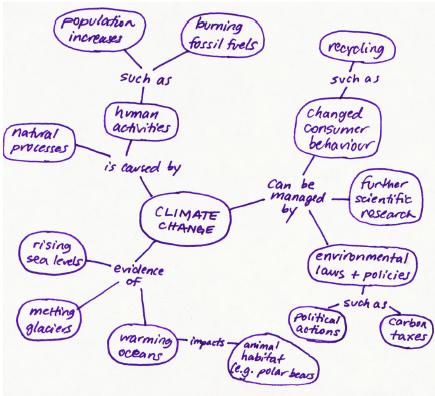
	</div>


	</div>

</div>
<div class="part-wrapper" id="part-teamwork-and-communication-wrapper">
    <div class="part  " id="part-teamwork-and-communication">
	<div class="part-title-wrap">
		<p class="part-number">IV</p>
		<h1 class="part-title">4. Teamwork and Communication</h1>
	</div>
	<div class="ugc part-ugc">
		<div class="textbox textbox--learning-objectives"><div class="textbox__header"><p class="textbox__title">Learning Objectives</p> </div> <div class="textbox__content"><p>This section contains the following chapters with the following learning objectives:</p> <ul><li><a href="#chapter-teampmtools" target="_blank" rel="noopener" data-url="/technicalwritingh5p/chapter/teampmtools/">4.1 Team Project Management Tools and Strategies</a>: Understand how to use strategies and documents, such as Team Charters, Agendas, Minutes, Work Logs to facilitate effective teamwork.</li> <li><a href="#chapter-models-for-understanding-team-dynamics" target="_blank" rel="noopener" data-url="/technicalwritingh5p/chapter/models-for-understanding-team-dynamics/">4.2 Models for Understanding Team Dynamics</a>: Understand various models of team dynamics, and reflect on how you might apply them to help you and your team mates resolve conflicts and work productively.</li> <li><a href="#chapter-collaborative-writing" target="_blank" rel="noopener" data-url="/technicalwritingh5p/chapter/collaborative-writing/">4.3 Collaborative Writing</a>: Understand the processes and strategies for writing collaboratively, and reflect on what works for your team.</li> </ul> </div> </div> <p>As companion reading to this chapter that offers a comprehensive discussion of how to work effectively in teams, I recommend reading the sections called “Introduction to Teamwork” and “Project Management” in <em>Designing Engineers: An Introductory Text</em>, by Susan McCahan <em>et al</em>.<span class="footnote"><span class="footnote-indirect" data-fnref="74-1"></span></span>.</p>
	</div>
			
				<div class="footnotes"><div id='74-1'><p>S. McCahan, P. Anderson, M. Kortschot, P. E. Weiss, and K. A. Woodhouse, “Introduction to teamwork,” in <em>Designing Engineers: An Introductory</em> <em>Text</em>, Hoboken, NJ: Wiley, 2015, pp. 219-246.</p>
</div></div>
	</div>
<div class="chapter numberless " id="chapter-teampmtools" title="4.1 Team Project Management Tools and Strategies">
	<div class="chapter-title-wrap">
		<p class="chapter-number"></p>
		<h1 class="chapter-title">4.1 Team Project Management Tools and Strategies</h1>
					<p class="chapter-author">Suzan Last and Candice Neveu</p>
			</div>
	<div class="ugc chapter-ugc">
				<p>Teamwork is a key component of almost any workplace, but it is essential in engineering and software development environments where you often find yourself working as part of a team on large projects. Imagine for a moment how many people must work together to designs a product like <em>Skyrim</em> (click here if you want to know: <a class="external" href="http://en.uesp.net/wiki/Skyrim:Development_Team" target="_blank" rel="noopener"><em>Skyrim</em> development team</a>).</p> <p>It is is widely accepted that team synergy and team intelligence lead to greater efficiency and better results in most situations. Why, then, are some people reluctant to engage in teamwork? Perhaps this reluctance stems from ineffective or dysfunctional teamwork experiences in the past. Often the culprit in these situations is not a &#8220;poor team player&#8221; or an &#8220;inability to get along with others.&#8221; More likely it was caused by one of two things:  misaligned goals or confusion over roles. For teamwork to be effective, all members of the team must understand and share the goals of the project, and all members must fully understand their roles—what is expected of them, and how they will be held accountable. An effective team leader will make sure that goals and roles are fully understood by all team members.</p> <p class="textbox__title">&#8220;Introduction to Teamwork,&#8221; a section in <em>Designing Engineers</em>, by Susan McCahan <em>et al</em>.<span class="footnote"><span class="footnote-indirect" data-fnref="75-1"></span></span> provides a detailed description of the stages of the Tuckman Team Formation model and the need for effective communications at each stage. A team, according to McCahan <em>et al</em>., “is a group of people who come together to work in an interrelated manner towards a common goal.” They go on to differentiate a team from a group by noting that a team is connected by “a common purpose or goal and the reliance on the skills of all the members to meet the goal” <span class="footnote"><span class="footnote-indirect" data-fnref="75-2"></span></span>. In other words, team members see themselves as part of a collective working towards a common goal rather than individuals working on separate tasks that may lead to an end product. In order to work effectively, team members need to communicate clearly and constructively, and learn how to deal with crises and conflicts that will inevitably arise.</p> <div class="textbox textbox--exercises"><div class="textbox__header"><p class="textbox__title">EXERCISE 4.1 Reflect on your previous team work experience</p> </div> <div class="textbox__content"><p class="no-indent">Think of a time when you had to work with others to produce something – a poster, presentation, document, <em>etc</em>. Briefly describe what the task was and then consider the following questions:</p> <ol><li>What was the team&#8217;s overall goal?</li> <li>What was your job within the group?</li> <li>How were the jobs distributed?</li> <li>How well did your group function?  Did anyone on the team behave in ways that McCahan <em>et al</em>. characterize as &#8220;hitchhikers, hijackers, isolationists, and enablers&#8221;?<span class="footnote"><span class="footnote-indirect" data-fnref="75-3"></span></span></li> <li>Was the outcome successful?</li> <li>Would you happily work with those team mates again on another project? Why or why not?</li> <li>How would you rate your overall experience and why?</li> </ol> </div> </div> <p>Some common benefits of working in teams include increased productivity, increased innovation, and increased efficiency. Excellent teams have synergy that makes them more than simply the sum of their parts. The term &#8220;team intelligence&#8221; refers to the fact that collectively, teams have more knowledge and skill than the single individuals working separately. However, challenges can also arise when working in a team. Conflicts within a team do occur and often they begin as a result of poor communication and weak focus. Some ways to handle these challenges include the following:</p> <ul><li><strong>Elect a team leader:</strong> the team leader will act as the hub for communication and tasks. This person helps provide direction and guidance for the team. This should be someone who has earned the team’s respect and who can be persuasive and tactful. This role can be rotated among team members.</li> <li><strong>Ensure the goal is clear: </strong>a team is governed by the goal that everyone works to achieve. It is important that the goal is clearly understood and agreed upon by everyone on the team.</li> <li><strong>Establish team rules: </strong>as a team, determine the rules by which the team will operate. These should include expectations around time, meetings, attendance, communication, decision-making, contribution, and mechanisms to warn and/or fire a team member or quit a team.</li> <li><strong>Assign responsibilities: </strong>as part of the breakdown of tasks, members should be assigned responsibility for certain tasks, which means that they are the primary leads in preventing and addressing issues that come up in that area.</li> <li><strong>Set agendas for meetings and keep minutes: </strong>to ensure that team meeting time is useful and achieves its purpose, plan an agenda for each meeting to help keep everyone on task. In addition, have someone take minutes to record decisions that are made. This record helps prevent repetition and ensures work actually gets done.</li> <li><strong>Determine the timing for tasks: </strong>task timing involves two aspects: the duration for completing the task and the timing of the task in relation to the other tasks. Typically, tasks take longer than you think they will so it is often better to add 25% to your duration estimate. The timing of the tasks are important to figure out because some tasks can be completed concurrently, but others may have to be sequenced. Professionals often use <a class="external" href="http://web.mit.edu/course/21/21.guide/grf-ttab.htm" target="_blank" rel="noopener">Gantt Charts</a> to outline these tasks and the time they will take within the overall project scale.</li> <li><strong>Manage communications: </strong>if a problem arises with someone on the team, the team leader should speak privately to the person and clearly indicate what needs to change and why. The focus should be on the behaviour, not on the person’s character. Issues should be dealt with quickly rather than left to deteriorate further. If this does not solve the problem, then try other approaches (See McCahan <em>et al</em>. “Management Strategies” for more information).</li> </ul> <p>There are several tools and strategies that teams can use to improve their functioning and productivity. Some examples include using the following documents:</p> <ul><li><strong>Team Charter</strong>: outlines the rules and expectations agreed upon by the team</li> <li><strong>Meeting Agenda</strong>: outlines the main points for discussion at a meeting</li> <li><strong>Meeting Minutes:</strong> records the decisions and relevant discussion points for a meeting</li> <li><strong>Work Logs</strong>: records the tasks and time spent for each team member</li> <li><strong>Status Reports</strong>: records the completed tasks and work left to complete</li> <li><strong>Gantt Chart:</strong> breaks down tasks and their estimated duration over the work period.</li> </ul> <p>There are also many software programs and apps that can help teams manage projects. Students often use Google docs to work collaboratively on a document or project. The most common one used in the workplace is Microsoft Project. However, other productivity apps can be used to great effect as well.  <strong>Slack</strong>, <strong>Wrike,</strong> and <strong>Asana</strong> are free popular web based options. Whatever tool you choose to use, it should be something that all members can access and understand.</p> <h1>Meeting Documents: Agendas and Minutes</h1> <p class="textbox__title">What happens at team meetings should be planned and recorded for future reference. <strong>Agendas</strong> and <strong>Minutes</strong> are documents that do this. A meeting also should have a chair (the person who keeps things on track) and a recorder (who records what happened and what decisions were made). The Agenda is the plan for what you want to discuss and accomplish at the meeting. It is usually made up of a list of items, sometimes with a time frame for each item.</p> <div class="textbox textbox--examples"><div class="textbox__header"><p class="textbox__title">Sample Agenda</p> </div> <div class="textbox__content"><p class="import-Normal" style="text-align: center;"><strong>ENGR 240 Team Meeting Agenda</strong></p> <p class="import-Normal" style="padding-left: 30px;">Date:</p> <p class="import-Normal" style="padding-left: 30px;">Place and time:</p> <p class="import-Normal" style="padding-left: 30px;">Members:</p> <p style="padding-left: 30px;">&#8212;&#8212;&#8212;&#8212;&#8212;&#8212;&#8212;&#8212;&#8212;&#8212;&#8212;&#8212;&#8212;&#8212;&#8212;&#8212;&#8212;-</p> <ul><li>Updates from each team member (progress) (5 min each)</li> <li>Develop work plan for upcoming week (15 min)</li> <li>Determine next meeting time (5 min)</li> <li>Work on Milestone 3 together (45 min)</li> <li>Matters arising</li> </ul> </div> </div> <p class="textbox__title"><strong>Minutes</strong> follow up on the agenda by recording what decisions were made and what important topics were discussed. One person is responsible for recording the events of the meeting, and distributing the minutes to each member (via email usually). That way, no one should forget what tasks they agreed to complete and when.</p> <div class="textbox textbox--examples"><div class="textbox__header"><p class="textbox__title">Sample Minutes</p> </div> <div class="textbox__content"><p class="import-Normal" style="text-align: center;"><strong>ENGR 240 Team Meeting Minutes</strong></p> <p class="import-Normal" style="padding-left: 30px;">Thursday Feb, 15, 2016</p> <p class="import-Normal" style="padding-left: 30px;">Cle A035, 3:30-4:45</p> <p class="import-Normal" style="padding-left: 30px;">Present: Jaime, Chris, Renee</p> <p class="import-Normal" style="padding-left: 30px;">Regrets: Joe (has the flu)</p> <p style="padding-left: 30px;">&#8212;&#8212;&#8212;&#8212;&#8212;&#8212;&#8212;&#8212;&#8212;&#8212;&#8212;&#8212;&#8212;&#8212;&#8212;&#8212;&#8212;-</p> <ul><li>All team members have completed last week’s work plan (Joe emailed a report, as she is sick)</li> <li>In the coming week, we plan to complete the following:<br /> <table class="grid" style="border-collapse: collapse; width: 90%;"><tbody><tr><td style="width: 50%; text-align: center;"><strong>Task</strong></td> <td style="width: 50%; text-align: center;"><strong>Who will do it?</strong></td> </tr> <tr><td style="width: 50%;">1. Interview Facilities Management contact</td> <td style="width: 50%;">Renee</td> </tr> <tr><td style="width: 50%;">2. Research bike share programs</td> <td style="width: 50%;">(Joe?)</td> </tr> <tr><td style="width: 50%;">3. Design a survey/questionnaire</td> <td style="width: 50%;">Chris</td> </tr> <tr><td style="width: 50%;">4. Do a site visit</td> <td style="width: 50%;">Jaime</td> </tr> </tbody> </table> </li> </ul> <ul><li>Next meeting: next Thursday Feb 21, after class</li> <li>Excellent progress during meeting; Joe will follow up on researching bike share programs.</li> <li>Meeting adjourned 4:50</li> </ul> </div> </div> <h1>Work Logs</h1> <p>Work logs are common documents used in the work place (and in your Co-op Work Terms) to keep track of what work is done, by whom, and how long it took. These can be very helpful for keeping a team on track and ensuring equitable workloads. To ensure accountability, have each team member sign off on the work log.</p> <div class="textbox textbox--examples"><div class="textbox__header"><p class="textbox__title">Sample Work Log</p> </div> <div class="textbox__content"><table class="grid" style="border-collapse: collapse; width: 100%;"><tbody><tr><td style="width: 12.5%; text-align: center;"><strong>Date</strong></td> <td style="width: 35%; text-align: center;"><strong>Task Description</strong></td> <td style="width: 12.5%; text-align: center;"><strong>Assigned to </strong></td> <td style="width: 25%; text-align: center;"><strong>Status / Date Completed</strong></td> <td style="width: 15%; text-align: center;"><strong>Total Time Spent</strong></td> </tr> <tr><td style="width: 12.5%;"><strong> </strong></td> <td style="width: 35%;"><strong> </strong></td> <td style="width: 12.5%;"><strong> </strong></td> <td style="width: 25%;"><strong> </strong></td> <td style="width: 15%;"><strong> </strong></td> </tr> <tr><td style="width: 12.5%;"><strong> </strong></td> <td style="width: 35%;"><strong> </strong></td> <td style="width: 12.5%;"><strong> </strong></td> <td style="width: 25%;"><strong> </strong></td> <td style="width: 15%;"><strong> </strong></td> </tr> <tr><td style="width: 12.5%;"><strong> </strong></td> <td style="width: 35%;"><strong> </strong></td> <td style="width: 12.5%;"><strong> </strong></td> <td style="width: 25%;"><strong> </strong></td> <td style="width: 15%;"><strong> </strong></td> </tr> <tr><td style="width: 12.5%;"><strong> </strong></td> <td style="width: 35%;"><strong> </strong></td> <td style="width: 12.5%;"><strong> </strong></td> <td style="width: 25%;"><strong> </strong></td> <td style="width: 15%;"><strong> </strong></td> </tr> <tr><td style="width: 12.5%;"><strong> </strong></td> <td style="width: 35%;"><strong> </strong></td> <td style="width: 12.5%;"><strong> </strong></td> <td style="width: 25%;"><strong> </strong></td> <td style="width: 15%;"><strong> </strong></td> </tr> <tr><td style="width: 12.5%;"><strong> </strong></td> <td style="width: 35%;"><strong> </strong></td> <td style="width: 12.5%;"><strong> </strong></td> <td style="width: 25%;"><strong> </strong></td> <td style="width: 15%;"><strong> </strong></td> </tr> </tbody> </table> <p><strong>Team signatures:</strong></p> <p>Name: <span style="text-decoration: underline;" aria-label="blank">                                                                    </span></p> <p>Name: <span style="text-decoration: underline;" aria-label="blank">                                                                    </span></p> <p>Name: <span style="text-decoration: underline;" aria-label="blank">                                                                    </span></p> <p>Name: <span style="text-decoration: underline;" aria-label="blank">                                                                    </span></p> </div> </div> <p>The next section reviews several Models for Understanding Team Dynamics.</p> 
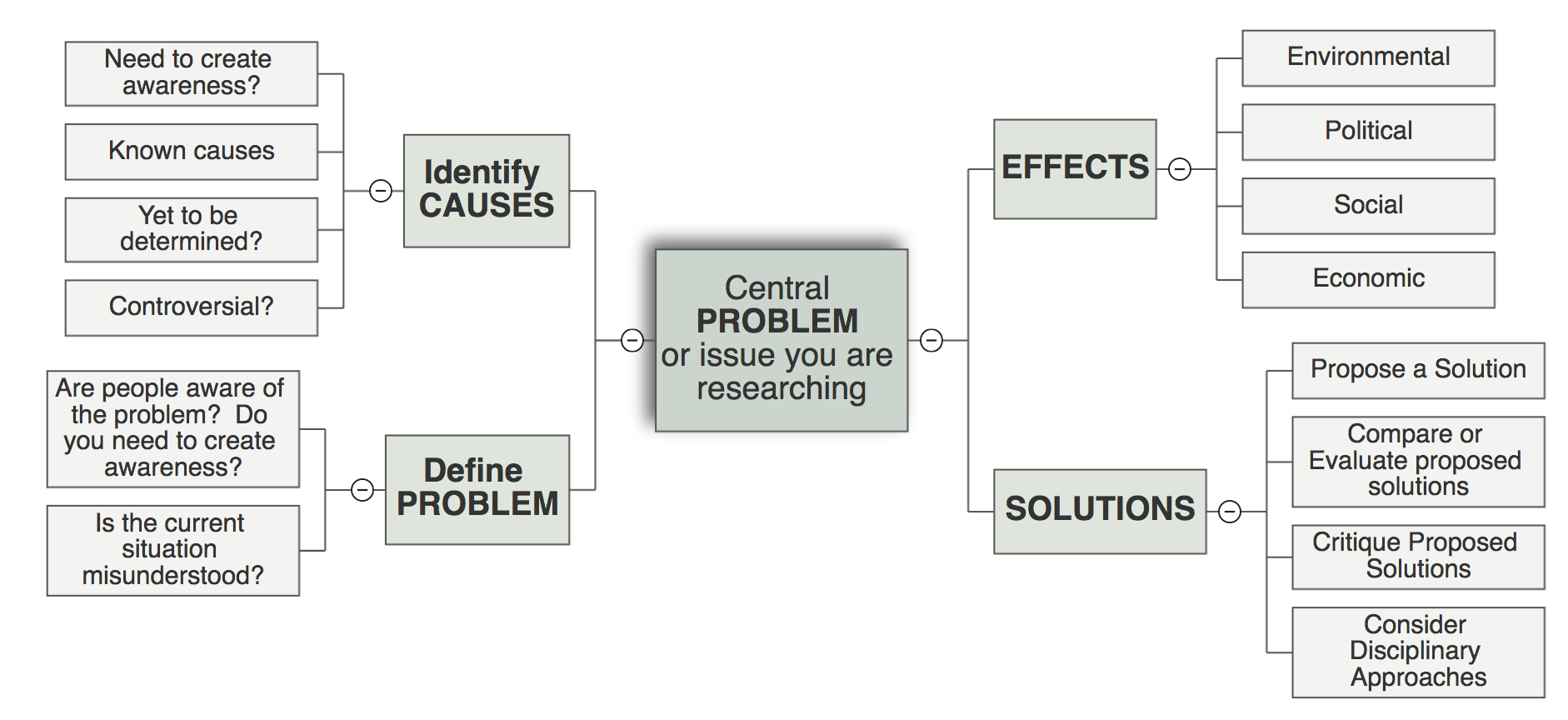
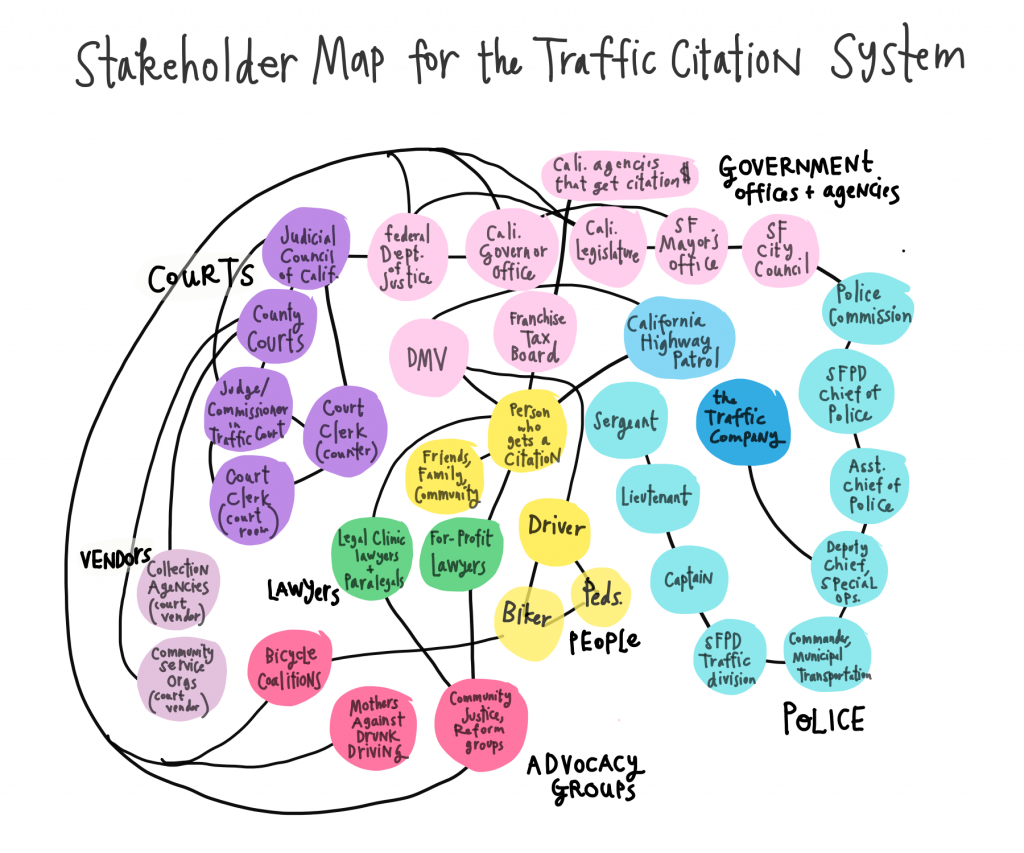
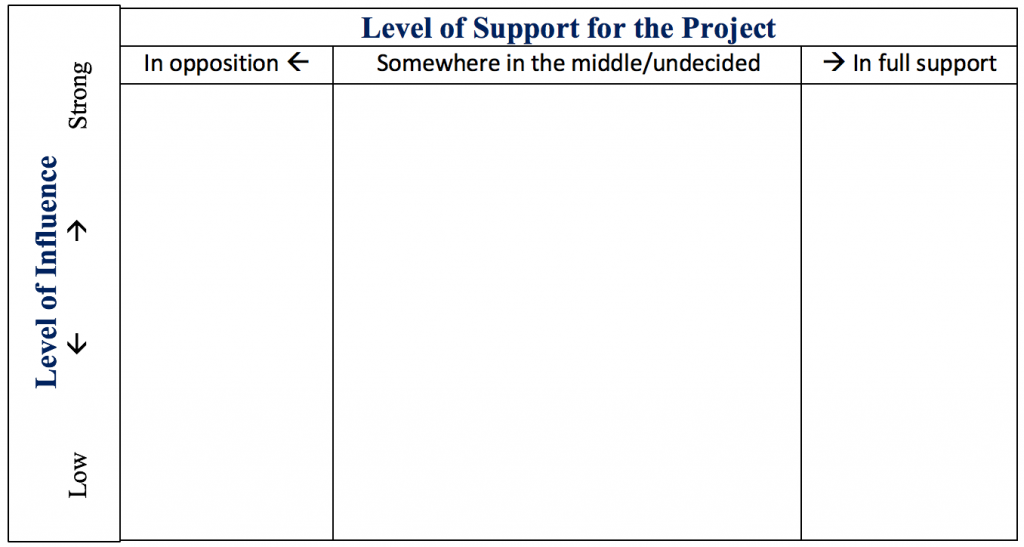
	</div>
			
				
				<div class="footnotes"><div id='75-1'><p>S. McCahan, P. Anderson, M. Kortschot, P. E. Weiss, and K. A. Woodhouse, “Introduction to teamwork,” in <em>Designing Engineers: An Introductory Text</em>, Hoboken, NJ: Wiley, 2015, pp. 219-246.</p>
</div><div id='75-2'><p>McCahan <em>et al</em>., p. 220</p>
</div><div id='75-3'><p>McCahan <em>et al</em>., p. 243</p>
</div></div>
	</div>
<div class="chapter numberless " id="chapter-models-for-understanding-team-dynamics" title="4.2 Models for Understanding Team Dynamics">
	<div class="chapter-title-wrap">
		<p class="chapter-number"></p>
		<h1 class="chapter-title">4.2 Models for Understanding Team Dynamics</h1>
								</div>
	<div class="ugc chapter-ugc">
				 <p class="import-BodyText">An important aspect of effective teamwork entails understanding group dynamics in terms of both team situation and individual temperament. The next few pages review a variety models often applied in workplaces that can help a team perform optimally and manage crises effectively.</p> <h1>The Tuckman Team Model</h1> <p class="import-BodyText">“Tuckman’s Stages of Group Development,” proposed by psychologist Bruce Tuckman in 1965,<span class="footnote"><span class="footnote-indirect" data-fnref="79-1"></span></span> is one of the most famous theories of team development. It describes four stages that teams may progress through: <strong>forming, storming, norming</strong>, and <strong>performing</strong> (a 5th stage was added later:&nbsp; <strong>adjourning</strong>).&nbsp; According to McCahan <em>et al</em>., the stages move from organizing to producing, and although the stages appear linear, in fact teams may move backwards depending on events that may influence the team and the communications strategies that they use. Some teams can also stall in a stage and never fully realize their potential. <strong>Figure 4.2.1</strong> outlines these stages. Please refer to the McCahan <em>et al</em>. text<span class="footnote"><span class="footnote-indirect" data-fnref="79-2"></span></span> for a more complete discussion.</p> <div class="wp-caption aligncenter" id="attachment_77" aria-describedby="caption-attachment-77" style="width: 1024px"><img class="wp-image-77 size-large" src="https://opentextbc.ca/technicalwritingh5p/wp-content/uploads/sites/387/2017/12/Tuckman_CC-1024x981.png" alt="circular diagram of Tuckman’s Linear Model of group development. Shows five stages: Forming, stroming, norming, performing, and adjourning." width="1024" height="981" srcset="https://opentextbc.ca/technicalwritingh5p/wp-content/uploads/sites/387/2017/12/Tuckman_CC-1024x981.png 1024w, https://opentextbc.ca/technicalwritingh5p/wp-content/uploads/sites/387/2017/12/Tuckman_CC-300x288.png 300w, https://opentextbc.ca/technicalwritingh5p/wp-content/uploads/sites/387/2017/12/Tuckman_CC-768x736.png 768w, https://opentextbc.ca/technicalwritingh5p/wp-content/uploads/sites/387/2017/12/Tuckman_CC-65x62.png 65w, https://opentextbc.ca/technicalwritingh5p/wp-content/uploads/sites/387/2017/12/Tuckman_CC-225x216.png 225w, https://opentextbc.ca/technicalwritingh5p/wp-content/uploads/sites/387/2017/12/Tuckman_CC-350x335.png 350w, https://opentextbc.ca/technicalwritingh5p/wp-content/uploads/sites/387/2017/12/Tuckman_CC.png 1420w" sizes="auto, (max-width: 1024px) 100vw, 1024px" /><div class="wp-caption-text" id="caption-attachment-77">Figure 4.2.1 The Stages of the Tuckman Model.</div></div> <p>Note that at each stage, communication is a critical component of successfully moving to the next stage. The <strong>forming</strong> stage, when everyone is getting to know each other and are trying to make a good impression, is a good time to create a set of shared expectations, guidelines, or a Team Charter. A team forming activity is also a good idea to help build trust and get to know the various strengths and weaknesses of the team members. This is an orientation stage, on both an interpersonal and professional level, where preliminary boundaries and expectations are established.</p> <p>The <strong>storming</strong> stage is the one most often characterized by group conflict and dysfunction. It is often where the preliminary expectations and boundaries are challenged as individuals learn more about each other’s motivations. This coincides with the “brainstorming” stage of the design process, in which each member contributes ideas that could potentially become the focus of the project. It is also the stage where team mates learn about each others’ strengths and weaknesses, and try to determine what their roles will be in the project.&nbsp; Learning to harness the constructive potential of conflict and compromise in this stage is important to progressing to the next stage.</p> <p>During the <strong>norming</strong> stage, if conflicts have been resolved and team mates have proved flexible, all is going well, each team member knows their role and works on their part of the project. Sometimes, people work independently in this stage, but check in with team mates frequently to make sure work flow is efficient and effective. Group cohesion ensures that everyone is responsible to the task and to each other.&nbsp; Problems might arise at this stage if teammates do not fully understand their role, the team expectations, or the overall goal; revisiting the forming or storming stage may be required.</p> <p>Few first-time teams reach the <strong>performing</strong> stage, as this happens when teams have worked together well on several projects, have established a synergy, and have developed systems that that make projects go smoothly and efficiently. Less time is needed to form, storm and learn to norm; performing teams can move quickly and interdependently to tackling the task at hand. <strong>Adjourning</strong> and going their separate ways can often be somewhat emotional for these teams. <strong>Figure 4.2.2</strong>&nbsp;depicts the trajectory of each team member during each stage.</p> <div class="wp-caption aligncenter" id="attachment_78" aria-describedby="caption-attachment-78" style="width: 1024px"><img class="CC BY-SA 4.0 wp-image-78 size-large" title="DIogo Nicoleti [CC BY-SA 4.0 (https://creativecommons.org/licenses/by-sa/4.0)], from Wikimedia Commons" src="https://opentextbc.ca/principlesofmarketingh5p/wp-content/uploads/sites/387/2022/01/Screen-Shot-2018-11-24-at-1.40.42-PM-1024x247.png" alt="Forming: 4 arrows pointing to the centre. Storming, 4 arrows going in various random directions. Norming: 4 arrows going in almost the same direction. Performing: 4 arrows perfectly aligned. Adjourning: 4 arrows pointing outward from the centre in the 4 cardinal directions." width="1024" height="247" srcset="https://opentextbc.ca/technicalwritingh5p/wp-content/uploads/sites/387/2022/01/Screen-Shot-2018-11-24-at-1.40.42-PM-1024x247.png 1024w, https://opentextbc.ca/technicalwritingh5p/wp-content/uploads/sites/387/2022/01/Screen-Shot-2018-11-24-at-1.40.42-PM-300x72.png 300w, https://opentextbc.ca/technicalwritingh5p/wp-content/uploads/sites/387/2022/01/Screen-Shot-2018-11-24-at-1.40.42-PM-768x185.png 768w, https://opentextbc.ca/technicalwritingh5p/wp-content/uploads/sites/387/2022/01/Screen-Shot-2018-11-24-at-1.40.42-PM-65x16.png 65w, https://opentextbc.ca/technicalwritingh5p/wp-content/uploads/sites/387/2022/01/Screen-Shot-2018-11-24-at-1.40.42-PM-225x54.png 225w, https://opentextbc.ca/technicalwritingh5p/wp-content/uploads/sites/387/2022/01/Screen-Shot-2018-11-24-at-1.40.42-PM-350x84.png 350w, https://opentextbc.ca/technicalwritingh5p/wp-content/uploads/sites/387/2022/01/Screen-Shot-2018-11-24-at-1.40.42-PM.png 1312w" sizes="auto, (max-width: 1024px) 100vw, 1024px" /><div class="wp-caption-text" id="caption-attachment-78"><em><strong>Figure 4.2.2</strong> Trajectory of team mates during each stage of the Tuckman team formation model.</em></div></div> <p>Review the components of the Tuckman model and then use the H5P interaction to test your knowledge. Drag the correct description to the appropriate component.</p> <div class="h5p"><div class="textbox interactive-content"><span class="interactive-content__icon"></span> <p>An interactive H5P element has been excluded from this version of the text. You can view it online here:<br /> <a href="https://opentextbc.ca/technicalwritingh5p/?p=79#h5p-20" title="Tuckman&amp;#039;s Linear Model of Group Development">https://opentextbc.ca/technicalwritingh5p/?p=79#h5p-20</a> </p> </div> </div> <div class="pdf"><p><img class="size-full wp-image-261 aligncenter" src="https://opentextbc.ca/technicalwritingh5p/wp-content/uploads/sites/387/2018/05/H5P-20.png" alt="" width="693" height="547" srcset="https://opentextbc.ca/technicalwritingh5p/wp-content/uploads/sites/387/2018/05/H5P-20.png 693w, https://opentextbc.ca/technicalwritingh5p/wp-content/uploads/sites/387/2018/05/H5P-20-300x237.png 300w, https://opentextbc.ca/technicalwritingh5p/wp-content/uploads/sites/387/2018/05/H5P-20-65x51.png 65w, https://opentextbc.ca/technicalwritingh5p/wp-content/uploads/sites/387/2018/05/H5P-20-225x178.png 225w, https://opentextbc.ca/technicalwritingh5p/wp-content/uploads/sites/387/2018/05/H5P-20-350x276.png 350w" sizes="auto, (max-width: 693px) 100vw, 693px" /></p> </div> <p>Next we will look at the DISC Model.</p> <h1>DISC Model</h1> <p>DISC theory, developed in 1928 by Dr. William Moulton Marston (who also, as it happens, created the <em>Wonder Woman</em> comic series!), has evolved into a useful model for conflict management as it predicts behaviours based on four key personality traits he originally described as Dominance, Inducement, Submission, and Compliance.<span class="footnote"><span class="footnote-indirect" data-fnref="79-3"></span></span> The names of these four traits have been variously revised by others over the decades, so you might find different terms used in different contexts. The four general traits are now often described as (1) Dominance, (2) Influence/Inspiring (3) Steadiness/Supportive, and (4) Compliance/Conscientiousness (see <strong>Figure 4.2.3</strong>).</p> <div class="wp-caption aligncenter" id="attachment_81" aria-describedby="caption-attachment-81" style="width: 1178px"><img class="wp-image-81 size-full" src="https://opentextbc.ca/technicalwritingh5p/wp-content/uploads/sites/387/2018/05/DISC-image-Fig-4.2.3.png" alt="Circle separated into 4 quadrants, each with one of the DISC profiles briefly described" width="1178" height="784" srcset="https://opentextbc.ca/technicalwritingh5p/wp-content/uploads/sites/387/2018/05/DISC-image-Fig-4.2.3.png 1178w, https://opentextbc.ca/technicalwritingh5p/wp-content/uploads/sites/387/2018/05/DISC-image-Fig-4.2.3-300x200.png 300w, https://opentextbc.ca/technicalwritingh5p/wp-content/uploads/sites/387/2018/05/DISC-image-Fig-4.2.3-1024x682.png 1024w, https://opentextbc.ca/technicalwritingh5p/wp-content/uploads/sites/387/2018/05/DISC-image-Fig-4.2.3-768x511.png 768w, https://opentextbc.ca/technicalwritingh5p/wp-content/uploads/sites/387/2018/05/DISC-image-Fig-4.2.3-65x43.png 65w, https://opentextbc.ca/technicalwritingh5p/wp-content/uploads/sites/387/2018/05/DISC-image-Fig-4.2.3-225x150.png 225w, https://opentextbc.ca/technicalwritingh5p/wp-content/uploads/sites/387/2018/05/DISC-image-Fig-4.2.3-350x233.png 350w" sizes="auto, (max-width: 1178px) 100vw, 1178px" /><div class="wp-caption-text" id="caption-attachment-81"><em><strong>Figure 4.2.3</strong>&nbsp;DISC Profile</em></div></div> <p>Industries often use DISC assessments in professional contexts. Having some insight into your teammates’ personality traits can help when trying to resolve conflicts. General characteristics of each trait are as follows:</p> <ul><li><strong>Dominance </strong> <ul><li><em>Characteristics</em>: direct, decisive, ego-driven, problem-solver, and risk-taker; likes new challenges and freedom from routine; driven to overcome obstacles</li> <li><em>Strengths</em>: great organizer and time manager; challenges the status quo; innovative</li> <li><em>Weaknesses</em>: can be argumentative, disrespectful of authority, and overly ambitious (taking on too much); can be blunt, stubborn, and aggressive</li> </ul> </li> </ul> <ul><li><strong>Inspiring/Influential</strong> <ul><li><em>Characteristics</em>: enthusiastic, persuasive, optimistic, trusting, impulsive, charismatic, and emotional</li> <li><em>Strengths</em>: creative problem solver; great cheer-leader, negotiator, and peace-maker; a real “people person”</li> <li><em>Weaknesses</em>: more concerned with popularity than tangible results; lacks attention to detail</li> </ul> </li> </ul> <ul><li><strong>Steady/Supportive</strong> <ul><li><em>Characteristics</em>: reliable, predictable, friendly, good listener, team player, empathetic, easy-going, and altruistic.</li> <li><em>Strengths</em>: dependable, loyal; respects authority; has patience and empathy; good at conflict resolution; willing to compromise.</li> <li><em>Weaknesses</em>: resistant to change; sensitive to criticism; difficulty prioritizing</li> </ul> </li> </ul> <ul><li><strong>Cautious/Conscientious/Compliant</strong> <ul><li><em>Characteristics: </em> has high standards<em>; </em>values precision and accuracy; analytical and systematic; even-tempered, realistic, and logical; methodical; respect for authority</li> <li><em>Strengths</em>: great information gatherer/researcher; able to define situations precisely and accurately; offers realistic perspective</li> <li><em>Weaknesses</em>: can get bogged down in details; needs clear boundaries, procedures, and methods; difficulty accepting criticism; may avoid conflict or just “give in.” May be overly timid.</li> </ul> </li> </ul> <p>Review the following H5P flash card interaction to test your understanding of the traits in the DISC model.</p> <div class="textbox interactive-content"><span class="interactive-content__icon"></span> <p>An interactive H5P element has been excluded from this version of the text. You can view it online here:<br /> <a href="https://opentextbc.ca/technicalwritingh5p/?p=79#h5p-21" title="DISC Model Flash Cards">https://opentextbc.ca/technicalwritingh5p/?p=79#h5p-21</a> </p> </div> <p>Richard Beckhard’s GRPI model, adapted as the GRIP model will be discussed next.</p> <h1>GRIP Model</h1> <p>Richard Beckhard’s GRPI model,<span class="footnote"><span class="footnote-indirect" data-fnref="79-4"></span></span> originally developed in 1972, has been widely adapted in sports contexts as the <strong>GRIP</strong> model (see <strong>Figure 4.2.4</strong>), outlining four interrelated components of highly effective teamwork:</p> <ul><li><strong>Goals</strong>: everyone must fully understand and be committed to the goals of the team, and of the organization. Everyone’s goals must be aligned in order to establish trust, make progress, and achieve desired outcome.</li> <li><strong>Roles</strong>: all team members must know what part they play, what is expected, and how they are held accountable and responsible.</li> <li><strong>Interpersonal</strong>: quality communication and collaboration require and foster trust among team members; sensitivity and flexibility needed to deal with conflict and make progress.</li> <li><strong>Processes</strong>: defined system for how decisions are made, how the team solves problems and addresses conflict; defines work flow and procedures to be followed in completing the project.</li> </ul> <div class="wp-caption aligncenter" id="attachment_442" aria-describedby="caption-attachment-442" style="width: 600px"><img class="wp-image-442" src="https://opentextbc.ca/technicalwritingh5p/wp-content/uploads/sites/387/2018/05/GRIP-Model.jpg" alt="Circle image divided into 4 equal portions, with each of the 4 GRIP elements in them: Goals, Roles, Interpersonal Relationships, and Rrocesses." width="600" height="600" srcset="https://opentextbc.ca/technicalwritingh5p/wp-content/uploads/sites/387/2018/05/GRIP-Model.jpg 1501w, https://opentextbc.ca/technicalwritingh5p/wp-content/uploads/sites/387/2018/05/GRIP-Model-300x300.jpg 300w, https://opentextbc.ca/technicalwritingh5p/wp-content/uploads/sites/387/2018/05/GRIP-Model-1024x1024.jpg 1024w, https://opentextbc.ca/technicalwritingh5p/wp-content/uploads/sites/387/2018/05/GRIP-Model-150x150.jpg 150w, https://opentextbc.ca/technicalwritingh5p/wp-content/uploads/sites/387/2018/05/GRIP-Model-768x767.jpg 768w, https://opentextbc.ca/technicalwritingh5p/wp-content/uploads/sites/387/2018/05/GRIP-Model-65x65.jpg 65w, https://opentextbc.ca/technicalwritingh5p/wp-content/uploads/sites/387/2018/05/GRIP-Model-225x225.jpg 225w, https://opentextbc.ca/technicalwritingh5p/wp-content/uploads/sites/387/2018/05/GRIP-Model-350x350.jpg 350w" sizes="auto, (max-width: 600px) 100vw, 600px" /><div class="wp-caption-text" id="caption-attachment-442"><em><strong>Figure 4.2.4</strong>&nbsp;GRIP Model of teamwork dynamics.</em></div></div> <p>Review the components of the GRIP model and then use the H5P interaction to test your knowledge. Drag the correct description to the appropriate component.</p> <div class="h5p"><div class="textbox interactive-content"><span class="interactive-content__icon"></span> <p>An interactive H5P element has been excluded from this version of the text. You can view it online here:<br /> <a href="https://opentextbc.ca/technicalwritingh5p/?p=79#h5p-22" title="Grip Model">https://opentextbc.ca/technicalwritingh5p/?p=79#h5p-22</a> </p> </div> </div> <div class="pdf"><img class="alignnone size-full wp-image-443" src="https://opentextbc.ca/technicalwritingh5p/wp-content/uploads/sites/387/2018/05/GRIP-Model-H5P-scaled.jpg" alt="" width="2560" height="1440" srcset="https://opentextbc.ca/technicalwritingh5p/wp-content/uploads/sites/387/2018/05/GRIP-Model-H5P-scaled.jpg 2560w, https://opentextbc.ca/technicalwritingh5p/wp-content/uploads/sites/387/2018/05/GRIP-Model-H5P-300x169.jpg 300w, https://opentextbc.ca/technicalwritingh5p/wp-content/uploads/sites/387/2018/05/GRIP-Model-H5P-1024x576.jpg 1024w, https://opentextbc.ca/technicalwritingh5p/wp-content/uploads/sites/387/2018/05/GRIP-Model-H5P-768x432.jpg 768w, https://opentextbc.ca/technicalwritingh5p/wp-content/uploads/sites/387/2018/05/GRIP-Model-H5P-1536x864.jpg 1536w, https://opentextbc.ca/technicalwritingh5p/wp-content/uploads/sites/387/2018/05/GRIP-Model-H5P-2048x1152.jpg 2048w, https://opentextbc.ca/technicalwritingh5p/wp-content/uploads/sites/387/2018/05/GRIP-Model-H5P-65x37.jpg 65w, https://opentextbc.ca/technicalwritingh5p/wp-content/uploads/sites/387/2018/05/GRIP-Model-H5P-225x127.jpg 225w, https://opentextbc.ca/technicalwritingh5p/wp-content/uploads/sites/387/2018/05/GRIP-Model-H5P-350x197.jpg 350w" sizes="auto, (max-width: 2560px) 100vw, 2560px" /></div> <p>The next model for understanding team dynamics is the Thomas-Kilmann Conflict Model Model.</p> <h1>Thomas-Kilmann Conflict Mode Model</h1> <p>Thomas and Kilmann’s model<span class="footnote"><span class="footnote-indirect" data-fnref="79-5"></span></span> for handling team conflict outlines five main approaches to managing team conflict (<em>Competing, Accommodating, Compromising, Avoiding, and Collaborating</em>), placed in a matrix of two scales: <strong><em>Assertiveness—</em></strong>the degree to which one tries to meet one’s own needs; and <strong><em>Cooperativeness—</em></strong>degree to which one tries to satisfy the needs of other team members (See <a class="external" href="https://www.themyersbriggs.com/en-US/Products-and-Services/TKI">illustration</a>).</p> <p>Each approach can have both positive and negative impacts:</p> <ol><li><strong>Competing:</strong>&nbsp; highly assertive, but uncooperative behaviour, characterized by the urge to “win at all costs,” dominate, and engage in power struggles. This can result in animosity, but can also spur teammates to compete constructively, which can lead to interesting innovations if well managed.</li> <li><strong>Accommodating</strong>:&nbsp; highly cooperative, but unassertive behaviour. This may seem like a good way to avoid conflict, but it can also lead to self-silencing of good ideas in order to appease others, which may lead to feelings of resentment.</li> <li><strong>Compromising</strong>:&nbsp; this approach is the most moderate in both scales, and while it might seem constructive, it can lead to dissatisfaction and mediocre progress or results. Sometimes compromise is necessary, but often, the best solution comes from a single inspirational source.</li> <li><strong>Avoiding</strong>:&nbsp; being unassertive and uncooperative is generally the least effective way to deal conflict, as this simply avoids the problem and neglects the need for a solution. However, when a feasible solution to a problem seems impossible, sometimes ignoring it and focusing on what is good can be the best way to just get through it.</li> <li><strong>Collaborating</strong>:&nbsp; being highly assertive and cooperative is the best way to find solutions that benefit the whole team and build respect.</li> </ol> <p>Review the five main approaches outlined in the Thomas-Kilmann Conflict Mode model and then test your knowledge with the H5P interaction.</p> <div class="textbox interactive-content"><span class="interactive-content__icon"></span> <p>An interactive H5P element has been excluded from this version of the text. You can view it online here:<br /> <a href="https://opentextbc.ca/technicalwritingh5p/?p=79#h5p-23" title="Thomas-Kilmann Conflict Mode Model Flashcards">https://opentextbc.ca/technicalwritingh5p/?p=79#h5p-23</a> </p> </div> <p>The final model we discuss is the Lencioni model.</p> <h1>Lencioni Model</h1> <p>In his 2005 book, <em>The Five Dysfunctions of a Team, </em>Lencioni<span class="footnote"><span class="footnote-indirect" data-fnref="79-6"></span></span> outlines five common problems teams experience that impact their effectiveness:</p> <ol><li><strong>Lack of trust</strong>:&nbsp; if team members do not trust each other, they are unlikely to take risks or ask for help. A lack of trust means a low level of comfort that makes it difficult to communicate and perform effectively as a team</li> <li><strong>Fear of conflict</strong>:&nbsp; avoiding conflict can lead to an artificial “peace” at the expense of progress and innovation. Conflict is a normal part of team work and can be very productive if managed effectively.</li> <li><strong>Lack of commitment</strong>:&nbsp; team members do not commit to doing the work, do not follow through on decisions or tasks, do not meet deadlines, and let their teammates down, ultimately affecting the success of the whole project.</li> <li><strong>Avoidance of accountability</strong>.</li> <li><strong>Inattention to results</strong>:&nbsp; when team members focus on their own personal goals instead of project goals, they lose sight of the expected results that actually measure the success of the project. Not focusing on the results during the process means that no one is planning how to improve those results.</li> </ol> <div class="wp-caption aligncenter" id="attachment_445" aria-describedby="caption-attachment-445" style="width: 700px"><img class="wp-image-445" src="https://opentextbc.ca/technicalwritingh5p/wp-content/uploads/sites/387/2018/05/5-disfunctions-of-a-team-scaled.jpg" alt="Pyramid figure with the five disfunctions, from the bottom up: Absence of Trust; Fear of Conflict; Lack of Commitment; Avoidance of Accountability; and Inattention to Detail." width="700" height="394" srcset="https://opentextbc.ca/technicalwritingh5p/wp-content/uploads/sites/387/2018/05/5-disfunctions-of-a-team-scaled.jpg 2560w, https://opentextbc.ca/technicalwritingh5p/wp-content/uploads/sites/387/2018/05/5-disfunctions-of-a-team-300x169.jpg 300w, https://opentextbc.ca/technicalwritingh5p/wp-content/uploads/sites/387/2018/05/5-disfunctions-of-a-team-1024x576.jpg 1024w, https://opentextbc.ca/technicalwritingh5p/wp-content/uploads/sites/387/2018/05/5-disfunctions-of-a-team-768x432.jpg 768w, https://opentextbc.ca/technicalwritingh5p/wp-content/uploads/sites/387/2018/05/5-disfunctions-of-a-team-1536x864.jpg 1536w, https://opentextbc.ca/technicalwritingh5p/wp-content/uploads/sites/387/2018/05/5-disfunctions-of-a-team-2048x1152.jpg 2048w, https://opentextbc.ca/technicalwritingh5p/wp-content/uploads/sites/387/2018/05/5-disfunctions-of-a-team-65x37.jpg 65w, https://opentextbc.ca/technicalwritingh5p/wp-content/uploads/sites/387/2018/05/5-disfunctions-of-a-team-225x127.jpg 225w, https://opentextbc.ca/technicalwritingh5p/wp-content/uploads/sites/387/2018/05/5-disfunctions-of-a-team-350x197.jpg 350w" sizes="auto, (max-width: 700px) 100vw, 700px" /><div class="wp-caption-text" id="caption-attachment-445"><em><strong>Figure 4.2.5</strong> Lencioni Model: Five Dysfunctions of a Team</em></div></div> <p class="textbox__title">Lencioni advises tackling each dysfunction, displayed in the pyramid in <strong>Figure 4.2.5</strong>, from the bottom up. Establishing trust is a crucial first step to being able to manage conflict, achieve commitment, create accountability and focus on results.</p> <p>Review the components of the Lenconi model and then use the H5P interaction to test your knowledge. Drag the correct description to the appropriate component.</p> <div class="h5p"><div class="textbox interactive-content"><span class="interactive-content__icon"></span> <p>An interactive H5P element has been excluded from this version of the text. You can view it online here:<br /> <a href="https://opentextbc.ca/technicalwritingh5p/?p=79#h5p-24" title="Lencioni Model">https://opentextbc.ca/technicalwritingh5p/?p=79#h5p-24</a> </p> </div> </div> <div class="pdf"><p><img class="size-full wp-image-271 aligncenter" src="https://opentextbc.ca/technicalwritingh5p/wp-content/uploads/sites/387/2021/08/H5P-24.png" alt="" width="695" height="404" srcset="https://opentextbc.ca/technicalwritingh5p/wp-content/uploads/sites/387/2021/08/H5P-24.png 695w, https://opentextbc.ca/technicalwritingh5p/wp-content/uploads/sites/387/2021/08/H5P-24-300x174.png 300w, https://opentextbc.ca/technicalwritingh5p/wp-content/uploads/sites/387/2021/08/H5P-24-65x38.png 65w, https://opentextbc.ca/technicalwritingh5p/wp-content/uploads/sites/387/2021/08/H5P-24-225x131.png 225w, https://opentextbc.ca/technicalwritingh5p/wp-content/uploads/sites/387/2021/08/H5P-24-350x203.png 350w" sizes="auto, (max-width: 695px) 100vw, 695px" /></p> </div> <p>Having examined the 5 models, complete the following exercise.</p> <div class="textbox textbox--exercises"><div class="textbox__header"><p class="textbox__title">EXERCISE 4.6 Apply these models to your experience</p> </div> <div class="textbox__content"><p>Apply one or more of these models to your past or current experience of teamwork:</p> <ol><li>Have you engaged in the Tuckman team formation steps?</li> <li>Can you determine which of the DISC characteristics most closely matches your personality traits?</li> <li>Have you experienced a team project where misaligned goals or unclear roles had a negative impact?</li> <li>Do you think learning about the conflict modes or typical dysfunctions can help make your future team experiences more productive?</li> <li>Could you propose an alternative model for effective teamwork?</li> </ol> </div> </div> <h3>Media Attributions</h3> <ul><li>Figure 4.2.1 The Stages of the Tuckman Model taken from <a href="https://ecampusontario.pressbooks.pub/commbusprofcdn/">Communication for Business Professionals – Canadian Edition</a> by eCampus Ontario is licensed under a <a href="https://creativecommons.org/licenses/by-sa/4.0">CC-BY-SA licence</a>.</li> <li>Figure 4.2.2 <a href="https://commons.wikimedia.org/wiki/File:Modelo_de_Tuckman.png">Modelo de Tuckman</a> by Dlogo Nicoleti is licensed under a&nbsp;<a href="https://creativecommons.org/licenses/by-sa/4.0">CC BY-SA 4.0 licence</a>.</li> <li>Figure 4.2.3&nbsp;DISC Profile&nbsp;by Suzan Last is licensed&nbsp;under a&nbsp;<a href="https://creativecommons.org/licenses/by/4.0/">CC BY 4.0 licence</a>.</li> <li>Figure 4.2.4 GRIP Model of teamwork dynamics by Suzan Last is licensed under a&nbsp;<a href="https://creativecommons.org/licenses/by/4.0/">CC BY 4.0 licence</a>.</li> <li>Figure 4.2.5&nbsp;Lencioni Model: Five Dysfunctions of a Team&nbsp;by Suzan Last is licensed&nbsp;under a&nbsp;<a href="https://creativecommons.org/licenses/by/4.0/">CC BY 4.0 licence</a>.</li> </ul> 
	</div>
			
				
				<div class="footnotes"><div id='79-1'><p>B. Tuckman, &#8220;Developmental sequence in small groups,&#8221; <em>Psychological Bulletin</em>, vol. 63, no. 6, pp. 384-399. Available: http://dx.doi.org/10.1037/h0022100 :</p>
</div><div id='79-2'><p>S. McCahan, P. Anderson, M. Kortschot, P. E. Weiss, and K. A. Woodhouse, “Introduction to teamwork,” in <em>Designing Engineers: An Introductory Text</em>, Hoboken, NJ: Wiley, 2015, pp. 219-246.</p>
</div><div id='79-3'><p>W. M. Marsten, <em>Emotions of Normal People</em>. Keegan Paul Trench Trubner and Co. Ltd., 1928; republished London: Routledge, 2002</p>
</div><div id='79-4'><p>R. Beckhard, (1972). “Optimizing team building efforts,” <em>Journal of Contemporary Business</em>, 1972, pp. 23–27.</p>
</div><div id='79-5'><p>K. W. Thomas &amp; R. H. Kilmann, “Thomas–Kilmann Conflict Mode Instrument,” Tuxedo NY: Xicom, 1974.</p>
</div><div id='79-6'><p>P. Lencioni, <em>Five Dysfunctions of a Team</em>, New York, NY:  John Wiley and Sons Inc., 2002.</p>
</div></div>
	</div>
<div class="chapter numberless " id="chapter-collaborative-writing" title="4.3 Collaborative Writing">
	<div class="chapter-title-wrap">
		<p class="chapter-number"></p>
		<h1 class="chapter-title">4.3 Collaborative Writing</h1>
					<p class="chapter-author">Suzan Last and Candice Neveu</p>
			</div>
	<div class="ugc chapter-ugc">
				 <p>You have likely had at least one opportunity to work and write collaboratively with others, as this is an increasingly common way to work, both in school and in the workplace. The engineering design process, at least in part, entails working collaboratively to gather, organize, manage and disseminate information.<span class="footnote"><span class="footnote-indirect" data-fnref="94-1"></span></span> This information is often carefully analyzed and used to make important decisions, so it is critical that team members collaborate effectively in managing these communications tasks.</p> <p>Engineers report spending a considerable amount of their time writing, and they frequently engage in collaborative writing (CW). A recent survey asked various professionals what portion of their work week was devoted to writing, collaborative writing, and international communications.<span class="footnote"><span class="footnote-indirect" data-fnref="94-2"></span></span> The results shown in <strong>Table 4.3.1</strong> indicate that collaborative writing makes up a significant portion of overall writing tasks.</p> <table style="border-collapse: collapse; width: 100%;"><caption>TABLE 4.3.1 Percentage of total work week that engineers and programmers report spending on communications tasks</caption> <tbody><tr><td style="width: 50%;"></td> <th class="shaded" style="width: 25%; text-align: center;" scope="col"><strong>Engineers</strong></th> <th class="shaded" style="width: 25%; text-align: center;" scope="col"><strong>Programmers</strong></th> </tr> <tr><th style="width: 50%;" scope="row"><strong>Time spent writing</strong></th> <td style="width: 25%;">35</td> <td style="width: 25%;">25</td> </tr> <tr><th style="width: 50%;" scope="row"><strong>Time spent planning and writing documents collaboratively</strong></th> <td style="width: 25%;">19</td> <td style="width: 25%;">12</td> </tr> <tr><th style="width: 50%;" scope="row"><strong>Time spent communicating internationally (across national borders)</strong></th> <td style="width: 25%;">14</td> <td style="width: 25%;">18</td> </tr> </tbody> </table> <p>Research has also shown that “writing in general and CW in particular have been recognized to be fundamental to most professional and academic practices in engineering.”<span class="footnote"><span class="footnote-indirect" data-fnref="94-3"></span></span>&nbsp; <strong>Figure 4.3.1 </strong>shows that engineers rate writing skills as extremely important to career advancement.<span class="footnote"><span class="footnote-indirect" data-fnref="94-4"></span></span></p> <div class="bc-figure figure"><img class="center4 aligncenter;" style="width: 95%;" src="https://opentextbc.ca/principlesofmarketingh5p/wp-content/uploads/sites/387/2021/08/Importance-of-writing-to-career-advancement-in-Engineering.png" alt="37%=Extremely important; 36%=very important; 20%=moderately important; 5%=slightly important; 2%=not at all important" width="1294" height="822" /><div class="bc-figcaption figcaption"><em><strong>Figure 4.3.1</strong></em> <em>The importance of writing for career advancement for surveyed engineers</em>.&nbsp;</div></div> <p>Like any kind of teamwork, collaborative writing requires the entire team to be focused on a common objective; according to Lowry <em>et al</em>., an effective team “negotiates, coordinates, and communicates during the creation of a common document.”<span class="footnote"><span class="footnote-indirect" data-fnref="94-5"></span></span> The collaborative writing process, like the Tuckman team formation model, is iterative and social, meaning the team works together and moves back and forth throughout the process.</p> <p>Successful collaborative writing is made easier when you understand the different strategies you can apply, how best to control the document, and the different roles people can assume. <strong>Figure 4.3.2</strong> outlines the various activities involved at various stages of the collaborating writing process.<a id="retfig4.3.2"></a></p> <div class="wp-caption aligncenter" id="attachment_93" aria-describedby="caption-attachment-93" style="width: 1620px"><img class="wp-image-93 size-full" src="https://opentextbc.ca/technicalwritingh5p/wp-content/uploads/sites/387/2022/01/Collaborative-Writing-Stages.png" alt="Four collaborative writing stages. Image description available." width="1620" height="942" srcset="https://opentextbc.ca/technicalwritingh5p/wp-content/uploads/sites/387/2022/01/Collaborative-Writing-Stages.png 1620w, https://opentextbc.ca/technicalwritingh5p/wp-content/uploads/sites/387/2022/01/Collaborative-Writing-Stages-300x174.png 300w, https://opentextbc.ca/technicalwritingh5p/wp-content/uploads/sites/387/2022/01/Collaborative-Writing-Stages-1024x595.png 1024w, https://opentextbc.ca/technicalwritingh5p/wp-content/uploads/sites/387/2022/01/Collaborative-Writing-Stages-768x447.png 768w, https://opentextbc.ca/technicalwritingh5p/wp-content/uploads/sites/387/2022/01/Collaborative-Writing-Stages-1536x893.png 1536w, https://opentextbc.ca/technicalwritingh5p/wp-content/uploads/sites/387/2022/01/Collaborative-Writing-Stages-65x38.png 65w, https://opentextbc.ca/technicalwritingh5p/wp-content/uploads/sites/387/2022/01/Collaborative-Writing-Stages-225x131.png 225w, https://opentextbc.ca/technicalwritingh5p/wp-content/uploads/sites/387/2022/01/Collaborative-Writing-Stages-350x204.png 350w" sizes="auto, (max-width: 1620px) 100vw, 1620px" /><div class="wp-caption-text" id="caption-attachment-93"><em><strong>Figure 4.3.2&nbsp;</strong> Collaborative writing stages <a href="#fig4.3.2">[Image description]</a><br /></em></div></div> <p>Collaborative writing strategies are methods a team uses to coordinate the writing of a collaborative document. There are five main strategies (see <strong>Table 4.3.2</strong>), each with their advantages and disadvantages. Can you think of any other benefits or limitations?<small></small></p> <table class="grid" style="border-collapse: collapse; width: 100%;"><caption>TABLE 4.3.2 <strong>Collaborative writing strategies</strong><span class="footnote"><span class="footnote-indirect" data-fnref="94-6"></span></span></caption> <tbody><tr><td style="width: 27%; text-align: center;" colspan="4">[<a href="#04">Skip Table</a>]<strong><br /> </strong></td> </tr> <tr><th class="shaded" style="width: 27%; text-align: center;" scope="col"><strong>Writing Strategy<br /> </strong></th> <th class="shaded" style="width: 27%; text-align: center;" scope="col"><strong>When to Use</strong></th> <th class="shaded" style="width: 23%; text-align: center;" scope="col"><strong>Pros</strong></th> <th class="shaded" style="width: 23%; text-align: center;" scope="col"><strong>Cons</strong></th> </tr> <tr><th style="width: 27%; vertical-align: middle;" scope="row"><strong>Single-author</strong> <p class="table-para">One member writes for the entire group</p> </th> <td style="width: 27%; vertical-align: middle;"><p class="table-para">For simple tasks; when little buy-in is needed; for small groups</p> </td> <td style="width: 23%; vertical-align: middle;"><p class="table-para">Efficient; consistent style</p> </td> <td style="width: 23%; vertical-align: middle;"><p class="table-para">May not clearly represent group’s intentions; less consensus produced</p> </td> </tr> <tr><th style="width: 27%; vertical-align: middle;" scope="row"><strong>Sequential</strong> <p class="table-para">Each member is in charge of writing a specific part and write in sequence</p> </th> <td style="width: 27%; vertical-align: middle;"><p class="table-para">For asynchronous work with poor coordination; when it’s hard to meet often; for straightforward writing tasks; small groups</p> </td> <td style="width: 23%; vertical-align: middle;"><p class="table-para">Easy to organize; simplifies planning</p> </td> <td style="width: 23%; vertical-align: middle;"><p class="table-para">Can lose sense of group; subsequent writers may invalidate previous work; lack of consensus; version control issues</p> </td> </tr> <tr><th style="width: 27%; vertical-align: middle;" scope="row"><strong>Parallel Writing: Horizontal Division</strong> <p class="table-para">Members are in charge of writing a specific part but write in parallel. Segments are distributed randomly.</p> </th> <td style="width: 27%; vertical-align: middle;"><p class="table-para">When high volume of rapid output is needed; when software can support this strategy; for easily segmented, mildly complex writing tasks; for groups with good structure and coordination; small to large groups</p> </td> <td style="width: 23%; vertical-align: middle;"><p class="table-para">Efficient; high volume of output</p> </td> <td style="width: 23%; vertical-align: middle;"><p class="table-para">Redundant work can be produced; writers can be blind to each other’s work; stylistic differences; doesn’t recognize individual talents well</p> </td> </tr> <tr><th style="width: 27%; vertical-align: middle;" scope="row"><strong>Parallel Writing: Stratified Division</strong> <p class="table-para">Members are in charge of writing a specific part but write in parallel. Segments are distributed based on talents or skills.</p> </th> <td style="width: 27%; vertical-align: middle;"><p class="table-para">For high volume rapid output; with supporting software; for complicated, difficult to segment tasks; when people have different talents/skills; for groups with good structure and coordination; small to large groups</p> </td> <td style="width: 23%; vertical-align: middle;"><p class="table-para">Efficient; high volume of quality output; better use of individual talent</p> </td> <td style="width: 23%; vertical-align: middle;"><p class="table-para">Redundant work can be produced; writers can be blind to each other’s work; stylistic differences; potential information overload</p> </td> </tr> <tr><th style="width: 27%; vertical-align: middle;" scope="row"><strong>Reactive Writing</strong> <p class="table-para">Members create a document in real time, while others review, react, and adjust to each other’s changes and addition without much pre-planning or explicit coordination</p> </th> <td style="width: 27%; vertical-align: middle;"><p class="table-para">Small groups; high levels of creativity; high levels of consensus on process and content</p> </td> <td style="width: 23%; vertical-align: middle;"><p class="table-para">Can build creativity and consensus</p> </td> <td style="width: 23%; vertical-align: middle;"><p class="table-para">Very hard to coordinate; version control issues</p> </td> </tr> </tbody> </table> <p><strong><a id="04"></a>Document management</strong> reflects the approaches used to maintain version control of the document and describe who is responsible for it. Four main control modes are listed in <strong>Table 4.3.3</strong>, along with their pros and cons. Can you think of any more, based on your experience?</p> <table class="grid" style="border-collapse: collapse; width: 100%;"><caption>TABLE 4.3.3 Document control modes</caption> <tbody><tr><th class="shaded" style="width: 16%; text-align: center;" scope="col"><strong>Mode</strong></th> <th class="shaded" style="width: 28%; text-align: center;" scope="col"><strong>Description</strong></th> <th class="shaded" style="width: 28%; text-align: center;" scope="col"><strong>Pros</strong></th> <th class="shaded" style="width: 28%; text-align: center;" scope="col"><strong>Cons</strong></th> </tr> <tr><th style="width: 16%;" scope="row"><strong>Centralized</strong></th> <td style="width: 28%;">When one person controls the document throughout the process.</td> <td style="width: 28%;">Can be useful for maintaining group focus and when working toward a strict deadline</td> <td style="width: 28%;">Non-controlling members may feel a lack of ownership or control of what goes into the document</td> </tr> <tr><th style="width: 16%;" scope="row"><strong>Relay</strong></th> <td style="width: 28%;">When one person at a time is in charge but the control changes in the group</td> <td style="width: 28%;">Democratic</td> <td style="width: 28%;">Less efficient</td> </tr> <tr><th style="width: 16%;" scope="row"><strong>Independent</strong></th> <td style="width: 28%;">When person maintains control of his/her assigned portion</td> <td style="width: 28%;">Useful for remote teams working on distinct parts</td> <td style="width: 28%;">Often requires an editor to pull it together; can reflect a group that lacks agreement.</td> </tr> <tr><th style="width: 16%;" scope="row"><strong>Shared</strong></th> <td style="width: 28%;">When everyone has simultaneous and equal privileges</td> <td style="width: 28%;">Can be highly effective; non-threatening; good for groups working F2F, who meet frequently, who have high levels of trust</td> <td style="width: 28%;">Can lead to conflict, especially in remote or less functional groups</td> </tr> </tbody> </table> <p><strong>Roles</strong> refer to the different hats participants might wear, depending on the activity. <strong>Table 4.3.4</strong> describes several roles within a collaborative writing team. Which role(s) have you had in a group project? Are there ones you always seem to do? Ones that you prefer, dislike, or would like to try?</p> <table class="grid" style="border-collapse: collapse; width: 100%;"><caption>TABLE 4.3.4 Collaborative writing roles</caption> <tbody><tr><th class="shaded" style="width: 15%; text-align: center;" scope="col"><strong>Role</strong></th> <th class="shaded" style="width: 85%; text-align: center;" scope="col"><strong>Description</strong></th> </tr> <tr><th style="width: 15%;" scope="row"><strong>Writer</strong></th> <td style="width: 85%;">A person who is responsible for writing a portion of the content</td> </tr> <tr><th style="width: 15%;" scope="row"><strong>Consultant</strong></th> <td style="width: 85%;">A person who is external to the project and has no ownership or responsibility for producing content but who offers content and process-related feedback (peer reviewers outside the team; instructor)</td> </tr> <tr><th style="width: 15%;" scope="row"><strong>Editor</strong></th> <td style="width: 85%;">A person who is responsible for the overall content production of the writers, and can make both style and content changes; typically has ownership of the content production</td> </tr> <tr><th style="width: 15%;" scope="row"><strong>Reviewer</strong></th> <td style="width: 85%;">A person, internal or external, who provides specific content feedback but is not responsible for making changes</td> </tr> <tr><th style="width: 15%;" scope="row"><strong>Team Leader</strong></th> <td style="width: 85%;">A person who is part of the team and may fully participate in authoring and reviewing the content, but who also leads the team through the processes, planning, rewarding, and motivating.</td> </tr> <tr><th style="width: 15%;" scope="row"><strong>Facilitator</strong></th> <td style="width: 85%;">A person external to the team who leads the team through processes but doesn’t give content related feedback.</td> </tr> </tbody> </table> <div class="textbox textbox--exercises"><div class="textbox__header"><p class="textbox__title">EXERCISE 4.3 Follow up and reflect</p> </div> <div class="textbox__content"><p class="no-indent">Refer back to the warm-up at the start of this section. Using the tables above, analyze your example to determine the writing strategy and mode that best describes your experience, and what role(s) you took on.</p> <p class="no-indent">How effective was the strategy that you used? Would another strategy have been more effective?</p> </div> </div> <h3>Image description</h3> <p><strong><a id="fig4.3.2"></a>Figure 4.3.2 Collaborative writing stages</strong></p> <p>Four stages of collaborative writing</p> <ol><li>Team Formation <ul><li>Team introductions, getting to know each others’ skill sets</li> <li>Team bonding, building trust</li> <li>Operating agreements, setting expectations</li> </ul> </li> <li>Team Planning <ul><li style="list-style-type: none;"><ul><li>Review tasks to be done and roles of each team mate, create a work plan</li> </ul> </li> </ul> <ul><li>Set team goals and objectives: milestones, deliverables, due dates</li> <li>Determine processes for workflow and decision making</li> </ul> </li> <li>Document Production <ul><li>Plan the document: research, brainstorm, outline the document format and content</li> <li>Compose a draft of the document</li> <li>Revise: iterative revisions, consider using an outside peer reviewer</li> </ul> </li> <li>Wind Up <ul><li>Final document review to edit and approve content, organization, and style</li> <li>Final document processing (proofreading and submitting)</li> <li>External approval</li> </ul> </li> </ol> <p><a href="#retfig4.3.2">[Return to Figure 4.3.2]</a></p> <h3>Media Attributions</h3> <ul><li>Figure 4.3.1 The importance of writing for career advancement for surveyed engineers by J. Swartz, et al. is licensed under a <a href="https://creativecommons.org/licenses/by/4.0/">CC-BY 4.0 licence</a>.</li> <li>Figure 4.3.2&nbsp; Collaborative writing stages&nbsp;by Suzan Last is licensed&nbsp;under a&nbsp;<a href="https://creativecommons.org/licenses/by/4.0/">CC BY 4.0 licence</a>.</li> </ul> 
	</div>
			
				
				<div class="footnotes"><div id='94-1'><p>S. McCahan, P. Anderson, M. Kortschot, P. E. Weiss, and K. A. Woodhouse, “Introduction to teamwork,” in <em>Designing Engineers: An Introductory Text</em>, Hoboken, NY: Wiley, 2015, p. 14.</p>
</div><div id='94-2'><p>J. Swartz, S. Pigg, J. Larsen, J. Helo Gonzalez, R. De Haas, and E. Wagner, &#8220;Communication in the workplace: What can NC State students expect?&#8221; Report from the Professional Writing Program, North Carolina State University, 2018.</p>
</div><div id='94-3'><p>J. Gimenez and J. Thondhlana, “Collaborative writing in Engineering: Perspectives from research and implications for undergraduate education,” <em>European Journal of Engineering Education</em>, vol. 37, no. 5, 2012, 471-487. DOI: <a href="http://dx.doi.org/10.1080/03043797.2012.714356" target="_blank" rel="noopener">http://dx.doi.org/10.1080/03043797.2012.714356</a></p>
</div><div id='94-4'><p>J. Swartz, <em>et al</em>.</p>
</div><div id='94-5'><p>P.B. Lowry, A. Curtis, and M.R. Lowry, “Building a taxonomy and nomenclature of collaborative writing to improve interdisciplinary research and practice,” <em>Journal of Business Communication</em>, vol. 41, 2004, pp. 66-97. DOI: https://doi.org/10.1177/0021943603259363</p>
</div><div id='94-6'><p>(adapted from Lowry <em>et al</em>. [4])</p>
</div></div>
	</div>

</div>
<div class="part-wrapper" id="part-research-methods-wrapper">
    <div class="part  " id="part-research-methods">
	<div class="part-title-wrap">
		<p class="part-number">V</p>
		<h1 class="part-title">5. Research Methods</h1>
	</div>
	<div class="ugc part-ugc">
		<div class="textbox textbox--learning-objectives"><div class="textbox__header"><p class="textbox__title">Chapter 5 Learning Objectives</p> </div> <div class="textbox__content"><p>The chapter contains the following sections that will help you develop your research skills and meet the following learning objectives:</p> <ul><li><a href="#chapter-research-terminology" target="_blank" rel="noopener" data-url="/technicalwritingh5p/chapter/research-terminology/">5.1 Research Terminology</a>: understand basic terms related to conducting and disseminating various kinds of research.</li> <li><a href="#chapter-finding-and-evaluating-research-sources" target="_blank" rel="noopener" data-url="/technicalwritingh5p/chapter/finding-and-evaluating-research-sources/">5.2 Finding and Evaluating Research Sources</a>: review various kinds of sources and how to determine their reliability, authority, and relevance as research sources in professional context.</li> <li><a href="#chapter-defining-the-scope-of-your-project" target="_blank" rel="noopener" data-url="/technicalwritingh5p/chapter/defining-the-scope-of-your-project/">5.3 Defining the Scope of Your Project</a>: understand how to use various methods to refine the scope of your project and determine a focused research question for a problem-based project.</li> <li><a href="#chapter-human-research-ethics" target="_blank" rel="noopener" data-url="/technicalwritingh5p/chapter/human-research-ethics/">5.4 Human Research Ethics</a>: understand the requirements and protocols for conducting primary research using human subjects (e.g.: surveys, interviews, focus groups, etc.)</li> <li><a href="#chapter-stakeholder-engagement-and-consultation" target="_blank" rel="noopener" data-url="/technicalwritingh5p/chapter/stakeholder-engagement-and-consultation/">5.5 Stakeholder Engagement and Consultation</a>: Understand what stakeholders are, how to map the stakeholders related to your project, and the general types of engagement strategies commonly used in public engagement plans.</li> </ul> </div> </div> <p>Most projects you work on—whether you are developing innovative new products, planning or implementing ideas, proposing ideas, or recommending solutions—will require research. Research can save you time by determining what other similar designs/solutions have already been proposed, what has been tried and tested in the past and what the results were, what patents are already in place, and so forth. It also helps you to understand the background of your project and how it fits into a larger context. Finally, research is necessary to help you to develop and validate your ideas by showing how similar projects have had beneficial outcomes. Researching is one of the key steps in any design process.</p>
	</div>
			
				
	</div>
<div class="chapter numberless " id="chapter-research-terminology" title="5.1 Research Terminology">
	<div class="chapter-title-wrap">
		<p class="chapter-number"></p>
		<h1 class="chapter-title">5.1 Research Terminology</h1>
								</div>
	<div class="ugc chapter-ugc">
				 <p>Nicholas Walliman, in his handbook <em>Research Methods: The Basics</em>, defines research methods as “the tools and techniques for doing research.”<span class="footnote"><span class="footnote-indirect" data-fnref="97-1"></span></span> These techniques include collecting, sorting, and analyzing the information and data you find. The better the tools and more comprehensive the techniques you employ, the more effective your research will be. By extension, the more effective your research is, the more credible and persuasive your argument will be.</p> <p class="import-Normal">Here are some basic terms and definitions you should be familiar with:</p> <p class="import-Normal" style="padding-left: 30px;"><strong>Research</strong>:&nbsp; the systematic process of finding out more about something than you already know, ideally so that you can prove a hypothesis, produce new knowledge and understanding, and make evidence-based decisions</p> <p class="import-Normal" style="padding-left: 30px;"><strong>Research Methods:</strong>&nbsp; techniques of collecting, sorting, and analyzing information/data</p> <p class="import-Normal" style="padding-left: 30px;"><strong>Data:</strong>&nbsp; bits of information.</p> <h1>Research Sources</h1> <p>The typical kinds of research sources you will use can be grouped into three broad categories:</p> <ul><li><strong>Primary Sources:</strong>&nbsp; research you might conduct yourself in lab experiments and product testing, through surveys, observations, measurements, interviews, site visits, prototype testing, beta testing, <em>etc</em>. These can also include published statistical data, historical records, legal documents, firsthand historical accounts, and original creative works.</li> <li><strong>Secondary Sources</strong>:&nbsp; written sources that discuss, analyze, and interpret primary data, such as published research and studies, reviews of these studies, meta-analyses, and formal critiques.</li> </ul> <ul><li><strong>Tertiary Sources</strong>:&nbsp; reference sources such as dictionaries, encyclopedias, and handbooks that provide a consolidation of primary and secondary information. They are useful to gain a general understanding of your topic and major concepts, lines of inquiry, or schools of thought in the field.</li> </ul> <h1>Categories of Data</h1> <p>Data can be categorized in several ways:</p> <h2>Primary data</h2> <p>Primary data are data that have been directly observed, experienced and recorded close to the event. This is data that you might create yourself by</p> <ul><li><strong>Measurement</strong>: collecting numbers indicating amounts (temperature, size, <em>etc.</em>)</li> <li><strong>Observation</strong>: with your own senses or with instruments (camera, microscope)</li> <li><strong>Interrogation</strong>: conducting interviews, focus groups, surveys, polls, or questionnaires</li> <li><strong>Participation</strong>: experience of doing or seeing something (visit the site, tour the facility, manipulate models or simulations, Beta test, <em>etc.</em>)</li> </ul> <p><strong><em>Note</em></strong>: primary research done in an academic setting that includes gathering information from human subjects requires strict protocols and will likely require ethics approval. Ask your instructor for guidance and see chapter <a href="#chapter-human-research-ethics" target="_blank" rel="noopener" data-url="/technicalwritingh5p/chapter/human-research-ethics/">5.4 Human Research Ethics.</a></p> <h2>Secondary data</h2> <p class="import-Normal">Secondary data comes from sources that record, analyze, and interpret primary data. It is critical to evaluate the credibility of these sources. You might find such data in</p> <ul><li><strong>Academic </strong><strong>research</strong><em>:</em> refereed academic studies published in academic journals</li> <li><strong>Print sources</strong><em>:</em> books, trade magazines, newspapers, popular media, <em>etc</em>.</li> <li><strong>Online research</strong><em>:</em> popular media sources, industry websites, government websites, non-profit organizations</li> <li><strong>Non-written Material</strong><em>: </em>TV, radio, film, such as documentaries, news, podcasts, etc.</li> <li><strong>Professional Documents</strong><em>:</em> annual reports, production records, committee reports, survey results, <em>etc</em>.</li> </ul> <h2>Quantitative data</h2> <p>Quantitative data uses numbers to describe information that can be measured quantitatively. This data is used to measure, make comparisons, examine relationships, test hypotheses, explain, predict, or even control.</p> <h2>Qualitative data</h2> <p>Uses words to record and describe the data collected; often describes people’s feelings, judgments, emotions, customs, and beliefs that can only be expressed in descriptive words, not in numbers. This includes “anecdotal data” or personal experiences.</p> <p>Use the H5P interaction to test your knowledge.</p> <div class="h5p"><div class="textbox interactive-content"><span class="interactive-content__icon"></span> <p>An interactive H5P element has been excluded from this version of the text. You can view it online here:<br /> <a href="https://opentextbc.ca/technicalwritingh5p/?p=97#h5p-25" title="Research Terminology" data-url="https://opentextbc.ca/technicalwritingh5p/?p=97#h5p-25">https://opentextbc.ca/technicalwritingh5p/?p=97#h5p-25</a> </p> </div> </div> <div class="pdf"><div class="textbox"><p><strong>H5P: Research Terminology</strong></p> <ol><li>Drag the words (Qualitative Quantitative) into the correct boxes. <ol type="a"><li><span style="text-decoration: underline;" aria-label="blank">&nbsp; &nbsp; &nbsp; &nbsp; &nbsp; &nbsp; &nbsp; &nbsp; &nbsp; &nbsp;</span> data uses numbers to describe information that can be measured, for example, statistics.</li> <li><span style="text-decoration: underline;" aria-label="blank">&nbsp; &nbsp; &nbsp; &nbsp; &nbsp; &nbsp; &nbsp; &nbsp; &nbsp; &nbsp;</span> data uses words to record and describe the data collected.</li> </ol> </li> <li>What type of research source is this: A chemistry experiment that you conducted? <ol type="a"><li>Secondary</li> <li>Tertiary</li> <li>Primary</li> </ol> </li> <li>Fill in the missing words from this list: primary, secondary, tertiary <ul><li><span style="text-decoration: underline;" aria-label="blank">&nbsp; &nbsp; &nbsp; &nbsp; &nbsp; &nbsp; &nbsp; &nbsp; &nbsp; &nbsp;</span> sources are those that discuss, analyze, or interpret primary data.</li> </ul> </li> <li>The Encyclopedia Britannica is what type of source? (Tip: Think about what kind of information an encyclopedia would contain.) <ol type="a"><li>Secondary</li> <li>Tertiary</li> <li>Primary</li> </ol> </li> <li>An academic article published in the British Medical Journal is what type of source? <ol type="a"><li>Secondary</li> <li>Tertiary</li> <li>Primary</li> </ol> </li> <li>Match the words (Research Methods, Data, Research) with the correct definition. <ol type="a"><li>Bits of information.</li> <li>Techniques of collecting, sorting, and analyzing information and data.</li> <li>The systematic process of finding out more about something than you already know. This is done to prove a hypothesis, produce new knowledge, and make evidence-based decisions.</li> </ol> </li> </ol> </div> </div> <h1>Research Methods</h1> <p>Research methods are often categorized as quantitative, qualitative or “mixed method.” Some projects, like a science, require the use of the scientific method of inquiry, observation, quantitative data collection, analysis and conclusions to test a hypothesis. Other kinds of projects take a more deductive approach and gather both quantitative and qualitative evidence to support a position or recommendation. The research methods you choose will be determined by the goals and scope of your project, and by your intended audience’s expectations. More specific methodologies, such as ways to structure the analysis of your data, include the following:</p> <ul><li><strong>Cost/benefit Analysis</strong>:&nbsp; determines how much something will cost <em>vs</em> what measurable benefits it will create</li> <li><strong>Life-cycle Analysis</strong>:&nbsp; determines overall sustainability of a product or process, from manufacturing, through lifetime use, to disposal (you can also perform comparative life-cycle analyses, or specific life cycle <em>stage</em> analysis)</li> <li><strong>Comparative Analysis</strong>:&nbsp; compares two or more options to determine which is the “best” solution (given specific problem criteria such as goals, objectives, and constraints)</li> <li><strong>Process Analysis</strong>:&nbsp; studies each aspect of a process to determine if all parts and steps work efficiently together to create the desired outcome.</li> <li><strong>Sustainability Analysis</strong>:&nbsp; uses concepts such as the “triple bottom line” or “<a class="external" href="http://www.thwink.org/sustain/glossary/ThreePillarsOfSustainability.htm" target="_blank" rel="noopener" data-url="http://www.thwink.org/sustain/glossary/ThreePillarsOfSustainability.htm">three pillars of sustainability</a>” to analyze whether a product or process is environmentally, economically, and socially sustainable.</li> </ul> <h1>Researching with Integrity</h1> <p>In all cases, the way you collect, analyze, and use data must be ethical and consistent with professional standards of honesty and integrity. Lapses in integrity can not only lead to poor quality reports in an academic context (poor grades and academic dishonesty penalties), but in the workplace, these lapses can also lead to lawsuits, loss of job, and even criminal charges. Some examples of these lapses include</p> <ul><li>Fabricating your own data (making it up to suit your purpose)</li> <li>Ignoring data that disproves or contradicts your ideas</li> <li>Misrepresenting someone else’s data or ideas</li> <li>Using data or ideas from another source without acknowledgment or citation of the source.</li> </ul> <p>Failing to cite quoted, paraphrased or summarized sources properly is one of the most common lapses in academic integrity, which is why your previous academic writing class spent considerable time and effort to give you a sophisticated understanding of how and why to avoid plagiarizing, as well as the consequences of doing so. If you would like to review this information, see <a href="#chapter-integrating-source-evidence-into-your-writing" target="_blank" rel="noopener" data-url="/technicalwritingh5p/chapter/integrating-source-evidence-into-your-writing/">Appendix C: Integrating Source Evidence into Your Writing</a>, and consult the University of Victoria Calendar entry on <a class="external" href="https://web.uvic.ca/calendar2018-09/undergrad/info/regulations/academic-integrity.html" target="_blank" rel="noopener" data-url="https://web.uvic.ca/calendar2018-09/undergrad/info/regulations/academic-integrity.html">Academic Integrity</a>.</p> 
	</div>
			
				
				<div class="footnotes"><div id='97-1'><p>N. Walliman, <em>Research Methods: The Basics</em>. New York: Routledge, 2011</p>
</div></div>
	</div>
<div class="chapter numberless " id="chapter-finding-and-evaluating-research-sources" title="5.2 Finding and Evaluating Research Sources">
	<div class="chapter-title-wrap">
		<p class="chapter-number"></p>
		<h1 class="chapter-title">5.2 Finding and Evaluating Research Sources</h1>
								</div>
	<div class="ugc chapter-ugc">
				 <p>In this “information age” when so much information is available at our fingertips on the Internet, it is crucial to be able to critically search through the reams of information in order to select <em>credible</em> sources that can provide <em>reliable and useful</em> data to support your ideas and convince your audience. In the era of “fake news,” deliberate misinformation, and “alternative facts,” developing the skill to evaluate the credibility of sources is critical.</p> <p>From your previous academic writing course, you are familiar with academic journals and how they differ from popular sources, as in <strong>Figure 5.2.1</strong>. If you would like to refresh your memory on this, watch UVic library’s video on <a href="https://www.youtube.com/watch?time_continue=27&amp;v=VCL08k6760A" target="_blank" rel="noopener">Scholarly and Popular Sources</a>. These contain peer-reviewed articles written by scholars, often presenting their original research, reviewing the original research of others, or performing a “meta-analysis” (an analysis of multiple studies that analyze a given topic).</p> <div class="wp-caption aligncenter" id="attachment_99" aria-describedby="caption-attachment-99" style="width: 452px"><img class="wp-image-99 size-full" src="https://opentextbc.ca/technicalwritingh5p/wp-content/uploads/sites/387/2017/12/Popular-vs-Scholarly.jpg" alt="Magazines like Psychology Today are popular sources. Academic journals like the Journal of Marriage and Family are scholarly" width="452" height="247" srcset="https://opentextbc.ca/technicalwritingh5p/wp-content/uploads/sites/387/2017/12/Popular-vs-Scholarly.jpg 452w, https://opentextbc.ca/technicalwritingh5p/wp-content/uploads/sites/387/2017/12/Popular-vs-Scholarly-300x164.jpg 300w, https://opentextbc.ca/technicalwritingh5p/wp-content/uploads/sites/387/2017/12/Popular-vs-Scholarly-65x36.jpg 65w, https://opentextbc.ca/technicalwritingh5p/wp-content/uploads/sites/387/2017/12/Popular-vs-Scholarly-225x123.jpg 225w, https://opentextbc.ca/technicalwritingh5p/wp-content/uploads/sites/387/2017/12/Popular-vs-Scholarly-350x191.jpg 350w" sizes="auto, (max-width: 452px) 100vw, 452px" /><div class="wp-caption-text" id="caption-attachment-99"><strong>Figure 5.2.1</strong> Examples of Popular vs Scholarly Sources.</div></div> <p>Scholarly articles published in academic journals are usually required sources in academic research essays; they are also an integral part of engineering projects and technical reports. Many projects require a <a class="external" href="https://ecp.engineering.utoronto.ca/resources/online-handbook/components-of-documents/literature-reviews/" target="_blank" rel="noopener">literature review</a>, which collects, summarizes and sometimes evaluates the work of researchers in this field whose work has been recognized as a valuable contribution to the “state of the art.” However, they are not the only kind of research you will find useful. Since you are researching in a professional field and preparing for the workplace, there are many credible kinds of sources you will draw on in a professional context. <strong>Table 5.2.1</strong> lists several types of sources you may find useful in researching your projects.</p> <table class="grid" style="border-collapse: collapse; width: 100%;"><caption>TABLE 5.2.1 Typical research sources for technical projects</caption> <tbody><tr><td style="width: 25%; text-align: center;" colspan="2">[<a href="#05">Skip Table</a>]<strong><br /> </strong></td> </tr> <tr><th class="shaded" style="width: 25%; text-align: center;" scope="col"><strong>Source Type</strong></th> <th class="shaded" style="width: 75%; text-align: center;" scope="col"><strong>Description</strong></th> </tr> <tr><th style="width: 25%;" scope="row"><strong>Academic Journals, Conference Papers, Dissertations, etc.</strong></th> <td style="width: 75%;"><p class="table-para">Scholarly (peer-reviewed) academic sources publish primary research done by professional researchers and scholars in specialized fields, as well as reviews of that research by other specialists in the same field.</p> <p class="table-para">For example, the <em>Journal of Computer and System Sciences</em> publishes original research papers in computer science and related subjects in system science; <em>International Journal of Robotics and Animation</em> is one of the most highly ranked journals in the field.</p> </td> </tr> <tr><th style="width: 25%;" scope="row"><strong>Reference Works</strong></th> <td style="width: 75%;"><p class="table-para">Specialized encyclopaedias, handbooks and dictionaries can provide useful terminology and background information.</p> <p class="table-para">For example, the <em>Kirk-Othmer Encyclopedia of Chemical Technology</em> is a widely recognized authoritative source.</p> <p class="table-para"><strong>Do not</strong> cite <em>Wikipedia</em> or <em>dictionary.com</em> in a technical report.</p> </td> </tr> <tr><th style="width: 25%;" scope="row"><strong>Books</strong> <p><strong>Chapters in Books</strong></p></th> <td style="width: 75%;"><p class="table-para">Books written by specialists in a given field and contain a References section can be very helpful in providing in-depth context for your ideas.</p> <p class="table-para">For example, <em>Designing Engineers</em> by Susan McCahan et al. has an excellent chapter on effective teamwork</p> </td> </tr> <tr><th style="width: 25%;" scope="row"><strong>Trade Magazines and Popular Science Magazines</strong></th> <td style="width: 75%;"><p class="table-para">Reputable trade magazines contain articles relating to current issues and innovations, and therefore they can be very useful in determining the “state of the art” or what is “cutting edge” at the moment, or finding out what current issues or controversies are affecting the industry.</p> <p class="table-para">Examples include <em>Computerworld</em>, <em>Wired</em>, and <em>Popular Mechanics</em>.</p> </td> </tr> <tr><th style="width: 25%;" scope="row"><strong>Newspapers </strong>(Journalism)</th> <td style="width: 75%;"><p class="table-para">Newspaper articles and media releases can offer a sense of what journalists and people in industry think the general public should know about a given topic. Journalists report on current events and recent innovations; more in-depth “investigative journalism” explores a current issue in greater detail. Newspapers also contain editorial sections that provide personal opinions on these events and issues.</p> <p class="table-para">Choose well-known, reputable newspapers such as <em>The New York Times</em>.</p> </td> </tr> <tr><th style="width: 25%;" scope="row"><strong>Industry Websites </strong>(.com)</th> <td style="width: 75%;"><p class="table-para">Commercial websites are generally intended to “sell,” so you have to select information carefully, but these websites can give you insights into a company’s “mission statement,” organization, strategic plan, current or planned projects, archived information, White Papers, technical reports, product details, costs estimates, <em>etc.</em></p> </td> </tr> <tr><th style="width: 25%;" scope="row"><strong>Organization Websites</strong> (.org)</th> <td style="width: 75%;"><p class="table-para">A vast array of .org sites can be very helpful in supplying data and information. These are often <strong>public service</strong> sites and are designed to share information with the public.</p> </td> </tr> <tr><th style="width: 25%;" scope="row"><strong>Government Publications and Public Sector Web Sites </strong>(.gov/.edu/.ca)</th> <td style="width: 75%;"><p class="table-para">Government departments often publish reports and other documents that can be very helpful in determining public policy, regulations, and guidelines that should be followed.</p> <p class="table-para"><a href="http://www.statcan.gc.ca/eng/start" target="_blank" rel="noopener"><em>Statistics Canada</em></a>,<span class="footnote"><span class="footnote-indirect" data-fnref="101-1"></span></span> for example, publishes a wide range of data.</p> <p class="table-para">University web sites also offer a wide array of non-academic information, such as strategic plans, facilities information, <em>etc.</em></p> </td> </tr> <tr><th style="width: 25%;" scope="row"><strong>Patents</strong></th> <td style="width: 75%;"><p class="table-para">You may have to distinguish your innovative idea from previously patented ideas; you can look these up and get detailed information on patented or patent-pending ideas.</p> </td> </tr> <tr><th style="width: 25%;" scope="row"><strong>Public Presentations</strong></th> <td style="width: 75%;"><p class="table-para">Public Consultation meetings and representatives from industry and government speak to various audiences about current issues and proposed projects. These can be live presentations or video presentations available on <strong>YouTube</strong> or <strong>TED talks</strong>.</p> </td> </tr> <tr><th style="width: 25%;" scope="row"><strong>Other</strong></th> <td style="width: 75%;"><p class="table-para">Can you think of some more? (Radio programs, Podcasts, Social Media, <em>etc.</em>)</p> </td> </tr> </tbody> </table> <p><span class="import-tgc"><a id="05"></a>The importance of critically evaluating your sources for authority, relevance, timeliness, and credibility cannot be overstated. </span><em class="import-tgc">Anyone can put anything on the internet</em>; and people with strong web and document design skills can make this information look very professional and credible—even if it isn’t<span class="import-tgc">. Since much research is currently done online, and many sources are available electronically, developing your critical evaluation skills is crucial to finding valid, credible evidence to support and develop your ideas.&nbsp; In fact, this has become such a challenging issue that there are sites like this <a class="external" href="https://predatoryjournals.com/journals/" target="_blank" rel="noopener">List of Predatory Journals</a> that regularly update its online list of journals that subvert the peer review process and simply publish for profit.<br /> </span></p> <p>Review your understanding of research sources with this H5P interactivity.</p> <div class="h5p"><div class="textbox interactive-content"><span class="interactive-content__icon"></span> <p>An interactive H5P element has been excluded from this version of the text. You can view it online here:<br /> <a href="https://opentextbc.ca/technicalwritingh5p/?p=101#h5p-26" title="Research Sources">https://opentextbc.ca/technicalwritingh5p/?p=101#h5p-26</a> </p> </div> </div> <div class="pdf"><div class="textbox"><p><strong>H5P: Research Sources</strong></p> <ol><li>These websites are helpful in supplying data and information from public service sites and their links often end with .org. <ol type="a"><li>​​​​​​​Government websites</li> <li>​​​​​​​Organization websites</li> <li>Industry websites</li> </ol> </li> <li>These sources are reputable and highlight current issues and innovations affecting specific industries. <ol type="a"><li>Newspapers</li> <li>Academic journals</li> <li>Trade magazines</li> </ol> </li> <li>These websites are generally intended to sell you something but can also include cost estimates, mission statements, strategic plans, etc. <ol type="a"><li>​​​​​​​Organization websites</li> <li>​​​​​​​Government websites</li> <li>Industry websites</li> </ol> </li> <li>These sources can be either books or websites and offer specialized information, useful terminology, and background information. <ol type="a"><li>Academic journals</li> <li>Reference works</li> <li>Books</li> </ol> </li> </ol> </div> </div> <p><span class="import-tgc">Mark Twain, supposedly quoting British Prime Minister Benjamin Disraeli, famously said, “There are three kinds of </span><span class="import-tgc">lies</span><span class="import-tgc">: </span><span class="import-tgc">lies</span><span class="import-tgc">, </span><span class="import-tgc">damned lies, and statistics</span><span class="import-tgc">.” On the other hand, </span>H.G. Wells has been (mis)quoted as stating, “statistical thinking will one day be as necessary&nbsp;for efficient citizenship as the ability to read and write.”<span class="footnote"><span class="footnote-indirect" data-fnref="101-2"></span></span> The fact that the actual sources of both of these “quotations” are unverifiable makes their sentiments no less true. The&nbsp;effective use of statistics can play a critical role in influencing&nbsp;public opinion as well as persuading in the workplace. However, as the fame of the first quotation indicates, statistics can be used to mislead rather than accurately inform—whether intentionally or unintentionally.</p> <p>When evaluating research sources and presenting your own research, be careful to critically evaluate the <strong>authority</strong>, <strong>content</strong>, and <strong>purpose</strong> of the material, using questions in <strong>Table 5.2.2</strong>.</p> <table class="grid" style="border-collapse: collapse; width: 100%;"><caption>TABLE 5.2.2 Evaluate the authority, content, and purpose of information</caption> <tbody><tr><th style="width: 20%;" scope="row"><strong>Authority</strong><br /> Researchers<br /> Authors<br /> Creators</th> <td style="width: 80%;"><ul><li class="table-para">Who are the researchers/authors/creators? Who is their intended audience?</li> <li class="table-para">What are their credentials/qualifications? What else has this author written?</li> <li class="table-para">Is this research funded? By whom? Who benefits?</li> <li class="table-para">Who has intellectual ownership of this idea? How do I cite it?</li> <li class="table-para">Where is this source published? What kind of publication is it?</li> <li class="table-para"><strong>Authoritative </strong><strong>Sources:</strong> written by experts for a specialized audience, published in peer-reviewed journals or by respected publishers, and containing well-supported, evidence-based arguments.</li> <li class="table-para"><strong>Popular Sources:</strong> written for a general (or possibly niche) public audience, often in an informal or journalistic style , published in newspapers, magazines, and websites with a purpose of entertaining or promoting a product; evidence is often “soft” rather than hard.</li> </ul> </td> </tr> <tr><th style="width: 20%;" rowspan="2" scope="row"><p class="import-Normal"><strong>Content</strong></p> </th> <td style="width: 80%;"><p class="table-para"><strong>Methodology</strong></p> <ul><li class="table-para">What is the methodology of their study? Or how has evidence been collected?</li> <li class="table-para">Is the methodology sound? Can you find obvious flaws?</li> <li class="table-para">What is its scope? Does it apply to your project? How?</li> <li class="table-para">How recent and relevant is it? What is the publication date or last update?</li> </ul> </td> </tr> <tr><td style="width: 80%;"><p class="table-para"><strong>Data</strong></p> <ul><li class="table-para">Is there sufficient data here to support their claims or hypotheses?</li> <li class="table-para">Do they offer quantitative and/or qualitative data?</li> <li class="table-para">Are visual representations of the data misleading or distorted in some way?</li> </ul> </td> </tr> <tr><th style="width: 20%;" scope="row"><p class="import-Normal"><strong>Purpose</strong><br /> Intended Use and Intended Audience</p> </th> <td style="width: 80%;"><ul><li class="table-para">Why has this author presented this information to this audience?</li> <li class="table-para">Why am I using this source?</li> <li class="table-para">Will using this source bolster my credibility or undermine it?</li> <li class="table-para">Am I “<strong>cherry picking</strong>” – the use of inadequate or unrepresentative data that only supports my position (and ignores substantial amount of data that contradicts it)?</li> <li class="table-para">Could “<strong>cognitive bias</strong>” be at work here? Have I only consulted the kinds of sources I know will support my idea? Have I failed to consider alternative kinds of sources?</li> <li class="table-para">Am I representing the data I have collected accurately?</li> <li class="table-para">Are the data statistically relevant or significant?</li> </ul> </td> </tr> </tbody> </table> <p><a id="06"></a>Given the pie chart in <strong>Figure 5.2.2</strong>, if you only consulted articles that rejected global warming in a project related to that topic, you would be guilty of cherry picking and cognitive bias.</p> <div class="bc-figure figure"><div class="wp-caption aligncenter" style="width: 500px"><img class="center4" style="width: 75%;" src="https://opentextbc.ca/principlesofmarketingh5p/wp-content/uploads/sites/387/2022/01/image1-5.png" alt="Pie chart showing that of the 13,950 peer-reviewed climate articles between 1991-2012, only 24 rejected global warming" width="500" height="340" /><div class="wp-caption-text"><strong>Figure 5.2.2</strong> The number of articles that reject global warming out of all peer-reviewed climate articles within a 21 year time period.</div></div> </div> <h1 class="import-Normal">Beware of Logical Fallacies</h1> <p class="import-Normal">There are many logical fallacies that both writers and readers can fall prey to (see <strong>Table 5.2.3</strong>). It is important to use data ethically and accurately, and to apply logic correctly and validly to support your ideas.</p> <table class="grid" style="border-collapse: collapse; width: 100%;"><caption>TABLE 5.2.3 Common logical fallacies</caption> <tbody><tr><th style="width: 20%;" scope="row"><strong>Bandwagon Fallacy</strong></th> <td style="width: 80%;"><p class="table-para">Argument from popularity – “<em>everyone else is doing it, so we should too!”</em></p> </td> </tr> <tr><th style="width: 20%;" scope="row"><strong>Hasty </strong><strong>Generalization</strong></th> <td style="width: 80%;"><p class="table-para">Using insufficient data to come to a general conclusion.</p> <p class="table-para"><em>An Australian stole my wallet; therefore, all Australians are thieves!</em></p> </td> </tr> <tr><th style="width: 20%;" scope="row"><strong>Unrepresentative Sample</strong></th> <td style="width: 80%;"><p class="table-para">Using data from a particular subset and generalizing to a larger set that may not share similar characteristics.</p> <p class="table-para"><em>e.g.:&nbsp; giving a survey to only female students under 20 and generalizing results to all students</em>.</p> </td> </tr> <tr><th style="width: 20%;" scope="row"><strong>False Dilemma</strong></th> <td style="width: 80%;"><p class="table-para">“Either/or fallacy” – presenting only two options when there are usually more possibilities to consider</p> <p class="table-para"><em>e.g.:&nbsp; You’re either with us or against us.</em></p> </td> </tr> <tr><th style="width: 20%;" scope="row"><strong>Slippery Slope</strong></th> <td style="width: 80%;"><p class="table-para">Claiming that a single cause will lead, eventually, to exaggerated catastrophic results.</p> </td> </tr> <tr><th style="width: 20%;" scope="row"><strong>Slanted </strong><strong>Language</strong></th> <td style="width: 80%;"><p class="table-para">Using language loaded with emotional appeal and either positive or negative connotation to manipulate the reader</p> </td> </tr> <tr><th style="width: 20%;" scope="row"><strong>False Analogy</strong></th> <td style="width: 80%;"><p class="table-para">Comparing your idea to another that is familiar to the audience but which may not have sufficient similarity to make an accurate comparison</p> <p class="table-para"><em>e.g.:&nbsp;Governing a country is like running a business.</em></p> </td> </tr> <tr><th style="width: 20%;" scope="row"><strong><em>Post hoc, ergo prompter hoc</em></strong></th> <td style="width: 80%;"><p class="table-para">“After this; therefore, because of this”</p> <p class="table-para"><em>e.g.</em>:&nbsp;<em>A happened, then B happened; therefore, A caused B</em>.</p> <p class="table-para">Just because one thing happened first, does not necessarily mean that the first thing caused the second thing.</p> </td> </tr> <tr><th style="width: 20%;" scope="row"><strong>Begging the Question</strong></th> <td style="width: 80%;"><p class="table-para">Circular argument – assuming the truth of the conclusion by its premises.</p> <p class="table-para"><em>e.g</em><em>.</em>:&nbsp; <em>I never lie; therefore, I must be telling the truth</em>.</p> </td> </tr> <tr><th style="width: 20%;" scope="row"><strong><em>Ad hominem</em></strong></th> <td style="width: 80%;"><p class="table-para">An attack on the person making an argument does not really invalidate that person’s argument. It might make them seem a bit less credible, but it does not dismantle the actual argument or invalidate the data.</p> </td> </tr> <tr><th style="width: 20%;" scope="row"><strong>Straw Man Argument</strong></th> <td style="width: 80%;"><p class="table-para">Making a “straw man” argument means restating the opposing idea in an inaccurately absurd or simplistic manner to more easily refute or undermine it.</p> </td> </tr> <tr><th style="width: 20%;" scope="row"><strong>Others? </strong></th> <td style="width: 80%;"><p class="table-para">There are many more… can you think of some?</p> <p class="table-para">For a bit of fun, check out <a class="external" href="http://www.tylervigen.com/spurious-correlations" target="_blank" rel="noopener">Spurious Correlations</a>.</p> </td> </tr> </tbody> </table> <p class="textbox__title"><a id="07"></a>We all have biases when we write or argue; however, when evaluating sources, you want to be on the look out for bias that is unfair, one-sided, or slanted. Consider whether the author has acknowledged and addressed opposing ideas, potential gaps in the research, or limits of the data. Look at the kind of language the author uses: is it slanted, strongly connotative, or emotionally manipulative? Is the supporting evidence presented logically, credibly, and ethically? Has the author cherry-picked or misrepresented sources or ideas? Does the author rely heavily on emotional appeal?</p> <div class="textbox"><p><a class="external" href="http://www.criticalreading.com/critical_thinking.htm" target="_blank" rel="noopener">Critical thinking</a> lies at the heart of evaluating sources. You want to be rigorous in your selection of evidence, because once you use it in your paper, it will either bolster your own credibility or undermine it.</p> </div> <h3>Media Attributions</h3> <ul><li>Figure 5.2.1 Cover images from journals are used to illustrate difference between popular and scholarly journals, and are for noncommercial, educational use only.</li> <li>Figure 5.2.2 “Why climate deniers have no credibility — in one pie chart,” DeSmog Blog. For noncommercial, educational use only.</li> </ul> 
	</div>
			
				
				<div class="footnotes"><div id='101-1'><p>Government of Canada, Statistics Canada [online]. Available: <a href="http://www.statcan.gc.ca/eng/start" target="_blank" rel="noopener">http://www.statcan.gc.ca/eng/start</a></p>
</div><div id='101-2'><p>“What is the source of the H.G. Wells quote, ‘Statistical thinking will one day be as necessary for efficient citizenship as the ability to read and write/”? <em>Quora</em> n.d.[Online]. Available: <a href="https://www.quora.com/What-is-the-source-of-the-H-G-Wells-quote-Statistical-thinking-will-one-day-be-as-necessary-for-efficient-citizenship-as-the-ability-to-read-and-write" target="_blank" rel="noopener">https://www.quora.com/What-is-the-source-of-the-H-G-Wells-quote-Statistical-thinking-will-one-day-be-as-necessary-for-efficient-citizenship-as-the-ability-to-read-and-write</a></p>
</div></div>
	</div>
<div class="chapter numberless " id="chapter-defining-the-scope-of-your-project" title="5.3 Defining the Scope of your Project">
	<div class="chapter-title-wrap">
		<p class="chapter-number"></p>
		<h1 class="chapter-title">5.3 Defining the Scope of your Project</h1>
								</div>
	<div class="ugc chapter-ugc">
				 <p>Often, when you are first given a project, the problem is fairly general and open-ended. This allows you to approach the problem in a variety of ways, but also requires you to do some work to decide which particular approach you will take. Most projects will require careful consideration of <strong>scope</strong>.</p> <p>Who is your audience? What is your purpose? What are the limitations placed on what can be expected or achieved? What are the constraints you have to work within? Clearly, no project will be relevant to <em>all</em> people in <em>all</em> places at <em>all</em> times. You must define the scope by considering:</p> <ul><li>Who is your primary audience? Who else might read this?</li> <li>What is the best format to use to present this project to these readers? (what format or specific information have they requested?)</li> <li>What is the specific outcome you want this document or project to achieve? What do you want your readers to do, think, or decide after reading it?</li> <li>Who are the people who will be affected by this project? Who are stakeholders?</li> <li>Are there limitations (or a potential to apply limits) in terms of geography, demographics, or available technology? Could you consider a Pilot Project or Beta-Test?</li> <li>Is there a time frame? A budget?</li> <li>Are there legal considerations, regulations, policies, and guidelines that must be taken into account?</li> </ul> <p>Review this sequence of slides to help you reflect on the questions above and define the scope of your project.</p> <div class="h5p"><div class="textbox interactive-content"><span class="interactive-content__icon"></span> <p>An interactive H5P element has been excluded from this version of the text. You can view it online here:<br /> <a href="https://opentextbc.ca/technicalwritingh5p/?p=105#h5p-27" title="Scope">https://opentextbc.ca/technicalwritingh5p/?p=105#h5p-27</a> </p> </div> </div> <div class="pdf"><div class="textbox"><p><strong>H5P: Scope Reflection Questions</strong></p> <ul><li>Who is your primary audience?</li> <li>Who is likely to read this?</li> <li>What is the best format to use?</li> <li>What specific information was requested?</li> <li>What outcome do you want this documents/project to achieve?</li> <li>What do you want readers to do after reading it?</li> <li>Who are your stakeholders?</li> <li>Who will be affected by this project?</li> <li>Are there limitations? Geography? Technology? Demographics?</li> <li>Is there a time frame? A budget?</li> <li>What considerations need to be taken into account? Regulations? Legal considerations? Policies?</li> </ul> </div> </div> <p>Your project will first require background research to clearly define the problem you are tackling. How do you know there is a problem? What measurable impacts can you point to? What will you need to prove that this is a significant problem that needs to be addressed? Can you provide data to show the extent of the “unsatisfactory situation” and how it negatively affects people? Is there an expected goal or target that any proposed solution is expected to meet?</p> <p>The process of coming up with a focused idea for your research can take many forms. Strategies for narrowing and focusing include the following:</p> <ul><li><strong>Free</strong><strong>–</strong><strong>writing</strong>:&nbsp; write for 10 minutes straight without stopping or self-editing</li> <li><strong>Mind-mapping or Concept-mapping</strong>:&nbsp; create a graphic organizer listing ideas and indicating how they are connected</li> <li><strong>Questioning</strong>:&nbsp; who, what, where, when, why, how? What do I already know? What do I need to find out?</li> <li><strong>Brainstorming</strong>:&nbsp; list all ideas without censoring or rejecting any, no matter how ridiculous they might seem at first.</li> </ul> <p>In engineering fields, projects most often take a Problem-Solution approach. This entails clearly defining the problem in as open-ended a way as is feasible, possibly considering its causes and effects, and potentially coming up with or evaluating solution ideas.</p> <p>In presenting your solution, you will have to find research to provide support for the basic premise of your research question (is this idea feasible?) and prove your hypothesis (it will be effective/beneficial). You might do this by showing that similar ideas have been implemented and/or researched in other areas, or that the ideas you are presenting are based on sound evidence. Collecting your own primary data (such as a questionnaire or site visit) may also help show how your ideas are feasible in the local community context.</p> <p>Using appropriate methods and finding the right sort of research allows you to convince people that your ideas have validity and merit, and that the knowledge you have acquired or created is evidence-based. Research gives you the tools to inform and persuade by doing the following:</p> <ul><li>Categorize, Classify</li> <li>Describe, Document</li> <li>Explain, Analyze, Evaluate</li> <li>Compare, Correlate</li> <li>Predict</li> </ul> <p>The first step in most projects is figuring out what you don’t know and what you need to know. Without this basic context work, it’s difficult to work your way to finding relevant sources that can help you apply and analyze information and data from sources, and synthesize them into your own argument or recommendation.</p> <p>A problem-solving approach offers many ways to narrow your focus. Try creating a concept map like in <strong>Figure 5.3.1</strong> to get a sense of the many ways you might approach your topic, and then narrow down your focus to <strong>one</strong> of those approaches. This will help you think of key words to use in your search for sources. The more you brainstorm, the more potential key words and synonyms you can come up with. The “mind map” below shows various ways to consider the larger context of your problem and find a specific area to focus on.<a id="retfig5.3.1"></a></p> <div class="bc-figure figure"><div class="wp-caption aligncenter" style="width: 521px"><img class="center4" src="https://opentextbc.ca/principlesofmarketingh5p/wp-content/uploads/sites/387/2017/12/image2-1.jpeg" alt="Hand-drawn concept map with &amp;quot;Climate Change&amp;quot; in the bubble, and several ideas radiating from it." width="521" height="475" /><div class="wp-caption-text"><strong>Figure 5.3.1</strong> Concept map for refining a topic on climate change <a href="#fig5.3.1">[Image description]</a></div></div> </div> <p>This kind of “graphic brainstorming” can help you consider many different ways your topic can be approached. You can ask questions such as how? why? who? to further extend this exploration. Your goal here is to narrow down your focus to one “bubble” (that is perhaps 3 or 4 nodes away from your central topic node) that can afford a promising topic while limiting the scope to something you can accomplish in the given time frame and assignment specifications (word count, research requirement, goal, etc).</p> <p>Clearly you can’t solve the problem of climate change in one paper or project. And no reasonable instructor or employer would expect you to. However, you might be asked to explore effective ways to reduce carbon emissions in a specific industry in a given period of time and/or geographical region. Or you might investigate whether a particular form of alternative energy would be effective in a particular situation. Even then, you would have to consider approaches. Would you recommend changing a policy or law to try to address the causes of the problem? Providing incentives to industry or consumers? Innovating a current technology or process? Creating a new technology or process? Evaluating a currently proposed solution?</p> <p>Researching what other people working in this field have studied and written about can help you refine your focus and choose how you want to “participate in this conversation.” The ultimate aim is to narrow your topic enough to provide a specific question to guide your research and identify key words and terminology related to your topic. A good research question should be somewhat open ended; that is, the answer should not be a simple “yes” or “no.” The focus of your research question should allow you to provide a comprehensive answer that takes context into careful consideration.</p> <p><strong>Figure 5.3.2</strong> shows a more specifically problem-based approach to concept mapping the general idea and finding areas of potential focus.&nbsp; A good focus for a paper or project will likely be 3-4 nodes away from the central problem box.<a id="retfig5.3.2"></a></p> <div class="wp-caption aligncenter" id="attachment_104" aria-describedby="caption-attachment-104" style="width: 1882px"><img class="wp-image-104 size-full" src="https://opentextbc.ca/technicalwritingh5p/wp-content/uploads/sites/387/2022/01/Problem-Concept-Map.png" alt="A problem-based approach to concept mapping. Image description available" width="1882" height="864" srcset="https://opentextbc.ca/technicalwritingh5p/wp-content/uploads/sites/387/2022/01/Problem-Concept-Map.png 1882w, https://opentextbc.ca/technicalwritingh5p/wp-content/uploads/sites/387/2022/01/Problem-Concept-Map-300x138.png 300w, https://opentextbc.ca/technicalwritingh5p/wp-content/uploads/sites/387/2022/01/Problem-Concept-Map-1024x470.png 1024w, https://opentextbc.ca/technicalwritingh5p/wp-content/uploads/sites/387/2022/01/Problem-Concept-Map-768x353.png 768w, https://opentextbc.ca/technicalwritingh5p/wp-content/uploads/sites/387/2022/01/Problem-Concept-Map-1536x705.png 1536w, https://opentextbc.ca/technicalwritingh5p/wp-content/uploads/sites/387/2022/01/Problem-Concept-Map-65x30.png 65w, https://opentextbc.ca/technicalwritingh5p/wp-content/uploads/sites/387/2022/01/Problem-Concept-Map-225x103.png 225w, https://opentextbc.ca/technicalwritingh5p/wp-content/uploads/sites/387/2022/01/Problem-Concept-Map-350x161.png 350w" sizes="auto, (max-width: 1882px) 100vw, 1882px" /><div class="wp-caption-text" id="caption-attachment-104"><em><strong>Figure 5.3.2</strong> Refining your project scope using a problem-based approach to concept mapping. <a href="#fig5.3.2">[Image description]</a><br /></em></div></div> <p class="import-Normal">You generally cannot cover <strong>all</strong> of these issues in one paper or project. Try to narrow your focus so that you can research a specific aspect of the topic in-depth. Choose <strong>one</strong> specific focus (proposing a solution), and consider what other aspects must be included (defining the problem; choosing a specific demographic or geographical area to focus on).</p> <p class="textbox__title">As an example, consider the issue of <strong>Climate Change</strong> and how it might fit into each of these “narrowing your focus” categories.</p> <div class="textbox textbox--examples"><div class="textbox__header"><p class="textbox__title">Examples of Narrowing the Focus on Climate Change Topics</p> </div> <div class="textbox__content"><p class="import-Normal"><strong>Define the Problem<br /> </strong></p> <p class="import-Normal">Several years ago, research focused on defining the problem, and convincing the general public and government officials that a problem exists and is serious enough that we must start working on solutions immediately. Now, the vast majority of scientists and researchers accept that a problem exists: the climate is indeed warming and this is a problem. Ongoing research might determine ways to convince people who are not yet convinced and ways to motivate people to take the problem seriously enough to consider changing their behaviour or policies.</p> <p class="import-Normal"><strong>Identify Causes</strong></p> <p class="import-Normal">In the last few years, there has been controversy over what the CAUSES of this problem are. Is climate change a naturally occurring, cyclical phenomenon or “anthropogenic” (human-caused)? Research has convinced most people that climate change is anthropogenic: that human consumption of fossil fuels is the main cause of climate change.</p> <p class="import-Normal">Research is ongoing about what kinds of activities (fracking, building dams, <em>etc</em><em>.</em>) might contribute more or less to climate change. Research might also consider effective ways to modify human behaviour in order to slow down those causes.</p> <p class="import-Normal"><strong>Identify Effects</strong></p> <p class="import-Normal">Much research currently explores the effects of climate change, and even how we can determine what specific effects can be the direct effect of climate change. This can be done from many different disciplinary approaches. For example:</p> <ul><li class="import-Normal"><p class="hanging-indent indent"><span class="hanging-indent indent">Social justice research explores how certain groups of people (based on geography or socio-economic status) are impacted more severely than others.</span></p> </li> <li><p class="hanging-indent indent"><span class="hanging-indent indent">Political theorists may explore how different government types create different kinds of policies in response to the problem.</span></p> </li> <li><p class="hanging-indent indent"><span class="hanging-indent indent">In economics, researchers might try to predict how climate change may affect certain aspects of the global or local markets.</span></p> </li> <li><p class="hanging-indent indent"><span class="hanging-indent indent">In psychology, researchers might explore how people respond to the idea of climate change (<em>e.g</em><em>.</em>: stress, depression, motivation, <em>etc</em><em>.</em>)&nbsp; </span></p> </li> <li><p class="hanging-indent indent"><span class="hanging-indent indent">Environmental researchers have numerous possible topics!&nbsp; For example, how is climate change affecting a particular species in a particular region?&nbsp; What impact might this have on the local ecology or human society?&nbsp; How should building standards in coastal areas be adapted for climate change? &nbsp; &nbsp; &nbsp; </span></p> </li> </ul> <p class="import-Normal"><strong>Explore Solutions</strong></p> <p class="import-Normal">Research questions—such as “Are Carbon Taxes and Caps an Effective Way to Reduce GHS Emissions?” and “Will Developed Nations Taxes Help Developing Countries Develop Low Carbon Technologies?”—analyze the effectiveness of proposed or currently implemented solutions. Some research compares the effectiveness of two possible solutions. Some propose new solutions (Tidal Power or AI controlled systems to enhance efficiency). Some might propose implementation of previous solutions in new contexts.</p> </div> </div> <h1>Why Project Proposals Might be Rejected</h1> <p>A proposal or recommendation needs research to convince the reader that the idea is worth pursuing or implementing. A project proposal could be rejected for any of the of following reasons related to insufficient research:</p> <ul><li><strong>Unclear Problem:</strong>&nbsp; research problem is not clearly defined so research plan has no clear focus (your ideas is too vague and not well though out)</li> <li><strong>Unnecessary Project</strong>:&nbsp; this issue is already well-known or the problem has already been solved (or is in the process of being solved). For example, proposing that the school cafeteria should replace plastic cutlery with compostable cutlery, when it has already done so, would result in a rejected proposal.</li> <li><strong>Impractical Scope</strong>:&nbsp; access to information, resources, and equipment needed to complete your proposed study may not be available; adequate conclusions cannot be reached in designated time frame and resources available. For example, if you propose to do a study that will take 2 years, but your project is due in 2 months, the proposal will be rejected.</li> </ul> <p>As you can see, research will be needed in all stages and sections of your project.</p> <div class="textbox textbox--exercises"><div class="textbox__header"><p class="textbox__title">EXERCISE 5.1 Background research</p> </div> <div class="textbox__content"><p class="no-indent">Think of a problem you have recently encountered on campus – something that caused inconvenience, unnecessary cost, or some other “unsatisfactory situation” for you. What kind of research would you have to do to prove</p> <ol><li>that this is a significant problem that needs solving?</li> <li>that it affects a large number of people, not just you?</li> <li>that this situation has tangible, measurable, negative consequences?</li> </ol> <p class="no-indent">How would you convince someone in a position of authority (<em>ie</em>. “Decision-makers”) that they should apply time and resources to remedy this situation?</p> <p class="no-indent">Use the relevant Library Guide&nbsp;<span class="footnote"><span class="footnote-indirect" data-fnref="105-1"></span></span> and&nbsp;<span class="footnote"><span class="footnote-indirect" data-fnref="105-2"></span></span> to help you determine where you can find appropriate sources to research this problem in more depth.</p> </div> </div> <h3>Image Descriptions</h3> <p><strong><a id="fig5.3.1"></a>Figure 5.3.1 Concept map for refining a topic on climate change</strong></p> <p>A concept map to brainstorm topics related to climate change.</p> <p>Climate change</p> <ul><li>is caused by <ul><li>natural processes</li> <li>human activities, such as <ul><li>population increases</li> <li>burning fossil fuels</li> </ul> </li> </ul> </li> <li>evidence <ul><li>rising sea levels</li> <li>melting glaciers</li> <li>warming oceans <ul><li>which impact animal habitat (e.g., polar bears)</li> </ul> </li> </ul> </li> <li>can be managed by <ul><li>changed consumer behaviour, such as <ul><li>recycling</li> </ul> </li> <li>further scientific research</li> <li>environmental laws and policies, such as <ul><li>political action</li> <li>carbon taxes</li> </ul> </li> </ul> </li> </ul> <p><a href="#retfig5.3.1">[Return to Figure 5.3.1]</a></p> <p><strong><a id="fig5.3.2"></a>Figure 5.3.2 Refining your project scope using a problem-based approach to concept mapping.</strong></p> <p>A problem based approach to concept mapping.</p> <p>What is the central problem or issue you are researching?</p> <ol><li>Define the problem. <ol><li>Are people aware of the problem? Do you need to create awareness?</li> <li>Is the current situation misunderstood?</li> </ol> </li> <li>Identify causes. <ol><li>Need to create awareness?</li> <li>Known causes</li> <li>Yet to be determined?</li> <li>Controversial?</li> </ol> </li> <li>Identify effects. <ol><li>Environmental</li> <li>Political</li> <li>Social</li> <li>Economic</li> </ol> </li> <li>Look at solutions. <ol><li>Propose a solution</li> <li>Compare or evaluate proposed solutions</li> <li>Critique proposed solutions</li> <li>Consider disciplinary approaches</li> </ol> </li> </ol> <p><a href="#retfig5.3.2">[Return to Figure 5.3.2]</a></p> <h3>Media Attributions</h3> <ul><li>Fig. 5.3.1. “Concept map for refining a topic on climate change”. Every attempt has been made to locate the copyright owner. For noncommercial, educational use only.</li> <li>Figure 5.3.2 Refining your project scope using a problem-based approach to concept mapping&nbsp;by Suzan Last is licensed&nbsp;under a&nbsp;<a href="https://creativecommons.org/licenses/by/4.0/">CC BY 4.0 licence</a>.</li> </ul> 
	</div>
			
				
				<div class="footnotes"><div id='105-1'><p>ENGR 120 Library Guide [Online]. University of Victoria Library. Available :  <a href="http://libguides.uvic.ca/engr120" target="_blank" rel="noopener">http://libguides.uvic.ca/engr120</a></p>
</div><div id='105-2'><p>ENGR 240 Library Guide [Online]. University of Victoria Library. Available: <a href="http://libguides.uvic.ca/engr240" target="_blank" rel="noopener">http://libguides.uvic.ca/engr240</a></p>
</div></div>
	</div>
<div class="chapter standard " id="chapter-human-research-ethics" title="5.4 Human Research Ethics">
	<div class="chapter-title-wrap">
		<p class="chapter-number">3</p>
		<h1 class="chapter-title">5.4 Human Research Ethics</h1>
								</div>
	<div class="ugc chapter-ugc">
				<p>“Primary research” is any research that you do yourself in which you collect raw data directly from the “real world” rather than from articles, books, or internet sources that have already collected and analyzed the data. If you are collecting data from human participants, you are engaging in “human research” and you must be aware of and follow strict ethical guidelines of your academic institution. Doing this is part of your responsibility to maintain academic integrity.</p> <p class="textbox__title">In Canada, any post-secondary educational institution that receives funding from one of the three federal granting bodies must ensure that all research involving humans conducted at that institution complies with the <a class="external" href="https://www.homelesshub.ca/resource/tri-council-policy-statement-ethical-conduct-research-involving-humans-tcps2" target="_blank" rel="noopener noreferrer">Tri-Council Policy Statement</a>. These rules are in place to protect people and communities from potential risk or harm and to ensure ethical conduct while doing research. In some cases, your instructors may have applied for “course-based ethics approval” for students in their classes to conduct certain kinds of carefully limited research (such as surveys or interviews) for a class project or assignment. Ethics approval is generally required for research that collects data from human subjects in the following ways:</p> <ul><li><strong>Interviews</strong>: one-on-one or small group question and answer sessions. Interviews will provide detailed information from a small number of people and are useful when you want to get an expert opinion on your topic. For such interviews, you may need to have the participants sign an informed consent form before you begin.</li> <li><strong>Surveys/Questionnaires</strong>: a form of questioning that is less flexible than interviews, as the questions are set ahead of time and cannot be changed. These involve much larger groups of people than interviews, but result in less detailed responses. Like interviews, surveys require that you get the participants’ informed consent before you begin.</li> <li><strong>Naturalistic observation in non-public venues</strong>: Observations involve taking organized notes about occurrences related to your research. Observations allow you to gain objective information without the potentially biased viewpoint of an interview or survey. In naturalistic observations, the goal is to be as unobtrusive as possible, so that your presence does not influence or disturb the normal activities you want to observe. If you want to observe activities in a specific work place, classroom, or other non-public place, you must first seek permission from the manager of that place and let participants know the nature of the observation. Observations in public places do not normally require approval. However, you may <strong><em>not</em></strong> photograph or video your observations without first getting the participants’ informed voluntary consent and permission.</li> </ul> <p>These are the most common methods used in undergraduate courses. There are many other methods, including engaging with people and their information via social media, organizing focus groups, engaging in beta-testing or prototype trials, <em>etc</em>. But for the purposes of your writing course, these other methods are generally not recommended because they involve additional ethical considerations for you and your instructor.</p> <h1>Guidelines for Students Conducting Human Research</h1> <p>In order to adhere to the ethical requirements involved in conducting human research for your course project, you should abide by the following ethics guidelines when recruiting participants, gaining their informed consent, and managing the data you collect.<span class="footnote"><span class="footnote-indirect" data-fnref="107-1"></span></span></p> <div class="textbox textbox--key-takeaways"><div class="textbox__header"><p class="textbox__title">Ethics Guidelines for Conducting Course-Based Human Research</p> </div> <div class="textbox__content"><p style="text-align: center;"><strong>Recruiting Participants</strong></p> <p>When recruiting potential participants, you must give them the following information before you begin:</p> <ul><li><strong><em>Student researcher(s)&#8217; name(s):</em></strong>  inform them of your name and contact information</li> <li><strong><em>Affiliation</em></strong>:  provide (a) the name of your institution, (b) your course name and number, and (c) your instructor’s name and contact information</li> <li><strong><em>Purpose</em></strong>:  describe the purpose of your research (objectives), and the benefits you hope will come from this research (overall goal).  Your research should not involve any deception (<em>e.g</em>.:  claiming to be gathering one kind of information, such as &#8220;do you prefer blue or green widgets?&#8221;, but actually gathering another kind, such as &#8220;what percentage of the population is blue/green colour blind?&#8221;).</li> </ul> <p style="text-align: center;"><strong>Informed Consent</strong></p> <p>You must gain the informed consent of the people you will be surveying, interviewing, or observing in non-public venues. This can be done using a consent form they can sign in person, or an “implied consent” statement on an electronic survey. The consent form should include all the information in the “recruiting” section above; in addition, you should</p> <ul><li>Inform participants that their participation is voluntary and that they may withdraw at any time without consequence, even if they have not completed the survey or interview</li> <li>Disclose any and all risks or discomfort that participation in the study may involve, and how these risks or discomfort will be addressed</li> <li>Ensure that all participants are adults (19 years of age or older) and fully capable of giving consent; do not recruit from vulnerable or at-risk groups, and do not collect demographic data regarding age, gender, or any other information not relevant to the study (e.g.: phone numbers, medications they are taking, whether they have a criminal records, <em>etc</em>.)</li> </ul> <p style="text-align: center;"><strong>Managing the Data</strong></p> <p>Participants should be told what will happen to the data you gather:</p> <ul><li>In the case of surveys, the data is anonymous if you will not track who submitted which survey.  In anonymous surveys, let participants know that once they submit their survey, it cannot be retrieved and removed from the overall results.</li> <li>Let survey participants know (a) that your research results will be reported without their names and identifiers, (b) where the data will be stored, (c) how it will be &#8220;published&#8221;, and (d) what will happen to the raw data once your project is complete</li> <li>Let interview participants know how their information will be used and if their names will be included or cited.</li> </ul> </div> </div> <p>There may be additional issues that must addressed, such as accessibility and cultural considerations, but those listed above are the most essential. If you are unsure whether a particular line of inquiry or method of data collection requires ethics approval, you should ask your instructor, and your instructor should contact the Research Ethics Office. Most importantly, you should always be completely up front and honest about what and how you are conducing your research.</p> <p>It may seem like “a lot of fuss” to go through simply to ask people whether they prefer blue widgets or green widgets, but there are important reasons for these guidelines. In the past, people posing as students have conducted “surveys” on campus for unethical reasons, asking students questions that were inappropriate and even harassing. People participating in your research need to be reassured that you are doing this for a legitimate reason, and must be able to contact the relevant faculty member or the campus research ethics office to verify that you have authority to do this research.</p> <p>For larger scale research projects, such as for a capstone course, an honour’s or master’s thesis, or a dissertation, students must apply for ethics approval with their academic supervisor before doing any research involving human subjects. Failure to obtain ethics approval before conducing research may result in the data not being accepted as part of the project, thesis or program. It may  prevent work from being accepted for publication, and can result in a university audit or academic integrity investigation.</p> <h1>Designing a Survey</h1> <p>When designing a questionnaire to give to the public, you must avoid doing anything that would cause physical or emotional harm to your participants. For example, be careful how you word sensitive or controversial questions in surveys and during interviews.  Be careful to avoid inserting unintended bias or asking leading questions. You want to design questions to get meaningful and accurate responses rather than ambiguous information that is impossible to quantify or analyze. For more detailed information on how to design effective and ethical questionnaires, see Purdue University&#8217;s OWL site for information on <a class="external" href="https://owl.purdue.edu/owl/research_and_citation/conducting_research/conducting_primary_research/interview_and_survey_questions.html" target="_blank" rel="noopener noreferrer">Creating Good Interview and Survey Questions</a>.</p> <p>If you plan to conduct a survey as part of your research project, you may be asked to provide your instructor with detailed information regarding your research methodology. Commonly requested details are in the checklist below.</p> <div class="textbox textbox--key-takeaways"><div class="textbox__header"><p class="textbox__title">Course-Based Human Research Checklist</p> </div> <div class="textbox__content"><p>Students wishing to do human research to collect data for a class project may be asked to provide their instructor with the following information:</p> <ul><li>A brief description of the project in lay language that can be understood by the participants and clearly identifies that this is a course-based project; this must include the course name and number, the instructor’s name and contact information, and the names of all persons involved in collecting data for the project</li> <li>A full description of all data collection methods, procedures, and instruments, as well as expectations regarding the amount of time required for participation; copies of any questionnaires must be provided for the instructor’s approval</li> <li>A copy of the informed consent form, that will be read and signed by the participants (see the sample <a class="external" href="/technicalwritingh5p/wp-content/uploads/sites/296/2018/12/Consent-Form-Template.docx">Consent Form Template [Word doc]</a>)</li> <li>A sample script you will use to explain to participants that their participation is entirely voluntary and that they can withdraw at any time, without explanation or consequences.  See <a class="external" href="/technicalwritingh5p/wp-content/uploads/sites/296/2018/12/Sample-Participant-Recruitment-Scripts.docx">Sample Participant Recruitment Scripts [Word doc]</a>.</li> <li>The means by which participants’ anonymity will be protected and data will be kept confidential</li> <li>How the raw data, including tapes, notes and other types of data will be disposed of at the end of the project</li> <li>The way in which the results will be presented and/or dissemination.</li> </ul> </div> </div> 
	</div>
			
				
				<div class="footnotes"><div id='107-1'><p>For more in-depth information, see the University of Victoria&#8217;s &#8220;Human Research Ethics&#8221; page: <a href="https://www.uvic.ca/research/conduct/home/regapproval/humanethics/index.php" target="_blank" rel="noopener noreferrer">https://www.uvic.ca/research/conduct/home/regapproval/humanethics/index.php</a></p>
</div></div>
	</div>
<div class="chapter standard " id="chapter-stakeholder-engagement-and-consultation" title="5.5 Stakeholder Engagement and Consultation">
	<div class="chapter-title-wrap">
		<p class="chapter-number">4</p>
		<h1 class="chapter-title">5.5 Stakeholder Engagement and Consultation</h1>
								</div>
	<div class="ugc chapter-ugc">
				 <p>One important area of primary research undertaken when embarking on any large scale project entails “public engagement,” or stakeholder consultation. Public engagements is the broadest term used to describe the increasingly necessary process that companies, organizations, and governments must undertake to achieve a “social licence to operate.” Stakeholder engagement can range from simply informing the public about plans for a project, to engaging in more consultative practices like getting input and feedback from various groups, and even to empowering key community stakeholders in the final decision-making process.</p> <p>For projects that have social, economic, and environmental impacts, stakeholder consultation is an increasingly critical part of the planning stage. Creating an understanding of how projects will affect a wide variety of stakeholders is beneficial for both the company instigating the project and the people who will be affected by it. Listening to stakeholder feedback and concerns can be helpful in identifying and mitigating risks that could otherwise slow down or even derail a project. For stakeholders, the consultation process creates an opportunity to be informed, as well as to inform the company about local contexts that may not be obvious, to raise issues and concerns, and to help shape the objectives and outcomes of the project.</p> <h1>What is a Stakeholder?</h1> <p>Stakeholders include any individual or group who may have a direct or indirect “stake” in the project – anyone who can be affected by it, or who can have an effect on the actions or decisions of the company, organization or government. They can also be people who are simply interested in the matter, but more often they are potential beneficiaries or risk-bearers. They can be internal – people from within the company or organization (owners, managers, employees, shareholders, volunteers, interns, students, etc.) – and external, such as community members or groups, investors, suppliers, consumers, policy makers, etc. Increasingly, arguments are being made for considering non-human stakeholders such as the natural environment.<span class="footnote"><span class="footnote-indirect" data-fnref="112-1"></span></span></p> <p>Stakeholders can contribute significantly to the decision-making and problem-solving processes. People most affected by the problem and most directly impacted by its effects can help you to</p> <ul><li>understand the context, issues and potential impacts more fully</li> <li>determine your focus, scope, and objectives for solutions</li> <li>establish whether further research is needed into the problem.</li> </ul> <p>People who are attempting to solve the problem can help you</p> <ul><li>refine, refocus, prioritize solution ideas</li> <li>define necessary steps to achieving them</li> <li>implement solutions, provide key data, resources, etc.</li> </ul> <p>There are also people who could help solve the problem, but lack awareness of the problem or their potential role. Consultation processes help create the awareness of the project to potentially get these people involved during the early stages of the project.</p> <h1>Stakeholder Mapping</h1> <p>The more a stakeholder group will be materially affected by the proposed project, the more important it is for them to be identified, properly informed, and encourage to participate in the consultation process. It is therefore critical to determine who the various stakeholders are, as well as their level of interest in the project, the potential impact it will have on them, and power they have to shape the process and outcome. You might start by brainstorming or mind-mapping all the stakeholders you can think of. See <strong>Figure 5.5.1</strong> as an example.</p> <div class="bc-figure figure"><div class="wp-caption aligncenter" id="attachment_109" aria-describedby="caption-attachment-109" style="width: 1024px"><img class="wp-image-109 size-large" src="https://opentextbc.ca/technicalwritingh5p/wp-content/uploads/sites/387/2018/12/Stakeholder-Map-for-the-Traffic-Citation-system-1024x853.png" alt="Hand-drawn concept map with 35 color-coded nodes listing stakeholders in the traffic citation system" width="1024" height="853" srcset="https://opentextbc.ca/technicalwritingh5p/wp-content/uploads/sites/387/2018/12/Stakeholder-Map-for-the-Traffic-Citation-system-1024x853.png 1024w, https://opentextbc.ca/technicalwritingh5p/wp-content/uploads/sites/387/2018/12/Stakeholder-Map-for-the-Traffic-Citation-system-300x250.png 300w, https://opentextbc.ca/technicalwritingh5p/wp-content/uploads/sites/387/2018/12/Stakeholder-Map-for-the-Traffic-Citation-system-768x640.png 768w, https://opentextbc.ca/technicalwritingh5p/wp-content/uploads/sites/387/2018/12/Stakeholder-Map-for-the-Traffic-Citation-system-1536x1279.png 1536w, https://opentextbc.ca/technicalwritingh5p/wp-content/uploads/sites/387/2018/12/Stakeholder-Map-for-the-Traffic-Citation-system-65x54.png 65w, https://opentextbc.ca/technicalwritingh5p/wp-content/uploads/sites/387/2018/12/Stakeholder-Map-for-the-Traffic-Citation-system-225x187.png 225w, https://opentextbc.ca/technicalwritingh5p/wp-content/uploads/sites/387/2018/12/Stakeholder-Map-for-the-Traffic-Citation-system-350x291.png 350w, https://opentextbc.ca/technicalwritingh5p/wp-content/uploads/sites/387/2018/12/Stakeholder-Map-for-the-Traffic-Citation-system.png 1800w" sizes="auto, (max-width: 1024px) 100vw, 1024px" /><div class="wp-caption-text" id="caption-attachment-109"><strong>Figure 5.5.1</strong> Sample Brainstorm Stakeholder Map.</div></div> </div> <p>Once you have identified stakeholders who may be impacted, organize them into categories or a matrix. One standard method of organizing stakeholders is to determine which are likely to be in support of the project and which are likely to oppose it, and then determine how much power or influence each of those groups has (see <strong>Figure 5.5.2</strong>).&nbsp; For example, a mayor of a community has a strong level of influence. If the mayor is in full support of the project, this stakeholder would go in the top right corner of the matrix. Someone who is deeply opposed to the project, but has little influence or power, would go at the bottom left corner.</p> <div class="wp-caption aligncenter" id="attachment_111" aria-describedby="caption-attachment-111" style="width: 1024px"><img class="wp-image-110 size-large" src="https://opentextbc.ca/principlesofmarketingh5p/wp-content/uploads/sites/387/2022/01/Sample-stakeholder-mapping-matrix-1024x547.png" alt="A tool for mapping the level of support different groups have for a project in relation to their level of influence" width="1024" height="547" srcset="https://opentextbc.ca/technicalwritingh5p/wp-content/uploads/sites/387/2022/01/Sample-stakeholder-mapping-matrix-1024x547.png 1024w, https://opentextbc.ca/technicalwritingh5p/wp-content/uploads/sites/387/2022/01/Sample-stakeholder-mapping-matrix-300x160.png 300w, https://opentextbc.ca/technicalwritingh5p/wp-content/uploads/sites/387/2022/01/Sample-stakeholder-mapping-matrix-768x410.png 768w, https://opentextbc.ca/technicalwritingh5p/wp-content/uploads/sites/387/2022/01/Sample-stakeholder-mapping-matrix-65x35.png 65w, https://opentextbc.ca/technicalwritingh5p/wp-content/uploads/sites/387/2022/01/Sample-stakeholder-mapping-matrix-225x120.png 225w, https://opentextbc.ca/technicalwritingh5p/wp-content/uploads/sites/387/2022/01/Sample-stakeholder-mapping-matrix-350x187.png 350w, https://opentextbc.ca/technicalwritingh5p/wp-content/uploads/sites/387/2022/01/Sample-stakeholder-mapping-matrix.png 1356w" sizes="auto, (max-width: 1024px) 100vw, 1024px" /><div class="wp-caption-text" id="caption-attachment-111"><em><strong>Figure 5.5.2</strong> Sample stakeholder mapping matrix</em></div></div> <p>A matrix like this can help you determine what level of engagement is warranted:&nbsp; where efforts to “consult and involve” might be most needed and most effective, or where more efforts to simply “inform” might be most useful.&nbsp; You might also consider the stakeholders’ level of knowledge on the issue, level of commitment (whether in support or opposed), and resources available.</p> <h1>Levels of Stakeholder Engagement</h1> <p>There are various levels of engagement, ranging from simply informing people about what you plan to do to actively seeking consent and placing the final decision in their hands. This range, presented in <strong>Figure 5.5.3</strong>, is typically presented as a “spectrum” or continuum of engagement from the least to most amount of engagement with stakeholders.</p> <div class="wp-caption aligncenter" aria-describedby="caption-attachment-111" style="width: 1024px"><img class="size-large wp-image-111" src="https://opentextbc.ca/principlesofmarketingh5p/wp-content/uploads/sites/387/2022/01/Spectrum-of-Public-Engagement-1024x117.png" alt="spectrum moves from left to right: Inform, consult, involve, collaborate, empower." width="1024" height="117" srcset="https://opentextbc.ca/technicalwritingh5p/wp-content/uploads/sites/387/2022/01/Spectrum-of-Public-Engagement-1024x117.png 1024w, https://opentextbc.ca/technicalwritingh5p/wp-content/uploads/sites/387/2022/01/Spectrum-of-Public-Engagement-300x34.png 300w, https://opentextbc.ca/technicalwritingh5p/wp-content/uploads/sites/387/2022/01/Spectrum-of-Public-Engagement-768x88.png 768w, https://opentextbc.ca/technicalwritingh5p/wp-content/uploads/sites/387/2022/01/Spectrum-of-Public-Engagement-1536x176.png 1536w, https://opentextbc.ca/technicalwritingh5p/wp-content/uploads/sites/387/2022/01/Spectrum-of-Public-Engagement-65x7.png 65w, https://opentextbc.ca/technicalwritingh5p/wp-content/uploads/sites/387/2022/01/Spectrum-of-Public-Engagement-225x26.png 225w, https://opentextbc.ca/technicalwritingh5p/wp-content/uploads/sites/387/2022/01/Spectrum-of-Public-Engagement-350x40.png 350w, https://opentextbc.ca/technicalwritingh5p/wp-content/uploads/sites/387/2022/01/Spectrum-of-Public-Engagement.png 1988w" sizes="auto, (max-width: 1024px) 100vw, 1024px" /><div class="wp-caption-text"><em><strong>Figure 5.5.3</strong> Spectrum of public engagement</em></div></div> <p>Depending on the type of project, the potential impacts and the types and needs of stakeholders, you may engage in a number of levels and strategies of engagement across this spectrum using a variety of different tools (see <strong>Table 5.5.1</strong>):</p> <ol><li><strong><em>Inform</em></strong>:&nbsp; Provide stakeholders with balanced and objective information to help them understand the project, the problem, and the solution alternatives. (There is no opportunity for stakeholder input or decision-making.)</li> <li><strong><em>Consult</em></strong>: Gather feedback on the information given. Level of input can range from minimal interaction (online surveys, etc) to extensive. Can be a one-time or ongoing/iterative opportunities to give feedback to be considered in the decision-making process)</li> <li><strong><em>Involve</em></strong>: Work directly with stakeholders during the process to ensure that their concerns and desired outcomes are fully understood and taken into account. Final decisions are still made by the consulting organization, but with well-considered input from stakeholders.</li> <li><strong><em>Collaborate</em></strong>: Partner with stakeholders at each stage of the decision-making, including developing alternative solution ideas and choosing the preferred solution together. Goal is to achieve consensus regarding decisions.</li> <li><strong><em>Empower</em></strong>: Place final decision-making power in the hands of stakeholders. Voting ballots and referenda are common examples. This level of stakeholder engagement is rare and usually includes a small number of people who represent important stakeholder groups.</li> </ol> <table class="grid" style="border-collapse: collapse; width: 100%;"><caption>TABLE 5.5.1 Typical tools for public engagement</caption> <tbody><tr><th style="width: 33.3333%;" scope="col"><strong>Inform</strong></th> <th style="width: 33.3333%;" scope="col"><strong>Consult</strong></th> <th style="width: 33.3333%;" scope="col"><strong>Involve / Collaborate / Empower</strong></th> </tr> <tr><td style="width: 33.3333%;"><ul><li>Public meetings</li> <li>Briefings</li> <li>News media</li> <li>Public Presentations</li> <li>Info Kiosks</li> <li>Hotlines</li> <li>Newsletters</li> <li>Bulletins</li> <li>Social media</li> <li>Websites</li> <li>Fact sheets</li> <li>Arts and entertainment</li> </ul> </td> <td style="width: 33.3333%;"><ul><li>Public meetings, hearings, workshops</li> <li>Focus groups</li> <li>Study circles</li> <li>Interviews</li> <li>Surveys</li> <li>Opinion polls</li> <li>Questionnaires</li> <li>Social Media</li> <li>Suggestion boxes</li> <li>Comment forms</li> </ul> </td> <td style="width: 33.3333%;"><ul><li>Consensus workshops</li> <li><a class="external" href="https://en.wikipedia.org/wiki/Charrette" target="_blank" rel="noopener noreferrer">Charrettes</a></li> <li>“<a class="external" href="http://www.theworldcafe.com/" target="_blank" rel="noopener noreferrer">World Cafes</a>”</li> <li>Study groups</li> <li>Focus groups</li> <li>Task Force</li> <li>Think Tanks</li> <li>Advisory boards, committees</li> <li>Citizen panels or juries</li> <li>Polling</li> <li>Votes, referenda</li> <li>Social media</li> </ul> </td> </tr> </tbody> </table> <h1>Consultation Project Management Steps</h1> <p>There is no single “right” way of consulting with stakeholders. Each situation will be different so each consultation process will be context-specific and will require a detailed plan. A poorly planned consultation process can backfire as it can lead to a lack of trust between stakeholders and the company. Therefore, it is critical that the process be carefully mapped out in advance, and that preliminary work is done to determine the needs and goals of the process and the stakeholders involved. In particular, make sure that whatever tools you choose to use are fully accessible to all the stakeholders you plan to consult; an online survey is not much use to a community that lacks robust wifi infrastructure. Consider the following steps:</p> <ol><li><strong><em>Situation Assessment</em></strong>: <em>Who needs to be consulted about what and why</em>? Define internal and external stakeholders, determine their level of involvement, interest level, and potential impact, their needs and conditions for effective engagement.</li> <li><strong><em>Goal-setting</em></strong>: <em>What is your strategic purpose for consulting with stakeholders at this phase of the project?</em>&nbsp;Define clear understandable goals and objectives for the role of stakeholders in the decision making process. Determine what questions, concerns, and goals the stakeholders will have and how these can be integrated into the process.</li> <li><strong><em>Planning/Requirements</em></strong>: Based on situation assessment and goals, determine what engagement strategies to use and how to implement them to best achieve these goals. Ensure that strategies consider issues of accessibility and inclusivity and consider vulnerable populations. Consider legal or regulatory requirements, policies, or conditions that need to be met. Determine how you will collect, record, track, analyze and disseminate the data.</li> <li><strong><em>Process and Event Management</em></strong>: keep the planned activities moving forward and on-track, and adjust strategies as needed.&nbsp; Keep track of documentation.</li> <li><strong><em>Evaluation</em></strong>: Design an evaluation metric to gauge the success of the engagement strategies; collect, analyze, and act on the data collected throughout the process. Determine how will you report the results of engagement process back to the stakeholders.</li> </ol> <div class="textbox textbox--key-takeaways"><div class="textbox__header"><p class="textbox__title">Stakeholder Consultation:&nbsp; Communication Skills</p> </div> <div class="textbox__content"><p>Effective communication is the foundation of stakeholder consultation. The ability to create and distribute effective information, develop meaningful relationships, build trust, and listen to public input is essential. The basic communication skills required for any successful stakeholder engagement project include the following:</p> <ul><li><strong><em>Effective Writing</em></strong>: The ability to create clear and concise written messages in plain language.</li> <li><strong><em>Visual Rhetoric</em></strong>: The ability to combine words and graphics to make complex issues understandable to a general audience.</li> <li><strong><em>Public Speaking/Presenting</em></strong>: The ability to present information to large audiences in a comfortable and understandable way. The ability to create effective visual information that assists the audience’s understanding.</li> <li><strong><em>Interpersonal and intercultural skills</em></strong>: The ability to relate to people in face-to-face situations, to make them feel comfortable and secure, and to be mindful of cultural factors that may affect interest level, accessibility, impact, values, or opinions.</li> <li><strong><em>Active listening</em></strong><em>:</em> The ability to focus on the speaker and portray the behaviours that provide them with the time and safety needed to be heard and understood. The ability to report back accurately and fully what you have heard from participants.</li> </ul> </div> </div> <h1>Additional Resources</h1> <p>For more information, see the guide developed by the Canadian Wind Energy Association (CANWEA) called <em><a class="external" href="https://canwea.ca/wp-content/uploads/2017/11/canwea-bestpractices-engagement-web.pdf" target="_blank" rel="noopener noreferrer">Best Practices for Indigenous and Public Engagment. </a><span class="footnote"><span class="footnote-indirect" data-fnref="112-2"></span></span> </em>The US Environmental Protection Agency (EPA) also has an online “<a class="external" href="https://www.epa.gov/international-cooperation/public-participation-guide-view-and-print-versions" target="_blank" rel="noopener noreferrer">Public Participation Guide</a>.”<span class="footnote"><span class="footnote-indirect" data-fnref="112-3"></span></span>&nbsp; For a recent and local example of a stakeholder engagement plan, see the University of Victoria’s &nbsp;“<a class="external" href="https://www.uvic.ca/campusplanning/assets/docs/grandprom-docs/uvic-grand-promenade-engagement-plan.pdf" target="_blank" rel="noopener noreferrer">Campus Greenway Engagement Plan</a>.”<span class="footnote"><span class="footnote-indirect" data-fnref="112-4"></span></span>&nbsp; A significant step in this plan — a Design Charrette — was implemented in the fall of 2018; the results of that engagement activity, presented in a <a class="external" href="https://www.uvic.ca/campusplanning/current-projects/campusgreenway/grand-promenade-design-charrette-summary.pdf" target="_blank" rel="noopener noreferrer">Summary Report [PDF]</a> <span class="footnote"><span class="footnote-indirect" data-fnref="112-5"></span></span> resulted in changes and augmentation of the original plan based on stakeholder feedback.</p> <h3>Media Attributions</h3> <ul><li><a href="https://www.openlawlab.com/2017/08/28/stakeholder-mapping-the-traffic-ticket-system/">Figure 5.5.1 Sample Brainstorm Stakeholder Map</a> by Margaret Hagan is licensed under <a href="https://creativecommons.org/licenses/by-nc-sa/4.0/">CC BY-NC-SA 4.0 licence</a>.</li> <li>Figure 5.5.2 Sample stakeholder mapping matrix&nbsp;by Suzan Last is licensed&nbsp;under a&nbsp;<a href="https://creativecommons.org/licenses/by/4.0/">CC BY 4.0 licence</a>.</li> <li>Figure 5.5.3 Spectrum of public engagement&nbsp;by Suzan Last is licensed&nbsp;under a&nbsp;<a href="https://creativecommons.org/licenses/by/4.0/">CC BY 4.0 licence</a>.</li> </ul> 
	</div>
			
				
				<div class="footnotes"><div id='112-1'><p>C. Driscoll and M. Starik, “The primordial stakeholder: Advancing the conceptual consideration of stakeholder status for the natural environment,” <em>Journal of Business Ethics</em>, vol. 49, no. 1, 2004, pp. 55-73. Available: <a href="https://doi.org/10.1023/B:BUSI.0000013852.62017.0e" target="_blank" rel="noopener noreferrer">https://doi.org/10.1023/B:BUSI.0000013852.62017.0e</a></p>
</div><div id='112-2'><p>Canadian Wind Energy Association, Best Practices for Indigenous and Public Engagement, Oct. 2017. Available: https://canwea.ca/wp-content/uploads/2017/11/canwea-bestpractices-engagement-web.pdf</p>
</div><div id='112-3'><p>EPA, “Public Participation Guide: View and Print Version,” <em>United States Environmental Protection Agency</em> [Online]. Available: https://www.epa.gov/international-cooperation/public-participation-guide-view-and-print-versions [Accessed Feb. 24, 2019].</p>
</div><div id='112-4'><p>University of Victoria Campus Planning and Sustainability, “Engagement plan for: The University of Victoria Grand Promenade landscape plan and design guidelines,” Campus Greenway [Online]. Available: https://www.uvic.ca/campusplanning/current-projects/campusgreenway/index.php</p>
</div><div id='112-5'><p>University of Victoria Campus Planning and Sustainability, &#8220;The Grand Promenade Design Charrette: Summary Report 11.2018,&#8221; Campus Greenway [Online]. Available: https://www.uvic.ca/campusplanning/current-projects/campusgreenway/index.php</p>
</div></div>
	</div>

</div>
<div class="part-wrapper" id="part-citing-and-documenting-sources-in-ieee-style-wrapper">
    <div class="part  " id="part-citing-and-documenting-sources-in-ieee-style">
	<div class="part-title-wrap">
		<p class="part-number">VI</p>
		<h1 class="part-title">6. Citing and Documenting Sources in IEEE Style</h1>
	</div>
	<div class="ugc part-ugc">
		<div class="textbox textbox--learning-objectives"><div class="textbox__header"><p class="textbox__title">Chapter 6 Learning Objectives</p> </div> <div class="textbox__content"><p>This chapter will help you understand how to use IEEE style to</p> <ul><li>Create in-text citations that alert the reader to your use of a source</li> <li>Effectively place in-text citations within your sentences</li> <li>Create an informative and usable <strong>References</strong> section</li> <li>Document various kinds of sources you may use in your documents.</li> </ul> <p>It contains the following sections:</p> <ul><li><a href="#chapter-faqs" target="_blank" rel="noopener" data-url="/technicalwritingh5p/chapter/faqs/">6.1 Frequently Asked Questions</a>: on how to cite within the body of your report</li> <li><a href="#chapter-setting-up-a-reference-list-sample-entries" target="_blank" rel="noopener" data-url="/technicalwritingh5p/chapter/setting-up-a-reference-list-sample-entries/">6.2 Setting Up Your Reference List</a>: Sample References for various kinds of sources</li> </ul> </div> </div> <p>Citing and documenting your sources is a critical component of using research in your writing. It gives credit to the experts upon whom you have built your argument. From an ethical standpoint, citing correctly, accurately, and thoroughly strengthens your credibility and the validity of your ideas.</p>
	</div>
			
				
	</div>
<div class="chapter numberless " id="chapter-frequently-asked-questions" title="6.1 Frequently Asked Questions">
	<div class="chapter-title-wrap">
		<p class="chapter-number"></p>
		<h1 class="chapter-title">6.1 Frequently Asked Questions</h1>
								</div>
	<div class="ugc chapter-ugc">
				 <h1>1. What is IEEE Style and why do I need to use it?</h1> <p>The Institute of Electrical and Electronics Engineers (IEEE) Style is one of many systems for referencing (citing and documenting) sources that you have quoted, paraphrased, or summarized in your documents or presentations. Different disciplines use different styles, as they suit the needs of their users. For example,</p> <ul><li>Engineering generally uses IEEE or APA Style</li> <li>Social Sciences generally use APA</li> <li>Humanities disciplines often use MLA or Chicago Style</li> <li>The Sciences generally use CSE.</li> </ul> <p class="import-Normal">IEEE is the generally <span class="ILfuVd yZ8quc">accepted format for writing research papers and reports in technical fields, particularly in computer science</span>. You should always confirm with your instructors which format they expect you to use.</p> <p class="import-Normal">In your assignments and Work Term Reports, you often have to gather information, data, illustrations, theories, interpretations and facts about your assigned topic. These sources often provide the evidence or theoretical framework you need to support and develop your ideas. You must cite information and images that you retrieved from other sources to show that you have done good quality research, and to give credit for the ideas to the original author. Failing to cite the source—whether quoted, paraphrased or summarized—is plagiarism. Citing your sources correctly has the following benefits:</p> <ul><li>Provides evidence you need to support your claims and validate ideas</li> <li>Shows you have done significant reading and research on your topic, and therefore have a credible level of authority to write or speak on this topic</li> <li>Shows that you can synthesize and incorporate information into your own work, combining it with your own ideas; the citations distinguish YOUR ideas from those of your sources</li> <li>Allows the reader to find those sources and do further reading</li> <li>Allows you to maintain academic integrity (avoid plagiarizing).</li> </ul> <h1>2. How do I cite and reference sources properly?</h1> <p class="import-Normal">Citing and referencing sources is a two-part process: there is an in-text marker that directs the reader to the complete bibliographical reference at the end of the document. Both elements are essential and missing one or the other can result in plagiarism. This <strong>cross-referencing</strong> system made up of the following two elements:</p> <ol><li><strong>In-Text Citations:&nbsp;</strong> when you (a) refer to a source, (b) quote, paraphrase or summarize a source, or (c) use data or graphics from a source, you place an in-text citation referring to that source within paragraph. The citation takes the form of a number in a square bracket [1] typed inline with your sentence text (generally not super-scripted). Citations are numbered in chronological order as they appear in your paper. Thus, the first source that you site is [1]. The second source is [2], <em>etc</em>. Once a source is given a number, it always retains that number. So if you cite the first source later on in your paper, it is still (and always) cited as [1] throughout your paper.</li> <li><strong>References List:&nbsp; </strong>include a numbered list of all the sources you have cited in your paper, documented properly in IEEE style, at the end of your paper. A reader familiar with academic conventions will be able to tell what kinds of sources you are referencing, and will be able to find the source based on the information included.</li> </ol> <h1>3. In-Text Citations – Where do they go?</h1> <p class="import-Normal">It can be tricky to know exactly where to place the in-text citation in your sentence. Generally, the default position for a citation is at the end of the sentence, unless placing it there would create confusion. For example, where should the citation go in the following sentence?</p> <p class="import-Normal" style="margin-left: 36pt;"><span style="color: #800000;">Smith claims that “insert a quotation here,” but other scientists argue that her conclusions are flawed.</span></p> <p class="import-Normal">If you place the citation for Smith at the end of the sentence, you are saying that Smith acknowledges that many scientists think her conclusions are flawed. That wouldn’t make sense. You would have to cite like this:</p> <p class="import-Normal" style="margin-left: 36pt;"><span style="color: #800000;">Smith claims that “insert a quotation here” [1], but other scientists [2]-[5] argue that her conclusions are flawed.</span></p> <p class="import-Normal">The citation can be placed at several places:</p> <ul><li>At the end of the sentence, if the entire sentence is a quotation, paraphrase, or summary of the source’s idea: <span style="color: #800000;">Chan asserts ideas X and Y, and he gives additional examples to illustrate them [3].</span></li> <li>Directly after the name of the source: <span style="color: #800000;">Chan [1] claims…</span></li> <li>Directly after the quotation: <span style="color: #800000;">Chan asserts that “insert quotation here” [2], and carry on with <em>your</em> idea (your analysis of Chan’s assertion).</span></li> <li>After referring to a source or an idea from a source: <ul><li><span style="color: #800000;">This theory was first put forward in a 1996 study [4].</span></li> <li><span style="color: #800000;">Several recent studies [3], [5], [9]-[12] have suggested that…</span></li> </ul> </li> </ul> <p class="import-Normal"><strong>NOTE</strong>: Your citation should NOT go inside the quotation marks; it is not part of the quotation. However, <strong>punctuation</strong> must be placed AFTER the citation, as that citation is part of that sentence (or clause), not part of the next sentence.&nbsp; For example</p> <p class="import-Normal" style="margin-left: 36pt;"><span style="color: #800000;">Author X claims “this idea is a quotation” [1]. The next sentence starts here…</span></p> <p class="import-Normal" style="margin-left: 36pt;"><span style="color: #800000;">Author X claims “this ideas is a quotation” [1], and I add my interpretation after.</span></p> <p class="import-Normal">Occasionally, some writers use IEEE citations like this (but I don’t recommend it for your university assignments or Co-op Work Term Reports):</p> <p class="import-Normal" style="margin-left: 36pt;"><span style="color: #800000;">As [1] and [5] have shown, quantum theory has many practical applications in real world settings. [2] disagrees, however, and argues that ….</span></p> <p class="import-Normal">This is why you must put the period AFTER the citation when a sentence ends with a citation. A citation that comes AFTER the period technically belongs to the next sentence, as [2] does in the preceding example.</p> <h1>4. What about page numbers for quotations?</h1> <p class="import-Normal">When citing a quotation from a print source, your citation should indicate the page where that quotation can be found:</p> <p class="import-Normal" style="margin-left: 36pt;">[2, p.7]. or, if referring to several consecutive page [2, pp. 7-12]</p> <p class="import-Normal">If the source is from the Internet or does not have pagination, you don’t have to indicate page numbers (or paragraph numbers).</p> <p class="import-Normal">When citing equations, figures, appendices and such, use the same format you use for citing the page number:</p> <p class="import-Normal" style="margin-left: 36pt;">[3, eq. (2)]</p> <p class="import-Normal" style="margin-left: 36pt;">[3, Fig. 7.2]</p> <p class="import-Normal" style="margin-left: 36pt;">[3, Appendix B]</p> <p class="import-Normal">If you create your own visual (table or graph) based on the data from a source, then your citation should refer to the source. You might include a note such as</p> <p class="import-Normal" style="text-indent: 36pt;">… figure data adapted from [3].</p> <h1>5. Do I need to keep citing the source every time I refer to it?</h1> <p class="import-Normal">If you are discussing the ideas in a source at length (for example,<del></del> in a summary), you do not need to cite every consecutive sentence. Cite the first time you mention the source. As long the following sentences clearly indicate that the ideas come from the same source—for example, you are using <strong>signal phrases</strong>, such as “the author further clarifies the problem by…”—you do not need to keep citing.</p> <p class="import-Normal">If you stop using signal phrases, be sure to include a citation. If you introduce material from another source or add your own analysis between references to that source, you will have to re-cite the source when you refer to it again. Always make sure your reader knows which ideas come from a source<del>,</del> and which come from you, and when you shift from one to the other. If in doubt, cite.</p> <h1>6. What if a source has more than one author?</h1> <p class="import-Normal">If the source you are citing has one or two authors, use their names in your signal phrase:</p> <ul><li>Brady [5] argues that ….</li> <li>Mehta and Barth’s study [6] demonstrates that ….</li> </ul> <p class="import-Normal">If the source has three or more authors, use the name of the lead author, followed by <em>et al.</em>, the Latin term meaning “and the others.” Like all Latin words, <em>et al.</em> should be italicized:</p> <ul><li>Isaacson <em>et al., </em>in their study on fluid dynamics, found that ….</li> </ul> <p class="import-Normal"><strong>NOTE:</strong> in your Reference at the end of your paper, it is a courtesy to list the names of ALL the authors who contributed to the source (rather than using <em>et al</em><em>.</em>). However, if there are 6 or more authors, it is acceptable to use <em>et al</em><em>.</em> in your reference list.</p> <h1>7. How do I figure out what the title of an academic journal is?</h1> <p class="import-Normal">&nbsp;<strong>Figure 6.1.1</strong> shows a typical .pdf file of a journal article.&nbsp; It will help you determine the various elements of an academic article that must be included in your reference. Note the difference between the database company (such as Elsevier, EbscoHost, JSTOR, etc) and the name of the journal.</p> <div class="wp-caption aligncenter" id="attachment_394" aria-describedby="caption-attachment-394" style="width: 833px"><img class="wp-image-394 size-full" src="https://opentextbc.ca/technicalwritingh5p/wp-content/uploads/sites/387/2017/12/6.1.1-e1657063868762.png" alt="An academic article will have information about the database, title, volume, issue, date, pages, authors, doi, and summary" width="833" height="612" srcset="https://opentextbc.ca/technicalwritingh5p/wp-content/uploads/sites/387/2017/12/6.1.1-e1657063868762.png 833w, https://opentextbc.ca/technicalwritingh5p/wp-content/uploads/sites/387/2017/12/6.1.1-e1657063868762-300x220.png 300w, https://opentextbc.ca/technicalwritingh5p/wp-content/uploads/sites/387/2017/12/6.1.1-e1657063868762-768x564.png 768w, https://opentextbc.ca/technicalwritingh5p/wp-content/uploads/sites/387/2017/12/6.1.1-e1657063868762-65x48.png 65w, https://opentextbc.ca/technicalwritingh5p/wp-content/uploads/sites/387/2017/12/6.1.1-e1657063868762-225x165.png 225w, https://opentextbc.ca/technicalwritingh5p/wp-content/uploads/sites/387/2017/12/6.1.1-e1657063868762-350x257.png 350w" sizes="auto, (max-width: 833px) 100vw, 833px" /><div class="wp-caption-text" id="caption-attachment-394"><strong>Figure 6.1.1</strong> Elements of an Academic Article.</div></div> <p>Test your knowledge with this multiple choice quiz. If you would like to make the image in the questions larger, click the + in the right hand corner.</p> <div class="h5p"><div class="textbox interactive-content"><span class="interactive-content__icon"></span> <p>An interactive H5P element has been excluded from this version of the text. You can view it online here:<br /> <a href="https://opentextbc.ca/technicalwritingh5p/?p=116#h5p-28" title="Elements of a Journal Article Quiz" data-url="https://opentextbc.ca/technicalwritingh5p/?p=116#h5p-28">https://opentextbc.ca/technicalwritingh5p/?p=116#h5p-28</a> </p> </div> </div> <div class="pdf"><div class="textbox"><p><strong>H5P:</strong> Elements of a Journal Article Quiz<img class="aligncenter wp-image-286" src="https://opentextbc.ca/technicalwritingh5p/wp-content/uploads/sites/387/2017/12/28_1.png" alt="" width="600" height="373" srcset="https://opentextbc.ca/technicalwritingh5p/wp-content/uploads/sites/387/2017/12/28_1.png 1198w, https://opentextbc.ca/technicalwritingh5p/wp-content/uploads/sites/387/2017/12/28_1-300x186.png 300w, https://opentextbc.ca/technicalwritingh5p/wp-content/uploads/sites/387/2017/12/28_1-1024x636.png 1024w, https://opentextbc.ca/technicalwritingh5p/wp-content/uploads/sites/387/2017/12/28_1-768x477.png 768w, https://opentextbc.ca/technicalwritingh5p/wp-content/uploads/sites/387/2017/12/28_1-65x40.png 65w, https://opentextbc.ca/technicalwritingh5p/wp-content/uploads/sites/387/2017/12/28_1-225x140.png 225w, https://opentextbc.ca/technicalwritingh5p/wp-content/uploads/sites/387/2017/12/28_1-350x217.png 350w" sizes="auto, (max-width: 600px) 100vw, 600px" /></p> <ol><li>Scientific Writing for the Biomedical Sciences is which element of the journal article? <ol type="a"><li>Journal title</li> <li>Summary</li> <li>Article title</li> </ol> </li> <li>The journal title is … (choose the appropriate answer below). <ol type="a"><li>Medical Science Pulse</li> <li>Scientific Writing for the Biomedical Sciences</li> <li>Reviews</li> </ol> </li> <li>The DOI number is … (choose the appropriate answer below). <ol type="a"><li>the Digital Object Identifier and is a unique number to a document published online.</li> <li>10.5604/01.3001.0011.8038.</li> <li>2544-1558</li> </ol> </li> <li>The authors are … <ol type="a"><li>Magdalena Ochmanska</li> <li>Mark Jeremy Hunt</li> <li>Justyna Cilulko-Dolega</li> <li>Medical Science Plus</li> </ol> </li> </ol> </div> </div> <h1>8. How do I set up my References list?</h1> <p class="import-Normal">&nbsp;Different citation styles use various terms to introduce their list of references, for example, <strong>Bibliography</strong> or <strong>Works Cited</strong>. IEEE style uses the term <strong>References</strong>, or sometimes <strong>Cited References</strong> to distinguish from <strong>General References</strong> (of works that have helped to form the author’s ideas, but have not been cited in the document).</p> <p class="textbox__title">At the end of your paper, add a list of all the sources you have cited in your paper, <strong>in the order you have cited them</strong>—that is, in numerical order (not in alphabetical order). Each reference must provide thorough and complete documentation so that readers can identify the kind of source, and retrieve it if they want to read it. <a href="#chapter-citingdocumenting" target="_blank" rel="noopener noreferrer" data-url="/technicalwritingh5p/chapter/citingdocumenting">Section 6.2</a> shows the formats for many of the different kinds of sources you will likely use in your papers and projects. It is important to use the correct conventions for each type of source, as readers familiar with academic conventions will expect this, and they will be able to tell what kinds of sources you are referencing based on what information is included and how it is formatted. If you use conventions incorrectly (such as failing to italicize or use quotation marks around titles to indicate what kind of source it is), you can confuse and mislead your readers.</p> <div class="textbox textbox--key-takeaways"><div class="textbox__header"><p class="textbox__title">Format Guidelines for Setting up a REFERENCES List</p> </div> <div class="textbox__content"><p>Here are some general formatting guidelines for setting up your references list:</p> <ul><li>Create a bold heading called <strong>References</strong>, aligned with the <strong>left</strong> margin. If you are using headings, make this heading consistent with other first level headings in your document.</li> <li>The square-bracketed numbered references should be flush with the left margin, and should form a column of their own, with the text of the references indented so the numbers are easy for the reader to see (use the “hanging indent” function to format this, or use a table with invisible grid lines).</li> <li>Give all authors’ names (up to five), but only use the first initial. Don’t invert the order. Separate names with commas, and include the word “and” before the last author.</li> <li>Capitalize only the first word (and the first word after a colon, as well as proper nouns) in titles of <strong>articles</strong> within journals, magazines and newspapers<strong>, chapters</strong> in books<strong>, conference papers</strong>, and <strong>reports</strong>. Only use ALL CAPS for acronyms.</li> <li>Capitalize the first letter of all main words in the titles of <strong>books, journals, magazines</strong> and <strong>newspapers</strong>.</li> <li>Add a space between references if you single space each reference.</li> </ul> </div> </div> <p class="import-Normal">If you use citation software (such as Zotero, Endnote, or Mendeley) to generate a list of references, be sure to review the references it generates for any errors. These programs are not foolproof, and it is up to you to make sure your references conform to IEEE conventions. For example, sometimes the auto-generator will give a title in ALL CAPS or the author’s full first name. You will have to revise this. They usually do not give DOIs; you may have to add these.</p> <h1>Sample References List</h1> <p class="import-Normal">The sample <strong>References</strong> list below presents shows the preferred formatting.&nbsp; Note the hanging indent that makes the numbers on the left stand out in a highly readable format.</p> <div class="textbox shaded"><p><strong>References</strong></p> <table class="no-lines" style="border-collapse: collapse; width: 100%; height: 182px;"><tbody><tr style="height: 36px;"><td style="width: 8%; height: 36px; vertical-align: top; border-width: 0px;">[1]</td> <td style="width: 92%; height: 36px; vertical-align: top; border-width: 0px;">M. Ogot and G. Kremer, <em>Engineering Design: A Practical Guide</em>, Pittsburgh: Togo Press, 2004.</td> </tr> <tr style="height: 36px;"><td style="width: 8%; height: 36px; vertical-align: top; border-width: 0px;">[2]</td> <td style="width: 92%; height: 36px; vertical-align: top; border-width: 0px;">A. B. Brown, P. D. Adams and J. A. Smith, “Improved procedure for error detection,” <em>Can. J. of Elec. Engineers</em>, vol. 9, pp. 545-588, Nov. 1979.</td> </tr> <tr style="height: 55px;"><td style="width: 8%; height: 55px; vertical-align: top; border-width: 0px;">[3]</td> <td style="width: 92%; height: 55px; vertical-align: top; border-width: 0px;">S. McCahan, P. Anderson, M. Kortschot, P. E. Weiss, and K. A. Woodhouse, “Working in Teams,” in <em>Designing Engineers:&nbsp; An Introductory Text</em>, Hoboken, NJ: Wiley, 2015, pp. 219-260.</td> </tr> <tr style="height: 55px;"><td style="width: 8%; height: 55px; vertical-align: top; border-width: 0px;">[4]</td> <td style="width: 92%; height: 55px; vertical-align: top; border-width: 0px;">“IEEE Style: A guide to referencing style for Murdoch University students and staff,” <em>Murdoch University Library</em>, 6 July, 2017. [Online]. Available: <a href="http://libguides.murdoch.edu.au/IEEE" target="_blank" rel="noopener noreferrer" data-url="http://libguides.murdoch.edu.au/IEEE">http://libguides.murdoch.edu.au/IEEE</a></td> </tr> </tbody> </table> </div> <h3>Media Attributions</h3> <ul><li>Figure 6.1.1 Elements of an Academic Article is a screenshot of “<a href="https://www.sciencedirect.com/science/article/pii/S2405880716300371" data-url="https://www.sciencedirect.com/science/article/pii/S2405880716300371">Why climate change adaptation in cities needs customised and flexible climate services</a>” by Jörg Cortekar, Steffen Bender, Miriam Brune, and Markus Groth that is licensed under a <a href="https://creativecommons.org/licenses/by-nc-nd/4.0/" data-url="https://creativecommons.org/licenses/by-nc-nd/4.0/">CC BY-NC-ND licence</a>.</li> </ul> 
	</div>


	</div>
<div class="chapter numberless " id="chapter-setting-up-a-reference-list-sample-entries" title="6.2 Setting Up A Reference List – Sample Entries">
	<div class="chapter-title-wrap">
		<p class="chapter-number"></p>
		<h1 class="chapter-title">6.2 Setting Up A Reference List – Sample Entries</h1>
								</div>
	<div class="ugc chapter-ugc">
				<p class="6-citing-and-documenting-sources-in-ieee-style">Below are some examples of how to document the kinds of sources you will typically reference in your academic and technical papers. When possible, include the DOI (Digital Object Identifier) for .pdf and other documents found online through a database, and/or a URL link for other online sources.</p> <p class="import-Normal"><span xml:lang="en-US">*</span> <span xml:lang="en-US"><a href="http://ieeeauthorcenter.ieee.org/wp-content/uploads/IEEE-Reference-Guide.pdf">IEEE Reference Guide [PDF]</a> (2018)<span class="footnote"><span class="footnote-indirect" data-fnref="118-1"></span></span> indicates that</span> <span xml:lang="en-US">t</span><span xml:lang="en-US">he basic guideline for citing online sources is to follow the standard citation for the print source given previously and add electronic location (URL) or the </span>Digital Object Identifier <span xml:lang="en-US">(DOI) at the end of the citation.  </span> <span xml:lang="en-US">Add a URL at the end of the reference if the source is available on the world wide web.  If both a URL and a DOI are available, place the DOI last.<br /> </span></p> <h1 class="import-Normal">Examples of how to reference different kinds of sources</h1> <h2><span style="color: #003300;">Articles from Journals and Magazines </span><span style="color: #003300;">(Things that are published periodically)</span></h2> <div class="textbox">Author(s), “Article title,” <em>Journal or Magazine Title</em>, vol. #, no. #, pp., Mo. year. DOI [If available online, add URL and/or DOI link]</div> <h3 style="text-align: left;">Print</h3> <p>H. Y. Zhou and K. M. Hou, “Intelligent urban public transportation for accessibility dedicated to people with disabilities,” <em>Sensors</em>, vol. 12, no. 8, pp. xx-xx, Aug. 2012.</p> <h3 style="text-align: left;">Online</h3> <p>M. Sakals, “Eyes in the sky: Unmanned aerial vehicles in the natural resources sector,” <em>Innovation Magazine</em> [Online], vol. 19, no. 5, pp. 17-19, Sept-Oct. 2015. Available: http://www.digitalityworks.com/Viewers/ViewIssue.aspx?IssueID=140&amp;PageNo=1</p> <h2><span style="color: #003300;">Conference Paper</span></h2> <div class="textbox">Author(s), “Title of paper,” Presented at <em>Name of Conf.,</em> City of Conf., Abbrev. State/Prov., year, pp. xxx-xxx. Paper number [If available online, give URL or DOI].</div> <p>M. Ibrahim, “Creative design dynamics and creative systems,” in <em>Proc. 2009 IEEE Int. Systems Conf</em>., Vancouver, BC, 2003, pp. 273-278. DOI: 10.1109/SYSTEMS.2009.4815811.</p> <h2><span style="color: #003300;">Newspaper Articles</span></h2> <div class="textbox">Author(s), “Title of article,” <em>Title of Newspaper,</em> Mo. day, year, [Online]. Available: URL [Accessed: Mon. day, year].</div> <h3 style="text-align: left;"><strong>Online</strong></h3> <p>C. Wilson-Clark, “Computers ranked as key literacy,” <em>The West Australian</em>, March 29, 2004. [Online]. Available: http://www.thewest.com.au. [Accessed Sept. 18, 2004].</p> <h3 style="text-align: left;"><strong>Print</strong></h3> <p>B. Bart. “Going Faster.” <em>Globe and Mail</em>, sec. A p.1, Oct. 14, 2002.</p> <h2>Webpage or Website (WWW) (m<span style="color: #003300;">aterial </span><span style="color: #003300;"><em>only</em> available online such as blogs, etc.)</span></h2> <div class="textbox"><span xml:lang="en-US">Author(s),</span> <span xml:lang="en-US">“Webpage Title,” </span><em xml:lang="en-US">Website Name</em> <span xml:lang="en-US">[Type of medium]. Available: </span><span class="import-Hyperlink" xml:lang="en-US">URL</span> <span xml:lang="en-US">and date. [Accessed: mo. day, year].</span></div> <p><span xml:lang="en-US">M. Fogarty,</span><em xml:lang="en-US">“</em><span xml:lang="en-US">Which versus that</span><em xml:lang="en-US">,</em><em xml:lang="en-US">” </em><em xml:lang="en-US">Grammar Girl, Quick and Dirty Tips</em> <span xml:lang="en-US">[Online]. Available: <a href="https://www.quickanddirtytips.com/education/grammar/which-versus-that-0">https://www.quickanddirtytips.com/education/grammar/which-versus-that-0</a>. [Accessed: June 1, 2019]. </span></p> <p><span xml:lang="en-US">“IEEE Style: A guide to referencing style for Murdoch University students and staff,” <em>Murdoch University Library</em>, [Online]. Available: <a class="rId9" href="http://libguides.murdoch.edu.au/IEEE" target="_blank" rel="noopener noreferrer"><span class="import-Hyperlink">http://libguides.murdoch.edu.au/IEEE</span></a></span></p> <h2>Books</h2> <div class="textbox">Author(s), <em>Title of Book</em>. City: Publisher, year.</div> <p><span xml:lang="en-US">M. Ogot and G. Kremer, <em>Engineering Design: A Practical Guide</em>. Pittsburgh: Togo Press, 2004.</span></p> <h2>Chapter in a book</h2> <div class="textbox">Author(s), “Title of Chapter,” in <em>Title of Book</em>. City: Publisher, year, pp.</div> <p><span xml:lang="en-US">S. McCahan, P. Anderson, M. Kortschot, P. E. Weiss, and K. A. Woodhouse, “Introduction to Teamwork,” in <em>Designing Engineers: An Introductory Text</em>, Hoboken: Wiley, 2015, pp. 219-260.</span></p> <h2>Technical Reports (Government, Industry, Organizations)</h2> <div class="textbox">Author(s), “Title of report,” Name of Company/Organization, City, Report. #, year. Accessed: date [Online]. Available: URL or DOI</div> <p>Delcan, “Johnson Street Bridge Condition Assessment Report,” Delcan and City of Victoria, Victoria, B.C., 2009. Accessed: June 14, 2019 [Online]. Available: https://www.johnsonstreetbridge.com/wp-content/uploads/2018/01/johnson-street-bridge-condition-assessment-delcan-engineering.pdf</p> <p>University of Victoria Campus Planning and Sustainability, &#8220;The Grand Promenade: Design Charrette,&#8221; Campus Greenway, Summary Report 11.2018. Accessed: May 1, 2019 [Online]. Available: https://www.uvic.ca/campusplanning/current-projects/campusgreenway/index.php</p> <h2>Personal Communications (interview, telephone, email, etc.)</h2> <div class="textbox">Author, private communication, Mo. day year.</div> <h2>Patents</h2> <div class="textbox">Author, “Title of patent,” U.S. Patent x xxx xxx, Mo. day, year.</div> <p><span xml:lang="en-US">J. P. Wilkinson, “Nonlinear resonant circuit devices,” U.S. Patent 3 624 125, July 16, 1990.</span></p> <h2><span style="color: #003300;">Lectures or Presentations</span></h2> <div class="textbox">Speaker (Date), “Title of Presentation/Lecture,” Occasion and location of presentation. [Type of medium: URL if available online].</div> <p><span xml:lang="en-US">J. Dagg (Oct. 22, 2017), “Team Dynamics,” ENGR 110 Plenary Lecture, University of Victoria. [PowerPoint slides available: https://coursespaces.uvic.ca/mod/folder/view.php?id=1021973]</span></p> <h2><span style="color: #003300;">Lecture Notes</span></h2> <div class="textbox">“Title of class notes,” class notes for Course Number, Department, University, Term, year.</div> <p><span xml:lang="en-US">“Maxwell’s equations and time-varying electromagnetic fields,” class notes for ECE 359, Department of Electrical and Computer Engineering, University of Victoria, Winter, 2015.</span></p> <h2><span style="color: #003300;">Reference Works (Encyclopedia, Dictionary, Handbook, etc.)</span></h2> <div class="textbox">Author(s). (year). “Chapter title,” in <em xml:lang="en-US">Book Title</em>, xth ed. [Type of medium]. Editor(s) name(s), Ed(s). Location: Publisher, mo. day, volume or chapter no. (if available), pp. Available: URL [access date].</div> <h3 style="text-align: left;">With an author</h3> <p><span xml:lang="en-US">D. Hart and A. Bauen. (2002). “Fuel cell fuel cycles,” in <em xml:lang="en-US">Fuel Cell Technology Handbook</em>. </span><span xml:lang="en-US">[Online]. </span><span xml:lang="en-US">G. Hoogers, Ed. Boca Raton, FL: CRC Press. Available: ENGnetBASE [Accessed: Sept. 22, 2008].</span></p> <p><span xml:lang="en-US">A. D. French, N. R. Bertoniere, R. M. Brown, H. Chanzy, D. Gray, K. Hattori, and W. Glasser. (2003). “Cellulose” in <em>Kirk-</em><em>Othmer</em> <em>Encylopedia</em> <em>of Chemical Technology. </em>[Online]. John Wiley &amp; Sons, Inc. DOI: 10.1002/0471238961.0305121206180514.a01.pub2.</span></p> <h3 style="text-align: left;">No author</h3> <p>“Composite material,” in <em xml:lang="en-US">Wikipedia, the Free Encyclopedia. </em>[Online]. May 13, 2008. Available: <a href="http://en.wikipedia.org/w/index.php?title=Composite_material">http://en.wikipedia.org/w/index.php?title=Composite_material</a> [Accessed: May 24, 2008].</p> <h2><span style="color: #003300;">Image from a Print Source</span></h2> <p><span xml:lang="en-US">Similar to a chapter in a book or article in a print journal:</span></p> <div class="textbox">Creator of image, “Title of image,” in “Title of article” or <em>Title of Book</em>, and the rest of the required publication information for an article or book.</div> <h2><span style="color: #003300;">Image from an Online Source</span></h2> <div class="textbox">Creator of image, if available. “Title of the image” if there is one, <em>Web Site name</em>, the URL, and the date of access.</div> <h2><span style="color: #003300;">Podcast</span></h2> <div class="textbox">A. A. Artist, Credit, and B. B. Artist, Credit, “Title of episode,” <em>Title of Program: Subtitle,</em> Date of recording, year. Place of recording: Publisher. [Format]. Available: URL. [Accessed: Mo. day, year].</div> <p>S. Gary, Presenter, “Mars Insight’s Drill Fails,” <i>SpaceTime with Stuart Gary</i>, June 12, 2019. Sydney: SpaceTime. [Podcast episode]. Available: https://megaphone.link/BIT3581656190. [Accessed June 14, 2019].</p> <h2><span style="color: #003300;">Others?</span></h2> <p><span xml:lang="en-US">See the IEEE style guide from Murdoch University<span class="footnote"><span class="footnote-indirect" data-fnref="118-2"></span></span> for helpful examples of many other kinds of sources.</span></p> <p>Also see <a class="external" href="http://ieeeauthorcenter.ieee.org/wp-content/uploads/IEEE-Reference-Guide.pdf">IEEE Reference Guide</a> (2018) for a more complete list of various types of sources and how to reference them.</p> <div class="textbox textbox--exercises"><div class="textbox__header"><p class="textbox__title">EXERCISE 6.1</p> </div> <div class="textbox__content"><p>Find a variety of sources (at least 5 different types) on a specific topic related to your current course project. Set up a <strong>References</strong> list for them in IEEE Style.</p> </div> </div> 
	</div>
			
				
				<div class="footnotes"><div id='118-1'><p><a href="https://ieeeauthorcenter.ieee.org/your-role-in-article-production/ieee-editorial-style-manual/">IEEE Editorial Style Manual</a>, IEEE Author Centre [Online]. Available: https://ieeeauthorcenter.ieee.org/your-role-in-article-production/ieee-editorial-style-manual/</p>
</div><div id='118-2'><p>“IEEE Style: A guide to referencing style for Murdoch University students and staff,” Murdoch University Library, 18 May 2018. [Online]. Available: http://libguides.murdoch.edu.au/IEEE</p>
</div></div>
	</div>

</div>
<div class="part-wrapper" id="part-common-document-types-wrapper">
    <div class="part  " id="part-common-document-types">
	<div class="part-title-wrap">
		<p class="part-number">VII</p>
		<h1 class="part-title">7. Common Document Types</h1>
	</div>
	<div class="ugc part-ugc">
		<div class="textbox textbox--learning-objectives"><div class="textbox__header"><p class="textbox__title">Chapter 7 Learning Objectives</p> </div> <div class="textbox__content"><p>In the following sections, you will learn about the general format, structure, and content expectations for the following types of technical documents:</p> <ul><li><a href="#chapter-correspondence-text-messages-emails-memos-and-letters" target="_blank" rel="noopener" data-url="/technicalwritingh5p/chapter/correspondence-text-messages-emails-memos-and-letters/">7.1 Correspondence: Text Messages, E-mails, Letters, and Memos</a></li> <li><a href="#chapter-proposals" target="_blank" rel="noopener" data-url="/technicalwritingh5p/chapter/proposals/">7.2 Proposals</a></li> <li><a href="#chapter-progress-reports" target="_blank" rel="noopener" data-url="/technicalwritingh5p/chapter/progress-reports/">7.3 Progress Reports</a></li> <li><a href="#chapter-technical-descriptions-and-definitions" target="_blank" rel="noopener" data-url="/technicalwritingh5p/chapter/technical-descriptions-and-definitions/">7.4 Technical Descriptions and Definitions</a></li> <li><a href="#chapter-long-reports-recommendation-reports-and-feasibility-studies" target="_blank" rel="noopener" data-url="/technicalwritingh5p/chapter/long-reports-recommendation-reports-and-feasibility-studies/">7.5 Long Reports: Feasibility and Recommendation Reports</a></li> <li><a href="#chapter-lab-reports" target="_blank" rel="noopener" data-url="/technicalwritingh5p/chapter/lab-reports/">7.6 Lab Reports</a></li> <li><a href="#chapter-writing-instructions" target="_blank" rel="noopener" data-url="/technicalwritingh5p/chapter/writing-instructions/">7.7 Instructions</a><strong><br /> </strong></li> </ul> </div> </div> <p>Just as the literary genre of poetry contains many forms — such as sonnets, haiku, epics, limericks, etc., — each with its own set of rules and conventions, technical writing also contains many forms, and each form has some conventions that must be observed.&nbsp; This chapter discusses several of the most common document forms, and reviews the general requirements for content, formatting, and style.</p>
	</div>
			
				
	</div>
<div class="chapter numberless " id="chapter-correspondence-text-messages-emails-memos-and-letters" title="7.1 Correspondence: Text Messages, Emails, Memos, and Letters">
	<div class="chapter-title-wrap">
		<p class="chapter-number"></p>
		<h1 class="chapter-title">7.1 Correspondence: Text Messages, Emails, Memos, and Letters</h1>
								</div>
	<div class="ugc chapter-ugc">
				 <h1>Netiquette</h1> <p class="nonindent no-indent">Text messaging, emailing, and posting on social media in a professional context requires that you be familiar with “netiquette,” or proper etiquette for using the internet. We have all heard the news stories about <a class="external" href="https://careers.workopolis.com/advice/14-canadians-who-were-fired-for-social-media-posts/" target="_blank" rel="noopener noreferrer">people who have been fired</a> and <a class="external" href="https://www.entrepreneur.com/article/294925" target="_blank" rel="noopener noreferrer">companies that have been boycotted for making offensive or inappropriate social media posts</a>. People have even gone to prison for <a class="external" href="https://en.wikipedia.org/wiki/Anthony_Weiner_sexting_scandals" target="_blank" rel="noopener noreferrer">illegal use of private messaging</a>.&nbsp; The digital world may <em>seem</em> like a free-for-all, “wild wild west” with no clear rules or regulations; however, this is clearly a dangerous perspective for a professional to take, as the consequences for breaking tacit rules, expectations, and guidelines for professional communications can be very costly.</p> <p>The way that you represent yourself in writing carries significant weight. Writing in an online environment requires tact, skill, and an awareness that what you write may be there for a very long time and may be seen by people you never considered as your intended audience. From text messages to memos to letters, from business proposals to press releases, your written business communication represents you and your company:&nbsp; your goal is to make it clear, concise, constructive, and professional.</p> <p class="nonindent no-indent">We create personal pages, post messages, and interact via online technologies as a normal part of our careers, but how we conduct ourselves can leave a lasting image, literally. The photograph you posted on your Instagram page or Twitter feed may have been seen by your potential employer, or that insensitive remark in a Facebook post may come back to haunt you later.</p> <div class="textbox textbox--key-takeaways"><div class="textbox__header"><p class="textbox__title">Guidelines for Communicating Online</p> </div> <div class="textbox__content"><p>Following several guidelines for online postings, as detailed below, can help you avoid embarrassment later:</p> <ul><li class="indent no-indent"><b>Know your context</b> <ul><li>Introduce yourself</li> <li>Avoid assumptions about your readers; remember that culture influences communication style and practices</li> <li>Familiarize yourself with policies on Acceptable Use of IT Resources at your organization.</li> </ul> </li> </ul> <ul><li class="indent no-indent"><b>Remember the human</b> <ul><li>Remember there is a person behind the words; ask for clarification before making judgment</li> <li>Check your tone before you publish; avoid jokes, sarcasm, and irony as these can often be misinterpreted and get “lost in translation” in the online environment</li> <li>Respond to people using their names</li> <li>Remember that culture, age, and gender can play a part in how people communicate</li> <li>Remain authentic and expect the same of others</li> <li>Remember that people may not reply immediately. People participate in different ways, some just by reading the communication rather than jumping into it.</li> </ul> </li> <li><strong>Recognize that text is permanent</strong> <ul><li>Be judicious and diplomatic; what you say online may be difficult or even impossible to retract later.</li> <li>Consider your responsibility to the group and to the working environment</li> <li>Agree on ground rules for text communication (formal or informal; seek clarification whenever needed) if you are working collaboratively</li> </ul> </li> </ul> <ul><li class="indent no-indent"><b>Avoid flaming:&nbsp; research before you react</b> <ul><li>Accept and forgive mistakes</li> <li>Consider your responsibility to the group and to the working environment</li> <li>Seek clarification before reacting; what you heard is not always what was said</li> <li>Ask your supervisor for guidance.*</li> </ul> </li> </ul> <ul><li class="indent no-indent"><b>Respect privacy and original ideas</b> <ul><li>Quote the original author if you are responding with a specific point made by someone else</li> <li>Ask the author of an email for permission before forwarding the communication.</li> </ul> </li> </ul> <p class="indent no-indent"><em>* Sometimes, online behaviour can appear so disrespectful and even hostile that it requires attention and follow up. In this case, let your supervisor know right away so that the right resources </em><em>can be called upon </em><em>to help.</em></p> </div> </div> <p>For further information on netiquette, check out the following links:</p> <ul><li>Business Insider: <a class="external" href="http://www.businessinsider.com/email-etiquette-rules-every-professional-needs-to-know-2016-1" target="_blank" rel="noopener noreferrer">Email etiquette rules every professional needs to know</a></li> <li>LinkedIn: <a class="external" href="https://www.linkedin.com/pulse/why-do-you-need-email-etiquette-what-rules-mezan-rahman/" target="_blank" rel="noopener noreferrer">Why do you need email etiquette</a></li> </ul> <h1>Texting</h1> <p><img class="Public Doman Pictures wp-image-121 aligncenter" title="text messaging" src="https://opentextbc.ca/principlesofmarketingh5p/wp-content/uploads/sites/387/2017/12/texting-300x200.jpg" alt="image of person using cell phone to text message" width="225" height="150" srcset="https://opentextbc.ca/technicalwritingh5p/wp-content/uploads/sites/387/2017/12/texting-300x200.jpg 300w, https://opentextbc.ca/technicalwritingh5p/wp-content/uploads/sites/387/2017/12/texting-65x43.jpg 65w, https://opentextbc.ca/technicalwritingh5p/wp-content/uploads/sites/387/2017/12/texting-225x150.jpg 225w, https://opentextbc.ca/technicalwritingh5p/wp-content/uploads/sites/387/2017/12/texting-350x234.jpg 350w, https://opentextbc.ca/technicalwritingh5p/wp-content/uploads/sites/387/2017/12/texting.jpg 640w" sizes="auto, (max-width: 225px) 100vw, 225px" /></p> <p class="nonindent no-indent">Whatever digital device you use, written communication in the form of brief messages, or texting, has become a common way to connect. It is useful for short exchanges, and is a convenient way to stay connected with others when talking on the phone would be cumbersome. Texting is not useful for long or complicated messages, and careful consideration should be given to the audience.</p> <p class="textbox__title">When texting, always consider your audience and your company, and choose words, terms, or abbreviations that will deliver your message appropriately and effectively.</p> <div class="textbox textbox--key-takeaways"><div class="textbox__header"><p class="textbox__title">Guidelines for Effective Business Texting</p> </div> <div class="textbox__content"><p>If your work situation allows or requires you to communicate via text messages, keep the following tips in mind:</p> <ul><li><strong>Know your recipient:</strong>&nbsp; “? % dsct” may be an understandable way to ask a close associate what the proper discount is to offer a certain customer, but if you are writing a text to your boss, it might be wiser to write, “what % discount does Murray get on $1K order?”</li> <li><strong>Anticipate unintentional misinterpretation:</strong>&nbsp; texting often uses symbols and codes to represent thoughts, ideas, and emotions. Given the complexity of communication, and the useful but limited tool of texting, be aware of its limitation and prevent misinterpretation with brief messages.</li> <li><strong>Use appropriately:&nbsp; </strong>contacting someone too frequently can border on harassment. Texting is a tool. Use it when appropriate but don’t abuse it.</li> <li><strong>Don’t text and drive:</strong>&nbsp; research shows that the likelihood of an accident increases dramatically if the driver is texting behind the wheel.<span class="footnote"><span class="footnote-indirect" data-fnref="124-1"></span></span> Being in an accident while conducting company business would reflect poorly on your judgment as well as on your employer.</li> </ul> </div> </div> <h1>Email</h1> <p><img class="aligncenter wp-image-122 size-thumbnail" src="https://opentextbc.ca/principlesofmarketingh5p/wp-content/uploads/sites/387/2022/01/email-150x150.png" alt="email icon" width="150" height="150" srcset="https://opentextbc.ca/technicalwritingh5p/wp-content/uploads/sites/387/2022/01/email-150x150.png 150w, https://opentextbc.ca/technicalwritingh5p/wp-content/uploads/sites/387/2022/01/email-300x300.png 300w, https://opentextbc.ca/technicalwritingh5p/wp-content/uploads/sites/387/2022/01/email-65x65.png 65w, https://opentextbc.ca/technicalwritingh5p/wp-content/uploads/sites/387/2022/01/email-225x225.png 225w, https://opentextbc.ca/technicalwritingh5p/wp-content/uploads/sites/387/2022/01/email-350x350.png 350w, https://opentextbc.ca/technicalwritingh5p/wp-content/uploads/sites/387/2022/01/email.png 512w" sizes="auto, (max-width: 150px) 100vw, 150px" /></p> <p class="nonindent no-indent">Email is familiar to most students and workers. In business, it has largely replaced print hard copy letters for external (outside the company) correspondence, and in many cases, it has taken the place of memos for internal (within the company) communication.<span class="footnote"><span class="footnote-indirect" data-fnref="124-2"></span></span></p> <p class="nonindent no-indent">Email can be very useful for messages that have slightly more content than a text message, but it is still best used for fairly brief messages. Many businesses use automated emails to acknowledge communications from the public, or to remind associates that periodic reports or payments are due. You may also be assigned to “populate” a form email in which standard paragraphs are used but you choose from a menu of sentences to make the wording suitable for a particular transaction.</p> <p class="textbox__title">Emails may be informal in personal contexts, but business communication requires attention to detail, awareness that your email reflects you and your company, and a professional tone so that it may be forwarded to any third party if needed. Email often serves to exchange information within organizations. Although email may have an informal feel, remember that when used for business, it needs to convey professionalism and respect. Never write or send anything that you wouldn’t want read in public or in front of your company president.</p> <p>As with all writing, professional communications require attention to the specific writing context, and it may surprise you that even elements of form can indicate a writer’s strong understanding of audience and purpose. The principles explained here apply to the educational context as well; use them when communicating with your instructors and classroom peers.</p> <div class="textbox textbox--key-takeaways"><div class="textbox__header"><p class="textbox__title">Guidelines for Effective Business Emails</p> </div> <div class="textbox__content"><ul><li><b>Open with a proper salutation:&nbsp;</b> proper salutations demonstrate respect and avoid mix-ups in case a message is accidentally sent to the wrong recipient. For example, use a salutation like “Dear Ms. X” (external) or “Hi Barry” (internal).</li> <li><b>Include a clear, brief, and specific subject line:&nbsp;</b> this helps the recipient understand the essence of the message. For example, “Proposal attached” or “Electrical specs for project Y.”</li> <li><b>Close with a signature:&nbsp;</b> identify yourself by creating a signature block that automatically contains your name and business contact information.</li> <li><b>Avoid abbreviations:&nbsp;</b> an email is not a text message, and the audience may not find your wit cause to ROTFLOL (roll on the floor laughing out loud).</li> <li><b>Be brief:&nbsp;</b> omit unnecessary words.</li> <li><b>Use a good format:&nbsp;</b> divide your message into brief paragraphs for ease of reading. A good email should get to the point and conclude in three small paragraphs or less.</li> <li><b>Reread, revise, and review:&nbsp;</b> catch and correct spelling and grammar mistakes before you press “send.” It will take more time and effort to undo the problems caused by a hasty, poorly written email than to take the time to get it right the first time.</li> <li><b>Reply promptly:&nbsp;</b> watch out for an emotional response—never reply in anger—but make a habit of replying to all emails within twenty-four hours, even if only to say that you will provide the requested information in forty-eight or seventy-two hours.</li> <li><b>Use “Reply All” sparingly:&nbsp;</b> do not send your reply to everyone who received the initial email unless your message absolutely needs to be read by the entire group.</li> <li><b>Avoid using all caps:&nbsp;</b> capital letters are used on the Internet to communicate emphatic emotion or yelling and are considered rude.</li> <li><b>Test links:&nbsp;</b> if you include a link, test it to make sure it is working.</li> <li><b>Email ahead of time if you are going to attach large files:&nbsp;</b> audio and visual files are often quite large; be careful to avoid exceeding the recipient’s mailbox limit or triggering the spam filter.</li> <li><b>Give feedback or follow up:&nbsp;</b> if you don’t get a response in twenty-four hours, email or call. Spam filters may have intercepted your message, so your recipient may never have received it.</li> <li><strong>Tip</strong>:&nbsp; add the address of the recipient last to avoid sending prematurely.&nbsp; This will give you time to do a last review of what you’ve written, make sure links work, make sure you’ve added the attachment, <em>etc</em>., before adding the sender’s address and hitting send.</li> </ul> </div> </div> <p>The sample email below demonstrates the principles listed above.</p> <div class="textbox shaded"><p id="email">From: Steve Jobs &lt;sjobs@apple.com&gt;</p> <p>To: Human Resources Division &lt;hr@apple.com&gt;</p> <p>Date: September 12, 2015</p> <p>Subject: Safe Zone Training</p> <p>&nbsp;</p> <p class="nonindent">Dear Colleagues:</p> <p class="nonindent">Please consider signing up for the next available Safe Zone workshop offered by the College. As you know, our department is working toward increasing the number of Safe Zone volunteers in our area, and I hope several of you may be available for the next workshop scheduled for Friday, October 9.</p> <p class="indent no-indent">For more information on the Safe Zone program, please visit http://www.cocc.edu/multicultural/safe-zone-training/</p> <p class="indent no-indent">Please let me know if you will attend.</p> <p class="indent no-indent">Steve Jobs<br /> CEO Apple Computing<br /> sjobs@apple.com</p> </div> <hr /> <h1>Memos</h1> <p>Memoranda, or <strong>memos</strong>, are one of the most versatile document forms used in professional settings.&nbsp; Memos are “in house” documents (sent within an organization) to pass along or request information, outline policies, present short reports, and propose ideas.&nbsp; While they are often used to inform, they can also be persuasive documents.&nbsp; A company or institution typically has its own “in house” style or template that is used for documents such as letters and memos.</p> <h2>Memo Format</h2> <p><strong>Figure 7.1.1</strong> shows a sample of our “in house” memo style (the style we will use for memo assignments written for this class), with annotations pointing out various relevant features. The main formatted portions of a memo are the Logo or Letterhead (optional), the Header Block, and the Message. The attached <a class="external" href="https://opentextbc.ca/technicalwritingh5p/wp-content/uploads/sites/296/2018/05/Memos-.ppt" target="_blank" rel="noopener noreferrer">Memos PowerPoint [PPTX]</a> reviews some of these features in detail.<a id="retfig7.1.1"></a></p> <div class="wp-caption aligncenter" id="attachment_123" aria-describedby="caption-attachment-123" style="width: 1028px"><img class="wp-image-123 size-full" src="https://opentextbc.ca/principlesofmarketingh5p/wp-content/uploads/sites/387/2022/01/Sample-Memo-Annotated.png" alt="An annotated memo. Image description available." width="1028" height="1152" srcset="https://opentextbc.ca/technicalwritingh5p/wp-content/uploads/sites/387/2022/01/Sample-Memo-Annotated.png 1028w, https://opentextbc.ca/technicalwritingh5p/wp-content/uploads/sites/387/2022/01/Sample-Memo-Annotated-268x300.png 268w, https://opentextbc.ca/technicalwritingh5p/wp-content/uploads/sites/387/2022/01/Sample-Memo-Annotated-914x1024.png 914w, https://opentextbc.ca/technicalwritingh5p/wp-content/uploads/sites/387/2022/01/Sample-Memo-Annotated-768x861.png 768w, https://opentextbc.ca/technicalwritingh5p/wp-content/uploads/sites/387/2022/01/Sample-Memo-Annotated-65x73.png 65w, https://opentextbc.ca/technicalwritingh5p/wp-content/uploads/sites/387/2022/01/Sample-Memo-Annotated-225x252.png 225w, https://opentextbc.ca/technicalwritingh5p/wp-content/uploads/sites/387/2022/01/Sample-Memo-Annotated-350x392.png 350w" sizes="auto, (max-width: 1028px) 100vw, 1028px" /><div class="wp-caption-text" id="caption-attachment-123"><em><strong>Figure 7.1.1</strong> Sample Memo, annotated.</em> <a href="#fig7.1.1">[Image description]</a></div></div> <h2>Memo Header Block</h2> <p>The <strong>Header Block</strong> appears at the top left side of your memo, directly underneath the word <strong>MEMO</strong> or <strong>MEMORANDUM</strong> in large, bold, capitalized letters.&nbsp; This section contains detailed information on the recipient, sender, and purpose.&nbsp; It includes the following lines:</p> <ul><li><strong>TO: </strong>give the recipient’s full name, and position or title within the organization</li> <li><strong>FROM</strong>: include the sender’s (your) full name and position or title</li> <li><strong>DATE</strong>: include the full date on which you sent the memo</li> <li><strong>SUBJECT or RE</strong>: write a brief phrase that concisely describes the main content of your memo.</li> </ul> <p>Place a horizontal line under your header block, and place your message below.</p> <h2>Memo Message</h2> <p>The length of a memo can range from a few short sentences to a multi-page report that includes figures, tables, and appendices.&nbsp; Whatever the length, there is a straightforward organizational principal you should follow.&nbsp; Organize the content of your memo so that it answers the following questions for the reader:</p> <ol><li><strong>Opening: </strong>Do I have to read this?&nbsp; Why do I have to read this?</li> <li><strong>Details: </strong>What do I need to know?</li> <li><strong>Closing: </strong>What am I expected to do now?</li> </ol> <p>Memos are generally very direct and concise.&nbsp; There is no need to start with general introductions before getting to your point. Your readers are colleagues within the same organization, and are likely familiar with the context in which you are writing.&nbsp; The opening sentences of the memo’s message should make it clear to the reader whether they have to read this entire memo and why (if the memo is informing me about an elevator that’s out of service in a building I never enter, then I don’t really have to read any further).</p> <p>The middle section of the message should give all of the information needed to adequately inform the readers and fulfill the purpose of the memo. Start with the most general information, and then add the more specific facts and details. Make sure there is enough detail to support your purpose, but don’t overwhelm your readers with unnecessary details or information that is already well known to them.</p> <p>The final part of the message indicates what, if any, action is required or requested of the readers.&nbsp; If you are asking your readers to do something, be as courteous as possible, and try to indicate how this action will also benefit them.</p> <p>For more information on writing memos, check out the memo page on the the <strong>Online Writing Lab</strong> at Purdue University: <a class="external" href="https://owl.purdue.edu/owl/subject_specific_writing/professional_technical_writing/memos/parts_of_a_memo.html" target="_blank" rel="noopener noreferrer">Parts of a Memo</a>.</p> <h1>Letters</h1> <p class="nonindent no-indent">Letters are brief messages sent to recipients that are often outside the organization. They are often printed on letterhead paper that represents the business or organization, and are generally limited to one or two pages. While email and text messages may be used more frequently today, the business letter remains a common form of written communication. It can serve to introduce you to a potential employer, announce a product or service, or even serve to communicate feelings and emotions (complaint letters, for example).</p> <p class="nonindent no-indent">There are many types of letters, and many adaptations in terms of form and content, but this chapter presents the fifteen elements of a traditional block-style letter. Letters may serve to introduce your skills and qualifications to prospective employers (cover letter), deliver important or specific information, provide documentation of an event or decision, or introduce an attached report or long document (letter of transmittal). <strong>Figure 7.1.2</strong> shows a letter of transmittal meant to introduce a technical report to its recipient.</p> <div class="wp-caption aligncenter" id="attachment_460" aria-describedby="caption-attachment-460" style="width: 624px"><a class="external" href="https://opentextbc.ca/technicalwritingh5p/wp-content/uploads/sites/387/2018/05/SampleLetter.pdf"><img class="wp-image-460 size-full" src="https://opentextbc.ca/technicalwritingh5p/wp-content/uploads/sites/387/2018/05/sampleletter.png" alt="" width="624" height="591" srcset="https://opentextbc.ca/technicalwritingh5p/wp-content/uploads/sites/387/2018/05/sampleletter.png 624w, https://opentextbc.ca/technicalwritingh5p/wp-content/uploads/sites/387/2018/05/sampleletter-300x284.png 300w, https://opentextbc.ca/technicalwritingh5p/wp-content/uploads/sites/387/2018/05/sampleletter-65x62.png 65w, https://opentextbc.ca/technicalwritingh5p/wp-content/uploads/sites/387/2018/05/sampleletter-225x213.png 225w, https://opentextbc.ca/technicalwritingh5p/wp-content/uploads/sites/387/2018/05/sampleletter-350x331.png 350w" sizes="auto, (max-width: 624px) 100vw, 624px" /></a><div class="wp-caption-text" id="caption-attachment-460"><em><strong>Figure 7.1.2</strong>&nbsp;Sample letter of transmittal (click image for an accessible PDF).</em></div></div> <div class="textbox textbox--key-takeaways"><div class="textbox__header"><p class="textbox__title">Strategies for Effective Letters</p> </div> <div class="textbox__content"><p>A typical letter has 7 main parts:</p> <ol><li><strong>Letterhead/logo</strong>:&nbsp; Sender’s name and return address</li> <li><strong>The heading:</strong>&nbsp; names the recipient, often including address and date</li> <li><strong>Salutation</strong>:&nbsp; “Dear <span style="text-decoration: underline;" aria-label="blank">&nbsp; &nbsp; &nbsp; &nbsp;</span> ” use the recipient’s name, if known.</li> <li><strong>The introduction</strong>:&nbsp; establishes the overall purpose of the letter</li> <li><strong>The body</strong>:&nbsp; articulates the details of the message</li> <li><strong>The conclusion:</strong>&nbsp; restates the main point and may include a call to action</li> <li><strong>The signature line:</strong>&nbsp; sometimes includes the contact information</li> </ol> <p class="indent no-indent">Keep in mind that letters represent you and your company in your absence. In order to communicate effectively and project a positive image, remember that</p> <ul><li>your language should be clear, concise, specific, and respectful</li> <li>each word should contribute to your purpose</li> <li>each paragraph should focus on one idea</li> <li>the parts of the letter should form a complete message</li> <li>the letter should be free of errors.</li> </ul> </div> </div> <h2>Letters with Specific Purposes</h2> <p>There are many possible reasons you might write a letter in a professional context.&nbsp; Here is a list of the most common kinds of letters:</p> <p class="nonindent" style="padding-left: 30px;"><b>Transmittal Letters:&nbsp; w</b>hen you send a report or some other document, such as a resumé, to an external audience, send it with a cover letter that briefly explains the purpose of the enclosed document and a brief summary.&nbsp; Click the link to download a <a href="https://opentextbc.ca/technicalwritingh5p/wp-content/uploads/sites/296/2018/05/Letter-of-Transmittal-Template.docx">Letter of Transmittal Template [Word doc]</a>.</p> <p class="nonindent" style="padding-left: 30px;"><b>Letters of Inquiry:&nbsp;</b> you may want to request information about a company or organization such as whether they anticipate job openings in the near future or whether they fund grant proposals from non-profit groups. In this case, you would send a letter of inquiry, asking for additional information. As with most business letters, keep your request brief, introducing yourself in the opening paragraph and then clearly stating your purpose and/or request in the second paragraph. If you need very specific information, consider placing your requests in list form for clarity. Conclude in a friendly way that shows appreciation for the help you will receive.</p> <p class="nonindent" style="padding-left: 30px;"><b>Follow-up Letters:&nbsp;</b> any time you have made a request of someone, write a follow-up letter expressing your appreciation for the time your letter-recipient has taken to respond to your needs or consider your job application. If you have had a job interview, the follow-up letter thanking the interviewer for his/her time is especially important for demonstrating your professionalism and attention to detail.</p> <p class="indent no-indent">Letters within the professional context may take on many other purposes, such as communicating with suppliers, contractors, partner organizations, clients, government agencies, and so on. For additional examples of professional letters, take a look at the sample letters provided by David McMurrey in his online textbook on technical writing: <a class="external" href="https://www.prismnet.com/~hcexres/textbook/models.html" target="_blank" rel="noopener noreferrer"><em>Online Technical Writing: Examples, Cases &amp; Models</em></a>.</p> <h3>Image Descriptions</h3> <p><strong><a id="fig7.1.1"></a>Figure 7.1.1 image description:</strong></p> <p>Design features of a 1-page memorandum.</p> <ul><li>The logo or letterhead is at the top of the page and centred or right-aligned (in this case, it is the University of Victoria letterhead).</li> <li>“Memorandum” appears at the top of the page left-aligned in large, bold font.</li> <li>The header block (which appears under the “Memorandum” heading) includes a “to,” “from,” “date,” and “subject” in a vertical list. Those values are aligned vertically for readability.</li> <li>A dividing line separates the header block from the message.</li> <li>The message begins by answering, “Why am I reading this?”</li> <li>The body of the message gives the details: (“What do I need to know?”)</li> <li>There is a table that is nicely formatted. (The table has a caption above the table in bold and italics, column headers are bold and centred, and text is left aligned.)</li> <li>A closing paragraph summarizes and indicates what (if any) action is expected of the reader (Answering, “What would you like me to do now?”)</li> <li>The text of this document uses an appropriate serif body font (Times New Roman)</li> <li>There is also a signature (optional)</li> </ul> <p><a href="#retfig7.1.1">[Return to Figure 7.1.1]</a></p> <h3>Text Attribution</h3> <ul><li>“<a href="https://coccoer.pressbooks.com/chapter/professional-communications/" target="_blank" rel="noopener noreferrer">Professional Communications</a>” chapter in <em><a href="https://coccoer.pressbooks.com/" target="_blank" rel="cc:attributionURL noopener noreferrer">Technical Writing</a></em> by Annemarie Hamlin, Chris Rubio, Michele DeSilva. This source is licensed under a <a href="https://creativecommons.org/licenses/by-sa/4.0/" rel="license">CC BY-SA 4.0 International licence.</a></li> </ul> <h3>Media Attributions</h3> <ul><li><a href="https://www.flickr.com/photos/13604571@N02/2094946972">Texting Blackberry</a> by <a id="yui_3_16_0_1_1656372447006_1933" title="Go to alexyangphotography’s photostream" href="https://www.flickr.com/photos/ayangster/" data-track="attributionNameClick">alexyangphotography</a> is licensed under <a href="https://creativecommons.org/licenses/by-nc/2.0/" target="_blank" rel="noopener noreferrer">CC BY-NC 2.0</a> licence.</li> <li><a href="https://www.iconfinder.com/icons/4417125/email_@_envelope_letter_icon">Email icon</a> by <a href="https://www.iconfinder.com/WHCompare">Alexiuz AS</a> is <a href="https://docs.google.com/spreadsheets/u/1/d/1E8X2_xmJkkoeZwa1HPNG6jT3ytAZlcAgzTDRX0jDF-Q/pubhtml?gid=0&amp;single=true">free for commercial use</a>.</li> <li>Figure 7.1.1 Sample Memo, annotated.</li> <li><a href="https://coccoer.pressbooks.com/chapter/professional-communications/">Figure 7.1.2 Sample letter of transmittal</a> by Annemarie Hamlin, Chris Rubio, Michele DeSilva is licensed under <a href="https://creativecommons.org/licenses/by-nc-sa/4.0/">CC-BY-NC-SA 4.0</a> licence.</li> </ul> 
	</div>
			
				
				<div class="footnotes"><div id='124-1'><p>&#8220;Deadly distraction: Texting while driving, twice as risky as drunk driving, should be banned,&#8221; <em>Houston Chronicle,</em> Sept 23, 2009 [Online]. Available:  http://www.chron.com/opinion/editorials/article/Deadly-distraction-Texting-while-driving-should-1592397.php↵</p>
</div><div id='124-2'><p>M. Guffey, <em>Essentials of Business Communication</em> (7th ed.). Mason, OH: Thomson/Wadsworth, 2008.</p>
</div></div>
	</div>
<div class="chapter numberless " id="chapter-proposals" title="7.2 Proposals">
	<div class="chapter-title-wrap">
		<p class="chapter-number"></p>
		<h1 class="chapter-title">7.2 Proposals</h1>
								</div>
	<div class="ugc chapter-ugc">
				 <p>Proposals and progress reports are some of the most common types of reports you will likely find yourself writing in the workplace. These reports are persuasive in nature:&nbsp; proposals attempt to persuade the reader to accept the writer’s proposed idea; progress reports assure the reader that the project is on time and on budget, or explain rationally why things might not be going according to the initial plan.</p> <p>A proposal, in the technical sense, is a document that tries to persuade the reader to implement a proposed plan or approve a proposed project. Most businesses rely on effective proposal writing to ensure successful continuation of their business and to get new contracts. The writer tries to convince the reader that the proposed plan or project is worth doing (worth the time, energy, and expense necessary to implement or see through), that the author represents the best candidate for implementing the idea, and that it will result in tangible benefits.</p> <div class="bc-figure figure"><div class="wp-caption aligncenter" id="attachment_126" aria-describedby="caption-attachment-126" style="width: 216px"><img class="wp-image-126 size-full" src="https://opentextbc.ca/technicalwritingh5p/wp-content/uploads/sites/387/2018/05/proposal.png" alt="A man holds a woman&amp;#039;s hand and offers her flowers" width="216" height="234" srcset="https://opentextbc.ca/technicalwritingh5p/wp-content/uploads/sites/387/2018/05/proposal.png 216w, https://opentextbc.ca/technicalwritingh5p/wp-content/uploads/sites/387/2018/05/proposal-65x70.png 65w" sizes="auto, (max-width: 216px) 100vw, 216px" /><div class="wp-caption-text" id="caption-attachment-126">Not that kind of proposal.</div></div> </div> <p>Proposals are often written in response to a <strong>Request For Proposals</strong> (RFP) by a government agency, organization, or company. The requesting body receives multiple proposals responding to their request, reviews the submitted proposals, and chooses the best one(s) to go forward. Thus, your proposal must <strong>persuade</strong> the reader that your idea is the one most worth pursuing. Proposals are persuasive documents intended to initiate a project and get the reader to authorize a course of action proposed in the document. These might include proposals to</p> <ul><li>Perform a task (such as a feasibility study, a research project, <em>etc.</em>)</li> <li>Provide a product</li> <li>Provide a service</li> </ul> <p>Proposals can have various purposes and thus take many forms. It may include sections such as the following:</p> <ul><li>Introduction and/or background</li> <li>Problem statement</li> <li>Purpose/motivation/goal/objectives</li> <li>Definition of scope and approach</li> <li>Review of the state of the art</li> <li>Technical background</li> <li>Project description</li> <li>Schedule of work/timeline</li> <li>Budget</li> <li>Qualifications</li> <li>Conclusion</li> </ul> <h1>Four Kinds of Proposals</h1> <ol><li><strong>Solicited Proposals:</strong>&nbsp; an organization identifies a situation or problem that it wants to improve or solve and issues an RFP (Request for Proposals) asking for proposals on how to address it. The requesting organization will vet proposals and choose the most convincing one, often using a detailed scoring rubric or weighted objectives chart to determine which proposal best responds to the request.</li> <li><strong>Unsolicited Proposals:&nbsp;</strong> a writer perceives a problem or an opportunity and takes the initiative to propose a way to solve the problem or take advantage of the opportunity (without being requested to do so). This can often be the most difficult kind of proposal to get approved.</li> <li><strong>Internal Proposals:</strong>&nbsp; these are written by and for someone within the same organization. Since both the writer and reader share the same workplace context, these proposals are generally shorter than external proposals, and usually address some way to improve a work-related situation (productivity, efficiency, profit, <em>etc</em>.). As internal documents, they are often sent as memos, or introduced with a memo if the proposal is lengthy.</li> <li><strong>External Proposals</strong>:&nbsp; these are sent outside of the writer’s organization to a separate entity (usually to solicit business). Since these are external documents, they are usually sent as a formal report (if long), introduced by a cover letter (letter of transmittal). External proposals are usually sent in response to a Request for Proposals, but not always.</li> </ol> <div class="textbox textbox--exercises"><div class="textbox__header"><p class="textbox__title">EXERCISE 7.1 Task Analysis</p> </div> <div class="textbox__content"><p>Identify the kinds of proposals your Report 1 and Report 2 assignments ask you to write by placing them within the grid below. Given the kinds of proposals you must write, what forms will you use (memo, letter, report, <em>etc</em>.)?</p> <table class="grid" style="border-collapse: collapse; width: 100%;"><tbody><tr><td style="width: 33.3333%;"></td> <td style="width: 33.3333%; text-align: center;"><strong>Solicited</strong></td> <td style="width: 33.3333%; text-align: center;"><strong>Unsolicited</strong></td> </tr> <tr><td style="width: 33.3333%;"><strong>Internal</strong></td> <td style="width: 33.3333%;"></td> <td style="width: 33.3333%;"></td> </tr> <tr><td style="width: 33.3333%;"><strong>External</strong></td> <td style="width: 33.3333%;"></td> <td style="width: 33.3333%;"></td> </tr> </tbody> </table> </div> </div> <h2>Proposals written as an assignment in a Technical Writing classes generally do the following:</h2> <ol><li>Identify and define the problem that needs to be solved or the opportunity that can be taken advantage of. You must show that you clearly understand the problem/situation if you are to convince the reader that you can solve it.&nbsp; Rubrics that assess proposals generally place significant weight (~20%) on clarity and accuracy of the problem definition.</li> <li>Describe your proposed project, clearly defining the scope of what you propose to do. Often, it is best to give a general overview of your idea, and then break it down into more detailed sub-sections.</li> <li>Indicate how your proposed solution will solve the problem and provide tangible benefits. Specifically, indicate how it will meet the objectives and abide by the constrains outlined in the problem definition. Give specific examples. Show the specific differences between “how things are now” and “how they could be.” Be as empirical as possible, but appeal to all appropriate persuasive strategies. Emphasize results, benefits, and feasibility of your proposed idea.</li> <li>Include the practical details: propose a budget and a timeline for completing your project. Represent these graphically (budget table, and <a class="external" href="https://en.wikipedia.org/wiki/Gantt_chart" target="_blank" rel="noopener" data-url="https://en.wikipedia.org/wiki/Gantt_chart">Gantt chart)</a>. Your timeline should include the major milestones or deliverables of the project, as well as dates or time frames for completion of each step.</li> <li>Conclude with a final pitch that summarizes and emphasizes the benefits of implementing your proposed idea – but without sounding like an advertisement.</li> </ol> <h2>Additional Proposal Elements to Consider</h2> <ol><li>Describe your qualifications to take on and/or lead this project; persuade the reader that you have the required skills, experience, and expertise to complete this job.</li> <li>Decide what graphics to use to illustrate your ideas, present data, and enhance your pitch.</li> <li>Include secondary research to enhance your credibility and the strength of your proposal.</li> <li>Choose format; is this a memo to an internal audience or a formal report to an external audience? Does it require a letter of transmittal?</li> </ol> <p>All proposals must be convincing, logical, and credible, and to do this, they must consider audience, purpose and tone.</p> <p>Irish and Weiss<span class="footnote"><span class="footnote-indirect" data-fnref="127-1"></span></span> urge readers to keep the following in mind:</p> <blockquote><p><em>An engineering proposal is not an advertisement. It must show, with objective language, clarity, and thoroughness, that the writers know what they are doing and will successfully complete the project.</em></p></blockquote> <h2>Sample Proposal Organization</h2> <p>Each proposal will be unique in that it must address a particular audience, in a particular context, for a specific purpose. However, the following offers a fairly standard organization for many types of proposals:</p> <table class="grid" style="border-collapse: collapse; width: 100%;"><tbody><tr><th style="width: 20%;" scope="row"><strong>Introduction/Background</strong></th> <td style="width: 80%;"><p class="table-para">Clearly and fully defines the problem or opportunity addressed by the proposal, and <strong>briefly</strong> presents the solution idea; convinces the reader that there is a clear need, and a clear benefit to the proposed idea.</p> </td> </tr> <tr><th style="width: 20%;" scope="row"><strong>Project Description</strong></th> <td style="width: 80%;"><p class="table-para">Detailed description of solution idea and detailed explanation of how the proposed idea will improve the situation:</p> <ol><li class="hanging-indent"><p class="table-para">Confirm feasibility (is it do-able?) How will you find out?</p> </li> <li class="hanging-indent"><p class="table-para">Explain the specific benefits of implementing the idea and the consequences of not doing it</p> </li> <li class="hanging-indent"><p class="table-para">Give a detailed description or explanation of your proposed idea or methodology, and the resources needed to achieve goals</p> </li> <li class="hanging-indent"><p class="table-para">Address potential obstacles or objections; concede where appropriate</p> </li> </ol> </td> </tr> <tr><th style="width: 20%;" scope="row"><strong>Credentials</strong></th> <td style="width: 80%;"><p class="table-para">Establish writer’s qualifications and experience to lead this project.</p> </td> </tr> <tr><th style="width: 20%;" scope="row"><strong>Timeline and Budget</strong></th> <td style="width: 80%;"><p class="table-para">Provide a detailed timeline for completion of project (use a Gantt chart to indicate when each stage of the project will be complete). Provide an itemized budget for completing the proposed project.</p> </td> </tr> <tr><th style="width: 20%;" scope="row"><strong>Conclusion</strong></th> <td style="width: 80%;"><p class="table-para">This is your last chance to convince the reader; be persuasive!</p> </td> </tr> <tr><th style="width: 20%;" scope="row"><strong>References</strong></th> <td style="width: 80%;"><p class="table-para">List your research sources.</p> </td> </tr> </tbody> </table> <h1>Language Considerations</h1> <p>Proposals are fundamentally <em>persuasive</em> documents, so paying attention to the rhetorical situation—position of the reader (upward, lateral, downward or outward communication), the purpose of the proposal, the form, and the tone—is paramount.</p> <ul><li>Clearly define your purpose and audience before you begin to write</li> <li>Be sure you have done research so you know what you are talking about</li> <li>Remain positive and constructive: you are seeking to <em>improve</em> a situation</li> <li>Be solution oriented; don’t blame or dwell on the negative</li> <li>Make your introduction very logical, objective, and empirical; don’t start off sounding like an advertisement or sounding biased; avoid logical fallacies</li> <li>Use primarily logical and ethical appeals; use emotional appeals sparingly</li> </ul> <p>As always, adhere to the 7 Cs by making sure that your writing is</p> <ul><li><em><strong>Clear and Coherent</strong>:</em>&nbsp; don’t confuse your reader with unclear ideas or an illogically organized structure.</li> <li><strong><em>Concise</em> <em>and Courteous</em></strong>:&nbsp; don’t annoy your reader with clutter, unnecessary padding, inappropriate tone, or hard-to-read formatting.</li> <li><strong><em>Concrete and Complete</em></strong>:&nbsp; avoid vague generalities; give specifics. Don’t leave out necessary information.</li> <li><strong><em>Correct</em></strong>:&nbsp; don’t undermine your professional credibility by neglecting grammar and spelling, or by including inaccurate information.</li> </ul> <h1>The Life Cycle of a Project Idea</h1> <p>A great idea does not usually go straight from proposal to implementation. You may think it would be a great idea to construct a green roof on top of the Clearihue building, but before anyone gives you the go ahead for such an expensive and time-consuming project, they will need to know that you have done research to ensure the idea is cost effective and will actually work.&nbsp; <strong>Figure 7.2.1</strong> breaks down the various stages a project might go through, and identifies some of the typical communications tasks that might be required at each stage.</p> <p>Most ideas start out as a proposal <strong>to determine</strong> if the idea is really feasible, or <strong>to find out</strong> which of several options will be most advantageous. So before you propose the actual green roof, you <em>propose to study whether or not it is a feasible</em> idea. Before you recommend a data storage system, you <em>propose to study 3 different systems to find out which is the best one for this particular situation</em>. Your proposal assumes the idea is worth looking into, convinces the reader that it is worth spending the time and resources to look into, and gives detailed information on <em>how</em> you propose to do the “finding out.”<a id="retfig7.2.1" data-url=""></a></p> <div class="bc-figure figure"><div class="wp-caption aligncenter" aria-describedby="caption-attachment-18" style="width: 600px"><img class="wp-image-18" src="https://opentextbc.ca/technicalwritingh5p/wp-content/uploads/sites/387/2019/01/PhasesOfAProject_REV-e1659044901459.png" alt="The four phases of a project and associated communications tasks. Image description available." width="600" height="770" srcset="https://opentextbc.ca/technicalwritingh5p/wp-content/uploads/sites/387/2019/01/PhasesOfAProject_REV-e1659044901459.png 768w, https://opentextbc.ca/technicalwritingh5p/wp-content/uploads/sites/387/2019/01/PhasesOfAProject_REV-e1659044901459-234x300.png 234w, https://opentextbc.ca/technicalwritingh5p/wp-content/uploads/sites/387/2019/01/PhasesOfAProject_REV-e1659044901459-65x83.png 65w, https://opentextbc.ca/technicalwritingh5p/wp-content/uploads/sites/387/2019/01/PhasesOfAProject_REV-e1659044901459-225x289.png 225w, https://opentextbc.ca/technicalwritingh5p/wp-content/uploads/sites/387/2019/01/PhasesOfAProject_REV-e1659044901459-350x449.png 350w" sizes="auto, (max-width: 600px) 100vw, 600px" /><div class="wp-caption-text"><strong>Figure 7.2.1</strong> Phases of a project and some accompanying communications tasks. <a href="#fig7.2.1" data-url="https://opentextbc.ca/technicalwritingh5p/chapter/proposals/#fig7.2.1">[Image description]</a></div></div> </div> <p>Once a project is in the implementation phase, the people who are responsible for the project will likely want regular status updates and/or progress reports to make sure that the project is proceeding on time and on budget, or to get a clear, rational explanation for why it is not. To learn more about Progress Reports, go to <a href="#chapter-progress-reports" target="_blank" rel="noopener" data-url="/technicalwritingh5p/chapter/progress-reports/">7.3 Progress Reports</a>.</p> <h3>Image Descriptions</h3> <p><strong><a id="fig7.2.1" data-url=""></a>Figure 7.2.1 image description:</strong></p> <p>Once there is an idea, a project goes through a design process made up of four stages.</p> <ol><li>Pre-project planning. <ul><li>Problem Definition – identifying needs, goals, objectives, and constraints.</li> <li>Define context and do research.</li> <li>Identify potential projects.</li> <li>Public engagement projects; Stakeholder consultation.</li> </ul> </li> <li>Project Development. <ul><li>Propose a project (budget, timeline, etc.).</li> <li>Create or respond to a request for proposals, evaluate proposals.</li> <li>Develop or design solution concepts.</li> <li>Project management plan.</li> <li>Feasibility Studies, Recommendation Reports).</li> </ul> </li> <li>Project Implementation. <ul><li>Write contracts and apply for permits for construction and building sites.</li> <li>Progress reports, status updates.</li> <li>Documentation of project.</li> <li>Continued research and design improvements.</li> </ul> </li> <li>Project completion. <ul><li>Final reports and documentation.</li> <li>Close contracts.</li> <li>Ongoing Support: User Guides, Troubleshooting, FAQs.</li> </ul> </li> </ol> <p><a href="#retfig7.2.1" data-url="https://opentextbc.ca/technicalwritingh5p/chapter/proposals/#retfig7.2.1">[Return to Figure 7.2.1]</a></p> <h3>Media Attributions</h3> <ul><li><a href="https://pixabay.com/en/couple-love-marriage-proposal-47192/" data-url="https://pixabay.com/en/couple-love-marriage-proposal-47192/">Couple Love Marriage</a> by <a href="https://pixabay.com/users/clker-free-vector-images-3736/" data-url="https://pixabay.com/users/clker-free-vector-images-3736/">Clker-Free-Vector-Images</a> is licensed under a <a href="https://pixabay.com/service/license/" data-url="https://pixabay.com/service/license/">Pixabay License</a>.</li> <li>Figure 7.2.1 Phases of a project and some accompanying communications tasks by Suzan Last is licensed under a <a href="https://creativecommons.org/licenses/by/4.0/" data-url="https://creativecommons.org/licenses/by/4.0/">CC BY 4.0 licence</a>.&nbsp;<a href="https://www.iconfinder.com/icons/667355/brilliance_idea_think_thought_lightbulb_icon" data-url="https://www.iconfinder.com/icons/667355/brilliance_idea_think_thought_lightbulb_icon">Brilliance, idea, think icon</a>&nbsp;by&nbsp;<a href="https://www.iconfinder.com/bluewolfski" data-url="https://www.iconfinder.com/bluewolfski">The Pictographers</a>&nbsp;is <a href="https://docs.google.com/spreadsheets/u/1/d/1E8X2_xmJkkoeZwa1HPNG6jT3ytAZlcAgzTDRX0jDF-Q/pubhtml?gid=0&amp;single=true" data-url="https://docs.google.com/spreadsheets/u/1/d/1E8X2_xmJkkoeZwa1HPNG6jT3ytAZlcAgzTDRX0jDF-Q/pubhtml?gid=0&amp;single=true">free for commercial use</a>.</li> </ul> 
	</div>
			
				
				<div class="footnotes"><div id='127-1'><p>R. Irish and P. Weiss, <em>Engineering Communication: From Principle to Practice</em>, 2nd Ed., Don Mill, ONT:  Oxford UP, 2013.</p>
</div></div>
	</div>
<div class="chapter numberless " id="chapter-progress-reports" title="7.3 Progress Reports">
	<div class="chapter-title-wrap">
		<p class="chapter-number"></p>
		<h1 class="chapter-title">7.3 Progress Reports</h1>
								</div>
	<div class="ugc chapter-ugc">
				<p>You write a progress report to inform a supervisor, associate, or client about progress you have made on a project over a specific period of time. Periodic progress reports are common on projects that go on for several months (or more). Whoever is paying for this project wants to know whether tasks are being completed on schedule and on budget.  If the project is not on schedule or on budget, they want to know why and what additional costs and time will be needed.</p> <p>Progress reports answer the following questions for the reader:</p> <ul><li> How much of the work is complete?</li> <li>What part of the work is currently in progress?</li> <li>What work remains to be done?</li> <li>When and how will the remaining work be completed?</li> <li>What changes, problems or unexpected issues, if any, have arisen?</li> <li>How is the project going in general?</li> </ul> <h1>Purpose of a Progress Report</h1> <p>The main function of a progress report is persuasive:  to reassure clients and supervisors that you are making progress, that the project is going smoothly, and that it will be completed by the expected date &#8212; or to give reasons why any of those might not be the case. They also offer the opportunity to do the following:</p> <ul><li>Provide a brief look at preliminary findings or in-progress work on the project</li> <li>Give your clients or supervisors a chance to evaluate your work on the project and to suggest or request changes</li> <li>Give you a chance to discuss problems in the project and thus to forewarn the recipients</li> <li>Force you to establish a work schedule, so that you will complete the project on time.</li> </ul> <h1>Format of a Progress Report</h1> <p>Depending on the size of the progress report, the length and importance of the project, and the recipient, a progress report can take forms ranging from a short informal conversation to a detailed, multi-paged report. Most commonly, progress reports are delivered in following forms:</p> <ul><li><strong>Memo</strong>:  a short, semi-formal report to someone within your organization (can range in length from 1-4 pages)</li> <li><strong>Letter</strong>:  a short, semi-formal report sent to someone outside your organization</li> <li><strong>Formal report: </strong> a long, formal report sent to someone within or outside of your organization</li> <li><strong>Presentation</strong>:  an oral presentation given directly to the target audience.</li> </ul> <h1>Organizational Patterns for Progress Reports</h1> <p>The recipient of a progress report wants to see what you’ve accomplished on the project, what you are working on now, what you plan to work on next, and how the project is going in general. The information is usually arranged with a focus either on time or on task, or a combination of the two:</p> <ul><li><strong>Focus on time:</strong>  shows time period (previous, current, and future) and tasks completed or scheduled to be completed in each period</li> <li><strong>Focus on specific tasks:</strong>  shows order of tasks (defined milestones) and progress made in each time period</li> <li><strong>Focus on larger goals</strong>:  focus on the overall effect of what has been accomplished.</li> </ul> <p class="textbox__title">Information can also be arranged by report topic. You should refer to established milestones or deliverables outlined in your original proposal or job specifications. Whichever organizational strategy you choose, your report will likely contain the elements described below.</p> <div class="textbox textbox--key-takeaways"><div class="textbox__header"><p class="textbox__title">Progress Reports &#8211; Structural Overview</p> </div> <div class="textbox__content"><strong>1. Introduction</strong>Review the details of your project’s purpose, scope, and activities. The introduction may also contain the following: <ul><li>date the project began; date the project is scheduled to be completed</li> <li>people or organization working on the project</li> <li>people or organization for whom the project is being done</li> <li>overview of the contents of the progress report.</li> </ul> <p><strong>2. Project status</strong></p> <p>This section (which could have sub-sections) should give the reader a clear idea of the current status of your project.  It should review the work completed, work in progress, and work remaining to be done on the project, organized into sub-sections by time, task, or topic. These sections might include</p> <ul><li>Direct reference to milestones or deliverables established in previous documents related to the project</li> <li>Timeline for when remaining work will be completed</li> <li>Any problems encountered or issues that have arisen that might affect completion, direction, requirements, or scope.</li> </ul> <p><strong>3.  Conclusion</strong></p> <p>The final section provides an overall assessment of the current state of the project and its expected completion, usually reassuring the reader that all is going well and on schedule. It can also alert recipients to unexpected changes in direction or scope, or problems in the project that may require intervention.</p> <p><strong>4.  References</strong> section if required.</p> </div> </div> 
	</div>


	</div>
<div class="chapter numberless " id="chapter-technical-descriptions-and-definitions" title="7.4 Technical Descriptions and Definitions">
	<div class="chapter-title-wrap">
		<p class="chapter-number"></p>
		<h1 class="chapter-title">7.4 Technical Descriptions and Definitions</h1>
								</div>
	<div class="ugc chapter-ugc">
				 <p>Descriptive technical writing uses a combination of visuals and text to both “show” and “tell” the reader about the information being conveyed. Like more creative descriptions, technical descriptions sometimes draw on the “five senses” and metaphorical comparisons (analogies) to allow the reader to fully conceptualize what is being described. More often, however, they rely on concrete, measurable descriptors. Technical descriptions can take many forms, depending on purpose and audience. Descriptions can range from a brief sentence, to a paragraph, a whole section of a report, or an entire manual.&nbsp; Poorly written technical descriptions can cause confusion, waste time, and even result in catastrophe!&nbsp; Technical product descriptions are often legally required to ensure safety and compliance.&nbsp; Attention to detail is critical.</p> <p>Product specifications require detailed descriptions of design features; instructions often require specific descriptive detail to “show” the reader what to do. Some general categories of technical descriptions include the following:</p> <ul><li><strong>Mechanism Descriptions:&nbsp;</strong> provide a detailed overview the physical aspects of a tool, machine or other mechanical device that has moving parts and is designed to perform a specific function. These could be product descriptions for sales or manufacturing, documentation of design specifications, info-graphics, <em>etc</em>.&nbsp; This chapter focuses in detail on this kind of description.</li> <li><strong>Process Descriptions:&nbsp;</strong> detail a series of events (<em>natural/biological/ecological, mechanical, social, or psychological phenomenon</em>) that happen in particular sequence in order to achieve a specific outcome. These can be categorized into <strong><em>non-instructional </em></strong>processes (such as a process analyses of how an internal combustion engine works, or natural processes like photosynthesis) and <strong><em>instructional</em></strong> process (such as recommended/required procedures and explicit step-by-step instructions to be followed). (See Section 7.7 for detailed information on <a href="#chapter-writing-instructions" target="_blank" rel="noopener" data-url="/technicalwritingh5p/chapter/writing-instructions/">Writing Instructions</a>).</li> <li><strong>Definitions:&nbsp; </strong>clarify the specific meaning, often related to a specific context, or express the essential nature of the terms being defined. These can range in length from a simple clarifying phrase to an extended document of several pages. Definitions will often include detailed descriptions and visuals to illustrate ideas. Click on the link below to view a student PowerPoint presentation on how to write effective definitions for technical purposes. This presentation is included with express permission of the student.</li> </ul> <p style="padding-left: 60px;"><a href="https://opentextbc.ca/technicalwritingh5p/wp-content/uploads/sites/387/2018/05/Definitions-in-Technical-Writing-Sample-student-presentation.pdf" data-url="https://opentextbc.ca/technicalwritingh5p/wp-content/uploads/sites/387/2018/05/Definitions-in-Technical-Writing-Sample-student-presentation.pdf">Definitions in Technical Writing – Sample student presentation [PDF]</a></p> <h1>Technical Description of a Mechanism</h1> <p>Mechanism descriptions should provide a clear understanding of the object being described, including</p> <ul><li>General appearance and physical properties</li> <li>Overall function/purpose</li> <li>Component parts</li> <li>How the parts interact to create a functioning whole.</li> </ul> <p>The reader should be able to clearly picture, and therefore understand, the nature of the object being described, what it does, and how it works.</p> <p>In order to achieve this clarity for the reader, the writer must choose significant details and organize information logically. Select details that can be described precisely and measurably, such as:</p> <ul class="threecolumn"><li>color</li> <li>materials</li> <li>texture, smell, taste</li> <li>shape</li> <li>component parts</li> <li>finish</li> <li>size</li> <li>properties</li> <li>patterns, designs</li> <li>dimensions</li> <li>principles at work</li> <li>interactions</li> </ul> <p>Depending on the reader’s need, the description may range from a general overview requiring only a few sentences to a multi-chapter manual detailing every aspect of the mechanism’s parts and functions in order to troubleshoot technical problems and complete repairs. For a fun example of the latter, see the <em>Star Trek: The Next Generation: Technical Manual</em> (cover depicted in <strong>Figure 7.4.1</strong>), which provides detailed descriptions of all equipment and technology used aboard the fictional U.S.S. Enterprise-D.</p> <div class="bc-figure figure"><div class="wp-caption aligncenter" style="width: 233px"><img class="center4" style="width: 233; height: 300;" src="https://opentextbc.ca/principlesofmarketingh5p/wp-content/uploads/sites/387/2017/12/STTNGTM.jpg" alt="Cover of manual" width="233" height="300" /><div class="wp-caption-text"><strong>Figure 7.4.1</strong> Cover Page of “Star Trek: The Next Generation: Technical Manual”.</div></div> </div> <p>Before you begin to draft your description, you must consider your <strong>purpose</strong> and <strong>audience</strong>: Why does your audience need this description? What will they use it for? Are you describing different types of solar panels for the average consumers to help them choose the one that best fits their needs? Are you giving schematics to technicians and installers?</p> <p>Once you have your purpose and audience clearly in focus, draft a description that includes the following elements:</p> <ol><li><strong><em>Definition</em></strong>: What is it, and what is its main purpose?</li> <li><strong><em>Overview</em></strong>: Describe the mechanism’s overall appearance (“big picture”).</li> <li><strong><em>Components</em></strong>: Describe the main component parts in labeled sections; consider the order of information carefully here. Create a logical connection between each component described.</li> <li><strong><em>Explanation:</em></strong> how do the parts work together to fulfill its function? What key principles govern its functioning? Consider how much detail is necessary here for your intended audience.</li> <li><strong><em>Visuals: </em></strong> include graphics that clearly illustrate the mechanism and/or its parts. Show the device as a whole; consider showing specific details in expanded views, cut-aways, or labeled diagrams. You may even embed or link to videos showing the device in action.</li> <li><strong><em>Conclusion</em></strong>: depending on the purpose, you might review product’s history, availability, manufacturing, costs, warnings, <em>etc</em>.)</li> <li><strong><em>References</em></strong>: Sources you have used in your description, or additional sources of information available (if relevant).</li> </ol> <p class="textbox__title">You might consider using a template, like the Technical Description Template below, keeping in mind that while templates can be helpful guides, they do not provide much flexibility and may not work for all situations.</p> <div class="textbox textbox--key-takeaways"><div class="textbox__header"><p class="textbox__title">Technical Description Template</p> </div> <div class="textbox__content"><table class="grid" style="border-collapse: collapse; width: 100%;"><tbody><tr><th scope="row">Audience and Purpose</th> <td style="width: 70%;">Who will read this description and why?</td> </tr> <tr><th scope="row">Definition and Function</th> <td style="width: 70%;">What is it? What does it do? What is its purpose?</td> </tr> <tr><th scope="row">Overview</th> <td style="width: 70%;">Describe its overall appearance (shape, size, color, etc)</td> </tr> <tr><th scope="row">Components and Explanations</th> <td style="width: 70%;">Describe the component parts (chose most relevant features) and explain how they work together</td> </tr> <tr><th scope="row">Visuals</th> <td style="width: 70%;">What kind of illustrative graphics will you use? Where? <ul><li><p class="table-para">Diagrams</p> </li> <li><p class="table-para">Photographs</p> </li> <li><p class="table-para">Cut-away views</p> </li> <li><p class="table-para">Exploded views</p> </li> </ul> </td> </tr> <tr><th scope="row">Conclusion</th> <td style="width: 70%;">Do you need to offer any further information? History? Warnings? Context? Costs? <em>etc</em>.</td> </tr> <tr><th scope="row">References</th> <td style="width: 70%;">Any sources used, or supplemental sources to suggest</td> </tr> </tbody> </table> </div> </div> <h1>Sample Descriptions</h1> <p>Examine the description of the “Up Goer Five” in <strong>Figure 7.4.2&nbsp;</strong>(click on image for larger version). Who might the intended audience be?</p> <div class="bc-figure figure"><div class="wp-caption aligncenter" style="width: 236px"><img class="center4" style="width: 236; height: 1024;" src="https://opentextbc.ca/principlesofmarketingh5p/wp-content/uploads/sites/387/2022/01/up_goer_five.png" alt="Blueprint of rocket, labeled using silly-sounding simplistic language such as &amp;quot;fire comes out here&amp;quot;" width="236" height="1024" /><div class="wp-caption-text">Figure 7.4.2 A description of the blueprints for NASA’s Saturn Five rocket using only the 1000 most commonly-used English words</div></div> </div> <p>Compare the description in <strong>Figure 7.4.2&nbsp;</strong>to the information given on the NASA website about the <a class="external" href="https://mars.nasa.gov/msl/mission/rover/" target="_blank" rel="noopener" data-url="https://mars.nasa.gov/msl/mission/rover/">Mars Curiosity Rover</a>.</p> <p class="textbox__title">Note the differences in the level of detail, vocabulary, and overall purpose of the descriptions.&nbsp; If you used the information on the NASA site to fill in the <strong>Technical Description Template</strong>, you might end up with something like the following chart.</p> <div class="textbox textbox--key-takeaways"><div class="textbox__header"><p class="textbox__title">Template for Description of Mars Curiosity Rover</p> </div> <div class="textbox__content"><table class="grid" style="border-collapse: collapse; width: 100%;"><tbody><tr><th scope="row">Definition</th> <td>Curiosity Rover – a NASA robot designed to explore Mars</td> </tr> <tr><th scope="row">Function</th> <td>Travels around the Gale Crater on Mars, collecting data to send back to Earth. Its mission is to see if Mars could ever have supported life, and if humans could survive there someday</td> </tr> <tr><th scope="row">Overview</th> <td>Car-sized, 6 wheel robot, about 7’ tall, with a roughly square chassis that has several appendages connected to it that house sensors of various types</td> </tr> <tr><th scope="row">Components</th> <td><ul><li><p class="table-para">Main body protects the computer, electronics and instrument systems</p> </li> <li><p class="table-para">“Neck and head” like a mast coming out of the centre of the chassis, this houses many of the rover’s cameras</p> </li> <li><p class="table-para">Six legs – “rocker bogie” design – wide apart, allows all wheels to remain on uneven terrain</p> </li> <li><p class="table-para">Arm – roughly 7 ’ long, (with “shoulder, elbow and wrist” joints), with a “hand” at the end, extends out of the front of the chassis. This contains many tools for drilling, collecting samples, etc.</p> </li> <li><p class="table-para">“Tail” – contains radio-isotopic power source that powers the rover</p> </li> </ul> </td> </tr> <tr><th scope="row">Visuals</th> <td><ul><li><p class="table-para">Overall view (front and side? Top view?)</p> </li> <li><p class="table-para">View of arm with labeled components</p> </li> <li><p class="table-para">View of head and neck with labeled components</p> </li> </ul> </td> </tr> <tr><th scope="row">Conclusion/Supplemental</th> <td>Information about lifespan? Travel speed? Energy use?</td> </tr> <tr><th scope="row">References</th> <td><a class="external" href="https://mars.nasa.gov/msl/mission/rover/" data-url="https://mars.nasa.gov/msl/mission/rover/">NASA website – Mars Curiosity Rover page</a></td> </tr> </tbody> </table> </div> </div> <p>You may find that some of these elements are not necessary; again, consider what your target audience already knows. Strike a balance between unnecessarily stating the obvious and incorrectly assuming your readers have knowledge that they lack.</p> <p>In refining the details of your description and its component parts, consider the following:</p> <ul><li><strong>Organization</strong>: Use a logical principle to organize your description <ul><li>Top to bottom (or foundation upward)</li> <li>Left to right (or right to left)</li> <li>Inside to outside (or outside to inside)</li> <li>Most important to least important features</li> <li>Central component to peripherals</li> <li>Material properties, <em>etc</em>.</li> </ul> </li> <li><strong>Language:&nbsp; </strong>Use specific, precise, concrete terms – avoid vague or overly-general terms <ul><li>Use correct terminology – define terms as necessary for your audience</li> <li>Use analogy to describe an unfamiliar thing in terms of a familiar thing</li> <li>Use objective language – no “ad speak” or subjective terms</li> <li>Use present tense, active verbs to describe how the device appears and what it does</li> <li>Use words that create vivid and specific pictures in the reader’s mind.</li> </ul> </li> </ul> <div class="textbox textbox--exercises"><div class="textbox__header"><p class="textbox__title">EXERCISE 7.2 Practice technical description</p> </div> <div class="textbox__content"><p class="no-indent">Choose a common, everyday object (such as one of the objects in <strong>Figure 7.4.3</strong>) and draft a technical description for an audience unfamiliar with the object. Start by imagining a target audience and purpose, and then try filling in the Technical Description Template with detailed information. Using the information in your template, draft a short description of 1-2 paragraphs, and add properly-captioned visuals.</p> <div class="bc-figure figure"><img class="alignnone wp-image-133" src="https://opentextbc.ca/principlesofmarketingh5p/wp-content/uploads/sites/387/2022/01/CommonObjects_REV-300x143.png" alt="" width="600" height="286" srcset="https://opentextbc.ca/technicalwritingh5p/wp-content/uploads/sites/387/2022/01/CommonObjects_REV-300x143.png 300w, https://opentextbc.ca/technicalwritingh5p/wp-content/uploads/sites/387/2022/01/CommonObjects_REV-768x366.png 768w, https://opentextbc.ca/technicalwritingh5p/wp-content/uploads/sites/387/2022/01/CommonObjects_REV-65x31.png 65w, https://opentextbc.ca/technicalwritingh5p/wp-content/uploads/sites/387/2022/01/CommonObjects_REV-225x107.png 225w, https://opentextbc.ca/technicalwritingh5p/wp-content/uploads/sites/387/2022/01/CommonObjects_REV-350x167.png 350w, https://opentextbc.ca/technicalwritingh5p/wp-content/uploads/sites/387/2022/01/CommonObjects_REV.png 1023w" sizes="auto, (max-width: 600px) 100vw, 600px" /><div class="bc-figcaption figcaption"><em><strong>Figure 7.4.3</strong> Common objects for practice description.</em></div></div> </div> </div> <h3>Media Attributions</h3> <ul><li>Fig. 7.4.1. Thumbnail cover of R. Sturnback and M. Okuna, Star Trek: The Next Generation: Technical Manual. New York: Pocket Books, 1991. For noncommercial, educational use only.</li> <li>Figure 7.4.2 <a href="https://xkcd.com/1133/" data-url="https://xkcd.com/1133/">A description of the blueprints for NASA’s Saturn Five rocket using only the 1000 most commonly-used English words</a>&nbsp;by Randall Munroe is licensed under <a href="https://creativecommons.org/licenses/by-nc/2.5/" data-url="https://creativecommons.org/licenses/by-nc/2.5/">CC BY-NC 2.5</a> licence.</li> <li>Figure 7.4.3 <a href="https://www.flickr.com/photos/dogbomb/527733767" data-url="https://www.flickr.com/photos/dogbomb/527733767">Corkscrew</a> by <a href="https://www.flickr.com/photos/dogbomb/" data-url="https://www.flickr.com/photos/dogbomb/">Simon Brass</a> is licensed under <a href="https://creativecommons.org/licenses/by/2.0/" data-url="https://creativecommons.org/licenses/by/2.0/">CC BY 2.0</a> licence.</li> <li>Figure 7.4.3 <a href="https://www.flickr.com/photos/8205548@N08/4607907389" data-url="https://www.flickr.com/photos/8205548@N08/4607907389">Bike</a>&nbsp;is licensed under <a href="https://creativecommons.org/licenses/by/2.0/" data-url="https://creativecommons.org/licenses/by/2.0/">CC BY 2.0</a> licence.</li> </ul> 
	</div>


	</div>
<div class="chapter numberless " id="chapter-long-reports-recommendation-reports-and-feasibility-studies" title="Recommendation and Feasibility Reports">
	<div class="chapter-title-wrap">
		<p class="chapter-number"></p>
		<h1 class="chapter-title">7.5 Long Reports – Recommendation Reports and Feasibility Studies</h1>
								</div>
	<div class="ugc chapter-ugc">
				 <p>Long reports, such as Feasibility and Recommendation Reports, are most often the final step in a series of documents, often beginning with a <strong>Proposal</strong> and perhaps a series of <strong>Progress Reports</strong>. The reports in this rather loosely defined category are variously called feasibility reports, recommendation reports, evaluation reports, assessment reports, <em>etc</em>. They all do roughly the same thing—provide a careful study of a situation or problem, and often recommend what should be done to improve the situation. There are some subtle differences among these types, and names for them can vary.</p> <h1><span class="subrunin_heading">Feasibility Reports</span></h1> <p>A feasibility report studies a situation (for example, a problem or opportunity) and a plan for doing something about it, and then determines whether that plan is “feasible”—whether it is practical in terms of current technology, economics, time frame, social needs and preferences, and so on. The feasibility report answers the question “Should we implement Plan X?” by stating “yes,” “no,” or sometimes a “maybe” or “under certain conditions.” Not only does it indicate whether the idea is feasible, it also provides the data and the reasoning behind that determination; conversely, it might outline the reasons why the idea cannot or should not be implemented, or what obstacles must be overcome before the idea can become feasible. Typical questions addressed in these reports include</p> <ul><li><strong><em>Is it possible?</em></strong>&nbsp; Can this be done within the allotted budget, time frame, legal and regulatory conditions, and technical capabilities?</li> <li><strong><em>Is it financially viable?&nbsp; </em></strong>Even if it falls within our budget, <em>should</em> we do it?&nbsp; Will it have long term benefits that outweigh costs? Is there a less expensive or financially risky way to achieving the same result? How does it compare to the cost of doing nothing about this situation?</li> <li><em><strong>Will it be accepted by the community?</strong></em>&nbsp; Will people be in favor of this idea? Will anyone be opposed to it?&nbsp; How much public support is necessary to make this successful? (What kind of stakeholder consultation might be necessary to determine this?)</li> </ul> <h1><span class="subrunin_heading">Recommendation Reports</span></h1> <p>A recommendation reports starts from a stated need; it offers a selection of solution options, presents a detailed comparative analysis of the options, and then recommends one, some, or none. For example, a company might be looking at grammar-checking software and want a recommendation on which product is the best fit for them. As the report writer on this project, you could study the market for this type of application and recommend one particular product, 2-3 possible products (differing perhaps in their strengths and their weaknesses), or none (maybe none of them are appropriate for the client’s specific needs). The recommendation report answers the question “Which option should we choose?” (or in some cases “Which are the best options?) by recommending Product B, or maybe both Products B and C, or none of the products. These recommendations might arise from questions such as</p> <ul><li>What should we do about Problem X?</li> <li>What is the best way to provide Function or Service A?</li> <li>Should we use Technology X or Technology Y to perform Function Z?</li> </ul> <h1><span class="subrunin_heading">Evaluation Reports</span></h1> <p>An evaluation report provides a judgment or assessment rather than a yes-no-maybe answer or a recommendation. It provides a studied opinion on the <i>value</i> or <i>worth</i> of something. For example, for over a year the city of Austin had free bus transportation in an attempt to increase ridership and reduce automobile traffic. Did it work? Was it worthwhile?—These are questions an evaluation report would attempt to answer. This type of report compares a thing to a set of requirements (or criteria) and determines how well it meets those requirements. (And of course, this may result in a recommendation: to continue the project, scrap it, change it, or other possibilities.)</p> <p>As you can see, these distinctions are rather fine, and they overlap somewhat. In real-world writing, these types often combine; you might see elements of the recommendation report combine with the feasibility report, for example.</p> <p>Test your knowledge.</p> <div class="h5p"><div class="textbox interactive-content"><span class="interactive-content__icon"></span> <p>An interactive H5P element has been excluded from this version of the text. You can view it online here:<br /> <a href="https://opentextbc.ca/technicalwritingh5p/?p=136#h5p-29" title="What Type of Report?" data-url="https://opentextbc.ca/technicalwritingh5p/?p=136#h5p-29">https://opentextbc.ca/technicalwritingh5p/?p=136#h5p-29</a> </p> </div> </div> <div class="pdf"><div class="textbox"><p><strong>H5P: What Type of Report?</strong></p> <p>Drag the type of report (Feasibility, Evaluation, Recommendation) to the end of the scenario.</p> <ol><li>Your office has been using a free trial of a new scheduling software, the trial will end soon. The office manager would like to know if it is worthwhile to purchase this software.</li> <li>Your office will be moving to a new location downtown where parking will be an issue for the employees. There is a paid parking lot across the street. Would it be possible for the office to purchase parking permits for each employee?</li> <li>The office manager has asked you to investigate options for a new photocopier and report back to her.</li> </ol> </div> </div> <h1>Typical Contents of Recommendation and Feasibility Reports</h1> <p>Whatever variety of feasibility or recommendation report you write, whatever name people call it—most of the sections and the organization of those sections are roughly the same.</p> <p>The structural principle fundamental to this type of report is this:&nbsp; you provide not only your recommendation, choice, or judgment, but also the data, analysis, discussion, and the conclusions leading to it. That way, readers can check your findings, your logic, and your conclusions to make sure your methodology was sound and that they can agree with your recommendation. Your goal is to convince the reader to agree with you by using your careful research, detailed analysis, rhetorical style, and documentation.</p> <p class="textbox__title">The general problem-solving approach for a Recommendation Report entails the steps shown in the example below.</p> <div class="textbox textbox--key-takeaways"><div class="textbox__header"><p class="textbox__title">Typical Recommendation Report Elements</p> </div> <div class="textbox__content"><table class="grid" style="border-collapse: collapse; width: 100%;"><tbody><tr><td style="width: 30%;">1. Identify the <strong>need</strong></td> <td style="width: 70%;">What is the “unsatisfactory situation” that needs to be improved?</td> </tr> <tr><td style="width: 30%;">2. Identify the <strong>criteria</strong> for responding to the need</td> <td style="width: 70%;"><p class="table-para">What is the overall goal?</p> <p class="table-para">What are the specific, measurable objectives any solution should achieve?</p> <p class="table-para">What constraints must any solution adhere to?</p> </td> </tr> <tr><td style="width: 30%;">3. Determine the solution <strong>options</strong> you will examine</td> <td style="width: 70%;"><p class="table-para">Define the scope of your approach to the problem.</p> <p class="table-para">Identify the possible courses of action that you will examine in your report. You might include the consequences of simply doing nothing.</p> </td> </tr> <tr><td style="width: 30%;">4. Study how well each <strong>option </strong>meets the <strong>criteria</strong></td> <td style="width: 70%;"><p class="table-para">Systematically study each option, and compare how well they meet each of the objectives you have set.</p> <p class="table-para">Provide a systematic and quantifiable way to compare how well to solution options meet the objectives (weighted objectives chart).</p> </td> </tr> <tr><td style="width: 30%;">5. Draw <strong>conclusions</strong> based on your analysis</td> <td style="width: 70%;">Based on the research presented in your discussion section, sum up your findings and give a comparative evaluation of how well each of the options meets the criteria and addresses the need.</td> </tr> <tr><td style="width: 30%;">6. Formulate <strong>recommendations </strong>based on your conclusion</td> <td style="width: 70%;">Indicate which course of action the reader should take to address the problem, based on your analysis of the data presented in the report.</td> </tr> </tbody> </table> </div> </div> <p>These steps generally coincide with how you will organize your information.&nbsp; Your report will be divided into several sections that will likely include most or all of the following elements:</p> <ol><li><strong><span class="runin_heading">INTRODUCTION:&nbsp; </span></strong><span class="runin_heading">t</span>he introduction should clearly indicate the document’s purpose. Your introduction will discuss the “unsatisfactory situation” that has given rise to this report, and the requirements that must be met (the <strong>Problem Definition</strong>). Your reader may also need some background. Finally, provide an overview of the contents of the report.</li> <li><strong><span class="runin_heading">TECHNICAL BACKGROUND:&nbsp; </span></strong><span class="runin_heading">s</span>ome recommendation or feasibility reports may require technical discussion in order to make the rest of the report meaningful. The dilemma with this kind of information is whether to put it in a section of its own or to fit it into the comparison sections where it is relevant. For example, a discussion of power and speed of tablet computers is going to necessitate some discussion of RAM, megahertz, and processors. Should you put that in a section that compares the tablets according to power and speed? Should you keep the comparison neat and clean, limited strictly to the comparison and the conclusion? Maybe all the technical background can be pitched in its own section—either toward the front of the report or in an appendix.</li> <li><span class="runin_heading"><strong>REQUIREMENTS AND CRITERIA</strong>:&nbsp; </span>a critical part of feasibility and recommendation reports is the discussion of the requirements (objectives and constraints) you’ll use to reach the final decision or recommendation. Here are some examples: <ul><li>If you’re trying to recommend a tablet computer for use by employees, your requirements are likely to involve size, cost, hard-disk storage, display quality, durability, and battery function.</li> <li>If you’re looking into the feasibility of providing every student at Austin Community College with an ID on the ACC computer network, you’d need define the basic requirements of such a program—what it would be expected to accomplish, problems that it would have to avoid, and so on.</li> <li>If you’re evaluating the recent program of free bus transportation in Austin, you’d need to know what was expected of the program and then compare its actual results to those requirements.</li> </ul> </li> </ol> <p style="padding-left: 30px;">Requirements can be defined in several ways:</p> <p style="padding-left: 60px;"><span class="subrunin_heading"><strong>Numerical Values</strong>:</span>&nbsp; many requirements are stated as maximum or minimum numerical values. For example, there may be a cost requirement—the tablet should cost no more than $900.</p> <p style="padding-left: 60px;"><span class="subrunin_heading"><strong>Yes/no Values</strong>:</span>&nbsp; some requirements are simply a yes-no question. Does the tablet come equipped with Bluetooth? Is the car equipped with voice recognition?</p> <p style="padding-left: 60px;"><span class="subrunin_heading"><strong>Ratings Values</strong>:&nbsp;</span> in some cases, key considerations cannot be handled either with numerical values or yes/no values. For example, your organization might want a tablet that has an ease-of-use rating of at least “good” by some nationally accepted ratings group. Or you may have to assign ratings yourself.</p> <p style="padding-left: 30px;">The requirements section should also discuss how important the individual requirements are in relation to each other. Picture the typical situation where no one option is best in all categories of comparison. One option is cheaper; another has more functions; one has better ease-of-use ratings; another is known to be more durable. Set up your requirements so that they dictate a “winner” from situation where there is no obvious winner. A “weighted objectives chart” or “Decision Matrix” is often used in these cases.</p> <p class="hanging-indent" style="padding-left: 30px;"><strong><span class="runin_heading">4. DISCUSSION OF SOLUTION OPTIONS:&nbsp;</span></strong> In certain kinds of feasibility or recommendation reports, you’ll need to explain how you narrowed the field of choices down to the ones your report focuses on. Often, this follows right after the discussion of the requirements. Your basic requirements may well narrow the field down for you. But there may be other considerations that disqualify other options—explain these as well.</p> <p style="padding-left: 30px;">Additionally, you may need to provide brief <a href="#chapter-technical-descriptions-and-definitions" target="_blank" rel="noopener" data-url="/technicalwritingh5p/chapter/technical-descriptions-and-definitions/"><strong>technical descriptions</strong></a> of the options themselves. Don’t get this mixed up with the comparison that comes up in the next section. In this description section, you provide a general discussion of the options so that readers will know something about them. The discussion at this stage is not comparative. It’s just a general orientation to the options. In the tablets example, you might want to give some brief, general specifications on each model about to be compared.</p> <p class="hanging-indent" style="padding-left: 30px;"><strong><span class="runin_heading">5. COMPARATIVE ANALYSIS: </span></strong>one of the most important parts of a feasibility or recommendation report is the comparison of the options. Remember that you include this section so that readers can follow the logic of your analysis and come up with different conclusions if they desire. This comparison can be structured using a “block” (whole-to-whole) approach, or an “alternating” (point-by-point) approach.</p> <table class="grid" style="border-collapse: collapse; width: 100%;"><tbody><tr><th style="width: 50%; text-align: center;" scope="col"><strong>Block Approach</strong></th> <th style="width: 50%; text-align: center;" scope="col">Alternating <strong>(Point-by-Point) Approach</strong></th> </tr> <tr><td style="width: 50%;"><p class="table-para">All the information about Option 1</p> </td> <td style="width: 50%;"><p class="table-para">Compare all Options according to Criteria A (cost)</p> </td> </tr> <tr><td style="width: 50%;"><p class="table-para">All the information about Option 2</p> </td> <td style="width: 50%;"><p class="table-para">Compare all Options according to Criteria B (functionality)</p> </td> </tr> <tr><td style="width: 50%;"><p class="table-para">All the information about Option 3</p> </td> <td style="width: 50%;"><p class="table-para">Compare all options according to Criteria C (ease of use)</p> </td> </tr> <tr><td style="width: 50%;"><p class="table-para">Direct Comparative Analysis of all three options and Summary of Results</p> </td> <td style="width: 50%;"><p class="table-para">Summary of Results</p> </td> </tr> </tbody> </table> <p style="padding-left: 30px;">You might compare 3 options (1, 2, and 3) using three criteria for comparison (A, B, and C).&nbsp; If you were comparing tablets, you’d likely use the point-by-point approach, having a section that compared all three options based on cost (criteria A), another section that compared them on battery function, and so on. You <i>wouldn’t</i> have a section that discussed everything about option 1, another that discussed everything about option 2, and so on. That would not be effective or efficient, because you still have to make direct comparisons somewhere near the end of your discussion (such as in a weighted objectives chart).</p> <p style="padding-left: 30px;">Each of these comparative sections should end with a conclusion that sums up the relative strengths and weaknesses of each option and indicates which option is the best choice in that particular category of comparison. Of course, it won’t always be easy to state a clear winner—you may have to qualify the conclusions in various ways, providing multiple conclusions for different conditions.</p> <p style="padding-left: 30px;">If you were writing an evaluation report, you wouldn’t be comparing options. Instead, you’d be comparing the thing being evaluated against the requirements placed upon it, the expectations people had of it. For example, Capital Metro had a program of more than a year of free bus transportation.&nbsp; What was expected of that program? Did the program meet those expectations?</p> <p class="hanging-indent" style="padding-left: 30px;"><strong><span class="runin_heading">6. SUMMARY TABLE: </span></strong> <span class="runin_heading">a</span>fter the individual comparisons, include a summary table (such as a <strong>Weighted Objectives Chart</strong>) that summarizes the conclusions from the comparative analysis section. Some readers are more likely to pay attention to details in a table than in paragraphs; however, you still have to write up a clear summary paragraph of your findings.</p> <p class="hanging-indent" style="padding-left: 30px;"><strong><span class="runin_heading">7. CONCLUSIONS:&nbsp;</span> </strong>the conclusions section of a feasibility or recommendation report amalgamates all of the conclusions you have already reached in each of the comparison sections. In this section, you restate the individual conclusions, for example, which model had the best price, which had the best battery function, and so on. You could give a summary of the relative strengths and weakness of each option based on how well they meet the criteria.</p> <p style="padding-left: 30px;">This section has to go further. It must untangle all the conflicting conclusions and somehow reach the final conclusion, which is the one that states which is the best choice. Thus, the conclusion section first lists the <i>primary conclusions</i>—the simple, single-category ones. Then it must state <i>secondary conclusions</i>—the ones that balance conflicting primary conclusions. For example, if one tablet is the least inexpensive but has poor battery function, but another is the most expensive but has good battery function, which do you choose and why? The secondary conclusion would state the answer to this dilemma.</p> <p class="hanging-indent" style="padding-left: 30px;"><strong><span class="runin_heading">8. RECOMMENDATIONS: </span></strong>the final section of feasibility and recommendation reports states the recommendations which flow directly from your conclusions and directly address the problem outlined in the introduction. These may sometimes be repetitive, but remember that some readers may skip right to the recommendation section. Also, there will be some cases where there may be a best choice but you wouldn’t want to recommend it. Early in their history, laptop computers were heavy and unreliable—there may have been one model that was better than the rest, but even it was not worth having. You may want to recommend further research, a pilot project, or a re-design of one of the options discussed.</p> <p style="padding-left: 30px;">The recommendation section should outline what further work needs to be done, based solidly on the information presented previously in the report and responding directly to the needs outlined in the beginning. In some cases, you may need to recommend several ranked options based on different possibilities.</p> <h1>Revision Checklist for Feasibility and Recommendation Reports<a data-url="" id="checklist"></a></h1> <p class="textbox__title">As you reread and revise your feasibility or recommendation report, ensure that you have included all of the sections and elements described below. Ensure you open each section and read the key content elements for each document section.</p> <div class="h5p"><div class="textbox interactive-content"><span class="interactive-content__icon"></span> <p>An interactive H5P element has been excluded from this version of the text. You can view it online here:<br /> <a href="https://opentextbc.ca/technicalwritingh5p/?p=136#h5p-30" title="Revision Checklist for Recommendation Reports" data-url="https://opentextbc.ca/technicalwritingh5p/?p=136#h5p-30">https://opentextbc.ca/technicalwritingh5p/?p=136#h5p-30</a> </p> </div> </div> <div class="pdf"><ul><li>Introductory Sections <ul><li>Indicate the situation and the audience.</li> <li>Discuss the background of the problem or opportunity – what brought about the need for the report? Give technical background if necessary.</li> <li>State requirements – those factors that influence the decision on the choice of options (objectives and constraints)</li> <li>Indicate how the field of options was narrowed to the ones being compared (if relevant).</li> <li>Provide an overview of the contents.</li> </ul> </li> <li>Discussion Sections <ul><li>Organize the comparative analysis/discussion of the options using the point-by-point or whole-to-whole approach. Choose the structure that best matches your content and purpose.</li> <li>At the end of each comparative section, state the best choice in terms that point of comparison.</li> <li>Include a summary table, if possible, in which you summarize all the key data in table form.</li> </ul> </li> <li>Conclusion <ul><li>Restate all the key conclusions from the Discussions section.</li> <li>State secondary conclusions, and based them on requirements established at the beginning.</li> <li>State a final conclusion (about the overall feasibility of the idea or about the overall strengths and weaknesses of each option compared).</li> </ul> </li> <li>Recommendations <ul><li>Make recommendations for future actions; reiterate how these actions will provide the sought-after benefits outlined in the introduction.</li> </ul> </li> <li>References <ul><li>Fully document any sources used in the report.</li> </ul> </li> <li>Appendices <ul><li>Add any additional information that has been referred to, but not included in the body of the report.</li> </ul> </li> </ul> </div> <h3>Text Attributions</h3> <ul><li>This chapter was adapted from David Murrey’s “Recommendation and Feasibility Reports”&nbsp; in <a href="https://www.prismnet.com/~hcexres/textbook/feas.html" data-url="https://www.prismnet.com/~hcexres/textbook/feas.html"><em>Online Technical Writing</em></a>, which is under a <a href="https://creativecommons.org/licenses/by/4.0/" data-url="https://creativecommons.org/licenses/by/4.0/">CC BY 4.0 International License</a>.</li> </ul> 
	</div>


	</div>
<div class="chapter standard " id="chapter-lab-reports" title="7.6 Lab Reports">
	<div class="chapter-title-wrap">
		<p class="chapter-number">5</p>
		<h1 class="chapter-title">7.6 Lab Reports</h1>
								</div>
	<div class="ugc chapter-ugc">
				<p>Whether your research takes place in a university lab or on some remote work site, you will often have to write up the results of your work in a Lab Report. Most basically, this report will describe the original hypothesis your work attempts to test, the methodology you used to test it, your observations and results of your testing, your analysis and discussion of what this data means, and your conclusions.</p> <p>In an academic context, especially in early courses, you are often asked to replicate the results of others rather than conduct your own original research. This is usually meant to instill an understanding of the <a class="external" href="https://www.livescience.com/20896-science-scientific-method.html" target="_blank" rel="noopener">scientific method</a> into students, and teach students the proper use of instruments, techniques, processes, data analysis, and documentation. Once you demonstrate your ability to understand and apply the scientific method in these contexts, you will be able to go on to design your own research studies and develop new knowledge. Your reports then become the way you pass on this new knowledge to the field and to society at large.</p> <p>For scientists and engineers to make valuable contributions to the sum of human knowledge, they must be able to convince readers that their findings are valid (can be replicated) and valuable. Thus, the way that you write these reports can impact the credibility and authority of your work; people will judge your work partly on how you present it. Yes, even lab reports have a persuasive edge and must make careful use of rhetorical strategies. Careless writing, poor organization, ineffective document design, and lack of attention to convention may cast doubt on your authority and expertise, and thus on the value of your work.</p> <h1>Science and Rhetoric</h1> <p>Some aspects of your report that might require you to think rhetorically are exemplified in how you approach the following questions:</p> <ul><li>Why is this research important? How does it solve a problem or contribute in some way to expanding human knowledge?</li> <li>What have other researchers already discovered about this? How are you contributing to this conversation?</li> <li>What gaps are there in our knowledge about this topic?</li> <li>Why have you chosen this methodology to test your hypothesis? What limitations might it have?</li> <li>How and why do you derive these inferences from the data you have collected?</li> <li>What further research should be done? Why?</li> </ul> <h1>Writing a Lab Report</h1> <p>Your report will be based on the work you have done in the lab. Therefore, you must have a plan for keeping careful notes on what you have done, how you have done it, and what you observed. Researchers often keep a notebook with them in the lab, sometimes with pre-designed tables or charts for recording the data they know they will be observing (you might be given a lab manual to use while completing a particular experiment to record your observations and data in a pre-organized format). Try to plan ahead so that you can capture as much information as possible during your research; don’t try to rely only on memory to record these important details.</p> <p class="textbox__title">How you choose the content and format for your report will depend on your audience and purpose. Students must make sure to read lab manuals and instructions carefully to determine what is required; if writing for publication, make sure to follow the submission guidelines of the publication you are sending it to. Lab reports typically contain the elements outlined below.</p> <div class="textbox textbox--key-takeaways"><div class="textbox__header"><p class="textbox__title">Typical Elements of a Lab Report</p> </div> <div class="textbox__content"><p><strong>Title</strong>: craft a descriptive and informative title that will enable readers to decide if this interests them, and will allow key words to be abstracted in indexing services. Ask your instructor about specific formatting requirements regarding title pages, <em>etc.</em></p> <p><strong>Abstract</strong>: write a summary of your report that mirrors your report structure (Hypothesis, Methods, Results, Discussion, Conclusion) in condensed form—roughly one sentence per section. Ideally, sum up your important findings.</p> <p><strong>Introduction</strong>: establish the context and significance of your work, its relevance in the field, and the hypothesis or question your study addresses. Give a brief overview of your methodology for testing your hypothesis and why it is appropriate. If necessary for your readers, provide a specialized theoretical framework, background or technical knowledge to help them understand your focus and how it contributes to the field. Your instructor may describe a target audience for you; pay attention to that and write for that audience. More detailed reports may require a Literature Review section.</p> <p><strong>Materials and Methods</strong>: this section has two key purposes. First, it must allow any reader to perfectly replicate your method; therefore, you must provide a thorough description of what you used and how you conducted your experiment. Second, you must persuade your reader that your chosen methodology and the materials are appropriate and valid for testing your hypothesis, and will lead to credible and valid results. This section will generally include 1) a list of all materials needed (which may include sub-lists, diagrams, and other graphics), and 2) a detailed description of your procedure, presented chronologically. Traditionally, the Sciences have required writers to describe what they did using the Passive Voice, as passive mode emphasizes the materials and actions taken and de-emphasizes the role of the scientist in the process. This is slowly changing, as the use of Active Voice is more concise; however, you should consult your instructor about which is preferred in your context.</p> <p><strong>Results</strong>: this section presents the raw date that you generated in your experiment, and provides the evidence you will need to form conclusions about your hypothesis. Present only the data that is relevant to your results (but if you omit data, you may have to explain why it is not relevant). You can organize this section based on chronology (following your methodology) or on the importance of data in proving (or negating) the hypothesis (most important to least important). Present data visually whenever possible (in tables, graphs, flowcharts, <em>etc</em>.), and help readers understand the context of your data. Make sure you present the data honestly and ethically; do not distort or obscure data to make it better fit your hypothesis. If data is inconclusive or contradictory, be honest about that. In the Results section, you should avoid interpreting or explaining your data, as this belongs in your Discussion section.</p> <p><strong>Discussion</strong>: this section includes your analysis and interpretation of the data you presented in the Results section in terms of how well it supports your original hypothesis. Start with the most important findings. It is perfectly fine to acknowledge that the data you have generated is problematic or fails to support the hypothesis. This points the way for further research. If your findings are inconsistent, try to suggest possible reasons for this.</p> <p><strong>Conclusion</strong>: in 1-2 short paragraphs, review the overall purpose of your study and the hypothesis you tested; then summarize your key findings and the important implications. This is your opportunity to persuade the audience of the significance of your work.</p> <p><strong>Acknowledgements</strong>: formally express appreciation for any assistance you have received while preparing the report (financial/funding support, help from colleagues or your institution, <em>etc</em>.).</p> <p><strong>References</strong>: list all references you have cited in your report (such as those you may have included in a “literature review” in your introduction, or sources that help justify your methodology). Check with your instructor or publication guidelines for which citation style to use.</p> <p><strong>Appendices</strong>: any information that does not fit within the body sections, but still adds valuable information to your report, can be placed in an appendix. Where your Results section may present summarized data, the full data tables may appear in an appendix. You may also include logs, calculations, or notes on analytical methods. Be sure to refer to your appendices in the body of your report to signal where readers can find additional information.</p> </div> </div> <p class="textbox__title">How you write up the results of a scientific experiment will generally follow the formulaic pattern described above, but may vary depending on audience and purpose. As a student, you are often writing to demonstrate to your instructor that you have mastered the knowledge and skills required in a particular course. But remember that science writing generally focuses on the observable results, not on your &#8220;learning experience.&#8221; Your report should include what anyone doing this experiment might observe and conclude; these do not typically include personal reflections. In the professional academic world, your report may have to pass through a rigorous peer review process before being published in a scholarly journal. As a professional, your work may result in the development of products and services that will be used by the public, so documenting your process and findings has financial, safety, and legal implications. It is therefore critical that your writing is accurate and ethical.</p> <div class="textbox textbox--key-takeaways"><div class="textbox__header"><p class="textbox__title">A Note on Scientific Writing Style</p> </div> <div class="textbox__content"><p>Lab reports are often written using past tense, 3rd person, and passive verb constructions when describing what was done and what was observed. Why do you suppose that is?</p> <p>Strict adherence to this style has in recent years been relaxed somewhat, and you might find more science writing that use first person and active rather than passive verb constructions. Can you think of reasons why this is changing?</p> </div> </div> <h1>Additional Resources</h1> <p>For a fun example of Process Report that is similar in many ways to a lab report, see the attached <a class="external" href="https://opentextbc.ca/technicalwritingh5p/wp-content/uploads/sites/296/2018/10/Drafting-Behind-Big-Rigs-Mythbusters-Report.pdf" target="_blank" rel="noopener">Drafting Behind Big Rigs &#8211; Mythbusters Report [PDF]</a></p> <p>When evaluating scientific literature that you read, you might find the the following TED-Ed video by David H. Schwartz helpful: <a class="external" href="https://www.youtube.com/watch?v=GUpd2HJHUt8" target="_blank" rel="noopener">Not all Scientific Studies are Created Equal</a>.</p> 
	</div>


	</div>
<div class="chapter standard " id="chapter-writing-instructions" title="7.7 Writing Instructions">
	<div class="chapter-title-wrap">
		<p class="chapter-number">6</p>
		<h1 class="chapter-title">7.7 Writing Instructions</h1>
								</div>
	<div class="ugc chapter-ugc">
				 <p>One of the most common and important uses of technical writing is to provide instructions, those step-by-step explanations of how to assemble, operate, repair, or do routine maintenance on something. Although they may seems intuitive and simple to write, instructions are some of the worst-written documents you can find. Most of us have probably had many infuriating experiences with badly written instructions. This chapter will show you what professionals consider the best techniques in providing instructions.</p> <p>An effective set of instruction requires the following:</p> <ul><li>Clear, precise, and simple writing</li> <li>A thorough understanding of the procedure in all its technical detail</li> <li>The ability to put yourself in the place of the reader, the person trying to use your instructions</li> <li>The ability to visualize the procedure in detail and to capture that awareness on paper</li> <li>Willingness to test your instructions on the kind of person you wrote them for.</li> </ul> <h1>Preliminary Steps</h1> <p>At the beginning of a project to write a set of instructions, it is important to determine the structure or characteristics of the particular procedure you are going to write about. Here are some steps to follow:</p> <h2>1. <span class="runin_heading">Do a careful audience and task analysis</span></h2> <p>Early in the process, define the audience and situation of your instructions. Remember that defining an audience means defining the level of familiarity your readers have with the topic.</p> <h2><span class="runin_heading">2. Determine the number of tasks</span></h2> <p>How many tasks are there in the procedure you are writing about? Let’s use the term <i>procedure</i> to refer to the whole set of activities your instructions are intended to discuss. A <i>task</i> is a semi-independent group of actions within the procedure: for example, setting the clock on a microwave oven is one task in the big overall procedure of operating a microwave oven.</p> <p>A simple procedure like changing the oil in a car contains only one task; there are no semi-independent groupings of activities. A more complex procedure like using a microwave oven contains several semi-independent tasks:&nbsp; setting the clock; setting the power level; using the timer; cleaning and maintaining the microwave, among others.</p> <p>Some instructions have only a single task, but have many steps within that single task. For example, imagine a set of instructions for assembling a kids’ swing set. In my own experience, there were more than a 130 steps! That can be a bit daunting. A good approach is to group similar and related steps into phases, and start renumbering the steps at each new phase. A <i>phase</i> then is a group of similar steps within a single-task procedure. In the swing-set example, setting up the frame would be a phase; anchoring the thing in the ground would be another; assembling the box swing would be still another.</p> <h2><span class="runin_heading">3.&nbsp; Determine the best approach to the step-by-step discussion</span></h2> <p>For most instructions, you can focus on tasks, or you can focus on tools (or features of tools).&nbsp; In a <i>task approach</i> (also known as task orientation) to instructions on using a phone-answering service, you’d have these sections:</p> <ul><li>Recording your greeting</li> <li>Playing back your messages</li> <li>Saving your messages</li> <li>Forwarding your messages</li> <li>Deleting your messages, and so on</li> </ul> <p>These are tasks—the typical things we’d want to do with the machine.</p> <p>On the other hand, in a <i>tools approach</i> to instructions on using a photocopier, there likely would be sections on how to use specific features:</p> <ul><li>Copy button</li> <li>Cancel button</li> <li>Enlarge/reduce button</li> <li>Collate/staple button</li> <li>Copy-size button, and so on</li> </ul> <p>If you designed a set of instructions on this plan, you’d write steps for using each button or feature of the photocopier. Instructions using this tools approach are hard to make work. Sometimes, the name of the button doesn’t quite match the task it is associated with; sometimes you have to use more than just the one button to accomplish the task. Still, there can be times when the tools/feature approach may be preferable.</p> <h2><span class="runin_heading">4.&nbsp; Design groupings of tasks</span></h2> <p>Listing tasks may not be all that you need to do. There may be so many tasks that you must group them so that readers can find individual ones more easily. For example, the following are common task groupings in instructions:</p> <ol><li>Unpacking and setup tasks</li> <li>Installing and customizing tasks</li> <li>Basic operating tasks</li> <li>Routine maintenance tasks</li> <li>Troubleshooting tasks.</li> </ol> <h1>Common Sections in Instructions</h1> <p>The following is a review of the sections you’ll commonly find in instructions. Don’t assume that each one of them <i>must</i> be in the actual instructions you write, nor that they have to be in the order presented here, nor that these are the only sections possible in a set of instructions.</p> <p class="textbox__title">For alternative formats, check out the <a href="https://www.prismnet.com/~hcexres/textbook/models.html#instructions" target="_blank" rel="noopener" data-url="https://www.prismnet.com/~hcexres/textbook/models.html#instructions">example instructions</a>.</p> <div class="textbox textbox--key-takeaways"><div class="textbox__header"><p class="textbox__title">A Set of Instructions Often Includes the Following</p> </div> <div class="textbox__content"><p><strong><span class="runin_heading">Introduction:&nbsp;</span></strong> plan the introduction to your instructions carefully. It might include any of the following (but not necessarily in this order):</p> <ul><li>Indicate the specific tasks or procedure to be explained as well as the scope (what will and will not be covered)</li> <li>Indicate what the audience needs in terms of knowledge and background to understand the instructions</li> <li>Give a general idea of the procedure and what it accomplishes</li> <li>Indicate the conditions when these instructions should (or should not) be used</li> <li>Give an overview of the contents of the instructions.</li> </ul> <p><span class="runin_heading"><strong>General warning, caution, danger notices</strong>:&nbsp;</span> instructions often must alert readers to the possibility of ruining their equipment, screwing up the procedure, and hurting themselves. Also, instructions must often emphasize key points or exceptions. For these situations, you use <a class="external" href="https://www.prismnet.com/~hcexres/textbook/notices.html" target="_blank" rel="noopener" data-url="https://www.prismnet.com/~hcexres/textbook/notices.html">special notices</a>—note, warning, caution, and danger notices. Notice how these special notices are used in the example instructions listed above.</p> <p><strong><span class="runin_heading">Technical background or theory:&nbsp;</span> </strong>at the beginning of certain kinds of instructions (after the introduction), you may need a discussion of background related to the procedure. For certain instructions, this background is critical—otherwise, the steps in the procedure make no sense. For example, you may have had some experience with those software applets in which you define your own colors by nudging red, green, and blue slider bars around. To really understand what you’re doing, you need to have some background on color. Similarly, you can imagine that, for certain instructions using cameras, some theory might be needed as well.</p> <p><strong><span class="runin_heading">Equipment and supplies:&nbsp;</span></strong> notice that most instructions include a list of the things you need to gather before you start the procedure. This includes <i>equipment</i>, the tools you use in the procedure (such as mixing bowls, spoons, bread pans, hammers, drills, and saws) and <i>supplies</i>, the things that are consumed in the procedure (such as wood, paint, oil, flour, and nails). In instructions, these typically are listed either in a simple vertical list or in a two-column list. Use the two-column list if you need to add some specifications to some or all of the items—for example, brand names, sizes, amounts, types, model numbers, and so on.</p> <p><strong><span class="runin_heading">Discussion of the steps:&nbsp;</span></strong> when you get to the actual writing of the steps, there are several things to keep in mind: (1) the structure and format of those steps, (2) supplementary information that might be needed, and (3) the point of view and general writing style.</p> <p><strong><span class="subrunin_heading">Structure and format:&nbsp;</span></strong> normally, we imagine a set of instructions as being formatted as vertical numbered lists. And most are in fact. Normally, you format your actual step-by-step instructions this way. There are some variations, however, as well as some other considerations:</p> <ul><li><strong><i>Fixed-order steps</i></strong> are steps that must be performed in the order presented. For example, if you are changing the oil in a car, draining the oil is a step that <i>must</i> come before putting the new oil. These are numbered lists (usually, vertical numbered lists).</li> <li><strong><em>Variable-order steps</em></strong> are steps that can be performed in practically any order. Good examples are those troubleshooting guides that tell you to check this, check that where you are trying to fix something. You can do these kinds of steps in practically any order. With this type, the bulleted list is the appropriate format.</li> <li><strong><i>Alternate steps</i></strong> are those in which two or more ways to accomplish the same thing are presented. Alternate steps are also used when various conditions might exist. Use bulleted lists with this type, with OR inserted between the alternatives, or the lead-in indicating that alternatives are about to be presented.</li> <li><strong><i>Nested steps </i></strong>may be used in&nbsp; cases when individual steps within a procedure are rather complex in their own right and need to be broken down into sub-steps. In this case, you indent further and sequence the sub-steps as a, b, c, and so on.</li> <li><strong><i>“Step-less” instructions</i></strong>. can be used when you really cannot use numbered vertical list or provide straightforward instructional-style directing of the reader. Some situations must be so generalized or so variable that steps cannot be stated.</li> </ul> <p><strong><span class="subrunin_heading">Supplementary discussion:</span> </strong>often, it is not enough simply to tell readers to do this or to do that. They need additional explanatory information such as how the thing should look before and after the step; why they should care about doing this step; what mechanical principle is behind what they are doing; even more micro-level explanation of the step—discussion of the specific actions that make up the step.</p> <p>The problem with supplementary discussion, however, is that it can hide the actual step. You want the actual step—the specific actions the reader is to take—to stand out. You don’t want it all buried in a heap of words. There are at least two techniques to avoid this problem: you can split the instruction from the supplement into separate paragraphs; or you can bold the instruction.</p> </div> </div> <h1><span class="subrunin_heading">Writing Style</span></h1> <p>Placing the key user steps in <strong>bold</strong> can a very helpful way to signal clearly what the reader needs to do.&nbsp; Often the command verb is bolded; sometimes bold font highlights the key component being discussed.</p> <p>Use of the <strong>passive voice</strong> in instructions can be problematic. For some strange reason, some instructions sound like this: “The <strong>Pause</strong> button should be depressed in order to stop the display temporarily.” Not only are we worried about the pause button’s mental health, but we wonder who’s supposed to depress the thing (<em>ninjas</em>?). It would be more helpful to indicate when the reader must “<strong>press</strong> the Pause button.”&nbsp;&nbsp; Consider this example: “The Timer button is then set to 3:00.” Again, one might ask, “is set by whom?&nbsp; <em>Ninjas</em>?” The person following these instructions might think it is simply a reference to some existing state, or she might wonder, “Are they talking to me?” Using the third person can also lead to awkwardness: “The user should then press the Pause button.” Instructions should typically be written using command verb forms and using “you” to make it perfectly clear what the reader should do.</p> <h1>Illustrating Your Instructions</h1> <p>Perhaps more than in any other form of technical writing, graphics are crucial to instructions. Sometimes, words simply cannot explain the step. Illustrations are often critical to the readers’ ability to visualize what they are supposed to do.&nbsp; Be sure that the graphics represent the image from the reader’s perspective.</p> <h1>Formatting Your Instructions</h1> <p>Since people rarely <em>want</em> to read instructions, but often <em>have</em> to, format your instructions for reluctant readability. Try to make your reader <em>want</em> to read them, or at least not <em>resistant</em> to the idea of consulting them.&nbsp; Highly readable format will allow readers who have figured out some of the instructions on their own to skip to the section where they are stuck.&nbsp; Use what you have learned about <a href="#chapter-headings" target="_blank" rel="noopener" data-url="/technicalwritingh5p/chapter/headings/">headings</a>, <a href="#chapter-lists" target="_blank" rel="noopener" data-url="/technicalwritingh5p/chapter/lists/">lists</a>, <a href="#chapter-figurestables" target="_blank" rel="noopener" data-url="/technicalwritingh5p/chapter/figurestables/">visuals</a>, and passive space to create effective and readable instructions:</p> <p style="padding-left: 30px;"><span class="runin_heading"><strong>Headings</strong>:</span> normally, you’d want headings for any background section you might have, the equipment and supplies section, a general heading for the actual instructions section, and subheadings for the individual tasks or phases within that section.</p> <p style="padding-left: 30px;"><span class="runin_heading"><strong>Lists</strong>:</span> similarly, instructions typically make extensive use of lists, particularly numbered vertical lists for the actual step-by-step explanations. Simple vertical lists or two-column lists are usually good for the equipment and supplies section. In-sentence lists are good whenever you give an overview of things to come.</p> <p style="padding-left: 30px;"><span class="runin_heading"><strong>Special Notices</strong>:&nbsp; you may have to </span>alert readers to possibilities in which they may damage their equipment, waste supplies, cause the entire procedure to fail, injure themselves or others—even seriously or fatally. Companies have been sued for lack of these special notices, for poorly written special notices, or for special notices that were out of place. See <a class="external" href="https://www.prismnet.com/~hcexres/textbook/notices.html" target="_blank" rel="noopener" data-url="https://www.prismnet.com/~hcexres/textbook/notices.html">special notices</a> for a complete discussion of the proper use of these special notices as well as their format and placement within instructions.</p> <div class="textbox textbox--key-takeaways"><div class="textbox__header"><p class="textbox__title">Revision Checklist for Written Instructions</p> </div> <div class="textbox__content"><p>As you reread and revise your instructions, check that they do the following:</p> <ul><li>Clearly describe the exact procedure to be explained</li> <li>Provide an overview of content</li> <li>Indicate audience requirements</li> <li>Use various types of lists wherever appropriate; in particular, use numbered lists for sequential steps</li> <li>Use headings and subheadings to divide the main sections and subsections in a logical, coherent order</li> <li>Use special notices as appropriate</li> <li>Use graphics to illustrate key actions and objects</li> <li>Provide additional supplementary explanation of the steps as necessary</li> <li>Create a section listing equipment and supplies if necessary.</li> </ul> </div> </div> <h3>Text Attribution</h3> <p>This chapter was adapted from <a href="https://www.prismnet.com/~hcexres/textbook" target="_blank" rel="noopener" data-url="https://www.prismnet.com/~hcexres/textbook">Online Technical Writing</a> by David McMurrey, which is under a <a href="https://creativecommons.org/licenses/by/4.0" target="_blank" rel="noopener" data-url="https://creativecommons.org/licenses/by/4.0">CC BY 4.0 International License</a>.</p> 
	</div>


	</div>

</div>
<div class="part-wrapper" id="part-oral-and-visual-presentation-wrapper">
    <div class="part  " id="part-oral-and-visual-presentation">
	<div class="part-title-wrap">
		<p class="part-number">VIII</p>
		<h1 class="part-title">8. Oral and Visual Presentation</h1>
	</div>
	<div class="ugc part-ugc">
		<div class="textbox textbox--learning-objectives"><div class="textbox__header"><p class="textbox__title">Chapter 8 Learning Objectives</p> </div> <div class="textbox__content"><p>This chapter contains the following sections to help you develop confidence and skills in presenting information orally, both individually and as a team, and designing visually effective presentations:</p> <ul><li><a href="#chapter-building-confidence-as-a-presenter" target="_blank" rel="noopener" data-url="/technicalwritingh5p/chapter/building-confidence-as-a-presenter/">8.1 Building Confidence as a Presenter</a></li> <li><a href="#chapter-developing-presentation-skills" target="_blank" rel="noopener" data-url="/technicalwritingh5p/chapter/developing-presentation-skills/">8.2 Developing Presentation Skills</a> <ul><li>Systematic process for deliberate practice</li> <li>Designing visual aids: PowerPoint basics</li> <li>Visual rhetoric: For posters and other displays</li> </ul> </li> <li><a href="#chapter-presenting-as-a-team" target="_blank" rel="noopener" data-url="/technicalwritingh5p/chapter/presenting-as-a-team/">8.3 Presenting as a Team</a></li> </ul> </div> </div> <p>Oral presentations may be one of the most anxiety-inducing prospects for many students and professionals alike. Yet the ability to speak clearly and confidently in public is an important competency in the workplace.</p>
	</div>
			
				
	</div>
<div class="chapter standard " id="chapter-building-confidence-as-a-presenter" title="8.1 Building Confidence as a Presenter">
	<div class="chapter-title-wrap">
		<p class="chapter-number">7</p>
		<h1 class="chapter-title">8.1 Building Confidence as a Presenter</h1>
					<p class="chapter-author">Monika Smith and Suzan Last</p>
			</div>
	<div class="ugc chapter-ugc">
				 <blockquote><p style="text-align: right;"><em>“Even the greatest was once a beginner.”</em></p> </blockquote> <p style="text-align: right;">Muhammad Ali</p> <blockquote><p style="text-align: right;"><em>“All the great speakers were bad speakers at first.”</em></p> </blockquote> <p style="text-align: right;">Ralph Waldo Emerson</p> <p>In this section, you will find some practical steps for becoming an effective public speaker, based on the principle that no matter how much of a novice or an expert you are, there’s always something to learn and room to improve. If you feel anxious about speaking in front of others—and, admittedly, most people do—then the steps, information, and additional resources provided here will help build your confidence, give you some stage tools to work with, and direct you to resources to further solidify your learning.</p> <p>Since there is an enormous amount of information on this topic available on the internet, and since &#8220;showing&#8221; is often more effective than &#8220;telling,&#8221; links to several online resources are included to help you sort through and find credible and authoritative sources of information and sample presentations to help you learn more and develop your own presentations.</p> <p class="textbox__title">Before you begin the process of building skills, consider these preliminary steps.</p> <div class="textbox textbox--key-takeaways"><div class="textbox__header"><p class="textbox__title">Preliminary Steps</p> </div> <div class="textbox__content"><p><strong>1. Acknowledge the Challenge</strong>:  The first thing to acknowledge up front and centre is that, aside from extroverts (a minority of the population), most people dislike, if not actively shudder at, the idea of public speaking. For many people, even those who have to speak as part of their job, the mere thought of speaking in front of a crowd can evoke feelings of doom and gloom: furrowed brows, shaking hands, trembling voice, palpitations.</p> <p>If this sounds like you, you’re not alone. Figures from a range of sources show you’re in good company:</p> <ul><li>From a 1973 study by polling firm, Bruskin-Goldring: 45% of those surveyed feared public speaking the most; 30% feared death<span class="footnote"><span class="footnote-indirect" data-fnref="143-1"></span></span></li> <li>From the 1977 <em>Book of Lists: </em>the #1 fear cited by 41% of those surveyed was speaking to an audience<span class="footnote"><span class="footnote-indirect" data-fnref="143-2"></span></span></li> </ul> <p>Hence, if you’d like to become an effective public speaker but feel anxious at the prospect of actually <em>doing</em> public speaking, you’re not alone.  Your fear of public speaking isn’t a personal failing; it’s a common human response.</p> <p>The good news, of course, is that fear of public speaking can be overcome. Some of the most famous voices we know initially struggled as speakers: James Earl Jones, for one, the voice of Darth Vader, overcame tremendous personal and social anxieties to “find his voice” and in doing so, got to the point where he could comfortably and confidently speak up and speak out.<span class="footnote"><span class="footnote-indirect" data-fnref="143-3"></span></span> You can too.</p> <p><strong> </strong><strong>2.</strong> <strong>Recognize the costs and benefits:</strong><strong> </strong> acknowledge the personal and professional costs of remaining stuck and not tackling the challenge that speaking before others can pose. Unfortunately, even if an employee has strong technical skills, an admirable work ethic, and intelligent, innovative ideas, if they struggle to speak confidently and coherently in a public or workplace setting, they may find it difficult to make a strong positive impact in their workplace. For example, fear of public speaking can</p> <ul><li>Lead people to believe they’re less competent and worthy than they are</li> <li>Keep their ideas from being heard and acted on</li> <li>Become a glass ceiling in a person’s career, thwarting advancement.</li> </ul> <p>Being unable to persuasively communicate your ideas in front of a group or audience means that, more likely than not, your ideas, skills, and potential—qualities that could have helped solve a problem and made a positive impact—don’t get heard.</p> <p>All these negatives stand in sharp contrast to what can be achieved with a strong, persuasive, confident voice. Once you commit to developing your voice as a presenter, you’ll find that speaking up is both liberating and empowering:  it not only allows your ideas to be heard, it enables you to accomplish the goals you set. Putting effort into developing your professional speaking skills will pay off in the long run, maximizing your potential as a professional.</p> <p><strong>3.</strong><strong>  Commit to Learning:  </strong>Whether public speaking makes you anxious or whether you enjoy taking centre stage, everyone can learn how to become a better public speaker. Regardless of where you are on the public speaking spectrum, you can always develop your skills by learning about and practising the tips, techniques, and strategies that successful public speakers use to inform, persuade, and even inspire their audiences.</p> </div> </div> 
	</div>
			
				
				<div class="footnotes"><div id='143-1'><p>“What are Americans Afraid Of? The Bruskin Report,&#8221; July 1973. Cited in Lilyan Wilder, <em>7 Steps to Fearless Speaking</em>, New York: John Wiley and Sons, Inc., 1999</p>
</div><div id='143-2'><p>D. Wallechinsky, I. Wallace, &amp; A. Wallace, The <em>Book of Lists</em>. New York: Morrow, 1977.</p>
</div><div id='143-3'><p>J. E. Jones and P. Niven, <em>James Earl Jones: Voices of Silence</em>, New York: Scribner Book Co., 1993.</p>
</div></div>
	</div>
<div class="chapter standard " id="chapter-developing-presentation-skills" title="8.2 Developing Presentation Skills">
	<div class="chapter-title-wrap">
		<p class="chapter-number">8</p>
		<h1 class="chapter-title">8.2 Developing Presentation Skills</h1>
					<p class="chapter-author">Suzan Last and Monika Smith</p>
			</div>
	<div class="ugc chapter-ugc">
				 <p>Like any kind of advanced communication skill, the art of giving effective presentations is not in-born; it requires <a class="external" href="https://jamesclear.com/deliberate-practice-theory" target="_blank" rel="noopener">deliberate practice</a>. An excellent way to learn more about delivering effective presentations is to follow a systematic process:</p> <ol><li>Observe others</li> <li>Study their strategies and reflect on their effectiveness</li> <li>Select and practice strategies that will work for you; reflect and get feedback from others.</li> </ol> <h1>Step 1: Observation</h1> <p>You can learn a lot simply by observing how successful public speakers “work the room” and engage their audience. Observe what they do. How do they use their voice to make it work as a tool of communication? How do they deploy tone, pausing, pacing, and projection? What do they do with their hands? How do they make use of the physical space around them? Take note of how speakers physically operate, either in person or on media: identify what they do, make note of what you feel works well and what doesn’t, then put what you’ve learned into practice.</p> <p class="textbox__title">As a student, you might start by observing your professors. Aim to identify what makes one professor a great lecturer and another less engaging. Compare what they do with their voice, their hands, their gestures, their movements. Pay attention to how they pace their talk to draw you in and create emphasis. Reflect on what they do to convey a sense of enthusiasm for what they’re talking about—or fail to do so. You want to know what kinds of things to avoid—a dull monotonous tone, for example—as well as what kinds of things to adopt to ensure your voice comes across as a powerful tool for communicating your ideas clearly and emphatically.</p> <div class="textbox textbox--exercises"><div class="textbox__header"><p class="textbox__title">EXERCISE 8.1: Observation in action</p> </div> <div class="textbox__content"><p>Whether observing your favourite professor give a lecture; watching your favourite podcaster, TV or YouTube presenter; or viewing the videos linked below, turn your observations into an active learning experience: create a list of what the speakers do well <em>as speakers</em>, and then use them as role models. The goal is to create a toolkit of practical tips, approaches, and ideas for building confidence, developing your own “spark” as public speaker, and engaging your audience. In short, watch, observe, and learn.</p> <p>Here are some public speakers on film that you may enjoy watching and learning from:</p> <ul><li><a href="https://www.youtube.com/watch?v=ji5_MqicxSo" target="_blank" rel="noopener">Really achieving your childhood dreams</a> by Randy Pausch,<span class="footnote"><span class="footnote-indirect" data-fnref="147-1"></span></span> computer scientist (Carnegie Mellon). As you watch the video, make note not simply of what he says, but <em>how </em>he says it.</li> <li><a href="https://www.youtube.com/watch?v=Bg_Q7KYWG1g">“The Wisdom of a Third Grade Dropout”</a> by Rick Rigsby<span class="footnote"><span class="footnote-indirect" data-fnref="147-2"></span></span></li> <li><a href="https://youtu.be/jbkSRLYSojo">“The Joy of Stats”</a> by Hans Rosling<span class="footnote"><span class="footnote-indirect" data-fnref="147-3"></span></span> offers an engaging and inspiring description of 250,000 data points from over 200 years for 200 countries—in 4 minutes flat!</li> </ul> </div> </div> <p id="yui_3_17_2_1_1626902862650_6596">Watch the video of Randy Pausch and note the 13 tips that will help make your presentations better. The video will pause when the tip comes up on the screen, once you have read it, click the play button to continue.</p> <p id="yui_3_17_2_1_1626902862650_6624">This is a long video but the information and interactions end at approximately the 12 minute mark. You do not need to watch past this point but we encourage you to because it’s a great video. Watch <a class="external" href="https://www.youtube.com/watch?v=ji5_MqicxSo&amp;t=2s">Randy Pausch Last Lecture: Achieving Your Childhood Dream</a>.</p> <div class="h5p"><div class="textbox interactive-content"><span class="interactive-content__icon"></span> <p>An interactive H5P element has been excluded from this version of the text. You can view it online here:<br /> <a href="https://opentextbc.ca/technicalwritingh5p/?p=147#h5p-31" title="Tips for Giving a Good Presentation">https://opentextbc.ca/technicalwritingh5p/?p=147#h5p-31</a> </p> </div> </div> <h1>Step 2: Study and Reflect</h1> <p>Learning from experts who lay out a set of simple techniques is a confidence builder because it shows that great speakers are made, not born. With deliberate practice, anyone can do this. There are no mysteries, just specific, applicable strategies <em>that anyone can adopt</em> to establish rapport with an audience and make a meaningful impact.</p> <p>Here are some more great online resources to help you develop further:</p> <ul><li><a class="external" href="http://www.public-speaking.org/index.htm" target="_blank" rel="noopener">Advanced Public Speaking Institute (Tips</a>)</li> <li><a class="external" href="https://youtu.be/AykYRO5d_lI" target="_blank" rel="noopener">Toastmasters 5 tips for public speaking</a> (YouTube)</li> <li><a class="external" href="https://blog.prezi.com/10-most-common-rookie-mistakes-in-public-speaking/" target="_blank" rel="noopener">10 Most Common Rookie Mistakes in Public Speaking</a> – Terry Gault (Prezi Blog)</li> <li><a class="external" href="https://www.youtube.com/watch?v=ZZZ7k8cMA-4" target="_blank" rel="noopener">The Power of your Hands</a> – Allan Pease (TED)</li> <li><a class="external" href="https://www.youtube.com/watch?v=8S0FDjFBj8o&amp;feature=youtu.be" target="_blank" rel="noopener">How to Sound Smart in your TED Talk </a>− Will Stephen (TED)</li> <li><a class="external" href="https://www.youtube.com/watch?v=80UVjkcxGmA" target="_blank" rel="noopener">How I Overcame my Fear of Public Speaking</a> − Danish Dhamani (TED)</li> </ul> <div class="textbox textbox--exercises"><div class="textbox__header"><p class="textbox__title">EXERCISE 8.2</p> </div> <div class="textbox__content"><p>Take notes from the sources while you study them.&nbsp; Making written notes about points you want to remember is an effective way to promote deep learning. As you watch each of the videos, identify 2-3 key tips. If you are doing this activity in class, share your “top two” tips with classmates and make note of their “top two” tips in turn.</p> <p>Then consider the value of the tips and strategies you’ve compiled. What makes them seem to work so well and, equally important, how could you feasibly incorporate them into your presentations to make them your own?</p> </div> </div> <h1>Step 3: Select, Practice and Assess your Progress</h1> <p>Now that you have identified strategies that you find effective and think might work for you, try putting them into practice.&nbsp; See if they add some extra “oomph” to your presentation style. Afterwards, either by engaging in self-reflection, or by asking for feedback, consider how well these strategies worked for you and whether you need to further hone, adapt, or change the way you used them.</p> <p>Videos are helpful because they not only provide information, but visually demonstrate the ideas (both showing and telling); however, you can also learn from many books on the subject. Here are four classic books by public speaking experts designed to help you develop your own strong presentation skills. By focusing on aspects such as“voice,” or by getting you to create effective slideshows, they offer a range of practical, “tried and tested” approaches designed to help you build confidence, speak fluently, and hold an audience’s attention with relevant, well designed visuals.</p> <ul><li>Lilyan Wilder, <strong><em>7 Steps to Fearless Speaking</em></strong> offers a lively, straightforward “how to” approach to public speaking, paying special attention to what to do before you even get on stage to deliver your talk. In short, according to Lilyan Wilder, it’s all about preparation. Wilder’s seven steps have been used by many successful public figures, including George H.W. Bush, Oprah Winfrey, Fortune 500 CEO’s, as well as network anchors at CNN, CBS, and more!</li> <li>Lee LeFever, <strong><em>The Art of Explanation: Making your Ideas, Products, and Services Easier to Understand </em></strong>invites you to become an “explanation specialist” by using simple elements to motivate your audience and inspire them to say “yes!” to your designs and ideas.</li> <li>Garr Reynolds, <strong><em><a class="external" href="http://ptgmedia.pearsoncmg.com/images/9780321811981/samplepages/0321811984.pdf" target="_blank" rel="noopener">PresentationZen: Simple Ideas on Presentation Design and Delivery</a></em> </strong>provides a clear, easy-to-read set of tips for cutting through the noise and blather of modern life and reaching an audience through simple, pared-down slides and story-telling:&nbsp; two techniques that can help you connect with and inspire your audience in an authentic, genuine way.</li> <li>Nancy Duarte, <strong><em>Slide:ology: T</em><em>he Art and Science of Creating Great Presentations</em></strong> looks to the role of presentation software in the visualization of ideas and information. Its goal is to turn you into a “visual thinker” so you can design presentation graphics that enable your audience to easily and effectively process data—an especially valuable skill for technical presenters who often have to convey complex data in meaningful ways to non-technical audiences.</li> </ul> <div class="textbox textbox--exercises"><div class="textbox__header"><p class="textbox__title">EXERCISE 8.3 Build your repertoire</p> </div> <div class="textbox__content">Just as you did when watching your videos, make a list of key tips that you want adopt as a presenter. Select a “top three” strategies, reflect on those three, rehearse them and put them in practice when you get a chance. Going through these steps will get you primed and ready to put the tips into play when time comes to actually deliver your talk. Keep adding tips to your repertoire until you’ve got a good, well-rounded set of strategies designed to keep your audience alert, engaged, and wanting to hear more!</div> </div> <h1>Visual Aids – PowerPoint Basics</h1> <p>Even the most dynamic speakers often make use of visual aids to accompany their presentation and help illustrate their ideas. Having well designed visuals as part of your presentation is one way for beginners and those honing their skills can add interest and audience engagement to their talks. PowerPoint is probably the most common form of visual aid used in presentations, so much discussion has been focused on the pros and cons of this medium.&nbsp; Indeed, a Google search of “death by PowerPoint” brings up over 90 million results!</p> <p>While there are many other presentation tools out there that you should explore (and perhaps present to your classmates or colleagues in your own presentation!), PowerPoint is a standard workplace tool, so it would be wise to gain proficiency with it.&nbsp; The key concept to remember is that your visual aids should <em>supplement</em> and <em>illustrate</em> what you want to say to your audience.</p> <h2 style="text-align: center;"><strong>PowerPoint Terminology</strong></h2> <p>When designing a PowerPoint presentation, it is helpful to be familiar with key terminology used to discuss the various elements.</p> <ul><li><strong>Deck</strong>: the entire presentation (all the slides in the presentation; see <strong>Figure 8.2.1)</strong>.</li> </ul> <div class="wp-caption aligncenter" id="attachment_145" aria-describedby="caption-attachment-145" style="width: 516px"><img class="wp-image-145" src="https://opentextbc.ca/principlesofmarketingh5p/wp-content/uploads/sites/387/2018/12/Deck-1024x482.png" alt="A screenshot of a 30-slide PowerPoint deck" width="516" height="243" srcset="https://opentextbc.ca/technicalwritingh5p/wp-content/uploads/sites/387/2018/12/Deck-1024x482.png 1024w, https://opentextbc.ca/technicalwritingh5p/wp-content/uploads/sites/387/2018/12/Deck-300x141.png 300w, https://opentextbc.ca/technicalwritingh5p/wp-content/uploads/sites/387/2018/12/Deck-768x362.png 768w, https://opentextbc.ca/technicalwritingh5p/wp-content/uploads/sites/387/2018/12/Deck-1536x724.png 1536w, https://opentextbc.ca/technicalwritingh5p/wp-content/uploads/sites/387/2018/12/Deck-2048x965.png 2048w, https://opentextbc.ca/technicalwritingh5p/wp-content/uploads/sites/387/2018/12/Deck-65x31.png 65w, https://opentextbc.ca/technicalwritingh5p/wp-content/uploads/sites/387/2018/12/Deck-225x106.png 225w, https://opentextbc.ca/technicalwritingh5p/wp-content/uploads/sites/387/2018/12/Deck-350x165.png 350w" sizes="auto, (max-width: 516px) 100vw, 516px" /><div class="wp-caption-text" id="caption-attachment-145"><em><strong>Figure 8.2.1</strong>&nbsp; PowerPoint Deck</em></div></div> <ul><li><strong>Gloss</strong>: what the speaker says about each slide. The speaker should not simply read what is on the slide. Slides should have minimal text in the form of key words and short bullet points. It might include key quotations. The speaker should elaborate on what is written or shown on the slide.</li> <li><strong>Slide</strong>:&nbsp; one “page” of the presentation (<strong>Figure 8.2.2</strong> shows one slide from the deck above) with the various elements identified.</li> </ul> <div class="bc-figure figure"><div class="wp-caption aligncenter" style="width: 1024px"><img class="center4" src="https://opentextbc.ca/principlesofmarketingh5p/wp-content/uploads/sites/387/2022/01/8.2.2-1024x774.png" alt="A sample PowerPoint slide with a title, some text, and an exhibit, which is an image." width="1024" height="774" /><div class="wp-caption-text"><strong>Figure 8.2.2</strong> PowerPoint slide.</div></div> </div> <ul><li><strong>Slide Titles</strong>:&nbsp; usually at the top of the slide, the titles acts as “headings” indicating the topic to be discussed in each slide.</li> <li><strong>Body Text:</strong>&nbsp; written text on the slide, often in the form of bullet points or key terms. This text should be kept to a minimum (key words/phrases; quotations you want to read out loud). Don’t write your “script” in the slide’s body text.</li> <li><strong>Exhibits</strong>:&nbsp; illustrative graphics on the slides that are glossed in the presentation. You should discuss graphics and explain what is important about them.</li> <li><strong>Decorative Graphics</strong>: Slide motifs, themes, and other non-essential images that add visual appeal to the slides, but do not illustrate substantive ideas.</li> <li><strong>Notes</strong>: The section underneath the slide where you can write notes you want to cover in your gloss. The audience will not see the “notes” portion.</li> </ul> <p class="textbox__title">Click on the <strong>Sample PowerPoint Presentations</strong> listed below to see detailed examples of PowerPoint decks.</p> <div class="textbox textbox--examples"><div class="textbox__header"><p class="textbox__title">Sample PowerPoint Presentations</p> </div> <div class="textbox__content"><p><a class="external" href="https://opentextbc.ca/technicalwritingh5p/wp-content/uploads/sites/296/2018/05/PowerPoint-Presentation-on-PRESENTATIONS.ppt">PowerPoint Presentation on PRESENTATIONS [PPTX]</a></p> <p><a class="external" href="https://opentextbc.ca/technicalwritingh5p/wp-content/uploads/sites/296/2018/05/Tuckman’s-Model-of-Team-Formation-sample-student-presentation.pptx">Tuckman’s Model of Team Formation – Sample student presentation [PPTX]</a></p> <p><a class="external" href="https://opentextbc.ca/technicalwritingh5p/wp-content/uploads/sites/296/2018/05/Definitions-in-Technical-Writing-Sample-student-presentation.pdf">Definitions in Technical Writing – Sample student presentation [PPTX]</a> (Created by Isaac Morton)</p> </div> </div> <h2>Visual Rhetoric</h2> <p>PowerPoint is not the only visual medium you might use.&nbsp; Pamphlets, posters, billboards, and other kinds of displays can also work to effectively convey your message if they are well designed.&nbsp; Considering how to present ideas visually can be as important as determining what to say. Here are some resources to help you design visual information in a rhetorically effective way:</p> <ul><li><a href="https://owl.purdue.edu/owl/general_writing/visual_rhetoric/index.html" target="_blank" rel="noopener">Visual Rhetoric</a> page from the Online Writing Lab (OWL) at Purdue University</li> <li><a href="https://en.wikipedia.org/wiki/Rule_of_thirds" target="_blank" rel="noopener">Rule of Thirds</a> (Wikipedia)</li> <li><a href="http://www.tigercolor.com/color-lab/color-theory/color-theory-intro.htm" target="_blank" rel="noopener">Color theory</a> (Tiger Color)</li> <li><a href="https://www.crazyegg.com/blog/psychology-of-fonts-infographic/" target="_blank" rel="noopener">Psychology of Font Choices</a> (The Daily Egg)</li> </ul> <h3>Media Attributions</h3> <ul><li>Figure 8.2.1&nbsp; PowerPoint Deck&nbsp;by Suzan Last is licensed&nbsp;under a&nbsp;<a href="https://creativecommons.org/licenses/by/4.0/">CC BY 4.0 licence</a>.</li> <li>Figure 8.2.2 PowerPoint slide. <a href="https://en.wikipedia.org/wiki/Derailleur_gears#/media/File:Derailleur_Bicycle_Drivetrain.svg">A modern road bicycle drivetrain with front and rear derailleurs</a> embedded in slide by Keithonearth is licensed under a&nbsp;<a href="//creativecommons.org/licenses/by-sa/3.0/">CC BY-SA 3.0 licence</a>.</li> </ul> 
	</div>
			
				
				<div class="footnotes"><div id='147-1'><p>R. Pausch, “Really achieving your childhood dreams, Sept. 18, 2007 Youtube [Online]: Available: <a href="https://www.youtube.com/watch?v=ji5_MqicxSo" target="_blank" rel="noopener">https://www.youtube.com/watch?v=ji5_MqicxSo</a></p>
</div><div id='147-2'><p>R. Rigsby, “The wisdom of a third grade dropout will change your life,” Oct. 2017, Youtube [Online]. Available: <a href="https://www.youtube.com/watch?v=Bg_Q7KYWG1g" target="_blank" rel="noopener">https://www.youtube.com/watch?v=Bg_Q7KYWG1g</a></p>
</div><div id='147-3'><p>H. Rosling, “The joy of stats,” Nov. 26, 2010, YouTube [Online]. Available: <a href="https://youtu.be/jbkSRLYSojo">https://youtu.be/jbkSRLYSojo</a></p>
</div></div>
	</div>
<div class="chapter standard " id="chapter-presenting-as-a-team" title="8.3 Presenting as a Team">
	<div class="chapter-title-wrap">
		<p class="chapter-number">9</p>
		<h1 class="chapter-title">8.3 Presenting as a Team</h1>
					<p class="chapter-author">Suzan Last and Candice Neveu</p>
			</div>
	<div class="ugc chapter-ugc">
				<p class="textbox__title">Since many projects are undertaken in teams, presentations related to those projects are also often given as a team.  Presenting coherent and engaging information as a team takes practice and coordination, and while different team members may share the work by being responsible for different elements of the preparation and delivery, sometimes giving a presentation as a team can entail more work than doing a solo talk.  Below are some useful resources that provide information on things to consider when presenting as a team.</p> <div class="textbox textbox--key-takeaways"><div class="textbox__header"><p class="textbox__title">Key Takeaways</p> </div> <div class="textbox__content"><p><a class="external" href="https://www.coursera.org/learn/oral-communication/lecture/2EpP0/how-to-coordinate-a-team-presentation" target="_blank" rel="noopener">How to Coordinate a Team Presentation</a> (Coursera: Oral Communicaiton for Engineering Leaders)  (4:45 min.)</p> <p>This video resource is presented by two professors who teach at Rice University in Engineering Leadership. They model and discuss how to coordinate a team presentation.</p> <hr /> <p><a class="external" href="https://www.inc.com/deborah-grayson-riegel/presenting-as-a-team-requires-more-work-not-less-h.html" target="_blank" rel="noopener">20 Things that Great Presenting Teams Ask Before They Open Their Mouths</a> (Inc. com)</p> <p>In this article, communications expert Deborah Grayson Riegel poses 20 questions that you should consider as a team in preparing for your presentation. This is a great list and would help your team consider perhaps the less obvious things.</p> <hr /> <p><a class="external" href="http://totalcommunicator.com/vol3_1/expert2.html" target="_blank" rel="noopener">Ask the Experts: Presentation Strategy for Team and Group Presentations</a> (Total Communicator e-zine)</p> <p>Peter Guiliano, communications consultant and Chairman of Executive Communications Group, provides tips on preparing and delivering successful team presentations.</p> <hr /> <p><a class="external" href="http://www.publicwords.com/2010/06/30/10-rules-for-presenting-as-a-team/" target="_blank" rel="noopener">10 Rules for Presenting as a Team</a> (Public Words)</p> <p>Nick Morgan PhD, a communications professor and coach, offers some advice for team presentations. While some info overlaps with the sources above, he does offer some additional tips and suggestions that may be of interest such as ways to handle discussion.</p> </div> </div> <p>Review these slides based on Deborah Grayson Riegel&#8217;s &#8220;20 Things that Great Presenting Teams Ask Before They Open Their Mouths&#8221;. Each slide features an item that you and your team should decide on before your group presentation.</p> <div class="h5p"><div class="textbox interactive-content"><span class="interactive-content__icon"></span> <p>An interactive H5P element has been excluded from this version of the text. You can view it online here:<br /> <a href="https://opentextbc.ca/technicalwritingh5p/?p=149#h5p-32" title="20 Things that Great Presenting Teams Ask Before They Open their Mouth">https://opentextbc.ca/technicalwritingh5p/?p=149#h5p-32</a> </p> </div> </div> <div class="pdf"><div class="textbox"><p><strong>H5P: 20 Things To Do When Presenting as a Team</strong></p> <p>Considerations:</p> <ol><li>Decide who will be accountable for the overall presentation. Who will get to make the final decision and have veto power?</li> <li>Decide who will be responsible for which elements. Will someone look after design and another person look after content?</li> <li>Will there be one person who will do a final revision to ensure the presentation has a consistent and cohesive look and sound?</li> <li>Will the group seek objective feedback from anyone outside the group?</li> <li>Decide on when each part is due and who is responsible to keep the project on schedule,</li> <li>Deciding on schedule and expectation for practicing as a team. Agree on how much time is needed for this aspect.</li> <li>Assign someone to be responsible for ensuring all AV requirements are met and working properly. Decide who is responsible for running the presentation.</li> <li>Decide on how to introduce the presentation and presenters.</li> <li>Decide on how team members will position themselves during the presentation.</li> <li>Decide on what non-speaking team members should do or not do during the presentation.</li> <li>Decide on how the presentation time will be divided and how you will keep track of time during the presentation especially if someone is over time.</li> <li>Decide on which team member will take notes, distribute materials, and write on flipcharts.</li> <li>Do you need a microphone? One for the group, or one each? If so, what kind and who will obtain this?</li> <li>What action will you take if someone says something incorrect or inaccurate?</li> <li>What if a team member isn&#8217;t at their best or is too nervous to present?</li> <li>Decide on who will watch the audience for cues. How will that person communicate this to the rest of the team?</li> <li>How will team members transition from one speaker to the next? Should they use a standard phrase?</li> <li>Decide on how to divide up the Q and A section.</li> <li>Who will be the point person for the team if any follow up is needed?</li> <li>How can be best support each other and allow everyone to shine? Is there space to mentor a new skill or use someone to their best ability?</li> </ol> </div> </div> 
	</div>


	</div>

</div>
<div class="part-wrapper" id="part-academic-writing-basics-wrapper">
    <div class="part  " id="part-academic-writing-basics">
	<div class="part-title-wrap">
		<p class="part-number">IX</p>
		<h1 class="part-title">APPENDICES: Academic Writing Basics</h1>
	</div>
	<div class="ugc part-ugc">
		<p><em>Technical Writing Essentials</em> is designed to follow up on the skills learned in a first year Academic Writing course. An open textbook used in some first year writing courses is <a class="external" href="https://pressbooks.bccampus.ca/whywriteguide/" target="_blank" rel="noopener noreferrer" data-url="https://pressbooks.bccampus.ca/whywriteguide/"><em>Why Write? A Guide for Students in Canada</em></a>.&nbsp; Chapter 5 of this textbook gives you an overview of the general <a class="external" href="https://pressbooks.bccampus.ca/whywriteguide/chapter/5-4-the-rules-for-academic-writing-in-english/" target="_blank" rel="noopener noreferrer" data-url="https://pressbooks.bccampus.ca/whywriteguide/chapter/5-4-the-rules-for-academic-writing-in-english/">“Rules for Academic Writing</a>.”&nbsp; The following sections provide a review of some of the basic conventions and expectations of academic writing that students should be familiar with and that are relevant to technical writing:</p> <ul><li><a href="#chapter-referring-to-authors-and-titles" target="_blank" rel="noopener noreferrer" data-url="/technicalwritingh5p/chapter/referring-to-authors-and-titles/">Appendix A: Referring to Authors and Titles</a></li> <li><a href="#chapter-writing-a-summary" target="_blank" rel="noopener noreferrer" data-url="/technicalwritingh5p/chapter/writing-a-summary/">Appendix B: Writing a Summary</a></li> <li><a href="#chapter-integrating-source-evidence-into-your-writing" target="_blank" rel="noopener noreferrer" data-url="/technicalwritingh5p/chapter/integrating-source-evidence-into-your-writing/">Appendix C: Integrating Source Evidence into your Writing</a></li> <li><a href="#chapter-transitional-words-and-phrases-for-university-writing" target="_blank" rel="noopener noreferrer" data-url="/technicalwritingh5p/chapter/transitional-words-and-phrases-for-university-writing/">Appendix D: </a><a href="#chapter-appendixd-transitionalwords" target="_blank" rel="noopener noreferrer" data-url="/technicalwritingh5p/chapter/appendixd-transitionalwords/">Transitional Words and Phrases for University Writing</a></li> <li><a href="#chapter-sentence-structure" target="_blank" rel="noopener noreferrer" data-url="/technicalwritingh5p/chapter/sentence-structure/">Appendix E: Sentence Structure</a></li> <li><a href="#chapter-punctuation-matters" target="_blank" rel="noopener noreferrer" data-url="/technicalwritingh5p/chapter/punctuation-matters/">Appendix F: Punctuation Matters</a></li> <li><a href="#chapter-writing-comparisons" target="_blank" rel="noopener noreferrer" data-url="/technicalwritingh5p/chapter/writing-comparisons/">Appendix G: Writing Comparisons</a></li> <li><a href="#chapter-peer-review-essentials" target="_blank" rel="noopener noreferrer" data-url="/technicalwritingh5p/chapter/peer-review-essentials/">Appendix H: Peer Review Essentials</a></li> </ul>
	</div>
			
				
	</div>
<div class="chapter standard " id="chapter-referring-to-authors-and-titles" title="Appendix A: Referring to Authors and Titles">
	<div class="chapter-title-wrap">
		<p class="chapter-number">10</p>
		<h1 class="chapter-title">Appendix A: Referring to Authors and Titles</h1>
								</div>
	<div class="ugc chapter-ugc">
				<p>Writing in an academic context often entails writing about or responding to the words and ideas of other authors. Academic writing is often a &#8220;dialogue&#8221; or conversation between scholars. Scholarly research generally builds on or reacts to the work of previous scholars. As student writers, you often use the works of published scholars to support your arguments or provide a framework for your analysis. When you do this, you must cite and document your source; you may also need to identify the author and title that you are referring to. There are some basic conventions (rules) to adhere to when you do this.</p> <h1>Referring to Authors</h1> <p>The first time that you mention the author, use the full name (but no titles, such as Mr. Ms, or Dr.). If there are more than three authors, use the Latin abbreviated term <em>et al.</em> to refer to additional authors:</p> <ul><li>William Shakespeare wrote <em>Hamlet</em> in 1601.</li> <li>Sean Petty and Justin Trudeau<span class="footnote"><span class="footnote-indirect" data-fnref="152-1"></span></span> argue that …</li> <li>Ross Phillips <em>et al.</em> recommend that….</li> </ul> <p>Every time you refer to the author after the first time, use the <strong>last</strong> name only. Never refer to the author by the first name (William or Will) only. Always use the last name:</p> <ul><li><em>Hamlet</em> is one of Shakespeare&#8217;s most studied plays.</li> <li>Petty and Trudeau go on to describe the effects of …</li> <li>Phillips <em>et al.</em> suggest that….</li> </ul> <p>The following H5P interaction will help you practice how to refer to authors in your writing. There are two multiple choice and two fill-in-the-blank questions. Remember to read the statements carefully.</p> <div class="h5p"><div class="textbox interactive-content"><span class="interactive-content__icon"></span> <p>An interactive H5P element has been excluded from this version of the text. You can view it online here:<br /> <a href="https://opentextbc.ca/technicalwritingh5p/?p=152#h5p-33" title="Referring to Authors">https://opentextbc.ca/technicalwritingh5p/?p=152#h5p-33</a> </p> </div> </div> <div class="pdf"><div class="textbox"><p><strong>H5P: Referring to Authors</strong></p> <ol><li>You want to reference a quotation from Dr. David Suzuki&#8217;s The Big Picture, you would: <ol><li>Refer to him as David throughout the entire essay</li> <li>Refer to him as Dr. David Suzuki and Suzuki each time after that</li> <li>Refer to him as David Suzuki the first time and Suzuki each time after that.</li> </ol> </li> <li>Fill in the missing words: You&#8217;re writing a summary of Maya Angelou&#8217;s 1969 book, I Know Why the Caged Bird Sings for your literature class. How would you format her name the first time you use it.  <span style="text-decoration: underline;" aria-label="blank">                 </span> (1969).</li> <li>The article you are using has four authors listed in this order, Frank Smith, Karandeep Singh, Ashley Carson, and Nico Lorenzo. The first time you mention the authors, it would look like this: <ol><li>Frank Smith, Karandeep Singh, Ashley Carson, and Nico Lorenzo (2018)</li> <li>Smith, Singh, Carson, and Lorenzo (2018)</li> <li>Frank Smith et al. (2018)</li> <li>F. Smith, K. Singh, A. Carson, and N. Lorenzo (2018)</li> <li>A. Carson, N. Lorenzo, K. Singh, and F. Smith (2018)</li> </ol> </li> <li>Fill in the missing words: How would you list the authors of the Handbook of Technical Writing who are Charles Brusaw, Gerald Alred, and Walter Oliu for the first time?<br /> <span style="text-decoration: underline;" aria-label="blank">                 </span> (2020)</li> </ol> </div> </div> <h1>Referring to Titles</h1> <p>When referring to titles, there are two distinct methods to indicate two types of works:</p> <ol><li>The titles of <strong>shorter work</strong>s that are published within a larger work (an article in a newspaper, an academic article in a periodical, a poem in an anthology, a chapter in a book) are enclosed in quotation marks: <ul><li>&#8220;The Case Against Bottled Water&#8221; is an editorial written by Justin Trudeau and Sean Petty, published in <em>The Star,</em> a Toronto newspaper.</li> <li>“People For Sale” is an magazine article in <em>The Utne Reader</em> written by E. Benjamin Skinner.<span class="footnote"><span class="footnote-indirect" data-fnref="152-2"></span></span></li> <li>“Bottled Water: The Pure Commodity in the Age of Branding” is an academic journal article by Richard Wilk, published in the <em>Journal of Consumer Culture.</em><span class="footnote"><span class="footnote-indirect" data-fnref="152-3"></span></span></li> </ul> </li> </ol> <div class="textbox">Tip:  Remember to <strong>enclose</strong> in quotation marks the titles of works that are <strong>contained</strong> within other works.</div> <ol start="2"><li>When referring to titles of <strong>larger works</strong>, or works that have smaller articles published within them (newspapers, magazines, periodicals, movies, novels, etc.), use <em>italics</em>*:</li> </ol> <ul><li>Trudeau and Petty&#8217;s article was published in <em>The Star</em>, a Toronto newspaper.</li> <li>Skinner published his article in <em>The Utne Reader</em>, an alternative magazine.</li> <li>Phillips <em>et al</em> published their academic article, “Risk compensation and bicycle helmets,” in the academic journal, <em>Risk Analysis</em>.<span class="footnote"><span class="footnote-indirect" data-fnref="152-4"></span></span></li> </ul> <p>* <strong><em>Note</em></strong>: before computers, people underlined these kinds of titles, as this was the only option available on a typewriter; however, underlining is “so 20th century” and is no longer done unless you are writing by hand.</p> <p>Using these conventions help the reader to know what kind of text you are writing about without you having to specify it. Like most specialized terminology or conventions, it offers a kind of short hand to avoid wordiness. If you do this incorrectly, you mislead and confuse the reader.</p> <p>For example, if you are writing about William Blake’s poem, “The Lamb,” you must use quotation marks around the title.  If you don’t use them, and simply write &#8212; the lamb &#8212; then you are referring to the animal, not the poem. If you italicize <em>The Lamb</em>, you are telling the reader that this is the title of a book (which is incorrect).</p> <p>This five question H5P interaction will help you practice referring to titles in your writing.</p> <div class="h5p"><div class="textbox interactive-content"><span class="interactive-content__icon"></span> <p>An interactive H5P element has been excluded from this version of the text. You can view it online here:<br /> <a href="https://opentextbc.ca/technicalwritingh5p/?p=152#h5p-34" title="Referring to Titles">https://opentextbc.ca/technicalwritingh5p/?p=152#h5p-34</a> </p> </div> </div> <div class="pdf"><div class="textbox"><p><strong>H5P: Referring to Titles</strong></p> <ol><li>Using the following information, format the article title: <ul><li>Article Title: Whatever Happened to Technical Writing?</li> <li>Author: Elizabeth Tebeaux</li> <li>Journal Title: Journal of Technical Writing and Communication</li> <li>Date: 2017</li> <li>Volume: 47</li> <li>Issue: 1</li> <li>Pages: 3-21</li> </ul> </li> <li>Which is the correct formatting for the journal title of this article: <ul><li>Article Title: Whatever Happened to Technical Writing?</li> <li>Author: Elizabeth Tebeaux</li> <li>Journal Title: Journal of Technical Writing and Communication</li> <li>Date: 2017</li> <li>Volume: 47</li> <li>Issue: 1</li> <li>Pages: 3-21</li> </ul> <ol type="a"><li>&#8220;Journal of Technical Writing and Communication&#8221;</li> <li>Journal of Technical Written and Communication</li> <li><em>Whatever Happened to Technical Writing?</em></li> <li><em>Journal of Technical Writing and Communication</em></li> </ol> </li> <li>Choose the correct formatting. In 2019, Ed Sheeran and Khalid released the song, <ol type="a"><li><em>Beautiful People.</em></li> <li>&#8220;Beautiful People&#8221;.</li> <li>Beautiful People.</li> </ol> </li> <li>Choose the correct formatting. The Globe and Mail newspaper featured an article titled, <ol type="a"><li>&#8220;Dangerous Heat Wave Sets Records across Western Canada.&#8221;</li> <li><em>Dangerous Heat Wave Sets Records across Western Canada</em>.</li> <li>Dangerous Heat Wave Sets Records across Western Canada.</li> </ol> </li> <li>Choose the option with the correct formatting: <ol type="a"><li>In the poem, I Lost My Talk, Rita Joe discusses her experience at Residential School.</li> <li>In the poem, <em>I Lost My Talk</em>, Rita Joe discusses her experience at Residential School.</li> <li>In the poem, &#8220;I Lost My Talk,&#8221; Rita Joe discusses her experience at Residential School.</li> </ol> </li> </ol> </div> </div> <h1>Questions for Review</h1> <ol><li>What is the difference between these two sentences discussing William Blake’s poem, “The Tyger”?</li> </ol> <blockquote><p style="text-align: center;">The Tyger is terrifying.</p> <p style="text-align: center;">“The Tyger” is terrifying.</p> </blockquote> <ol start="2"><li>Why is the following incorrect? What mistaken ideas does it give to the reader?</li> </ol> <blockquote><p style="padding-left: 40px;">In <em>The Case Against Bottled Water</em>, Sean and Justin explain why bottled water is not as safe as tap water.</p> </blockquote> 
	</div>
			
				
				<div class="footnotes"><div id='152-1'><p>S. Petty and J. Trudeau, &#8220;The case against bottled water,&#8221; <em>The Star</em>, Aug. 11, 2008 [Online]. Available: <a href="https://www.thestar.com/life/health_wellness/2008/08/11/the_case_against_bottled_water.html" target="_blank" rel="noopener noreferrer">https://www.thestar.com/life/health_wellness/2008/08/11/the_case_against_bottled_water.html</a></p>
</div><div id='152-2'><p>B. Skinner, &#8220;People for sale,&#8221; <em>Utne Reader</em>, July/Aug 2008 [Online]. Available: <a href="https://www.utne.com/politics/people-for-sale" target="_blank" rel="noopener noreferrer">https://www.utne.com/politics/people-for-sale</a></p>
</div><div id='152-3'><p>R. Wilk, &#8220;Bottled water: The pure commodity in the age of branding,&#8221; <em>Journal of Consumer Culture</em>, Nov. 2006, <a href="https://doi.org/10.1177/1469540506068681" target="_blank" rel="noopener noreferrer">https://doi.org/10.1177/1469540506068681</a></p>
</div><div id='152-4'><p>R.W. Phillips, A. Fyhyri, and F. Sagberg, &#8220;Risk compensation and bicycle helmets,&#8221; <em>Risk Analysis</em>, vol. 31, no. 8, Aug. 2011, pp. 1187-1195 [Online]. Available: <a href="https://doi.org/10.1111/j.1539-6924.2011.01589.x" target="_blank" rel="noopener noreferrer">https://doi.org/10.1111/j.1539-6924.2011.01589.x</a></p>
</div></div>
	</div>
<div class="chapter standard " id="chapter-writing-a-summary" title="Appendix B: Writing a Summary">
	<div class="chapter-title-wrap">
		<p class="chapter-number">11</p>
		<h1 class="chapter-title">Appendix B: Writing a Summary</h1>
								</div>
	<div class="ugc chapter-ugc">
				 <p>An academic summary provides an objective, condensed (shortened) description of the content of a piece of writing or presentation. Unlike a review, it does NOT analyze, evaluate, or critique; your opinion of the work is not typically part of the summary (unless you have been asked to <em>add</em> your thoughts afterward). Since summaries usually occur within a context (eg., part of your essay), your thoughts about what you have summarized will probably be relevant to your subsequent analysis. But when writing the actual summary of someone else’s ideas, you must neutrally and accurately describe what you take to be the important ideas in the author’s or presenter’s work in as few words as possible. Occasionally, if the work you are summarizing has an unusual form, style, or tone that affects the content, your summary might describe HOW the author presents those ideas.</p> <h1>What is the purpose of a summary?</h1> <p>A summary is meant to <strong>inform</strong> your reader—who <strong>has not read</strong> the text or seen the presentation—of what the text is about. It describes its purpose or main idea, and summarizes the supporting arguments that develop that idea. The reader will then know if he or she will find it useful and want to read it.</p> <p>There are many kinds of summaries that serve different purposes:</p> <ul><li>An <strong>academic summary</strong> of someone else’s ideas, in the context of a research essay, helps you to support and develop your ideas. You may summarize someone’s ideas because they support your own, or because they differ from yours and allow you to introduce the idea you want to argue. Someone else’s theory may provide a framework for your analysis, so you might summarize the theory before beginning your argument. A summary can act as a springboard to launch your ideas</li> <li>An <strong>abstract</strong>, written by the author(s) of the paper, describes the content and purpose of an academic paper and is included at the beginning of the article. Abstracts are written by the authors, and thus do not use signal phrases.</li> <li>Government workers often write <strong>briefing notes</strong> to give the busy minister a summary of important information needed for a meeting or for a decision</li> <li>In business, an <strong>executive summary</strong> gives the busy executive a quick overview of the contents of a formal report.</li> </ul> <p>Being able to write a clear and useful summary is a valuable skill both in academic and professional contexts.</p> <p>Test your knowledge on types of summaries with this practice exercise:</p> <div class="h5p"><div class="textbox interactive-content"><span class="interactive-content__icon"></span> <p>An interactive H5P element has been excluded from this version of the text. You can view it online here:<br /> <a href="https://opentextbc.ca/technicalwritingh5p/?p=154#h5p-35" title="Summaries" data-url="https://opentextbc.ca/technicalwritingh5p/?p=154#h5p-35">https://opentextbc.ca/technicalwritingh5p/?p=154#h5p-35</a> </p> </div> </div> <div class="pdf"><div class="textbox"><p><strong>H5P: Summaries</strong></p> <p>Match the words (Briefing Notes, Academic Summary, Executive Summary, Abstract) with the correct description.</p> <ol><li>Kevin is asked by his director to read the report and provide him with a summary of the main ideas.</li> <li>Samira is writing a summary for the college’s new Strategic Plan.</li> <li>Leo has read a great article for his research paper and is now using that information to support and develop his idea.</li> <li>Emilé has just completed his academic paper and now needs to write the summary of the content and purpose.</li> </ol> </div> </div> <h1>How do you write an effective summary?</h1> <p>Before you can summarize anything, you must understand it and do some pre-writing. Some of the most common flaws in summaries come from not completing these pre-writing steps. For example, some summary writers get bogged down in the small details and neglect to present the main idea; or they present a series of unconnected thoughts that come directly from the source, but do not coherently indicate what that source was about or how ideas were developed; occasionally, a writer may summarize the structure of a text instead of the ideas in that text. These errors occur because the pre-writing work was done poorly.</p> <h2>Pre-writing Stage</h2> <ol><li><strong>Actively read the article or pay attention to the presentation. </strong>Make notes. Make sure you understand what you are summarizing: what is its main purpose? What is the “thesis”? What are the main points that support the thesis? Explain it verbally to someone else. Use your own words to make sure you really understand what you have read or seen.</li> <li><strong>Reread</strong> the article (or your notes on the presentation, or the&nbsp; slides if they have been provided) and break it up into sections or “stages of thought.” Briefly summarize each section and indicate how it relates to the main idea. Again, paraphrase.</li> <li>Keep your purpose and intended audience in mind when you design your summary; remember, your intended reader has not read the article or seen the presentation. Why are you summarizing it? Why is your audience reading your summary?</li> </ol> <h2>Writing Stage</h2> <p>Now you are ready to begin writing your summary. Follow these steps:</p> <ol><li>Provide the author’s name and title of the text being summarized. If you are are summarizing a speaker’s presentation, give the presenter’s name, the title or topic of the presentation. If context is important to your summary, give some details about the intended audience, etc. <ul><li><em>In “Can Ethics be Technologized?” Peter Dombrowski [1] critiques the idea that …</em></li> </ul> </li> <li>Paraphrase (write in YOUR OWN WORDS) the author’s THESIS or main idea: <ul><li><em>… the idea that ethics can be reduced to an objective formula or algorithm that can implemented in any given situation.&nbsp; </em></li> </ul> </li> <li>Describe, in a neutral and objective manner, how the author supports and develops the main idea. Do not editorialize (evaluate, critique, analyze, etc); simply describe. Keep the following in mind: <ul><li>summarize the key points used to develop the main idea</li> <li>leave out minor details and examples that are not important to the main idea</li> <li>do not quote from the article; or limit quotations to a single key word or important phrase. Padding your summary with quotations will lower your mark.</li> <li>use signal phrases, such as “Dombrowski explains” and “Dombrowski asserts” to show that the ideas are not yours, but that they come from the article you are summarizing. <strong>Do not accidentally plagiarize</strong>. <em>Do not inadvertently present the author’s ideas as your own</em>.</li> <li>Pay attention to <strong>verb tense</strong>: summaries of <em>ideas</em> are generally given in the present tense, while results and findings are often given in the past tense. <ul><li>Dombrowski <em>explains </em>…&nbsp; (present tense)</li> <li>Hollander’s study <em>found</em> that …&nbsp; (past tense)</li> </ul> </li> <li>Summaries of presentations are generally given in the past tense, since the presentation happened only once in the past, while a text can be read and reread several times, making it more “present.” However, a video presentation, such as a TED Talk, would likely be summarized in present tense, much like an article, because it can be reviewed over and over again. Which verb tense you should use is not subject to absolute rules; you will have to use some judgment to determine what sounds best (and what sounds awkward).</li> <li>Cite and document your source using an IEEE note [1].</li> </ul> </li> </ol> <h3>Example Reference</h3> <p class="hanging-indent" style="padding-left: 60px;">[1] &nbsp;&nbsp; &nbsp;P.M. Dombrowski.&nbsp; “Can Ethics be Technologized? Lessons from Challenger, Philosophy, and Rhetoric.”&nbsp; In <em>IEEE Transactions of Professional Communication, </em>vol. 38.3, Sept. 1995, pp. 146-50 . DOI: &nbsp;<a class="ng-binding ng-isolate-scope" href="https://doi.org/10.1109/47.406727" target="_blank" rel="noopener" data-url="https://doi.org/10.1109/47.406727">10.1109/47.406727</a></p> <h2>Rewriting Stage</h2> <p>Review and revise your draft using the following steps:</p> <ol><li><em>Revise content and organization:</em> Is it complete? Should you add any important details? Is it well organized? Does it follow the order of the original text?&nbsp; Can you get rid of any unnecessary content? Have you used your own words and phrasing?</li> <li><em>Edit for flow:&nbsp;</em> Do ideas flow smoothly together? Are sentences clear, concise, correct and coherent? Or do they require effort to decode? Do transitions effectively indicate the relationships between ideas? Have you effectively introduced, developed and concluded?</li> <li><em>Proofread</em>: Look for mechanical errors (typos, spelling, punctuation), and for grammar and usage errors that may have crept in during revision and editing.</li> </ol> <h1>Signal Phrases<strong><br /> </strong></h1> <p>Signal phrases allow you to clearly indicate when words, phrases and ideas you include in your writing come from someone else. These include verbs that introduce summaries, paraphrases, and quotations. In general, it is best to avoid verbs like</p> <ul><li>says (too vague)</li> <li>writes&nbsp; (too vague)</li> <li>talks about (too informal)</li> </ul> <p>Instead, use a verb that more precisely and accurately describes the author’s rhetorical intention — describe what the author is DOING in this quotation, or what rhetorical purpose the author is trying to achieve. <a href="#chapter-integrating-source-evidence-into-your-writing" target="_blank" rel="noopener" data-url="/technicalwritingh5p/chapter/integrating-source-evidence-into-your-writing/">Appendix C</a> contains a useful table of Signal Verbs for various purposes.</p> <h2>&nbsp;“I Can’t See the Forest for the Trees”</h2> <p>A summary should move from a statement of the <strong>general purpose</strong> to the <strong>specific ideas</strong> used to develop that purpose; it should be neither too vague nor too specific. There is an expression: “you can’t see the forest for the trees.” It means you get too focused on the details so you miss the “big picture.” You don’t want to be too general or too detailed. You want to give an accurate description of the forest as a whole, and quickly go over the main characteristics of the types of trees that comprise it (the key examples used to illustrate the main idea). Don’t let your summary get bogged down in the minor details, specific examples, and precise data (the species of fungus on the leaves of the trees).</p> 
	</div>


	</div>
<div class="chapter numberless " id="chapter-integrating-source-evidence-into-your-writing" title="Appendix C: Integrating Source Evidence into Your Writing">
	<div class="chapter-title-wrap">
		<p class="chapter-number"></p>
		<h1 class="chapter-title">Appendix C: Integrating Source Evidence into Your Writing</h1>
					<p class="chapter-author">Suzan Last and Candice Neveu</p>
			</div>
	<div class="ugc chapter-ugc">
				 <p>Writing in an academic context often entails engaging with the words and ideas of other authors. Therefore, being able to correctly and fluently incorporate and engage with other writers’ words and ideas in your own writing is a critical academic skill. There are three main ways to integrate evidence from sources into your writing: quoting, paraphrasing, and summarizing. Each form requires a citation because you are using another person’s words and/or ideas. Even if you do not quote directly, but paraphrase source content and express it in your own words, you still must give credit to the original authors for their ideas.&nbsp; Similarly, if you quote someone who says something that is “common knowledge,” you still must cite this quotation, as you are using their sentences structure, organizational logic, and/or syntax.</p> <h2><strong>Integrating Quotations</strong></h2> <p><strong>WHY:</strong> Using direct quotations in your argument has several benefits:</p> <ul><li>Integrating quotations provide direct evidence from reliable sources to support your argument.</li> <li>Using the words of credible sources conveys your credibility by showing you have done research into the area you are writing about and consulted relevant and authoritative sources.</li> <li>Selecting effective quotations illustrates that you can extract the important aspects of the information and use them effectively in your own argument.</li> </ul> <p><strong>WHEN: </strong>Be careful not to over-quote.&nbsp; Quotations should be used sparingly because too many quotations can interfere with the flow of ideas and make it seem like you don’t have ideas of your own. Paraphrasing can be more effective in some cases.</p> <p>So when should you use quotations?</p> <ul><li>If the language of the original source uses the best possible phrasing or imagery, and no paraphrase or summary could be as effective; or</li> <li>If the use of language in the quotation is itself the focus of your analysis (<em>e.g.,</em> if you are analyzing the author’s use of a particular image, metaphor, or other rhetorical strategy).</li> </ul> <h2><strong>How to Integrate Quotations Correctly</strong></h2> <p>Integrating quotations into your writing happens on two levels:&nbsp; argumentative and grammatical. At the argument level, the quotation is being used to illustrate or support a point that you have made, and you will follow it with some analysis, explanation, comment, or interpretation that ties that quote to your argument. <strong><em>Never quote and run</em></strong>: don’t leave your reader to determine the relevance of the quotation. A quotation, statistic or bit of data cannot speak for itself; you must provide context and an explanation for quotations you use.&nbsp; Essentially, you should create a “quotation sandwich” (see <strong>Figure C-1</strong>). Remember the acronym I.C.E. → Introduce – Cite – Explain.</p> <div class="wp-caption aligncenter" id="attachment_156" aria-describedby="caption-attachment-156" style="width: 642px"><img class="wp-image-156" src="https://opentextbc.ca/principlesofmarketingh5p/wp-content/uploads/sites/387/2018/09/Quote-Sandwich-1024x525.png" alt="A sandwich. &amp;quot;Introduce&amp;quot; and &amp;quot;Explain&amp;quot; are the pieces of bread that contain the quote" width="642" height="329" srcset="https://opentextbc.ca/technicalwritingh5p/wp-content/uploads/sites/387/2018/09/Quote-Sandwich-1024x525.png 1024w, https://opentextbc.ca/technicalwritingh5p/wp-content/uploads/sites/387/2018/09/Quote-Sandwich-300x154.png 300w, https://opentextbc.ca/technicalwritingh5p/wp-content/uploads/sites/387/2018/09/Quote-Sandwich-768x394.png 768w, https://opentextbc.ca/technicalwritingh5p/wp-content/uploads/sites/387/2018/09/Quote-Sandwich-65x33.png 65w, https://opentextbc.ca/technicalwritingh5p/wp-content/uploads/sites/387/2018/09/Quote-Sandwich-225x115.png 225w, https://opentextbc.ca/technicalwritingh5p/wp-content/uploads/sites/387/2018/09/Quote-Sandwich-350x180.png 350w, https://opentextbc.ca/technicalwritingh5p/wp-content/uploads/sites/387/2018/09/Quote-Sandwich.png 1084w" sizes="auto, (max-width: 642px) 100vw, 642px" /><div class="wp-caption-text" id="caption-attachment-156"><em><strong>Figure C-1</strong> Quotation sandwich.</em></div></div> <p>The second level of integration is grammatical. This involves integrating the quotation into your own sentences so that it flows smoothly and fits logically and syntactically. There are three main methods to integrate quotations grammatically:</p> <ol><li><strong>Seamless Integration Method:</strong> embed the quoted words as if they were an organic part of your sentence (if you read the sentence aloud, your listeners would not know there was a quotation).</li> <li><strong>Signal Phrase Method:</strong> use a signal phrase (Author + Verb) to introduce the quotation, clearly indicating that the quotation comes from a specific source</li> <li><strong>Colon Method:</strong> introduce the quotation with a complete sentence ending in a colon.</li> </ol> <p>Consider the following opening sentence (and famous comma splice) from <em>A Tale of Two Cities</em> by Charles Dickens, as an example:</p> <div class="textbox" style="text-align: center;"><strong>“It was the best of times, it was the worst of times.”</strong></div> <p class="hanging-indent"><strong>1. Seamless Integration:</strong> embed the quotation, or excerpts from the quotation, as a seamless part of your sentence</p> <blockquote><p style="padding-left: 30px;">Charles Dickens begins his novel with the paradoxical observation that the eighteenth century was both “the best of times” and “the worst of times” [1].</p> </blockquote> <p><strong>2. Signal Phrase:</strong> introduce the author and then the quote using a signal verb (scroll down to see a list of common verbs that signal you are about to quote someone)<em><br /> </em></p> <blockquote><p style="padding-left: 30px;">Describing the eighteenth century, Charles Dickens observes, “It was the best of times, it was the worst of times” [1].</p> </blockquote> <p class="hanging-indent"><strong>3. Colon:</strong> if your own introductory words form a complete sentence, you can use a colon to introduce and set off the quotation. This can give the quotation added emphasis.</p> <blockquote><p style="padding-left: 30px;">Dickens defines the eighteenth century as a time of paradox: “It was the best of times, it was the worst of times” [1].</p> <p style="padding-left: 30px;">The eighteenth century was a time of paradox: “It was the best of times, it was the worst of times” [1].</p> </blockquote> <h2><strong>Editing Quotations</strong></h2> <p>When you use quotation marks around material, this indicates that you have used the <em><strong>exact</strong></em> words of the original author. However, sometimes the text you want to quote will not fit grammatically or clearly into your sentence without making some changes. Perhaps you need to replace a pronoun in the quote with the actual noun to make the context clear, or perhaps the verb tense does not fit. There are two key ways to edit a quotation to make it fit grammatically with your own sentence:</p> <ul><li><strong>Use square brackets</strong>: to reflect changes or additions to a quote, place square brackets around any words that have been changed or added.</li> <li><strong>Use ellipses</strong> (3 dots): to show that some text has been removed, use the ellipses. Three dots indicate that some words have been removed from the sentence; 4 dots indicate that a substantial amount of text has been deleted, including the period at the end of a sentence.</li> </ul> <div class="textbox textbox--examples"><div class="textbox__header"><p class="textbox__title">Sample Quotation, Citation, and Reference</p> </div> <div class="textbox__content"><p>“Engineers are always striving for success, but failure is seldom far from their minds. In the case of Canadian engineers, this focus on potentially catastrophic flaws in a design is rooted in a failure that occurred over a century ago. In 1907 a bridge of enormous proportions collapsed while still under construction in Quebec. Planners expected that when completed, the 1,800-foot main span of the cantilever bridge would set a world record for long-span bridges of all types, many of which had come to be realized at a great price. According to one superstition, a bridge would claim one life for every million dollars spent on it. In fact, by the time the Quebec Bridge would finally be completed, in 1917, almost ninety construction workers would have been killed in the course of building the $25 million structure” [3].</p> <p class="no-indent hanging-indent">[3]&nbsp; H. Petroski, “The Obligation of an Engineer,” in <em>To Forgive Design</em>, Boston: Belknap Press, 2014, p. 175.</p> </div> </div> <p>You are allowed to change the original words, to shorten the quoted material or integrate material grammatically, but only if you signal those changes appropriately with square brackets or ellipses:</p> <p style="padding-left: 30px;"><strong>Example 1:</strong>&nbsp; Petroski observed that “[e]ngineers are always striving for success, but failure is seldom far from their minds” [3; p. 175].</p> <p style="padding-left: 30px;"><strong>Example 2:</strong>&nbsp; Petroski recounts the story of a large bridge that was constructed at the beginning of the twentieth century in Quebec, saying that “by the time [it was done], in 1917, almost ninety construction workers [were] killed in the course of building the $25 million structure” [3; p. 175].</p> <p style="padding-left: 30px;"><strong>Example 3:</strong>&nbsp; “Planners expected that when completed the … bridge would set a world record for long-span bridges of all types” [3; p. 175].</p> <h2><strong>Integrating Paraphrases and Summaries</strong></h2> <p>Instead of using direct quotations, you can paraphrase and summarize evidence to integrate it into your argument more succinctly. Both paraphrase and summary requires you to read the source carefully, understand it, and then rewrite the idea in your own words. Using these forms of integration demonstrates your understanding of the source, because rephrasing requires a good grasp of the core ideas. Paraphrasing and summarizing also makes integrating someone else’s ideas into your own sentences and paragraphs a little easier, as you do not have to merge grammar and writing style—you don’t need to worry about grammatical integration of someone else’s language.</p> <p class="textbox__title">Paraphrase and summary differ in that paraphrases focuses on a smaller, specific section of text that when paraphrased may be close to the length of the original. Summaries, on the other hand, are condensations of large chunks of text, so they are much shorter than the original and capture only the main ideas.</p> <div class="textbox textbox--examples"><div class="textbox__header"><p class="textbox__title">Sample Paraphrase</p> </div> <div class="textbox__content">At the end of its construction, the large cantilever bridge cost $25 million dollars, but the cost in lives lost far exceeded the prediction of one death for each million spent. While the planners hoped that the bridge would set a global record, in fact its claim to fame was much more grim [3].</div> </div> <div><div class="textbox textbox--examples"><div class="textbox__header"><p class="textbox__title">Sample Summary</p> </div> <div class="textbox__content">According to Petroski, a large bridge built in Quebec during the early part of the twentieth century claimed the lives of dozens of workers during its construction. The collapse of the bridge early in its construction represented a pivotal design failure for Canadian engineers that shaped the profession [3].</div> </div> <p>Regardless of whether you are quoting, paraphrasing or summarizing, you must cite your source any time you use someone else’s intellectual property—whether in the form of words, ideas, language structures, images, statistics, data, or formulas—in your document.</p> <p>Test your knowledge with this H5P quiz. There are 12 questions.</p> <div class="h5p"><div class="textbox interactive-content"><span class="interactive-content__icon"></span> <p>An interactive H5P element has been excluded from this version of the text. You can view it online here:<br /> <a href="https://opentextbc.ca/technicalwritingh5p/?p=157#h5p-36" title="Integrating Quotations">https://opentextbc.ca/technicalwritingh5p/?p=157#h5p-36</a> </p> </div> </div> <div class="pdf"><div class="textbox"><p><strong>H5P: Integrating Quotations</strong></p> <ol><li>Use direct quotations in your writing to: (choose all that apply) <ol type="a"><li>Show that you understand how to extract the important aspects of information.</li> <li>Show that you have done your research.</li> <li>Support your argument from reliable sources.</li> <li>Show that consulted relevant and authoritative sources.</li> <li>Add to your word count.</li> <li>Convey your credibility.</li> </ol> </li> <li>Using too many quotations: (choose all that apply). <ol type="a"><li>Shows how smart you are.</li> <li>Makes it appear like you don’t have ideas of your own.</li> <li>Interferes with the flow of ideas.</li> <li>Can be fixed by paraphrasing.</li> </ol> </li> <li>True or False: Quotations need to be integrated into your writing argumentatively and grammatically. <ol type="a"><li>True</li> <li>False</li> </ol> </li> <li>The following quotation uses which method: In <em>The Fellowship of the Ring</em>, Gandalf explains to Frodo that we have both a responsibility and a lack of control, “[a]ll we have to decide is what to do with the time that is given us” (n.p.). <ol type="a"><li>Seamless integration</li> <li>Signal phrase</li> <li>Colon</li> </ol> </li> <li>The following quotation uses which method: Tolkien illustrates both a responsibility and a lack of control in our lives: “[a]ll we have to decide is what to do with the time that is given us” (n.p.). <ol type="a"><li>Signal phrase</li> <li>Seamless integration</li> <li>Colon</li> </ol> </li> <li>The following quotation uses which method: The famous line, “[e]lementary, my dear Watson”, never appeared in any of the Sherlock Holmes stories by Arthur Conan Doyle. <ol type="a"><li>Seamless integration</li> <li>Signal phrase</li> <li>Colon</li> </ol> </li> <li>The following quotation uses which method: Conan Doyle never wrote the phrase: “[e]lementary, my dear Watson” (n.p.). <ol type="a"><li>Signal phrase</li> <li>Seamless integration</li> <li>Colon</li> </ol> </li> <li>The following quotation uses which method: In <em>The Fellowship of the Ring</em>, Gandalf explains, “[a]ll we have to decide is what to do with the time that is given us” (n.p.). <ol type="a"><li>Seamless integration</li> <li>Signal phrase</li> <li>Colon</li> </ol> </li> <li>The following quotation uses which method: Sherlock proclaimed, “[e]lementary, my dear Watson”. (n.p.) <ol type="a"><li>Colon</li> <li>Seamless integration</li> <li>Signal phrase</li> </ol> </li> <li>True or False: In the sentence, “Planners expected that when completed the … bridge would set a world record for long-span bridges of all types” (3; p. 175) The ellipses are used to show that some text has been changed. <ol type="a"><li>True</li> <li>False</li> </ol> </li> <li>True or False: In the sentence, Petroski observed that “[e]ngineers are always striving for success, but failure is seldom far from their mind” (3, p. 175). The square brackets show that the E has been changed from uppercase to lowercase. <ol type="a"><li>True</li> <li>False</li> </ol> </li> <li>True or False: Paraphrases are a smaller, specific section of text that is rewritten in your own words. <ol type="a"><li>True</li> <li>False</li> </ol> </li> </ol> </div> </div> <h2><strong>Using Signal Verbs</strong></h2> <p>Verbs like “”says,” “writes” or “discusses” tend to be commonly over-used to signal a quotation and are rather vague. In very informal situations, people use “talks about” (avoid “talks about” in formal writing). These verbs, however, do not provide much information about the rhetorical purpose of the author.</p> <p>The list of signal verbs below offers suggestions for introducing quoted, paraphrased, and summarized material that convey more information than verbs like “says” or “writes” or “discusses.” When choosing a signal verb, try to indicate the author’s rhetorical purpose: what is the author <strong><em>doing</em></strong> in the quoted passage? Is the author <em>describing</em> something?&nbsp; <em>Explaining</em> something? <em>Arguing</em>? <em>Giving examples? Estimating? Recommending? Warning</em>?&nbsp;<em>Urging?&nbsp;</em> Be sure the verb you choose accurately represents the intention of the source text. For example, don’t use “concedes” if the writer isn’t actually conceding a point. Look up any words you don’t know and add ones that you like to use.</p> <table class="lines" style="border-collapse: collapse; width: 100%;"><caption>Table C.1 Commonly used signal verbs</caption> <thead><tr><th style="width: 16.6667%;" scope="col">Making a claim</th> <th style="width: 16.6667%;" scope="col">Recommending</th> <th style="width: 16.6667%;" scope="col">Disagreeing or Questioning</th> <th style="width: 16.6667%;" scope="col">Showing</th> <th style="width: 16.6667%;" scope="col">Expressing Agreement</th> <th style="width: 16.6667%;" scope="col">Additional Signal Verbs</th> </tr> </thead> <tbody><tr><td style="width: 16.6667%; vertical-align: top;">argue <p>assert</p> <p>believe</p> <p>claim</p> <p>emphasize</p> <p>insist</p> <p>remind</p> <p>suggest</p> <p>hypothesize</p> <p>maintains</p></td> <td style="width: 16.6667%; vertical-align: top;">advocate <p>call for</p> <p>demand</p> <p>encourage</p> <p>exhort</p> <p>implore</p> <p>plead</p> <p>recommend</p> <p>urge</p> <p>warn</p></td> <td style="width: 16.6667%; vertical-align: top;">challenge <p>complicate</p> <p>criticize</p> <p>qualify</p> <p>counter</p> <p>contradict</p> <p>refute</p> <p>reject</p> <p>deny</p> <p>question</p></td> <td style="width: 16.6667%; vertical-align: top;">illustrates <p>conveys</p> <p>reveals</p> <p>demonstrates</p> <p>proposes</p> <p>points out</p> <p>exemplifies</p> <p>indicates</p></td> <td style="width: 16.6667%; vertical-align: top;">agree <p>admire</p> <p>endorse</p> <p>support</p> <p>affirm</p> <p>corroborate</p> <p>verify</p> <p>reaffirm</p></td> <td style="width: 16.6667%; vertical-align: top;">responds <p>assumes</p> <p>speculates</p> <p>debates</p> <p>estimates</p> <p>explains</p> <p>implies</p> <p>uses</p></td> </tr> </tbody> </table> <p>Be careful with the phrasing after your signal verb. In some cases, you will use “that” to join the signal phrase to the quotation:</p> <p style="text-align: center;"><em>Smith argues <strong>that</strong> “bottled water should be banned from campus” [1].&nbsp;</em></p> <p>But not all signal verbs can be followed by “that.”</p> <p>We can use clauses with <strong><em>that</em></strong> after these verbs related to thinking:</p> <blockquote><blockquote><p>Think&nbsp;&nbsp;&nbsp;&nbsp;&nbsp;&nbsp;&nbsp;&nbsp;&nbsp;&nbsp;&nbsp;&nbsp;&nbsp;&nbsp; I think <strong><em>that</em></strong> you have an excellent point.</p></blockquote> <blockquote><p>Believe&nbsp;&nbsp;&nbsp;&nbsp;&nbsp;&nbsp;&nbsp;&nbsp;&nbsp;&nbsp;&nbsp; He believes <strong><em>that</em></strong> unicorns exist.</p></blockquote> <blockquote><p>Expect&nbsp;&nbsp;&nbsp;&nbsp;&nbsp;&nbsp;&nbsp;&nbsp;&nbsp;&nbsp;&nbsp;&nbsp; She expects <strong><em>that</em></strong> things will get better.</p></blockquote> <blockquote><p>Decide&nbsp;&nbsp;&nbsp;&nbsp;&nbsp;&nbsp;&nbsp;&nbsp;&nbsp;&nbsp;&nbsp;&nbsp; He decided <strong><em>that</em></strong> it would be best to buy the red car.</p></blockquote> <blockquote><p>Hope&nbsp;&nbsp;&nbsp;&nbsp;&nbsp;&nbsp;&nbsp;&nbsp;&nbsp;&nbsp;&nbsp;&nbsp;&nbsp;&nbsp; I hope <strong><em>that</em></strong> you know what you are doing.</p></blockquote> <blockquote><p>Know&nbsp;&nbsp;&nbsp;&nbsp;&nbsp;&nbsp;&nbsp;&nbsp;&nbsp;&nbsp;&nbsp;&nbsp;&nbsp; I know <strong><em>that</em></strong> you will listen carefully</p></blockquote> <blockquote><p>Understand&nbsp;&nbsp;&nbsp;&nbsp;&nbsp; She understood <strong><em>that</em></strong> this would be complicated.</p></blockquote> </blockquote> <p>And after verbs related to saying:</p> <blockquote><p>Say&nbsp;&nbsp;&nbsp;&nbsp;&nbsp;&nbsp;&nbsp;&nbsp;&nbsp;&nbsp;&nbsp;&nbsp;&nbsp;&nbsp;&nbsp;&nbsp;&nbsp; She said <strong><em>that</em></strong> she would be here by 6:00 pm.</p> <p>Admit&nbsp;&nbsp;&nbsp;&nbsp;&nbsp;&nbsp;&nbsp;&nbsp;&nbsp;&nbsp;&nbsp;&nbsp;&nbsp; He admits <strong><em>that</em></strong> the study had limitations.</p> <p>Argue&nbsp;&nbsp;&nbsp;&nbsp;&nbsp;&nbsp;&nbsp;&nbsp;&nbsp;&nbsp;&nbsp;&nbsp;&nbsp; She argues <strong><em>that</em></strong> bottled water should be banned on campus.</p> <p>Agree&nbsp;&nbsp;&nbsp;&nbsp;&nbsp;&nbsp;&nbsp;&nbsp;&nbsp;&nbsp;&nbsp;&nbsp;&nbsp; He agrees <strong><em>that</em></strong> carbon taxes are effective.</p> <p>Claim&nbsp;&nbsp;&nbsp;&nbsp;&nbsp;&nbsp;&nbsp;&nbsp;&nbsp;&nbsp;&nbsp;&nbsp;&nbsp; They claim <strong><em>that</em></strong> their methods are valid.</p> <p>Explain&nbsp;&nbsp;&nbsp;&nbsp;&nbsp;&nbsp;&nbsp;&nbsp;&nbsp;&nbsp;&nbsp; He explained <strong><em>that</em></strong> the rules are complicated.</p> <p>Suggest&nbsp;&nbsp;&nbsp;&nbsp;&nbsp;&nbsp;&nbsp;&nbsp;&nbsp;&nbsp; They suggest <strong><em>that</em></strong> you follow instructions carefully.</p></blockquote> <p>But some verbs require an <strong><em>object</em></strong> (a person or thing) before you can use “that”:</p> <blockquote><p style="padding-left: 30px;">Tell &nbsp;&nbsp;&nbsp;&nbsp;&nbsp;&nbsp;&nbsp;&nbsp;&nbsp;&nbsp;&nbsp;&nbsp;&nbsp;&nbsp;&nbsp;&nbsp; tell <strong><em>a person</em></strong> that… tell <strong><em>as story</em></strong>… tell <strong><em>the truth</em></strong></p> <p style="padding-left: 30px;">Describe&nbsp;&nbsp;&nbsp;&nbsp;&nbsp;&nbsp;&nbsp;&nbsp;&nbsp; describe <strong><em>the mechanism </em></strong></p> <p style="padding-left: 30px;">Convince &nbsp;&nbsp;&nbsp;&nbsp;&nbsp;&nbsp;&nbsp; convince <strong><em>an audience</em></strong> that you are credible</p> <p style="padding-left: 30px;">Persuade &nbsp;&nbsp;&nbsp;&nbsp;&nbsp;&nbsp;&nbsp;&nbsp; persuade <strong><em>a reader</em></strong> that this is a worthwhile idea</p> <p style="padding-left: 30px;">Inform &nbsp;&nbsp;&nbsp;&nbsp;&nbsp;&nbsp;&nbsp;&nbsp;&nbsp;&nbsp;&nbsp; inform <strong><em>a colleague</em></strong> that their proposal has been accepted</p> <p style="padding-left: 30px;">Remind&nbsp;&nbsp;&nbsp;&nbsp;&nbsp;&nbsp;&nbsp;&nbsp;&nbsp;&nbsp;&nbsp; remind <strong><em>the client</em></strong> that …</p> <p style="padding-left: 30px;">Analyze&nbsp;&nbsp;&nbsp;&nbsp;&nbsp;&nbsp;&nbsp;&nbsp;&nbsp;&nbsp;&nbsp; analyze <strong><em>a process</em></strong>; analyze <strong><em>a text</em></strong>; analyze<strong><em>the problem</em></strong></p> <p style="padding-left: 30px;">Summarize&nbsp;&nbsp;&nbsp;&nbsp;&nbsp;&nbsp; summarize <strong><em>a text</em></strong>; summarize <strong><em>an idea</em></strong></p> <p style="padding-left: 30px;">Support&nbsp;&nbsp;&nbsp;&nbsp;&nbsp;&nbsp;&nbsp;&nbsp;&nbsp;&nbsp;&nbsp; I support <strong><em>the idea</em></strong> that all people are created equal</p> </blockquote> <p>It would be <strong>incorrect</strong> to write the following:</p> <ul><li>The author persuades <span style="background-color: #ffff99;">that </span>…<span style="color: #ff0000;">x</span></li> <li>The writers convince <span style="background-color: #ffff99;">that </span>… <span style="color: #ff0000;">x</span></li> <li>The speaker expressed <span style="background-color: #ffff99;">that </span>…<span style="color: #ff0000;">x</span></li> <li>He analyzes <span style="background-color: #ffff99;">that </span>…<span style="color: #ff0000;">x</span></li> <li>She informs <span style="background-color: #ffff99;">that </span>… <span style="color: #ff0000;">x</span></li> <li>They described <span style="background-color: #ffff99;">that </span>…<span style="color: #ff0000;">x</span></li> <li>I support <span style="background-color: #ffff99;">that </span>… <span style="color: #ff0000;">x</span></li> </ul> <div class="textbox textbox--exercises"><div class="textbox__header"><p class="textbox__title">Practice Exercise C-1</p> </div> <div class="textbox__content">Download the linked Word document containing a practice exercise for integrating quotations: <a href="https://opentextbc.ca/technicalwritingh5p/wp-content/uploads/sites/296/2018/01/Integrating-Quotations-Exercise.docx">Integrating Quotations Exercise [Word doc]</a></div> <div></div> </div> </div> 
	</div>


	</div>
<div class="chapter standard " id="chapter-transitional-words-and-phrases-for-university-writing" title="Appendix D: Transitional Words and Phrases for University Writing">
	<div class="chapter-title-wrap">
		<p class="chapter-number">12</p>
		<h1 class="chapter-title">Appendix D: Transitional Words and Phrases for University Writing</h1>
								</div>
	<div class="ugc chapter-ugc">
				<p>In previous English classes, you may have learned the basic transitional words or phrases in <strong>Table D.1</strong>. These can be effective when writing simple information in a structure where you simply add one idea after another, or want to show the order of events.</p> <p><strong>TABLE D.1 Basic beginner-level transitions</strong></p> <ul class="threecolumn"><li>first</li> <li>second</li> <li>third</li> <li>last</li> <li>moreover</li> <li>firstly</li> <li>secondly</li> <li>thirdly</li> <li>last but not least,</li> <li>furthermore</li> <li>first of all</li> <li>next</li> <li>then</li> <li>finally</li> <li>besides</li> </ul> <p>However, more complex university-level writing requires more sophisticated transitions. It requires you to connect ideas in ways that show the logic of why one idea comes after another in a complex argument or analysis. For example, you might be comparing/contrasting ideas, or showing a cause and effect relationship, providing detailed examples to illustrate an idea, or presenting a conclusion to an argument. When expressing these complex ideas, the simple transitions you’ve learned earlier will not always be effective – indeed, they may even confuse the reader.</p> <p>Consider the transitions in <strong>Table D.2,</strong> and how they are categorized. While this is not an exhaustive list, it will gives you a sense of the many transitional words and phrases that you can choose from, and demonstrate the need to choose the one that most effectively conveys your meaning.</p> <table style="border-collapse: collapse; width: 100%;"><caption>TABLE D.2 Sophisticated university-level transitions</caption> <tbody><tr><th class="shaded" style="width: 25%;" scope="col"><strong>Addition</strong></th> <th class="shaded" style="width: 25%;" scope="col"><strong>Comparison</strong></th> <th class="shaded" style="width: 25%;" scope="col"><strong>Contrast</strong></th> <th class="shaded" style="width: 25%;" scope="col"><strong>Cause and Effect</strong></th> </tr> <tr><td style="width: 25%; vertical-align: top;">also <p>and</p> <p>in addition</p> <p>in fact</p> <p>indeed</p> <p>so too</p> <p>as well as</p> <p>furthermore</p> <p>moreover</p></td> <td style="width: 25%; vertical-align: top;">along the same lines <p>in the same way</p> <p>similarly</p> <p>likewise</p> <p>like</p></td> <td style="width: 25%; vertical-align: top;">although <p>but</p> <p>in contrast</p> <p>conversely</p> <p>despite</p> <p>even though</p> <p>however</p> <p>nevertheless</p> <p>whereas</p> <p>yet</p> <p>while</p> <p>on the other hand</p></td> <td style="width: 25%; vertical-align: top;">accordingly <p>as a result</p> <p>consequently</p> <p>hence</p> <p>it follows, then</p> <p>since</p> <p>so</p> <p>then</p> <p>therefore</p> <p>thus</p></td> </tr> <tr><th class="shaded" style="width: 25%;" scope="col"><strong>Conclusion</strong></th> <th class="shaded" style="width: 25%;" scope="col"><strong>Example</strong></th> <th class="shaded" style="width: 25%;" scope="col"><strong>Concession</strong></th> <th class="shaded" style="width: 25%;" scope="col"><strong>Elaboration</strong></th> </tr> <tr><td style="width: 25%; vertical-align: top;">as a result <p>consequently</p> <p>hence</p> <p>in conclusion</p> <p>in short</p> <p>in sum</p> <p>it follow, then</p> <p>so</p> <p>therefore</p> <p>thus</p></td> <td style="width: 25%; vertical-align: top;">as an illustration <p>consider</p> <p>for example</p> <p>for instance</p> <p>specifically</p> <p>a case in point</p></td> <td style="width: 25%; vertical-align: top;">admittedly <p>granted</p> <p>of course</p> <p>naturally</p> <p>to be sure</p> <p>conceding that</p> <p>although it is true that…</p></td> <td style="width: 25%; vertical-align: top;">by extension <p>in short</p> <p>that is to say</p> <p>in other words</p> <p>to put it another way</p> <p>to put it bluntly</p> <p>to put it succinctly</p> <p>ultimately</p></td> </tr> </tbody> </table> <p><strong>Transitional words and phrases</strong> show the connection between ideas, and show how one idea relates to and builds upon another. They help create <strong>coherence</strong>. When transitions are missing or inappropriate, the reader has a hard time following the logic and development of ideas. The most effective transitions are sometimes invisible; they rely on the vocabulary and logic of your sentence to allow the reader to “connect the dots” and see the logical flow of your discussion.</p> <div class="textbox textbox--key-takeaways"><div class="textbox__header"><p class="textbox__title">Common Transitional Strategies to Link Ideas</p> </div> <div class="textbox__content"><ul><li>Repeat a word or phrase from the previous sentence (or use a synonym, related word, or antonym) to show that the same idea is still being discussed, but is being developed further</li> <li>Use the pronoun “this + noun” to show continued discussion of the idea</li> <li>Use one of the above transitional words or phrases to show HOW you are developing your idea (are you showing contrast? Are you using an example to develop your idea? Are you showing a cause and effect relationship? Are you concluding? Are you conceding a point?).</li> </ul> </div> </div> <div class="textbox textbox--exercises"><div class="textbox__header"><p class="textbox__title">Transition Exercises: Place the transitional words below the paragraph into the blanks where they work most logically into the paragraphs.</p> </div> <div class="textbox__content"><h3><strong>Exercise 1</strong></h3> <p>A vegan can be defined as someone who does not eat meat, fish, or other animal products, such as eggs or cheese; <span style="text-decoration: underline;" aria-label="blank">                 </span>, he or she eats vegetables, fruits, grains, and seeds.  <span style="text-decoration: underline;" aria-label="blank">                 </span> this diet consists of non-meat food sources, a vegan typically consumes less fat and cholesterol than an individual who consumes meat.   <span style="text-decoration: underline;" aria-label="blank">                 </span>, raising animals for food uses valuable land, water, and energy.    <span style="text-decoration: underline;" aria-label="blank">                 </span>, adopting a vegetarian diet helps conserve the valuable resources that our future depends on.</p> <ul><li>Consequently</li> <li>Because</li> <li>Furthermore</li> <li>Instead</li> <li>For example</li> </ul> <h3><strong>Exercise 2</strong></h3> <p><span style="text-decoration: underline;" aria-label="blank">                 </span> many educators and parents have praised the <em>Harry Potter</em> series, some Christian parents have called for a ban on the books in their schools and libraries.    Some churches have even gone as far as burning the books, citing biblical injunctions against witchcraft, <span style="text-decoration: underline;" aria-label="blank">                 </span> those in <em>Exodus</em> and <em>Leviticus</em>.    <span style="text-decoration: underline;" aria-label="blank">                 </span>, some Christians believe the books are compatible with Christianity, <span style="text-decoration: underline;" aria-label="blank">                 </span>, that they embody basic Christian beliefs.</p> <ul><li>However</li> <li>Although</li> <li>In addition</li> <li>Such as</li> <li>Indeed</li> </ul> </div> </div> <p>Transition Exercise: Place the transitional words or phrases into the blanks where they work most logically into the paragraphs:</p> <div class="h5p"><div class="textbox interactive-content"><span class="interactive-content__icon"></span> <p>An interactive H5P element has been excluded from this version of the text. You can view it online here:<br /> <a href="https://opentextbc.ca/technicalwritingh5p/?p=159#h5p-37" title="Transitional Phrases">https://opentextbc.ca/technicalwritingh5p/?p=159#h5p-37</a> </p> </div> </div> <div class="pdf"><div class="textbox"><p><strong>H5P: Transitional Phrases</strong></p> <p>Drag the appropriate transitional word into the correct blanks in the following sentences.</p> <p>A vegan can be defined as someone who does not eat meat, fish, or other animal products, such as eggs or cheese;  <span style="text-decoration: underline;" aria-label="blank">                   </span>, they eat vegetables, fruits, grains, and seeds.  <span style="text-decoration: underline;" aria-label="blank">                   </span> this diet consists of non-meat food sources, a vegan typically consumes less fat and cholesterol than an individual who consumes meat.   <span style="text-decoration: underline;" aria-label="blank">                   </span>, raising animals for food uses valuable land, water, and energy.   <span style="text-decoration: underline;" aria-label="blank">                   </span>, adopting a vegetarian diet helps conserve the valuable resources that our future depends on.</p> <p><span style="text-decoration: underline;" aria-label="blank">                   </span> many educators and parents have praised the Harry Potter series, some Christian parents have called for a ban on the books in their schools and libraries. Some churches have even gone as far as burning the books, citing biblical injunctions against witchcraft,  <span style="text-decoration: underline;" aria-label="blank">                   </span> those in Exodus and Leviticus.   <span style="text-decoration: underline;" aria-label="blank">                   </span>, some Christians believe the books are compatible with Christianity,   <span style="text-decoration: underline;" aria-label="blank">                   </span>, that they embody basic Christian beliefs.</p> </div> </div> 
	</div>


	</div>
<div class="chapter standard " id="chapter-sentence-structure" title="Appendix E: Sentence Structure">
	<div class="chapter-title-wrap">
		<p class="chapter-number">13</p>
		<h1 class="chapter-title">Appendix E: Sentence Structure</h1>
								</div>
	<div class="ugc chapter-ugc">
				<p class="import-BodyText">When building anything, it is important to be familiar with the tools you are using. Grammatical elements are the main &#8220;tools&#8221; you use when building sentences and longer written works. Thus, it is critical to have some understanding of grammatical terminology in order to construct effective sentences. If you would like to a review some basic parts of speech (nouns, pronouns, articles, adjectives, adverbs, verbs, conjunctions, prepositions, etc), see the <a href="https://owl.purdue.edu/owl/general_writing/mechanics/parts_of_speech_overview.html" target="_blank" rel="noopener noreferrer">Parts of Speech Overview</a> at the OWL.</p> <p class="import-BodyText">The two essential parts of a sentence are the <strong>subject</strong> and the <strong>predicate</strong> (verb portion). The subject refers to the topic being discussed while the verb conveys the action or state of being expressed in the sentence. All clauses must contain both a subject and a verb; phrases, on the other hand, lack one or both a subject and a verb, so they need to relate to or modify other parts of the sentence. Main clauses, also called <strong>independent</strong> clauses, can stand on their own and convey an idea. <strong>Dependent</strong> clauses, also called <strong>subordinate</strong> clauses, rely on another part of the sentence for meaning and can’t stand on their own.</p> <p>Consider the following examples:</p> <table class="grid" style="border-collapse: collapse; width: 100%;"><caption>Sentence 1</caption> <tbody><tr><th style="width: 50%;" scope="col">Independent Clause</th> <th style="width: 50%;" scope="col">Phrase</th> </tr> <tr><td style="width: 50%;">The <strong>engineers</strong> <span style="color: #ff0000;">stood</span> <span style="text-decoration: underline;">around the table</span></td> <td style="width: 50%;"><span style="text-decoration: underline;">looking at the schematics</span> <span style="text-decoration: underline;">for the machine.</span></td> </tr> <tr><td style="width: 50%;"><strong>(subject) </strong>(<span style="color: #ff0000;">verb</span>) (<span style="text-decoration: underline;">phrase</span>)</td> <td style="width: 50%;">(<span style="text-decoration: underline;">phrase</span>) (<span style="text-decoration: underline;">phrase</span>)</td> </tr> </tbody> </table> <p><strong>Sentence 1</strong> is a simple sentence. It has one clause, with one <strong>subject</strong> (The engineers) and one verb (stood). These are followed by 3 modifying phrases (“around the table” “looking at the schematics” and “for the machine”).</p> <table class="grid" style="border-collapse: collapse; width: 100%;"><caption>Sentence 2</caption> <tbody><tr><th style="width: 50%;" scope="col">Dependent Clause</th> <th style="width: 50%;" scope="col">Independent Clause</th> </tr> <tr><td style="width: 50%;"><span style="background-color: #ffff00;">After</span> <strong>they</strong> <span style="color: #ff0000;">discussed</span> <span style="text-decoration: underline;">different options</span>,</td> <td style="width: 50%;"><strong>they</strong> <span style="color: #ff0000;">decided</span> <span style="text-decoration: underline;">to re-design the components</span>.</td> </tr> <tr><td style="width: 50%;"><span style="background-color: #ffff00;">Sub. Conj.</span> <strong>(subject) </strong>(<span style="color: #ff0000;">verb</span>) (<span style="text-decoration: underline;">phrase</span>)</td> <td style="width: 50%;"><strong>(subject) </strong>(<span style="color: #ff0000;">verb</span>) (<span style="text-decoration: underline;">phrase</span>)</td> </tr> </tbody> </table> <p><strong>Sentence 2</strong> is a complex sentence, with one dependent and one independent clause, each with its own <strong>subject</strong>-verb combination (“<strong>they</strong> discussed” and “<strong>they</strong> decided”). The two clauses are joined by the subordinate conjunction, “after,” which makes the first clause subordinate to (or dependent upon) the second one.</p> <p>Being able to identify the critical parts of the sentence will help you design sentences that have a clear and effective subject-verb relationship. Knowing the components will also help you improve your punctuation. If you would like a more detailed review of sentence structure, visit Purdue&#8217;s  OWL (Online Writing Lab) <a class="external" href="https://owl.purdue.edu/owl/general_writing/mechanics/index.html" target="_blank" rel="noopener noreferrer">Mechanics</a> page.</p> <h1 class="import-Normal">Sentence Structures</h1> <p class="import-BodyText">There are four main types of sentence structures: simple, compound, complex, and compound-complex. In the examples above, Sentence 1 is a simple sentence, while Sentence 2 is complex.</p> <p><strong>SIMPLE SENTENCES </strong>have one main clause (one subject + one verb) and any number of phrases. The following are all simple sentences:</p> <div class="textbox textbox--examples"><div class="textbox__header"><p class="textbox__title">Sample simple sentences</p> </div> <div class="textbox__content"><ul><li>A simple sentence can be very effective.</li> <li>It makes one direct point.</li> <li>It is good for creating emphasis and clarity.</li> <li>Too many in a row can sound repetitive and choppy.</li> <li>Varied sentence structure sounds more natural.</li> </ul> </div> </div> <p><strong>COMPOUND SENTENCES</strong> have two or more main clauses joined by <strong>coordinating</strong> <strong>conjunctions</strong> (CC) such as <em>and, but, for, yet, nor, or, so</em> <em>(FANBOYS)</em>. You can also connect them using punctuation such as a semi-colon or a colon. By <strong>coordinating</strong> the ideas, you are giving them roughly equal weight and importance.</p> <div class="textbox shaded" style="text-align: center;">Subject + verb,    CC    Subject + verb</div> <div><p>The following sentences are all compound:</p> <div class="textbox textbox--examples"><div class="textbox__header"><p class="textbox__title">Sample compound sentences</p> </div> <div class="textbox__content"><ul><li>A compound sentence coordinates two ideas<strong>, and</strong> each idea is given roughly equal weight.</li> <li>The two ideas are closely related<strong>, so</strong> you don’t want to separate them with a period.</li> <li>The two clauses make up part of the same idea<strong>; thus</strong>, they should be part of the same sentence.</li> <li>The two clauses may express a parallel idea<strong>;</strong> they might also have a parallel structure.</li> <li>You must remember to include the coordinate conjunction, <strong>or</strong> you may commit a comma splice.</li> </ul> </div> </div> </div> <p><strong>COMPLEX SENTENCES</strong> express complex and usually unequal relationships between ideas. One idea is “<strong>subordinated</strong>” to the main idea by using a &#8220;<strong>subordinate conjunction</strong>&#8221; (like &#8220;while&#8221; or &#8220;although&#8221;); one idea is “dependent” upon the other one for logic and completeness. <strong>Complex sentences</strong> include one main clause and at least one dependent clause (see Example 2 above). Often, it is stylistically effective to begin your sentence with the dependent clause, and place the main clause at the end for emphasis.</p> <div class="textbox shaded" style="text-align: center;">Subord. Conjunction + subject + verb (<em>this is the dependent clause</em>),    Subject + verb (<em>this is the main clause</em>)</div> <p>The following are all examples of complex sentences:</p> <div class="textbox textbox--examples"><div class="textbox__header"><p class="textbox__title">Sample complex sentences</p> </div> <div class="textbox__content"><ul><li><strong>When</strong> you make a complex sentence, you subordinate one idea to another.</li> <li><strong>If </strong>you place the subordinate clause first, you give added emphasis to the main clause at the end.</li> <li>Subordinate clauses cannot stand on their own. <span style="text-decoration: underline;"><span style="background-color: #ffff99;">Despite the fact that many students try to use them that way.</span></span> <span style="color: #ff0000;">x</span> (<em><span style="text-decoration: underline;">fragment</span></em> &#8211; replace the period with a comma to fix this error)</li> </ul> </div> </div> <p class="textbox__title"><strong>COMPOUND-COMPLEX SENTENCES</strong> have at least two main clauses and at least one dependent clause. Because a compound-complex sentence is usually quite long, you must be careful that it makes sense; it is easy for the reader to get lost in a long sentence.</p> <div class="textbox textbox--key-takeaways"><div class="textbox__header"><p class="textbox__title">Key Takeaways</p> </div> <div class="textbox__content"><p>Using a variety of sentence types as well as using these types strategically to convey your ideas will strengthen your style.  Keep the following in mind:</p> <ul><li><strong>Simple sentences</strong> are great for emphasis.  The make great topic sentences.</li> <li><strong>Compound sentences</strong> balance ideas; they are great for conveying the equal importance of related ideas.</li> <li><strong>Complex sentences</strong>, when you use them effectively, show complicated relationships between ideas by subordinating one idea to another.</li> </ul> </div> </div> <p>Test your knowledge with this exercise:</p> <div class="h5p"><div class="textbox interactive-content"><span class="interactive-content__icon"></span> <p>An interactive H5P element has been excluded from this version of the text. You can view it online here:<br /> <a href="https://opentextbc.ca/technicalwritingh5p/?p=163#h5p-38" title="Simple, Compound, Complex, and Compound-Complex Sentences">https://opentextbc.ca/technicalwritingh5p/?p=163#h5p-38</a> </p> </div> </div> <div class="pdf"><div class="textbox"><p><strong>H5P: Simple, Compound, Complex, and Compound-Complex Sentences</strong></p> <ol><li>Nikki shops.</li> <li>After the blisters heal, I want to go hiking again, and I want to try mountaineering.</li> <li>Next time I go hiking, I need to wear proper shoes.</li> <li>While Nikki got her hair cut, her groceries melted, but she didn’t care.</li> <li>I went hiking, and I got bad bad blisters.</li> <li>Nikki needs a haircut and groceries.</li> <li>Nikki went to the store, and then she went to the hairdresser.</li> <li>Although Nikki needed groceries, she needed a haircut more.</li> <li>I went hiking and got bad blisters.</li> </ol> </div> </div> <p>Identify whether the sentences below are simple, compound, complex, or compound-complex sentences by dragging the words, simple, compound, complex, or compound-complex into the box behind the sentence.</p> <div class="textbox textbox--exercises"><div class="textbox__header"><p class="textbox__title">EXERCISE Combining sentences</p> </div> <div class="textbox__content"><p><em>Combine the following pairs of sentences to make one idea subordinate to the other. Notice the impression you convey by how you subordinate one idea to another. If your combined sentence was a topic sentence for a paragraph, what idea would the reader expect that paragraph to emphasize?</em></p> <ol><li>Pair 1. <ul><li>Energy drinks enhance awareness and energy level.</li> <li>Energy drinks have negative health impacts.</li> </ul> </li> <li>Pair 2. <ul><li>Smith&#8217;s study found that energy drinks can increase athletic endurance.</li> <li>The study also found that energy drinks can cause negative side effects such as headaches and &#8220;energy crashes&#8221;, and can possibly lead to caffeine addiction.</li> </ul> </li> <li>Pair 3. <ul><li>The rates of adolescent male violence has dropped by 20% over the last decade.</li> <li>The rates of female adolescent violence has increased by 50% over the last decade.</li> </ul> </li> <li>Pair 4. <ul><li>Nuclear power plants can pose significant dangers.</li> <li>Nuclear energy is a clean and efficient way to generate power and reduce reliance on fossil fuels.</li> </ul> </li> </ol> </div> </div> 
	</div>


	</div>
<div class="chapter standard " id="chapter-punctuation-matters" title="Appendix F: Punctuation Matters">
	<div class="chapter-title-wrap">
		<p class="chapter-number">14</p>
		<h1 class="chapter-title">Appendix F: Punctuation Matters</h1>
								</div>
	<div class="ugc chapter-ugc">
				 <blockquote><p><em>“Punctuation marks are the road signs placed along the highway of our communication, to control speeds, provide directions and prevent head-on collisions.”&nbsp;</em></p></blockquote> <p style="text-align: right;">Pico Iyer, “In praise of the humble comma”<span class="footnote"><span class="footnote-indirect" data-fnref="168-1"></span></span></p> <h1>Punctuation <em>Really</em> Matters!</h1> <p style="text-align: left;">Consider how punctuation can change the meaning of the following run-on sentence:</p> <blockquote><p style="text-align: center;"><em>I have two hours to kill someone come see me.&nbsp;</em></p> </blockquote> <p>The main function of punctuation is to separate phrases and clauses into meaningful units of information. Therefore, it is necessary to understand the basic structure of sentences—phrases and clauses—to understand the proper uses of punctuation. When punctuation is missing or incorrectly used, the reader may get a completely different message than the one intended. This can not only confuse readers and waste time, but can have disastrous results in cases where the writing has legal, economic, or safety implications.<br /> <img class="wp-image-165 size-full aligncenter" src="https://opentextbc.ca/principlesofmarketingh5p/wp-content/uploads/sites/387/2018/11/lets-eat-grandma.jpg" alt="&amp;quot;Let&amp;#039;s eat grandma!&amp;quot; vs &amp;quot;Let&amp;#039;s eat, grandma!&amp;quot; PUNCTUATION SAVES LIVES!" width="225" height="225" srcset="https://opentextbc.ca/technicalwritingh5p/wp-content/uploads/sites/387/2018/11/lets-eat-grandma.jpg 225w, https://opentextbc.ca/technicalwritingh5p/wp-content/uploads/sites/387/2018/11/lets-eat-grandma-150x150.jpg 150w, https://opentextbc.ca/technicalwritingh5p/wp-content/uploads/sites/387/2018/11/lets-eat-grandma-65x65.jpg 65w" sizes="auto, (max-width: 225px) 100vw, 225px" /></p> <p>An example of how a punctuation error can have real world costs and consequences is reported in “<a class="external" href="https://www.theglobeandmail.com/report-on-business/comma-quirk-irks-rogers/article1101686/" target="_blank" rel="noopener">Comma Quirk Irks Rogers</a>”:&nbsp; one comma error in a 10-page contract cost Rogers $2 million.<span class="footnote"><span class="footnote-indirect" data-fnref="168-2"></span></span>&nbsp; If you need further evidence, read about the <a class="external" href="https://www.newyorker.com/culture/culture-desk/a-few-words-about-that-ten-million-dollar-serial-comma" target="_blank" rel="noopener">case of the trucker’s comma</a> that went all the way to the supreme court, resulting in a $10 million dollar payout!<span class="footnote"><span class="footnote-indirect" data-fnref="168-3"></span></span></p> <p>There are several helpful rules that will help you determine where and how to use punctuation, but first, it might be helpful to understand the origins. Punctuation was initially developed to help people who were giving speeches or reading aloud. Various kinds of punctuation indicated when and for how long the reader should pause between phrases, clauses, and sentences:</p> <div><div class="textbox"><p>Comma = 1 second pause</p> <p>Semicolon = 2 second pause</p> <p>Colon = 3 second pause</p> <p>Period = 4 second pause</p> </div> </div> <p>These “pause rules” can still offer some guidance, but they are not foolproof, as there are many reasons that someone might pause while speaking, including that they simply ran out of breath, got distracted, or need time to think of a word. Below are some more consistent rules that you should follow to properly punctuate your sentences. These are presented in a numerical order to help you remember the rules more easily.</p> <div class="textbox textbox--key-takeaways"><div class="textbox__header"><p class="textbox__title">COMMA RULE 1 – Introduce the subject</p> </div> <div class="textbox__content"><p>If the subject is not the <strong>first</strong> word/phrase in the sentence, place a comma before it to separate it clearly from the introductory element and indicate clearly what the subject of the sentence is.</p> </div> </div> <p>As we have discussed before, sentences are most often strongest when the subject is the first element of the sentence:&nbsp; S&nbsp;→&nbsp; V&nbsp;→&nbsp; O</p> <p>Occasionally, however, we might want to place a word or phrase before the subject. In cases where you want to do this, it can be helpful, and often necessary, to place a comma after that word or phrase to clearly indicate the subject of the sentence. In the following sentence, see if you can determine what the subject is without a comma to help you:</p> <blockquote><p style="text-align: center;"><em>Based on that initial design concepts will be generated.</em></p> </blockquote> <p>The subject—and therefore the meaning of the sentence—depends on where you place the comma. If the initial phrase is “Based on that,” and “that” refers to some previously stated idea, then the sentence indicates that the subject is “initial design concepts,” and the verb is “will be generated.” However, if the initial phrase is “Based on that initial design,” then we already have an initial design to work from and do not have to generate one. We are now focusing on creating more advanced “concepts,” that will be “based on that initial design.”</p> <p>So if the subject is not the #1 word in your sentence, place a comma before it to clearly show what the subject is (hence “comma rule #1”). In each of the following examples, the subject of the main clause is <strong>bolded</strong>.</p> <table class="grid" style="border-collapse: collapse; width: 100%;"><tbody><tr><th scope="row">After an introductory word</th> <td style="width: 70%;">Finally, <strong>the design</strong> must consider all constraints.</td> </tr> <tr><th scope="row">After an introductory phrase</th> <td style="width: 70%;">In the initial phase, <strong>the design</strong> must meet early objectives. <p>Meeting all the client’s needs, <strong>this design</strong> has the potential to be very successful.</p> <p>Unlike Emma, <strong>Karla</strong> loves mechatronics.</p></td> </tr> <tr><th scope="row">After a subordinate clause</th> <td style="width: 70%;">If the design meets all the objectives, <strong>we</strong> will get a get a raise. <p>Although we are slightly over budget, <strong>the design</strong> will be&nbsp; cost effective overall.</p> <p>While he interviews the client, <strong>she</strong> will do a site survey.</p></td> </tr> </tbody> </table> <div class="textbox textbox--key-takeaways"><div class="textbox__header"><p class="textbox__title">COMMA RULE 2 – Interrupt the subject and verb</p> </div> <div class="textbox__content"><em>Never place a single comma between the subject and verb of the sentence; you need either two commas (like brackets) or no commas between the subject and verb.<br /> </em></div> </div> <p>When you place an interrupting word, phrase, or clause between the subject and verb, if that phrase is a non-essential element, you must enclose that phrase in commas (use the “bracket test”: if you could enclose it in brackets, then you can use commas).&nbsp; If the phrase is essential to the meaning, omit the commas. The words interrupting the subject and verb are <strong>bolded</strong> in the examples below.</p> <table class="grid" style="border-collapse: collapse; width: 100%;"><tbody><tr><th scope="row">Interrupting word</th> <td style="width: 70%;">Communication errors, <strong>unfortunately</strong>, can lead to disastrous design flaws. <p>The rules, <strong>however</strong>, are quite easy to learn.</p></td> </tr> <tr><th scope="row">Interrupting Non-Essential Phrase or Relative Clause <p>(these could be bracketed, and even omitted, without changing the meaning of the sentence)</p></th> <td style="width: 70%;">The Johnson street bridge, <strong>commonly known as the “Blue Bridge,</strong>” had to be replaced. <p>The new bridge, <strong>completed last year,</strong> is a rolling bascule design.</p> <p>The new bridge, <strong>which is a rolling bascule design</strong>, was completed last year.</p></td> </tr> <tr><th scope="row">Interrupting Essential phrases or clauses <p>do not use commas; these are essential to the meaning of the sentence</p></th> <td style="width: 70%;">The objective <strong>that is most critical to our success</strong> is the first one. <p>That bridge <strong>that needed replacing</strong> was the Blue Bridge.</p> <p>The man <strong>with the yellow hat</strong> belongs to Curious George.</p> <p>The student <strong>who has the best design</strong> will get an innovator’s award.</p></td> </tr> </tbody> </table> <p>If you would like more information on Essential vs Non-Essential elements, and when to use “that” vs “which,”&nbsp; check out this <em><strong>Grammar Girl</strong></em> link: <a class="external" href="https://www.quickanddirtytips.com/education/grammar/which-versus-that-0" target="_blank" rel="noopener">Which versus That</a>.</p> <p><strong>Beware the “Pause Rule”</strong>—many comma rule 2 errors occur when a sentence has a long subject phrase followed by the verb “is.” People have the tendency to want to place a comma here, even though it is incorrect, simply because they would normally pause here when speaking:</p> <blockquote><p style="padding-left: 30px;"><em>The main thing that you must be sure to remember about the magnificent Chinese pandas of the southwest<span style="background-color: #ffff00;">, </span><span style="color: #ff0000;">x</span>&nbsp; is that they can be dangerous.</em></p> </blockquote> <div class="textbox textbox--key-takeaways"><div class="textbox__header"><p class="textbox__title">COMMA RULE 3 – The serial comma</p> </div> <div class="textbox__content"><em>When listing a series of 3 or more items, separate the items with commas.</em></div> </div> <p>Whether you are listing 3 or more nouns, verb, adjectives, phrases, or even clauses, use commas to separate them. In general, do <strong>not</strong> place a comma before the first item or after the last item. If you are only listing two items, do not separate them with commas. Note what happens when you forget to put commas in the following sentence:</p> <p style="text-align: center;"><em>“I love cooking my family and my pets.”</em></p> <p>The author may have intended to list three things that she loves, but without punctuation, she ends up listing two things she loves to cook.</p> <p>Only use the commas if there are three or more elements being listed. Make sure to list the elements in a consistent grammatical form (all nouns, or all verbs, or all using parallel phrasing).</p> <table class="grid" style="border-collapse: collapse; width: 100%; height: 297px;"><tbody><tr class="border" style="height: 105px;"><th scope="row"><strong>2 listed elements</strong> <p>(no commas needed)</p></th> <td style="width: 77.8464%; height: 105px;">All initial designs must incorporate mechanical structures and electrical systems. (2 nouns) <p>Squirrels eat acorns and sleep in trees.&nbsp; (1 subject + compound verb (2 verbs)</p></td> </tr> <tr class="border" style="height: 159px;"><th scope="row">3 listed elements</th> <td style="width: 77.8464%; height: 159px;">The final design must incorporate mechanical, electrical, and software subsystems.&nbsp; (3 adjectives describing different subsystems) <p>Squirrels eat acorns, sleep in trees, and dig holes in the garden.&nbsp; (3 verbs)</p> <p>The proposed designs must not go over budget, use more than the allotted equipment, or take longer than 1 week to construct.&nbsp;&nbsp; (3 verbs:&nbsp; go, use, and take)</p></td> </tr> <tr class="border" style="height: 33px;"><th scope="row"><strong>faulty parallel phrasing</strong> <p>(one of these things is not like the others…)</p></th> <td style="width: 77.8464%; height: 33px;">Proposed design concepts must adhere to all constraints, meet all objectives, and <span style="background-color: #ffff00;">the components <span style="color: #ff0000;">x</span></span> must be on the approved list.&nbsp; (2 verbs and a <span style="background-color: #ffff00;">1 noun</span>) <p>The new bridge is aesthetically pleasing, structurally sound, and <span style="background-color: #ffff00;">has <span style="color: #ff0000;">x</span></span> a pedestrian walkway.&nbsp; (2 adjectives and <span style="background-color: #ffff00;">1 verb</span>)</p></td> </tr> </tbody> </table> <p>There is some debate about whether to place a comma before the “and” used before the final listed item. This comma, referred to as the <a class="external" href="https://writingcooperative.com/say-hello-to-the-switzerland-of-oxford-comma-opinions-a96e9ab4afc8" target="_blank" rel="noopener">Oxford Comma</a> as it is required by Oxford University Press, is optional in many situations. For an optional piece of punctuation, has stirred up a surprising amount of <a class="external" href="https://blog.quiet.ly/community/should-you-use-the-oxford-comma/" target="_blank" rel="noopener">controversy</a>! As with most grammatical rules, they can be broken when it is prudent and effective to do so; use your judgment, and choose the option that achieves the most clarity for your reader.</p> <p>Test your knowledge with this H5P quiz. There are 6 questions.</p> <div class="h5p"><div class="textbox interactive-content"><span class="interactive-content__icon"></span> <p>An interactive H5P element has been excluded from this version of the text. You can view it online here:<br /> <a href="https://opentextbc.ca/technicalwritingh5p/?p=168#h5p-39" title="Commas - Rules 1 to 3">https://opentextbc.ca/technicalwritingh5p/?p=168#h5p-39</a> </p> </div> </div> <div class="pdf"><div class="textbox"><p><strong>H5P: Commas – Rules 1 to 3</strong></p> <ol><li>Review the following sentence and choose the comma rule that applies to it.<br /> <blockquote><p>After surviving this ordeal, the trapper felt relieved.</p></blockquote> <ol type="a"><li>​​​​​​​Rule 2: To interrupt the subject and verb.</li> <li>Rule 1: To separate an introductory word, phrase, or subordinate clause.</li> <li>Rule 3: To separate a series of 3 or more items.</li> </ol> </li> <li>Choose the sentence that uses the comma correctly. <ol type="a"><li>Fortunately, he only had a few cuts and bruises.</li> <li>Fortunately he only had a few cuts, and bruises.</li> <li>Fortunately he only had a few cuts and bruises.</li> </ol> </li> <li>Review the following sentence and choose the comma rule that applies to it.<br /> <blockquote><p>The car, unfortunately, was completely totaled.</p></blockquote> <ol type="a"><li>Rule 1: To separate an introductory word, phrase, or subordinate clause.</li> <li>Rule 3: To separate a series of 3 or more items.</li> <li>​​​​​​​Rule 2: To interrupt the subject and verb.</li> </ol> </li> <li>Choose the sentence that uses the comma correctly. <ol type="a"><li>That Tuesday which happens to be my birthday is the other day I am free to meet.</li> <li>​​​​​​​That Tuesday which happens to be my birthday, is the other day I am free to meet.</li> <li>​​​​​​​That Tuesday, which happens to be my birthday, is the other day I am free to meet.</li> </ol> </li> <li>Review the following sentence and choose the comma rule that applies to it.<br /> <blockquote><p>The city needs healthier businesses, new schools, and improved housing.</p></blockquote> <ol type="a"><li>Rule 1: To separate an introductory word, phrase, or subordinate clause.</li> <li>Rule 3: To separate a series of 3 or more items.​​​​​​​</li> <li>Rule 2: To interrupt the subject and verb.</li> </ol> </li> <li>Choose the sentence that uses the comma correctly. *Hint: There are two correct answers. <ol type="a"><li>The candidate promised to, lower taxes protect the environment reduce crime and end unemployment.</li> <li>​​​​​​​The candidate promised to lower taxes, protect the environment, reduce crime and end unemployment.</li> <li>The candidate promised to lower taxes protect the environment reduce crime and end unemployment.</li> <li>The candidate promised to lower taxes, protect the environment, reduce crime, and end unemployment.</li> </ol> </li> </ol> </div> </div> <div class="textbox textbox--exercises"><div class="textbox__header"><p class="textbox__title">Review Comma Rules 1-3</p> </div> <div class="textbox__content"><p>Punctuate my imaginary award acceptance speech below, indicating where you would put commas and which rules you are following:</p> <p><em>For their guidance and inspiration throughout my life I with all humility would like to thank my parents Lady Gaga and Ghandi.<br /> </em></p> </div> </div> <div class="textbox textbox--key-takeaways"><div class="textbox__header"><p class="textbox__title">COMMA RULE 4 – Joining clauses</p> </div> <div class="textbox__content"><p><em>Separate independent clauses by placing a comma before the coordinating conjunction.<br /> </em></p> </div> </div> <p>While you might occasionally omit commas if the two clauses you want to join are very short (“She drove and he navigated.”), it is a good habit to separate them with a comma for the sake of clarity. The mnemonic device for remembering the coordinating conjunctions that can link two independent clauses together is FANBOYS (for, and, nor, but, or, yet, so). When you have two complete sentences, but you want to join them together to make one larger idea, use a comma before the coordinating conjunction.</p> <table class="grid" style="border-collapse: collapse; width: 100%;"><tbody><tr><th scope="col">FANBOYS</th> <th scope="col">Two clauses joined by a comma and coordinating conjunction</th> </tr> <tr><td class="shaded" style="width: 20%;">, for</td> <td style="width: 80%;">Thanks goodness next week is reading break<strong>, for</strong> we all need rest.</td> </tr> <tr><td class="shaded" style="width: 20%;">, and</td> <td style="width: 80%;">Vampires drink blood<strong>, and</strong> zombies eat brains.</td> </tr> <tr><td class="shaded" style="width: 20%;">, nor</td> <td style="width: 80%;">You should not play with vampires, nor should you hang around with zombies.</td> </tr> <tr><td class="shaded" style="width: 20%;">, but</td> <td style="width: 80%;">The undead are not acceptable playmates<strong>, but</strong> werewolves are ok.</td> </tr> <tr><td class="shaded" style="width: 20%;">, or</td> <td style="width: 80%;">You can simply avoid werewolves during the full moon<strong>, or</strong> you can lock them in the basement.</td> </tr> <tr><td class="shaded" style="width: 20%;">, yet</td> <td style="width: 80%;">Some rules of etiquette suggest it is rude to lock someone in the basement, <strong>yet</strong> safety is of paramount concern.</td> </tr> <tr><td class="shaded" style="width: 20%;">, so</td> <td style="width: 80%;">I think you understand my concerns<strong>, so</strong> I will leave it at that.</td> </tr> </tbody> </table> <div class="textbox textbox--key-takeaways"><div class="textbox__header"><p class="textbox__title">COMMA RULE 5</p> </div> <div class="textbox__content"><em>Use commas to indicate that a non-essential sentence element (a word, phrase, or clause) follows the comma, or to signal an abrupt shift in thought. </em></div> </div> <p><img class="wp-image-166 aligncenter" src="https://opentextbc.ca/principlesofmarketingh5p/wp-content/uploads/sites/387/2022/01/stop-clubbing-300x213.jpg" alt="Meme: seals on a club dance floor: &amp;quot;Stop clubbing, baby seals&amp;quot;" width="371" height="263" srcset="https://opentextbc.ca/technicalwritingh5p/wp-content/uploads/sites/387/2022/01/stop-clubbing-300x213.jpg 300w, https://opentextbc.ca/technicalwritingh5p/wp-content/uploads/sites/387/2022/01/stop-clubbing-65x46.jpg 65w, https://opentextbc.ca/technicalwritingh5p/wp-content/uploads/sites/387/2022/01/stop-clubbing-225x160.jpg 225w, https://opentextbc.ca/technicalwritingh5p/wp-content/uploads/sites/387/2022/01/stop-clubbing-350x248.jpg 350w, https://opentextbc.ca/technicalwritingh5p/wp-content/uploads/sites/387/2022/01/stop-clubbing.jpg 598w" sizes="auto, (max-width: 371px) 100vw, 371px" /></p> <div><div class="textbox"><p>Learning comma rules takes practice, of course.</p> <p>Practice makes perfect, in the long run.</p> <p>Vampires make everyone nervous, even the bravest slayers.</p> <p>I told you I need it by Wednesday, not Thursday.</p> </div> </div> <p>Consider the difference between “It’s raining cats and dogs” and “It’s raining, cats and dogs.”</p> <div class="textbox textbox--key-takeaways"><div class="textbox__header"><p class="textbox__title">SEMICOLON RULES</p> </div> <div class="textbox__content"><em>Use semicolons to link ideas when something stronger than a comma is needed.&nbsp;</em></div> </div> <p>A semicolon has three main functions:</p> <p class="hanging-indent" style="padding-left: 30px;"><strong>1. Join closely related independent sentences into one sentence: </strong></p> <blockquote><p style="padding-left: 30px;"><em>Scott was impatient to get married; Sharon wanted to wait until they were financially secure</em>.</p> </blockquote> <p style="padding-left: 30px;">(Subject are strongly related — indeed, in this case, they are engaged!)</p> <p class="hanging-indent" style="padding-left: 30px;"><strong>2. Link two sentences joined by a transitional phrase/conjunctive adverb</strong> (however, therefore, finally, moreover, etc.):</p> <blockquote><p><em>Canadian History is a rather dull class; however, it is a requirement for the elementary education program.</em></p></blockquote> <p class="hanging-indent" style="padding-left: 30px;"><strong>3. Separate items in a complex list where one or more of the items have internal punctuation: </strong></p> <blockquote><p style="padding-left: 30px;"><em>The role of the vice-president will be to enhance the university’s external relations; strengthen its relationship with alumni, donors, and community leaders; and implement fundraising programs.</em></p> </blockquote> <p>In the first two cases, a semicolon works the same way a period does; if you could put a period there, then you can put a semicolon there. The semicolon simply connects the ideas more closely as part of one key idea, and makes the pause between them a little shorter.<img class="alignright wp-image-167 size-medium" src="https://opentextbc.ca/principlesofmarketingh5p/wp-content/uploads/sites/387/2022/01/bifolddoor-170x300.png" alt="Picture of bifold doors showing hinges holding the two separate pieces together" width="170" height="300" srcset="https://opentextbc.ca/technicalwritingh5p/wp-content/uploads/sites/387/2022/01/bifolddoor-170x300.png 170w, https://opentextbc.ca/technicalwritingh5p/wp-content/uploads/sites/387/2022/01/bifolddoor-579x1024.png 579w, https://opentextbc.ca/technicalwritingh5p/wp-content/uploads/sites/387/2022/01/bifolddoor-65x115.png 65w, https://opentextbc.ca/technicalwritingh5p/wp-content/uploads/sites/387/2022/01/bifolddoor-225x398.png 225w, https://opentextbc.ca/technicalwritingh5p/wp-content/uploads/sites/387/2022/01/bifolddoor-350x619.png 350w, https://opentextbc.ca/technicalwritingh5p/wp-content/uploads/sites/387/2022/01/bifolddoor.png 694w" sizes="auto, (max-width: 170px) 100vw, 170px" /></p> <p>The main rule you must remember is that if you use a semicolon in this way, the clauses on either side of the semicolon must be complete sentences. You cannot use a semicolon to introduce a phrase or fragment.</p> <p style="text-align: center;"><em>Complete sentence; complete sentence.</em></p> <p>Think of the semicolon as working like a hinge in a bi-fold door; it joins two complete door panels that each have their own frame together as one.</p> <p>Also remember that you cannot simply use a comma instead of a semicolon to link the two clauses; that would result in a comma splice error.</p> <p>The 3rd case–using semicolons to separate long, complex list items that contain commas within them–can result in complicated sentences that are difficult to read. You might consider using a bullet list instead of an in-sentence list in these cases.</p> <p>How would you punctuate the following to clearly show how many courses Makiko is taking?</p> <blockquote><p style="padding-left: 30px;"><em>Makiko is taking Classics, a course on the drama of Sophocles, Seneca, Euripides, Fine Arts, a course on Impressionism, Expressionism, Modernism, Literature, a course on Satire, Pastiche, Burlesque, and Science, a new course for Arts students.</em></p> </blockquote> <p>Test your knowledge of semicolons and colons with the eight questions in this H5P interaction.</p> <div class="h5p"><div class="textbox interactive-content"><span class="interactive-content__icon"></span> <p>An interactive H5P element has been excluded from this version of the text. You can view it online here:<br /> <a href="https://opentextbc.ca/technicalwritingh5p/?p=168#h5p-40" title="Semicolons and Colons">https://opentextbc.ca/technicalwritingh5p/?p=168#h5p-40</a> </p> </div> </div> <div class="pdf"><div class="textbox"><p><strong>H5P: Semicolons and Colons</strong></p> <ol><li>Review the following sentence and choose the comma rule that applies to it.<br /> <blockquote><p>After surviving this ordeal, the trapper felt relieved.</p></blockquote> <ol type="a"><li>Rule 3: To separate a series of 3 or more items.</li> <li>​​​​​​​Rule 2: To interrupt the subject and verb.</li> <li>Rule 1: To separate an introductory word, phrase, or subordinate clause.</li> </ol> </li> <li>Choose the sentence that uses the comma correctly. <ol type="a"><li>Fortunately he only had a few cuts and bruises.</li> <li>Fortunately he only had a few cuts, and bruises.</li> <li>Fortunately, he only had a few cuts and bruises.</li> </ol> </li> <li>Review the following sentence and choose the comma rule that applies to it.<br /> <blockquote><p>The car, unfortunately, was completely totaled.</p></blockquote> <ol type="a"><li>Rule 1: To separate an introductory word, phrase, or subordinate clause.</li> <li>​​​​​​​Rule 2: To interrupt the subject and verb.</li> <li>Rule 3: To separate a series of 3 or more items.</li> </ol> </li> <li>Choose the sentence that uses the comma correctly. <ol type="a"><li>​​​​​​​That Tuesday, which happens to be my birthday, is the other day I am free to meet.</li> <li>That Tuesday which happens to be my birthday is the other day I am free to meet.</li> <li>​​​​​​​That Tuesday which happens to be my birthday, is the other day I am free to meet.</li> </ol> </li> <li>Review the following sentence and choose the comma rule that applies to it.<br /> <blockquote><p>The city needs healthier businesses, new schools, and improved housing.</p></blockquote> <ol type="a"><li>Rule 1: To separate an introductory word, phrase, or subordinate clause.</li> <li>Rule 3: To separate a series of 3 or more items.</li> <li>​​​​​​​Rule 2: To interrupt the subject and verb.</li> </ol> </li> <li>Choose the sentence that uses the comma correctly. *Hint: There are two correct answers. <ol type="a"><li>The candidate promised to, lower taxes protect the environment reduce crime and end unemployment.</li> <li>The candidate promised to lower taxes protect the environment reduce crime and end unemployment.</li> <li>​​​​​​​The candidate promised to lower taxes, protect the environment, reduce crime and end unemployment.</li> <li>The candidate promised to lower taxes, protect the environment, reduce crime, and end unemployment.</li> </ol> </li> </ol> </div> </div> <div class="textbox textbox--exercises"><div class="textbox__header"><p class="textbox__title">Punctuation Practice : Add commas and/or semicolons as needed in the following sentences</p> </div> <div class="textbox__content"><ol><li>Many companies make sugar-free soft drinks that are flavored by synthetic chemicals the drinks usually contain only one or two calories per serving.</li> <li>The crab grass was flourishing but the rest of the lawn unfortunately was dying.</li> <li>The hill was covered with wildflowers it was a beautiful sight.</li> <li>The artist preferred to paint in oils he did not like watercolors.</li> <li>The house was clean the table set and the porch light on everything was ready for the guests’ arrival.</li> <li>The computer could perform millions of operations in a split second however it could not think spontaneously.</li> <li>The snowstorm dumped twelve inches of snow on the interstate subsequently the state police closed the road.</li> <li>We invited a number of senior managers including Ann Kung senior vice-president Lionel Tiger director of information technology and Marty Sells manager of marketing.</li> </ol> </div> </div> <div class="textbox textbox--key-takeaways"><div class="textbox__header"><p class="textbox__title">COLON RULES</p> </div> <div class="textbox__content"><p><em>Use a colon to introduce amplification in the form of an example, explanation, quotation, summary, or list.</em></p> </div> </div> <p>Keep in mind that when correctly used, colons are only placed where the sentence could come to a complete stop (<em>i.e</em>: you could put a period there instead).</p> <table class="grid" style="border-collapse: collapse; width: 100%;"><tbody><tr><th scope="row">Amplification</th> <td style="width: 75%;">The hurricane lashed the coastal community: within two hours, every tree on the waterfront had been blown down.</td> </tr> <tr><th scope="row">Example</th> <td style="width: 75%;">The tour guide quoted Gerald Durrell’s opinion of pandas: “They are vile beasts who eat far too many leaves.”</td> </tr> <tr><th scope="row">List</th> <td style="width: 75%;">Today we examined two geographical areas: the Nile and the Amazon.</td> </tr> </tbody> </table> <p>Remember that when introducing a list, example, or quotation with a colon, whatever comes <em>before</em> the colon should be a complete sentence.&nbsp; You should not write something like this:</p> <blockquote><p style="padding-left: 30px;">Today we examine<span style="background-color: #ffff00;">d:&nbsp;</span> <span style="color: #ff0000;">x</span></p> <p style="padding-left: 30px;">Three important objectives we must consider ar<span style="background-color: #ffff00;">e:&nbsp;<span style="color: #ff0000;">x</span></span></p> </blockquote> <p>If these cannot end in a period, they should not end in a colon. Whatever comes <em>after</em> the colon can be a fragment or list; it does not have to be a complete sentence.</p> <div class="textbox textbox--exercises"><div class="textbox__header"><p class="textbox__title">Punctuation Exercises</p> </div> <div class="textbox__content"><ol><li>Download the attached <a class="external" href="/technicalwritingh5p/wp-content/uploads/sites/296/2018/11/Punctuation-Exercise-1.docx">Punctuation Exercise [Word doc]</a> document and compete the exercises with a classmate.</li> <li>Choose a paragraph from the Pico Iyer’s <em>Time Magazine</em> article, “<a class="external" href="http://content.time.com/time/magazine/article/0,9171,149453,00.html" target="_blank" rel="noopener">In praise of the humble comma,</a>” and examine how he has used punctuation to demonstrate his point in that paragraph.&nbsp; In particular, note how he not only <em>explains</em> the importance of punctuation, but also <em>shows</em> its use in action.</li> </ol> </div> </div> <h3>Media Attributions</h3> <ul><li><a href="https://91rules.wordpress.com/2011/10/14/who-knew-commas-could-be-so-important/">Grandma image</a> by <a href="https://91rules.wordpress.com/author/91rules/">91rules</a> is licensed under a <a href="https://creativecommons.org/licenses/by/2.0/ca/">CC-BY 2.0 licence</a>.</li> <li><a href="https://www.flickr.com/photos/venditti_min_min-venditti/30088824650">Stop clubbing, baby seals. Punctuation, matters</a> by <a href="https://www.flickr.com/photos/venditti_min_min-venditti/">Phil Venditti</a> is licensed under a <a href="https://creativecommons.org/licenses/by/2.0/ca/">CC-BY 2.0 licence</a>.</li> </ul> 
	</div>
			
				
				<div class="footnotes"><div id='168-1'><p>P. Iyer, &#8220;In praise of the humble comma,&#8221; <em>Time</em>, 24 June, 2001 [Online]. Available: <a href="http://content.time.com/time/magazine/article/0,9171,149453,00.html" target="_blank" rel="noopener">http://content.time.com/time/magazine/article/0,9171,149453,00.html</a></p>
</div><div id='168-2'><p>G. Robertson, &#8220;Comma quirk irks Rogers,&#8221; <em>The Globe and Mail,</em> Aug. 6, 2006 [Online]. Available: <a href="https://www.theglobeandmail.com/report-on-business/comma-quirk-irks-rogers/article1101686/" target="_blank" rel="noopener">https://www.theglobeandmail.com/report-on-business/comma-quirk-irks-rogers/article1101686/</a></p>
</div><div id='168-3'><p>M. Norris, &#8221; A few words about that ten-million-dollar serial comma,&#8221; <em>The New Yorker</em>, March 17, 2017 [Online]. Available: <a href="https://www.newyorker.com/culture/culture-desk/a-few-words-about-that-ten-million-dollar-serial-comma" target="_blank" rel="noopener">https://www.newyorker.com/culture/culture-desk/a-few-words-about-that-ten-million-dollar-serial-comma</a></p>
</div></div>
	</div>
<div class="chapter standard " id="chapter-writing-comparisons" title="Appendix G: Writing Comparisons">
	<div class="chapter-title-wrap">
		<p class="chapter-number">15</p>
		<h1 class="chapter-title">Appendix G: Writing Comparisons</h1>
								</div>
	<div class="ugc chapter-ugc">
				 <p>University classes often ask you to write comparative analyses in which you compare 2 or more items in a way that offers some meaningful conclusions.&nbsp; You can compare almost anything – even porcupine and mushrooms – as long as you have a clear reason for your comparison (a thesis) and logical criteria for comparing the items.&nbsp; For example, although porcupines and mushrooms seem to have very little in common (different life forms) you might compare how both porcupines and mushrooms have developed similar self-preservation methods to avoid predators.&nbsp; In order to compare two items, they must have obvious differences, but interesting similarities – or, conversely, obvious similarities, but interesting differences.&nbsp; Your reason for comparing can often be expressed by clearly articulating these interesting similarities or differences.</p> <p>This chapter will review</p> <ol><li>the basic grammar of comparative sentence structure</li> <li>overall comparative essay structures.</li> </ol> <h1>1. Comparative Grammar</h1> <p>We frequently engage in making comparisons in daily life.&nbsp; This leads to a sort of “short hand” in the way we express comparisons. This shorthand might be understood in a conversational way, but in formal writing, we must adhere to certain grammatical standards.&nbsp; A correct comparative sentence should adhere to the following rules:</p> <ol><li>Clearly identify the things being compared</li> <li>Ensure the compared items are equivalent and comparable</li> <li>State the specific criteria for comparison</li> </ol> <p>These rules might seem obvious, but we often break them in our informal conversational comparisons. For example, the following sentence wants to compare the difficulty of dealing with the peels of apples and oranges, but grammatically compares apple peels to “my lab group,” which are not equivalently comparable.</p> <p style="padding-left: 40px;"><em>Compared with apples peels, my lab group found orange peels more difficult to deal with.</em></p> <p>How would you fix this sentence to correctly express the comparison of apple peels to orange peels?</p> <p>They say you can’t compare apples and oranges, but you actually can as long as you have established their equivalence, have stated a purpose, and defined clear criteria for comparison.&nbsp; For example, you CAN compare apples to oranges, but you cannot compare apples to fruit.&nbsp; You can compare fruit to vegetables, but you cannot compare fruit to carrots.&nbsp; These are non-equivalent.&nbsp; Non-equivalent comparisons are often a result of faulty sentence structure.</p> <p>Here is an example of effective comparative topic sentence:</p> <p style="padding-left: 40px;"><em>There are significant differences between apples and oranges, in terms of their culinary uses, nutritional content, and growing needs.&nbsp; </em></p> <p>Comparative sentences can fail for several reasons:</p> <ol><li>They are incomplete (do not clearly identify the two items being compared) <ul><li><em>Apples grow better in northern climates. </em></li> <li><em>Oranges have twice the vitamin C content. </em></li> <li><em>Apples are considered more effective “comfort food.” </em></li> <li><em>This design is better.</em></li> </ul> </li> <li>They are too vague (they don’t provide enough meaningful information about the items) <ul><li><em>There were some differences in the characteristics of apples and oranges.</em></li> <li><em>There were some similarities in the teamwork between the two lab. </em></li> <li><em>Lab 2 was better than lab 1.</em></li> </ul> </li> <li>The comparisons are faulty (often missing information, a sentence structure error, or idiom error)</li> </ol> <ul><li style="list-style-type: none;"><ul><li><em>This process of juicing oranges is different than apples. </em></li> <li><em>Compared with the first lab exercise, my team and I have a more professional approach toward our common goal.</em></li> <li><em>Cooking apples is easier <strong>as</strong> <strong>opposed to</strong> oranges. </em></li> <li><em>This lab helped us understand the value of teamwork <strong>as against</strong> individual work.</em></li> </ul> </li> </ul> <div class="textbox textbox--exercises"><div class="textbox__header"><p class="textbox__title">Exercise G-1</p> </div> <div class="textbox__content"><p>Try writing 2 or 3 comparative sentences, making sure you follow all three rules, and watching out for incorrect vernacular phrasing.</p> </div> </div> <h1>2. Comparative Structure:&nbsp; Alternating vs Block Structures</h1> <p>Just as there are rules at the sentence level, there are also guidelines for comparative paragraph and essay structure.&nbsp; Alternating (also called Point-by-point) and Block (also called Whole-to-whole) structures are common ways of organizing a comparative analysis, and the structure you use will depend on what, how, and why you are comparing.&nbsp; Let’s say you are writing a comparative analysis of how two different articles make use of the three rhetorical appeals.&nbsp; Your overall purpose might be to analyze how (or evaluate how well) each article uses rhetorical appeals to effectively convince its specific target audience.</p> <ol><li><strong>Alternating Style</strong> arranges the structure based on the criteria for comparison (the appeals).&nbsp; Your first section will focus on one of the rhetorical appeals (<em>logos</em>?), and compare how both articles use the appeal to logic to convince their respective audiences. The second section will focus on a second rhetorical appeal (<em>pathos</em>?), and again, compare how both articles employ the appeal to emotion differently to appeal to their different audiences.&nbsp; In each case, the topic sentence focuses on the criteria for comparison and compares both items according to that criteria.</li> <li><strong>Block Style</strong> arranges the structure based on the items being compared (the articles).&nbsp; Each paragraph will focus on one of the articles, and may discuss more than one criteria for comparison.&nbsp; For example, the first section might focus on one article in detail, and might discuss how it uses both appeals to logic and credibility. The next section would focus on the other article, perhaps discussing its reliance on appeals to emotion.</li> </ol> <p>Often, <strong>Alternating</strong> structures work well for this kind of comparison, as you can structure your analysis based on a discussion of each rhetorical appeal in turn.&nbsp; You might choose to organize your analysis in a <strong>Block</strong> style, if the articles are quite different and you are focusing on different criteria for comparison in each article.&nbsp; The table below shows simplified outlines for each structure</p> <table class="grid" style="width: 100%;"><caption>Table G-1 Simple Outlines of Block and Point-by-Point Structures</caption> <thead><tr><th scope="col">Block Style</th> <th scope="col">Alternating Style</th> </tr> </thead> <tbody><tr><td style="width: 277.95px; vertical-align: top;"><strong>Introduction</strong>: <p>Introduce items being compared and state the purpose of your comparison (thesis)</p> <p><strong>Item 1 (Article A)</strong></p> <ul><li>In-depth analysis of item 1, focusing on several criteria (may need more than 1 paragraph)</li> </ul> <p><strong>Item 2 (Article B)</strong></p> <ul><li>all the things you want to say about item 2</li> <li>you may compare a bit to item 1</li> </ul> <p><strong>Direct Comparison</strong></p> <p>You will likely need an extra paragraph here for direct comparative analysis based on the discussions in the previous sections.</p> <p><strong>Conclusion</strong></p></td> <td style="width: 258.583px; vertical-align: top;"><strong>Introduction</strong>: <p>Introduce items being compared and state the purpose of your comparison (thesis).</p> <p><strong>Criteria 1 (appeal to logic)</strong></p> <ul><li>Article A directly compared to Article B in terms of criteria 1</li> </ul> <p><strong>Criteria 2 (appeal to credibility)</strong></p> <ul><li>Article A directly compared to Article B in terms of criteria 2</li> </ul> <p><strong>Criteria 3 (appeal to emotion)</strong></p> <ul><li>Article A directly compared to Article B in terms of criteria 3</li> </ul> <p><strong>Conclusion</strong></p> <p>&nbsp;</p></td> </tr> <tr><td style="width: 277.95px; vertical-align: top;"><strong>PROs and CONs</strong> <p>If&nbsp; your items are different enough that you aren’t using the same criteria for comparison, use Block style.&nbsp; But this can end up being a bit repetitive in that you have to remind your reader of your analysis when you get to the direct comparison part at the end.</p></td> <td style="width: 258.583px; vertical-align: top;"><strong>PROs and CONs</strong> <p>If you have the same criteria for each item, this is the most economical way to organize your essay.&nbsp; But it can sound a bit “ping-pong” like if you are not careful with transitional words and phrases.</p> <p>&nbsp;</p></td> </tr> </tbody> </table> <p><strong>H5P Instructions:</strong> In this exercise, you are writing an essay comparing apples and oranges. The criteria that was chosen is the they are both fruit, the growing method, and vitamins. Dragging the boxes, complete a simple outline for both the block style and the alternating style.</p> <div class="h5p"><div class="textbox interactive-content"><span class="interactive-content__icon"></span> <p>An interactive H5P element has been excluded from this version of the text. You can view it online here:<br /> <a href="https://opentextbc.ca/technicalwritingh5p/?p=170#h5p-41" title="Simple Outlines of Block and Point-by-Point Structures">https://opentextbc.ca/technicalwritingh5p/?p=170#h5p-41</a> </p> </div> </div> <div class="pdf"><p><img class="aligncenter size-full wp-image-360" src="https://opentextbc.ca/technicalwritingh5p/wp-content/uploads/sites/387/2020/04/H5P-41.png" alt="" width="694" height="405" srcset="https://opentextbc.ca/technicalwritingh5p/wp-content/uploads/sites/387/2020/04/H5P-41.png 694w, https://opentextbc.ca/technicalwritingh5p/wp-content/uploads/sites/387/2020/04/H5P-41-300x175.png 300w, https://opentextbc.ca/technicalwritingh5p/wp-content/uploads/sites/387/2020/04/H5P-41-65x38.png 65w, https://opentextbc.ca/technicalwritingh5p/wp-content/uploads/sites/387/2020/04/H5P-41-225x131.png 225w, https://opentextbc.ca/technicalwritingh5p/wp-content/uploads/sites/387/2020/04/H5P-41-350x204.png 350w" sizes="auto, (max-width: 694px) 100vw, 694px" /></p> </div> <p>Block and Point-by-point structures are helpful principles for organizing your ideas, but keep in mind that you do not have to rigidly follow these outlines.&nbsp; You can mix these up a bit and use hybrid methods.&nbsp; Examine the excerpt below, from Douglas Rushkoff’s book <em>Program or Be Programmed:&nbsp; Ten Commands for a Digital Age</em>.<span class="footnote"><span class="footnote-indirect" data-fnref="170-1"></span></span>&nbsp; Identify where the author has used block style, point-by-point style, and a mixture of the two.&nbsp; Also note the use of comparative <strong>transitional words and phrases </strong>(highlighted for emphasis).</p> <div class="textbox textbox--examples"><div class="textbox__header"><p class="textbox__title">Sample Comparative Passage – by Douglas Rushkoff</p> </div> <div class="textbox__content"><p>The difference between an analog record and a digital CD is really quite simple.&nbsp; The record is the artifact of a real event that happened in a particular time and place.&nbsp; A musician plays an instrument while, nearby, a needle cuts a groove in a wax disk….&nbsp; The sound vibrates the needle, leaving a physical record of the noise that can be turned into a mold and copied.&nbsp; When someone else passes a needle over the jagged groove over one of the copies, the original sound emerges.&nbsp; No one has to really know anything about the sound for this to work.&nbsp; It’s just a physical event — an impression left in matter.</p> <p>A CD, <strong>on the other hand</strong>, is not a physical artifact but a symbolic representation.&nbsp; It’s more like a text than it is like a sound.&nbsp; A computer is programmed to measure various parameters of the sound coming from a musician’s instrument.&nbsp; The computer assigns numerical values, many times a second to the sound in an effort to represent it mathematically.&nbsp; Once the numerical – or &nbsp;“digital – equivalent of the recording is quantified, it can be transferred to another computer, which then synthesizes the music from scratch based on those numbers.</p> <p>The analog recording is a physical impression, <strong>while</strong> the digital recording is a series of choices.&nbsp; <strong>The former</strong> is as smooth and continuous as real time; <strong>the latter</strong> is a series of numerical snapshots.&nbsp; <strong>The record has as much fidelity</strong> as the materials will allow. The <strong>CD has as much fidelity</strong> as the people programming its creation thought to allow.&nbsp; The [configuration of] numbers used to represent the song – the digital file – is perfect, at least on its own terms.&nbsp; It can be copied exactly, and infinitely.</p> <p>In the digital recording, however, only the dimensions of the sound that can be measured and represented in numbers are taken into account. Any dimensions that the recording engineers haven’t taken into consideration are lost.&nbsp; They are simply not measured, written down, stored, and reproduced.&nbsp; It’s not as if they can be rediscovered later on some upgraded playback device.&nbsp; They are gone.</p> <p>Given how convincingly real a digital recording can seem — especially <strong>in comparison</strong> with a scratchy record – this loss may seem trivial.&nbsp; After all, if we can’t hear it, how important could it be?&nbsp; Most of us have decided it’s not so important at all.&nbsp; But early tests of analog recording <strong>compared</strong> <strong>to</strong> digital ones revealed that music played back on a CD format had <strong>much less of</strong> a positive impact on depressed patients <strong>than</strong> the same recording played back on a record.&nbsp; Other tests showed that digitally recorded sound moved the air in a room <strong>significantly differently than</strong> analog recordings played through the same speakers.&nbsp; The bodies in that room would, presumably, also experience that difference – even if we humans can’t immediately put a name or metric on exactly what that difference is.</p> <blockquote><p>Rushkoff, <em>Program or Be Programmed: Ten Commands for a Digital Age</em>. Soft Skull Press, 2011, pp. 52-54</p></blockquote> </div> </div> 
	</div>
			
				
				<div class="footnotes"><div id='170-1'><p>D. Rushkoff, <em>Program or Be Programmed: Ten Commands for a Digital Age</em>. Soft Skull Press, 2011. pp. 52-54.</p>
</div></div>
	</div>
<div class="chapter standard " id="chapter-peer-review-essentials" title="Appendix H: Peer Review Essentials">
	<div class="chapter-title-wrap">
		<p class="chapter-number">16</p>
		<h1 class="chapter-title">Appendix H: Peer Review Essentials</h1>
								</div>
	<div class="ugc chapter-ugc">
				 <p>Peer review entails having a peer — a fellow student who is familiar with your assignment, or a colleague who understands your purpose in writing — read and offer feedback on the effectiveness of your document and how it might be improved.&nbsp; While peer review ultimately benefits the reader as a form of “quality control” ensuring an effective final product, it also has clear benefits for both the author and the reviewer.&nbsp; In the process of peer review, authors can get helpful feedback on how they can improve their drafts, and reviewers can learn from the document they are reviewing, reinforce the assignment and grading criteria, and come back to their own draft with a fresh perspective. For both it is a helpful way to review content, structure, style and formatting before submitting your final document to its intended reader. Building in time for peer review also helps with time management, as you have a completed final draft well before the due date.</p> <div class="textbox textbox--key-takeaways"><div class="textbox__header"><p class="textbox__title">In order to attain the maximum benefits of Peer Review, both authors and reviewers should keep the following strategies in mind:</p> </div> <div class="textbox__content"><p><strong>Author Strategies<br /> </strong></p> <ul><li><strong>Be prepared</strong>: submit the most polished and complete draft possible in order to fully benefit from peer review.&nbsp; A partial or very rough draft can benefit from some preliminary review, but a completed draft can elicit more helpful feedback.</li> <li><strong>Give reviewer some guidance</strong>: describe the concerns you have about your paper at this point.&nbsp; Alert your reviewer to areas where you would particularly like some feedback.&nbsp; If the reviewer is not familiar with your purpose and audience, fill them in.</li> <li><strong>Be open to new ideas</strong>: avoid becoming defensive about the feedback; remember, your reviewer is trying help you improve your draft.&nbsp; Consider alternative viewpoints you may not have thought of before; listen before deciding what you will do.</li> <li><strong>Consider advice carefully</strong>: think critically about whether the reviewer’s suggestions will help you to improve your draft and if they are appropriate for your purpose and audience.&nbsp; What and how you revise is ultimately up to you; take your reviewer’s advice with a grain of salt, and seek additional advice if you are unsure what to do.</li> </ul> <p><strong>Reviewer Strategies<br /> </strong></p> <ul><li><strong>Know the document’s purpose</strong>: review the assignment description and/or grading rubric before reviewing the draft; know what the paper is trying to achieve before you assess whether it needs revision to achieve it.</li> <li><strong>Focus on the positive</strong>: be honest and critical, but also point out strong areas within the writing where things are working well.&nbsp; Use positive, constructive tone to discuss areas that could use improvement.&nbsp; Don’t gush (“your paper is so awesome!”) and don’t trash (“This totally sucks! Rewrite the whole thing!”).&nbsp; Remember your purpose is to help the author find ways to improve the draft; recognize what is already good, and suggest what needs further work.</li> <li><strong>Be specific</strong>: explain why a sentence, paragraph, or image needs improvement; explain why you as the reader are confused or bothered by a specific phrase or passage, or why the logic does not flow for you (be “reader centred”).</li> <li><strong>Be courteous</strong>: be aware of your language use and tone when addressing peers. Avoid patronizing or “talking down” to your peers when giving advice.</li> <li><strong>Don’t edit</strong>: Your job is reviewer, not editor.&nbsp; Don’t fix errors or phrasing problems; just point out areas that need improvement.&nbsp; You might offer ONE sample correction to demonstrate what you mean, but do not engage in wholesale editing.&nbsp; The purpose of peer review is for each person to learn how to edit their own document based on reviewer feedback.</li> <li><strong>Be efficient</strong>: don’t overwhelm your author with too much detailed feedback.&nbsp; A page that has more feedback notes than content will be very difficult to process.&nbsp; Focus on a handful (3-6?) of the most important revisions that are needed to help improve the draft. For example, if there are numerous spelling errors, don’t point them all out; highlight one or two and then comment that the draft contains numerous spelling errors that will need fixing before it can be submitted.</li> </ul> </div> </div> <p>Test your knowledge of the strategies above.</p> <div class="h5p"><div class="textbox interactive-content"><span class="interactive-content__icon"></span> <p>An interactive H5P element has been excluded from this version of the text. You can view it online here:<br /> <a href="https://opentextbc.ca/technicalwritingh5p/?p=175#h5p-42" title="Author and Reviewer Strategies">https://opentextbc.ca/technicalwritingh5p/?p=175#h5p-42</a> </p> </div> </div> <div class="pdf"><div class="textbox"><p><strong>H5P: Author and Reviewer Strategies</strong></p> <p>Based on the information in this section, choose all of the reviewer strategies. *Some may apply to both but choose the ones specifically listed in this section.</p> <p><img class="aligncenter size-full wp-image-362" src="https://opentextbc.ca/technicalwritingh5p/wp-content/uploads/sites/387/2020/06/H5P-42.png" alt="" width="693" height="327" srcset="https://opentextbc.ca/technicalwritingh5p/wp-content/uploads/sites/387/2020/06/H5P-42.png 693w, https://opentextbc.ca/technicalwritingh5p/wp-content/uploads/sites/387/2020/06/H5P-42-300x142.png 300w, https://opentextbc.ca/technicalwritingh5p/wp-content/uploads/sites/387/2020/06/H5P-42-65x31.png 65w, https://opentextbc.ca/technicalwritingh5p/wp-content/uploads/sites/387/2020/06/H5P-42-225x106.png 225w, https://opentextbc.ca/technicalwritingh5p/wp-content/uploads/sites/387/2020/06/H5P-42-350x165.png 350w" sizes="auto, (max-width: 693px) 100vw, 693px" /></p> </div> </div> <h1>Methods of giving feedback</h1> <p>There are many ways to provide feedback on someone’s work; how you do this will depend on what form of work you are reviewing, the context, and the situation.&nbsp; For example, if you are doing a peer review in a classroom with your peer groups face-to-face, you might give feedback verbally, or you might put hand-written feedback on their papers.&nbsp; In some cases, your instructor might give you a checklist to use, which you must fill out as you are reading your peer’s draft.</p> <p>If working remotely, you might read your peer’s work as an online post, and post a reply in which you write out all your feedback within the reply window, like the one below.</p> <p><img class="aligncenter wp-image-172 size-full" src="https://opentextbc.ca/technicalwritingh5p/wp-content/uploads/sites/387/2020/04/Post-feedback-as-a-reply-to-a-thread.png" alt="Example of a reply to an online discussion post, giving feedback about the length of a sentence that should be revised." width="1500" height="682" srcset="https://opentextbc.ca/technicalwritingh5p/wp-content/uploads/sites/387/2020/04/Post-feedback-as-a-reply-to-a-thread.png 1500w, https://opentextbc.ca/technicalwritingh5p/wp-content/uploads/sites/387/2020/04/Post-feedback-as-a-reply-to-a-thread-300x136.png 300w, https://opentextbc.ca/technicalwritingh5p/wp-content/uploads/sites/387/2020/04/Post-feedback-as-a-reply-to-a-thread-1024x466.png 1024w, https://opentextbc.ca/technicalwritingh5p/wp-content/uploads/sites/387/2020/04/Post-feedback-as-a-reply-to-a-thread-768x349.png 768w, https://opentextbc.ca/technicalwritingh5p/wp-content/uploads/sites/387/2020/04/Post-feedback-as-a-reply-to-a-thread-65x30.png 65w, https://opentextbc.ca/technicalwritingh5p/wp-content/uploads/sites/387/2020/04/Post-feedback-as-a-reply-to-a-thread-225x102.png 225w, https://opentextbc.ca/technicalwritingh5p/wp-content/uploads/sites/387/2020/04/Post-feedback-as-a-reply-to-a-thread-350x159.png 350w" sizes="auto, (max-width: 1500px) 100vw, 1500px" /></p> <p>To offer more detailed feedback, you might download the author’s document and write inline comments on the draft – ideally using a different colour to make your comments standout more easily, as seen below.</p> <p><img class="aligncenter wp-image-173 size-full" src="https://opentextbc.ca/technicalwritingh5p/wp-content/uploads/sites/387/2022/01/inline-feedback-e1656621913904.png" alt="Example of inline comments, where the author&amp;#039;s sentence is highlighted in yellow, and the review adds a comment in red suggesting a revision." width="1358" height="518" srcset="https://opentextbc.ca/technicalwritingh5p/wp-content/uploads/sites/387/2022/01/inline-feedback-e1656621913904.png 1358w, https://opentextbc.ca/technicalwritingh5p/wp-content/uploads/sites/387/2022/01/inline-feedback-e1656621913904-300x114.png 300w, https://opentextbc.ca/technicalwritingh5p/wp-content/uploads/sites/387/2022/01/inline-feedback-e1656621913904-1024x391.png 1024w, https://opentextbc.ca/technicalwritingh5p/wp-content/uploads/sites/387/2022/01/inline-feedback-e1656621913904-768x293.png 768w, https://opentextbc.ca/technicalwritingh5p/wp-content/uploads/sites/387/2022/01/inline-feedback-e1656621913904-65x25.png 65w, https://opentextbc.ca/technicalwritingh5p/wp-content/uploads/sites/387/2022/01/inline-feedback-e1656621913904-225x86.png 225w, https://opentextbc.ca/technicalwritingh5p/wp-content/uploads/sites/387/2022/01/inline-feedback-e1656621913904-350x134.png 350w" sizes="auto, (max-width: 1358px) 100vw, 1358px" /></p> <p>Then upload your revised document as a reply to the author.&nbsp; Inline comments can affect the formatting of the document, so you may instead want to use the “insert comment” function.</p> <p><img class="aligncenter wp-image-174 size-full" src="https://opentextbc.ca/technicalwritingh5p/wp-content/uploads/sites/387/2022/01/Feedback-via-Comments-e1656621943317.png" alt="Example of feedback that uses the &amp;quot;insert comments&amp;quot; function in MS Word." width="2230" height="489" srcset="https://opentextbc.ca/technicalwritingh5p/wp-content/uploads/sites/387/2022/01/Feedback-via-Comments-e1656621943317.png 2230w, https://opentextbc.ca/technicalwritingh5p/wp-content/uploads/sites/387/2022/01/Feedback-via-Comments-e1656621943317-300x66.png 300w, https://opentextbc.ca/technicalwritingh5p/wp-content/uploads/sites/387/2022/01/Feedback-via-Comments-e1656621943317-1024x225.png 1024w, https://opentextbc.ca/technicalwritingh5p/wp-content/uploads/sites/387/2022/01/Feedback-via-Comments-e1656621943317-768x168.png 768w, https://opentextbc.ca/technicalwritingh5p/wp-content/uploads/sites/387/2022/01/Feedback-via-Comments-e1656621943317-1536x337.png 1536w, https://opentextbc.ca/technicalwritingh5p/wp-content/uploads/sites/387/2022/01/Feedback-via-Comments-e1656621943317-2048x449.png 2048w, https://opentextbc.ca/technicalwritingh5p/wp-content/uploads/sites/387/2022/01/Feedback-via-Comments-e1656621943317-65x14.png 65w, https://opentextbc.ca/technicalwritingh5p/wp-content/uploads/sites/387/2022/01/Feedback-via-Comments-e1656621943317-225x49.png 225w, https://opentextbc.ca/technicalwritingh5p/wp-content/uploads/sites/387/2022/01/Feedback-via-Comments-e1656621943317-350x77.png 350w" sizes="auto, (max-width: 2230px) 100vw, 2230px" /> This will allow the document formatting to remain stable, and your comments can be easily deleted after reading.</p> <p>However you give feedback, keep in mind these essential guidelines:</p> <ul><li><strong><em>Be specific:</em></strong> give the author specific examples and details; avoid vague or overly general statements</li> <li><strong><em>Be constructive:</em></strong> try to help the author improve the quality of their work in substantial ways</li> <li><strong><em>Be courteous:</em></strong> remember the golden rule, and give feedback in a way that you would like to receive it yourself.</li> </ul> 
	</div>


	</div>

</div>
<div class="back-matter miscellaneous " id="back-matter-versioning-history" title="Versioning History">
	<div class="back-matter-title-wrap">
		<p class="back-matter-number">1</p>
		<h1 class="back-matter-title">Versioning History</h1>
								</div>
	<div class="ugc back-matter-ugc">
				 <p>This page provides a record of edits and changes made to this book since its initial publication. Whenever edits or updates are made in the text, we provide a record and description of those changes here. If the change is minor, the version number increases by 0.01. If the edits involve substantial updates, the version number increases to the next full number.</p> <p>The files posted by this book always reflect the most recent version. If you find an error in this book, please fill out the <a href="https://collection.bccampus.ca/report-error/" data-url="https://collection.bccampus.ca/report-error/">Report an Error</a> form.</p> <table style="border-collapse: collapse; width: 100%;"><tbody><tr><th style="width: 10%;" scope="col">Version</th> <th style="width: 22.3967%;" scope="col">Date</th> <th style="width: 27.6033%;" scope="col">Change</th> <th style="width: 40%;" scope="col">Details</th> </tr> <tr><td style="width: 10%;">1.00</td> <td style="width: 22.3967%;">January 1, 2019</td> <td style="width: 27.6033%;">Book published by UVic.</td> <td style="width: 40%;"></td> </tr> <tr><td style="width: 10%;">2.00</td> <td style="width: 22.3967%;">August 2, 2022</td> <td style="width: 27.6033%;">H5P edition published by BCcampus.</td> <td style="width: 40%;"></td> </tr> <tr><td style="width: 10%;">2.01</td> <td style="width: 22.3967%;">March 23, 2023</td> <td style="width: 27.6033%;">Spelling error corrected.</td> <td style="width: 40%;">Spelling of “Plus” corrected to “Pulse” in the “Elements of&nbsp; Journal Article” multiple choice quiz in <a class="internal" href="#chapter-frequently-asked-questions" data-url="https://opentextbc.ca/technicalwritingh5p/chapter/frequently-asked-questions/">6.1 Frequently Asked Questions</a></td> </tr> <tr><td style="width: 10%;">2.02</td> <td style="width: 22.3967%;">May 24, 2024</td> <td style="width: 27.6033%;">Typographical error corrected.</td> <td style="width: 40%;">Changed “compliant letters” to “complaint letters” in the second paragraph under the heading “Letters” in <a href="#chapter-correspondence-text-messages-emails-memos-and-letters" data-url="https://opentextbc.ca/technicalwritingh5p/chapter/correspondence-text-messages-emails-memos-and-letters/">7.1 Correspondence: Text Messages, Emails, Memos, and Letters</a>.</td> </tr> <tr><td style="width: 10%;">2.03</td> <td style="width: 22.3967%;">October 27, 2025</td> <td style="width: 27.6033%;">Fixed broken link.</td> <td style="width: 40%;">Updated link to Faculty of Engineering Co-op Work Term Report Guideline in <a class="internal" href="#chapter-figures-and-tables" data-url="https://opentextbc.ca/technicalwritingh5p/chapter/figures-and-tables/">section 3.4 Figures and Tables</a>.</td> </tr> <tr><td style="width: 10%;">2.04</td> <td style="width: 22.3967%;">January 20, 2026</td> <td style="width: 27.6033%;">Corrected typographical error.</td> <td style="width: 40%;">Removed word repeated in a sentence in <a class="internal" href="#chapter-sentence-structure" data-url="https://opentextbc.ca/technicalwritingh5p/chapter/sentence-structure/">Appendix E: Sentence Structure</a>.</td> </tr> </tbody> </table> 
	</div>


	</div>

</body>
</html>