<?xml version="1.0" encoding="UTF-8"?>
<!DOCTYPE html PUBLIC "-//W3C//DTD XHTML 1.1//EN" "http://www.w3.org/TR/xhtml11/DTD/xhtml11.dtd">
<html xmlns="http://www.w3.org/1999/xhtml" xml:lang="en">
<head>
<meta content="text/html; charset=UTF-8" http-equiv="content-type" />
<meta http-equiv="Content-Language" content="en" />
<meta name="generator" content="Pressbooks 5.37.0" />
<meta name="pb-authors" content="Lisa Kanary" />
<meta name="pb-title" content="Introduction to Business Statistics Problem Ancillary Materials: Yukon Edition" />
<meta name="pb-language" content="en-ca" />
<meta name="pb-cover-image" content="https://opentextbc.ca/busstatsancillary/wp-content/uploads/sites/426/2023/03/OTB321-01-COVER-Introduction-to-Business-Statistics-Problem-Ancillary-Materials_Yukon-Edition.jpg" />
<meta name="pb-primary-subject" content="KCH" />
<meta name="pb-publisher" content="BCcampus" />
<meta name="pb-publisher-city" content="Victoria, B.C." />
<meta name="pb-book-license" content="cc-by" />
<meta name="pb-custom-copyright" content="© 2023 Lisa KanaryThe CC licence permits you to retain, reuse, copy, redistribute, and revise this book—in whole or in part—for free providing the author is attributed as follows:Introductory Business Statistics Ancillaries by Lisa Kanary is licensed under a CC BY 4.0 licence.If you redistribute all or part of this book, it is recommended the following statement be added to the copyright page so readers can access the original book at no cost:Download for free from the B.C. Open Collection.Sample APA-style citation (7th Edition):Kanary, L. (2023). Introductory business statistics ancillaries. BCcampus. https://opentextbc.ca/busstatsancillary/Cover image attribution:Cover by Lisa Kanary is licensed under a CC BY 4.0 licence.Visit BCcampus Open Education to learn about open education in British Columbia." />
<meta name="pb-about-50" content="Welcome to &quot;Introduction to Business Statistics: Northern Canadian Edition&quot;. This textbook is specifically designed for students and professionals in the Canadian North who are interested in learning the fundamentals of business statistics. As you know, the Canadian North presents unique challenges and opportunities for business owners and managers. Understanding business statistics is critical for making informed decisions that can lead to success in this region. You will find numerous real-world examples that illustrate the application of statistical concepts in the context of northern Canadian businesses. These examples cover a wide range of industries that will help you develop your skills and reinforce your understanding of the material. By the end of this course, you will have a solid foundation in business statistics and will be well-equipped to apply these skills to real-world business problems. Whether you are a student or a professional, this material will help you make informed decisions and achieve success in the Canadian North.These ancillary materials relate to material covered in Introductory Business Statistics: OpenStax." />
<meta name="pb-about-unlimited" content="Welcome to “Introduction to Business Statistics: Northern Canadian Edition”. This textbook is specifically designed for students and professionals in the Canadian North who are interested in learning the fundamentals of business statistics. As you know, the Canadian North presents unique challenges and opportunities for business owners and managers. Understanding business statistics is critical for making informed decisions that can lead to success in this region. You will find numerous real-world examples that illustrate the application of statistical concepts in the context of northern Canadian businesses. These examples cover a wide range of industries that will help you develop your skills and reinforce your understanding of the material. By the end of this course, you will have a solid foundation in business statistics and will be well-equipped to apply these skills to real-world business problems. Whether you are a student or a professional, this material will help you make informed decisions and achieve success in the Canadian North." />
<title>Introduction to Business Statistics Problem Ancillary Materials: Yukon Edition</title>
</head>
<body lang='en' >
<div id="half-title-page"><h1 class="title">Introduction to Business Statistics Problem Ancillary Materials: Yukon Edition</h1></div><div id="title-page">
			<h1 class="title">Introduction to Business Statistics Problem Ancillary Materials: Yukon Edition</h1>
		<h2 class="subtitle"></h2>
					<p class="author">Lisa Kanary</p>
								<p class="publisher">BCcampus</p>
		<p class="publisher-city">Victoria, B.C.</p>
	</div>
<div id="copyright-page">
	<div class="ugc">
					
<div class="license-attribution"><p><img src="https://opentextbc.ca/busstatsancillary/wp-content/themes/pressbooks-book/packages/buckram/assets/images/cc-by.svg" alt="Icon for the Creative Commons Attribution 4.0 International License" /></p><p>Introduction to Business Statistics Problem Ancillary Materials: Yukon Edition by Lisa Kanary is licensed under a <a rel="license" href="https://creativecommons.org/licenses/by/4.0/">Creative Commons Attribution 4.0 International License</a>, except where otherwise noted.</p></div>

							<p>© 2023 Lisa Kanary</p><p>The CC licence permits you to retain, reuse, copy, redistribute, and revise this book—in whole or in part—for free providing the author is attributed as follows:</p><div class="textbox"><a href="https://opentextbc.ca/busstatsancillary/"><em>Introductory Business Statistics Ancillaries</em></a> by Lisa Kanary is licensed under a <a href="http://creativecommons.org/licenses/by/4.0/">CC BY 4.0 licence</a>.</div><p>If you redistribute all or part of this book, it is recommended the following statement be added to the copyright page so readers can access the original book at no cost:</p><div class="textbox">Download for free from the <a href="https://collection.bccampus.ca/">B.C. Open Collection</a>.</div><p><strong>Sample APA-style citation (7th Edition):</strong></p><div class="textbox">Kanary, L. (2023). <em>Introductory business statistics ancillaries</em>. BCcampus. https://opentextbc.ca/busstatsancillary/</div><p><strong>Cover image attribution:</strong></p><div class="textbox">Cover by Lisa Kanary <span style="orphans: 1; text-align: initial; background-color: initial; font-size: 0.9em; word-spacing: normal;">is licensed under a </span><a style="orphans: 1; text-align: initial; background-color: initial; font-size: 0.9em; word-spacing: normal;" href="https://creativecommons.org/licenses/by/4.0/">CC BY 4.0 licence</a><span style="orphans: 1; text-align: initial; background-color: initial; font-size: 0.9em; word-spacing: normal;">.</span></div><p>Visit <a href="http://open.bccampus.ca/">BCcampus Open Education</a> to learn about open education in British Columbia.</p>
							</div>
</div>
<div id="toc">
	<h1>Contents</h1>
	<ul>
					<li class="front-matter miscellaneous">
	<a href="#front-matter-accessibility-statement">
		<span class="toc-chapter-title">Accessibility Statement</span>
							</a>
	</li>

					<li class="front-matter miscellaneous">
	<a href="#front-matter-acknowledgements">
		<span class="toc-chapter-title">Acknowledgements</span>
							</a>
	</li>

					<li class="front-matter miscellaneous">
	<a href="#front-matter-for-students-how-to-access-and-use-this-resource">
		<span class="toc-chapter-title">For Students: How to Access and Use this Resource</span>
							</a>
	</li>

					<li class="front-matter miscellaneous">
	<a href="#front-matter-about-bccampus-open-education">
		<span class="toc-chapter-title">About BCcampus Open Education</span>
							</a>
	</li>

					<li class="part">
	<a href="#part-sampling-and-data">
					Chapter 1. Sampling and Data
			</a>
</li>

					<li class="chapter standard">
	<a href="#chapter-definitions-of-statistics-probability-and-key-terms">
		<span class="toc-chapter-title">1.1 Definitions of Statistics, Probability, and Key Terms</span>
							</a>
	</li>

					<li class="chapter standard">
	<a href="#chapter-data-sampling-and-variation-in-data-and-sampling">
		<span class="toc-chapter-title">1.2 Data, Sampling, and Variation in Data and Sampling</span>
							</a>
	</li>

					<li class="chapter standard">
	<a href="#chapter-levels-of-measurements">
		<span class="toc-chapter-title">1.3 Levels of Measurements</span>
							</a>
	</li>

					<li class="chapter standard">
	<a href="#chapter-sampling-and-data-excel-tools-instruction">
		<span class="toc-chapter-title">Sampling and Data - Excel Tools Instruction</span>
							</a>
	</li>

					<li class="part">
	<a href="#part-descriptive-statistics">
					Chapter 2. Descriptive Statistics
			</a>
</li>

					<li class="chapter standard">
	<a href="#chapter-display-data">
		<span class="toc-chapter-title">2.1 Display Data</span>
							</a>
	</li>

					<li class="chapter standard">
	<a href="#chapter-measures-of-the-location-of-the-data">
		<span class="toc-chapter-title">2.2 Measures of the Location of the Data</span>
							</a>
	</li>

					<li class="chapter standard">
	<a href="#chapter-measures-of-the-center-of-the-data">
		<span class="toc-chapter-title">2.3 Measures of the Center of the Data</span>
							</a>
	</li>

					<li class="chapter standard">
	<a href="#chapter-measures-of-the-spread-of-the-data">
		<span class="toc-chapter-title">2.7 Measures of the Spread of the Data</span>
							</a>
	</li>

					<li class="chapter standard">
	<a href="#chapter-descriptive-statistics-excel-tools-instruction">
		<span class="toc-chapter-title">Descriptive Statistics - Excel Tools Instruction</span>
							</a>
	</li>

					<li class="part">
	<a href="#part-probability-topics">
					Chapter 3: Probability Topics
			</a>
</li>

					<li class="chapter standard">
	<a href="#chapter-terminology">
		<span class="toc-chapter-title">3.1 Terminology</span>
							</a>
	</li>

					<li class="chapter standard">
	<a href="#chapter-two-basic-rules-of-probability">
		<span class="toc-chapter-title">3.3 Two Basic Rules of Probability</span>
							</a>
	</li>

					<li class="part">
	<a href="#part-discrete-random-variables">
					Chapter 4: Discrete Random Variables
			</a>
</li>

					<li class="chapter standard">
	<a href="#chapter-hypergeometric-distribution">
		<span class="toc-chapter-title">4.1 Hypergeometric Distribution</span>
							</a>
	</li>

					<li class="chapter standard">
	<a href="#chapter-binomial-distribution">
		<span class="toc-chapter-title">4.2 Binomial Distribution</span>
							</a>
	</li>

					<li class="chapter standard">
	<a href="#chapter-discrete-random-variables-excel-tools-instruction">
		<span class="toc-chapter-title">Discrete Random Variables - Excel Tools Instruction</span>
							</a>
	</li>

					<li class="part">
	<a href="#part-continuous-random-variables">
					Chapter 5. Continuous Random Variables
			</a>
</li>

					<li class="chapter standard">
	<a href="#chapter-the-uniform-distribution">
		<span class="toc-chapter-title">5.2 The Uniform Distribution</span>
							</a>
	</li>

					<li class="part">
	<a href="#part-the-normal-distribution">
					Chapter 6. The Normal Distribution
			</a>
</li>

					<li class="chapter standard">
	<a href="#chapter-the-standard-normal-distribution">
		<span class="toc-chapter-title">6.1 The Standard Normal Distribution</span>
							</a>
	</li>

					<li class="chapter standard">
	<a href="#chapter-using-the-normal-distribution">
		<span class="toc-chapter-title">6.2 Using the Normal Distribution</span>
							</a>
	</li>

					<li class="chapter standard">
	<a href="#chapter-the-normal-distribution-excel-tools-instruction">
		<span class="toc-chapter-title">The Normal Distribution - Excel Tools Instruction</span>
							</a>
	</li>

					<li class="part">
	<a href="#part-the-central-limit-theorem">
					Chapter 7. The Central Limit Theorem
			</a>
</li>

					<li class="chapter standard">
	<a href="#chapter-slug-7-3-the-central-limit-theorem-for-proportions">
		<span class="toc-chapter-title">7.3 The Central Limit Theorem for Proportions</span>
							</a>
	</li>

					<li class="chapter standard">
	<a href="#chapter-finite-population-correction-factor">
		<span class="toc-chapter-title">7.4 Finite Population Correction Factor</span>
							</a>
	</li>

					<li class="part">
	<a href="#part-confidence-intervals">
					Chapter 8. Confidence Intervals
			</a>
</li>

					<li class="chapter standard">
	<a href="#chapter-a-confidence-interval-for-a-population-standard-deviation-known-or-large-sample-size">
		<span class="toc-chapter-title">8.1 A Confidence Interval for a Population Standard Deviation, Known or Large Sample Size</span>
							</a>
	</li>

					<li class="part display-none">
	<a href="#part-hypothesis-testing-with-one-sample">
					Hypothesis Testing with One Sample
			</a>
</li>

					<li class="part display-none">
	<a href="#part-hypothesis-testing-with-two-samples">
					Hypothesis Testing with Two Samples
			</a>
</li>

					<li class="part display-none">
	<a href="#part-the-chi-square-distribution">
					The Chi-Square Distribution
			</a>
</li>

					<li class="part display-none">
	<a href="#part-f-distribution-and-one-way-anova">
					F Distribution and One-Way ANOVA
			</a>
</li>

					<li class="part">
	<a href="#part-linear-regression-and-correlation">
					Chapter 13. Linear Regression and Correlation
			</a>
</li>

					<li class="chapter standard">
	<a href="#chapter-linear-regression-and-correlation-excel-tools-instruction">
		<span class="toc-chapter-title">Linear Regression and Correlation - Excel Tools Instruction</span>
							</a>
	</li>

					<li class="back-matter miscellaneous">
	<a href="#back-matter-versioning-history">
		<span class="toc-chapter-title">Versioning History</span>
							</a>
	</li>

			</ul>
</div>
<div class="front-matter miscellaneous " id="front-matter-accessibility-statement" title="Accessibility Statement">
	<div class="front-matter-title-wrap">
		<p class="front-matter-number">1</p>
		<h1 class="front-matter-title">Accessibility Statement</h1>
								</div>
	<div class="ugc front-matter-ugc">
				 <p>BCcampus Open Education believes that education must be available to everyone. This means supporting the creation of free, open, and accessible educational resources. We are actively committed to increasing the accessibility and usability of the resources we produce.</p> <h1>Accessibility of This Resource</h1> <p>The web version of <a href="https://opentextbc.ca/busstatsancillary/" data-url="https://opentextbc.ca/busstatsancillary/">Introductory Business Statistics Ancillaries</a>&nbsp;has been designed to meet <a href="https://www.w3.org/TR/WCAG20/" data-url="https://www.w3.org/TR/WCAG20/">Web Content Accessibility Guidelines 2.0</a>, level AA. In addition, it follows all guidelines in <a href="https://opentextbc.ca/accessibilitytoolkit/back-matter/appendix-checklist-for-accessibility-toolkit/" data-url="https://opentextbc.ca/accessibilitytoolkit/back-matter/appendix-checklist-for-accessibility-toolkit/">Appendix A: Checklist for Accessibility</a> of the <a href="https://opentextbc.ca/accessibilitytoolkit/" data-url="https://opentextbc.ca/accessibilitytoolkit/"><em>Accessibility Toolkit – 2nd Edition</em></a>. It includes:</p> <ul><li><strong>Easy navigation</strong>. This resource has a linked table of contents and uses headings in each chapter to make navigation easy.</li> <li><strong>Accessible math equations</strong>. Many of the equations in this resource have been written in LaTeX and rendered with MathJax, which makes them accessible to people using screen readers that are set up to read MathML. The rest of the equations are rendered as images with appropriate alternative text.</li> <li><strong>Accessible images</strong>. All images in this resource that convey information have alternative text. Images that are decorative have empty alternative text.</li> <li><strong>Accessible links</strong>. All links use descriptive link text.</li> </ul> <table class="grid" style="width: 100%;"><caption>Accessibility Checklist</caption> <tbody><tr><th scope="col">Element</th> <th scope="col">Requirements</th> <th scope="col">Pass?</th> </tr> <tr><th scope="row">Headings</th> <td>Content is organized under headings and subheadings that are used sequentially.</td> <td>Yes</td> </tr> <tr><th scope="row">Images</th> <td>Images that convey information include alternative text descriptions. These descriptions are provided in the alt text field, in the surrounding text, or linked to as a long description.</td> <td>Yes</td> </tr> <tr><th scope="row">Images</th> <td>Images and text do not rely on colour to convey information.</td> <td>Yes</td> </tr> <tr><th scope="row">Images</th> <td>Images that are purely decorative or are already described in the surrounding text contain empty alternative text descriptions. (Descriptive text is unnecessary if the image doesn’t convey contextual content information.)</td> <td>Yes</td> </tr> <tr><th scope="row">Tables</th> <td>Tables include row and/or column headers that have the correct scope assigned.</td> <td>Yes</td> </tr> <tr><th scope="row">Tables</th> <td>Tables include a title or caption.</td> <td>Yes</td> </tr> <tr><th scope="row">Tables</th> <td>Tables do not have merged or split cells.</td> <td>Yes</td> </tr> <tr><th scope="row">Tables</th> <td>Tables have adequate cell padding.</td> <td>Yes</td> </tr> <tr><th scope="row">Links</th> <td>The link text describes the destination of the link.</td> <td>Yes</td> </tr> <tr><th scope="row">Links</th> <td>Links do not open new windows or tabs. If they do, a textual reference is included in the link text.</td> <td>Yes</td> </tr> <tr><th><strong>Links</strong></th> <td>Links to files include the file type in the link text.</td> <td>Yes</td> </tr> <tr><th scope="row">Formulas</th> <td>Formulas have been created using LaTeX and are rendered with MathJax.</td> <td>Yes</td> </tr> <tr><th scope="row">Formulas</th> <td>If LaTeX is not an option, formulas are images with alternative text descriptions.</td> <td>Yes</td> </tr> <tr><th scope="row">Font</th> <td>Font size is 12 point or higher for body text.</td> <td>Yes</td> </tr> <tr><th scope="row">Font</th> <td>Font size is 9 point for footnotes or endnotes.</td> <td>Yes</td> </tr> <tr><th scope="row">Font</th> <td>Font size can be zoomed to 200% in the webbook or eBook formats.</td> <td>Yes</td> </tr> </tbody> </table> <h1>Known Accessibility Issues and Areas for Improvement</h1> <p>There are currently no known accessibility issues.</p> <h1>Let Us Know if You are Having Problems Accessing This Book</h1> <p>We are always looking for ways to make our resources more accessible. If you have problems accessing this resource, please contact us to let us know so we can fix the issue.</p> <p>Please include the following information:</p> <ul><li>The name of the resource</li> <li>The location of the problem by providing a web address or page description.</li> <li>A description of the problem</li> <li>The computer, software, browser, and any assistive technology you are using that can help us diagnose and solve your issue (e.g., Windows 10, Google Chrome (Version 65.0.3325.181), NVDA screen reader)</li> </ul> <p>You can contact us one of the following ways:</p> <ul><li>Web form: <a href="https://collection.bccampus.ca/contact/" data-url="https://collection.bccampus.ca/contact/">BCcampus Open Ed Help</a></li> <li>Web form: <a href="https://open.bccampus.ca/browse-our-collection/reporting-an-error/" data-url="https://open.bccampus.ca/browse-our-collection/reporting-an-error/">Report an Error</a></li> </ul> <p>This statement was last updated on January 20, 2023.</p> <p>The Accessibility Checklist table was adapted from one originally created by the <a href="https://press.rebus.community/the-rebus-guide-to-publishing-open-textbooks/back-matter/accessibility-assessment/" data-url="https://press.rebus.community/the-rebus-guide-to-publishing-open-textbooks/back-matter/accessibility-assessment/">Rebus Community</a> and shared under a <a href="https://creativecommons.org/licenses/by/4.0/" data-url="https://creativecommons.org/licenses/by/4.0/">CC BY 4.0 licence</a>.</p> 
	</div>


	</div>
<div class="front-matter miscellaneous " id="front-matter-acknowledgements" title="Acknowledgements">
	<div class="front-matter-title-wrap">
		<p class="front-matter-number">2</p>
		<h1 class="front-matter-title">Acknowledgements</h1>
								</div>
	<div class="ugc front-matter-ugc">
				 <p>Thank you to the MATH210 (2021) class and student researchers (Shaoli Huang, Jeff Lazeo &amp; Christy Huey) who helped to develop, design, and edit this material. Thank you to Colleen Grandy for supporting us through the editing process to help us increase our capacity with inclusive writing.</p> 
	</div>


	</div>
<div class="front-matter miscellaneous " id="front-matter-for-students-how-to-access-and-use-this-resource" title="For Students: How to Access and Use this Resource">
	<div class="front-matter-title-wrap">
		<p class="front-matter-number">3</p>
		<h1 class="front-matter-title">For Students: How to Access and Use this Resource</h1>
								</div>
	<div class="ugc front-matter-ugc">
				 <p>This resource is available in the following formats:</p> <ul><li><strong>Online webbook</strong>. You can read this book online on a computer or mobile device in one of the following browsers: Chrome, Firefox, Edge, and Safari.</li> <li><strong>PDF</strong>. You can download this book as a PDF to read on a computer (Digital PDF) or print it out (Print PDF).</li> <li><strong>Mobile</strong>. If you want to read this book on your phone or tablet, you can use the EPUB (eReader) file.</li> <li><strong>HTML</strong>. An HTML file can be opened in a browser. It has very little style so it doesn’t look very nice, but some people might find it useful.</li> </ul> <p>For more information about the accessibility of this book, see the Accessibility Statement.</p> <p>You can access the online webbook and download any of the formats for free here: <em><a href="https://opentextbc.ca/busstatsancillary/" data-url="https://opentextbc.ca/busstatsancillary/">Introductory Business Statistics Ancillaries</a></em>. To download the book in a different format, look for the “Download this book” drop-down menu and select the file type you want.</p> <table class="grid"><caption>How can I use the different formats?</caption> <tbody><tr><th scope="col">Format</th> <th scope="col">Internet required?</th> <th scope="col">Device</th> <th scope="col">Required apps</th> <th scope="col">Accessibility Features</th> <th scope="col">Screen reader compatible</th> </tr> <tr><td>Online webbook</td> <td>Yes</td> <td>Computer, tablet, phone</td> <td>An Internet browser (Chrome, Firefox, Edge, or Safari)</td> <td>WCAG 2.0 AA compliant, option to enlarge text, and compatible with browser text-to-speech tools</td> <td>Yes</td> </tr> <tr><td>PDF</td> <td>No</td> <td>Computer, print copy</td> <td>Adobe Reader (for reading on a computer) or a printer</td> <td>Ability to highlight and annotate the text. If reading on the computer, you can zoom in.</td> <td>Unsure</td> </tr> <tr><td>EPUB</td> <td>No</td> <td>Computer, tablet, phone</td> <td>An eReader app</td> <td>Option to enlarge text, change font style, size, and colour.</td> <td>Unsure</td> </tr> <tr><td>HTML</td> <td>No</td> <td>Computer, tablet, phone</td> <td>An Internet browser (Chrome, Firefox, Edge, or Safari)</td> <td>WCAG 2.0 AA compliant and compatible with browser text-to-speech tools.</td> <td>Yes</td> </tr> </tbody> </table> <h1>Tips for Using This Resource</h1> <ul><li><strong>Search the book</strong>. <ul><li>If using the online webbook, you can use the search bar in the top right corner to search the entire book for a key word or phrase. To search a specific chapter, open that chapter and use your browser’s search feature by hitting <strong>[Cntr] + [f]</strong> on your keyboard if using a Windows computer or <strong>[Command] + [f] </strong>if using a Mac computer.</li> <li>The <strong>[Cntr] + [f]</strong> and <strong>[Command] + [f]</strong> keys will also allow you to search a PDF, HTML, and EPUB files if you are reading them on a computer.</li> <li>If using an eBook app to read this book, the app should have a built-in search tool.</li> </ul> </li> <li><strong>Navigate the book</strong>. <ul><li>This book has a table of contents to help you navigate through the book easier. If using the online webbook, you can find the full table of contents on the book’s homepage or by selecting “Contents” from the top menu when you are in a chapter.</li> </ul> </li> <li><strong>Annotate the book</strong>. <ul><li>If you like to highlight or write on your books, you can do that by getting a print copy, using the Digital PDF in Adobe Reader, or using the highlighting tools in eReader apps.</li> </ul> </li> </ul> 
	</div>


	</div>
<div class="front-matter miscellaneous " id="front-matter-about-bccampus-open-education" title="About BCcampus Open Education">
	<div class="front-matter-title-wrap">
		<p class="front-matter-number">4</p>
		<h1 class="front-matter-title">About BCcampus Open Education</h1>
								</div>
	<div class="ugc front-matter-ugc">
				 <p><a href="https://opentextbc.ca/busstatsancillary/" data-url="https://opentextbc.ca/busstatsancillary/">Introductory Business Statistics Ancillaries</a> by Lisa Kanary was funded by BCcampus Open Education.</p> <p><a href="https://open.bccampus.ca/" data-url="https://open.bccampus.ca/">BCcampus Open Education</a> began in 2012 as the B.C. Open Textbook Project with the goal of making post-secondary education in British Columbia more accessible by reducing students’ costs through the use of open textbooks and other OER. <a href="https://bccampus.ca/" data-url="https://bccampus.ca/">BCcampus</a> supports the post-secondary institutions of British Columbia as they adapt and evolve their teaching and learning practices to enable powerful learning opportunities for the students of B.C. BCcampus Open Education is funded by the <a href="https://www2.gov.bc.ca/gov/content/governments/organizational-structure/ministries-organizations/ministries/post-secondary-education-and-future-skills" rel="noopener" data-url="https://www2.gov.bc.ca/gov/content/governments/organizational-structure/ministries-organizations/ministries/post-secondary-education-and-future-skills">Ministry of Post-Secondary Education and Future Skills</a> and the <a href="http://www.hewlett.org/" rel="noopener" data-url="http://www.hewlett.org/">Hewlett Foundation</a>.</p> <p>Open educational resources (OER) are teaching, learning, and research resources that, through permissions granted by the copyright holder, allow others to use, distribute, keep, or make changes to them. Our open textbooks are openly licensed using a <a href="https://creativecommons.org/licenses/" data-url="https://creativecommons.org/licenses/">Creative Commons licence</a> and are offered in various eBook formats free of charge, or as printed books that are available at cost.</p> <p>For more information about open education in British Columbia, please visit the <a href="https://open.bccampus.ca/" data-url="https://open.bccampus.ca/">BCcampus Open Education</a> website. If you are an instructor who is using this book for a course, please fill out our <a href="https://open.bccampus.ca/use-open-textbooks/tell-us-youre-using-an-open-textbook/" data-url="https://open.bccampus.ca/use-open-textbooks/tell-us-youre-using-an-open-textbook/">Adoption of an Open Textbook</a> form.</p> 
	</div>


	</div>
<div class="part-wrapper" id="part-sampling-and-data-wrapper">
    <div class="part  introduction" id="part-sampling-and-data">
	<div class="part-title-wrap">
		<p class="part-number">I</p>
		<h1 class="part-title">Chapter 1. Sampling and Data</h1>
	</div>
	<div class="ugc part-ugc">
		
	</div>
			
				
	</div>
<div class="chapter standard " id="chapter-definitions-of-statistics-probability-and-key-terms" title="1.1 Definitions of Statistics, Probability, and Key Terms">
	<div class="chapter-title-wrap">
		<p class="chapter-number">1</p>
		<h1 class="chapter-title">1.1 Definitions of Statistics, Probability, and Key Terms</h1>
								</div>
	<div class="ugc chapter-ugc">
				 <p>The following activities and questions relate to material covered in <a href="https://openstax.org/books/introductory-business-statistics/pages/1-1-definitions-of-statistics-probability-and-key-terms" data-url="https://openstax.org/books/introductory-business-statistics/pages/1-1-definitions-of-statistics-probability-and-key-terms">Chapter 1.1 Definitions of Statistics, Probability, and Key Terms</a> in <a href="https://openstax.org/details/books/introductory-business-statistics" target="_blank" rel="noopener" data-url="https://openstax.org/details/books/introductory-business-statistics"><em>Introductory Business Statistics (OpenStax)</em></a>.</p> <div class="textbox">Data sets for the following questions are available in Excel: <a href="https://opentextbc.ca/busstatsancillary/wp-content/uploads/sites/426/2023/01/1.1-Data-Sets.xlsx" data-url="https://opentextbc.ca/busstatsancillary/wp-content/uploads/sites/426/2023/01/1.1-Data-Sets.xlsx">1.1 Data Sets [XLSX]</a>.</div> <h1>Questions</h1> <ol><li>Consider the following and choose the correct answer: X = The number of times a student missed a class over zoom. In this instance, X is: <ol type="a"><li>Statistic</li> <li>Population</li> <li>Variable</li> <li>Sample</li> </ol> </li> <li>Mount Sima Ski Resort is interested in the average age that children take their first ski lessons. They need this information to plan their ski classes. Identify the <ol type="a"><li>population</li> <li>sample</li> <li>parameter</li> <li>statistic</li> <li>variable, and</li> <li>an example of variable data.</li> </ol> </li> <li>The Council of Yukon First Nations (CYFN) is interested to know about the mean age of First Nation people who are living in Yukon, Canada. Identify the <ol type="a"><li>population</li> <li>sample</li> <li>parameter</li> <li>statistic</li> <li>variable, and</li> <li>an example of variable data.</li> </ol> </li> <li>A Yukon statistician is interested in the proportion of eligible Yukon dogsled teams that compete in the Yukon Quest. Identify the <ol type="a"><li>population</li> <li>sample</li> <li>parameter</li> <li>statistic</li> <li>variable, and</li> <li>an example of variable data.</li> </ol> </li> <li>The city of Whitehorse wants to know how much time it takes for people to travel downtown from their place of residence. The following chart displays the surrounding areas and time taken to travel downtown in minutes according to Google Maps 2021. Find the average time and round to one and two decimal places.<br /> <table class="grid aligncenter" style="border-collapse: collapse; width: 50%;"><caption>Time taken to travel downtown Whitehorse from surrounding areas</caption> <tbody><tr><th scope="col">Place Name</th> <th scope="col">Time (minutes)</th> </tr> <tr><td>Whistle Bend</td> <td>9</td> </tr> <tr><td>Riverdale</td> <td>3</td> </tr> <tr><td>Porter Creek</td> <td>11</td> </tr> <tr><td>Takhini</td> <td>5</td> </tr> <tr><td>Copper Ridge</td> <td>10</td> </tr> <tr><td>Mt. Sima</td> <td>10</td> </tr> <tr><td>Wolf Creek</td> <td>14</td> </tr> <tr><td>Grey Mountain</td> <td>9</td> </tr> </tbody> </table> </li> </ol> <div class="wp-caption aligncenter" id="attachment_364" aria-describedby="caption-attachment-364" style="width: 600px"><img class="wp-image-364" src="https://opentextbc.ca/busstatsancillary/wp-content/uploads/sites/426/2023/01/Whitehorse-cliffs.jpg" alt="" width="600" height="327" srcset="https://opentextbc.ca/busstatsancillary/wp-content/uploads/sites/426/2023/01/Whitehorse-cliffs.jpg 922w, https://opentextbc.ca/busstatsancillary/wp-content/uploads/sites/426/2023/01/Whitehorse-cliffs-300x164.jpg 300w, https://opentextbc.ca/busstatsancillary/wp-content/uploads/sites/426/2023/01/Whitehorse-cliffs-768x419.jpg 768w, https://opentextbc.ca/busstatsancillary/wp-content/uploads/sites/426/2023/01/Whitehorse-cliffs-65x35.jpg 65w, https://opentextbc.ca/busstatsancillary/wp-content/uploads/sites/426/2023/01/Whitehorse-cliffs-225x123.jpg 225w, https://opentextbc.ca/busstatsancillary/wp-content/uploads/sites/426/2023/01/Whitehorse-cliffs-350x191.jpg 350w" title="" /><div class="wp-caption-text" id="caption-attachment-364">Whitehorse cliffs</div></div> <h1>Solutions</h1> <ol><li>c. Variable</li> <li><ol type="a"><li>The population is all people who ski at Mount Sima Ski.</li> <li>The sample is a selected group of people who ski at Mount Sima Ski.</li> <li>The parameter is the mean age of when all people who ski at Mount Sima Ski took their first lesson.</li> <li>The statistic is the mean age of when the sample of people who ski at Mount Sima Ski took their first lesson.</li> <li>The variable is the age of when someone skiing at Mount Sima Ski took their first lesson.</li> <li>Example: data values can be 1 year, 10.5 yrs.</li> </ol> </li> <li><ol type="a"><li>The population is all the First Nation People living in Yukon Territory.</li> <li>The sample is a selected group of First Nation people living in the Yukon.</li> <li>The parameter is the mean age of all First Nation people living in the Yukon.</li> <li>The statistic is the mean age of the sample of First Nation people living in Yukon.</li> <li>The variable is the age of a First Nation person living in Yukon.</li> <li>Example: data values can be 4 months, 25 yrs.</li> </ol> </li> <li><ol type="a"><li>The population is the total number of dogsled teams in Yukon eligible for competition.</li> <li>The sample is a selected group of dogsled teams in Yukon eligible for competition.</li> <li>The parameter is the proportion of all eligible Yukon dogsled teams that compete in the Yukon Quest.</li> <li>The statistic is the proportion of the sample of eligible Yukon dogsled teams that compete in the Yukon Quest.</li> <li>The variable is whether an eligible dogsled team competed in the Yukon Quest.</li> <li>Example: data will be either: (1) Yes, the team did compete, or (2) No, the team did not compete.</li> </ol> </li> <li>Sum of all travel time = 9 + 3 + 11 + 5 + 10 + 10 + 14 + 9 = 71<br /> Number of places = 8<br /> Mean travel time = <img src="http://opentextbc.ca:3000/latex?latex=%5Cdfrac%7B%5Ctext%7BSum%20of%20all%20travel%20time%7D%7D%7B%5Ctext%7BNumber%20of%20places%7D%7D&amp;fg=000000&amp;font=TeX&amp;svg=1" alt="\dfrac{\text{Sum of all travel time}}{\text{Number of places}}" title="\dfrac{\text{Sum of all travel time}}{\text{Number of places}}" class="latex mathjax" /> = <img src="http://opentextbc.ca:3000/latex?latex=%5Cdfrac%7B71%7D%7B8%7D&amp;fg=000000&amp;font=TeX&amp;svg=1" alt="\dfrac{71}{8}" title="\dfrac{71}{8}" class="latex mathjax" /> = 8.875 minutes<br /> Rounded to one decimal place = 8.9 minutes<br /> Rounded to two decimal places = 8.88 minutes</li> </ol> <h3>Media Attributions</h3> <ul><li>Whitehorse cliffs by Lisa Kanary is licensed under a <a href="https://creativecommons.org/licenses/by/4.0/" data-url="https://creativecommons.org/licenses/by/4.0/">CC BY 4.0 licence</a>.</li> </ul> 
	</div>


	</div>
<div class="chapter standard " id="chapter-data-sampling-and-variation-in-data-and-sampling" title="1.2 Data, Sampling, and Variation in Data and Sampling">
	<div class="chapter-title-wrap">
		<p class="chapter-number">2</p>
		<h1 class="chapter-title">1.2 Data, Sampling, and Variation in Data and Sampling</h1>
								</div>
	<div class="ugc chapter-ugc">
				 <p>The following activities and questions relate to material covered in <a href="https://openstax.org/books/introductory-business-statistics/pages/1-2-data-sampling-and-variation-in-data-and-sampling" data-url="https://openstax.org/books/introductory-business-statistics/pages/1-2-data-sampling-and-variation-in-data-and-sampling">Chapter 1.2 Data, Sampling, and Variation in Data and Sampling</a>&nbsp;in <a href="https://openstax.org/details/books/introductory-business-statistics" target="_blank" rel="noopener" data-url="https://openstax.org/details/books/introductory-business-statistics"><em>Introductory Business Statistics (OpenStax)</em></a>.</p> <h1>Questions</h1> <p>Name the sampling method used in each of the following situations:</p> <ol type="a"><li>At the Beaver Creek Public Library, a librarian wants to determine what proportion of the library users are children. The librarian has a tally sheet on which she marks whether books are checked out by an adult or a child. She records this data for every fourth patron who checks out books.</li> <li>A Yukon University instructor wants to know if her students are doing the required take-home exercises, so she randomly selects rows 1 and 3 in the (virtual) classroom and calls on all students in those rows to present the solutions to the take-home exercises to the rest of the class.</li> <li>An Air North employee is at the airport handing out questionnaires to travelers asking them to evaluate their experience with the Yukon airline company. They do not want to disturb anyone looking like they are in a rush, so focus on asking travelers who are calmly sitting at their gates or look to not be too busy.</li> <li>The regional manager of Petro-Canada wants information about the ages of the customers who buy gas from them. Over the next two weeks, at each station location all over the Yukon, 50 randomly selected customers are given questionnaires to fill out asking for information about their age.</li> <li>Yukon Health &amp; Social Services wants to know what people’s reactions to the Covid-19 vaccination roll-out information package are. The day after the schedule was released, the department team surveys 1,200 randomly selected Yukoners.</li> </ol> <h1>Solutions</h1> <ol type="a"><li>Systematic sampling</li> <li>Cluster sampling</li> <li>Convenience sampling</li> <li>Stratified sampling</li> <li>Simple Random sampling</li> </ol> 
	</div>


	</div>
<div class="chapter standard " id="chapter-levels-of-measurements" title="1.3 Levels of Measurements">
	<div class="chapter-title-wrap">
		<p class="chapter-number">3</p>
		<h1 class="chapter-title">1.3 Levels of Measurements</h1>
								</div>
	<div class="ugc chapter-ugc">
				 <p>The following activities and questions relate to material covered in <a href="https://openstax.org/books/introductory-business-statistics/pages/1-3-levels-of-measurement" data-url="https://openstax.org/books/introductory-business-statistics/pages/1-3-levels-of-measurement">Chapter 1.3 Levels of Measurements</a> in <a href="https://openstax.org/details/books/introductory-business-statistics" target="_blank" rel="noopener" data-url="https://openstax.org/details/books/introductory-business-statistics"><em>Introductory Business Statistics (OpenStax)</em></a>.</p> <div class="textbox">Data sets for the following questions are available in Excel:<a href="https://opentextbc.ca/busstatsancillary/wp-content/uploads/sites/426/2023/01/1.3-Data-Sets.xlsx" data-url="https://opentextbc.ca/busstatsancillary/wp-content/uploads/sites/426/2023/01/1.3-Data-Sets.xlsx">1.3 Data Sets [XLSX]</a>.</div> <h1>Questions</h1> <ol><li>Between 1953 and 2020, 38 hurricanes have made landfall on Canadian soil. The hurricanes are often downgraded by the time they reach Canada; however, at their strongest force, they receive a category rating to determine the maximum size and intensity of the storm of either Tropical, 1, 2, 3, 4, or 5. Five represents the largest and most ferocious storms, with the title of Tropical given to downgraded storms that more commonly impact Canada.<span class="footnote"><span class="footnote-indirect" data-fnref="129-1"></span></span> The table below depicts hurricanes at their peak strength before impacting Canada. Use the given data to create a table with columns for frequency, relative frequency, and cumulative frequency for each category of hurricane.<br /> <table class="grid alignleft" style="width: 50%;"><caption>List of hurricanes in Canada 1950-1999</caption> <tbody><tr><th scope="col">Year</th> <th style="width: 60%;" scope="col">Name</th> <th scope="col">Category</th> </tr> <tr><td>1953</td> <td>Carol</td> <td>5</td> </tr> <tr><td>1954</td> <td>Hazel</td> <td>4</td> </tr> <tr><td>1955</td> <td>Connie</td> <td>4</td> </tr> <tr><td>1958</td> <td>Helene</td> <td>4</td> </tr> <tr><td>1959</td> <td>Cindy</td> <td>1</td> </tr> <tr><td>1959</td> <td>Escuminac</td> <td>1</td> </tr> <tr><td>1962</td> <td>Daisy</td> <td>2</td> </tr> <tr><td>1963</td> <td>Ginny</td> <td>2</td> </tr> <tr><td>1964</td> <td>Gladys</td> <td>4</td> </tr> <tr><td>1971</td> <td>Beth</td> <td>1</td> </tr> <tr><td>1973</td> <td>Alice</td> <td>1</td> </tr> <tr><td>1975</td> <td>Blanche</td> <td>1</td> </tr> <tr><td>1989</td> <td>Dean</td> <td>2</td> </tr> <tr><td>1990</td> <td>Bertha</td> <td>1</td> </tr> <tr><td>1991</td> <td>1991 “Perfect Storm”</td> <td>1</td> </tr> <tr><td>1995</td> <td>Luis</td> <td>4</td> </tr> <tr><td>1996</td> <td>Bertha</td> <td>3</td> </tr> <tr><td>1996</td> <td>Huron</td> <td>Tropical</td> </tr> <tr><td>1996</td> <td>Hortense</td> <td>4</td> </tr> <tr><td>1999</td> <td>Floyd</td> <td>4</td> </tr> </tbody> </table> <table class="grid" style="width: 45%;"><caption>List of hurricanes in Canada 2000-2020</caption> <tbody><tr><th scope="col">Year</th> <th style="width: 60%;" scope="col">Name</th> <th scope="col">Category</th> </tr> <tr><td>2000</td> <td>Michael</td> <td>2</td> </tr> <tr><td>2001</td> <td>Karen</td> <td>1</td> </tr> <tr><td>2002</td> <td>Gustav</td> <td>2</td> </tr> <tr><td>2003</td> <td>Juan</td> <td>2</td> </tr> <tr><td>2005</td> <td>Ophelia</td> <td>1</td> </tr> <tr><td>2007</td> <td>Noel</td> <td>1</td> </tr> <tr><td>2008</td> <td>Kyle</td> <td>1</td> </tr> <tr><td>2009</td> <td>Bill</td> <td>4</td> </tr> <tr><td>2010</td> <td>Earl</td> <td>4</td> </tr> <tr><td>2010</td> <td>Igor</td> <td>4</td> </tr> <tr><td>2011</td> <td>Irene</td> <td>3</td> </tr> <tr><td>2011</td> <td>Maria</td> <td>1</td> </tr> <tr><td>2011</td> <td>Ophelia</td> <td>4</td> </tr> <tr><td>2012</td> <td>Leslie</td> <td>1</td> </tr> <tr><td>2012</td> <td>Sandy</td> <td>3</td> </tr> <tr><td>2014</td> <td>Arthur</td> <td>2</td> </tr> <tr><td>2016</td> <td>Matthew</td> <td>5</td> </tr> <tr><td>2019</td> <td>Dorian</td> <td>5</td> </tr> <tr><td>2020</td> <td>Isaias</td> <td>1</td> </tr> <tr><td>2020</td> <td>Teddy</td> <td>4</td> </tr> </tbody> </table> </li> </ol> <h1>Solutions</h1> <ol><li><table class="grid" style="width: 100%;"><tbody><tr><th scope="col">Category</th> <th scope="col">Frequency of Hurricanes</th> <th scope="col">Relative Frequency</th> <th scope="col">Cumulative Frequency</th> </tr> <tr><td>1</td> <td>14</td> <td>0.350</td> <td>0.350</td> </tr> <tr><td>2</td> <td>7</td> <td>0.175</td> <td>0.525</td> </tr> <tr><td>3</td> <td>3</td> <td>0.075</td> <td>0.600</td> </tr> <tr><td>4</td> <td>12</td> <td>0.300</td> <td>0.900</td> </tr> <tr><td>5</td> <td>3</td> <td>0.075</td> <td>0.975</td> </tr> <tr><td>Tropical</td> <td>1</td> <td>0.025</td> <td>1</td> </tr> </tbody> </table> </li> </ol> 
	</div>
			
				
				<div class="footnotes"><div id='129-1'>Data source: Wikipedia. (n.d.) <em>List of hurricanes in Canada</em>. https://en.wikipedia.org/wiki/List_of_Canada_hurricanes </div></div>
	</div>
<div class="chapter standard " id="chapter-sampling-and-data-excel-tools-instruction" title="Sampling and Data - Excel Tools Instruction">
	<div class="chapter-title-wrap">
		<p class="chapter-number">4</p>
		<h1 class="chapter-title">Sampling and Data - Excel Tools Instruction</h1>
								</div>
	<div class="ugc chapter-ugc">
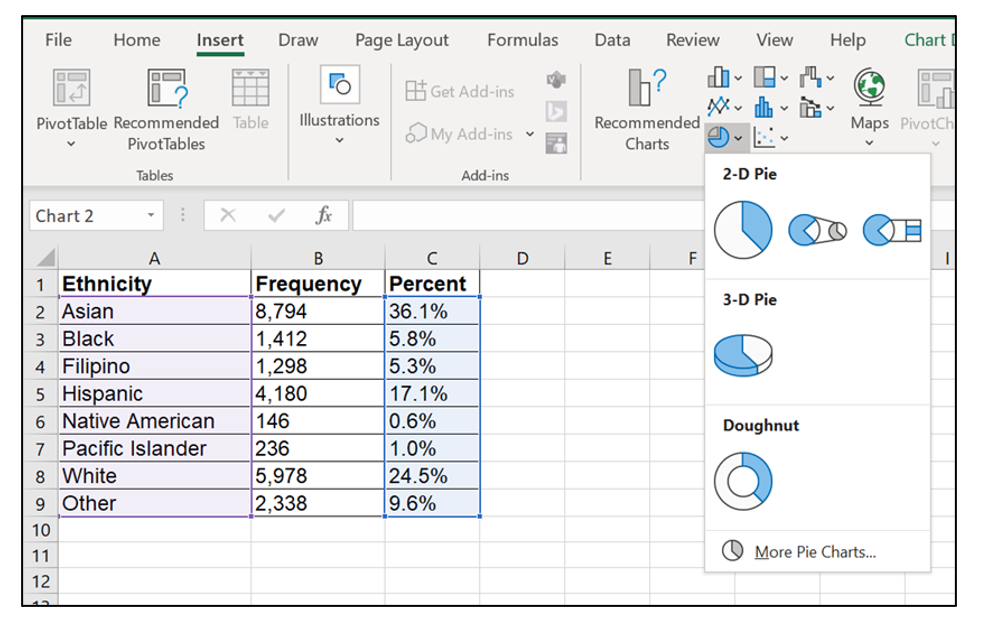
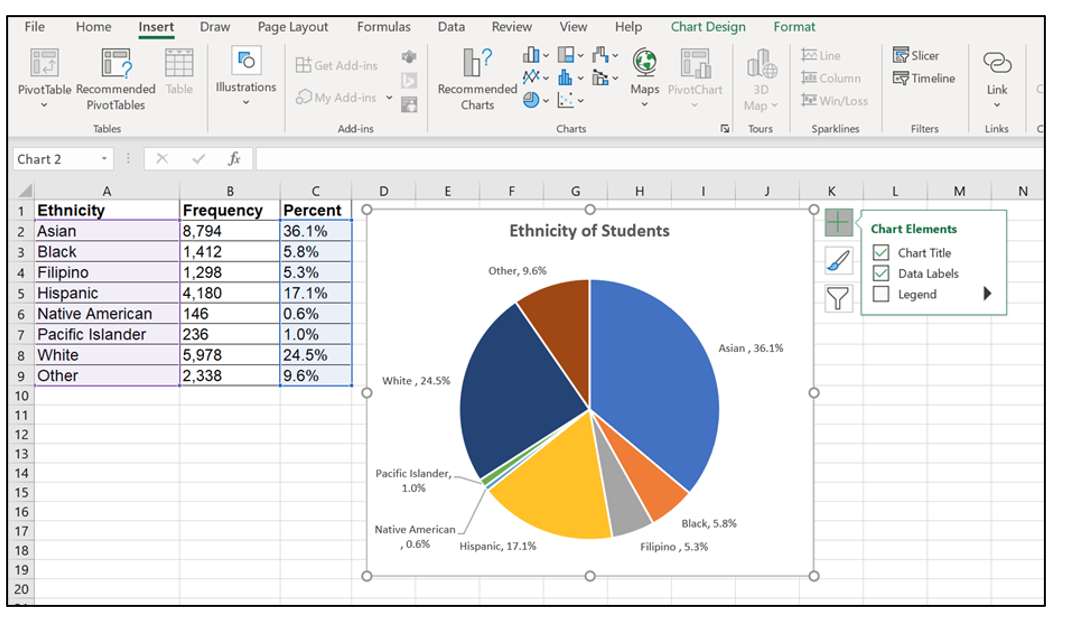
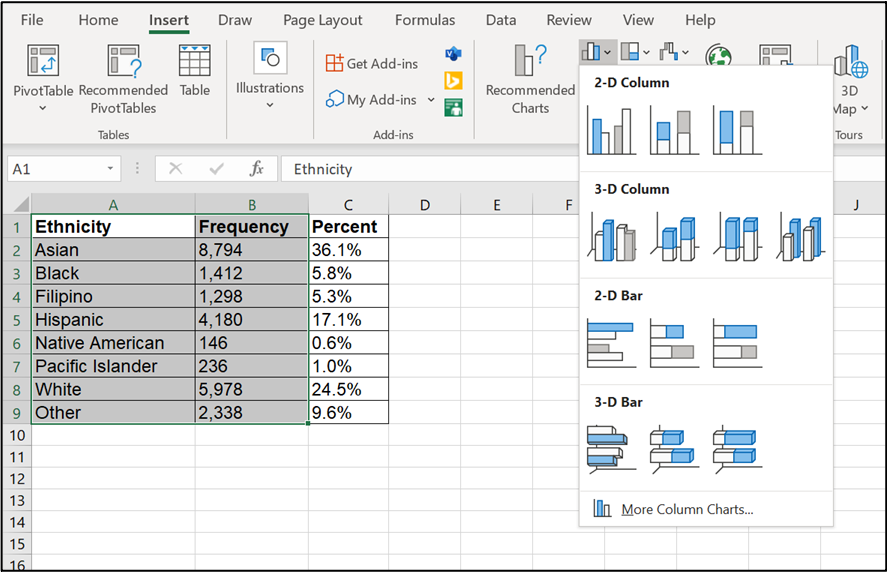
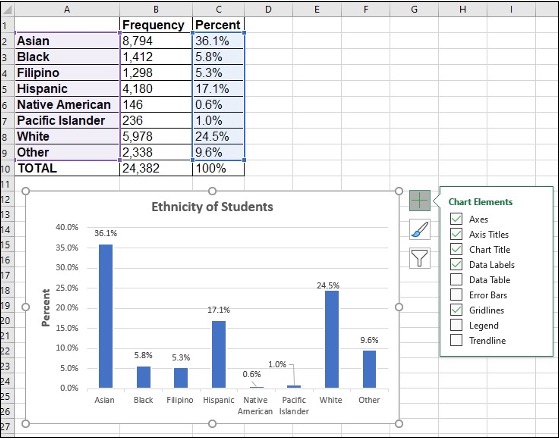
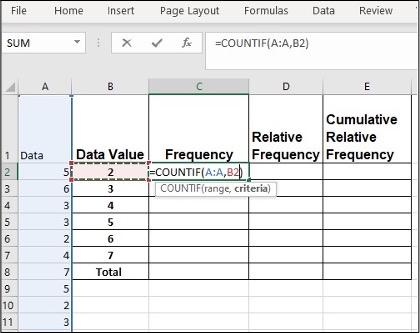
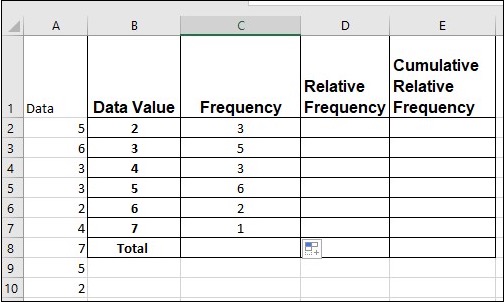
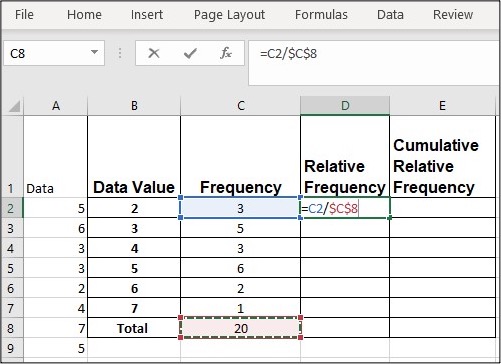
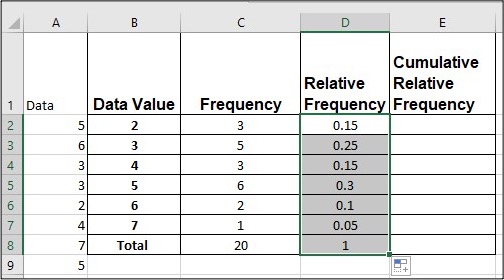
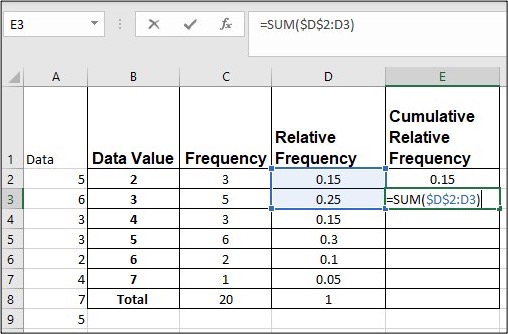
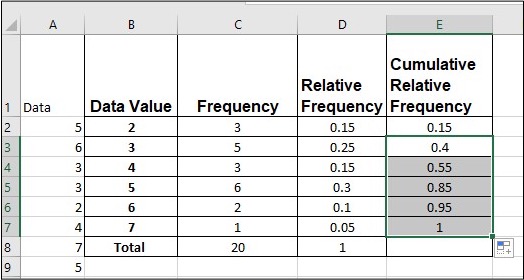
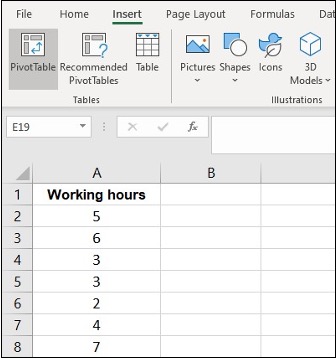
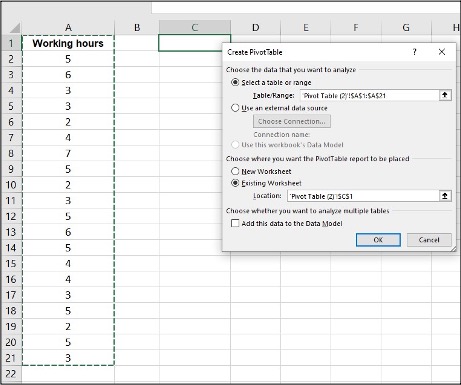
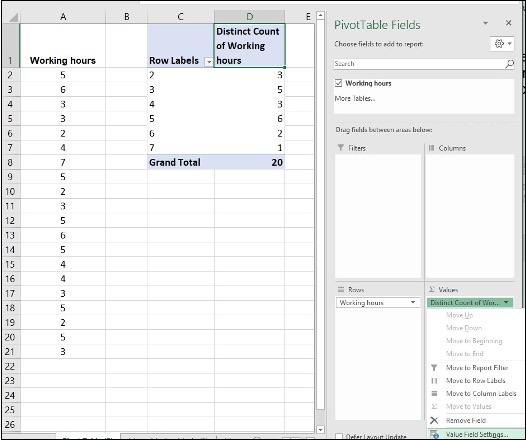
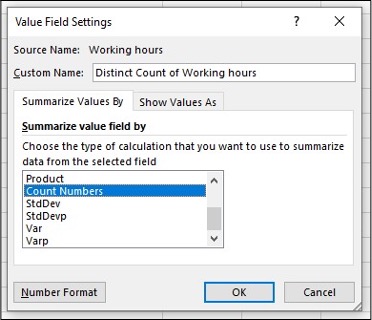
				 <div class="textbox">Download <a href="https://opentextbc.ca/busstatsancillary/wp-content/uploads/sites/426/2022/10/Sampling-and-Data-–-Excel-Instruction-Data-Sets.xlsx" data-url="https://opentextbc.ca/busstatsancillary/wp-content/uploads/sites/426/2022/10/Sampling-and-Data-–-Excel-Instruction-Data-Sets.xlsx">Sampling and Data – Excel Instruction Data Sets [Excel]</a>.</div> <h1>Pie Charts and Bar Graphs</h1> <ul><li>In a <strong>pie chart</strong>, categories of data are represented by wedges in a circle and are proportional in size to the percent of individuals in each category.</li> <li>In a <strong>bar graph</strong>, the length of the bar for each category is proportional to the number or percent of individuals in each category. Bars may be vertical or horizontal.</li> </ul> <h2>Pie Charts in Excel</h2> <ol><li>Highlight <span style="color: #eb0000;">columns of</span> cells (hold ‘<span style="color: #eb0000;">Ctrl</span>‘ button if columns not adjacent)</li> <li>Click <span style="color: #eb0000;">Insert, Charts</span> and the <span style="color: #eb0000;">first 2-D pie</span></li> <li>Click on the <span style="color: #eb0000;">new pie chart</span> and icon <span style="color: #2d8659;">+</span> to make changes</li> <li>Right click on wedge, choose ‘<span style="color: #eb0000;">Add Data Labels</span>‘</li> </ol> <table class="grid" style="border-collapse: collapse; width: 100%;"><caption>Table 1.4 Ethnicity of Students at De Anza College Fall Term 2007 (Census Day)</caption> <tbody><tr><th style="width: 149.671875px;" scope="col">Ethnicity</th> <th style="width: 149.671875px;" scope="col">Frequency</th> <th style="width: 149.671875px;" scope="col">Percent</th> </tr> <tr><td style="width: 149.671875px;">Asian</td> <td style="width: 149.671875px;">8,794</td> <td style="width: 149.671875px;">36.1%</td> </tr> <tr><td style="width: 149.671875px;">Black</td> <td style="width: 149.671875px;">1,412</td> <td style="width: 149.671875px;">5.8%</td> </tr> <tr><td style="width: 149.671875px;">Filipino</td> <td style="width: 149.671875px;">1,298</td> <td style="width: 149.671875px;">5.3%</td> </tr> <tr><td style="width: 149.671875px;">Hispanic</td> <td style="width: 149.671875px;">4,180</td> <td style="width: 149.671875px;">17.1%</td> </tr> <tr><td style="width: 149.671875px;">Native American</td> <td style="width: 149.671875px;">146</td> <td style="width: 149.671875px;">0.6%</td> </tr> <tr><td style="width: 149.671875px;">Pacific Islander</td> <td style="width: 149.671875px;">236</td> <td style="width: 149.671875px;">1.0%</td> </tr> <tr><td style="width: 149.671875px;">White</td> <td style="width: 149.671875px;">5,978</td> <td style="width: 149.671875px;">24.5%</td> </tr> <tr><td style="width: 149.671875px;">Other</td> <td style="width: 149.671875px;">2,338</td> <td style="width: 149.671875px;">9.6%</td> </tr> </tbody> </table> <div class="wp-caption aligncenter" id="attachment_36" aria-describedby="caption-attachment-36" style="width: 600px"><img class="wp-image-23" src="https://opentextbc.ca/busstatsancillary/wp-content/uploads/sites/426/2019/07/Screen-Shot-2022-10-07-at-8.40.18-AM-e1665768896559.png" alt="" width="600" height="387" srcset="https://opentextbc.ca/busstatsancillary/wp-content/uploads/sites/426/2019/07/Screen-Shot-2022-10-07-at-8.40.18-AM-e1665768896559.png 981w, https://opentextbc.ca/busstatsancillary/wp-content/uploads/sites/426/2019/07/Screen-Shot-2022-10-07-at-8.40.18-AM-e1665768896559-300x194.png 300w, https://opentextbc.ca/busstatsancillary/wp-content/uploads/sites/426/2019/07/Screen-Shot-2022-10-07-at-8.40.18-AM-e1665768896559-768x496.png 768w, https://opentextbc.ca/busstatsancillary/wp-content/uploads/sites/426/2019/07/Screen-Shot-2022-10-07-at-8.40.18-AM-e1665768896559-65x42.png 65w, https://opentextbc.ca/busstatsancillary/wp-content/uploads/sites/426/2019/07/Screen-Shot-2022-10-07-at-8.40.18-AM-e1665768896559-225x145.png 225w, https://opentextbc.ca/busstatsancillary/wp-content/uploads/sites/426/2019/07/Screen-Shot-2022-10-07-at-8.40.18-AM-e1665768896559-350x226.png 350w" title="" /><div class="wp-caption-text" id="caption-attachment-36">Step 1 &amp; 2: Highlight column of cells and create 2-D Pie</div></div> <div class="wp-caption aligncenter" aria-describedby="caption-attachment-36" style="width: 600px"><img class="wp-image-24" src="https://opentextbc.ca/busstatsancillary/wp-content/uploads/sites/426/2023/01/Screen-Shot-2022-10-07-at-8.40.44-AM-e1665769031571.png" alt="" width="600" height="348" srcset="https://opentextbc.ca/busstatsancillary/wp-content/uploads/sites/426/2023/01/Screen-Shot-2022-10-07-at-8.40.44-AM-e1665769031571.png 1067w, https://opentextbc.ca/busstatsancillary/wp-content/uploads/sites/426/2023/01/Screen-Shot-2022-10-07-at-8.40.44-AM-e1665769031571-300x174.png 300w, https://opentextbc.ca/busstatsancillary/wp-content/uploads/sites/426/2023/01/Screen-Shot-2022-10-07-at-8.40.44-AM-e1665769031571-1024x594.png 1024w, https://opentextbc.ca/busstatsancillary/wp-content/uploads/sites/426/2023/01/Screen-Shot-2022-10-07-at-8.40.44-AM-e1665769031571-768x446.png 768w, https://opentextbc.ca/busstatsancillary/wp-content/uploads/sites/426/2023/01/Screen-Shot-2022-10-07-at-8.40.44-AM-e1665769031571-65x38.png 65w, https://opentextbc.ca/busstatsancillary/wp-content/uploads/sites/426/2023/01/Screen-Shot-2022-10-07-at-8.40.44-AM-e1665769031571-225x131.png 225w, https://opentextbc.ca/busstatsancillary/wp-content/uploads/sites/426/2023/01/Screen-Shot-2022-10-07-at-8.40.44-AM-e1665769031571-350x203.png 350w" title="" /><div class="wp-caption-text">Step 3 &amp; 4: Click icon + and add Data Labels</div></div> <h2>Bar graphs in Excel</h2> <ol><li>Highlight <span style="color: #eb0000;">columns</span> of cells</li> <li>Click <span style="color: #eb0000;">Insert, Charts</span> and the <span style="color: #eb0000;">first 2-D Column</span></li> <li>Click on the <span style="color: #eb0000;">new bar graph</span> and icon <strong><span style="color: #2d8659;">+</span></strong> to make changes</li> <li>Right click on wedge, choose ‘<span style="color: #eb0000;">Add Data Labels</span>’</li> </ol> <div class="wp-caption aligncenter" aria-describedby="caption-attachment-36" style="width: 887px"><img class="wp-image-25 size-full" src="https://opentextbc.ca/busstatsancillary/wp-content/uploads/sites/426/2023/01/bar1.png" alt="" width="887" height="572" srcset="https://opentextbc.ca/busstatsancillary/wp-content/uploads/sites/426/2023/01/bar1.png 887w, https://opentextbc.ca/busstatsancillary/wp-content/uploads/sites/426/2023/01/bar1-300x193.png 300w, https://opentextbc.ca/busstatsancillary/wp-content/uploads/sites/426/2023/01/bar1-768x495.png 768w, https://opentextbc.ca/busstatsancillary/wp-content/uploads/sites/426/2023/01/bar1-65x42.png 65w, https://opentextbc.ca/busstatsancillary/wp-content/uploads/sites/426/2023/01/bar1-225x145.png 225w, https://opentextbc.ca/busstatsancillary/wp-content/uploads/sites/426/2023/01/bar1-350x226.png 350w" title="" /><div class="wp-caption-text">Step 1 &amp; 2: Highlight column of cells and insert 2-D Chart</div></div> <div class="wp-caption aligncenter" aria-describedby="caption-attachment-36" style="width: 560px"><img class="wp-image-26 size-full" src="https://opentextbc.ca/busstatsancillary/wp-content/uploads/sites/426/2023/01/Bar2.jpg" alt="" width="560" height="438" srcset="https://opentextbc.ca/busstatsancillary/wp-content/uploads/sites/426/2023/01/Bar2.jpg 560w, https://opentextbc.ca/busstatsancillary/wp-content/uploads/sites/426/2023/01/Bar2-300x235.jpg 300w, https://opentextbc.ca/busstatsancillary/wp-content/uploads/sites/426/2023/01/Bar2-65x51.jpg 65w, https://opentextbc.ca/busstatsancillary/wp-content/uploads/sites/426/2023/01/Bar2-225x176.jpg 225w, https://opentextbc.ca/busstatsancillary/wp-content/uploads/sites/426/2023/01/Bar2-350x274.jpg 350w" title="" /><div class="wp-caption-text">Step 3 &amp; 4: Click on New Bar Graph + icon to make changes and Add Data Labels</div></div> <h1>Frequency, Relative Frequency and Cumulative Relative Frequency</h1> <ul><li>A <strong>frequency</strong> is the number of times a value of the data occurs.</li> <li>A <strong>relative frequency</strong> is the ratio (fraction or proportion) of the number of times a value of the data occurs in the set of all outcomes to the total number of outcomes. Relative frequencies can be written as fractions, percents, or decimals.</li> <li>A <strong>cumulative relative frequency</strong> is the accumulation of the previous relative frequencies.</li> </ul> <h2>Frequency in Excel</h2> <p>Twenty students were asked how many hours they worked per day. Their responses, in hours, are as follows: 5; 6; 3; 3; 2; 4; 7; 5; 2; 3; 5; 6; 5; 4; 4; 3; 5; 2; 5; 3.</p> <p>Enter <span style="color: #eb0000;">all data in column A.</span> Create a column for data categories (<span style="color: #eb0000;">column B</span>).</p> <ol><li>Enter <span style="color: #eb0000;">=COUNTIF</span> in cell C2, click column A, comma and <span style="color: #eb0000;">B2</span></li> <li>Click <span style="color: #eb0000;">Enter</span></li> <li>Click <span style="color: #eb0000;">C2</span>, move the mouse to <span style="color: #eb0000;">the right bottom corner</span>, a little <span style="color: #eb0000;">+</span> appears</li> <li>Click on the little <span style="color: #eb0000;">+</span> and <span style="color: #eb0000;">drag down</span> to repeat cell</li> </ol> <div class="wp-caption aligncenter" id="attachment_27" aria-describedby="caption-attachment-27" style="width: 420px"><img class="wp-image-27 size-full" src="https://opentextbc.ca/busstatsancillary/wp-content/uploads/sites/426/2023/01/Picture-1.jpg" alt="" width="420" height="333" srcset="https://opentextbc.ca/busstatsancillary/wp-content/uploads/sites/426/2023/01/Picture-1.jpg 420w, https://opentextbc.ca/busstatsancillary/wp-content/uploads/sites/426/2023/01/Picture-1-300x238.jpg 300w, https://opentextbc.ca/busstatsancillary/wp-content/uploads/sites/426/2023/01/Picture-1-65x52.jpg 65w, https://opentextbc.ca/busstatsancillary/wp-content/uploads/sites/426/2023/01/Picture-1-225x178.jpg 225w, https://opentextbc.ca/busstatsancillary/wp-content/uploads/sites/426/2023/01/Picture-1-350x278.jpg 350w" title="" /><div class="wp-caption-text" id="caption-attachment-27">Step 1 &amp; 2: Enter =COUNTIF, select column A, column B, then click Enter</div></div> <div class="wp-caption aligncenter" aria-describedby="caption-attachment-36" style="width: 504px"><img class="wp-image-28 size-full" src="https://opentextbc.ca/busstatsancillary/wp-content/uploads/sites/426/2023/01/Picture-2.jpg" alt="" width="504" height="302" srcset="https://opentextbc.ca/busstatsancillary/wp-content/uploads/sites/426/2023/01/Picture-2.jpg 504w, https://opentextbc.ca/busstatsancillary/wp-content/uploads/sites/426/2023/01/Picture-2-300x180.jpg 300w, https://opentextbc.ca/busstatsancillary/wp-content/uploads/sites/426/2023/01/Picture-2-65x39.jpg 65w, https://opentextbc.ca/busstatsancillary/wp-content/uploads/sites/426/2023/01/Picture-2-225x135.jpg 225w, https://opentextbc.ca/busstatsancillary/wp-content/uploads/sites/426/2023/01/Picture-2-350x210.jpg 350w" title="" /><div class="wp-caption-text">Step 3 &amp; 4: Click C2 and use + in bottom right corner to drag down and repeat cell</div></div> <h2>Relative Frequency in Excel</h2> <p>Twenty students were asked how many hours they worked per day. Their responses, in hours, are as follows: 5; 6; 3; 3; 2; 4; 7; 5; 2; 3; 5; 6; 5; 4; 4; 3; 5; 2; 5; 3.</p> <ol><li>In cell D2, enter <span style="color: #eb0000;">=,</span> click cell <span style="color: #eb0000;">C2</span>, enter <span style="color: #eb0000;">/</span>, and click <span style="color: #eb0000;">C8 F4</span> (<span style="color: #eb0000;">F4</span> holds a cell constant)</li> <li>Click <span style="color: #eb0000;">Enter</span>, 0.15 shows in D2</li> <li>Click D2, move the mouse to the <span style="color: #eb0000;">right bottom corner</span>, a little <span style="color: #eb0000;">+</span> shows up</li> <li>Click on the little <span style="color: #eb0000;">+</span> and <span style="color: #eb0000;">drag down</span> to repeat cell</li> </ol> <div class="wp-caption aligncenter" aria-describedby="caption-attachment-36" style="width: 501px"><img class="wp-image-29 size-full" src="https://opentextbc.ca/busstatsancillary/wp-content/uploads/sites/426/2023/01/Picture1.jpg" alt="" width="501" height="364" srcset="https://opentextbc.ca/busstatsancillary/wp-content/uploads/sites/426/2023/01/Picture1.jpg 501w, https://opentextbc.ca/busstatsancillary/wp-content/uploads/sites/426/2023/01/Picture1-300x218.jpg 300w, https://opentextbc.ca/busstatsancillary/wp-content/uploads/sites/426/2023/01/Picture1-65x47.jpg 65w, https://opentextbc.ca/busstatsancillary/wp-content/uploads/sites/426/2023/01/Picture1-225x163.jpg 225w, https://opentextbc.ca/busstatsancillary/wp-content/uploads/sites/426/2023/01/Picture1-350x254.jpg 350w" title="" /><div class="wp-caption-text">Step 1: In cell D2, enter =, click cell C2, enter /, and click C8 F4</div></div> <div class="wp-caption aligncenter" aria-describedby="caption-attachment-36" style="width: 504px"><img class="wp-image-30 size-full" src="https://opentextbc.ca/busstatsancillary/wp-content/uploads/sites/426/2023/01/Picture2.jpg" alt="" width="504" height="280" srcset="https://opentextbc.ca/busstatsancillary/wp-content/uploads/sites/426/2023/01/Picture2.jpg 504w, https://opentextbc.ca/busstatsancillary/wp-content/uploads/sites/426/2023/01/Picture2-300x167.jpg 300w, https://opentextbc.ca/busstatsancillary/wp-content/uploads/sites/426/2023/01/Picture2-65x36.jpg 65w, https://opentextbc.ca/busstatsancillary/wp-content/uploads/sites/426/2023/01/Picture2-225x125.jpg 225w, https://opentextbc.ca/busstatsancillary/wp-content/uploads/sites/426/2023/01/Picture2-350x194.jpg 350w" title="" /><div class="wp-caption-text">Step 2, 3 &amp; 4: Click Enter. Then click D2, click and drag + in bottom right corner to repeat cells</div></div> <h2>Cumulative Relative Frequency in Excel</h2> <p>Twenty students were asked how many hours they worked per day. Their responses, in hours, are as follows: 5; 6; 3; 3; 2; 4; 7; 5; 2; 3; 5; 6; 5; 4; 4; 3; 5; 2; 5; 3.</p> <ol><li>In cell E2, enter <span style="color: #eb0000;">=,</span> click <span style="color: #eb0000;">D2</span> and <span style="color: #eb0000;">Enter</span></li> <li>In cell E3, enter <span style="color: #eb0000;">=SUM($D$2:D3)</span></li> <li>Click <span style="color: #eb0000;">Enter</span>, 0.4 shows in E3</li> <li>Click <span style="color: #eb0000;">E3</span>, move the mouse to <span style="color: #eb0000;">the right bottom corner</span>, a little <span style="color: #eb0000;">+</span> shows up</li> <li>Click on the little <span style="color: #eb0000;">+</span> and <span style="color: #eb0000;">drag down</span> to repeat cell</li> </ol> <div class="wp-caption aligncenter" id="attachment_31" aria-describedby="caption-attachment-31" style="width: 508px"><img class="wp-image-31 size-full" src="https://opentextbc.ca/busstatsancillary/wp-content/uploads/sites/426/2023/01/Picture3.jpg" alt="" width="508" height="334" srcset="https://opentextbc.ca/busstatsancillary/wp-content/uploads/sites/426/2023/01/Picture3.jpg 508w, https://opentextbc.ca/busstatsancillary/wp-content/uploads/sites/426/2023/01/Picture3-300x197.jpg 300w, https://opentextbc.ca/busstatsancillary/wp-content/uploads/sites/426/2023/01/Picture3-65x43.jpg 65w, https://opentextbc.ca/busstatsancillary/wp-content/uploads/sites/426/2023/01/Picture3-225x148.jpg 225w, https://opentextbc.ca/busstatsancillary/wp-content/uploads/sites/426/2023/01/Picture3-350x230.jpg 350w" title="" /><div class="wp-caption-text" id="caption-attachment-31">Step 1 &amp; 2: In cell E2, enter =, click D2 and Enter, then in cell E3, enter =SUM($D$2:D3)</div></div> <div class="wp-caption aligncenter" id="attachment_32" aria-describedby="caption-attachment-32" style="width: 524px"><img class="wp-image-32 size-full" src="https://opentextbc.ca/busstatsancillary/wp-content/uploads/sites/426/2023/01/Picture4.jpg" alt="" width="524" height="280" srcset="https://opentextbc.ca/busstatsancillary/wp-content/uploads/sites/426/2023/01/Picture4.jpg 524w, https://opentextbc.ca/busstatsancillary/wp-content/uploads/sites/426/2023/01/Picture4-300x160.jpg 300w, https://opentextbc.ca/busstatsancillary/wp-content/uploads/sites/426/2023/01/Picture4-65x35.jpg 65w, https://opentextbc.ca/busstatsancillary/wp-content/uploads/sites/426/2023/01/Picture4-225x120.jpg 225w, https://opentextbc.ca/busstatsancillary/wp-content/uploads/sites/426/2023/01/Picture4-350x187.jpg 350w" title="" /><div class="wp-caption-text" id="caption-attachment-32">Step 3, 4 &amp; 5: Click Enter, click E3, then click and drag + in bottom right corner to repeat cells</div></div> <h1>Pivot Table</h1> <ul><li>A Pivot Table helps to arrange and summarize complex data.</li> </ul> <h2>Pivot Table for Frequency in Excel</h2> <p>Twenty students were asked how many hours they worked per day. Their responses, in hours, are as follows: 5; 6; 3; 3; 2; 4; 7; 5; 2; 3; 5; 6; 5; 4; 4; 3; 5; 2; 5; 3.</p> <ol><li>Enter <span style="color: #eb0000;">all data in column A</span></li> <li>Click <span style="color: #eb0000;">Insert</span>, <span style="color: #eb0000;">Pivot Table</span></li> <li>Click on the area of <span style="color: #eb0000;">Table/Range</span>, <span style="color: #eb0000;">highlight all data</span></li> <li>Click on the area of <span style="color: #eb0000;">Location</span>, click on cell <span style="color: #eb0000;">C1</span> on where the pivot table will display</li> <li>Click <span style="color: #eb0000;">OK</span></li> </ol> <div class="wp-caption aligncenter" id="attachment_33" aria-describedby="caption-attachment-33" style="width: 336px"><img class="wp-image-33 size-full" src="https://opentextbc.ca/busstatsancillary/wp-content/uploads/sites/426/2023/01/Picture5.jpg" alt="" width="336" height="358" srcset="https://opentextbc.ca/busstatsancillary/wp-content/uploads/sites/426/2023/01/Picture5.jpg 336w, https://opentextbc.ca/busstatsancillary/wp-content/uploads/sites/426/2023/01/Picture5-282x300.jpg 282w, https://opentextbc.ca/busstatsancillary/wp-content/uploads/sites/426/2023/01/Picture5-65x69.jpg 65w, https://opentextbc.ca/busstatsancillary/wp-content/uploads/sites/426/2023/01/Picture5-225x240.jpg 225w" title="" /><div class="wp-caption-text" id="caption-attachment-33">Step 1 &amp; 2: Enter all data in column A then Click Insert, Pivot Table</div></div> <div class="wp-caption aligncenter" id="attachment_34" aria-describedby="caption-attachment-34" style="width: 461px"><img class="wp-image-34 size-full" src="https://opentextbc.ca/busstatsancillary/wp-content/uploads/sites/426/2023/01/Picture6.jpg" alt="" width="461" height="385" srcset="https://opentextbc.ca/busstatsancillary/wp-content/uploads/sites/426/2023/01/Picture6.jpg 461w, https://opentextbc.ca/busstatsancillary/wp-content/uploads/sites/426/2023/01/Picture6-300x251.jpg 300w, https://opentextbc.ca/busstatsancillary/wp-content/uploads/sites/426/2023/01/Picture6-65x54.jpg 65w, https://opentextbc.ca/busstatsancillary/wp-content/uploads/sites/426/2023/01/Picture6-225x188.jpg 225w, https://opentextbc.ca/busstatsancillary/wp-content/uploads/sites/426/2023/01/Picture6-350x292.jpg 350w" title="" /><div class="wp-caption-text" id="caption-attachment-34">Step 3, 4 &amp; 5: Click on the area of Table/Range, highlight all data then click Location, click on cell C1 where pivot table will display, click OK</div></div> <ol start="6"><li>Click on <span style="color: #eb0000;">Working hours</span>, hold and drag down to <span style="color: #eb0000;">Rows</span> area</li> <li>Click on <span style="color: #eb0000;">Working hours</span>, hold and drag down to <span style="color: #eb0000;">Values</span> area</li> <li>Click on the <span style="color: #eb0000;">drop-down icon</span>, <span style="color: #eb0000;">Value Field Setting</span></li> <li>Choose <span style="color: #eb0000;">Count Numbers</span>, click <span style="color: #eb0000;">OK</span></li> </ol> <div class="wp-caption aligncenter" aria-describedby="caption-attachment-36" style="width: 526px"><img class="wp-image-35 size-full" src="https://opentextbc.ca/busstatsancillary/wp-content/uploads/sites/426/2023/01/Picture7.jpg" alt="" width="526" height="440" srcset="https://opentextbc.ca/busstatsancillary/wp-content/uploads/sites/426/2023/01/Picture7.jpg 526w, https://opentextbc.ca/busstatsancillary/wp-content/uploads/sites/426/2023/01/Picture7-300x251.jpg 300w, https://opentextbc.ca/busstatsancillary/wp-content/uploads/sites/426/2023/01/Picture7-65x54.jpg 65w, https://opentextbc.ca/busstatsancillary/wp-content/uploads/sites/426/2023/01/Picture7-225x188.jpg 225w, https://opentextbc.ca/busstatsancillary/wp-content/uploads/sites/426/2023/01/Picture7-350x293.jpg 350w" title="" /><div class="wp-caption-text">Step 6, 7 &amp; 8: Click on Working hours, hold and drag down to Rows area, repeat the same for Values area then click on the drop-down icon, Value Field Setting</div></div> <div class="wp-caption aligncenter" aria-describedby="caption-attachment-36" style="width: 372px"><img class="wp-image-36 size-full" src="https://opentextbc.ca/busstatsancillary/wp-content/uploads/sites/426/2023/01/Picture8.jpg" alt="" width="372" height="320" srcset="https://opentextbc.ca/busstatsancillary/wp-content/uploads/sites/426/2023/01/Picture8.jpg 372w, https://opentextbc.ca/busstatsancillary/wp-content/uploads/sites/426/2023/01/Picture8-300x258.jpg 300w, https://opentextbc.ca/busstatsancillary/wp-content/uploads/sites/426/2023/01/Picture8-65x56.jpg 65w, https://opentextbc.ca/busstatsancillary/wp-content/uploads/sites/426/2023/01/Picture8-225x194.jpg 225w, https://opentextbc.ca/busstatsancillary/wp-content/uploads/sites/426/2023/01/Picture8-350x301.jpg 350w" title="" /><div class="wp-caption-text">Step 9: Choose Count Numbers, click OK</div></div> <h3>Media Attributions</h3> <ul><li>Screenshots of Excel are used with <a href="https://www.microsoft.com/en-us/legal/intellectualproperty/copyright/permissions" target="_blank" rel="noopener" data-url="https://www.microsoft.com/en-us/legal/intellectualproperty/copyright/permissions">permission from Microsoft</a>.</li> </ul> 
	</div>


	</div>

</div>
<div class="part-wrapper" id="part-descriptive-statistics-wrapper">
    <div class="part  " id="part-descriptive-statistics">
	<div class="part-title-wrap">
		<p class="part-number">II</p>
		<h1 class="part-title">Chapter 2. Descriptive Statistics</h1>
	</div>
	<div class="ugc part-ugc">
		
	</div>
			
				
	</div>
<div class="chapter standard " id="chapter-display-data" title="2.1 Display Data">
	<div class="chapter-title-wrap">
		<p class="chapter-number">5</p>
		<h1 class="chapter-title">2.1 Display Data</h1>
								</div>
	<div class="ugc chapter-ugc">
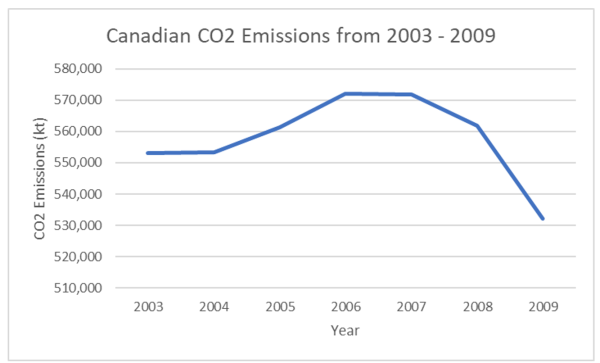
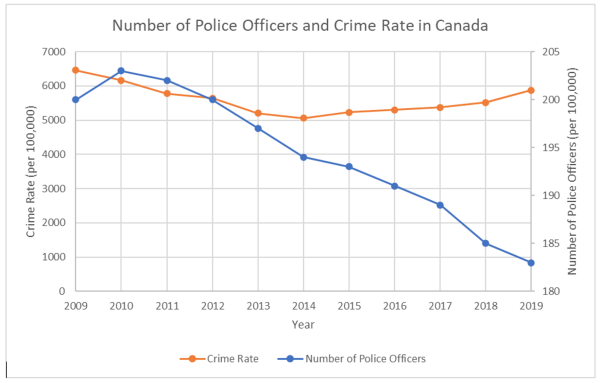
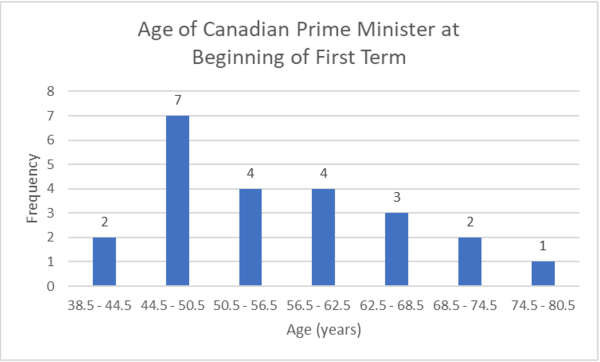
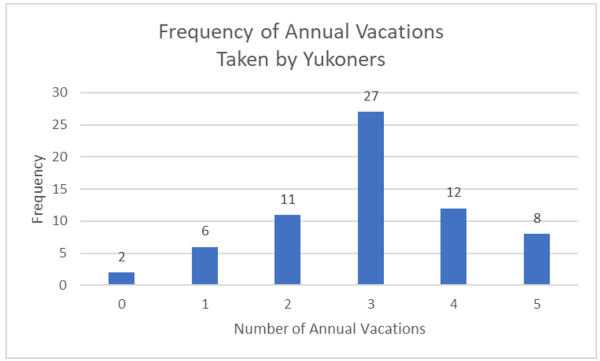
				 <p>The following activities and questions relate to material covered in <a href="https://openstax.org/books/introductory-business-statistics/pages/2-1-display-data" data-url="https://openstax.org/books/introductory-business-statistics/pages/2-1-display-data">Chapter 2.1 Display Data</a> in <a href="https://openstax.org/details/books/introductory-business-statistics" target="_blank" rel="noopener" data-url="https://openstax.org/details/books/introductory-business-statistics"><em>Introductory Business Statistics (OpenStax)</em></a>.</p> <div class="textbox">Data sets for the following questions are available in Excel: <a href="https://opentextbc.ca/busstatsancillary/wp-content/uploads/sites/426/2019/07/2.1-Data-Sets.xlsx" data-url="https://opentextbc.ca/busstatsancillary/wp-content/uploads/sites/426/2019/07/2.1-Data-Sets.xlsx">2.1 Data Sets [XLSX]</a>.</div> <h1>Questions</h1> <ol><li>The annual Canadian CO<sub>2</sub> emissions from 2003 to 2009 are as follows.<br /> <table class="grid aligncenter" style="border-collapse: collapse; width: 50%;"><tbody><tr><th scope="col">Year</th> <th scope="col">CO<sub>2</sub> Emissions (kt)</th> </tr> <tr><td>2003</td> <td>553,101</td> </tr> <tr><td>2004</td> <td>553,358</td> </tr> <tr><td>2005</td> <td>561,425</td> </tr> <tr><td>2006</td> <td>571,993</td> </tr> <tr><td>2007</td> <td>571,846</td> </tr> <tr><td>2008</td> <td>561,781</td> </tr> <tr><td>2009</td> <td>532,192</td> </tr> </tbody> </table> <ol type="a"><li>Organize the data into a line graph.</li> <li>Calculate the sample mean.</li> </ol> </li> <li>The table below is the number of police officers and crime rate (each per 100,000 citizens) in Canada during the period from 2009 to 2019.<br /> <table class="grid" style="border-collapse: collapse; width: 100%;"><caption>Number of police officers and crime rate (each per 100,000 citizens) <span class="footnote"><span class="footnote-indirect" data-fnref="181-1"></span></span></caption> <tbody><tr><th scope="col">Year</th> <th scope="col">Number of Police Officers</th> <th scope="col">Crime Rate</th> </tr> <tr><td>2009</td> <td>200</td> <td>6461</td> </tr> <tr><td>2010</td> <td>203</td> <td>6159</td> </tr> <tr><td>2011</td> <td>202</td> <td>5780</td> </tr> <tr><td>2012</td> <td>200</td> <td>5638</td> </tr> <tr><td>2013</td> <td>197</td> <td>5206</td> </tr> <tr><td>2014</td> <td>194</td> <td>5061</td> </tr> <tr><td>2015</td> <td>193</td> <td>5232</td> </tr> <tr><td>2016</td> <td>191</td> <td>5297</td> </tr> <tr><td>2017</td> <td>189</td> <td>5375</td> </tr> <tr><td>2018</td> <td>185</td> <td>5514</td> </tr> <tr><td>2019</td> <td>183</td> <td>5874</td> </tr> </tbody> </table> <ol type="a"><li>Construct a double time series graph using a common x-axis for both sets of data and different y-axes.</li> <li>How did variables change for both data sets? Explain.</li> </ol> </li> <li>Construct a histogram of the ages of Prime Ministers at the time of their being sworn into the position by the Governor General using the table below:<br /> <table class="grid aligncenter" style="border-collapse: collapse; width: 60%;"><caption>Ages of Prime Ministers at the time of being sworn into the position <span class="footnote"><span class="footnote-indirect" data-fnref="181-2"></span></span></caption> <tbody><tr><th scope="col">Age of Canadian Prime Minister (yrs.)</th> <th scope="col">Frequency</th> </tr> <tr><td>38.5 – 44.5</td> <td>2</td> </tr> <tr><td>44.5 – 40.5</td> <td>7</td> </tr> <tr><td>50.5 – 56.5</td> <td>4</td> </tr> <tr><td>56.5 – 62.5</td> <td>4</td> </tr> <tr><td>62.5 – 68.5</td> <td>3</td> </tr> <tr><td>68.5 – 74.5</td> <td>2</td> </tr> <tr><td>74.5 – 80.5</td> <td>1</td> </tr> </tbody> </table> </li> <li>Assume a sample of 66 people in northern Canada were asked how often they go on vacations a year. <ol type="a"><li>Create a table with columns for frequency, relative frequency, and cumulative frequency for each number category of vacations taken (i.e., 0, 1, 2…).</li> <li>Construct a bar chart/histogram of the data.</li> <li>Describe two features of the bar chart.</li> </ol> </li> </ol> <h1>Solutions</h1> <ol><li><ol type="a"><li>Line graph of Canadian CO<sub>2</sub> Emissions from 2003 – 2009:<br /> <img class="wp-image-169 size-full aligncenter" src="https://opentextbc.ca/busstatsancillary/wp-content/uploads/sites/426/2023/01/Screen-Shot-2022-10-07-at-6.51.32-AM-e1673914264914.png" alt="" width="600" height="363" srcset="https://opentextbc.ca/busstatsancillary/wp-content/uploads/sites/426/2023/01/Screen-Shot-2022-10-07-at-6.51.32-AM-e1673914264914.png 600w, https://opentextbc.ca/busstatsancillary/wp-content/uploads/sites/426/2023/01/Screen-Shot-2022-10-07-at-6.51.32-AM-e1673914264914-300x182.png 300w, https://opentextbc.ca/busstatsancillary/wp-content/uploads/sites/426/2023/01/Screen-Shot-2022-10-07-at-6.51.32-AM-e1673914264914-65x39.png 65w, https://opentextbc.ca/busstatsancillary/wp-content/uploads/sites/426/2023/01/Screen-Shot-2022-10-07-at-6.51.32-AM-e1673914264914-225x136.png 225w, https://opentextbc.ca/busstatsancillary/wp-content/uploads/sites/426/2023/01/Screen-Shot-2022-10-07-at-6.51.32-AM-e1673914264914-350x212.png 350w" title="" /></li> <li><img src="http://opentextbc.ca:3000/latex?latex=%5Cbegin%7Barray%7D%7Bll%7D%5Ctext%7BSample%20mean%7D%26%3D%20%5Cdfrac%7B553101%2B553358%2B561425%2B571993%2B571846%2B561781%2B532192%7D%7B7%7D%5C%5C%26%3D%20557%2C956%5Ctext%7B%20kt%7D%5Cend%7Barray%7D&amp;fg=000000&amp;font=TeX&amp;svg=1" alt="\begin{array}{ll}\text{Sample mean}&amp;amp;= \dfrac{553101+553358+561425+571993+571846+561781+532192}{7}\\&amp;amp;= 557,956\text{ kt}\end{array}" title="\begin{array}{ll}\text{Sample mean}&amp;amp;= \dfrac{553101+553358+561425+571993+571846+561781+532192}{7}\\&amp;amp;= 557,956\text{ kt}\end{array}" class="latex mathjax" /></li> </ol> </li> <li><ol type="a"><li>Double time series graph of number of police officers and crime rate in Canada:<br /> <img class="wp-image-171 size-full aligncenter" src="https://opentextbc.ca/busstatsancillary/wp-content/uploads/sites/426/2023/01/Screen-Shot-2022-10-07-at-6.28.43-AM-e1673914280457.png" alt="" width="600" height="383" srcset="https://opentextbc.ca/busstatsancillary/wp-content/uploads/sites/426/2023/01/Screen-Shot-2022-10-07-at-6.28.43-AM-e1673914280457.png 600w, https://opentextbc.ca/busstatsancillary/wp-content/uploads/sites/426/2023/01/Screen-Shot-2022-10-07-at-6.28.43-AM-e1673914280457-300x192.png 300w, https://opentextbc.ca/busstatsancillary/wp-content/uploads/sites/426/2023/01/Screen-Shot-2022-10-07-at-6.28.43-AM-e1673914280457-65x41.png 65w, https://opentextbc.ca/busstatsancillary/wp-content/uploads/sites/426/2023/01/Screen-Shot-2022-10-07-at-6.28.43-AM-e1673914280457-225x144.png 225w, https://opentextbc.ca/busstatsancillary/wp-content/uploads/sites/426/2023/01/Screen-Shot-2022-10-07-at-6.28.43-AM-e1673914280457-350x223.png 350w" title="" /></li> <li>Crime rate decreased between 2009 and 2014, then increased until 2019. The number of police officers steadily decreased between 2010 and 2019.</li> </ol> </li> <li>Histogram of age of Canadian Prime Minister at the beginning of their first term:<br /> <img class="wp-image-173 size-full aligncenter" src="https://opentextbc.ca/busstatsancillary/wp-content/uploads/sites/426/2023/01/Screen-Shot-2022-10-07-at-6.35.29-AM-e1673914297441.png" alt="" width="600" height="362" srcset="https://opentextbc.ca/busstatsancillary/wp-content/uploads/sites/426/2023/01/Screen-Shot-2022-10-07-at-6.35.29-AM-e1673914297441.png 600w, https://opentextbc.ca/busstatsancillary/wp-content/uploads/sites/426/2023/01/Screen-Shot-2022-10-07-at-6.35.29-AM-e1673914297441-300x181.png 300w, https://opentextbc.ca/busstatsancillary/wp-content/uploads/sites/426/2023/01/Screen-Shot-2022-10-07-at-6.35.29-AM-e1673914297441-65x39.png 65w, https://opentextbc.ca/busstatsancillary/wp-content/uploads/sites/426/2023/01/Screen-Shot-2022-10-07-at-6.35.29-AM-e1673914297441-225x136.png 225w, https://opentextbc.ca/busstatsancillary/wp-content/uploads/sites/426/2023/01/Screen-Shot-2022-10-07-at-6.35.29-AM-e1673914297441-350x211.png 350w" title="" /></li> <li><ol type="a"><li><table class="grid aligncenter" style="border-collapse: collapse; width: 100%;"><tbody><tr><th style="width: 40%;" scope="col">Number of Annual Vacations</th> <th style="width: 30%;" scope="col">Frequency</th> <th style="width: 33.3333%;" scope="col">Relative Frequency</th> </tr> <tr><td>0</td> <td>2</td> <td style="width: 33.3333%;">3.03%</td> </tr> <tr><td>1</td> <td>6</td> <td style="width: 33.3333%;">9.09%</td> </tr> <tr><td>2</td> <td>11</td> <td style="width: 33.3333%;">16.67%</td> </tr> <tr><td>3</td> <td>27</td> <td style="width: 33.3333%;">40.91%</td> </tr> <tr><td>4</td> <td>12</td> <td style="width: 33.3333%;">18.18%</td> </tr> <tr><td>5</td> <td>8</td> <td style="width: 33.3333%;">12.12%</td> </tr> </tbody> </table> </li> <li>Histogram of Yukoners’ Annual Vacations:<br /> <img class="wp-image-174 size-full aligncenter" src="https://opentextbc.ca/busstatsancillary/wp-content/uploads/sites/426/2023/01/Screen-Shot-2022-10-07-at-6.48.36-AM-e1673915329982.png" alt="" width="600" height="361" srcset="https://opentextbc.ca/busstatsancillary/wp-content/uploads/sites/426/2023/01/Screen-Shot-2022-10-07-at-6.48.36-AM-e1673915329982.png 600w, https://opentextbc.ca/busstatsancillary/wp-content/uploads/sites/426/2023/01/Screen-Shot-2022-10-07-at-6.48.36-AM-e1673915329982-300x181.png 300w, https://opentextbc.ca/busstatsancillary/wp-content/uploads/sites/426/2023/01/Screen-Shot-2022-10-07-at-6.48.36-AM-e1673915329982-65x39.png 65w, https://opentextbc.ca/busstatsancillary/wp-content/uploads/sites/426/2023/01/Screen-Shot-2022-10-07-at-6.48.36-AM-e1673915329982-225x135.png 225w, https://opentextbc.ca/busstatsancillary/wp-content/uploads/sites/426/2023/01/Screen-Shot-2022-10-07-at-6.48.36-AM-e1673915329982-350x211.png 350w" title="" /></li> <li>Yukoners are most likely to take 3 annual vacations. The data is negatively skewed.</li> </ol> </li> </ol> <p>&nbsp;</p> 
	</div>
			
				
				<div class="footnotes"><div id='181-1'>Data source: Statistics Canada. (2020). <em>Table 3 Trends in police personnel, Canada, 1962 to 2019.</em> https://www150.statcan.gc.ca/n1/pub/85-002-x/2020001/article/00015/tbl/tbl03-eng.htm. Statistics Canada. (2020). <em>Table 7 Police-reported crime rate, Canada, 2009 to 2019</em>. https://www150.statcan.gc.ca/n1/pub/85-002-x/2020001/article/00010/tbl/tbl07-eng.htm</div><div id='181-2'>Data source: Wikipedia. (n.d.). <em>List of prime ministers of Canada</em>. https://en.wikipedia.org/wiki/List_of_prime_ministers_of_Canada</div></div>
	</div>
<div class="chapter standard " id="chapter-measures-of-the-location-of-the-data" title="2.2 Measures of the Location of the Data">
	<div class="chapter-title-wrap">
		<p class="chapter-number">6</p>
		<h1 class="chapter-title">2.2 Measures of the Location of the Data</h1>
								</div>
	<div class="ugc chapter-ugc">
				 <p>The following activities and questions relate to material covered in <a href="https://openstax.org/books/introductory-business-statistics/pages/2-2-measures-of-the-location-of-the-data" data-url="https://openstax.org/books/introductory-business-statistics/pages/2-2-measures-of-the-location-of-the-data">Chapter 2.2 Measures of the Location of the Data</a> in <a href="https://openstax.org/details/books/introductory-business-statistics" target="_blank" rel="noopener" data-url="https://openstax.org/details/books/introductory-business-statistics"><em>Introductory Business Statistics (OpenStax)</em></a>.</p> <div class="textbox">Data sets for the following questions are available in Excel: <a href="https://opentextbc.ca/busstatsancillary/wp-content/uploads/sites/426/2023/01/2.2-Data-Sets.xlsx" data-url="https://opentextbc.ca/busstatsancillary/wp-content/uploads/sites/426/2023/01/2.2-Data-Sets.xlsx">2.2 Data Sets [XLSX]</a>.</div> <h1>Questions</h1> <ol><li>This is a table of monthly ticket sales at the Yukon Beringia Interpretive Centre in 2018.<br /> <table class="grid" style="border-collapse: collapse; width: 100%;"><caption>Monthly Ticket Sales at Yukon Beringia Interpretive Centre <span class="footnote"><span class="footnote-indirect" data-fnref="186-1"></span></span></caption> <tbody><tr><th style="width: 25%;" scope="col">Month</th> <th style="width: 25%;" scope="col">Beringia 2018 Ticket Sales</th> <th style="width: 25%;" scope="col">Relative Frequency</th> <th style="width: 25%;" scope="col">Cumulative Frequency</th> </tr> <tr><td style="width: 25%;">January</td> <td style="width: 25%;">673</td> <td style="width: 25%;"></td> <td style="width: 25%;"></td> </tr> <tr><td style="width: 25%;">February</td> <td style="width: 25%;">814</td> <td style="width: 25%;"></td> <td style="width: 25%;"></td> </tr> <tr><td style="width: 25%;">March</td> <td style="width: 25%;">1670</td> <td style="width: 25%;"></td> <td style="width: 25%;"></td> </tr> <tr><td style="width: 25%;">April</td> <td style="width: 25%;">1303</td> <td style="width: 25%;"></td> <td style="width: 25%;"></td> </tr> <tr><td style="width: 25%;">May</td> <td style="width: 25%;">1347</td> <td style="width: 25%;"></td> <td style="width: 25%;"></td> </tr> <tr><td style="width: 25%;">June</td> <td style="width: 25%;">3519</td> <td style="width: 25%;"></td> <td style="width: 25%;"></td> </tr> <tr><td style="width: 25%;">July</td> <td style="width: 25%;">4745</td> <td style="width: 25%;"></td> <td style="width: 25%;"></td> </tr> <tr><td style="width: 25%;">August</td> <td style="width: 25%;">4065</td> <td style="width: 25%;"></td> <td style="width: 25%;"></td> </tr> <tr><td style="width: 25%;">September</td> <td style="width: 25%;">1808</td> <td style="width: 25%;"></td> <td style="width: 25%;"></td> </tr> <tr><td style="width: 25%;">October</td> <td style="width: 25%;">1170</td> <td style="width: 25%;"></td> <td style="width: 25%;"></td> </tr> <tr><td style="width: 25%;">November</td> <td style="width: 25%;">1475</td> <td style="width: 25%;"></td> <td style="width: 25%;"></td> </tr> <tr><td style="width: 25%;">December</td> <td style="width: 25%;">1309</td> <td style="width: 25%;"></td> <td style="width: 25%;"></td> </tr> </tbody> </table> <ol type="a"><li>Complete the table.</li> <li>What proportion of 2018 ticket sales were sold in July and August?</li> <li>What proportion of ticket sales in the first 8 months of 2018?</li> </ol> </li> <li>Use the 2020 Yukon population by age group table below to:<br /> <table class="grid" style="border-collapse: collapse; width: 100%;"><tbody><tr><th style="width: 33.3333%;" scope="col">Age Group (yrs.)</th> <th style="width: 33.3333%;" scope="col">Frequency</th> <th style="width: 33.3333%;" scope="col">Relative Frequency</th> </tr> <tr><td style="width: 33.3333%;">0-9</td> <td style="width: 33.3333%;">4692</td> <td style="width: 33.3333%;"></td> </tr> <tr><td style="width: 33.3333%;">10-19</td> <td style="width: 33.3333%;">4355</td> <td style="width: 33.3333%;"></td> </tr> <tr><td style="width: 33.3333%;">20-29</td> <td style="width: 33.3333%;">5435</td> <td style="width: 33.3333%;"></td> </tr> <tr><td style="width: 33.3333%;">30-39</td> <td style="width: 33.3333%;">7266</td> <td style="width: 33.3333%;"></td> </tr> <tr><td style="width: 33.3333%;">40-49</td> <td style="width: 33.3333%;">5938</td> <td style="width: 33.3333%;"></td> </tr> <tr><td style="width: 33.3333%;">50-59</td> <td style="width: 33.3333%;">5913</td> <td style="width: 33.3333%;"></td> </tr> <tr><td style="width: 33.3333%;">60-69</td> <td style="width: 33.3333%;">5459</td> <td style="width: 33.3333%;"></td> </tr> <tr><td style="width: 33.3333%;">70-79</td> <td style="width: 33.3333%;">2574</td> <td style="width: 33.3333%;"></td> </tr> <tr><td style="width: 33.3333%;">80+</td> <td style="width: 33.3333%;">875</td> <td style="width: 33.3333%;"></td> </tr> </tbody> </table> <ol type="a"><li>Create a bar chart.</li> <li>Complete the table.</li> <li>Which age category has the highest frequency and what proportion of the total population is that category?</li> <li>Use 2 sentences to describe features of the bar chart</li> </ol> </li> <li>Forty randomly selected people in Yellowknife, NWT were asked the number of nights they saw northern lights last year. The results are as follows:<br /> <table class="grid" style="border-collapse: collapse; width: 100%;"><tbody><tr><th style="width: 30%;" scope="col">Number of Nights Northern Lights Viewed</th> <th style="width: 20%;" scope="col">Frequency</th> <th style="width: 25%;" scope="col">Relative Frequency</th> <th style="width: 25%;" scope="col">Cumulative Frequency</th> </tr> <tr><td>0</td> <td>0</td> <td></td> <td></td> </tr> <tr><td>1</td> <td>15</td> <td></td> <td></td> </tr> <tr><td>2</td> <td>10</td> <td></td> <td></td> </tr> <tr><td>3</td> <td>2</td> <td></td> <td></td> </tr> <tr><td>4</td> <td>2</td> <td></td> <td></td> </tr> <tr><td>5</td> <td>2</td> <td></td> <td></td> </tr> </tbody> </table> <ol type="a"><li>Complete the columns of the chart.</li> <li>Use a bar chart to graph the frequencies.</li> <li>What is the probability someone chosen randomly viewed at least one night of northern lights?</li> </ol> </li> <li>In a survey collecting data about the salaries earned by recent Yukon University graduates, Christy found that her salary was in the 85<sup>th</sup> percentile. Should Christy be pleased by this result? Explain.</li> <li>Thirty part-time grocery clerks who work at grocery store in northern Canada were asked, “What is your average weekly salary?” The results are in the table below.<br /> <table class="grid aligncenter" style="border-collapse: collapse; width: 50%;"><tbody><tr><th style="width: 50%;" scope="col">Weekly Salary ($)</th> <th style="width: 50%;" scope="col">Frequency</th> </tr> <tr><td style="width: 50%;">No response</td> <td style="width: 50%;">7</td> </tr> <tr><td style="width: 50%;">200-250</td> <td style="width: 50%;">5</td> </tr> <tr><td style="width: 50%;">350-300</td> <td style="width: 50%;">6</td> </tr> <tr><td style="width: 50%;">300-350</td> <td style="width: 50%;">6</td> </tr> <tr><td style="width: 50%;">350-400</td> <td style="width: 50%;">3</td> </tr> <tr><td style="width: 50%;">400-450</td> <td style="width: 50%;">1</td> </tr> <tr><td style="width: 50%;">450-500</td> <td style="width: 50%;">2</td> </tr> </tbody> </table> <ol type="a"><li>What percentage of the survey did not give an answer?</li> <li>What percentage says their weekly salary is from $200.00 to $350.00?</li> <li>Construct a bar graph of the data.</li> </ol> </li> <li>The annual precipitation in Atlin, BC between 2005 and 2014 is as follows:<br /> <table class="grid aligncenter" style="border-collapse: collapse; width: 50%;"><caption>Annual Precipitation in Altlin, BC <span class="footnote"><span class="footnote-indirect" data-fnref="186-2"></span></span></caption> <tbody><tr><th scope="col">Year</th> <th scope="col">Annual Atlin Precip. (mm)</th> </tr> <tr><td>2005</td> <td>307.3</td> </tr> <tr><td>2006</td> <td>24.1</td> </tr> <tr><td>2007</td> <td>50.0</td> </tr> <tr><td>2008</td> <td>143.8</td> </tr> <tr><td>2009</td> <td>66.4</td> </tr> <tr><td>2010</td> <td>54.2</td> </tr> <tr><td>2011</td> <td>85.9</td> </tr> <tr><td>2012</td> <td>259.7</td> </tr> <tr><td>2013</td> <td>330.8</td> </tr> <tr><td>2014</td> <td>279.4</td> </tr> </tbody> </table> <ol type="a"><li>Organize the data into a line graph.</li> <li>Construct a histogram of the data.</li> <li>Calculate the sample mean.</li> <li>Find the interquartile range.</li> </ol> </li> </ol> <h1>Solutions</h1> <ol><li><ol type="a"><li><table class="grid" style="border-collapse: collapse; width: 100%;"><caption>Monthly Ticket Sales at Yukon Beringia Interpretive Centre</caption> <tbody><tr><th style="width: 25%;" scope="col">Month</th> <th style="width: 25%;" scope="col">Beringia 2018 Ticket Sales</th> <th style="width: 25%;" scope="col">Relative Frequency</th> <th style="width: 25%;" scope="col">Cumulative Frequency</th> </tr> <tr><td style="width: 25%;">January</td> <td style="width: 25%;">673</td> <td style="width: 25%;">2.82%</td> <td style="width: 25%;">2.82%</td> </tr> <tr><td style="width: 25%;">February</td> <td style="width: 25%;">814</td> <td style="width: 25%;">3.41%</td> <td style="width: 25%;">6.22%</td> </tr> <tr><td style="width: 25%;">March</td> <td style="width: 25%;">1670</td> <td style="width: 25%;">6.99%</td> <td style="width: 25%;">13.21%</td> </tr> <tr><td style="width: 25%;">April</td> <td style="width: 25%;">1303</td> <td style="width: 25%;">5.45%</td> <td style="width: 25%;">18.66%</td> </tr> <tr><td style="width: 25%;">May</td> <td style="width: 25%;">1347</td> <td style="width: 25%;">5.64%</td> <td style="width: 25%;">24.30%</td> </tr> <tr><td style="width: 25%;">June</td> <td style="width: 25%;">3519</td> <td style="width: 25%;">14.73%</td> <td style="width: 25%;">39.02%</td> </tr> <tr><td style="width: 25%;">July</td> <td style="width: 25%;">4745</td> <td style="width: 25%;">19.86%</td> <td style="width: 25%;">58.88%</td> </tr> <tr><td style="width: 25%;">August</td> <td style="width: 25%;">4065</td> <td style="width: 25%;">17.01%</td> <td style="width: 25%;">75.89%</td> </tr> <tr><td style="width: 25%;">September</td> <td style="width: 25%;">1808</td> <td style="width: 25%;">7.57%</td> <td style="width: 25%;">83.45%</td> </tr> <tr><td style="width: 25%;">October</td> <td style="width: 25%;">1170</td> <td style="width: 25%;">4.90%</td> <td style="width: 25%;">88.35%</td> </tr> <tr><td style="width: 25%;">November</td> <td style="width: 25%;">1475</td> <td style="width: 25%;">6.17%</td> <td style="width: 25%;">94.52%</td> </tr> <tr><td style="width: 25%;">December</td> <td style="width: 25%;">1309</td> <td style="width: 25%;">5.48%</td> <td style="width: 25%;">100%</td> </tr> </tbody> </table> </li> <li>In July and August of 2018, (19.86%+17.01% =) 36.87% of 2018’s tickets were sold.</li> <li>In 2018, 75.89% of 2018’s tickets were sold in the first 8 months of the year.</li> </ol> </li> <li><ol type="a"><li>Bar chart of 2020 Yukon population by age group<br /> <img class="wp-image-178 size-full aligncenter" src="https://opentextbc.ca/busstatsancillary/wp-content/uploads/sites/426/2023/01/Screen-Shot-2022-10-07-at-7.12.50-AM-e1673983853935.png" alt="" width="600" height="362" srcset="https://opentextbc.ca/busstatsancillary/wp-content/uploads/sites/426/2023/01/Screen-Shot-2022-10-07-at-7.12.50-AM-e1673983853935.png 600w, https://opentextbc.ca/busstatsancillary/wp-content/uploads/sites/426/2023/01/Screen-Shot-2022-10-07-at-7.12.50-AM-e1673983853935-300x181.png 300w, https://opentextbc.ca/busstatsancillary/wp-content/uploads/sites/426/2023/01/Screen-Shot-2022-10-07-at-7.12.50-AM-e1673983853935-65x39.png 65w, https://opentextbc.ca/busstatsancillary/wp-content/uploads/sites/426/2023/01/Screen-Shot-2022-10-07-at-7.12.50-AM-e1673983853935-225x136.png 225w, https://opentextbc.ca/busstatsancillary/wp-content/uploads/sites/426/2023/01/Screen-Shot-2022-10-07-at-7.12.50-AM-e1673983853935-350x211.png 350w" title="" /></li> <li><table class="grid" style="border-collapse: collapse; width: 100%;"><tbody><tr><th style="width: 33.3333%;" scope="col">Age Group (yrs.)</th> <th style="width: 33.3333%;" scope="col">Frequency</th> <th style="width: 33.3333%;" scope="col">Relative Frequency</th> </tr> <tr><td style="width: 33.3333%;">0-9</td> <td style="width: 33.3333%;">4692</td> <td style="width: 33.3333%;">11.04%</td> </tr> <tr><td style="width: 33.3333%;">10-19</td> <td style="width: 33.3333%;">4355</td> <td style="width: 33.3333%;">10.25%</td> </tr> <tr><td style="width: 33.3333%;">20-29</td> <td style="width: 33.3333%;">5435</td> <td style="width: 33.3333%;">12.79%</td> </tr> <tr><td style="width: 33.3333%;">30-39</td> <td style="width: 33.3333%;">7266</td> <td style="width: 33.3333%;">17.09%</td> </tr> <tr><td style="width: 33.3333%;">40-49</td> <td style="width: 33.3333%;">5938</td> <td style="width: 33.3333%;">13.97%</td> </tr> <tr><td style="width: 33.3333%;">50-59</td> <td style="width: 33.3333%;">5913</td> <td style="width: 33.3333%;">13.91%</td> </tr> <tr><td style="width: 33.3333%;">60-69</td> <td style="width: 33.3333%;">5459</td> <td style="width: 33.3333%;">12.84%</td> </tr> <tr><td style="width: 33.3333%;">70-79</td> <td style="width: 33.3333%;">2574</td> <td style="width: 33.3333%;">6.06%</td> </tr> <tr><td style="width: 33.3333%;">80+</td> <td style="width: 33.3333%;">875</td> <td style="width: 33.3333%;">2.06%</td> </tr> </tbody> </table> </li> <li>The age category with the highest frequency is Yukoners between 30-39 years of age occupying 17.09% of the total Yukon population.</li> <li>There is a lower probability of choosing a random Yukoner between 10 and 19 years of age than any other age group. There are almost as many Yukoners between the ages of 0 and 39 as there are Yukoners older than 40 yrs. old.</li> </ol> </li> <li><ol type="a"><li><table class="grid" style="border-collapse: collapse; width: 100%;"><tbody><tr><th style="width: 30%;" scope="col">Number of Nights Northern Lights Viewed</th> <th style="width: 20%;" scope="col">Frequency</th> <th style="width: 25%;" scope="col">Relative Frequency</th> <th style="width: 25%;" scope="col">Cumulative Frequency</th> </tr> <tr><td>0</td> <td>0</td> <td>22.50%</td> <td>22.50%</td> </tr> <tr><td>1</td> <td>15</td> <td>37.50%</td> <td>60.00%</td> </tr> <tr><td>2</td> <td>10</td> <td>25.00%</td> <td>85.00%</td> </tr> <tr><td>3</td> <td>2</td> <td>5.00%</td> <td>90.00%</td> </tr> <tr><td>4</td> <td>2</td> <td>5.00%</td> <td>95.00%</td> </tr> <tr><td>5</td> <td>2</td> <td>5.00%</td> <td>100.00%</td> </tr> </tbody> </table> </li> <li>Bar chart of the frequency of viewing northern lights.<br /> <img class="wp-image-180 size-full aligncenter" src="https://opentextbc.ca/busstatsancillary/wp-content/uploads/sites/426/2023/01/Screen-Shot-2022-10-07-at-7.04.02-AM-e1673984237277.png" alt="" width="600" height="362" srcset="https://opentextbc.ca/busstatsancillary/wp-content/uploads/sites/426/2023/01/Screen-Shot-2022-10-07-at-7.04.02-AM-e1673984237277.png 600w, https://opentextbc.ca/busstatsancillary/wp-content/uploads/sites/426/2023/01/Screen-Shot-2022-10-07-at-7.04.02-AM-e1673984237277-300x181.png 300w, https://opentextbc.ca/busstatsancillary/wp-content/uploads/sites/426/2023/01/Screen-Shot-2022-10-07-at-7.04.02-AM-e1673984237277-65x39.png 65w, https://opentextbc.ca/busstatsancillary/wp-content/uploads/sites/426/2023/01/Screen-Shot-2022-10-07-at-7.04.02-AM-e1673984237277-225x136.png 225w, https://opentextbc.ca/busstatsancillary/wp-content/uploads/sites/426/2023/01/Screen-Shot-2022-10-07-at-7.04.02-AM-e1673984237277-350x211.png 350w" title="" /></li> <li>The probability a randomly chosen person in Yellowknife viewed northern lights last year is 77.5%.</li> </ol> </li> <li>Christy should be pleased considering this means her salary is higher than 85% of people surveyed, or rather it is in the top 15% of people surveyed.</li> <li><ol type="a"><li>The percentage of people who did not provide a response 7/30 = 0.2333 = 23.33%. 23.37% of grocery clerk refused to give answers.</li> <li>16.67% + 20% + 20% = 56.67%. 56.67% of the grocery clerks says their weekly salary is from $200.00 to $350.00.</li> <li>Bar graph of part-time grocery employee weekly salary frequency.<br /> <img class="aligncenter wp-image-201 size-full" src="https://opentextbc.ca/busstatsancillary/wp-content/uploads/sites/426/2023/01/Screen-Shot-2022-10-07-at-7.08.24-AM-e1673990842119.png" alt="" width="600" height="436" srcset="https://opentextbc.ca/busstatsancillary/wp-content/uploads/sites/426/2023/01/Screen-Shot-2022-10-07-at-7.08.24-AM-e1673990842119.png 600w, https://opentextbc.ca/busstatsancillary/wp-content/uploads/sites/426/2023/01/Screen-Shot-2022-10-07-at-7.08.24-AM-e1673990842119-300x218.png 300w, https://opentextbc.ca/busstatsancillary/wp-content/uploads/sites/426/2023/01/Screen-Shot-2022-10-07-at-7.08.24-AM-e1673990842119-65x47.png 65w, https://opentextbc.ca/busstatsancillary/wp-content/uploads/sites/426/2023/01/Screen-Shot-2022-10-07-at-7.08.24-AM-e1673990842119-225x164.png 225w, https://opentextbc.ca/busstatsancillary/wp-content/uploads/sites/426/2023/01/Screen-Shot-2022-10-07-at-7.08.24-AM-e1673990842119-350x254.png 350w" title="" /></li> </ol> </li> <li><ol type="a"><li>Line graph of annual precipitation in Atlin, BC.<br /> <img class="aligncenter wp-image-203 size-full" src="https://opentextbc.ca/busstatsancillary/wp-content/uploads/sites/426/2023/01/Screen-Shot-2022-10-07-at-7.20.49-AM-e1673991516292.png" alt="" width="600" height="363" title="" /></li> <li><img src="http://opentextbc.ca:3000/latex?latex=%5Ctext%7BWidth%20of%20bins%7D%3D%20%5Cdfrac%7B%28%5Ctext%7Bmax%20%7D%E2%88%92%5Ctext%7B%20min%7D%29%7D%7B%5Ctext%7BNo.%20of%20bins%7D%7D%3D%20%5Cdfrac%7B%28330.80%E2%88%9224.10%29%7D%7B6%7D%20%3D%2051.12&amp;fg=000000&amp;font=TeX&amp;svg=1" alt="\text{Width of bins}= \dfrac{(\text{max }−\text{ min})}{\text{No. of bins}}= \dfrac{(330.80−24.10)}{6} = 51.12" title="\text{Width of bins}= \dfrac{(\text{max }−\text{ min})}{\text{No. of bins}}= \dfrac{(330.80−24.10)}{6} = 51.12" class="latex mathjax" />, use 50 mm for the width.<img class="aligncenter wp-image-203 size-full" src="https://opentextbc.ca/busstatsancillary/wp-content/uploads/sites/426/2023/01/Screen-Shot-2022-10-07-at-7.20.49-AM-e1673991571138.png" alt="" width="600" height="398" srcset="https://opentextbc.ca/busstatsancillary/wp-content/uploads/sites/426/2023/01/Screen-Shot-2022-10-07-at-7.20.49-AM-e1673991571138.png 600w, https://opentextbc.ca/busstatsancillary/wp-content/uploads/sites/426/2023/01/Screen-Shot-2022-10-07-at-7.20.49-AM-e1673991571138-300x199.png 300w, https://opentextbc.ca/busstatsancillary/wp-content/uploads/sites/426/2023/01/Screen-Shot-2022-10-07-at-7.20.49-AM-e1673991571138-65x43.png 65w, https://opentextbc.ca/busstatsancillary/wp-content/uploads/sites/426/2023/01/Screen-Shot-2022-10-07-at-7.20.49-AM-e1673991571138-225x149.png 225w, https://opentextbc.ca/busstatsancillary/wp-content/uploads/sites/426/2023/01/Screen-Shot-2022-10-07-at-7.20.49-AM-e1673991571138-350x232.png 350w" title="" /></li> <li>Sample mean = 160.15 mm</li> <li>Interquartile Range = Q<sub>3</sub> − Q<sub>1</sub> = 286.375mm − 53.075 mm = 233.3 mm</li> </ol> </li> </ol> 
	</div>
			
				
				<div class="footnotes"><div id='186-1'>Data source: Government of Yukon. (2018). <em>Tourism Yukon</em>
<em>2018 Year-End Report</em>. https://yukon.ca/sites/yukon.ca/files/tc/tc-tourism-yukon-2018-year-end-report.pdf</div><div id='186-2'>Data source: Weather Dashboard for Atlin. (n.d.). <em>Total precipitation - Annual data for Atlin</em>. https://atlin.weatherstats.ca/charts/precipitation-yearly.html</div></div>
	</div>
<div class="chapter standard " id="chapter-measures-of-the-center-of-the-data" title="2.3 Measures of the Center of the Data">
	<div class="chapter-title-wrap">
		<p class="chapter-number">7</p>
		<h1 class="chapter-title">2.3 Measures of the Center of the Data</h1>
								</div>
	<div class="ugc chapter-ugc">
				 <p>The following activities and questions relate to material covered in&nbsp;<a href="https://openstax.org/books/introductory-business-statistics/pages/2-3-measures-of-the-center-of-the-data" data-url="https://openstax.org/books/introductory-business-statistics/pages/2-3-measures-of-the-center-of-the-data">Chapter 2.3 Measures of the Center of the Data</a>&nbsp;in&nbsp;<a href="https://openstax.org/details/books/introductory-business-statistics" target="_blank" rel="noopener" data-url="https://openstax.org/details/books/introductory-business-statistics"><em>Introductory Business Statistics (OpenStax)</em></a>.</p> <p>Data sets for the following questions are available in Excel: <a href="https://opentextbc.ca/busstatsancillary/wp-content/uploads/sites/426/2019/07/2.3-Data-Sets.xlsx" data-url="https://opentextbc.ca/busstatsancillary/wp-content/uploads/sites/426/2019/07/2.3-Data-Sets.xlsx">2.3 Data Sets [XLSX]</a>.</p> <h1>Questions</h1> <ol><li>Eleven selected Northern Canadian Adventure salespersons were asked the number of guests they sold the full package winter adventure to in one week during the pandemic in northern Canada January 2021: four salespeople answered 20 bookings; two salespeople answered 6 bookings; five salespeople answered 11 bookings. What is the sample mean, median and mode?</li> <li>Twelve car-selling agencies in northern Canada were asked the number of cars they generally sell in a week. Two of them answered that they generally sell two cars; three of them said that they generally sell three cars; three answered four cars; and the four said that they sell five cars a week. Calculate the sample mean, median, and mode of this data.</li> <li>The following data show the lengths (in feet) of boats that sold in northern British Columbia and Yukon. The data are ordered from smallest to largest: 16; 17; 19; 20; 20; 21; 23; 24; 25; 25; 25; 26; 26; 27; 27; 27; 27; 29; 30; 32; 33; 33; 34; 35; 37; 39; 40. <ol type="a"><li>What is the sample mean, median and mode?</li> <li>Create a histogram to display the data distribution.</li> </ol> </li> <li>Ten random Yukon University Bachelor of Business Administration students were given a general business-related test during their first year. In their final year, the same students were again tested with the same test. The questionnaire score totaled 100. Both scores listed below:<br /> <table class="grid" style="border-collapse: collapse; width: 100%;"><tbody><tr><th scope="col">Student</th> <th scope="col">Beginning Score</th> <th scope="col">Ending Score</th> </tr> <tr><td>1</td> <td>61</td> <td>81</td> </tr> <tr><td>2</td> <td>62</td> <td>83</td> </tr> <tr><td>3</td> <td>67</td> <td>85</td> </tr> <tr><td>4</td> <td>68</td> <td>91</td> </tr> <tr><td>5</td> <td>68</td> <td>91</td> </tr> <tr><td>6</td> <td>68</td> <td>95</td> </tr> <tr><td>7</td> <td>72</td> <td>95</td> </tr> <tr><td>8</td> <td>73</td> <td>95</td> </tr> <tr><td>9</td> <td>74</td> <td>95</td> </tr> <tr><td>10</td> <td>79</td> <td>96</td> </tr> </tbody> </table> <ol type="a"><li>What is the average improvement?</li> <li>Does it matter if the means are subtracted, or the individual values are subtracted?</li> </ol> </li> </ol> <h1>Solutions</h1> <ol><li>The sample mean is <img src="http://opentextbc.ca:3000/latex?latex=%5Cdfrac%7B%284%20%C3%97%2020%29%20%2B%20%282%20%C3%97%206%29%20%2B%20%285%20%C3%97%2011%29%7D%7B11%7D%3D%5Cdfrac%7B147%7D%7B11%7D&amp;fg=000000&amp;font=TeX&amp;svg=1" alt="\dfrac{(4 × 20) + (2 × 6) + (5 × 11)}{11}=\dfrac{147}{11}" title="\dfrac{(4 × 20) + (2 × 6) + (5 × 11)}{11}=\dfrac{147}{11}" class="latex mathjax" /> = 13.36 sales<br /> The median is 11 sales.<br /> The mode is 11 sales.</li> <li>Sample order: 2 2 3 3 3 4 4 4 5 5 5 5<br /> Sample mean = <img src="http://opentextbc.ca:3000/latex?latex=%5Cdfrac%7B2%5Ctimes2%2B3%5Ctimes3%2B3%5Ctimes4%2B4%5Ctimes5%7D%7B12%7D&amp;fg=000000&amp;font=TeX&amp;svg=1" alt="\dfrac{2\times2+3\times3+3\times4+4\times5}{12}" title="\dfrac{2\times2+3\times3+3\times4+4\times5}{12}" class="latex mathjax" />=3.75 car sales<br /> Median = <img src="http://opentextbc.ca:3000/latex?latex=%5Cdfrac%7B4%2B4%7D%7B2%7D&amp;fg=000000&amp;font=TeX&amp;svg=1" alt="\dfrac{4+4}{2}" title="\dfrac{4+4}{2}" class="latex mathjax" /> = 4 car sales<br /> Mode = 5 car sales</li> <li><ol type="a"><li>The sample mean is:<br /> <img src="http://opentextbc.ca:3000/latex?latex=%5Cdfrac%7B16%20%2B%2017%20%2B%2019%20%2B%2020%20%2B%2020%20%2B%2021%20%2B%2023%20%2B%2024%20%2B%2025%20%2B%2025%20%2B%2025%20%2B%2026%20%2B%2026%20%2B%2027%20%2B%2027%20%2B%2027%20%2B%2027%20%2B%2029%20%2B%2030%20%2B%2032%20%2B%2033%20%2B%2033%20%2B%2034%20%2B%2035%20%2B%2037%20%2B%2039%20%2B%2040%7D%7B27%7D%20%3D%20%5Cdfrac%7B73%7D%7B27%7D&amp;fg=000000&amp;font=TeX&amp;svg=1" alt="\dfrac{16 + 17 + 19 + 20 + 20 + 21 + 23 + 24 + 25 + 25 + 25 + 26 + 26 + 27 + 27 + 27 + 27 + 29 + 30 + 32 + 33 + 33 + 34 + 35 + 37 + 39 + 40}{27} = \dfrac{73}{27}" title="\dfrac{16 + 17 + 19 + 20 + 20 + 21 + 23 + 24 + 25 + 25 + 25 + 26 + 26 + 27 + 27 + 27 + 27 + 29 + 30 + 32 + 33 + 33 + 34 + 35 + 37 + 39 + 40}{27} = \dfrac{73}{27}" class="latex mathjax" /> = 27.3 feet.<br /> The median is 27 feet.<br /> The mode is 27 feet.</li> <li>Histogram of frequency of boat sales in Yukon<br /> <img class="aligncenter size-full wp-image-209" src="https://opentextbc.ca/busstatsancillary/wp-content/uploads/sites/426/2023/01/Screen-Shot-2022-10-07-at-6.42.42-AM-e1673994760627.png" alt="" width="600" height="363" srcset="https://opentextbc.ca/busstatsancillary/wp-content/uploads/sites/426/2023/01/Screen-Shot-2022-10-07-at-6.42.42-AM-e1673994760627.png 600w, https://opentextbc.ca/busstatsancillary/wp-content/uploads/sites/426/2023/01/Screen-Shot-2022-10-07-at-6.42.42-AM-e1673994760627-300x182.png 300w, https://opentextbc.ca/busstatsancillary/wp-content/uploads/sites/426/2023/01/Screen-Shot-2022-10-07-at-6.42.42-AM-e1673994760627-65x39.png 65w, https://opentextbc.ca/busstatsancillary/wp-content/uploads/sites/426/2023/01/Screen-Shot-2022-10-07-at-6.42.42-AM-e1673994760627-225x136.png 225w, https://opentextbc.ca/busstatsancillary/wp-content/uploads/sites/426/2023/01/Screen-Shot-2022-10-07-at-6.42.42-AM-e1673994760627-350x212.png 350w" title="" /></li> </ol> </li> <li><ol type="a"><li>The average beginning score is 69.2% and the average ending score is 90.7%, so the overall average improvement is 21.5%.</li> <li>To answer the previous question, it does not matter if the differences are taken after averages or averages are taken after individual differences.</li> </ol> </li> </ol> 
	</div>


	</div>
<div class="chapter standard " id="chapter-measures-of-the-spread-of-the-data" title="2.7 Measures of the Spread of the Data">
	<div class="chapter-title-wrap">
		<p class="chapter-number">8</p>
		<h1 class="chapter-title">2.7 Measures of the Spread of the Data</h1>
								</div>
	<div class="ugc chapter-ugc">
				 <p class="BookBanner__BookChapter-sc-1avy0c0-4 hQlFIi"><span class="os-number">The following activities and questions relate to material covered in <a href="https://openstax.org/books/introductory-business-statistics/pages/2-7-measures-of-the-spread-of-the-data" data-url="https://openstax.org/books/introductory-business-statistics/pages/2-7-measures-of-the-spread-of-the-data">Chapter 2.7</a></span><a href="https://openstax.org/books/introductory-business-statistics/pages/2-7-measures-of-the-spread-of-the-data" data-url="https://openstax.org/books/introductory-business-statistics/pages/2-7-measures-of-the-spread-of-the-data"><span class="os-divider">&nbsp;</span></a><span class="os-text" data-type=""><a href="https://openstax.org/books/introductory-business-statistics/pages/2-7-measures-of-the-spread-of-the-data" data-url="https://openstax.org/books/introductory-business-statistics/pages/2-7-measures-of-the-spread-of-the-data">Measures of the Spread of the Data</a> in&nbsp;<a href="https://openstax.org/details/books/introductory-business-statistics" target="_blank" rel="noopener" data-url="https://openstax.org/details/books/introductory-business-statistics"><em>Introductory Business Statistics (OpenStax)</em></a>.</span></p> <div class="textbox">Data sets for the following questions are available in Excel: <a href="https://opentextbc.ca/busstatsancillary/wp-content/uploads/sites/426/2023/01/2.7-Data-Sets.xlsx" data-url="https://opentextbc.ca/busstatsancillary/wp-content/uploads/sites/426/2023/01/2.7-Data-Sets.xlsx">2.7 Data Sets [XLSX]</a>.</div> <h1>Questions</h1> <p>Janine lives in Whitehorse, YT and she just graduated from high school. She is considering a career as a baker and would like to know what the Canadian salary outlook is for this career. She collected data from Jobillico (table below) and would like to calculate the following values:</p> <ol type="a"><li>What is the sample size?</li> <li>What is the sample mean?</li> <li>What is the sample variance?</li> <li>What is the sample standard deviation?</li> </ol> <table class="grid aligncenter" style="border-collapse: collapse; width: 60%;"><caption>Average Salary for Baker in Canada <span class="footnote"><span class="footnote-indirect" data-fnref="219-1"></span></span></caption> <tbody><tr><th scope="col">Province</th> <th scope="col">Average salary for Baker in Canada</th> </tr> <tr><td>Alberta</td> <td>$41,589</td> </tr> <tr><td>British Columbia</td> <td>$58,497</td> </tr> <tr><td>Manitoba</td> <td>$44,321</td> </tr> <tr><td>New Brunswich</td> <td>$65,756</td> </tr> <tr><td>Newfoundland</td> <td>$67,803</td> </tr> <tr><td>Northwest Territories</td> <td>$48,484</td> </tr> <tr><td>Nova Scotia</td> <td>$64,981</td> </tr> <tr><td>Nunavut</td> <td>$72,280</td> </tr> <tr><td>Ontario</td> <td>$45,858</td> </tr> <tr><td>Prince Edward Island</td> <td>$67,754</td> </tr> <tr><td>Quebec</td> <td>$40,858</td> </tr> <tr><td>Saskatchewan</td> <td>$39,773</td> </tr> <tr><td>Yukon</td> <td>$37,440</td> </tr> </tbody> </table> <h1>Solutions</h1> <ol type="a"><li>Sample size n = 13</li> <li>Sample mean x = $53,491.85</li> <li>Sample variance s2 = 165,274,453.5</li> <li>Sample standard deviation s = $12,855.91</li> </ol> 
	</div>
			
				
				<div class="footnotes"><div id='219-1'>Data source: Jobillico. (n.d). <em>Average salary for baker in Canada</em>. https://www.jobillico.com/salary/job/Baker</div></div>
	</div>
<div class="chapter standard " id="chapter-descriptive-statistics-excel-tools-instruction" title="Descriptive Statistics - Excel Tools Instruction">
	<div class="chapter-title-wrap">
		<p class="chapter-number">9</p>
		<h1 class="chapter-title">Descriptive Statistics - Excel Tools Instruction</h1>
								</div>
	<div class="ugc chapter-ugc">
				 <div class="textbox">Download <a href="https://opentextbc.ca/busstatsancillary/wp-content/uploads/sites/426/2022/10/Descriptive-Statistics-–-Excel-Instructions-Data-Sets.xlsx" data-url="https://opentextbc.ca/busstatsancillary/wp-content/uploads/sites/426/2022/10/Descriptive-Statistics-–-Excel-Instructions-Data-Sets.xlsx">Descriptive Statistics – Excel Instructions Data Sets [XLSX]</a>.</div> <h1>Histogram</h1> <ul><li>A <strong>histogram</strong> consists of contiguous (adjoining) boxes. It has both a horizontal axis and a vertical axis. The horizontal axis is labeled with what the data represents (for instance, distance from your home to school). The vertical axis is labeled either <strong>frequency</strong> or <strong>relative frequency</strong> (or percent frequency or probability). The graph will have the same shape with either label. The histogram (like the stemplot) can give you the shape of the data, the center, and the spread of the data.</li> </ul> <h2>Histogram in Excel</h2> <p>The following data are the heights (in inches to the nearest half inch) of 100 male semiprofessional soccer players. The heights are continuous data, since height is measured.</p> <p>60; 60.5; 61; 61; 61.5; 63.5; 63.5; 63.5; 64; 64; 64; 64; 64; 64; 64; 64.5; 64.5; 64.5; 64.5; 64.5; 64.5; 64.5; 64.5 66; 66; 66; 66; 66; 66; 66; 66; 66; 66; 66.5; 66.5; 66.5; 66.5; 66.5; 66.5; 66.5; 66.5; 66.5; 66.5; 66.5; 67; 67; 67; 67; 67; 67; 67; 67; 67; 67; 67; 67; 67.5; 67.5; 67.5; 67.5; 67.5; 67.5; 67.5; 68; 68; 69; 69; 69; 69; 69; 69; 69; 69; 69; 69; 69.5; 69.5; 69.5; 69.5; 69.5; 70; 70; 70; 70; 70; 70; 70.5; 70.5; 70.5; 71; 71; 71; 72; 72; 72; 72.5; 72.5; 73; 73.5; 74</p> <ol><li>Enter <span style="color: #eb0000;">the data</span> into column A. Create <span style="color: #eb0000;">bins Range</span> into column C</li> <li>Click <span style="color: #eb0000;">Data</span>, <span style="color: #eb0000;">Data Analysis</span>, <span style="color: #eb0000;">Histogram</span> and <span style="color: #eb0000;">OK</span></li> <li>Specify <span style="color: #eb0000;">Input Range ($A$1:$A$101)</span>, <span style="color: #eb0000;">Bin Range ($C$1:$C$9)</span>, and <span style="color: #eb0000;">Output Range ($E$1)</span></li> <li>Click <span style="color: #eb0000;">Labels</span>, <span style="color: #eb0000;">Chart Output</span> and <span style="color: #eb0000;">OK</span></li> <li>Make <span style="color: #eb0000;">changes</span> for the Histogram (i.e. delete <span style="color: #eb0000;">Frequency</span>, <span style="color: #eb0000;">More</span> on the right side)</li> <li>Click on <span style="color: #eb0000;">one blue rectangle</span>, right click, click <span style="color: #eb0000;">Format Data Series</span></li> </ol> <div class="wp-caption aligncenter" id="attachment_66" aria-describedby="caption-attachment-66" style="width: 422px"><img class="wp-image-41 size-full" src="https://opentextbc.ca/busstatsancillary/wp-content/uploads/sites/426/2019/07/OER1.jpg" alt="" width="422" height="305" srcset="https://opentextbc.ca/busstatsancillary/wp-content/uploads/sites/426/2019/07/OER1.jpg 422w, https://opentextbc.ca/busstatsancillary/wp-content/uploads/sites/426/2019/07/OER1-300x217.jpg 300w, https://opentextbc.ca/busstatsancillary/wp-content/uploads/sites/426/2019/07/OER1-65x47.jpg 65w, https://opentextbc.ca/busstatsancillary/wp-content/uploads/sites/426/2019/07/OER1-225x163.jpg 225w, https://opentextbc.ca/busstatsancillary/wp-content/uploads/sites/426/2019/07/OER1-350x253.jpg 350w" title="" /><div class="wp-caption-text" id="caption-attachment-66">Step 1, 2, 3 &amp; 4: Enter data into column A, create bins Range into column C. Click Data, Data Analysis, Histogram and click OK. Specify Input Range ($A$1:$A$101), Bin Range ($C$1:$C$9), and Output Range ($E$1), then click Labels, Chart Output and OK</div></div> <div class="wp-caption aligncenter" aria-describedby="caption-attachment-66" style="width: 422px"><img class="wp-image-42 size-full" src="https://opentextbc.ca/busstatsancillary/wp-content/uploads/sites/426/2023/01/OER2.jpg" alt="" width="422" height="301" srcset="https://opentextbc.ca/busstatsancillary/wp-content/uploads/sites/426/2023/01/OER2.jpg 422w, https://opentextbc.ca/busstatsancillary/wp-content/uploads/sites/426/2023/01/OER2-300x214.jpg 300w, https://opentextbc.ca/busstatsancillary/wp-content/uploads/sites/426/2023/01/OER2-65x46.jpg 65w, https://opentextbc.ca/busstatsancillary/wp-content/uploads/sites/426/2023/01/OER2-225x160.jpg 225w, https://opentextbc.ca/busstatsancillary/wp-content/uploads/sites/426/2023/01/OER2-350x250.jpg 350w" title="" /><div class="wp-caption-text">Step 5 &amp; 6: Make changes for the Histogram, click on one blue rectangle, right click, click Format Data Series</div></div> <ol start="7"><li>To change the ‘gap width’, click on symbol ı under <span style="color: #eb0000;">Gap Width</span> slide line, hold and slide it to <span style="color: #eb0000;">0%</span></li> <li>Click on the <span style="color: #eb0000;">Histogram</span> and icon <strong><span style="color: #2d8659;">+</span></strong> to make changes</li> <li>Change Axis Titles</li> </ol> <div class="wp-caption aligncenter" aria-describedby="caption-attachment-66" style="width: 534px"><img class="wp-image-43 size-full" src="https://opentextbc.ca/busstatsancillary/wp-content/uploads/sites/426/2023/01/OER3.jpg" alt="" width="534" height="226" srcset="https://opentextbc.ca/busstatsancillary/wp-content/uploads/sites/426/2023/01/OER3.jpg 534w, https://opentextbc.ca/busstatsancillary/wp-content/uploads/sites/426/2023/01/OER3-300x127.jpg 300w, https://opentextbc.ca/busstatsancillary/wp-content/uploads/sites/426/2023/01/OER3-65x28.jpg 65w, https://opentextbc.ca/busstatsancillary/wp-content/uploads/sites/426/2023/01/OER3-225x95.jpg 225w, https://opentextbc.ca/busstatsancillary/wp-content/uploads/sites/426/2023/01/OER3-350x148.jpg 350w" title="" /><div class="wp-caption-text">Step 7: To change the ‘gap width’, click on symbol ı under Gap Width slide line, hold and slide it to 0%</div></div> <div class="wp-caption aligncenter" aria-describedby="caption-attachment-66" style="width: 488px"><img class="wp-image-44 size-full" src="https://opentextbc.ca/busstatsancillary/wp-content/uploads/sites/426/2023/01/OER4.jpg" alt="" width="488" height="209" srcset="https://opentextbc.ca/busstatsancillary/wp-content/uploads/sites/426/2023/01/OER4.jpg 488w, https://opentextbc.ca/busstatsancillary/wp-content/uploads/sites/426/2023/01/OER4-300x128.jpg 300w, https://opentextbc.ca/busstatsancillary/wp-content/uploads/sites/426/2023/01/OER4-65x28.jpg 65w, https://opentextbc.ca/busstatsancillary/wp-content/uploads/sites/426/2023/01/OER4-225x96.jpg 225w, https://opentextbc.ca/busstatsancillary/wp-content/uploads/sites/426/2023/01/OER4-350x150.jpg 350w" title="" /><div class="wp-caption-text">Step 8 &amp; 9: Click on the Histogram and icon + to make changes, Change Axis Titles</div></div> <p>To change the <span style="color: #eb0000;">bin range</span> on the histogram table, change the values in the X-Axis data.</p> <p><img class="alignnone size-full wp-image-45" src="https://opentextbc.ca/busstatsancillary/wp-content/uploads/sites/426/2023/01/Screen-Shot-2022-10-07-at-9.03.26-AM.png" alt="" width="1835" height="723" srcset="https://opentextbc.ca/busstatsancillary/wp-content/uploads/sites/426/2023/01/Screen-Shot-2022-10-07-at-9.03.26-AM.png 1835w, https://opentextbc.ca/busstatsancillary/wp-content/uploads/sites/426/2023/01/Screen-Shot-2022-10-07-at-9.03.26-AM-300x118.png 300w, https://opentextbc.ca/busstatsancillary/wp-content/uploads/sites/426/2023/01/Screen-Shot-2022-10-07-at-9.03.26-AM-1024x403.png 1024w, https://opentextbc.ca/busstatsancillary/wp-content/uploads/sites/426/2023/01/Screen-Shot-2022-10-07-at-9.03.26-AM-768x303.png 768w, https://opentextbc.ca/busstatsancillary/wp-content/uploads/sites/426/2023/01/Screen-Shot-2022-10-07-at-9.03.26-AM-1536x605.png 1536w, https://opentextbc.ca/busstatsancillary/wp-content/uploads/sites/426/2023/01/Screen-Shot-2022-10-07-at-9.03.26-AM-65x26.png 65w, https://opentextbc.ca/busstatsancillary/wp-content/uploads/sites/426/2023/01/Screen-Shot-2022-10-07-at-9.03.26-AM-225x89.png 225w, https://opentextbc.ca/busstatsancillary/wp-content/uploads/sites/426/2023/01/Screen-Shot-2022-10-07-at-9.03.26-AM-350x138.png 350w" title="" /></p> <h1>Line Chart</h1> <ul><li>A <strong>line chart</strong> is often used to represent a set of data values in which a quantity varies with time. These graphs are useful for finding trends. That is, finding a general pattern in data sets including temperature, sales, employment, company profit or cost over a period of time.</li> </ul> <h2>Line chart in Excel</h2> <ol><li>Enter the data (Year and Annual) into <span style="color: #eb0000;">column A, B</span></li> <li>Highlight the columns of data, click <span style="color: #eb0000;">Insert</span>, <span style="color: #eb0000;">Line Chart</span></li> <li>Click <span style="color: #eb0000;">“More Line Charts”</span></li> <li>Choose the graph with a single line.</li> </ol> <div class="wp-caption aligncenter" aria-describedby="caption-attachment-66" style="width: 870px"><img class="wp-image-46 size-full" src="https://opentextbc.ca/busstatsancillary/wp-content/uploads/sites/426/2023/01/Screen-Shot-2022-10-07-at-9.05.43-AM.png" alt="" width="870" height="413" srcset="https://opentextbc.ca/busstatsancillary/wp-content/uploads/sites/426/2023/01/Screen-Shot-2022-10-07-at-9.05.43-AM.png 870w, https://opentextbc.ca/busstatsancillary/wp-content/uploads/sites/426/2023/01/Screen-Shot-2022-10-07-at-9.05.43-AM-300x142.png 300w, https://opentextbc.ca/busstatsancillary/wp-content/uploads/sites/426/2023/01/Screen-Shot-2022-10-07-at-9.05.43-AM-768x365.png 768w, https://opentextbc.ca/busstatsancillary/wp-content/uploads/sites/426/2023/01/Screen-Shot-2022-10-07-at-9.05.43-AM-65x31.png 65w, https://opentextbc.ca/busstatsancillary/wp-content/uploads/sites/426/2023/01/Screen-Shot-2022-10-07-at-9.05.43-AM-225x107.png 225w, https://opentextbc.ca/busstatsancillary/wp-content/uploads/sites/426/2023/01/Screen-Shot-2022-10-07-at-9.05.43-AM-350x166.png 350w" title="" /><div class="wp-caption-text">Table 2.19 Construct a line chart for the Annual Consumer Price Index data only</div></div> <div class="wp-caption aligncenter" aria-describedby="caption-attachment-66" style="width: 810px"><img class="wp-image-47 size-full" src="https://opentextbc.ca/busstatsancillary/wp-content/uploads/sites/426/2023/01/OER8.png" alt="" width="810" height="739" srcset="https://opentextbc.ca/busstatsancillary/wp-content/uploads/sites/426/2023/01/OER8.png 810w, https://opentextbc.ca/busstatsancillary/wp-content/uploads/sites/426/2023/01/OER8-300x274.png 300w, https://opentextbc.ca/busstatsancillary/wp-content/uploads/sites/426/2023/01/OER8-768x701.png 768w, https://opentextbc.ca/busstatsancillary/wp-content/uploads/sites/426/2023/01/OER8-65x59.png 65w, https://opentextbc.ca/busstatsancillary/wp-content/uploads/sites/426/2023/01/OER8-225x205.png 225w, https://opentextbc.ca/busstatsancillary/wp-content/uploads/sites/426/2023/01/OER8-350x319.png 350w" title="" /><div class="wp-caption-text">Step 1, 2 &amp; 3: Enter the data (Year and Annual) into column A, B, then highlight the columns of data, click Insert, Line Chart. Click “More Line Charts”</div></div> <div class="wp-caption aligncenter" aria-describedby="caption-attachment-66" style="width: 916px"><img class="wp-image-48 size-full" src="https://opentextbc.ca/busstatsancillary/wp-content/uploads/sites/426/2023/01/OER9.png" alt="" width="916" height="682" srcset="https://opentextbc.ca/busstatsancillary/wp-content/uploads/sites/426/2023/01/OER9.png 916w, https://opentextbc.ca/busstatsancillary/wp-content/uploads/sites/426/2023/01/OER9-300x223.png 300w, https://opentextbc.ca/busstatsancillary/wp-content/uploads/sites/426/2023/01/OER9-768x572.png 768w, https://opentextbc.ca/busstatsancillary/wp-content/uploads/sites/426/2023/01/OER9-65x48.png 65w, https://opentextbc.ca/busstatsancillary/wp-content/uploads/sites/426/2023/01/OER9-225x168.png 225w, https://opentextbc.ca/busstatsancillary/wp-content/uploads/sites/426/2023/01/OER9-350x261.png 350w" title="" /><div class="wp-caption-text">Step 4: Choose the graph with a single line</div></div> <ol start="5"><li>Click on <span style="color: #eb0000;">Y-axis data</span>, <span style="color: #eb0000;">right click</span>, <span style="color: #eb0000;">Format Axis</span></li> <li>Change <span style="color: #eb0000;">Minimum</span> and <span style="color: #eb0000;">Maximum values</span> which suit your data best, click <span style="color: #eb0000;">Enter</span></li> <li>Click on the <span style="color: #eb0000;">new bar graph</span> and icon <strong><span style="color: #2d8659;">+</span></strong> to make Axis title changes</li> </ol> <div class="wp-caption aligncenter" aria-describedby="caption-attachment-66" style="width: 482px"><img class="wp-image-49 size-full" src="https://opentextbc.ca/busstatsancillary/wp-content/uploads/sites/426/2023/01/OER10.jpg" alt="" width="482" height="305" srcset="https://opentextbc.ca/busstatsancillary/wp-content/uploads/sites/426/2023/01/OER10.jpg 482w, https://opentextbc.ca/busstatsancillary/wp-content/uploads/sites/426/2023/01/OER10-300x190.jpg 300w, https://opentextbc.ca/busstatsancillary/wp-content/uploads/sites/426/2023/01/OER10-65x41.jpg 65w, https://opentextbc.ca/busstatsancillary/wp-content/uploads/sites/426/2023/01/OER10-225x142.jpg 225w, https://opentextbc.ca/busstatsancillary/wp-content/uploads/sites/426/2023/01/OER10-350x221.jpg 350w" title="" /><div class="wp-caption-text">Step 5: Click on Y-axis data, right click, Format Axis</div></div> <div class="wp-caption aligncenter" aria-describedby="caption-attachment-66" style="width: 552px"><img class="wp-image-50 size-full" src="https://opentextbc.ca/busstatsancillary/wp-content/uploads/sites/426/2023/01/OER11.jpg" alt="" width="552" height="218" srcset="https://opentextbc.ca/busstatsancillary/wp-content/uploads/sites/426/2023/01/OER11.jpg 552w, https://opentextbc.ca/busstatsancillary/wp-content/uploads/sites/426/2023/01/OER11-300x118.jpg 300w, https://opentextbc.ca/busstatsancillary/wp-content/uploads/sites/426/2023/01/OER11-65x26.jpg 65w, https://opentextbc.ca/busstatsancillary/wp-content/uploads/sites/426/2023/01/OER11-225x89.jpg 225w, https://opentextbc.ca/busstatsancillary/wp-content/uploads/sites/426/2023/01/OER11-350x138.jpg 350w" title="" /><div class="wp-caption-text">Step 6: Change Minimum and Maximum values which suit your data best, click Enter</div></div> <div class="wp-caption aligncenter" aria-describedby="caption-attachment-66" style="width: 783px"><img class="wp-image-51 size-full" src="https://opentextbc.ca/busstatsancillary/wp-content/uploads/sites/426/2023/01/OER12.png" alt="" width="783" height="468" srcset="https://opentextbc.ca/busstatsancillary/wp-content/uploads/sites/426/2023/01/OER12.png 783w, https://opentextbc.ca/busstatsancillary/wp-content/uploads/sites/426/2023/01/OER12-300x179.png 300w, https://opentextbc.ca/busstatsancillary/wp-content/uploads/sites/426/2023/01/OER12-768x459.png 768w, https://opentextbc.ca/busstatsancillary/wp-content/uploads/sites/426/2023/01/OER12-65x39.png 65w, https://opentextbc.ca/busstatsancillary/wp-content/uploads/sites/426/2023/01/OER12-225x134.png 225w, https://opentextbc.ca/busstatsancillary/wp-content/uploads/sites/426/2023/01/OER12-350x209.png 350w" title="" /><div class="wp-caption-text">Step 7: Click on the new bar graph and icon + to make Axis title changes</div></div> <h1>Mean, Median &amp; Mode</h1> <ul><li><strong>Mean:</strong> a number that measures the central tendency of the data; a common name for mean is ‘average’.</li> <li><strong>Median:</strong> a number that separates ordered data into halves; half the values are the same number or smaller than the median and half the values are the same number or larger than the median. The median may or may not be part of the data.</li> <li><strong>Mode:</strong> the value that appears most frequently in a set of data.</li> </ul> <h2>Mean, Median &amp; Mode in Excel&nbsp;(<span style="color: #eb0000;">Formula tool</span>)</h2> <p>Use the following information to answer the next three exercises: The following data show the lengths of boats moored in a marina. The data are ordered from smallest to largest:</p> <p>16; 17; 19; 20; 20; 21; 23; 24; 25; 25; 25; 26; 26; 27; 27; 27; 28; 29; 30; 32; 33; 33; 34; 35; 37; 39; 40</p> <ol><li>Enter the <span style="color: #eb0000;">data</span> into <span style="color: #eb0000;">column A</span></li> <li>Create a table for <span style="color: #eb0000;">Mean, Median</span> and <span style="color: #eb0000;">Mode</span></li> <li>Enter <span style="color: #eb0000;">=AVERAGE(A:A)</span> in cell <span style="color: #eb0000;">D2</span>, click <span style="color: #eb0000;">Enter</span></li> <li>Enter <span style="color: #eb0000;">=MEDIAN(A:A)</span> in cell <span style="color: #eb0000;">D3</span>, click <span style="color: #eb0000;">Enter</span></li> <li>Enter <span style="color: #eb0000;">=MODE(A:A)</span> in cell <span style="color: #eb0000;">D4</span>, click <span style="color: #eb0000;">Enter</span></li> </ol> <div class="wp-caption aligncenter" aria-describedby="caption-attachment-66" style="width: 429px"><img class="wp-image-52 size-full" src="https://opentextbc.ca/busstatsancillary/wp-content/uploads/sites/426/2023/01/OER13.jpg" alt="" width="429" height="240" srcset="https://opentextbc.ca/busstatsancillary/wp-content/uploads/sites/426/2023/01/OER13.jpg 429w, https://opentextbc.ca/busstatsancillary/wp-content/uploads/sites/426/2023/01/OER13-300x168.jpg 300w, https://opentextbc.ca/busstatsancillary/wp-content/uploads/sites/426/2023/01/OER13-65x36.jpg 65w, https://opentextbc.ca/busstatsancillary/wp-content/uploads/sites/426/2023/01/OER13-225x126.jpg 225w, https://opentextbc.ca/busstatsancillary/wp-content/uploads/sites/426/2023/01/OER13-350x196.jpg 350w" title="" /><div class="wp-caption-text">Step 1, 2 &amp; 3: Enter the data into column A. Create a table for Mean, Median and Mode. Enter =AVERAGE(A:A) in cell D2, click Enter</div></div> <div class="wp-caption aligncenter" aria-describedby="caption-attachment-66" style="width: 400px"><img class="wp-image-53 size-full" src="https://opentextbc.ca/busstatsancillary/wp-content/uploads/sites/426/2023/01/OER14.jpg" alt="" width="400" height="241" srcset="https://opentextbc.ca/busstatsancillary/wp-content/uploads/sites/426/2023/01/OER14.jpg 400w, https://opentextbc.ca/busstatsancillary/wp-content/uploads/sites/426/2023/01/OER14-300x181.jpg 300w, https://opentextbc.ca/busstatsancillary/wp-content/uploads/sites/426/2023/01/OER14-65x39.jpg 65w, https://opentextbc.ca/busstatsancillary/wp-content/uploads/sites/426/2023/01/OER14-225x136.jpg 225w, https://opentextbc.ca/busstatsancillary/wp-content/uploads/sites/426/2023/01/OER14-350x211.jpg 350w" title="" /><div class="wp-caption-text">Step 4: Enter =MEDIAN(A:A) in cell D3, click Enter</div></div> <div class="wp-caption aligncenter" aria-describedby="caption-attachment-66" style="width: 406px"><img class="wp-image-54 size-full" src="https://opentextbc.ca/busstatsancillary/wp-content/uploads/sites/426/2023/01/OER15.jpg" alt="" width="406" height="241" srcset="https://opentextbc.ca/busstatsancillary/wp-content/uploads/sites/426/2023/01/OER15.jpg 406w, https://opentextbc.ca/busstatsancillary/wp-content/uploads/sites/426/2023/01/OER15-300x178.jpg 300w, https://opentextbc.ca/busstatsancillary/wp-content/uploads/sites/426/2023/01/OER15-65x39.jpg 65w, https://opentextbc.ca/busstatsancillary/wp-content/uploads/sites/426/2023/01/OER15-225x134.jpg 225w, https://opentextbc.ca/busstatsancillary/wp-content/uploads/sites/426/2023/01/OER15-350x208.jpg 350w" title="" /><div class="wp-caption-text">Step 5: Enter =MODE(A:A) in cell D4, click Enter</div></div> <h2>Mean, Median &amp; Mode in Excel (<span style="color: #eb0000;">Data Analysis tool</span>)</h2> <p>Use the following information to answer the next three exercises: The following data show the lengths of boats moored in a marina. The data are ordered from smallest to largest:</p> <p>16; 17; 19; 20; 20; 21; 23; 24; 25; 25; 25; 26; 26; 27; 27; 27; 28; 29; 30; 32; 33; 33; 34; 35; 37; 39; 40</p> <ol><li>Enter the <span style="color: #eb0000;">data</span> into <span style="color: #eb0000;">column A</span></li> <li>Click <span style="color: #eb0000;">Data</span>, <span style="color: #eb0000;">Data Analysis</span></li> <li>Click Descriptive Statistics, OK</li> <li>Specify <span style="color: #eb0000;">Input Range ($A$1:$A$28)</span>, <span style="color: #eb0000;">Output Range ($C$1)</span></li> <li>Click <span style="color: #eb0000;">Labels in first row,</span> <span style="color: #eb0000;">Summary statistics</span> and <span style="color: #eb0000;">OK</span></li> <li>Find Mean, Median and Mode in the Summary statistics table</li> </ol> <div class="wp-caption aligncenter" aria-describedby="caption-attachment-66" style="width: 325px"><img class="wp-image-55 size-full" src="https://opentextbc.ca/busstatsancillary/wp-content/uploads/sites/426/2023/01/OER16.jpg" alt="" width="325" height="285" srcset="https://opentextbc.ca/busstatsancillary/wp-content/uploads/sites/426/2023/01/OER16.jpg 325w, https://opentextbc.ca/busstatsancillary/wp-content/uploads/sites/426/2023/01/OER16-300x263.jpg 300w, https://opentextbc.ca/busstatsancillary/wp-content/uploads/sites/426/2023/01/OER16-65x57.jpg 65w, https://opentextbc.ca/busstatsancillary/wp-content/uploads/sites/426/2023/01/OER16-225x197.jpg 225w" title="" /><div class="wp-caption-text">Step 1 &amp; 2: Enter the data into column A and Click Data, Data Analysis</div></div> <div class="wp-caption aligncenter" aria-describedby="caption-attachment-66" style="width: 320px"><img class="wp-image-56 size-full" src="https://opentextbc.ca/busstatsancillary/wp-content/uploads/sites/426/2023/01/OER17.jpg" alt="" width="320" height="281" srcset="https://opentextbc.ca/busstatsancillary/wp-content/uploads/sites/426/2023/01/OER17.jpg 320w, https://opentextbc.ca/busstatsancillary/wp-content/uploads/sites/426/2023/01/OER17-300x263.jpg 300w, https://opentextbc.ca/busstatsancillary/wp-content/uploads/sites/426/2023/01/OER17-65x57.jpg 65w, https://opentextbc.ca/busstatsancillary/wp-content/uploads/sites/426/2023/01/OER17-225x198.jpg 225w" title="" /><div class="wp-caption-text">Step 3, 4 &amp; 5: Click Descriptive Statistics, click OK. Specify Input Range ($A$1:$A$28), Output Range ($C$1). Click Labels in first row, Summary statistics and OK</div></div> <div class="wp-caption aligncenter" aria-describedby="caption-attachment-66" style="width: 290px"><img class="wp-image-57 size-full" src="https://opentextbc.ca/busstatsancillary/wp-content/uploads/sites/426/2023/01/OER18.jpg" alt="" width="290" height="282" srcset="https://opentextbc.ca/busstatsancillary/wp-content/uploads/sites/426/2023/01/OER18.jpg 290w, https://opentextbc.ca/busstatsancillary/wp-content/uploads/sites/426/2023/01/OER18-65x63.jpg 65w, https://opentextbc.ca/busstatsancillary/wp-content/uploads/sites/426/2023/01/OER18-225x219.jpg 225w" title="" /><div class="wp-caption-text">Step 6: Find Mean, Median and Mode in the Summary statistics table</div></div> <h1>Variance &amp; Standard Deviation</h1> <ul><li>The <strong>variance</strong> is the <strong>average of the squares of the deviations</strong>.</li> <li>If x is a number, then the difference “x minus the mean” is called its <strong>deviation</strong>. The standard deviation is a number that is equal to the square root of the variance and measures how far data values are<br /> from their mean.</li> <li>Notation: s for sample standard deviation and σ for population standard deviation.</li> </ul> <h2>Variance and Standard Deviation in Excel (<span style="color: #eb0000;">Formula tool</span>)</h2> <p>In a fifth-grade class, the teacher was interested in the average age and the sample standard deviation of the ages of her students. The following data are the ages for a SAMPLE of n = 20 fifth grade students. The ages are rounded to the nearest half year: 9; 9.5; 9.5; 10; 10; 10; 10; 10.5; 10.5; 10.5; 10.5; 11; 11; 11; 11; 11; 11; 11.5; 11.5; 11.5;</p> <ol><li>Enter the <span style="color: #eb0000;">data</span> into <span style="color: #eb0000;">column A</span></li> <li>Create a table for <span style="color: #eb0000;">Variance</span> and <span style="color: #eb0000;">Standard deviation</span></li> <li>Enter <span style="color: #eb0000;">=VAR.S(A:A)</span> in cell <span style="color: #eb0000;">D2</span>, click <span style="color: #eb0000;">Enter</span></li> <li>Enter <span style="color: #eb0000;">=STDEV.S(A:A)</span> in cell <span style="color: #eb0000;">D3</span>, click <span style="color: #eb0000;">Enter</span></li> </ol> <div class="wp-caption aligncenter" aria-describedby="caption-attachment-66" style="width: 422px"><img class="wp-image-58 size-full" src="https://opentextbc.ca/busstatsancillary/wp-content/uploads/sites/426/2023/01/OER19.jpg" alt="" width="422" height="266" srcset="https://opentextbc.ca/busstatsancillary/wp-content/uploads/sites/426/2023/01/OER19.jpg 422w, https://opentextbc.ca/busstatsancillary/wp-content/uploads/sites/426/2023/01/OER19-300x189.jpg 300w, https://opentextbc.ca/busstatsancillary/wp-content/uploads/sites/426/2023/01/OER19-65x41.jpg 65w, https://opentextbc.ca/busstatsancillary/wp-content/uploads/sites/426/2023/01/OER19-225x142.jpg 225w, https://opentextbc.ca/busstatsancillary/wp-content/uploads/sites/426/2023/01/OER19-350x221.jpg 350w" title="" /><div class="wp-caption-text">Step 1, 2 &amp; 3: Enter the data into column A and create a table for Variance and Standard deviation. Enter =VAR.S(A:A) in cell D2, click Enter</div></div> <div class="wp-caption aligncenter" aria-describedby="caption-attachment-66" style="width: 409px"><img class="wp-image-59 size-full" src="https://opentextbc.ca/busstatsancillary/wp-content/uploads/sites/426/2023/01/OER20.jpg" alt="" width="409" height="268" srcset="https://opentextbc.ca/busstatsancillary/wp-content/uploads/sites/426/2023/01/OER20.jpg 409w, https://opentextbc.ca/busstatsancillary/wp-content/uploads/sites/426/2023/01/OER20-300x197.jpg 300w, https://opentextbc.ca/busstatsancillary/wp-content/uploads/sites/426/2023/01/OER20-65x43.jpg 65w, https://opentextbc.ca/busstatsancillary/wp-content/uploads/sites/426/2023/01/OER20-225x147.jpg 225w, https://opentextbc.ca/busstatsancillary/wp-content/uploads/sites/426/2023/01/OER20-350x229.jpg 350w" title="" /><div class="wp-caption-text">Step 4: Enter =STDEV.S(A:A) in cell D3, click Enter</div></div> <h2>Variance and Standard Deviation in Excel (<span style="color: #eb0000;">Data Analysis tool</span>)</h2> <p>In a fifth-grade class, the teacher was interested in the average age and the sample standard deviation of the ages of her students. The following data are the ages for a SAMPLE of n = 20 fifth grade students. The ages are rounded to the nearest half year: 9; 9.5; 9.5; 10; 10; 10; 10; 10.5; 10.5; 10.5; 10.5; 11; 11; 11; 11; 11; 11; 11.5; 11.5; 11.5;</p> <ol><li>Enter the <span style="color: #eb0000;">data</span> into <span style="color: #eb0000;">column A</span></li> <li>Click <span style="color: #eb0000;">Data</span>, <span style="color: #eb0000;">Data Analysis</span></li> <li>Click <span style="color: #eb0000;">Descriptive Statistics</span>, <span style="color: #eb0000;">OK</span></li> <li>Specify <span style="color: #eb0000;">Input Range ($A$1:$A$21)</span>, <span style="color: #eb0000;">Output Range ($C$6)</span></li> <li>Click <span style="color: #eb0000;">Labels in first row</span>, <span style="color: #eb0000;">Summary statistics</span> and <span style="color: #eb0000;">OK</span></li> <li>Find <span style="color: #eb0000;">Variance</span> and <span style="color: #eb0000;">Standard Deviation</span> in the Summary statistics table</li> </ol> <div class="wp-caption aligncenter" aria-describedby="caption-attachment-66" style="width: 324px"><img class="wp-image-60 size-full" src="https://opentextbc.ca/busstatsancillary/wp-content/uploads/sites/426/2023/01/OER21.jpg" alt="" width="324" height="325" srcset="https://opentextbc.ca/busstatsancillary/wp-content/uploads/sites/426/2023/01/OER21.jpg 324w, https://opentextbc.ca/busstatsancillary/wp-content/uploads/sites/426/2023/01/OER21-300x300.jpg 300w, https://opentextbc.ca/busstatsancillary/wp-content/uploads/sites/426/2023/01/OER21-150x150.jpg 150w, https://opentextbc.ca/busstatsancillary/wp-content/uploads/sites/426/2023/01/OER21-65x65.jpg 65w, https://opentextbc.ca/busstatsancillary/wp-content/uploads/sites/426/2023/01/OER21-225x226.jpg 225w" title="" /><div class="wp-caption-text">Step 1 &amp; 2: Enter the data into column A and Click Data, Data Analysis</div></div> <div class="wp-caption aligncenter" aria-describedby="caption-attachment-66" style="width: 376px"><img class="wp-image-61 size-full" src="https://opentextbc.ca/busstatsancillary/wp-content/uploads/sites/426/2023/01/OER22.jpg" alt="" width="376" height="325" srcset="https://opentextbc.ca/busstatsancillary/wp-content/uploads/sites/426/2023/01/OER22.jpg 376w, https://opentextbc.ca/busstatsancillary/wp-content/uploads/sites/426/2023/01/OER22-300x259.jpg 300w, https://opentextbc.ca/busstatsancillary/wp-content/uploads/sites/426/2023/01/OER22-65x56.jpg 65w, https://opentextbc.ca/busstatsancillary/wp-content/uploads/sites/426/2023/01/OER22-225x194.jpg 225w, https://opentextbc.ca/busstatsancillary/wp-content/uploads/sites/426/2023/01/OER22-350x303.jpg 350w" title="" /><div class="wp-caption-text">Step 3, 4 &amp; 5: Click Descriptive Statistics, click OK. Specify Input Range ($A$1:$A$21), Output Range ($C$6). Click Labels in first row, Summary statistics and OK</div></div> <div class="wp-caption aligncenter" aria-describedby="caption-attachment-66" style="width: 286px"><img class="wp-image-62 size-full" src="https://opentextbc.ca/busstatsancillary/wp-content/uploads/sites/426/2023/01/OER23.jpg" alt="" width="286" height="324" srcset="https://opentextbc.ca/busstatsancillary/wp-content/uploads/sites/426/2023/01/OER23.jpg 286w, https://opentextbc.ca/busstatsancillary/wp-content/uploads/sites/426/2023/01/OER23-265x300.jpg 265w, https://opentextbc.ca/busstatsancillary/wp-content/uploads/sites/426/2023/01/OER23-65x74.jpg 65w, https://opentextbc.ca/busstatsancillary/wp-content/uploads/sites/426/2023/01/OER23-225x255.jpg 225w" title="" /><div class="wp-caption-text">Step 6: Find Variance and Standard Deviation in the Summary statistics table</div></div> <h1>Quartiles</h1> <ul><li><strong>Quartiles</strong> are the numbers that separate the data into quarters; quartiles may or may not be part of the data. The second quartile is the median of the data.</li> </ul> <h2>Quartiles in Excel</h2> <p>Use the following data (first exam scores) from Susan Dean’s spring pre-calculus class:</p> <p>33; 42; 49; 49; 53; 55; 55; 61; 63; 67; 68; 68; 69; 69; 72; 73; 74; 78; 80; 83; 88; 88; 88; 90; 92; 94; 94; 94; 94; 96; 100</p> <ol><li>Enter the <span style="color: #eb0000;">data</span> into <span style="color: #eb0000;">column A</span>, and <span style="color: #eb0000;">sort them</span></li> <li>Create a table for <span style="color: #eb0000;">Q1, Q2, Q3</span> and <span style="color: #eb0000;">Q3-Q1</span></li> <li>Enter <span style="color: #eb0000;">=QUARTILE.EXC($A:$A,1)</span> in cell <span style="color: #eb0000;">D2</span>, click <span style="color: #eb0000;">Enter</span></li> <li>Enter <span style="color: #eb0000;">=QUARTILE.EXC($A:$A,2)</span> in cell <span style="color: #eb0000;">D3</span>, click <span style="color: #eb0000;">Enter</span></li> <li>Enter <span style="color: #eb0000;">=QUARTILE.EXC($A:$A,3)</span> in cell <span style="color: #eb0000;">D4</span>, click <span style="color: #eb0000;">Enter</span></li> <li>Enter <span style="color: #eb0000;">=</span> in cell <span style="color: #eb0000;">D5</span>, click on cell <span style="color: #eb0000;">D4</span>, enter <span style="color: #eb0000;">–</span>, clike on cell <span style="color: #eb0000;">D2</span>, click <span style="color: #eb0000;">Enter</span></li> </ol> <div class="wp-caption aligncenter" aria-describedby="caption-attachment-66" style="width: 376px"><img class="wp-image-63 size-full" src="https://opentextbc.ca/busstatsancillary/wp-content/uploads/sites/426/2023/01/Q1.jpg" alt="" width="376" height="182" srcset="https://opentextbc.ca/busstatsancillary/wp-content/uploads/sites/426/2023/01/Q1.jpg 376w, https://opentextbc.ca/busstatsancillary/wp-content/uploads/sites/426/2023/01/Q1-300x145.jpg 300w, https://opentextbc.ca/busstatsancillary/wp-content/uploads/sites/426/2023/01/Q1-65x31.jpg 65w, https://opentextbc.ca/busstatsancillary/wp-content/uploads/sites/426/2023/01/Q1-225x109.jpg 225w, https://opentextbc.ca/busstatsancillary/wp-content/uploads/sites/426/2023/01/Q1-350x169.jpg 350w" title="" /><div class="wp-caption-text">Step 1, 2 &amp; 3: Enter the data into column A, and sort them. Create a table for Q1, Q2, Q3 and Q3-Q1. Enter =QUARTILE.EXC($A:$A,1) in cell D2, click Enter</div></div> <div class="wp-caption aligncenter" aria-describedby="caption-attachment-66" style="width: 373px"><img class="wp-image-64 size-full" src="https://opentextbc.ca/busstatsancillary/wp-content/uploads/sites/426/2023/01/Q2.jpg" alt="" width="373" height="166" srcset="https://opentextbc.ca/busstatsancillary/wp-content/uploads/sites/426/2023/01/Q2.jpg 373w, https://opentextbc.ca/busstatsancillary/wp-content/uploads/sites/426/2023/01/Q2-300x134.jpg 300w, https://opentextbc.ca/busstatsancillary/wp-content/uploads/sites/426/2023/01/Q2-65x29.jpg 65w, https://opentextbc.ca/busstatsancillary/wp-content/uploads/sites/426/2023/01/Q2-225x100.jpg 225w, https://opentextbc.ca/busstatsancillary/wp-content/uploads/sites/426/2023/01/Q2-350x156.jpg 350w" title="" /><div class="wp-caption-text">Step 4: Enter =QUARTILE.EXC($A:$A,2) in cell D3, click Enter</div></div> <div class="wp-caption aligncenter" aria-describedby="caption-attachment-66" style="width: 362px"><img class="wp-image-65 size-full" src="https://opentextbc.ca/busstatsancillary/wp-content/uploads/sites/426/2023/01/Q3.jpg" alt="" width="362" height="160" srcset="https://opentextbc.ca/busstatsancillary/wp-content/uploads/sites/426/2023/01/Q3.jpg 362w, https://opentextbc.ca/busstatsancillary/wp-content/uploads/sites/426/2023/01/Q3-300x133.jpg 300w, https://opentextbc.ca/busstatsancillary/wp-content/uploads/sites/426/2023/01/Q3-65x29.jpg 65w, https://opentextbc.ca/busstatsancillary/wp-content/uploads/sites/426/2023/01/Q3-225x99.jpg 225w, https://opentextbc.ca/busstatsancillary/wp-content/uploads/sites/426/2023/01/Q3-350x155.jpg 350w" title="" /><div class="wp-caption-text">Step 5: Enter =QUARTILE.EXC($A:$A,3) in cell D4, click Enter</div></div> <div class="wp-caption aligncenter" aria-describedby="caption-attachment-66" style="width: 374px"><img class="wp-image-66 size-full" src="https://opentextbc.ca/busstatsancillary/wp-content/uploads/sites/426/2023/01/Q4.jpg" alt="" width="374" height="166" srcset="https://opentextbc.ca/busstatsancillary/wp-content/uploads/sites/426/2023/01/Q4.jpg 374w, https://opentextbc.ca/busstatsancillary/wp-content/uploads/sites/426/2023/01/Q4-300x133.jpg 300w, https://opentextbc.ca/busstatsancillary/wp-content/uploads/sites/426/2023/01/Q4-65x29.jpg 65w, https://opentextbc.ca/busstatsancillary/wp-content/uploads/sites/426/2023/01/Q4-225x100.jpg 225w, https://opentextbc.ca/busstatsancillary/wp-content/uploads/sites/426/2023/01/Q4-350x155.jpg 350w" title="" /><div class="wp-caption-text">Step 6: Enter = in cell D5, click on cell D4, enter -, clike on cell D2, click Enter</div></div> <h3>Media Attributions</h3> <ul><li>Screenshots of Excel are used with <a href="https://www.microsoft.com/en-us/legal/intellectualproperty/copyright/permissions" target="_blank" rel="noopener" data-url="https://www.microsoft.com/en-us/legal/intellectualproperty/copyright/permissions">permission from Microsoft</a>.</li> </ul> 
	</div>


	</div>

</div>
<div class="part-wrapper" id="part-probability-topics-wrapper">
    <div class="part  " id="part-probability-topics">
	<div class="part-title-wrap">
		<p class="part-number">III</p>
		<h1 class="part-title">Chapter 3: Probability Topics</h1>
	</div>
	<div class="ugc part-ugc">
		
	</div>
			
				
	</div>
<div class="chapter standard " id="chapter-terminology" title="3.1 Terminology">
	<div class="chapter-title-wrap">
		<p class="chapter-number">10</p>
		<h1 class="chapter-title">3.1 Terminology</h1>
								</div>
	<div class="ugc chapter-ugc">
				 <p>The following activities and questions relate to material covered in <a href="https://openstax.org/books/introductory-business-statistics/pages/3-1-terminology" data-url="https://openstax.org/books/introductory-business-statistics/pages/3-1-terminology">Chapter 3.1 Terminology</a>&nbsp;in&nbsp;<a href="https://openstax.org/details/books/introductory-business-statistics" target="_blank" rel="noopener" data-url="https://openstax.org/details/books/introductory-business-statistics"><em>Introductory Business Statistics (OpenStax)</em></a>.</p> <div class="textbox">Data sets for the following questions are available in Excel: <a href="https://opentextbc.ca/busstatsancillary/wp-content/uploads/sites/426/2023/01/3.1-Data-Sets.xlsx" data-url="https://opentextbc.ca/busstatsancillary/wp-content/uploads/sites/426/2023/01/3.1-Data-Sets.xlsx">3.1 Data Sets [XLSX]</a>.</div> <h1>Questions</h1> <ol><li>In 2020, the following survey information was provided by 177 students at Yukon University asking them to define which school services are most needed or most important to that student.<br /> <table class="grid aligncenter" style="width: 60%;"><caption>Important Services in Yukon University Survey Result <span class="footnote"><span class="footnote-indirect" data-fnref="228-1"></span></span></caption> <tbody><tr><th scope="col">Most Important Services</th> <th scope="col">Frequency</th> </tr> <tr><td>Academic support</td> <td>30</td> </tr> <tr><td>Study space</td> <td>22</td> </tr> <tr><td>Communication with Instructors</td> <td>22</td> </tr> <tr><td>Learning Commons</td> <td>21</td> </tr> <tr><td>Mental health supports/counselling</td> <td>11</td> </tr> <tr><td>Student-to-student connection</td> <td>10</td> </tr> <tr><td>Other</td> <td></td> </tr> </tbody> </table> <p>Let:</p> <ul><li>AS = the event of randomly selecting a student that responded, “Academic support”.</li> <li>SS = the event of randomly selecting a student that responded, “Study space”.</li> <li>CI = the event of randomly selecting a student that responded, “Communication with Instructors”.</li> <li>LC = the event of randomly selecting a student that responded, “Learning Commons”.</li> <li>MH = the event of randomly selecting a student that responded, “Mental health supports/counselling”.</li> <li>SC = the event of randomly selecting a student that responded “Student-to-student connection”.</li> <li>O = the event of randomly selecting a student that responded with various other answers.</li> </ul> <p>Find:</p> <ol class="twocolumn" type="a"><li>P(AS)</li> <li>P(SS)</li> <li>P(CI)</li> <li>P(LC)</li> <li>P(MH)</li> <li>P(SC)</li> <li>P(O)</li> </ol> </li> <li>The 39th Yukon General Election was held on April 21, 2021. Data was retrieved from Yukon Elections:<br /> <table class="grid aligncenter" style="width: 60%;"><caption>2021 Yukon General Election Results <span class="footnote"><span class="footnote-indirect" data-fnref="228-2"></span></span></caption> <tbody><tr><th scope="col">Electoral District</th> <th scope="col">Number of Votes</th> </tr> <tr><td>Copperbelt North</td> <td>1381</td> </tr> <tr><td>Copperbelt South</td> <td>1274</td> </tr> <tr><td>Klondike</td> <td>1114</td> </tr> <tr><td>Kluane</td> <td>782</td> </tr> <tr><td>Lake Laberge</td> <td>1277</td> </tr> <tr><td>Mayo Tatchun</td> <td>632</td> </tr> <tr><td>Mount Lorne – Southern Lakes</td> <td>1144</td> </tr> <tr><td>Mountainview</td> <td>1052</td> </tr> <tr><td>Pelly Nisutlin</td> <td>713</td> </tr> <tr><td>Porter Creek Centre</td> <td>1681</td> </tr> <tr><td>Porter Creek North</td> <td>1143</td> </tr> <tr><td>Porter Creek South</td> <td>655</td> </tr> <tr><td>Riverdale North</td> <td>1124</td> </tr> <tr><td>Riverdale South</td> <td>1056</td> </tr> <tr><td>Takhini Kopper King</td> <td>1205</td> </tr> <tr><td>Vuntut Gwitchin</td> <td>156</td> </tr> <tr><td>Watson Lake</td> <td>550</td> </tr> <tr><td>Whitehorse Centre</td> <td>1059</td> </tr> <tr><td>Whitehorse West</td> <td>1003</td> </tr> </tbody> </table> <p>Find the probabilities a randomly selected voter (someone who voted in the election) had voted in each of the electoral districts below:</p> <ol type="a"><li>P(Whitehorse Centre)</li> <li>P(Riverdale North)</li> <li>P(Porter Creek Centre)</li> <li>P(Mountainview)</li> <li>P(Takhini Kopper King)</li> <li>P(Copperbelt North)</li> </ol> </li> </ol> <div class="wp-caption aligncenter" id="attachment_367" aria-describedby="caption-attachment-367" style="width: 600px"><img class="wp-image-367" src="https://opentextbc.ca/busstatsancillary/wp-content/uploads/sites/426/2023/01/Kathleen-Lake.jpg" alt="" width="600" height="398" srcset="https://opentextbc.ca/busstatsancillary/wp-content/uploads/sites/426/2023/01/Kathleen-Lake.jpg 744w, https://opentextbc.ca/busstatsancillary/wp-content/uploads/sites/426/2023/01/Kathleen-Lake-300x199.jpg 300w, https://opentextbc.ca/busstatsancillary/wp-content/uploads/sites/426/2023/01/Kathleen-Lake-65x43.jpg 65w, https://opentextbc.ca/busstatsancillary/wp-content/uploads/sites/426/2023/01/Kathleen-Lake-225x149.jpg 225w, https://opentextbc.ca/busstatsancillary/wp-content/uploads/sites/426/2023/01/Kathleen-Lake-350x232.jpg 350w" title="" /><div class="wp-caption-text" id="caption-attachment-367">Kathleen Lake</div></div> <h1>Solutions</h1> <ol><li><ol type="a"><li>P(AS) = <img src="http://opentextbc.ca:3000/latex?latex=%5Cdfrac%7B30%7D%7B177%7D&amp;fg=000000&amp;font=TeX&amp;svg=1" alt="\dfrac{30}{177}" title="\dfrac{30}{177}" class="latex mathjax" /> = 0.1695 = 16.95%</li> <li>P(SS) = <img src="http://opentextbc.ca:3000/latex?latex=%5Cdfrac%7B22%7D%7B177%7D&amp;fg=000000&amp;font=TeX&amp;svg=1" alt="\dfrac{22}{177}" title="\dfrac{22}{177}" class="latex mathjax" /> = 0.1243 = 12.43%</li> <li>P(CI) = <img src="http://opentextbc.ca:3000/latex?latex=%5Cdfrac%7B22%7D%7B177%7D&amp;fg=000000&amp;font=TeX&amp;svg=1" alt="\dfrac{22}{177}" title="\dfrac{22}{177}" class="latex mathjax" /> = 0.1243 = 12.43%</li> <li>P(LC) = <img src="http://opentextbc.ca:3000/latex?latex=%5Cdfrac%7B21%7D%7B177%7D&amp;fg=000000&amp;font=TeX&amp;svg=1" alt="\dfrac{21}{177}" title="\dfrac{21}{177}" class="latex mathjax" /> = 0.1186 = 11.86%</li> <li>P(MH) = <img src="http://opentextbc.ca:3000/latex?latex=%5Cdfrac%7B11%7D%7B177%7D&amp;fg=000000&amp;font=TeX&amp;svg=1" alt="\dfrac{11}{177}" title="\dfrac{11}{177}" class="latex mathjax" /> = 0.0621 = 6.21%</li> <li>P(SC) = <img src="http://opentextbc.ca:3000/latex?latex=%5Cdfrac%7B10%7D%7B177%7D&amp;fg=000000&amp;font=TeX&amp;svg=1" alt="\dfrac{10}{177}" title="\dfrac{10}{177}" class="latex mathjax" /> = 0.0565 = 5.65%</li> <li>P(VA) = <img src="http://opentextbc.ca:3000/latex?latex=%5Cdfrac%7B%28177-30-22-22-21-11-10%29%7D%7B177%7D%3D%5Cdfrac%7B61%7D%7B177%7D&amp;fg=000000&amp;font=TeX&amp;svg=1" alt="\dfrac{(177-30-22-22-21-11-10)}{177}=\dfrac{61}{177}" title="\dfrac{(177-30-22-22-21-11-10)}{177}=\dfrac{61}{177}" class="latex mathjax" /> = 0.3446 = 34.46%</li> </ol> </li> <li><ol type="a"><li>P(Whitehorse Centre) = <img src="http://opentextbc.ca:3000/latex?latex=%5Cdfrac%7B1059%7D%7B19001%7D&amp;fg=000000&amp;font=TeX&amp;svg=1" alt="\dfrac{1059}{19001}" title="\dfrac{1059}{19001}" class="latex mathjax" /> = 5.57%</li> <li>P(Riverdale North) = <img src="http://opentextbc.ca:3000/latex?latex=%5Cdfrac%7B1124%7D%7B19001%7D&amp;fg=000000&amp;font=TeX&amp;svg=1" alt="\dfrac{1124}{19001}" title="\dfrac{1124}{19001}" class="latex mathjax" /> = 5.92%</li> <li>P(Porter Creek Centre) = <img src="http://opentextbc.ca:3000/latex?latex=%5Cdfrac%7B1681%7D%7B19001%7D&amp;fg=000000&amp;font=TeX&amp;svg=1" alt="\dfrac{1681}{19001}" title="\dfrac{1681}{19001}" class="latex mathjax" /> = 8.85%</li> <li>P(Mountainview) = <img src="http://opentextbc.ca:3000/latex?latex=%5Cdfrac%7B1052%7D%7B19001%7D&amp;fg=000000&amp;font=TeX&amp;svg=1" alt="\dfrac{1052}{19001}" title="\dfrac{1052}{19001}" class="latex mathjax" /> = 5.54%</li> <li>P(Takhini Kopper King) = <img src="http://opentextbc.ca:3000/latex?latex=%5Cdfrac%7B1205%7D%7B19001%7D&amp;fg=000000&amp;font=TeX&amp;svg=1" alt="\dfrac{1205}{19001}" title="\dfrac{1205}{19001}" class="latex mathjax" /> = 6.34%</li> <li>P(Copperbelt North) = <img src="http://opentextbc.ca:3000/latex?latex=%5Cdfrac%7B1381%7D%7B19001%7D&amp;fg=000000&amp;font=TeX&amp;svg=1" alt="\dfrac{1381}{19001}" title="\dfrac{1381}{19001}" class="latex mathjax" /> = 7.27%</li> </ol> </li> </ol> <h3>Media Attributions</h3> <ul><li>Kathleen Lake by Lisa Kanary is licensed under a <a href="https://creativecommons.org/licenses/by/4.0/" data-url="https://creativecommons.org/licenses/by/4.0/">CC BY 4.0 licence</a>.</li> </ul> 
	</div>
			
				
				<div class="footnotes"><div id='228-1'>Data source: Macdonald, D. (2020). <em>Student survey 2020: Results</em>. Yukon University Institutional Research and Planning. https://www.yukonu.ca/sites/default/files/inline-files/StudentSurveyResults2020_Report_0.pdf</div><div id='228-2'>Data source: Election Yukon. (2021). <em>Unofficial election results 2021</em>. https://electionsyukon.ca/en/content/unofficial-election-results-2021</div></div>
	</div>
<div class="chapter standard " id="chapter-two-basic-rules-of-probability" title="3.3 Two Basic Rules of Probability">
	<div class="chapter-title-wrap">
		<p class="chapter-number">11</p>
		<h1 class="chapter-title">3.3 Two Basic Rules of Probability</h1>
								</div>
	<div class="ugc chapter-ugc">
				 <p>The following activities and questions relate to material covered in <a href="https://openstax.org/books/introductory-business-statistics/pages/3-3-two-basic-rules-of-probability" data-url="https://openstax.org/books/introductory-business-statistics/pages/3-3-two-basic-rules-of-probability">Chapter 3.3 Two Basic Rules of Probability</a>&nbsp;in&nbsp;<a href="https://openstax.org/details/books/introductory-business-statistics" target="_blank" rel="noopener" data-url="https://openstax.org/details/books/introductory-business-statistics"><em>Introductory Business Statistics (OpenStax)</em></a>.</p> <div class="textbox">Data sets for the following questions are available in Excel: <a href="https://opentextbc.ca/busstatsancillary/wp-content/uploads/sites/426/2023/01/3.3-Data-Sets.xlsx" data-url="https://opentextbc.ca/busstatsancillary/wp-content/uploads/sites/426/2023/01/3.3-Data-Sets.xlsx">3.3 Data Sets [XLSX]</a>.</div> <h1>Questions</h1> <ol><li>According to the Yukon Bureau of Statistics, the total population of the Yukon territory in the year 2016 was 35,874 people. <span class="footnote"><span class="footnote-indirect" data-fnref="224-1"></span></span> <ul><li>From the 2016 census we see that 32,538 people spoke English most often at home.</li> <li>3,336 people reported speaking a language other than English most often at home.</li> <li>Of those who speak another language at home, 0.2% spoke an aboriginal language most often at home.</li> </ul> <p>Let:</p> <ul><li>E = speaks English most often, at home.</li> <li>E’= Speaks another language most often, at home.</li> <li>A = Speaks an aboriginal language most often, at home.</li> </ul> <p>Finish each probability statement. Check your work after answering b. by making sure P(E) + P(E’) = 1.</p> <ol type="a"><li>P(E’)</li> <li>P(E)</li> <li>P(A ∩ E′)</li> <li>P(A | E′)</li> </ol> </li> <li>Yukon University is looking to ask the local café to cater some desserts for a faculty meeting. The café makes cookies with chocolate (36%) and nuts (12%) and, of those, 8% contain both chocolate and nuts. Let’s imagine an instructor attending the meeting is allergic to both chocolate and nuts but wants a safe cookie to eat from this selection. <ol type="a"><li>Find the probability that a cookie contains chocolate or nuts (they cannot eat the cookies).</li> <li>Find the probability that a cookie does not contain chocolate or nuts (they can eat the cookie)</li> </ol> </li> <li>The table below is the roster from newly renamed Edmonton Elks (formerly “Eskimos”).<br /> <table class="grid" style="width: 100%;"><caption>Weight of Edmonton Elks Roster <span class="footnote"><span class="footnote-indirect" data-fnref="224-2"></span></span></caption> <tbody><tr><th scope="col">Jersey Number (J) / Weight (W)</th> <th scope="col">≤200 lbs</th> <th scope="col">201 – 231 lbs</th> <th scope="col">232 – 262 lbs</th> <th scope="col">≥263 lbs</th> </tr> <tr><td>1 – 33</td> <td>9</td> <td>6</td> <td>2</td> <td>0</td> </tr> <tr><td>34 – 66</td> <td>4</td> <td>3</td> <td>4</td> <td>7</td> </tr> <tr><td>67 – 99</td> <td>9</td> <td>1</td> <td>1</td> <td>4</td> </tr> </tbody> </table> <p>For the following, suppose that you randomly selected one player from the Elks roster.</p> <ol type="a"><li>Find the probability that the jersey number is from 1 – 33.</li> <li>Find the probability that the player weighs at most 200 pounds.</li> <li>Find the probability that their jersey number is from 1 – 33 AND the player weighs at most 200 pounds.</li> <li>Find the probability that their jersey number is from 1 – 33 OR the player weighs at most 200 pounds.</li> <li>Find the probability that their jersey number is from 1 – 33 GIVEN that the player weighs at most 200 pounds.</li> </ol> </li> </ol> <h1>Solutions</h1> <ol><li><ol type="a"><li>P(E’) = <img src="http://opentextbc.ca:3000/latex?latex=%5Cdfrac%7B3%2C336%7D%7B35%2C874%7D&amp;fg=000000&amp;font=TeX&amp;svg=1" alt="\dfrac{3,336}{35,874}" title="\dfrac{3,336}{35,874}" class="latex mathjax" /> = 0.093 or 9.3%</li> <li>P(E) = <img src="http://opentextbc.ca:3000/latex?latex=%5Cdfrac%7B32%2C538%7D%7B35%2C874%7D&amp;fg=000000&amp;font=TeX&amp;svg=1" alt="\dfrac{32,538}{35,874}" title="\dfrac{32,538}{35,874}" class="latex mathjax" /> = 0.907 or 90.7%.<br /> <strong><em>Check your work by making sure P(E) + P(E’) = 1!</em></strong></li> <li>P(A ∩ E′) = <img src="http://opentextbc.ca:3000/latex?latex=%5Cdfrac%7B7%7D%7B35%2C874%7D&amp;fg=000000&amp;font=TeX&amp;svg=1" alt="\dfrac{7}{35,874}" title="\dfrac{7}{35,874}" class="latex mathjax" /> = 0.0002 or 0.02%</li> <li>P (A | E′) = P(A ∩ E′) / P(E’) = <img src="http://opentextbc.ca:3000/latex?latex=%5Cdfrac%7B0.0002%7D%7B0.093%7D&amp;fg=000000&amp;font=TeX&amp;svg=1" alt="\dfrac{0.0002}{0.093}" title="\dfrac{0.0002}{0.093}" class="latex mathjax" /> = 0.0022</li> </ol> </li> <li>Let:<br /> C = the event that the cookie contains chocolate.<br /> N = the event that the cookie contains nuts. <ol type="a"><li>P(C ∪ N) = P(C) + P(N) – P(C ∩ N) = 0.36 + 0.12 – 0.08 = 0.40</li> <li>P(NEITHER chocolate NOR nuts) = 1 – P(C ∪ N) = 1 – 0.40 = 0.60</li> </ol> </li> <li><ol type="a"><li>P(J = 1-33) = <img src="http://opentextbc.ca:3000/latex?latex=%5Cdfrac%7B17%7D%7B50%7D&amp;fg=000000&amp;font=TeX&amp;svg=1" alt="\dfrac{17}{50}" title="\dfrac{17}{50}" class="latex mathjax" /> = 34%</li> <li>P(W ≤ 200) = <img src="http://opentextbc.ca:3000/latex?latex=%5Cdfrac%7B22%7D%7B50%7D&amp;fg=000000&amp;font=TeX&amp;svg=1" alt="\dfrac{22}{50}" title="\dfrac{22}{50}" class="latex mathjax" /> = 44%</li> <li>P(J = 1-33 ∩ W ≤ 200) = <img src="http://opentextbc.ca:3000/latex?latex=%5Cdfrac%7B9%7D%7B50%7D&amp;fg=000000&amp;font=TeX&amp;svg=1" alt="\dfrac{9}{50}" title="\dfrac{9}{50}" class="latex mathjax" /> = 18%</li> <li>P(J = 1-33 ∪ W ≤ 200) = <img src="http://opentextbc.ca:3000/latex?latex=%5Cdfrac%7B17%7D%7B50%7D%20%2B%20%5Cdfrac%7B22%7D%7B50%7D-%20%5Cdfrac%7B9%7D%7B50%7D%20%3D%20%5Cdfrac%7B30%7D%7B50%7D&amp;fg=000000&amp;font=TeX&amp;svg=1" alt="\dfrac{17}{50} + \dfrac{22}{50}- \dfrac{9}{50} = \dfrac{30}{50}" title="\dfrac{17}{50} + \dfrac{22}{50}- \dfrac{9}{50} = \dfrac{30}{50}" class="latex mathjax" /> = 60%</li> <li>P(J = 1-33 | W ≤ 200) = <img src="http://opentextbc.ca:3000/latex?latex=%5Cdfrac%7B%5Ctext%7BP%7D%28%5Ctext%7BJ%7D-33%5Ccap%5Ctext%7BW%7D%5Cleq200%29%7D%7B%5Ctext%7BP%7D%28%5Ctext%7BW%7D%5Cleq200%29%7D%3D%5Cdfrac%7B0.18%7D%7B0.44%7D&amp;fg=000000&amp;font=TeX&amp;svg=1" alt="\dfrac{\text{P}(\text{J}-33\cap\text{W}\leq200)}{\text{P}(\text{W}\leq200)}=\dfrac{0.18}{0.44}" title="\dfrac{\text{P}(\text{J}-33\cap\text{W}\leq200)}{\text{P}(\text{W}\leq200)}=\dfrac{0.18}{0.44}" class="latex mathjax" /> = 40.9%</li> </ol> </li> </ol> 
	</div>
			
				
				<div class="footnotes"><div id='224-1'>Data source: Yukon Bureau of Statistics. (2016). <em>Yukon Census historical population, 1901 to 2016</em>. https://yukon.ca/sites/yukon.ca/files/ybs/fin-yukon-census-historical-population-1901-2016.pdf. </div><div id='224-2'>Data source: Edmonton Elks. (n.d.). <em>Roster</em>. https://www.goelks.com/roster/</div></div>
	</div>

</div>
<div class="part-wrapper" id="part-discrete-random-variables-wrapper">
    <div class="part  " id="part-discrete-random-variables">
	<div class="part-title-wrap">
		<p class="part-number">IV</p>
		<h1 class="part-title">Chapter 4: Discrete Random Variables</h1>
	</div>
	<div class="ugc part-ugc">
		
	</div>
			
				
	</div>
<div class="chapter standard " id="chapter-hypergeometric-distribution" title="4.1 Hypergeometric Distribution">
	<div class="chapter-title-wrap">
		<p class="chapter-number">12</p>
		<h1 class="chapter-title">4.1 Hypergeometric Distribution</h1>
								</div>
	<div class="ugc chapter-ugc">
				 <p><span class="os-number">The following activities and questions relate to material covered in <a href="https://openstax.org/books/introductory-business-statistics/pages/4-1-hypergeometric-distribution" data-url="https://openstax.org/books/introductory-business-statistics/pages/4-1-hypergeometric-distribution">Chapter 4.1</a></span><a href="https://openstax.org/books/introductory-business-statistics/pages/4-1-hypergeometric-distribution" data-url="https://openstax.org/books/introductory-business-statistics/pages/4-1-hypergeometric-distribution"><span class="os-divider">&nbsp;</span><span class="os-text" data-type="">Hypergeometric Distribution</span></a>&nbsp;in&nbsp;<a href="https://openstax.org/details/books/introductory-business-statistics" target="_blank" rel="noopener" data-url="https://openstax.org/details/books/introductory-business-statistics"><em>Introductory Business Statistics (OpenStax)</em></a>.</p> <div class="textbox">Data sets for the following questions are available in Excel: <a href="https://opentextbc.ca/busstatsancillary/wp-content/uploads/sites/426/2023/01/4.1-Data-Sets.xlsx" data-url="https://opentextbc.ca/busstatsancillary/wp-content/uploads/sites/426/2023/01/4.1-Data-Sets.xlsx">4.1 Data Sets [XLSX]</a>.</div> <h1>Questions</h1> <ol><li>A member of the YT Elites Volleyball Club has a volleyball practice four days a week. She practices for all of the four days 87% of the time, three days 6% of the time, two days 4% of the time, one day 2% of the time, and no days 1% of the time. Suppose one week is randomly selected. <ol type="a"><li>Define the random variable X.</li> <li>Construct a probability distribution table for the data.</li> <li>We know that for a probability distribution function to be discrete, it must have two characteristics. One is that the sum of the probabilities is one. What is the other characteristic?</li> </ol> </li> <li>Valerie volunteers at the local territorial farmer’s market no more than 7 hours and no less than 1 hour, per week. She volunteers 7 hours 42% of this summer, 6 hours 29% of this summer, 5 hours 10% of this summer, 4 hours 7% of this summer, 3 hours 6% of this summer, 2 hours 4% of this summer, and 1 hour 2% of this summer. <ol type="a"><li>Define the random variable X.</li> <li>What values does X take on?</li> <li>Construct a table to organize the data.</li> <li>Find the probability that Valerie volunteers for more than 5 hours, per week.</li> <li>Find the probability that Valerie volunteers for at most 3 hours, per week.</li> </ol> </li> <li>Over the last 13 years, Yukon University, has averaged 5,574 students enrolled, per year. Of these enrollments 11.35% are full-time credit students, 10.15% are part-time credit students, and 78.49% are non-credit students. One student is selected at random. Data source: Yukon University. <em>Fast facts, Credit program enrolment</em>. (2021). https://www.yukonu.ca/about-us/publications-plans-reports/institutional-research/fast-facts <ol type="a"><li>Define the Random Variable, is it discrete or continuous?</li> <li>Use the data to construct a probability distribution table.</li> <li>What is the probability that the student will be enrolled in credit courses?</li> <li>What are the two characteristics required for a probability distribution function to be discrete?</li> </ol> </li> </ol> <h1>Solutions</h1> <ol><li><ol type="a"><li>Let x be the number of days volleyball member attends the practice per week.</li> <li><table class="grid aligncenter" style="width: 50%;"><tbody><tr><th style="width: 50%;" scope="col">x</th> <th style="width: 50%;" scope="col">P(x)</th> </tr> <tr><td>0</td> <td>0.01</td> </tr> <tr><td>1</td> <td>0.02</td> </tr> <tr><td>2</td> <td>0.04</td> </tr> <tr><td>3</td> <td>0.06</td> </tr> <tr><td>4</td> <td>0.87</td> </tr> </tbody> </table> </li> <li>Each probability is between zero (0) and one (1), inclusive.</li> </ol> </li> <li><ol type="a"><li>Let X = the number of hours Valerie volunteers at the market.</li> <li>The values that X takes on are the number of hours Valerie volunteers at the market. X = 1, 2, 3, 4, 5, 6, 7</li> <li><table class="grid aligncenter" style="width: 50%;"><tbody><tr><th style="width: 50%;" scope="col">X</th> <th style="width: 50%;" scope="col">P(X) (%)</th> </tr> <tr><td>1</td> <td>2</td> </tr> <tr><td>2</td> <td>4</td> </tr> <tr><td>3</td> <td>6</td> </tr> <tr><td>4</td> <td>7</td> </tr> <tr><td>5</td> <td>10</td> </tr> <tr><td>6</td> <td>29</td> </tr> <tr><td>7</td> <td>42</td> </tr> </tbody> </table> </li> <li>P(X &gt; 5) = 29% + 42% = 71%.<br /> The probability that Valerie volunteers for more than 5 hours per week is 71%.</li> <li>P(X &lt; 3) = 2% + 4% + 6% = 12%.<br /> The probability that Valerie volunteers for at most 3 hours per week is 12%.</li> </ol> </li> <li><ol type="a"><li>The discrete random variable is the type of program the student is enrolled in. (FT, PT, NC)</li> <li><table class="grid aligncenter" style="width: 50%;"><tbody><tr><th style="width: 50%;" scope="col">X</th> <th style="width: 50%;" scope="col">P(X)</th> </tr> <tr><td>Full-time</td> <td>0.1135</td> </tr> <tr><td>Part-time</td> <td>0.1015</td> </tr> <tr><td>Non-credit</td> <td>0.7849</td> </tr> </tbody> </table> </li> <li>There is a 11.35% + 10.15% = 21.51% chance the randomly selected student will be enrolled in credit courses.</li> <li>Each probability is between 0 and 1, inclusive. The sum of probabilities is 1.</li> </ol> </li> </ol> 
	</div>


	</div>
<div class="chapter standard " id="chapter-binomial-distribution" title="4.2 Binomial Distribution">
	<div class="chapter-title-wrap">
		<p class="chapter-number">13</p>
		<h1 class="chapter-title">4.2 Binomial Distribution</h1>
								</div>
	<div class="ugc chapter-ugc">
				 <p>The following activities and questions relate to material covered in <a href="https://openstax.org/books/introductory-business-statistics/pages/4-2-binomial-distribution" data-url="https://openstax.org/books/introductory-business-statistics/pages/4-2-binomial-distribution">Chapter 4.2 Binomial Distribution</a>&nbsp;in&nbsp;<a href="https://openstax.org/details/books/introductory-business-statistics" target="_blank" rel="noopener" data-url="https://openstax.org/details/books/introductory-business-statistics"><em>Introductory Business Statistics (OpenStax)</em></a>.</p> <div class="textbox">Data sets for the following questions are available in Excel: <a href="https://opentextbc.ca/busstatsancillary/wp-content/uploads/sites/426/2023/01/4.2-Data-Sets.xlsx" data-url="https://opentextbc.ca/busstatsancillary/wp-content/uploads/sites/426/2023/01/4.2-Data-Sets.xlsx">4.2 Data Sets [XLSX]</a>.</div> <h1>Questions</h1> <ol><li>When a patient calls the medical advice line saying that they have the flu, the probability of him or her testing positive for the flu is 4%. Of the next 25 patients who call in claiming to have the flu, we are curious to see how many test positive for the flu. Find the probability that at exactly four of the 25 patients test positive flu.</li> <li>People visiting a northern outdoor gear rental shop during the summer often rent camping and backpacking gear. The probability distribution for gear rentals per customer is given in the table below. There is a five-gear rental limit per customer at this shop.<br /> <table class="grid aligncenter" style="border-collapse: collapse; width: 50%;"><tbody><tr><th style="width: 50%;" scope="col">X</th> <th style="width: 50%;" scope="col">P(x)</th> </tr> <tr><td style="width: 50%;">0</td> <td style="width: 50%;">0.05</td> </tr> <tr><td style="width: 50%;">1</td> <td style="width: 50%;">0.40</td> </tr> <tr><td style="width: 50%;">2</td> <td style="width: 50%;">0.25</td> </tr> <tr><td style="width: 50%;">3</td> <td style="width: 50%;"></td> </tr> <tr><td style="width: 50%;">4</td> <td style="width: 50%;">0.10</td> </tr> <tr><td style="width: 50%;">5</td> <td style="width: 50%;">0.07</td> </tr> </tbody> </table> <ol type="a"><li>Describe the random variable X in words.</li> <li>Find the probability that a customer rents three gear items.</li> <li>Find the probability that a customer rents at least four gear items.</li> <li>Find the probability that a customer rents at most 2 gear items.</li> </ol> </li> <li>In a northern Alberta community, 46% of the children are involved in an organized sport. Suppose you randomly pick 20 children. <ol type="a"><li>Find the probability that at least 12 are enrolled in an organized sport.</li> <li>Is it more likely that 11 or that 12 will be enrolled in an organized sport?</li> </ol> </li> <li>Suppose about 70% of youth (age 12 – 19 years) living in a northern Canadian town attend local music festivals. A group of 15 youths is randomly chosen. <ol type="a"><li>In words, define the random variable X.</li> <li>List the values that X may take on.</li> <li>Give the distribution of X. X ~&nbsp; <span style="text-decoration: underline;" aria-label="blank">&nbsp; &nbsp; &nbsp; &nbsp; &nbsp;</span> ( <span style="text-decoration: underline;" aria-label="blank">&nbsp; &nbsp; &nbsp; </span> , <span style="text-decoration: underline;" aria-label="blank">&nbsp; &nbsp; &nbsp;&nbsp;</span>)</li> <li>Find the probability that 7 or 8 will attend.</li> </ol> </li> </ol> <h1>Solutions</h1> <ol><li>This is binominal distribution as there are two outcomes; test positive for the flu (success), test negative for the flu (failure).<br /> <img src="http://opentextbc.ca:3000/latex?latex=%5Cbegin%7Barray%7D%7Bll%7Dp%28x%3D4%2C%20n%3D25%2C%20p%3D0.04%29%26%3D%5Cdfrac%7Bn%21%7D%7Bx%21%28n-x%29%21%7Dp%5Ex%281-p%29%5E%7Bn-x%7D%5C%5C%26%3D%5Cdfrac%7B25%21%7D%7B4%2125-4%21%7D0.04%5E4%7B%281-0.04%29%7D%5E%7B25-4%7D%5C%5C%26%3D0.0137%5C%5C%26%3D1.37%5C%25%5Cend%7Barray%7D&amp;fg=000000&amp;font=TeX&amp;svg=1" alt="\begin{array}{ll}p(x=4, n=25, p=0.04)&amp;amp;=\dfrac{n!}{x!(n-x)!}p^x(1-p)^{n-x}\\&amp;amp;=\dfrac{25!}{4!25-4!}0.04^4{(1-0.04)}^{25-4}\\&amp;amp;=0.0137\\&amp;amp;=1.37\%\end{array}" title="\begin{array}{ll}p(x=4, n=25, p=0.04)&amp;amp;=\dfrac{n!}{x!(n-x)!}p^x(1-p)^{n-x}\\&amp;amp;=\dfrac{25!}{4!25-4!}0.04^4{(1-0.04)}^{25-4}\\&amp;amp;=0.0137\\&amp;amp;=1.37\%\end{array}" class="latex mathjax" /><br /> There is a 1.37% probability that exactly 4 out of 25 patients who call in claiming the flu, test positive for the flu.</li> <li><ol type="a"><li>The random variable X is an example of discrete random variables. X has a countable number of possible values. In the above problem X represents the number of items a customer will rent.<br /> X = the number of northern outdoor gear items a customer will rent.</li> <li>1− 0.05 + 0.4 + 0.25 + 0.10+ 0.07 = 0.13<br /> The probability that a customer rents three gear items is 13%.</li> <li>P (X ≥ 4) = P (0.10) + P (0.07) = 0.17<br /> The probability that a customer rents at least four gear items is 17%.</li> <li>P (X ≤ 2) = P (0.05) + P (0.40) + P (0.25) = 0.70<br /> The probability that a customer rents at least 2 gear items is 70%.</li> </ol> </li> <li><ol type="a"><li>P(x &gt; = 12) = 0.1511 = 15.11%</li> <li>P(x = 11) = 0.1280, P(x = 12) = 0.0817. It is more likely that 11, rather than 12, children will be enrolled in an organized sport.</li> </ol> </li> <li><ol type="a"><li>Let X = the number of youths who would attend a local music festival</li> <li>X = 0, 1, 2, 3, 4, 5, 6, 7, 8, 9, 10, 11, 12, 13, 14, 15</li> <li>X ~ B(15, 0.70)</li> <li>P(X = 7 or X = 8) = 0.0348 + 0.0811 = 0.1159 = 11.59%</li> </ol> </li> </ol> 
	</div>


	</div>
<div class="chapter standard " id="chapter-discrete-random-variables-excel-tools-instruction" title="Discrete Random Variables - Excel Tools Instruction">
	<div class="chapter-title-wrap">
		<p class="chapter-number">14</p>
		<h1 class="chapter-title">Discrete Random Variables - Excel Tools Instruction</h1>
								</div>
	<div class="ugc chapter-ugc">
				 <div class="textbox">Download <a href="https://opentextbc.ca/busstatsancillary/wp-content/uploads/sites/426/2022/10/Discrete-Random-Variables-–-Excel-Instructions-Data-Sets.xlsx" data-url="https://opentextbc.ca/busstatsancillary/wp-content/uploads/sites/426/2022/10/Discrete-Random-Variables-–-Excel-Instructions-Data-Sets.xlsx">Discrete Random Variables – Excel Instructions Data Sets [XLSX]</a>.</div> <h1>Binomial Distribution</h1> <ul><li>A more valuable probability density function with many applications is the <strong>binomial distribution</strong>. This distribution will compute probabilities for any binomial process.</li> </ul> <h2>Binomial Distribution in Excel</h2> <p>A fair coin is flipped 15 times. Each flip is independent. What is the probability of getting more than ten heads?</p> <p>Let X = the number of heads in 15 flips of the fair coin. X takes on the values</p> <ol><li>Enter the <span style="color: #eb0000;">value of n and p</span>. Create <span style="color: #eb0000;">a table for the probability and cumulativ</span>e of&nbsp;0, 1, 2, 3, …, 15.</li> <li>Enter <span style="color: #eb0000;">=BINOM.DIST(A5,$B$1,$B$2,FALSE)</span> in cell <span style="color: #eb0000;">B5</span>, click <span style="color: #eb0000;">Enter</span></li> <li>Click <span style="color: #eb0000;">B5</span>, move the mouse to <span style="color: #eb0000;">the right bottom corner</span>, a little <span style="color: #eb0000;">+</span> shows up</li> <li>Click on the little <span style="color: #eb0000;">+</span> and drag <span style="color: #eb0000;">down</span></li> </ol> <div class="wp-caption aligncenter" id="attachment_76" aria-describedby="caption-attachment-76" style="width: 334px"><img class="wp-image-73 size-full" src="https://opentextbc.ca/busstatsancillary/wp-content/uploads/sites/426/2019/07/BI1.jpg" alt="" width="334" height="377" srcset="https://opentextbc.ca/busstatsancillary/wp-content/uploads/sites/426/2019/07/BI1.jpg 334w, https://opentextbc.ca/busstatsancillary/wp-content/uploads/sites/426/2019/07/BI1-266x300.jpg 266w, https://opentextbc.ca/busstatsancillary/wp-content/uploads/sites/426/2019/07/BI1-65x73.jpg 65w, https://opentextbc.ca/busstatsancillary/wp-content/uploads/sites/426/2019/07/BI1-225x254.jpg 225w" title="" /><div class="wp-caption-text" id="caption-attachment-76">Step 1 &amp; 2: Enter the value of n and p. Create a table for the probability and cumulative of&nbsp;0, 1, 2, 3, …, 15. Enter =BINOM.DIST(A5,$B$1,$B$2,FALSE) in cell B5, click Enter</div></div> <div class="wp-caption aligncenter" aria-describedby="caption-attachment-76" style="width: 328px"><img class="wp-image-74 size-full" src="https://opentextbc.ca/busstatsancillary/wp-content/uploads/sites/426/2023/01/bi2.jpg" alt="" width="328" height="376" srcset="https://opentextbc.ca/busstatsancillary/wp-content/uploads/sites/426/2023/01/bi2.jpg 328w, https://opentextbc.ca/busstatsancillary/wp-content/uploads/sites/426/2023/01/bi2-262x300.jpg 262w, https://opentextbc.ca/busstatsancillary/wp-content/uploads/sites/426/2023/01/bi2-65x75.jpg 65w, https://opentextbc.ca/busstatsancillary/wp-content/uploads/sites/426/2023/01/bi2-225x258.jpg 225w" title="" /><div class="wp-caption-text">Step 3 &amp; 4: Click B5, move the mouse to the right bottom corner, a little + shows up. Click on the little + and drag down</div></div> <ol start="5"><li>Enter <span style="color: #eb0000;">=BINOM.DIST(A5,$B$1,$B$2,TRUE)</span> in cell <span style="color: #eb0000;">C5</span>, click <span style="color: #eb0000;">Enter</span></li> <li>Click <span style="color: #eb0000;">C5</span>, move the mouse to <span style="color: #eb0000;">the right bottom corner</span>, a little <span style="color: #eb0000;">+</span> shows up</li> <li>Click on the little <span style="color: #eb0000;">+</span> and <span style="color: #eb0000;">drag down</span></li> </ol> <div class="wp-caption aligncenter" aria-describedby="caption-attachment-76" style="width: 400px"><img class="wp-image-75 size-full" src="https://opentextbc.ca/busstatsancillary/wp-content/uploads/sites/426/2023/01/bi3.jpg" alt="" width="400" height="230" srcset="https://opentextbc.ca/busstatsancillary/wp-content/uploads/sites/426/2023/01/bi3.jpg 400w, https://opentextbc.ca/busstatsancillary/wp-content/uploads/sites/426/2023/01/bi3-300x173.jpg 300w, https://opentextbc.ca/busstatsancillary/wp-content/uploads/sites/426/2023/01/bi3-65x37.jpg 65w, https://opentextbc.ca/busstatsancillary/wp-content/uploads/sites/426/2023/01/bi3-225x129.jpg 225w, https://opentextbc.ca/busstatsancillary/wp-content/uploads/sites/426/2023/01/bi3-350x201.jpg 350w" title="" /><div class="wp-caption-text">Step 5: Enter =BINOM.DIST(A5,$B$1,$B$2,TRUE) in cell C5, click Enter</div></div> <div class="wp-caption aligncenter" aria-describedby="caption-attachment-76" style="width: 318px"><img class="wp-image-76 size-full" src="https://opentextbc.ca/busstatsancillary/wp-content/uploads/sites/426/2023/01/bi4.jpg" alt="" width="318" height="364" srcset="https://opentextbc.ca/busstatsancillary/wp-content/uploads/sites/426/2023/01/bi4.jpg 318w, https://opentextbc.ca/busstatsancillary/wp-content/uploads/sites/426/2023/01/bi4-262x300.jpg 262w, https://opentextbc.ca/busstatsancillary/wp-content/uploads/sites/426/2023/01/bi4-65x74.jpg 65w, https://opentextbc.ca/busstatsancillary/wp-content/uploads/sites/426/2023/01/bi4-225x258.jpg 225w" title="" /><div class="wp-caption-text">Step 6 &amp; 7: Click C5, move the mouse to the right bottom corner, a little + shows up. Click on the little + and drag down</div></div> <h3>Media Attributions</h3> <ul><li>Screenshots of Excel are used with <a href="https://www.microsoft.com/en-us/legal/intellectualproperty/copyright/permissions" target="_blank" rel="noopener" data-url="https://www.microsoft.com/en-us/legal/intellectualproperty/copyright/permissions">permission from Microsoft</a>.</li> </ul> 
	</div>


	</div>

</div>
<div class="part-wrapper" id="part-continuous-random-variables-wrapper">
    <div class="part  " id="part-continuous-random-variables">
	<div class="part-title-wrap">
		<p class="part-number">V</p>
		<h1 class="part-title">Chapter 5. Continuous Random Variables</h1>
	</div>
	<div class="ugc part-ugc">
		
	</div>
			
				
	</div>
<div class="chapter standard " id="chapter-the-uniform-distribution" title="5.2 The Uniform Distribution">
	<div class="chapter-title-wrap">
		<p class="chapter-number">15</p>
		<h1 class="chapter-title">5.2 The Uniform Distribution</h1>
								</div>
	<div class="ugc chapter-ugc">
				 <p>The following activities and questions relate to material covered in <a href="https://openstax.org/books/introductory-business-statistics/pages/5-2-the-uniform-distribution" data-url="https://openstax.org/books/introductory-business-statistics/pages/5-2-the-uniform-distribution">Chapter 5.2 The Uniform Distribution</a>&nbsp;in&nbsp;<a href="https://openstax.org/details/books/introductory-business-statistics" target="_blank" rel="noopener" data-url="https://openstax.org/details/books/introductory-business-statistics"><em>Introductory Business Statistics (OpenStax)</em></a>.</p> <h1>Questions</h1> <ol><li>The White Pass &amp; Yukon Route Railway is a well-known tourist attraction bringing people between Skagway Alaska and Carcross Yukon. The time that the train takes is a uniformly distributed random variable that lies between 2.4 hours and 2.6 hours to complete a round trip. Imagine that you are in Skagway and have just missed the first train of the day and decide to wait for the next one.<span class="footnote"><span class="footnote-indirect" data-fnref="247-1"></span></span> What is the probability that you will wait fewer than 150 minutes?</li> </ol> <div class="wp-caption aligncenter" id="attachment_369" aria-describedby="caption-attachment-369" style="width: 600px"><img class="wp-image-369" src="https://opentextbc.ca/busstatsancillary/wp-content/uploads/sites/426/2023/01/Carcross.jpg" alt="" width="600" height="269" srcset="https://opentextbc.ca/busstatsancillary/wp-content/uploads/sites/426/2023/01/Carcross.jpg 920w, https://opentextbc.ca/busstatsancillary/wp-content/uploads/sites/426/2023/01/Carcross-300x134.jpg 300w, https://opentextbc.ca/busstatsancillary/wp-content/uploads/sites/426/2023/01/Carcross-768x344.jpg 768w, https://opentextbc.ca/busstatsancillary/wp-content/uploads/sites/426/2023/01/Carcross-65x29.jpg 65w, https://opentextbc.ca/busstatsancillary/wp-content/uploads/sites/426/2023/01/Carcross-225x101.jpg 225w, https://opentextbc.ca/busstatsancillary/wp-content/uploads/sites/426/2023/01/Carcross-350x157.jpg 350w" title="" /><div class="wp-caption-text" id="caption-attachment-369">Carcross</div></div> <h1>Solutions</h1> <ol><li>Let X = the number of minutes you must wait for the train<br /> a = 2.4 hours = 144 minutes<br /> b = 2.6 hours = 156 minutes<br /> P(135 &lt; x &lt; 155 ) = <img src="http://opentextbc.ca:3000/latex?latex=%5Cdfrac%7B%28150-144%29%7D%7B%28156-144%29%7D%20%3D%20%5Cdfrac%7B6%7D%7B12%7D&amp;fg=000000&amp;font=TeX&amp;svg=1" alt="\dfrac{(150-144)}{(156-144)} = \dfrac{6}{12}" title="\dfrac{(150-144)}{(156-144)} = \dfrac{6}{12}" class="latex mathjax" /> = 50%<br /> There is a 50% chance that you will wait fewer than 150 minutes for the next train.</li> </ol> <h3>Media Attributions</h3> <ul><li>Carcross by Lisa Kanary is licensed under a <a href="https://creativecommons.org/licenses/by/4.0/" data-url="https://creativecommons.org/licenses/by/4.0/">CC BY 4.0 licence</a>.</li> </ul> 
	</div>
			
				
				<div class="footnotes"><div id='247-1'>Data source: ALASKA.ORG. (n.d.). <em>White pass &amp; Yukon route railroad</em>. https://www.alaska.org/detail/white-pass-yukon-route-railroad</div></div>
	</div>

</div>
<div class="part-wrapper" id="part-the-normal-distribution-wrapper">
    <div class="part  " id="part-the-normal-distribution">
	<div class="part-title-wrap">
		<p class="part-number">VI</p>
		<h1 class="part-title">Chapter 6. The Normal Distribution</h1>
	</div>
	<div class="ugc part-ugc">
		
	</div>
			
				
	</div>
<div class="chapter standard " id="chapter-the-standard-normal-distribution" title="6.1 The Standard Normal Distribution">
	<div class="chapter-title-wrap">
		<p class="chapter-number">16</p>
		<h1 class="chapter-title">6.1 The Standard Normal Distribution</h1>
								</div>
	<div class="ugc chapter-ugc">
				 <p>The following activities and questions relate to material covered in <a href="https://openstax.org/books/introductory-business-statistics/pages/6-1-the-standard-normal-distribution" data-url="https://openstax.org/books/introductory-business-statistics/pages/6-1-the-standard-normal-distribution">Chapter 6.1 The Standard Normal Distribution</a>&nbsp;in&nbsp;<a href="https://openstax.org/details/books/introductory-business-statistics" target="_blank" rel="noopener" data-url="https://openstax.org/details/books/introductory-business-statistics"><em>Introductory Business Statistics (OpenStax)</em></a>.</p> <h1>Questions</h1> <ol><li>A Yukon Rent Survey in October 2020 showed that the average unit rent was $1315, per month. Assuming the rental standard deviation σ = $ 150. The rental price is normally distributed. X ~ N (1315, 150). <span class="footnote"><span class="footnote-indirect" data-fnref="253-1"></span></span> Calculate the z-score for a rental price of $1000 and interpret it using a complete sentence.</li> </ol> <h1>Solutions</h1> <ol><li><img src="http://opentextbc.ca:3000/latex?latex=Z%3D%5Cdfrac%7BX-%5Cmu%7D%7B%5Csigma%7D%3E%5Cdfrac%7B1000-1315%7D%7B150%7D%3D-2.1&amp;fg=000000&amp;font=TeX&amp;svg=1" alt="Z=\dfrac{X-\mu}{\sigma}&amp;gt;\dfrac{1000-1315}{150}=-2.1" title="Z=\dfrac{X-\mu}{\sigma}&amp;gt;\dfrac{1000-1315}{150}=-2.1" class="latex mathjax" /><br /> The rental price of $1000 is 2.1 standard deviations below the mean of $1315, per month.</li> </ol> 
	</div>
			
				
				<div class="footnotes"><div id='253-1'>Data source: Yukon Bureau of Statistics. (October, 2020). <em>Yukon rent survey October 2020</em>. https://yukon.ca/sites/yukon.ca/files/ybs/rent_oct20.pdf.</div></div>
	</div>
<div class="chapter standard " id="chapter-using-the-normal-distribution" title="6.2 Using the Normal Distribution">
	<div class="chapter-title-wrap">
		<p class="chapter-number">17</p>
		<h1 class="chapter-title">6.2 Using the Normal Distribution</h1>
								</div>
	<div class="ugc chapter-ugc">
				 <p>The following activities and questions relate to material covered in <a href="https://openstax.org/books/introductory-business-statistics/pages/6-2-using-the-normal-distribution" data-url="https://openstax.org/books/introductory-business-statistics/pages/6-2-using-the-normal-distribution">Chapter 6.2 Using the Normal Distribution</a>&nbsp;in&nbsp;<a href="https://openstax.org/details/books/introductory-business-statistics" target="_blank" rel="noopener" data-url="https://openstax.org/details/books/introductory-business-statistics"><em>Introductory Business Statistics (OpenStax)</em></a>.</p> <h1>Questions</h1> <ol><li>The average salary for a baker in Whitehorse, YT, in the year 2020, was $35,360, approximately $22/hour. Assume that the population of baker salaries in Whitehorse is normally distributed with a population mean of $35,360 and a population standard deviation of $1,500. <span class="footnote"><span class="footnote-indirect" data-fnref="259-1"></span></span> What is the probability of a randomly selected Whitehorse baker making more than $38,000 a year?</li> </ol> <h1>Solutions</h1> <ol><li><img src="http://opentextbc.ca:3000/latex?latex=P%28X%3E%2438000%29%3DP%5Cleft%28%5Cdfrac%7BX-%5Cmu%7D%7B%5Csigma%7D%3E%5Cdfrac%7B38000-35360%7D%7B1500%7D%5Cright%29%3D1-P%28Z%3C1.76%29%3D3.92%25%5Cqquad&amp;fg=000000&amp;font=TeX&amp;svg=1" alt="P(X&amp;gt;$38000)=P\left(\dfrac{X-\mu}{\sigma}&amp;gt;\dfrac{38000-35360}{1500}\right)=1-P(Z&amp;lt;1.76)=3.92%\qquad" title="P(X&amp;gt;$38000)=P\left(\dfrac{X-\mu}{\sigma}&amp;gt;\dfrac{38000-35360}{1500}\right)=1-P(Z&amp;lt;1.76)=3.92%\qquad" class="latex mathjax" /></li> <li style="list-style: none;">The probability of a randomly selected Whitehorse baker making more than $38,000 a year is 3.92%.</li> </ol> 
	</div>
			
				
				<div class="footnotes"><div id='259-1'>Data source: Canadian Visa | Canadian Immigration Consultants. (n.d.). <em>Top jobs in Yukon Canada</em>. https://canadianvisa.org/blog/jobs/top-jobs-in-yukon-canada.</div></div>
	</div>
<div class="chapter standard " id="chapter-the-normal-distribution-excel-tools-instruction" title="The Normal Distribution - Excel Tools Instruction">
	<div class="chapter-title-wrap">
		<p class="chapter-number">18</p>
		<h1 class="chapter-title">The Normal Distribution - Excel Tools Instruction</h1>
								</div>
	<div class="ugc chapter-ugc">
				 <div class="textbox">Download <a href="https://opentextbc.ca/busstatsancillary/wp-content/uploads/sites/426/2022/10/The-Normal-Distribution-–-Excel-Instructions-Data-Sets.xlsx" data-url="https://opentextbc.ca/busstatsancillary/wp-content/uploads/sites/426/2022/10/The-Normal-Distribution-–-Excel-Instructions-Data-Sets.xlsx">The Normal Distribution – Excel Instructions Data Sets [XLSX]</a>.</div> <h1>Normal Distribution</h1> <ul><li>The <strong>normal distribution</strong>, which is continuous, is the most important of all the probability distributions. Its graph is bellshaped. This bell-shaped curve is used in almost all disciplines. Since it is a continuous distribution, the total area under the curve is one. The parameters of the normal are the mean µ and the standard deviation σ. A special normal distribution, called the standard normal distribution is the distribution of z-scores. Its mean is zero, and its standard deviation is one.</li> </ul> <h2>Normal Distribution in Excel</h2> <p>The final exam scores in a statistics class were normally distributed with a mean of 63 and a standard deviation of five.</p> <ol type="a"><li>Find the probability that a randomly selected student scored more than 65 on the exam.</li> <li>Find the probability that a randomly selected student scored less than 85.</li> </ol> <ol><li>Find out what is <span style="color: #eb0000;">x, mean, standard deviation</span> for question a and b.</li> <li>For question a, to compute cumulative normal probabilities <span style="color: #eb0000;">P(X&gt;65)</span></li> <li>Enter <span style="color: #eb0000;">P(X&gt;65)</span> in cell <span style="color: #eb0000;">A2</span>, enter<span style="color: #eb0000;">=1-NORMDIST(65,63,5,TRUE)</span> in cell <span style="color: #eb0000;">B2</span>, click <span style="color: #eb0000;">Enter</span></li> <li>For question b, to compute cumulative normal probabilities <span style="color: #eb0000;">P(X&lt;85)</span></li> <li>Enter <span style="color: #eb0000;">P(X&lt;85)</span> in cell <span style="color: #eb0000;">A4</span>, enter<span style="color: #eb0000;">=NORMDIST(85,63,5,TRUE)</span> in cell <span style="color: #eb0000;">B4</span>, click <span style="color: #eb0000;">Enter</span></li> </ol> <div class="wp-caption aligncenter" id="attachment_86" aria-describedby="caption-attachment-86" style="width: 376px"><img class="wp-image-83 size-full" src="https://opentextbc.ca/busstatsancillary/wp-content/uploads/sites/426/2019/07/N1.jpg" alt="" width="376" height="84" srcset="https://opentextbc.ca/busstatsancillary/wp-content/uploads/sites/426/2019/07/N1.jpg 376w, https://opentextbc.ca/busstatsancillary/wp-content/uploads/sites/426/2019/07/N1-300x67.jpg 300w, https://opentextbc.ca/busstatsancillary/wp-content/uploads/sites/426/2019/07/N1-65x15.jpg 65w, https://opentextbc.ca/busstatsancillary/wp-content/uploads/sites/426/2019/07/N1-225x50.jpg 225w, https://opentextbc.ca/busstatsancillary/wp-content/uploads/sites/426/2019/07/N1-350x78.jpg 350w" title="" /><div class="wp-caption-text" id="caption-attachment-86">Step 1 &amp; 2: Find out what is x, mean, standard deviation for question a. Compute cumulative normal probabilities P(X&gt;65)</div></div> <div class="wp-caption aligncenter" aria-describedby="caption-attachment-86" style="width: 376px"><img class="wp-image-84 size-full" src="https://opentextbc.ca/busstatsancillary/wp-content/uploads/sites/426/2023/01/N2.jpg" alt="" width="376" height="81" srcset="https://opentextbc.ca/busstatsancillary/wp-content/uploads/sites/426/2023/01/N2.jpg 376w, https://opentextbc.ca/busstatsancillary/wp-content/uploads/sites/426/2023/01/N2-300x65.jpg 300w, https://opentextbc.ca/busstatsancillary/wp-content/uploads/sites/426/2023/01/N2-65x14.jpg 65w, https://opentextbc.ca/busstatsancillary/wp-content/uploads/sites/426/2023/01/N2-225x48.jpg 225w, https://opentextbc.ca/busstatsancillary/wp-content/uploads/sites/426/2023/01/N2-350x75.jpg 350w" title="" /><div class="wp-caption-text">Step 3: Enter P(X&gt;65) in cell A2, enter=1-NORMDIST(65,63,5,TRUE) in cell B2, click Enter</div></div> <div class="wp-caption aligncenter" aria-describedby="caption-attachment-86" style="width: 352px"><img class="wp-image-85 size-full" src="https://opentextbc.ca/busstatsancillary/wp-content/uploads/sites/426/2023/01/N3.jpg" alt="" width="352" height="124" srcset="https://opentextbc.ca/busstatsancillary/wp-content/uploads/sites/426/2023/01/N3.jpg 352w, https://opentextbc.ca/busstatsancillary/wp-content/uploads/sites/426/2023/01/N3-300x106.jpg 300w, https://opentextbc.ca/busstatsancillary/wp-content/uploads/sites/426/2023/01/N3-65x23.jpg 65w, https://opentextbc.ca/busstatsancillary/wp-content/uploads/sites/426/2023/01/N3-225x79.jpg 225w, https://opentextbc.ca/busstatsancillary/wp-content/uploads/sites/426/2023/01/N3-350x123.jpg 350w" title="" /><div class="wp-caption-text">Step 4: Find out what is x, mean, standard deviation for question b. Compute cumulative normal probabilities P(X&lt;85)</div></div> <div class="wp-caption aligncenter" aria-describedby="caption-attachment-86" style="width: 354px"><img class="wp-image-86 size-full" src="https://opentextbc.ca/busstatsancillary/wp-content/uploads/sites/426/2023/01/N4.jpg" alt="" width="354" height="128" srcset="https://opentextbc.ca/busstatsancillary/wp-content/uploads/sites/426/2023/01/N4.jpg 354w, https://opentextbc.ca/busstatsancillary/wp-content/uploads/sites/426/2023/01/N4-300x108.jpg 300w, https://opentextbc.ca/busstatsancillary/wp-content/uploads/sites/426/2023/01/N4-65x24.jpg 65w, https://opentextbc.ca/busstatsancillary/wp-content/uploads/sites/426/2023/01/N4-225x81.jpg 225w, https://opentextbc.ca/busstatsancillary/wp-content/uploads/sites/426/2023/01/N4-350x127.jpg 350w" title="" /><div class="wp-caption-text">Step 5: Enter P(X&lt;85) in cell A4, enter=NORMDIST(85,63,5,TRUE) in cell B4, click Enter</div></div> <p>For a reference to calculate a different value with typing a different formula<br /> <img class="alignnone size-full wp-image-87" src="https://opentextbc.ca/busstatsancillary/wp-content/uploads/sites/426/2023/01/Screen-Shot-2022-10-07-at-9.24.31-AM.png" alt="" width="1402" height="887" srcset="https://opentextbc.ca/busstatsancillary/wp-content/uploads/sites/426/2023/01/Screen-Shot-2022-10-07-at-9.24.31-AM.png 1402w, https://opentextbc.ca/busstatsancillary/wp-content/uploads/sites/426/2023/01/Screen-Shot-2022-10-07-at-9.24.31-AM-300x190.png 300w, https://opentextbc.ca/busstatsancillary/wp-content/uploads/sites/426/2023/01/Screen-Shot-2022-10-07-at-9.24.31-AM-1024x648.png 1024w, https://opentextbc.ca/busstatsancillary/wp-content/uploads/sites/426/2023/01/Screen-Shot-2022-10-07-at-9.24.31-AM-768x486.png 768w, https://opentextbc.ca/busstatsancillary/wp-content/uploads/sites/426/2023/01/Screen-Shot-2022-10-07-at-9.24.31-AM-65x41.png 65w, https://opentextbc.ca/busstatsancillary/wp-content/uploads/sites/426/2023/01/Screen-Shot-2022-10-07-at-9.24.31-AM-225x142.png 225w, https://opentextbc.ca/busstatsancillary/wp-content/uploads/sites/426/2023/01/Screen-Shot-2022-10-07-at-9.24.31-AM-350x221.png 350w" title="" /></p> <h3>Media Attributions</h3> <ul><li>Screenshots of Excel are used with <a href="https://www.microsoft.com/en-us/legal/intellectualproperty/copyright/permissions" target="_blank" rel="noopener" data-url="https://www.microsoft.com/en-us/legal/intellectualproperty/copyright/permissions">permission from Microsoft</a>.</li> </ul> 
	</div>


	</div>

</div>
<div class="part-wrapper" id="part-the-central-limit-theorem-wrapper">
    <div class="part  " id="part-the-central-limit-theorem">
	<div class="part-title-wrap">
		<p class="part-number">VII</p>
		<h1 class="part-title">Chapter 7. The Central Limit Theorem</h1>
	</div>
	<div class="ugc part-ugc">
		
	</div>
			
				
	</div>
<div class="chapter standard " id="chapter-slug-7-3-the-central-limit-theorem-for-proportions" title="7.3 The Central Limit Theorem for Proportions">
	<div class="chapter-title-wrap">
		<p class="chapter-number">19</p>
		<h1 class="chapter-title">7.3 The Central Limit Theorem for Proportions</h1>
								</div>
	<div class="ugc chapter-ugc">
				 <p>The following activities and questions relate to material covered in <a href="https://openstax.org/books/introductory-business-statistics/pages/7-3-the-central-limit-theorem-for-proportions" data-url="https://openstax.org/books/introductory-business-statistics/pages/7-3-the-central-limit-theorem-for-proportions">Chapter 7.3 The Central Limit Theorem for Proportions</a>&nbsp;in&nbsp;<a href="https://openstax.org/details/books/introductory-business-statistics" target="_blank" rel="noopener" data-url="https://openstax.org/details/books/introductory-business-statistics"><em>Introductory Business Statistics (OpenStax)</em></a>.</p> <h1>Questions</h1> <ol><li>A Yukon-based farm usually butchers chicken in mid-July and mid-August. If a chicken weighs less than 6 pounds, the farmer will keep them. The farmer weighed and butchered 220 chickens last year. One in forty chickens was not fit to keep. What is the standard deviation of the mean of the sampling distribution of sample proportions?</li> </ol> <h1>Solutions</h1> <ol><li><img src="http://opentextbc.ca:3000/latex?latex=%5Csigma%3D%5Csqrt%7B%5Cdfrac%7Bp%281-p%29%7D%7Bn%7D%7D%3D%5Csqrt%7B%5Cdfrac%7B%5Cfrac%7B1%7D%7B40%7D%281-%5Cfrac%7B1%7D%7B40%7D%29%7D%7B220%7D%7D%3D0.0105&amp;fg=000000&amp;font=TeX&amp;svg=1" alt="\sigma=\sqrt{\dfrac{p(1-p)}{n}}=\sqrt{\dfrac{\frac{1}{40}(1-\frac{1}{40})}{220}}=0.0105" title="\sigma=\sqrt{\dfrac{p(1-p)}{n}}=\sqrt{\dfrac{\frac{1}{40}(1-\frac{1}{40})}{220}}=0.0105" class="latex mathjax" /><br /> The standard deviation of the mean of the sampling distribution of sample proportions is 0.0105.</li> </ol> 
	</div>


	</div>
<div class="chapter standard " id="chapter-finite-population-correction-factor" title="7.4 Finite Population Correction Factor">
	<div class="chapter-title-wrap">
		<p class="chapter-number">20</p>
		<h1 class="chapter-title">7.4 Finite Population Correction Factor</h1>
								</div>
	<div class="ugc chapter-ugc">
				 <p>The following activities and questions relate to material covered in <a href="https://openstax.org/books/introductory-business-statistics/pages/7-4-finite-population-correction-factor" data-url="https://openstax.org/books/introductory-business-statistics/pages/7-4-finite-population-correction-factor">Chapter 7.4 Finite Population Correction Factor</a> in&nbsp;<a href="https://openstax.org/details/books/introductory-business-statistics" target="_blank" rel="noopener" data-url="https://openstax.org/details/books/introductory-business-statistics"><em>Introductory Business Statistics (OpenStax)</em></a>.</p> <div class="textbox">Data sets for the following questions are available in Excel: <a href="https://opentextbc.ca/busstatsancillary/wp-content/uploads/sites/426/2023/01/7.4-Data-Sets.xlsx" data-url="https://opentextbc.ca/busstatsancillary/wp-content/uploads/sites/426/2023/01/7.4-Data-Sets.xlsx">7.4 Data Sets [XLSX]</a>.</div> <h1>Questions</h1> <ol><li>A local territorial brewery would like to know if the morning shift and the afternoon shift are equally efficient at brewing beer. The average brewing time is normally distributed with a mean of 2.38 hours days and a standard deviation of 0.36 hours. A study is completed to sample 10 shifts from the morning, and 13 shifts from the afternoon. The data was collected as below:<br /> <table class="grid alignleft" style="width: 45%;"><tbody><tr><th scope="col">Shift</th> <th scope="col">Number of Hours to Process 100 Bottles of Beer</th> </tr> <tr><td>Morning</td> <td>2</td> </tr> <tr><td>Morning</td> <td>2.2</td> </tr> <tr><td>Morning</td> <td>2.3</td> </tr> <tr><td>Morning</td> <td>2</td> </tr> <tr><td>Morning</td> <td>3</td> </tr> <tr><td>Morning</td> <td>2.6</td> </tr> <tr><td>Morning</td> <td>2.2</td> </tr> <tr><td>Morning</td> <td>2.6</td> </tr> <tr><td>Morning</td> <td>2</td> </tr> <tr><td>Morning</td> <td>2.6</td> </tr> </tbody> </table> <table class="grid" style="width: 50%;"><tbody><tr><th scope="col">Shift</th> <th scope="col">Number of Hours to Process 100 Bottles of Beer</th> </tr> <tr><td>Afternoon</td> <td>2.4</td> </tr> <tr><td>Afternoon</td> <td>2.4</td> </tr> <tr><td>Afternoon</td> <td>2.1</td> </tr> <tr><td>Afternoon</td> <td>2.8</td> </tr> <tr><td>Afternoon</td> <td>3.4</td> </tr> <tr><td>Afternoon</td> <td>2.2</td> </tr> <tr><td>Afternoon</td> <td>2.4</td> </tr> <tr><td>Afternoon</td> <td>2</td> </tr> <tr><td>Afternoon</td> <td>2</td> </tr> <tr><td>Afternoon</td> <td>2.8</td> </tr> <tr><td>Afternoon</td> <td>2.2</td> </tr> <tr><td>Afternoon</td> <td>2</td> </tr> <tr><td>Afternoon</td> <td>2.6</td> </tr> </tbody> </table> <p>Complete the chart below and write a sentence to assess whether the morning or afternoon shift is more efficient at brewing beer.</p> <table class="grid" style="font-weight: 400; width: 100%;"><tbody><tr><th scope="col">Shift</th> <th scope="col">Sample Size</th> <th scope="col">Average Number of Hours to Process 100 Bottles of Beer</th> <th scope="col">Sample Standard Deviation</th> <th scope="col">z-score</th> </tr> <tr><th scope="row">Morning Shift</th> <td></td> <td></td> <td></td> <td></td> </tr> <tr><th scope="row">Afternoon Shift</th> <td></td> <td></td> <td></td> <td></td> </tr> </tbody> </table> </li> </ol> <h1>Solutions</h1> <ol><li><table class="grid" style="font-weight: 400; width: 100%;"><tbody><tr><th scope="col">Shift</th> <th scope="col">Sample Size</th> <th scope="col">Average Number of Hours to Process 100 Bottles of Beer</th> <th scope="col">Sample Standard Deviation</th> <th scope="col">z-score</th> </tr> <tr><th scope="row">Morning Shift</th> <td>10</td> <td>2.35</td> <td>0.34</td> <td>0.28</td> </tr> <tr><th scope="row">Afternoon Shift</th> <td>13</td> <td>2.41</td> <td>0.41</td> <td>−0.24</td> </tr> </tbody> </table> <p>Because the afternoon shift has a negative z-score (meaning they take less than the average time), the afternoon shift is more efficient at brewing beer compared to the morning shift.</p></li> </ol> 
	</div>


	</div>

</div>
<div class="part-wrapper" id="part-confidence-intervals-wrapper">
    <div class="part  " id="part-confidence-intervals">
	<div class="part-title-wrap">
		<p class="part-number">VIII</p>
		<h1 class="part-title">Chapter 8. Confidence Intervals</h1>
	</div>
	<div class="ugc part-ugc">
		
	</div>
			
				
	</div>
<div class="chapter standard " id="chapter-a-confidence-interval-for-a-population-standard-deviation-known-or-large-sample-size" title="8.1 A Confidence Interval for a Population Standard Deviation, Known or Large Sample Size">
	<div class="chapter-title-wrap">
		<p class="chapter-number">21</p>
		<h1 class="chapter-title">8.1 A Confidence Interval for a Population Standard Deviation, Known or Large Sample Size</h1>
								</div>
	<div class="ugc chapter-ugc">
				 <p>The following activities and questions relate to material covered in <a href="https://openstax.org/books/introductory-business-statistics/pages/8-1-a-confidence-interval-for-a-population-standard-deviation-known-or-large-sample-size" data-url="https://openstax.org/books/introductory-business-statistics/pages/8-1-a-confidence-interval-for-a-population-standard-deviation-known-or-large-sample-size">Chapter 8.1 A Confidence Interval for a Population Standard Deviation, Known or Large Sample Size</a>&nbsp;in&nbsp;<a href="https://openstax.org/details/books/introductory-business-statistics" target="_blank" rel="noopener" data-url="https://openstax.org/details/books/introductory-business-statistics"><em>Introductory Business Statistics (OpenStax)</em></a>.</p> <div class="textbox">Data sets for the following questions are available in Excel: <a href="https://opentextbc.ca/busstatsancillary/wp-content/uploads/sites/426/2023/01/8.1-Data-Sets.xlsx" data-url="https://opentextbc.ca/busstatsancillary/wp-content/uploads/sites/426/2023/01/8.1-Data-Sets.xlsx">8.1 Data Sets [XLSX]</a>.</div> <h1>Questions</h1> <ol><li>The Yukon Bureau of Statistics tracked the self-serve fuel price data in Whitehorse from May 2018 to May 19, 2021, (see table below). Assume that the fuel price population distribution of fuel price is normal, and the population standard deviation is known to be $6.50. Construct a 90% confidence interval for the population mean of the fuel price. <span class="footnote"><span class="footnote-indirect" data-fnref="274-1"></span></span> State the confidence interval.<br /> <table class="grid alignleft" style="width: 45%;"><caption>Whitehorse, Yukon Fuel Price 2018-2019</caption> <tbody><tr><th scope="col">Date</th> <th scope="col">Fuel Price</th> </tr> <tr><td>May’ 2018</td> <td>141.6</td> </tr> <tr><td>Jun’ 2018</td> <td>144.0</td> </tr> <tr><td>Jul’ 2018</td> <td>143.9</td> </tr> <tr><td>Aug’ 2018</td> <td>143.7</td> </tr> <tr><td>Sep’ 2018</td> <td>143.5</td> </tr> <tr><td>Oct’ 2018</td> <td>143.6</td> </tr> <tr><td>Nov’ 2018</td> <td>141.9</td> </tr> <tr><td>Dec’ 2018</td> <td>124.0</td> </tr> <tr><td>Jan’ 2019</td> <td>124.5</td> </tr> <tr><td>Feb’ 2019</td> <td>124.6</td> </tr> <tr><td>Mar’ 2019</td> <td>131.5</td> </tr> </tbody> </table> <table class="grid" style="width: 50%;"><caption>Whitehorse, Yukon Fuel Price 2019-2020</caption> <tbody><tr><th scope="col">Date</th> <th scope="col">Whitehorse</th> </tr> <tr><td>Apr’ 2019</td> <td>137.5</td> </tr> <tr><td>May’ 2019</td> <td>137.4</td> </tr> <tr><td>Jun’ 2019</td> <td>137.1</td> </tr> <tr><td>Jul’ 2019</td> <td>140.9</td> </tr> <tr><td>Aug’ 2019</td> <td>141.4</td> </tr> <tr><td>Sep’ 2019</td> <td>142.0</td> </tr> <tr><td>Oct’ 2019</td> <td>141.8</td> </tr> <tr><td>Nov’ 2019</td> <td>142.2</td> </tr> <tr><td>Dec’ 2019</td> <td>142.1</td> </tr> <tr><td>Jan’ 2020</td> <td>142.1</td> </tr> <tr><td>Feb’ 2020</td> <td>142.0</td> </tr> </tbody> </table> <p>&nbsp;</p></li> <li>Monthly sales of the motor vehicle and parts dealers in Yukon in 2020 are list in the table below ($1,000). Assume that the population distribution of monthly sales is normal, and the population standard deviation is known to be 2500 in $1,000. Construct a 95% confidence interval for the population mean of monthly sales. <span class="footnote"><span class="footnote-indirect" data-fnref="274-2"></span></span> State the confidence interval.<br /> <table class="grid" style="width: 100%;"><caption>Monthly motor vehicle and parts sales in Yukon, 2020</caption> <tbody><tr><th scope="col">Jan</th> <th scope="col">Feb</th> <th scope="col">Mar</th> <th scope="col">Apr</th> <th scope="col">May</th> <th scope="col">Jun</th> <th scope="col">Jul</th> <th scope="col">Aug</th> <th scope="col">Sep</th> <th scope="col">Oct</th> <th scope="col">Nov</th> <th scope="col">Dec</th> </tr> <tr><td>10136</td> <td>10875</td> <td>12094</td> <td>9614</td> <td>15156</td> <td>16032</td> <td>17898</td> <td>15011</td> <td>13285</td> <td>15706</td> <td>13110</td> <td>12672</td> </tr> </tbody> </table> </li> </ol> <h1>Solutions</h1> <ol><li><img src="http://opentextbc.ca:3000/latex?latex=%5Cbar%7Bx%7D%5Cpm%7Bz%7D_%7B%5Cfrac%7Ba%7D%7B2%7D%7D%5Cdfrac%7B%5Csigma%7D%7B%5Csqrt%7Bn%7D%7D%3D138.80%5Cpm1.645%5Cdfrac%7B6.50%7D%7B%5Csqrt%7B22%7D%7D%3D138.80%5Cpm2.28&amp;fg=000000&amp;font=TeX&amp;svg=1" alt="\bar{x}\pm{z}_{\frac{a}{2}}\dfrac{\sigma}{\sqrt{n}}=138.80\pm1.645\dfrac{6.50}{\sqrt{22}}=138.80\pm2.28" title="\bar{x}\pm{z}_{\frac{a}{2}}\dfrac{\sigma}{\sqrt{n}}=138.80\pm1.645\dfrac{6.50}{\sqrt{22}}=138.80\pm2.28" class="latex mathjax" /><br /> LCL = 136.52<br /> UCL = 141.08<br /> The population mean of fuel price in Whitehorse from May 2018 to May 19, 2021 is between (LCL) $136.52 and (UCL) $141.08 with 90% confidence.</li> <li>Sample mean:<br /> <img src="http://opentextbc.ca:3000/latex?latex=%5Cbegin%7Barray%7D%7Bll%7D%5Cbar%7Bx%7D%26%3D%5Clarge%7B%5Cfrac%7B10136%2B10875%2B12094%2B9614%2B15156%2B16032%2B17898%2B15011%2B13285%2B15706%2B13110%2B12672%7D%7B12%7D%7D%5C%5C%26%3D13465.75%5Cend%7Barray%7D&amp;fg=000000&amp;font=TeX&amp;svg=1" alt="\begin{array}{ll}\bar{x}&amp;amp;=\large{\frac{10136+10875+12094+9614+15156+16032+17898+15011+13285+15706+13110+12672}{12}}\\&amp;amp;=13465.75\end{array}" title="\begin{array}{ll}\bar{x}&amp;amp;=\large{\frac{10136+10875+12094+9614+15156+16032+17898+15011+13285+15706+13110+12672}{12}}\\&amp;amp;=13465.75\end{array}" class="latex mathjax" /><br /> <img src="http://opentextbc.ca:3000/latex?latex=%5Cbar%7Bx%7D%5Cpm%7Bz%7D_%7B%5Cfrac%7Ba%7D%7B2%7D%7D%5Cdfrac%7B%5Csigma%7D%7B%5Csqrt%7Bn%7D%7D%3D13465.75%5Cpm1.96%5Cdfrac%7B2500%7D%7B%5Csqrt%7B12%7D%7D%3D13456.75%5Cpm1414.51&amp;fg=000000&amp;font=TeX&amp;svg=1" alt="\bar{x}\pm{z}_{\frac{a}{2}}\dfrac{\sigma}{\sqrt{n}}=13465.75\pm1.96\dfrac{2500}{\sqrt{12}}=13456.75\pm1414.51" title="\bar{x}\pm{z}_{\frac{a}{2}}\dfrac{\sigma}{\sqrt{n}}=13465.75\pm1.96\dfrac{2500}{\sqrt{12}}=13456.75\pm1414.51" class="latex mathjax" /><br /> LCL = $12,051,240<br /> UCL = $14, 880,260<br /> In 2020, the population mean of monthly sales of the motor vehicles and parts dealers in Yukon is between (LCL) $12,051,240 and (UCL) $14, 880,260 with 95% confidence.</li> </ol> 
	</div>
			
				
				<div class="footnotes"><div id='274-1'>Data source: Yukon Bureau of Statistics. (2021). <em>Yukon fuel price survey May 2021</em>. https://yukon.ca/sites/yukon.ca/files/ybs/fuel_may21.pdf</div><div id='274-2'>Data source: Yukon Bureau of Statistics. (2020). <em>Yukon retail sales 2020</em>. https://yukon.ca/sites/yukon.ca/files/ybs/retail2020.pdf</div></div>
	</div>

</div>
<div class="part-wrapper" id="part-linear-regression-and-correlation-wrapper">
    <div class="part  " id="part-linear-regression-and-correlation">
	<div class="part-title-wrap">
		<p class="part-number">IX</p>
		<h1 class="part-title">Chapter 13. Linear Regression and Correlation</h1>
	</div>
	<div class="ugc part-ugc">
		
	</div>
			
				
	</div>
<div class="chapter standard " id="chapter-linear-regression-and-correlation-excel-tools-instruction" title="Linear Regression and Correlation - Excel Tools Instruction">
	<div class="chapter-title-wrap">
		<p class="chapter-number">22</p>
		<h1 class="chapter-title">Linear Regression and Correlation - Excel Tools Instruction</h1>
								</div>
	<div class="ugc chapter-ugc">
				 <div class="textbox">Download <a href="https://opentextbc.ca/busstatsancillary/wp-content/uploads/sites/426/2022/10/Linear-Regression-and-Correlation-–-Excel-Instructions-Data-Sets.xlsx" data-url="https://opentextbc.ca/busstatsancillary/wp-content/uploads/sites/426/2022/10/Linear-Regression-and-Correlation-–-Excel-Instructions-Data-Sets.xlsx">Linear Regression and Correlation – Excel Instructions Data Sets [XLSX]</a>.</div> <h1>Scatter Plot</h1> <p>A <strong>scatter plot graph</strong> presents the data set where it is hypothesized that Y is dependent upon the single independent variable X.</p> <h2>Scatter Plot in Excel</h2> <ol><li>Highlight <span style="color: #ff0000;">columns of</span> cells</li> <li>Click <span style="color: #ff0000;">Insert, Scatter</span> and <span style="color: #ff0000;">the one with only Markers</span></li> <li>Click on the <span style="color: #ff0000;">new Scatter plot</span> to change <span style="color: #ff0000;">Title</span>, and click icon <strong><span style="color: #2d8659;">+</span></strong> to make other changes</li> </ol> <table class="grid aligncenter" style="border-collapse: collapse; width: 50%;"><tbody><tr><th scope="col">x (third exam score)</th> <th scope="col">y (final exam score)</th> </tr> <tr><td>65</td> <td>175</td> </tr> <tr><td>67</td> <td>133</td> </tr> <tr><td>71</td> <td>185</td> </tr> <tr><td>71</td> <td>163</td> </tr> <tr><td>66</td> <td>126</td> </tr> <tr><td>75</td> <td>198</td> </tr> <tr><td>67</td> <td>153</td> </tr> <tr><td>70</td> <td>163</td> </tr> <tr><td>71</td> <td>159</td> </tr> <tr><td>69</td> <td>151</td> </tr> <tr><td>69</td> <td>159</td> </tr> </tbody> </table> <div class="wp-caption aligncenter" id="attachment_105" aria-describedby="caption-attachment-105" style="width: 382px"><img class="wp-image-104 size-full" src="https://opentextbc.ca/busstatsancillary/wp-content/uploads/sites/426/2019/07/T1.jpg" alt="" width="382" height="346" srcset="https://opentextbc.ca/busstatsancillary/wp-content/uploads/sites/426/2019/07/T1.jpg 382w, https://opentextbc.ca/busstatsancillary/wp-content/uploads/sites/426/2019/07/T1-300x272.jpg 300w, https://opentextbc.ca/busstatsancillary/wp-content/uploads/sites/426/2019/07/T1-65x59.jpg 65w, https://opentextbc.ca/busstatsancillary/wp-content/uploads/sites/426/2019/07/T1-225x204.jpg 225w, https://opentextbc.ca/busstatsancillary/wp-content/uploads/sites/426/2019/07/T1-350x317.jpg 350w" title="" /><div class="wp-caption-text" id="caption-attachment-105">Step 1 &amp; 2: Highlight columns of cells. Click Insert, Scatter and the one with only Markers</div></div> <div class="wp-caption aligncenter" aria-describedby="caption-attachment-105" style="width: 613px"><img class="wp-image-105 size-full" src="https://opentextbc.ca/busstatsancillary/wp-content/uploads/sites/426/2023/01/T2.jpg" alt="" width="613" height="289" srcset="https://opentextbc.ca/busstatsancillary/wp-content/uploads/sites/426/2023/01/T2.jpg 613w, https://opentextbc.ca/busstatsancillary/wp-content/uploads/sites/426/2023/01/T2-300x141.jpg 300w, https://opentextbc.ca/busstatsancillary/wp-content/uploads/sites/426/2023/01/T2-65x31.jpg 65w, https://opentextbc.ca/busstatsancillary/wp-content/uploads/sites/426/2023/01/T2-225x106.jpg 225w, https://opentextbc.ca/busstatsancillary/wp-content/uploads/sites/426/2023/01/T2-350x165.jpg 350w" title="" /><div class="wp-caption-text">Step 3: Click on the new Scatter plot to change Title, and click icon + to make other changes</div></div> <h3>Media Attributions</h3> <ul><li>Screenshots of Excel are used with <a href="https://www.microsoft.com/en-us/legal/intellectualproperty/copyright/permissions" target="_blank" rel="noopener" data-url="https://www.microsoft.com/en-us/legal/intellectualproperty/copyright/permissions">permission from Microsoft</a>.</li> </ul> 
	</div>


	</div>

</div>
<div class="back-matter miscellaneous " id="back-matter-versioning-history" title="Versioning History">
	<div class="back-matter-title-wrap">
		<p class="back-matter-number">1</p>
		<h1 class="back-matter-title">Versioning History</h1>
								</div>
	<div class="ugc back-matter-ugc">
				 <p>This page provides a record of edits and changes made to this book since its initial publication. Whenever edits or updates are made in the text, we provide a record and description of those changes here. If the change is minor, the version number increases by 0.01. If the edits involve substantial updates, the version number increases to the next full number.</p> <p>The files posted by this book always reflect the most recent version. If you find an error in this book, please fill out the <a href="https://open.bccampus.ca/browse-our-collection/reporting-an-error/" data-url="https://open.bccampus.ca/browse-our-collection/reporting-an-error/">Report an Error</a> form.</p> <table class="grid" style="border-collapse: collapse; width: 100%;"><tbody><tr><th style="width: 10%;" scope="col">Version</th> <th style="width: 15%;" scope="col">Date</th> <th style="width: 35%;" scope="col">Change</th> <th style="width: 40%;" scope="col">Details</th> </tr> <tr><td style="width: 10%;">1.00</td> <td style="width: 15%;">March 29, 2023</td> <td style="width: 35%;">Book published.</td> <td style="width: 40%;"></td> </tr> </tbody> </table> 
	</div>


	</div>

</body>
</html>